The Smell of Molten Projects in the Morning

Ed Nisley's Blog: Shop notes, electronics, firmware, machinery, 3D printing, laser cuttery, and curiosities. Contents: 100% human thinking, 0% AI slop.

Category: PC Tweakage

Remembering which tweaks worked

  • Ubuntu 12.04: NFS Mounts vs. Upstart

    Back in the old days, the Unix startup sequence was rigidly fixed. For a variety of reasons, that’s no longer the case; Ubuntu (and, presumably, other distros) now use upstart, which turns the startup sequence into a lightly documented Pachinko machine. This parallel processing presumably works great for most of Ubuntu’s use cases and falls flat on its face for me: I’m apparently the only person who expects NFS mounts to be in place before signing in.

    Well, maybe other folks expect that, but the entire startup mechanism is apparently broken as designed.

    The only solution seems to be stalling the user sign-on screen by jamming the display manager until the NFS client hauls itself to its feet. This takes up to a minute, for reasons I do not understand, but it’s better to let it run to completion rather than signing on and expecting one’s files to be in the right places. Email clients, in particular, have difficulty coping with missing files.

    The fix involves adding a line to /etc/init/lightdm.conf, as mentioned there (albeit with incorrect syntax):

    start on ((filesystem
               and runlevel [!06]
               and started dbus
               and (drm-device-added card0 PRIMARY_DEVICE_FOR_DISPLAY=1
                    or stopped udev-fallback-graphics)
               and mounted MOUNTPOINT=/mnt/bulkdata)
              or runlevel PREVLEVEL=S)
    

    I tried to check for another filesystem that should also be mounted, but, as I understand neither the syntax nor the semantics of the language, what you see is what finally worked. As it turns out, upstart's syntax error messages aren’t particularly helpful; a single line (helpfully relating, perhaps, that the parser expected a token on line 16) appears on VT 7, but if you don’t know to switch from VT 1, you’ll never get even that minimal assistance. No, such errors don’t appear in the /var/log/upstart/* logs.

    For unknown reasons, waiting for the remote-filesystems event didn’t delay the startup at all. Evidently, mountall emits that event almost immediately, long before the NFS mounts happen. Perhaps the event occurs even when the mount fails, contrary to what the doc suggests?

    Most of the debugging occurred through an ssh session across the room. Edit the file, try a new version, reboot, watch for the filesystems to come up, watch for the sign-in screen to appear. Or not, as the case may be.

    Grumpy though I may seem, the great thing about Open Source / Free Software is that when it breaks, you have access to all the pieces and can actually fix the problem. That makes up for nearly everything, I’d say.

    No, I didn’t update any of those bug reports or start another one. It’s obvious this isn’t getting any attention, so what’s the point? If you’re also having the problem, you’ll eventually wind up here…

    FWIW, I knew the NFS mounts weren’t working because I always set the screen background to an image on the file server: no mount = no picture = fix-the-problem-now. This image seemed appropriate:

    XB-70A Cockpit
    XB-70A Cockpit

    Back then, transistors were countable resources…

    [Update: The previous picture link, now broken, was to http://www.nasaimages.org/luna/servlet/detail/nasaNAS~2~2~2995~104520. The revised link points to a description on archive.org, with versions of the picture available for download.]

  • Why Friends Don’t Let Friends Run Windows: Virus Scanning

    So an email made its way through all the spam filtering:

    From:     USPS Service <us@usps.com>
    Reply-To:     USPS Service <us@usps.com>
    To:     (me)
    Subject:     Failure to deliver

    Notification,

    Your parcel can’t be delivered by courier service.
    Status:The size of parcel is exceeded.

    LOCATION OF YOUR ITEM:Riverside
    STATUS OF YOUR ITEM: not delivered
    SERVICE: One-day Shipping
    :U954571533NU
    INSURANCE: Yes

    Label is enclosed to the letter.
    Print a label and show it at your post office.

    Information in brief:
    If the parcel isn’t received within 30 working days our company will have the right to claim compensation from you for it’s keeping in the amount of $12.70 for each day of keeping of it.

    You can find the information about the procedure and conditions of parcels keeping in the nearest office.

    Thank you for your attention.
    USPS Customer.

    It had, of course, an attachment:
    Zip archive attachment (Label_Parcel_USPS_ID.45-123-14.zip)

    Not having sent a package using “one-day shipping” (which the USPS would call Express Mail), this seemed odd, as did the somewhat stilted phrasing.

    We all know how this is going to work out, but let’s do the exercise anyway.

    Save the ZIP attachment in /tmp, then …

    Apply ClamAV: run freshclam to update the virus signatures and fire clamscan at the ZIP file:

    /tmp/Label_Parcel_USPS_ID.45-123-14.zip: OK
    
    ----------- SCAN SUMMARY -----------
    Known viruses: 1201128
    Engine version: 0.97.3
    Scanned directories: 0
    Scanned files: 1
    Infected files: 0
    Data scanned: 0.04 MB
    Data read: 0.02 MB (ratio 2.00:1)
    Time: 7.549 sec (0 m 7 s)
    

    Huh. Well, then, it must be safe, right? (The alert reader will note that my version of clamav is one click back from the latest & greatest. Maybe that would make a difference. Probably not.)

    Let’s see what VirusTotal has to say:

    SHA256: febe98371e5b327118f5a703215f6f55ab47760764c68b0b9a64d1e5bdb28e25
    File name: Label_Parcel_USPS_ID.45-123-14.zip
    Detection ratio: 3 / 42
    Analysis date: 2012-04-20 11:40:44 UTC ( 0 minutes ago )
    More details
    Antivirus Result Update
    AhnLab-V3 20120420
    AntiVir 20120420
    Antiy-AVL 20120420
    Avast 20120420
    AVG 20120420
    BitDefender 20120420
    ByteHero 20120417
    CAT-QuickHeal 20120420
    ClamAV 20120419
    Commtouch W32/Trojan2.NQWF 20120420
    Comodo 20120420
    DrWeb 20120420
    Emsisoft 20120420
    eSafe 20120419
    eTrust-Vet 20120420
    F-Prot 20120420
    F-Secure 20120420
    Fortinet 20120420
    GData 20120420
    Ikarus 20120420
    Jiangmin 20120420
    K7AntiVirus 20120418
    Kaspersky 20120420
    McAfee 20120420
    McAfee-GW-Edition 20120420
    Microsoft TrojanDownloader:Win32/Kuluoz.A 20120420
    NOD32 a variant of Win32/Kryptik.AEKY 20120420
    Norman 20120420
    nProtect 20120420
    Panda 20120420
    PCTools 20120420
    Rising 20120420
    Sophos 20120420
    SUPERAntiSpyware 20120402
    Symantec 20120420
    TheHacker 20120420
    TrendMicro 20120420
    TrendMicro-HouseCall 20120420
    VBA32 20120419
    VIPRE 20120420
    ViRobot 20120420
    VirusBuster 20120420

    Obviously, this blob of slime arrived still warm from the oven: even though the Big Name AV checkers have up-to-date signatures, they detect nothing wrong and would happily let me run a Trojan installer. That’s what malware protection buys you these days.

    To a good first approximation, whatever virus scanner you’re using won’t save your bacon, either; the advice to keep the signatures up-to-date is necessary, but not sufficient. Of course, you know enough to not autorun random files on your Windows box, but this attack works often enough to justify sending messages to everybody in the world. Repeatedly.

    I recently had a discussion with someone who wanted a system secured against email and web malware. She also insisted that it had to run Windows and share files with other Windows machines. I declined to bid on the job…

  • Kindle Fire Power Button Protector

    I finally broke down and bought a Kindle Fire last week, with the intent of having my accumulation of datasheets and manuals where I need them when I need them, and it works reasonably well. One ergonomic blunder: the power button stands just slightly proud of the edge:

    Kindle Fire Power Button
    Kindle Fire Power Button

    That’s exactly where my little finger rests when I’m supporting the slab in my left hand. Past experience has also shown that any opening will admit dust that eventually accumulates behind the screen, so a small protector seemed in order:

    Kindle Power Button Protector - solid model
    Kindle Power Button Protector – solid model

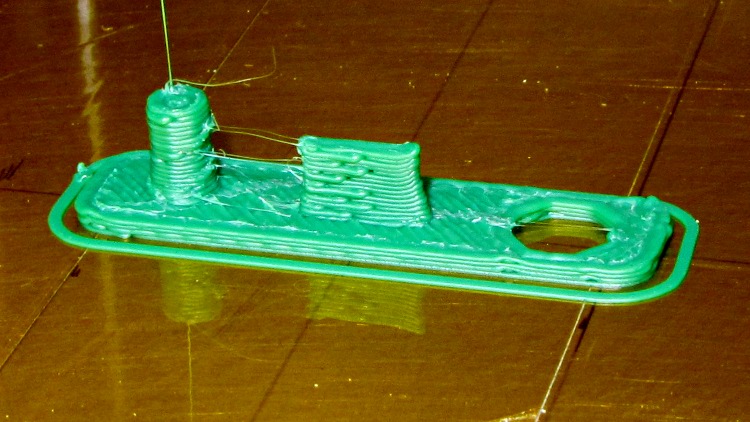
    Printed with zero added shells and 1.0 infill produced a solid block of plastic that required very little cleanup:

    Kindle power button protector - as built
    Kindle power button protector – as built

    The zittage serves to improve the fit: the protector should require a bit of fingernail persuasion to remove.

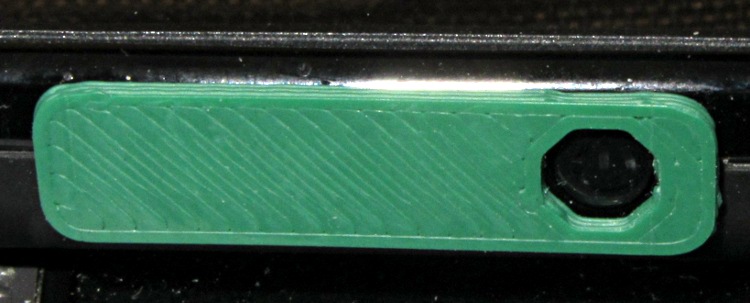
    It took two tries to get the Micro-B USB connector slab offset from the centerline just right, but eventually everything lined up correctly:

    Kindle power button protector - in place
    Kindle power button protector – in place

    My pudgy finger squeezes into that opening just enough to turn the thing on and off, but pressing on the green plastic bar has no effect. There’s not enough plastic to allow chamfering the edge in the solid model, but a bit of riffler file action worked wonders on those sharp edges.

    The OpenSCAD source code:

    // Kindle Fire Power Button Protector
    // Ed Nisley KE4ZNU April 2012
    
    include </home/ed/Thing-O-Matic/lib/MCAD/boxes.scad>
    
    //- Extrusion parameters must match reality!
    //  Print with +0 shells and 3 solid layers
    
    ThreadThick = 0.25;
    ThreadWidth = 2.0 * ThreadThick;
    
    HoleWindage = 0.2;
    
    function IntegerMultiple(Size,Unit) = Unit * ceil(Size / Unit);
    
    Protrusion = 0.1;			// make holes end cleanly
    
    //----------------------
    //- Dimensions
    
    PlugDia = 3.5;					// audio jack
    PlugLength = 5.0;
    PlugOffset = -10;
    
    USBThick = 1.0;					// Micro-B USB jack
    USBWidth = 6.8;
    USBLength = 4.0;
    USBOffset = -0.25;
    
    ButtonDia = 5.2;				// power button
    ButtonOffset = 10.0;
    
    PlateWidth = 7.5;
    PlateLength = 30.0;
    PlateThick = 1.0;
    PlateRadius = 2.0;
    
    //----------------------
    // Useful routines
    
    module PolyCyl(Dia,Height,ForceSides=0) {			// based on nophead's polyholes
    
      Sides = (ForceSides != 0) ? ForceSides : (ceil(Dia) + 2);
    
      FixDia = Dia / cos(180/Sides);
    
      cylinder(r=(FixDia + HoleWindage)/2,
               h=Height,
    	   $fn=Sides);
    }
    
    module ShowPegGrid(Space = 10.0,Size = 1.0) {
    
      Range = floor(50 / Space);
    
    	for (x=[-Range:Range])
    	  for (y=[-Range:Range])
    		translate([x*Space,y*Space,Size/2])
    		  %cube(Size,center=true);
    
    }
    
    //-------------------
    // Component parts
    
    //-------------------
    // Build things...
    
    ShowPegGrid();
    
    union() {
      translate([PlugOffset,0,0])
    	cylinder(r=PlugDia/2,h=(PlugLength + PlateThick),$fn=8);
      translate([0,USBOffset,(PlateThick + USBLength)/2])
    	cube([USBWidth,USBThick,(PlateThick + USBLength)],center=true);
      difference() {
    	translate([0,0,PlateThick/2])
    	  roundedBox([PlateLength,PlateWidth,PlateThick],PlateRadius,true,$fn=4*4);
    	translate([ButtonOffset,0,-Protrusion])
    	  rotate(360/(2*8))
    		PolyCyl(ButtonDia,(PlateThick + 2*Protrusion));
      }
    }
    

    I loves me my 3D printer…

  • Why I Don’t Like Hotel Networks

    Perhaps this indicates most folks can’t configure network encryption with known parameters, but advising everybody to just turn that pesky WEP stuff off seems, well, misguided:

    Disable WEP
    Disable WEP

    Sniffing a guest’s private bits from an unencrypted link doesn’t pose any challenge at all and, given the hotel’s location in Hartford’s hot urban core, I’d expect absolutely no security-by-obscurity whatsoever.

    On the other paw, Dragorn of Kismet points out the triviality of a man-in-the-middle WiFi attack no matter what encryption you might (think you) have in effect. So maybe it doesn’t make much difference.

    And if you think the wired network is inherently more secure, that should change your mind.

  • Kensington Expert Mouse: Unit 3

    A week or so ago, the scroll ring on the Kensington Expert Mouse trackball at my left hand failed completely. Unlike the previous repair attempts, tweaking the IR emitter-detector pair positions did nothing. Tried it on three different PCs and five different operating systems with the same result: the ring stayed dead.

    Fortunately, this one was a warranty replacement for the dead Unit 1 I bought some years back and was still within its 5 year warranty, so when I contacted Kensington tech support with the story they immediately shipped a replacement. It just arrived and works fine.

    The scroll ring detents seem much smoother on this one, so I haven’t taken it apart to remove the magnetic latch and don’t know if they’re using a different quadrature sensor. One can but hope.

    Kensington Expert Mouse - ball bearing
    Kensington Expert Mouse – ball bearing

    For what it’s worth, an absolutely brand new ball barely moves on those three jeweled bearings (one marked with the yellow oval in the picture). Just rub the ball on one side of your nose to add some skin oil: shazam it spins like glass on ice.

    They don’t mention that trick anywhere in the meager instructions…

    Update: Eight years in the future, a real fix appears!

  • Epson R380 Printhead Clog: Teardown Failure

    So the Epson R380’s magenta printhead has clogged and cleaning it doesn’t have any effect. I figured I’d pop the printhead out, rinse off the crud, and see if that improved the situation. Turns out, you can’t get there from here…

    The first step is removing the printer side panels, which involves sliding a steel strip into the not-really-vent slots along the side to release the catches as described there. This picture shows what’s going on inside:

    R380 side panel locking tab release
    R380 side panel locking tab release

    You must hit that slot in the catch with the strip, so the strip must be no wider than 15 mm = 5/8 inch and tapering the end would certainly help. After I removed the panels, I broke those latch tabs off; the panel has locating tabs that align the edges, so the latch tabs just keep you out.

    In any rational printer, accessing the printhead for cleaning would be trivially easy. Epson has a different attitude: KEEP OUT!

    My original idea was to release the rod upon which the ink tank carrier slides, then pull the whole thing out, but it turns out the rod is also a shaft that transmits rotary motion from one side of the printer to the other, plus a mechanism to raise and lower the printhead over the cleaning station (and, perhaps, the DVD carrier that I’ve never used). A vast assortment of gears, clips, encoder wheels, and doodads affixed to each end convinced me not to go that route right now.

    The left side includes an impossibly delicate rotary encoder disk blocking the end of the shaft:

    R380 left side mechanism
    R380 left side mechanism

    Prying the spring out of the shaft notch allows it to slide to the right until another spring clip slams up against the inside of the frame on the right side. That clip may be pry-able, but it’s carefully arranged so as to be maximally inconvenient to reach.

    R380 right side interior
    R380 right side interior

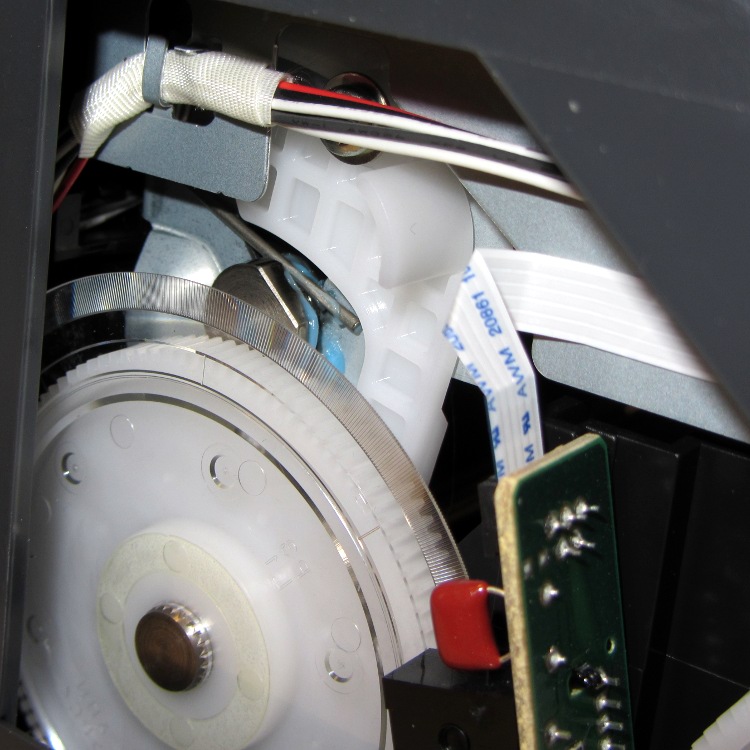
    The ring holding the gear in place must be removable, somehow or another, even without an obvious hole or tab:

    R380 right side mechanism
    R380 right side mechanism

    With that encoder wheel blocking the left end of the rod, I gave up.

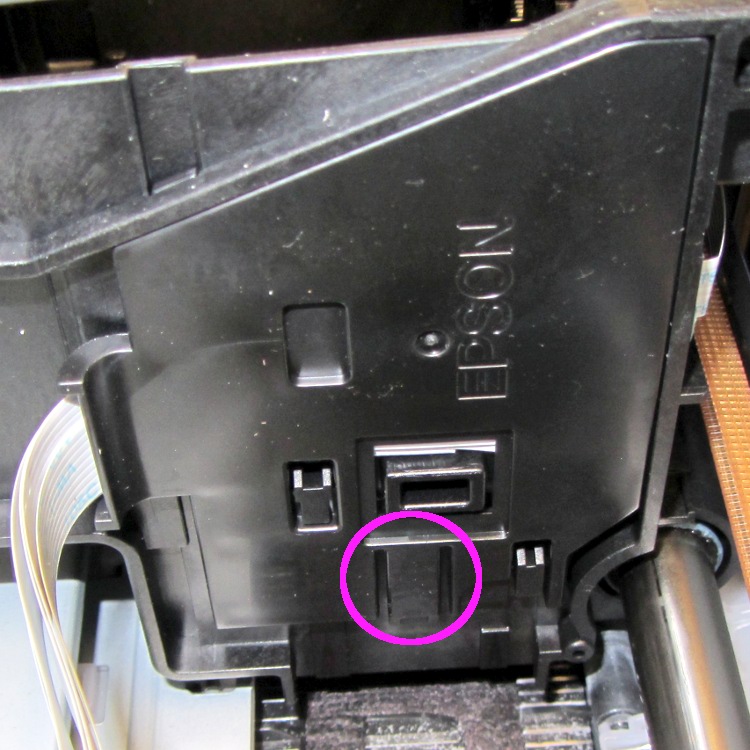
    Then I tried to dismantle enough of the ink tank carrier to release the printhead. The first step removed the tank carrier’s two side panels, both of which use pull-out clips to prevent them from sliding. A view of the removed panels shows the tabs:

    R380 Ink Tank Carrier side panels latches
    R380 Ink Tank Carrier side panels latches

    The outside panel requires jamming a small screwdriver behind that tab at an awkward angle, then the panel slides downward:

    R380 Ink Tank Carrier - right side cover
    R380 Ink Tank Carrier – right side cover

    You can release the inside panel with a fingernail near the top of the (unmarked, but obvious) tab outlined in white on the far right side, then slide upward:

    R380 Ink Tank carrier - interior
    R380 Ink Tank carrier – interior

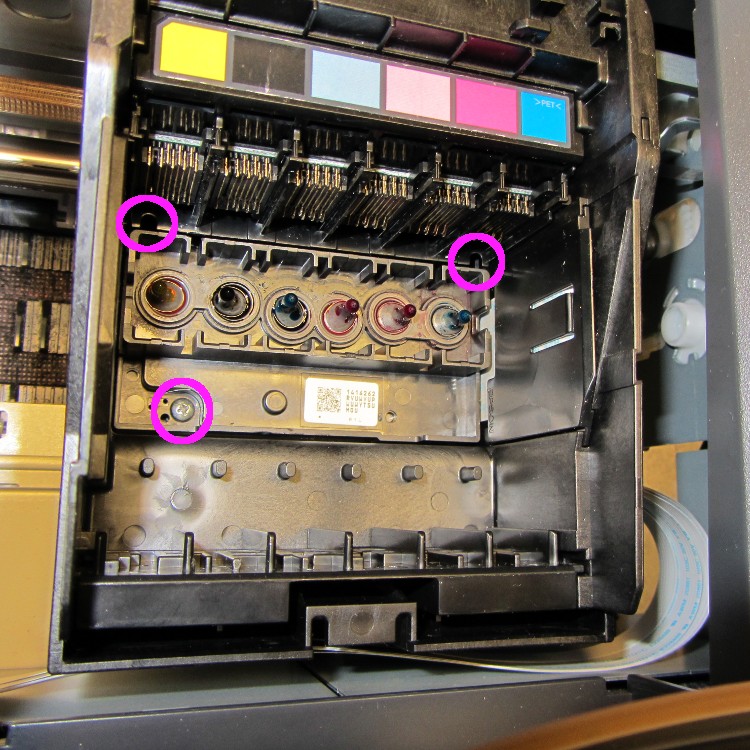
    The magenta circles mark three screws that secure the printhead plate to the carrier, but it won’t do you any good. The two rear screws require a narrow-shaft Philips #1 driver and you cannot get the screws out through the holes; I managed to get them back in place, but don’t loosen them until you figure out how to remove the assembly holding the electrical contacts for the ink tanks.

    That assembly, marked by the six color panels, slides vertically into the rear wall of the carrier and seems to have a latch on the rear wall of the tank carrier. Of course, you can’t access the latch without dismantling the damn printer.

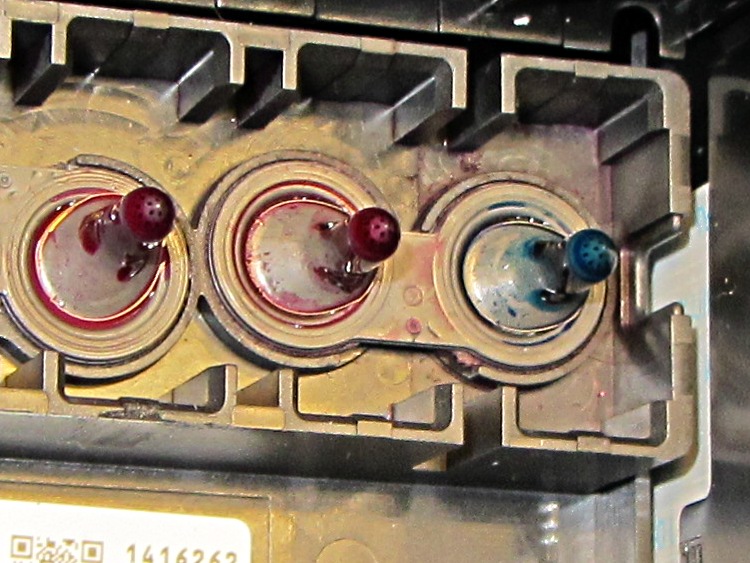
    So I put everything back together again and the printer works no worse than it did before. I’m considering connecting a syringe with length of tubing to the magenta inlet port, then forcing a toxic mix of water, alcohol, and detergent through the printhead:

    R380 printhead ink inlets
    R380 printhead ink inlets

    Given that the printer cost something like $15 after rebate, it’s pretty much fully depreciated by now…

  • Computer Amusements

    A friend asked me to scrub and rebuild an ancient IBM Thinkpad 760XD (there were good reasons for this task that aren’t relevant here), which led to a blast from the past:

    Windows 98 Welcome
    Windows 98 Welcome

    After Windows settled down from its obligatory reboots, installing the exceedingly complex MWave DSP drivers from three diskettes (!) produced this classic result:

    Windows 98 - BSOD
    Windows 98 – BSOD

    Ordinarily, I’d suggest installing some flavor of Linux, but the 760XD’s BIOS can’t boot from either CD or USB, so you’d be forced to sneak the install files onto the hard drive, hand-craft a suitable boot diskette (!), and then perpetrate some serious fiddling around. That made even less sense than (re-)installing Windows 98.

    However, given that exposing a fresh Windows 98 installation to the 2012 Internet would resemble tossing a duckling into a brush chipper, we agreed that this laptop’s next experience should be at an upcoming e-waste recycling event.

    The next morning confronted me with this delightful reminder that nobody knows how to handle boot-time errors, not even on a 2011 PC:

    Lenovo - USB Keyboard not found
    Lenovo – USB Keyboard not found

    The keyboard cable had gotten dislodged when the USB hub fell from its perch along the back edge of the desk. It’s fine now…