The Smell of Molten Projects in the Morning

Ed Nisley's Blog: Shop notes, electronics, firmware, machinery, 3D printing, laser cuttery, and curiosities. Contents: 100% human thinking, 0% AI slop.

Category: PC Tweakage

Remembering which tweaks worked

  • Why Proper Packaging Is A Good Thing

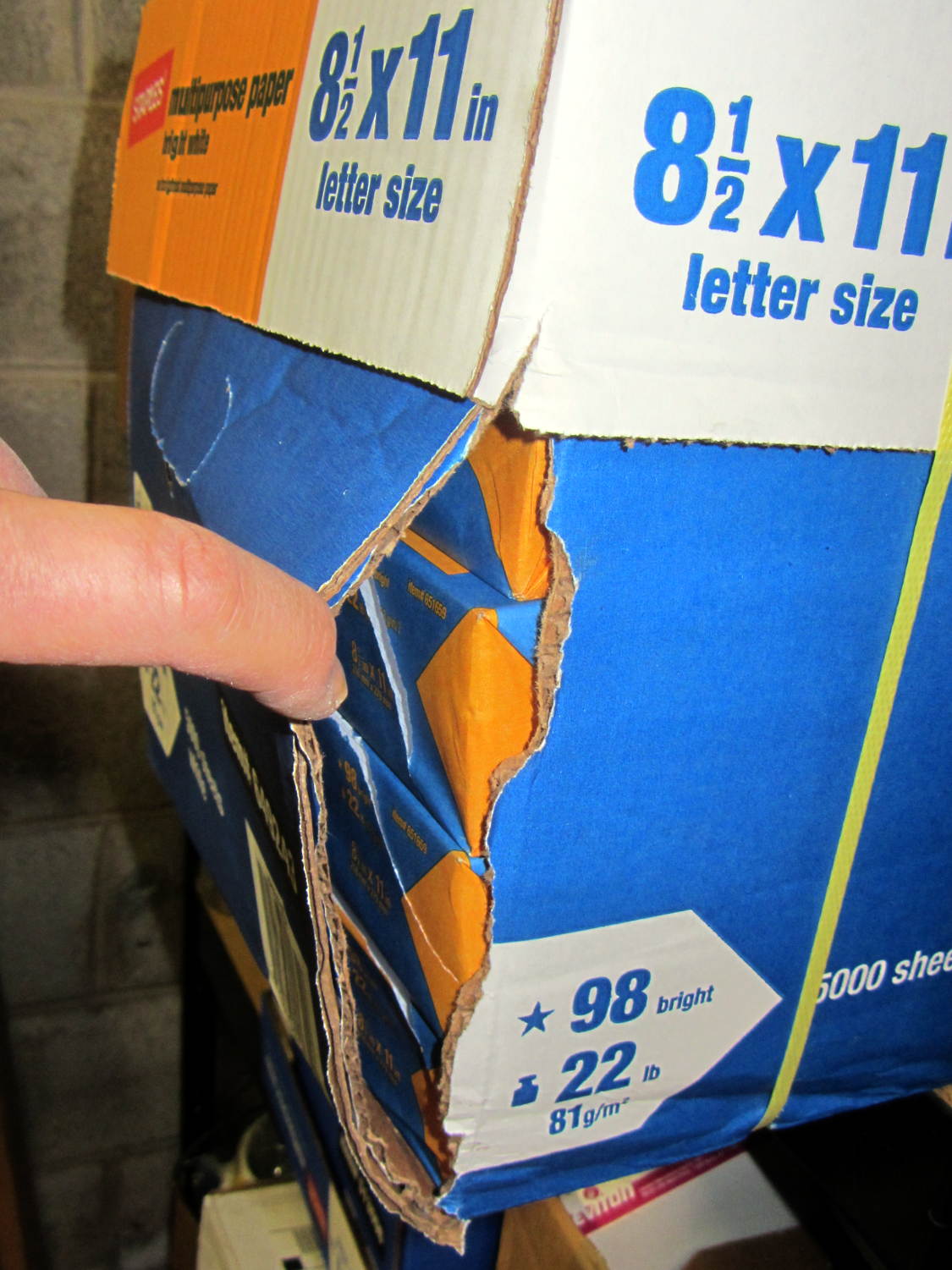
    When I ordered this carton of paper, I specified “pick up at store” because I knew this would happen:

    Ruptured paper carton
    Ruptured paper carton

    A carton weighs so much that everybody, myself included, grabs it by the straps and slings it around. Unlike them, I put it down gently, because it’s my paper… but now it’s too late.

    Inside the carton, the impact shattered the paper wrapper on every one of the ten reams:

    Split paper reams
    Split paper reams

    In the last carton I bought (admittedly, quite some time ago), Staples used plastic wrappers that gave each ream a bit more protection against abuse and the elements, but that’s been cheapnified out of existence.

    I also ordered a ream of fancy heavyweight paper that pushed the order over the “Free Shipping!” threshold; I missed the fact that they auto-checked “Free Delivery!” for the whole order. Of course, that ream shipped separately and it’s now delayed by a week or two…

    I could take it back, but the paper from that bottom-corner ream seems to be no more than somewhat bent, so I’ll live with it.

  • Dell Optiplex 980 Setup

    My desktop box (an off-lease Dell Optiplex 780) work up dead a while back, but recovered; I figured an insurance policy might be a good idea, so a new-to-me off-lease Dell Optiplex 980 just arrived. It booted into Windows Vista Business, whereupon:

    • Apply all the usual Windows updates
    • Boot SysRescCD from USB, run GPartEd
    • Shrink the Windows partition (/dev/sda1) to 25 GB
    • Slide the recovery partition (/dev/sda2) over against it
    • Create 10 GB swap partition (/dev/sda3), likely never to be used with 4 GB of RAM
    • Create extended partition (/dev/sda4)
    • Create 35 GB Linux partition (/dev/sda5)

    Then install Xubuntu 13.10 using the mini ISO USB, put GRUB in the MBR, reboot, and … get Vista again. Huh. This is not a nominal outcome.

    For whatever reason, GRUB either doesn’t get control or defaults to the Windows partition. However, attempting to boot from the mini ISO transfers control to GRUB, thence to Xubuntu, and attempting to boot from SysRescCD works fine. Boot to Xubuntu, tinker with /etc/default/grub, run update-grub, and it still doesn’t work. Well, it boots Vista, but that doesn’t work for me; no error messages, either.

    The box runs BIOS A07, so:

    • Fetch BIOS A14
    • Boot Windows, update the BIOS
    • Check the settings and discover that the hard drive is set to RAID mode
    • Change that to RAID Autodetect – AHCI
    • Ignore warnings about possible reinstall; box doesn’t come with a reinstall CD
    • Reboot and it’s all good: GRUB is now in full control
    • Both Vista and Xubuntu work fine

    I think the problem came from having a single hard drive set to RAID mode. Dunno what they had in mind with that; it’s a small form factor box with no room for another drive…

    Memo to Self: Yet Another Thing To Preemptively Un-Wedge

  • Hard Drive Lifetime: Data Points

    Three years ago I installed a 1.5 TB WD Elements USB drive as an external backup for the “file server” in the Basement Laboratory. The log files show that the drive started spitting out “short reads” early in October, which means the rust has begun flaking off the platters.

    Repeated fsck -fyv /dev/sda1 runs produce repeated failures at various spots, so it’s not in good condition:

    e2fsck 1.41.14 (22-Dec-2010)
    Backup-1.5TB contains a file system with errors, check forced.
    Pass 1: Checking inodes, blocks, and sizes
    Error reading block 97649088 (Attempt to read block from filesystem resulted in short read) while getting next inode from scan.  Ignore error? yes
    ... snippage ...
    Pass 2: Checking directory structure
    Error reading block 104039017 (Attempt to read block from filesystem resulted in short read) while reading directory block.  Ignore error? yes
    Force rewrite? yes
    Directory inode 26009985, block #26, offset 0: directory corrupted
    Salvage? yes
    ... snippage ...
    Pass 4: Checking reference counts
    Inode 25903223 ref count is 41, should be 40.  Fix? yes
    ... snippage ...
    Backup-1.5TB: ***** FILE SYSTEM WAS MODIFIED *****
    
    736471 inodes used (0.80%)
    10173 non-contiguous files (1.4%)
    9367 non-contiguous directories (1.3%)
    # of inodes with ind/dind/tind blocks: 119655/12234/0
    142996292 blocks used (39.04%)
    0 bad blocks
    3 large files
    
    276772 regular files
    459614 directories
    0 character device files
    0 block device files
    0 fifos
    10377447 links
    76 symbolic links (72 fast symbolic links)
    0 sockets
    --------
    11113909 files
    

    Given that rsnapshot lashes the daily backups together with extensive hard links, so that there’s only one copy of a given file version on the drive, I don’t know what 76 symbolic links might mean.

    It’s been spinning up once a day, every day, for about 40 months; call it 1200 power cycles and you’ll be close. The usual runtime is about 10 minutes, giving the poor thing barely enough time to warm up.

    One data point does not a curve make.

    The warranty on new WD Element drives seems to be a year; I have no idea what it was slightly over three years ago, although I’m pretty sure it wasn’t more than three years…

    The various desktop boxes around here get powered up once a day, too, but I tend to replace them every few years and have never had a hard drive failure; a few system boards have crapped out, though. The boxes acting as controllers for the 3D printers and the Sherline CNC mill have a much lower duty cycle.

  • Devilspie2: Lua Scripts

    Prompted by that suggestion, here’s the current collection of Devilspie2 scripts (in ~/.config/devilspie2/) that make my dual-monitor setup (left: 2560×1440 landscape, right: 1050×1680 portrait) usable with a single X session in Xubuntu 12.10. The window manager understands about the monitor layout, so maximizing a window will fill whatever monitor it’s currently occupying.

    acroread.lua — maximized on portrait

    if (get_window_name()=="Adobe Reader") then
          unmaximize();
          set_window_geometry(0,0,1000,100);
          set_window_geometry(2561,0,1000,100);
          maximize();
    end
    

    chromium.lua — right half of landscape

    if (get_application_name()=="Chromium" and get_window_name() ~= "Print") then
       set_window_geometry(1400,0,1150,1200);
       maximize_vertically();
    end
    

    debugging.lua — handy with –debug option

    debug_print("Window Name: " .. get_window_name());
    debug_print("Application name: " .. get_application_name());
    

    digikam.lua — right half of landscape, force large Search dialog, dammit

    if (get_application_name() == "Digikam") then
    	debug_print("DigiKam conditional - top");
    	if (get_window_name() == "Advanced Search") then
    		debug_print("Digikam - Adv Search");
    		set_window_geometry(750,100,1000,1300);
    	else
    		debug_print("Main DigiKam window");
    		set_window_geometry(0,0,1400,1000);
    		maximize_vertically();
    	end
    end
    

    firefox.lua — left half of landscape, enlarge dialogs

    if (get_application_name()=="Firefox") then
    	debug_print("FF conditional - top");
    	if (get_window_name() == "Print") then
    		set_window_position(700,350);
    	elseif (0 == string.find(get_window_name(),"Password")) then
    		set_window_position(0,0);
    		maximize_vertically();
    	end
    end
    

    gimp.lua — force Gutenprint dialog to the top, dammit

    if (get_application_name() == "GNU Image Manipulation Program") then
    	debug_print("GIMP conditional - top");
    	if (string.find(get_window_name(),"Print")) then
    		debug_print("GIMP - GutenPrint")
    		set_window_position(700,350);
    		make_always_on_top();
    	else
    		debug_print("GIMP - Main window");
    	end
    end
    

    passwords.lua — put password dialogs in mid-screen

    if (get_window_name()=="Password Required") then
    	debug_print("Password");
    	set_window_position(700,350);
    end
    

    pronterface.lua — force to middle-ish of Desktop 2

    if (get_window_name()=="Printer Interface") then
       set_window_workspace(2);
       set_window_position(1200,750);
    end
    

    slic3r.lua — force to right side of Desktop 2

    if (get_window_name()=="Slic3r") then
       set_window_workspace(2);
       set_window_geometry(1600,0,700,700);
    end
    

    terminal.lua — maximized on portrait

    if (get_window_name()=="Terminal") then
       set_window_position(2561,0);
       maximize();
    end
    

    thunderbird.lua — left half of landscape, force big dialogs

    if (get_application_name() == "Thunderbird") then
    	debug_print("TBird conditional - top");
    	if (1 == string.find(get_window_name(),"Print")) then
    		debug_print("TBird - print...");
    		set_window_position(700,350);
    	elseif (string.find(get_window_name(),"Sending") or
    			string.find(get_window_name(),"Confirm") or
    			string.find(get_window_name(),"Processing")) then
    		debug_print("TBird - generic dialog");
    		set_window_position(200,600);
    	elseif (string.find(get_window_name(),"Write:")) then
    		debug_print("TBird - writing");
    		set_window_geometry(1300,0,900,600);
    		maximize_vertically();
    	elseif (0 == string.find(get_window_name(),"Password")) then
    		debug_print("Main TBird window?");
    		debug_print(" name: ",get_window_name());
    		set_window_geometry(0,0,1300,1200);
    		maximize_vertically();
    	end
    end
    
  • Why I Won’t Fix Your Windows PC

    Got a call from a friend who was having trouble getting BitDefender to accept its new license key, so I drove over; she’s at the top of a killer hill and I’d already biked my two dozen miles for the day. Solving that problem was straightforward, if you happen to know that they use “authorization” and “license” as synonyms and that you access the key entry dialog by clicking on a text field that doesn’t look at all clickable.

    I should have declared victory and returned to the Basement Laboratory, but, no, I had to be a nice guy.

    BitDefender kvetched that it had been 777 days since its last scan, so I set up some regularly scheduled scans and automagic updates for everything in sight; we agreed she’d just let the thing run overnight on Mondays to get all that done.

    BitDefender also suggested a handful of critical Windows XP updates, plus the usual Adobe Flash and Reader updates, plus some nonsense about Windows Live Messenger that seemed to require downloading and installing a metric shitload of Microsoft Bloatware. Rather than leave all that for next Monday’s unattended update, I unleashed the critical ones, did the Flash and Reader updates, and stuffed the Messenger update back under the rug.

    Then AOL recommended an urgent update to AOL Desktop 9.7. She has a couple of AOL email addresses, mostly for historic reasons, and I asked if she ever used the AOL Desktop. She wasn’t sure, so I lit up the installed AOL Desktop 9.6: “Oh, that’s how I get all my email!” OK, so we’ll update that, too.

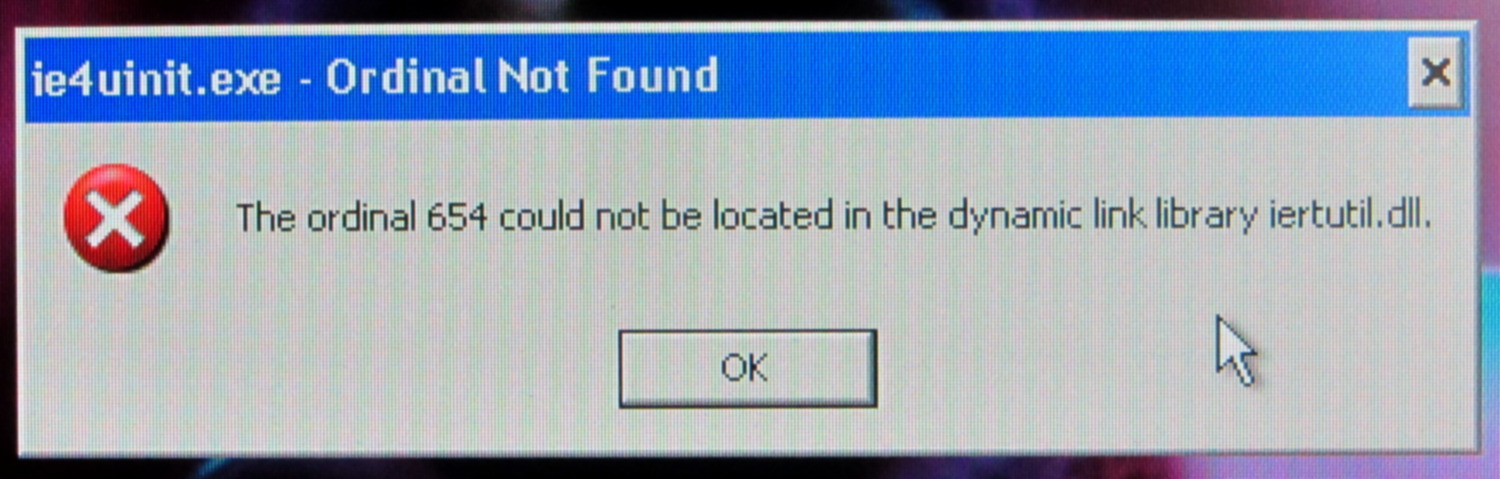
    After all the thrashing was done, the system rebooted and presented us with the single most unhelpful error message I’ve ever seen:

    Windows Error - Ordinal Not Found
    Windows Error – Ordinal Not Found

    No, you chowderheads, that is not OK…

    Searching on the obvious terms indicated this had something to do with Internet Explorer 8 (remember IE 8?) and produced a number of irrelevant suggestions. The least awful seemed to involve running the Microsoft System File Checker utility:

    sfc /scannow

    Which I did.

    It ran for the better part of an hour, then suggested a reboot. During the shutdown, it replaced 29 files at an average of about 5 minutes per file.

    After which, Windows restarted and displayed exactly the same error message. Actually, a series of them; various programs couldn’t locate a fairly wide selection of ordinals in several DLLs.

    OK. I give up.

    We located a tech who does this sort of thing for a living. I’ve offered to split the cost of getting the box up and running again, with the understanding that it may be easier to start with a fresh off-lease Dell box running Windows 7 than to exhume an aging Windows XP installation.

    I stopped caring about Windows toward the end of the last millennium and now keep a Token Windows Box only for hardware like the HOBOWare dataloggers and software like TurboTax.

    Other than that, well…

    I. Don’t. Care.

  • LinuxCNC Electronics Case Mods

    I’m planning to put all the stepper driver bricks, solid state relays, power suppliers, miscellaneous doodads, and suchlike that will interface LinuxCNC with the M2 printer into a repurposed Dell desktop PC case.

    The front of the case had some tabs sticking out that anchored / aligned / captured various bits of hardware; grabbing them with a Vise-Grip, wiggling until the steel failed, and then filing the raw edge solved that problem:

    Dell PC case - removing small tabs
    Dell PC case – removing small tabs

    The PC had room for a diskette drive, with a lip protruding below the opening:

    Dell PC case - diskette drive slot tab
    Dell PC case – diskette drive slot tab

    A welding pliers wiggled nearly the entire tab at once:

    PC case - removing diskette drive tab
    PC case – removing diskette drive tab

    The bulky Dell front panel had four locating pins that mated with four round holes, one of which appears in the first picture. I wanted a somewhat less butt-ugly front than the bare metal grill, but still with some air flow into the case, so I found some 1/4 inch diameter standoffs tapped 4-40 that fit snugly in the holes and cut them to length:

    Dell PC case - trimming panel mounts
    Dell PC case – trimming panel mounts

    Another defunct Dell case contributed a side panel with roughly the right color. Four match-drilled clearance holes later:

    Dell PC case - vent panel
    Dell PC case – vent panel

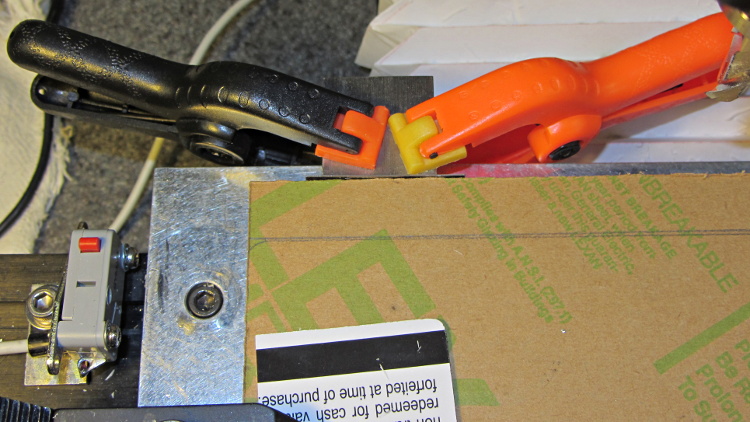
    Just for effect, I squared up a slab of nice smoke-brown polycarb to cover the upper opening and perhaps hold das Blinkenlights. The slab was, as almost always happens, slightly too large for the Sherline, so I had to reclamp it to clean up all the sides. It came out about half a millimeter out of square and, being that type of guy, I clamped a block to the back of the table with a suitable spacer against the wide side, removed the spacer, loosened the step clamp on that end, rotated the slab against the block, made another pass, and it came out perfectly square:

    Dell PC case - squaring polycarb panel
    Dell PC case – squaring polycarb panel

    Four match-drilled holes and some epoxy later:

    Dell PC case - polycarb panel mounts
    Dell PC case – polycarb panel mounts

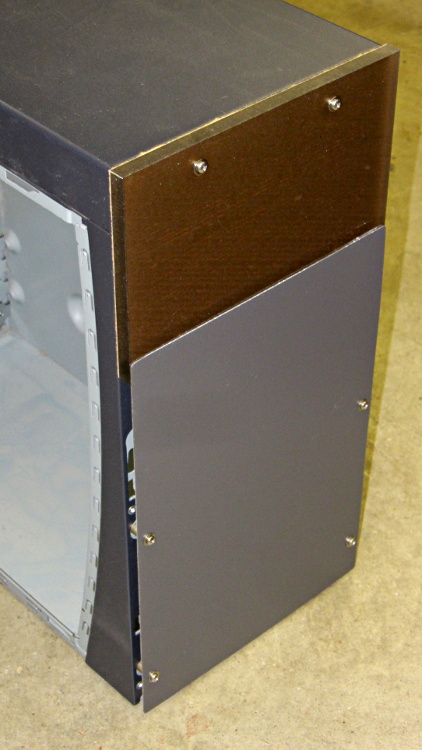
    I’ll probably put the main AC switch on that top panel, but it looks pretty good even with the protective paper on the back:

    Dell PC case - front panels
    Dell PC case – front panels

    I must mill a recess under the vent panel and counterbore the screw heads so everything fits flush and lines up neatly.

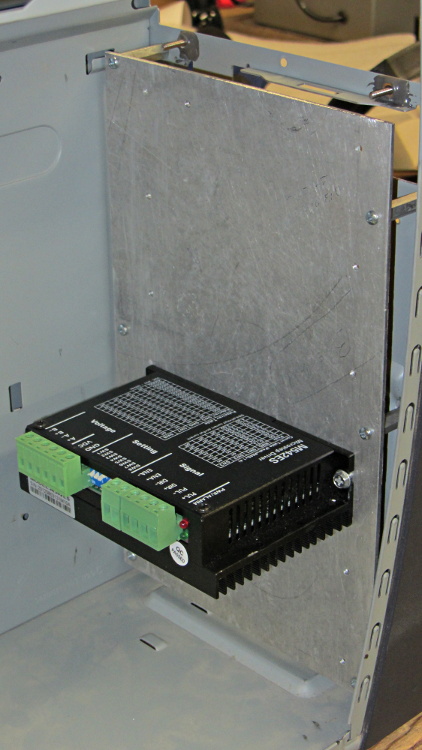
    Another chunk of aluminum will hold the stepper driver bricks along the front of the case:

    Dell PC case - stepper drive panel
    Dell PC case – stepper drive panel

    I laid out the holes with a square, eyeballed the spacing on a machinist’s scale, manually punched / drilled / tapped the holes, and it’s all good. The standoffs provide a bit of airflow around the edges; I don’t expect the drivers to get more than slightly warm, because they’re running near the bottom of their current rating. Incidentally, that sheet is a different and much nicer alloy than the pure aluminum I jeweled for the main base plate and will probably not use.

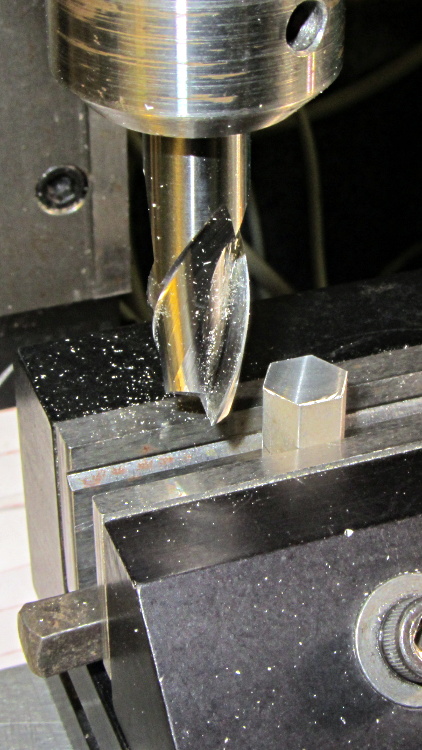
    The 24 VDC power supply will mount on the top of the case, up where the Dell PC supply used to reside. The supply has M4 tapped holes and, of course, I don’t have any such standoffs, but I did find some hex standoffs with 6-32 tapped holes on both ends. Bandsaw ’em in half and clean up the raw end to the proper length:

    Dell PC case - power supply standoffs - trimming
    Dell PC case – power supply standoffs – trimming

    Center drill in the lathe / drill / tap an M4 thread in each one, saw off some M4 screws, slather with red Loctite, insert studs into standoffs, and that should hold the power supply in place with 6-32 screws through the case top:

    Dell PC case - power supply standoffs
    Dell PC case – power supply standoffs

    More Quality Shop Time lies ahead, but it’s coming together…

  • HP ScanJet 3970 Lid Hinge Re-Repair

    As expected, that repair didn’t last very long at all; one hinge fractured along the same line as before. This time, however, we had a visit already in-plan, so I brought along my solvents and clamps.

    Perhaps you wondered how I could have been so remiss as to not brace those thin white flanges. One picture of the unbroken hinge in the “lid down” position is worth a thousand words:

    HP 3970 Scanjet - intact hinge
    HP 3970 Scanjet – intact hinge

    Need more? Here’s another thousand words from the other side:

    HP 3970 Scanjet - intact hinge pivot
    HP 3970 Scanjet – intact hinge pivot

    As the lid opens, the gray tab pivots toward the edge of the lid until it’s nearly parallel, at which point all of the force tries to yank those two flanges apart and then crack the tiny solid part at the pivot pin.

    Eventually, it succeeds. This is a view of the scanner base with the gray tab inserted in its slot, with the broken hinge in the “lid up” position:

    HP 3970 Scanjet - broken hinge pivot
    HP 3970 Scanjet – broken hinge pivot

    Clever design, no?

    I was unable to extract the broken fragment from the gray tab (actually, unwilling to apply more force, as I cracked part of the gray ring around the hinge pin), so this became an in situ repair. Once again, I applied solvent glue and squished the pieces together:

    HP 3970 Scanjet - glued hinge
    HP 3970 Scanjet – glued hinge

    And clamped it while we ate lunch:

    HP 3970 Scanjet - hinge clamping
    HP 3970 Scanjet – hinge clamping

    The brass rod applies the clamping force to the fractured part of the hinge through the pivot point. This isn’t the most stable clamp arrangement you’ve ever seen, but it worked well enough.

    I pushed the scanner back half a foot, so the lid now clunks against the wall just before the hinges reach their limit. Maybe they’ll survive until the next visit…