Ed Nisley's Blog: Shop notes, electronics, firmware, machinery, 3D printing, laser cuttery, and curiosities. Contents: 100% human thinking, 0% AI slop.
It turns out that the audio-over-HDMI/DisplayPort channel which, for whatever reason, is the only way to get audio out of the Optiplex 980 with the big Dell U2711 monitor starts up AT MAXIMUM VOLUME! regardless of the GUI’s Pulseaudio mixer setting that’s diligently saved-and-restored across sessions. That makes a certain perverse sense, as the digital-to-analog converter & power amp live inside the monitor.
Manually adjusting the GUI mixer by one click, either up or down, forces the new setting out over the digital link to the monitor, after which the audio output corresponds to the mixer; I never remember that until just after some dipshit auto-play video lights up with a fanfare.
Setting the mixer to the same value doesn’t force an update, so the obvious solution (at least to me) of sending a fixed initial value doesn’t work; it’s optimized away. I think that’s why the initial update doesn’t happen: the stored volume is the same as the, ah, stored volume, so there’s no need to tell the monitor.
The automatic solution involves putting two more commands in my ever-growing ~/.config/startup.sh:
That sets a rational level (which might be the same as the existing one from the previous session), then changing it by one tiny click to force the new value out to the monitor.
The Token Windows box (which runs the few programs that don’t get along with Linux) doesn’t get a lot of attention, but a recent update changed their stylin’ graphic CPU meter to something a bit less, mmm, smooth:
For some unknown reason, one of the very rare updates to the Ubuntu 10.04 LTS infrastructure (for LinuxCNC 2.5.3 on my Foxconn D510 box, driving the Sherline mill) stopped supporting the system board’s built-in NIC: networking stopped working. The only symptom was that the NIC didn’t respond and all the usual tricks were unproductive.
After some fruitless searching, I took the easy way out:
NIC added to Foxconn D510 PC
That’s the backside of an ancient NIC using the classic Tulip driver. It used to have a full-size bracket, which I chopped off, bent, and filed to suit, much as with that one in the D525.
Fired it up, the kernel automagically picked the proper driver, and networking Just Worked again.
The backup scripts running on Mary’s folks’ PC kvetched on each backup:
WARNING: Some files and/or directories in /home/ only transferred partially during rsync operation

WARNING: /usr/bin/rsnapshot daily: completed, but with some warnings
Poking around showed that the problem came from the .gvfs “directory” tucked into each home directory, which produced this unenlightening ls -al result:
d????????? ? ? ? ? ? .gvfs
Come to find out that it’s an old problem with mysterious causes that should be fixed by now; evidently I triggered it by installing basic Ubuntu-with-Unity and then installing the Xbubuntu desktop. Or something like that.
Anyhow, the solution workaround involves an rsnapshot configuration entry that bypasses that directory:
I did five minutes of standup comedy at yesterday’s MHV Lug meeting, pointing out some of the more interesting ways to compromise a PC when you have an infinite budget for development and consumables.
You don’t get my patter with the PDF (unless you had access to the room’s bugging hardware), but the links may come in handy in the unlikely event you haven’t been following the story closely.
If you have a security clearance or are in line for one, you probably shouldn’t click on the link, because it contains copies of pages from the leaked NSA catalog:
This resembles the 32 GB Micro SD card checkout, with the exception that, for some unknown reason, the available space doesn’t match up with the actual space occupied by the file. It also turns out that rsync deletes the incomplete file, rather than leaving a stub, which makes perfect sense, but was still a bit disappointing after two hours.
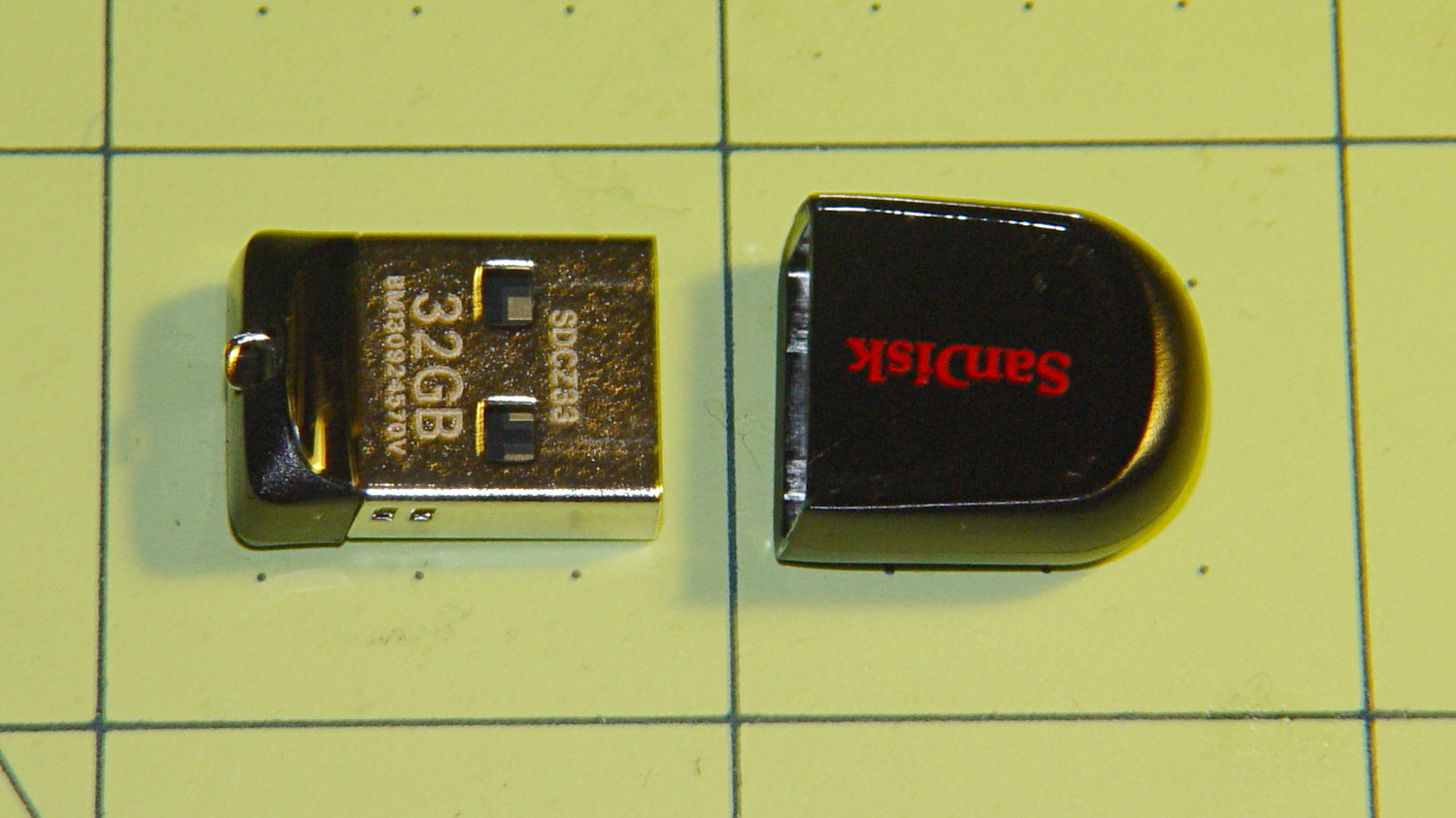
I had two identical Sandisk Cruzer Fit Flash Drives, one of which appears here:
32 GB Sandisk USB Flash Drive
Those squares are an inch on a side, so it’s a bit larger than the Micro SD card. Adding a lanyard loop on the plastic cap or a string between cap and drive seems like a great idea, because that little thing is certain to get lost.
The snippets here represent a compendium of Things Done that happened over the course of two days; I didn’t save all the logs. The process started with the same 32 GB file of entropy I used for the Micro SD card:
df -B1 /mnt/part2
Filesystem       1B-blocks      Used   Available Use% Mounted on
/dev/sdc1      31512350720 180424704 31331926016   1% /mnt/part2
-----------------------
time rsync --progress /mnt/part/Testdata/Testdata.bin /mnt/part2
Testdata.bin
 31298191360  99%   14.18kB/s    0:39:38
rsync: writefd_unbuffered failed to write 4 bytes to socket [sender]: Broken pipe (32)
rsync: write failed on "/mnt/part2/Testdata.bin": No space left on device (28)
rsync error: error in file IO (code 11) at receiver.c(322) [receiver=3.0.9]
rsync: connection unexpectedly closed (28 bytes received so far) [sender]
rsync error: error in rsync protocol data stream (code 12) at io.c(605) [sender=3.0.9]

real	126m20.505s
user	3m6.393s
sys	2m17.492s
-----------------------
time dd bs=8K count=20000000 if=/mnt/part/Testdata/Testdata.bin of=/mnt/part2/Test1.bin
dd: writing ‘/mnt/part2/Test1.bin’: No space left on device
3820963+0 records in
3820962+0 records out
31301320704 bytes (31 GB) copied, 7455.97 s, 4.2 MB/s

real	124m15.970s
user	0m1.607s
sys	1m17.546s
-----------------------
truncate -s 31301320704 /mnt/part/Testdata/Testdata.bin
-----------------------
ll /mnt/part/Testdata/Testdata.bin
-rw-r--r-- 1 ed ed 31301320704 Dec 24 18:13 /mnt/part/Testdata/Testdata.bin
-----------------------
time diff /mnt/part/Testdata/Testdata.bin /mnt/part3/Test1.bin

real	26m37.081s
user	0m4.400s
sys	0m52.723s
Notice that the write speed runs around 4 MB/s, which is a lot slower than you might expect from a USB 2.0 device; as with a hard drive, the interface doesn’t limit the throughput! The read speed, on the other paw, trots along at about 20 MB/s.
One of these will go to Mary’s folks as an online daily backup device; their PC will soon run a version of the rsnapshot scripts that back up our basement file server. It’s not off-site backup and it’s not proof against catastrophic hardware failure, but it should be good enough.