The Smell of Molten Projects in the Morning

Ed Nisley's Blog: Shop notes, electronics, firmware, machinery, 3D printing, laser cuttery, and curiosities. Contents: 100% human thinking, 0% AI slop.

Category: Oddities

Who’d’a thunk it?

  • 123 Block Links: Cap Screw Head Pins

    123 Block Links: Cap Screw Head Pins

    Contemplating a project using a small saw in the Sherline suggested that attaching the workpiece to the side of a 123 block would simplify the machining. My blocks have a centered quintet of 3/8-16 tapped holes through the 2×3 side, all the remaining holes are untapped, and it has no smaller holes. The hole spacing doesn’t match the Sherline tooling plate, but the T-nut slots in the underlying table would suffice.

    Rather than run long 10-32 screws through the entire block, It Would Be Nice to use short screws from, say, the nearest holes:

    123 Block Links - assembled
    123 Block Links – assembled

    I cannot possibly be the first person to have this idea, but the obvious keywords don’t produce any useful results on The Intertubes, other than a link to a different (and far more complex) block with counterbored holes of various sizes.

    Update: Jason found a video about building those blocks and somebody else built some pins similar to mine. Nope, I’m definitely not the first person to have this idea!

    Further doodling produced some useful dimensions:

    123 Block Links - SHCS head pin doodle
    123 Block Links – SHCS head pin doodle

    The holes through the blocks probably came from a 5/16 inch drill, the 75% thread depth diameter for the 3/8-16 taps used on the threaded holes. They’re distorted, full of debris, and hardened enough to kill a file, so I eventually settled on 8.2 mm pins that pass through most of the holes.

    The socket head screws seat at the pin axis, because the pin diameter is scary close to the counterbore diameter and I didn’t see much point in finesse. I started with a half-inch aluminum rod and peeled it to size, because it simplified the clamping and I have a bunch of them.

    The pins are 3/4 inch long to leave a little space on either side of the 1 inch deep holes. I started with comfort marks along the length of the rod:

    123 Block Links - laser alignment
    123 Block Links – laser alignment

    Center-drill so the clearance drill doesn’t skitter off the top:

    123 Block Links - center drilling
    123 Block Links – center drilling

    The counterbore calls for a 0.204 inch = #6 drill, just slightly larger than the #7 clearance drill for a 10-32 screw:

    123 Block Links - counterbore
    123 Block Links – counterbore

    I touched off the counterbore flutes on the sides of the hole, then drilled downward half the 12.8 mm actual rod diameter:

    123 Block Links - 10-32 SHCS test fit
    123 Block Links – 10-32 SHCS test fit

    Lower the counterbore into the hole again, relax the vise enough to let the rod slide, jog the spindle to X = -25.4 mm, and tighten the vise again:

    123 Block Links - index setup
    123 Block Links – index setup

    I figured I needed four pins, tops, so make half a dozen to be sure:

    123 Block Links - all c-bored
    123 Block Links – all c-bored

    Stick the rod in the mini-lathe chuck, add some comfort marks, and prepare to peel it down to 8.2 mm:

    123 Block Links - lathe setup
    123 Block Links – lathe setup

    Having done the lathe work during a Squidwrench remote meeting, I have no pictures of the process, but it goes a little something like this:

    • Peel off 0.5 mm at a time, stopping just beyond the mark on the left
    • Mark 3/8 inch on each side of the hole center
    • Face the end
    • Chamfer the rim with a file
    • Clean up the body hole and counterbore
    • Part the pin off a bit to the left of the mark
    • Remove the rod
    • Chuck the pin with the cut off end outward
    • Face to the mark
    • Chamfer
    • Repeat for all six pins
    • Done!

    It’s tedious, but not particularly difficult.

    Futher doodling suggested the need for threaded pins to join two blocks together.

  • Snow Flow

    Snow Flow

    The recent snowfall arrived on a stiff north wind layering it atop the garage roof and sculpting the corner:

    Snow - roof wave
    Snow – roof wave

    The retaining wall along the driveway accumulated a thick coat that gradually peeled off as the weather warmed:

    Snow - wall wave A
    Snow – wall wave A

    The wave crashed to the driveway in slow motion:

    Snow - wall wave B
    Snow – wall wave B

    It seems to rebound from the wall, even though we know it’s been there all along:

    Snow - wall wave C
    Snow – wall wave C

    This winter has more snow in store for us, but so far it’s been more decorative than disastrous.

    One difference between deep snow and strong hurricanes: not much looting after the snow stops falling…

  • Off To A Good Start

    Off To A Good Start

    This could happen:

    Flying Pig
    Flying Pig

    It vanished a few hours after appearing at the end of a neighbor’s driveway: a pig must be flying somewhere!

  • Aerosol Can Corrosion

    Aerosol Can Corrosion

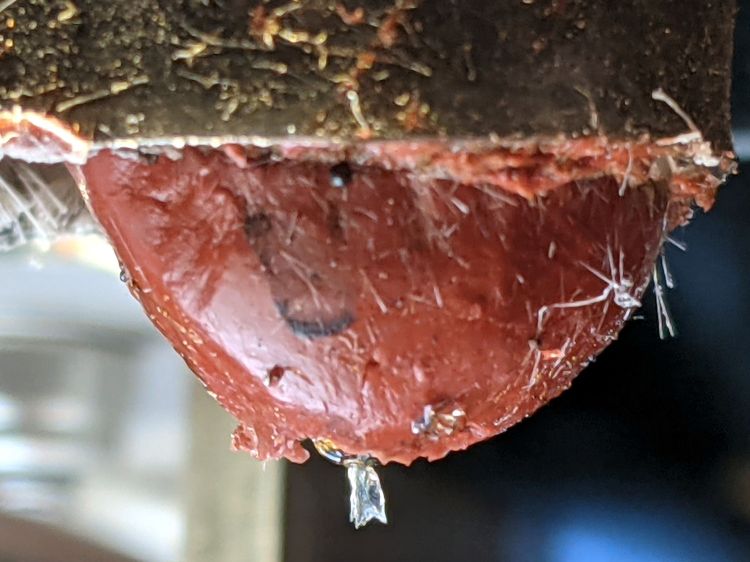
    An odd smell in the Basement Laboratory Chemical Warehouse led to this discovery:

    Leaking aerosol can
    Leaking aerosol can

    It’s a can of spray-on topical anesthetic That Came With The House™, so it’s almost certainly four decades old and, other than being moved to that shelf, hasn’t been touched in the last quarter century.

    Surprisingly, the orange-brown goo wiped off the shelf almost completely. The similarly old box of stain remover on the left was a dead loss.

  • MOSFET Astable: NP-BX1 Rundown

    MOSFET Astable: NP-BX1 Rundown

    After eight months from a full charge, an old NP-BX1 lithium battery has come to this:

    Astable green - NP-BX1 - 2.31 V
    Astable green – NP-BX1 – 2.31 V

    The astable still ticks along at 1.4 seconds per blink, but the green LED barely lights up from a 2.1 V battery:

    Astable green - NP-BX1 - 12 mV 100 ohm
    Astable green – NP-BX1 – 12 mV 100 ohm

    A pulse of 12 mV across the 100 Ω resistor puts the LED current at a mere 120 µA: no wonder the poor thing wasn’t visible in ordinary room light.

    Another full charge restored its vigor for another couple of seasons.

  • Privacy Preferences: Broken As Intended

    Privacy Preferences: Broken As Intended

    The Chase website seems to be fine, except:

    Chase Privacy Settings - not working
    Chase Privacy Settings – not working

    Huh.

    Follow the money: being a bank / credit card / fintech company, it’s safe to assume they sell your sensitive bits and have zero incentive to let you limit their actions in any way.

    A week later, that part of their site remains broken, presumably as intended.

  • Huion H610Pro (V2) Tablet vs. USB 3.0

    Huion H610Pro (V2) Tablet vs. USB 3.0

    For reasons that surely made sense at the time, the Huion H610Pro (V2) tablet can recognize when it’s connected to an Android device’s USB port and enter a special mode where the stylus only responds in a phone-shaped portrait rectangle over on the left side:

    Huion H610Pro (V2) Tablet - Android layout
    Huion H610Pro (V2) Tablet – Android layout

    There’s a Vulcan Nerve Pinch button push to force the tablet into Android mode if it doesn’t automagically get there on its own, but AFAICT there’s no way to force it out of Android mode.

    It’s a USB 2.0 device, but I had plugged it into a USB 3.0 port on my desktop box, whereupon it would enter Android mode on pretty nearly every boot. The only way to coerce it back into normal mode was to unplug it, replug it, then manually run the xsetwacom incantation to restrict the coordinates to the portrait monitor.

    I just discovered it works perfectly when plugged into one of the few USB 2.0 ports on the box.

    Apparently, USB 3.0 ports keep the thing powered all the time, whereupon it doesn’t see the proper sequence of events (or, perhaps, sees the Android sequence) during the next boot. USB 2.0 ports don’t do that and it works fine all the time.

    Much better!