Ed Nisley's Blog: Shop notes, electronics, firmware, machinery, 3D printing, laser cuttery, and curiosities. Contents: 100% human thinking, 0% AI slop.
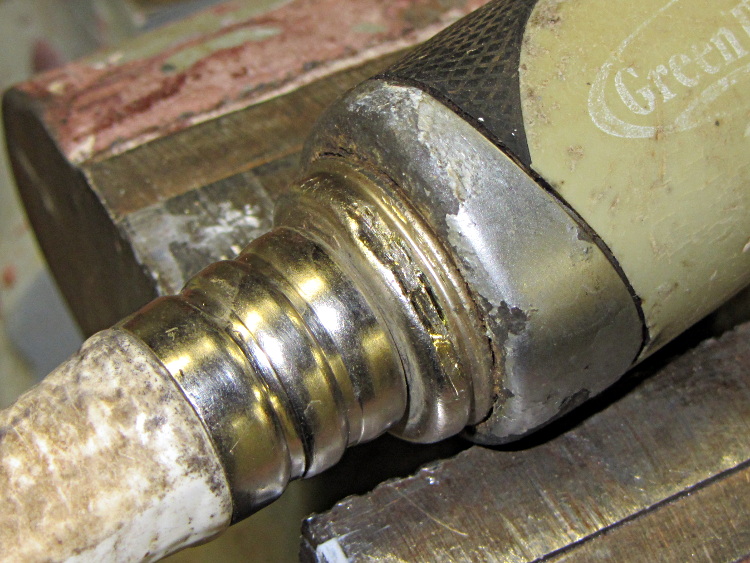
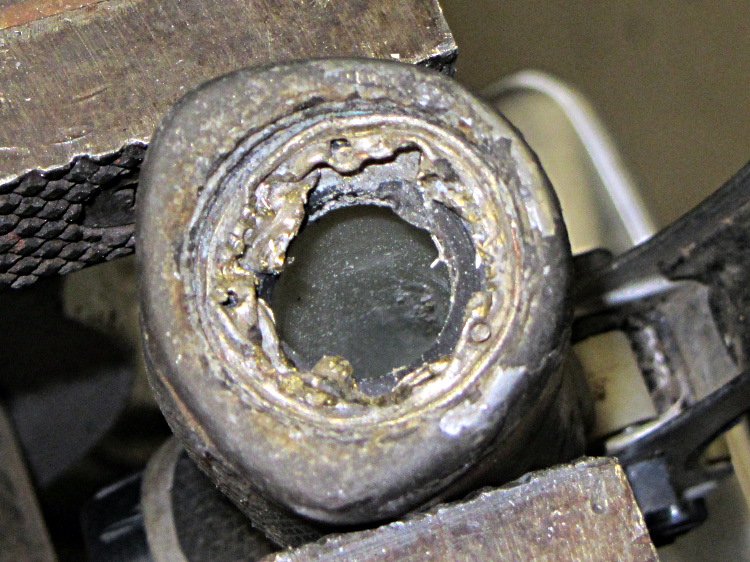
The hose attached to this garden sprayer had failed last season, but the hose fitting had become one with the sprayer. Soaking it with penetrating oil for far longer than seemed necessary didn’t help, so I tried brute force:
Garden sprayer hose fitting
After convincing myself that wasn’t going to work, I cut the fitting off and tried the old standby of collapsing the threaded shell inward with a small punch:
Garden sprayer – rolled-in fitting
That didn’t work, either: the shell really had become one with the sprayer.
As it turned out, the plastic sprayer body had begun to crack in several high-stress locations and would shortly become Yet Another Project. I cut my losses and tossed the hose and the sprayer.
Given that test fixture, the obvious question is whether the PIN-10AP photodiode’s output current varies linearly with light intensity, just like the specs would lead you to believe. I excavated the sheet of 2-stop neutral density filter gel from the Parts Warehouse Wing and cut some 30 mm disks:
LED Photodiode test fixture – ND filter disks
A single filter layer should reduce the light intensity by 2 f/stops = a factor of 4. Each successive layer reduces the intensity by another factor of 4. They’re all at least reasonably clean and free of defects, but they’re definitely not optical lens quality.
Running the LED with a 100 mA pulse at 20% duty cycle and stacking the disks in the fixture, one by one, between the LED and photodiode, produces this data:
Layers
Attenuation
Scale
V
I – uA
Ratio
0
1
1.0000
8.7
87
1
4
0.2500
1.9
19
4.58
2
16
0.0625
0.43
4.3
4.42
3
64
0.0156
0.097
0.97
4.43
4
256
0.0039
0.022
0.22
4.41
The Ratio column divides successive pairs of current values. The first step, from “no filter” to “one filter”, came out a bit larger than the rest, probably because the gel sheet isn’t anti-reflective and some light bounces off the top.
After that, though, it looks just like I’m cheating, doesn’t it?
The ratios should be 4.0, but the actual 4.4 means it’s a 2.1 stop filter. Close enough, methinks.
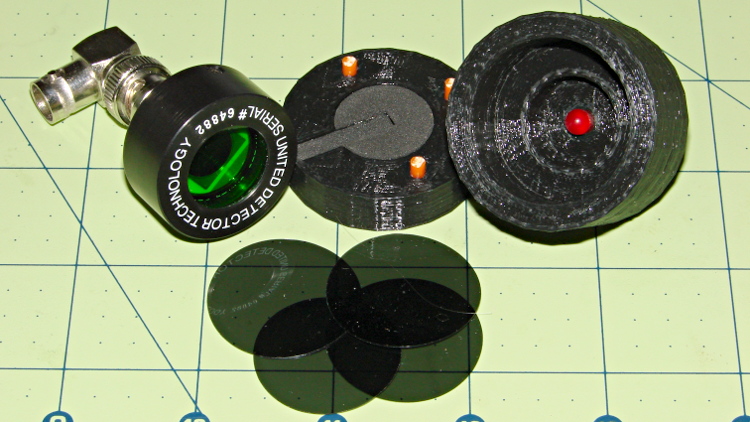
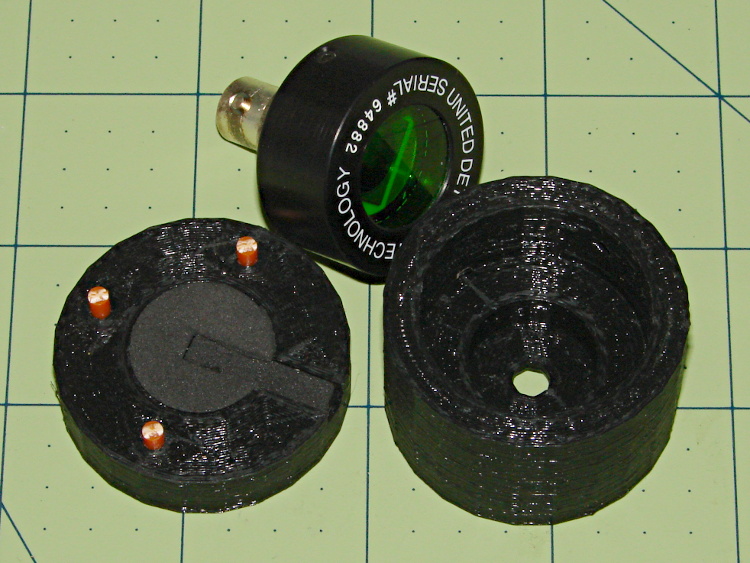
An upcoming Circuit Cellar column calls for a way to measure LED light output vs. current input, which means I need some way to hold LEDs directly over a photodiode while excluding ambient light. Fortunately, the M2 had black PLA filament already loaded:
LED Photocell Fixture – parts
That honkin’ big photodiode is a surplus PIN-10AP that’s been lying in wait for an opportunity just like this. The green filter matches the silicon response to CIE-standard human eye sensitivity, so the output tracks what you’d actually see. That’s irrelevant for testing red LEDs that all have pretty much the same wavelength, but it might come in handy for something.
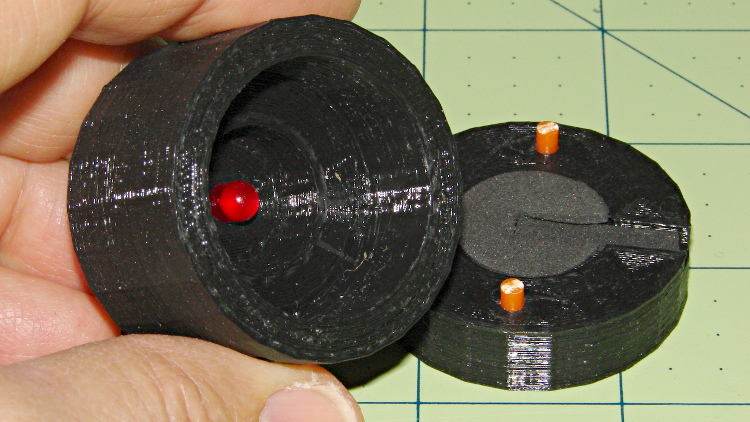
The main body of the fixture holds the LED about 1 mm from the front of the photodiode, indexed against the LED flange so they’re all at a consistent location. The cap has three locating pins made of 3 mm orange filament, with black foam rubber to push the LED into position and block ambient light.
The business end looks like this:
LED Photocell Fixture – LED view
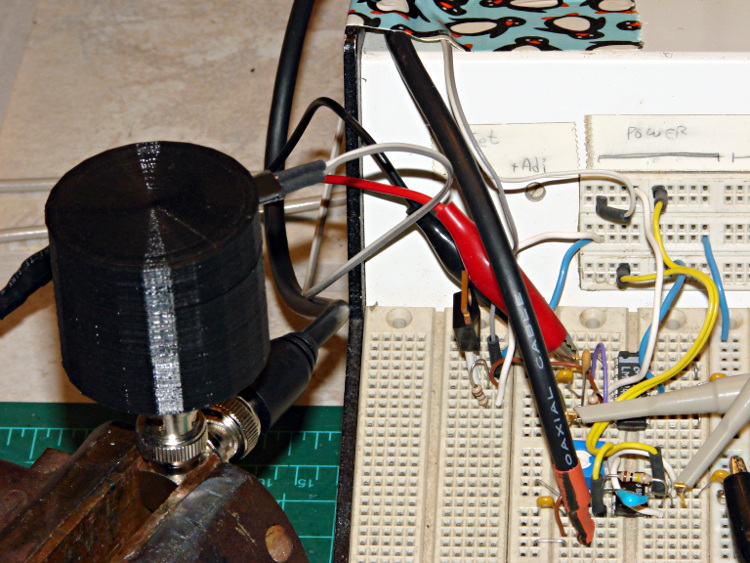
The most convenient way to mount the thing involves a right-angle BNC adapter in my trusty bench vise:
LED Photocell Fixture – with breadboard
The circuitry has a voltage-to-current driver for the LED and a zero-bias current-to-voltage converter for the photocell. The zero-bias trick keeps the voltage across the photodiode at zero, so the current varies linearly with illumination.
The solid model laid out for printing along the X axis:
LED Fixture for PIN-10AP Photodiode – solid model overview
It obviously has some improvements over the as-printed one in the pictures, in the unlikely event I need another fixture. The most important: a rear ring covering the back of the photodiode. Turns out that the PIN-10AP filter cap leaks a surprising amount of light around the body; I covered the gap with black tape to make the measurements, but that’s crude.
I added a few screw holes to hold the parts together, but the cap (with the foam and pegs) must come off easily while swapping LEDs. I’d be tempted to sink studs into the body and use wing nuts to hold the lid in place, but I don’t have any 4-40 wing nuts…
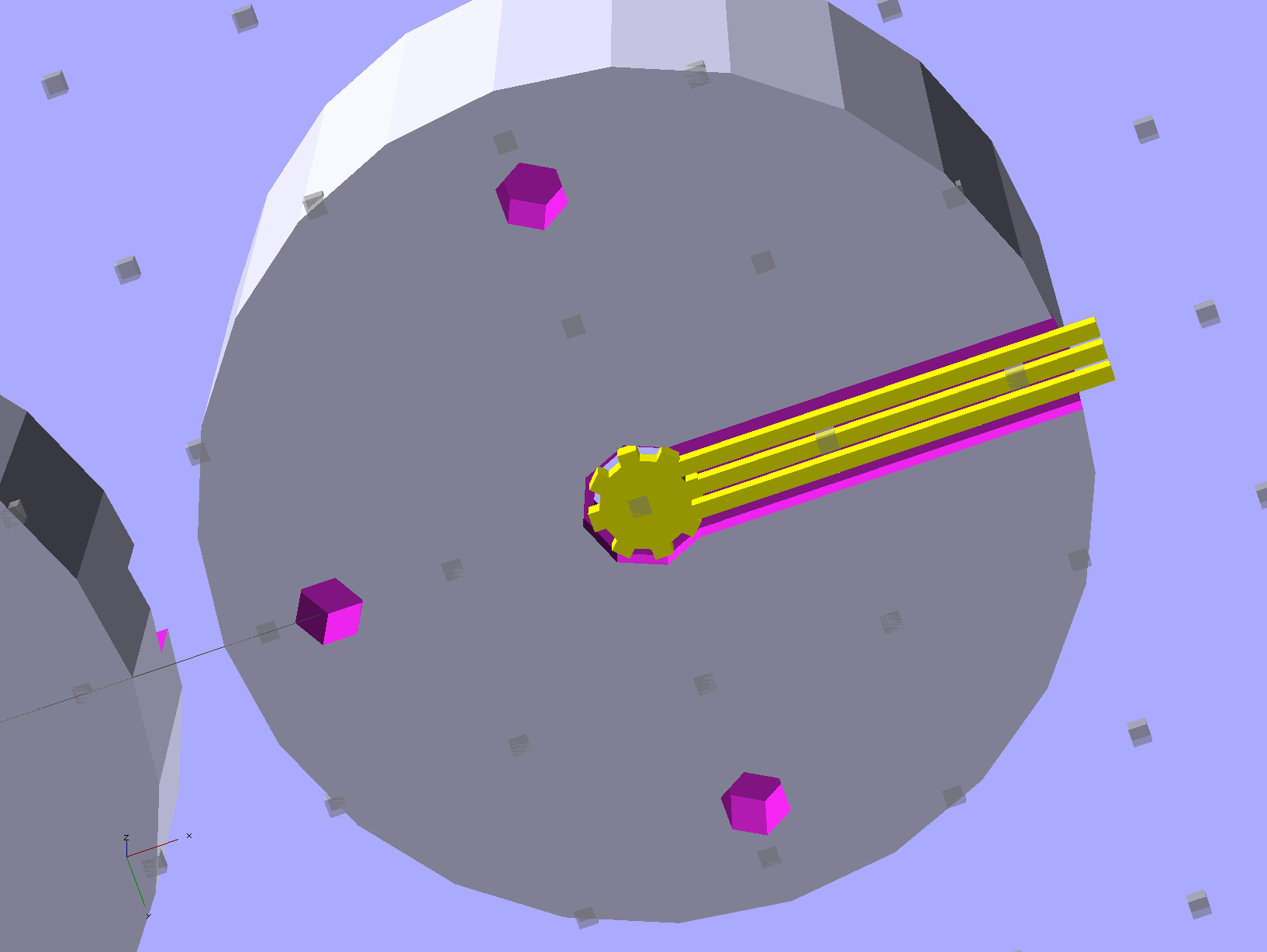
There’s a tiny bit of support under the central hole to support the LED flange recess and the trench for some foam under the leads:
LED Fixture for PIN-10AP Photodiode – support
That’s another improvement; the as-printed one has foam on only one side of the leads.
The OpenSCAD source code:
// LED test fixture for PIN-10AP photodiode
// Ed Nisley KE4ZNU May 2013

// Layouts: Adapter AdapterSupport Cap Shield Build Show

Layout = "Build";

Gap = 8;		// between parts in Show

//- Extrusion parameters must match reality!
//  Print with +1 shells and 3 solid layers

ThreadThick = 0.25;
ThreadWidth = 0.40;

HoleWindage = 0.2;

function IntegerMultiple(Size,Unit) = Unit * ceil(Size / Unit);

Protrusion = 0.1;			// make holes end cleanly

Spacing = 5;				// between parts on build platform

inch = 25.4;

Tap2_56 = 0.070 * inch;
Clear2_56 = 0.082 * inch;
Head2_56 = 0.156 * inch;
Head2_56Thick = 0.055 * inch;

//----------------------
// Dimensions

PhotoDiodeOD = 31.3;
PhotoDiodeStemOD = 16.0;
PhotoDiodeStemLength = 8.0;
PhotoDiodeWindowDia = 17.7;
PhotoDiodeHeight = 14.0;

FixtureOD = PhotoDiodeOD + 2*7.0;

LEDDia = 5.0;				// LED body
LEDFlangeOD = 6.0;			// flange at base of LED
LEDFlangeThick = IntegerMultiple(1.5,ThreadThick);
LEDLength = 10.0;			// overall length
LEDRecess = 4.0;			// tube to fit LED body
LEDSides = 8;

FixtureLength = PhotoDiodeHeight + LEDLength + IntegerMultiple(1.0,ThreadThick);

CapLength = 15.0;			// LED cover

FoamOD = FixtureOD/2;
FoamThick = IntegerMultiple(2.0,ThreadThick);

TrenchDepth = 2*FoamThick;
TrenchWidth = LEDDia;

ShieldThick = 5.0;
ShieldScrewCircle = PhotoDiodeOD + (FixtureOD - PhotoDiodeOD)/2;

PinOD = 3.0;				// alignment pin (filament)
PinLength = 10.0;			//   ... total length
PinCircle = FixtureOD/2;

GrubScrewOD = Tap2_56;

$fn=4*6;					// default cylinder sides

//----------------------
// Useful routines

module PolyCyl(Dia,Height,ForceSides=0) {			// based on nophead's polyholes

  Sides = (ForceSides != 0) ? ForceSides : (ceil(Dia) + 2);

  FixDia = Dia / cos(180/Sides);

  cylinder(r=(FixDia + HoleWindage)/2,
           h=Height,
	   $fn=Sides);
}

module ShowPegGrid(Space = 10.0,Size = 1.0) {

  RangeX = floor(95 / Space);
  RangeY = floor(125 / Space);

	for (x=[-RangeX:RangeX])
	  for (y=[-RangeY:RangeY])
		translate([x*Space,y*Space,Size/2])
		  %cube(Size,center=true);

}

//-----------------------
// Parts

module Adapter() {

	difference() {
		cylinder(r=FixtureOD/2,h=FixtureLength);
		translate([0,0,-Protrusion]) {
			PolyCyl(LEDDia,2*FixtureLength,LEDSides);
			PolyCyl(PhotoDiodeWindowDia,(FixtureLength - LEDRecess + Protrusion));
			PolyCyl(PhotoDiodeOD,(PhotoDiodeHeight + Protrusion));
		}
		translate([0,0,(FixtureLength - LEDFlangeThick)])
			PolyCyl(LEDFlangeOD,2*LEDFlangeThick,LEDSides);
		translate([FixtureOD/2,0,(FixtureLength + FoamThick/2 - LEDFlangeThick)]) {
			cube([FixtureOD,TrenchWidth,FoamThick],center=true);
		}
		for (angle = [90:90:270])
			rotate(angle)
				translate([0.75*PinCircle,0,(FixtureLength - PinLength/2)])
					PolyCyl(PinOD,PinLength,6);
		for (angle = [0:120:240])
			rotate(angle)
				translate([ShieldScrewCircle/2,0,-Protrusion])
					rotate(45)
						PolyCyl(Tap2_56,(ShieldThick - 6*ThreadThick + Protrusion));
		if (0)
			translate([0,0,FixtureLength/4])
				rotate([0,90,0])
					PolyCyl(GrubScrewOD,FixtureOD);
	}

}

module AdapterSupport() {

spiderthick = IntegerMultiple(LEDFlangeThick - ThreadThick,ThreadThick);

	color("Yellow")
		union() {
			for (leg = [0:LEDSides/2 - 1])
				rotate(leg*360/LEDSides)
					translate([0,0,spiderthick/2])
					cube([(LEDFlangeOD - 0.5*ThreadWidth),
							2.5*ThreadWidth,
							spiderthick],
							center=true);
			cylinder(r=LEDDia/2,h=spiderthick,$fn=LEDSides);
			for (bar = [-1:1])
				translate([LEDDia/3,(bar*3*ThreadWidth - ThreadWidth),0])
					cube([FixtureOD/2,2*ThreadWidth,IntegerMultiple(LEDFlangeThick - ThreadThick)]);
		}
}

module Cap() {

	difference() {
		cylinder(r=FixtureOD/2,h=CapLength);
		translate([(FixtureOD/2 - LEDDia/2),0,CapLength]) {
			cube([FixtureOD,TrenchWidth,2*TrenchDepth],center=true);
		}
		translate([0,0,(CapLength - FoamThick)])
			PolyCyl(FoamOD,(FoamThick + Protrusion));
		for (angle = [90:90:270])
			rotate(angle)
				translate([0.75*PinCircle,0,(CapLength - PinLength/2)])
					PolyCyl(PinOD,PinLength,6);
	}

}

module Shield() {

	difference() {
		cylinder(r=FixtureOD/2,h=ShieldThick);
		translate([0,0,-Protrusion])
			PolyCyl(PhotoDiodeStemOD,(ShieldThick + 2*Protrusion));
		for (angle = [0:120:240])
			rotate(angle) {
				translate([ShieldScrewCircle/2,0,-Protrusion])
					rotate(180/5)
						PolyCyl(Clear2_56,(ShieldThick + 2*Protrusion));
				if (0)
				translate([ShieldScrewCircle/2,0,(ShieldThick - 1.5*Head2_56Thick)])
					rotate(180/6)
						PolyCyl(Head2_56,4*Head2_56Thick);
			}
	}
}

//-------------------
// Build it...

ShowPegGrid();

if (Layout == "Adapter")
	Adapter();

if (Layout == "Cap")
	Cap();

if (Layout == "Shield")
	Shield();

if (Layout == "Show") {
	translate([0,0,(ShieldThick + Gap)]) {
		translate([0,0,FixtureLength + CapLength + Gap])
			rotate([180,0,0])
				Cap();
		Adapter();

		color("Orange")
		for (angle = [90:90:270])
			rotate(angle)
				translate([0.75*PinCircle,0,(FixtureLength + Gap - PinLength/2)])
					PolyCyl(PinOD,PinLength,6);
	}

	Shield();
}

	if (Layout == "AdapterSupport") {
	translate([0,0,FixtureLength])
		rotate([180,0,0])
			%Adapter();
	AdapterSupport();
}

if (Layout == "Build") {
	translate([(Spacing + FixtureOD),0,0]) {
		translate([0,0,FixtureLength])
			rotate([180,0,0])
				Adapter();
		AdapterSupport();
	}
	translate([0,0,0])
		Cap();

	translate([-(Spacing + FixtureOD),0,0])
		Shield();
}
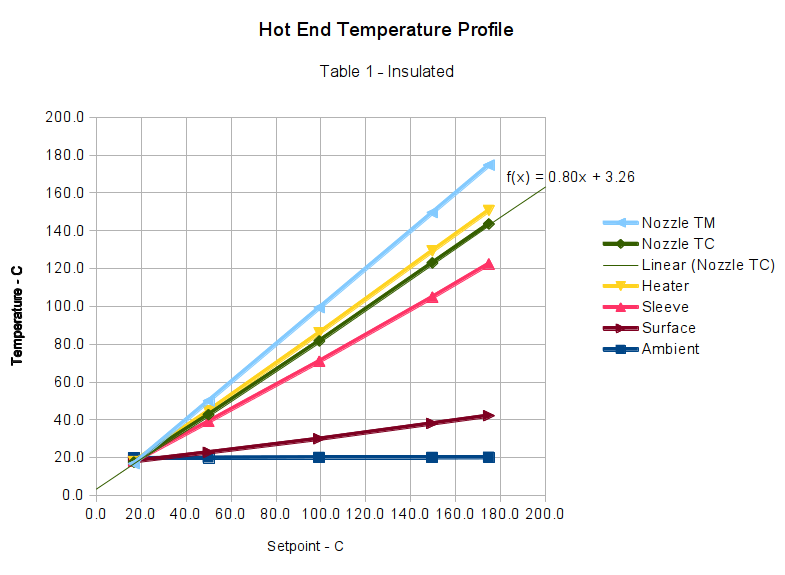
Those measurements suggested that my initial correction to the Table 1 values weren’t quite correct, but a similar correction might work as long as I didn’t change the insulating wrap. This graph includes a linear fit to the Nozzle TC data, based on the original M2 firmware’s Table 1 thermistor data and cotton insulation:
M2 Extruder Thermistor Recal – Table 1 Insulated – Nozzle TC linear fit
Applying that equation to Table 1 produces this thermistor lookup table:
I extrapolated the last entry from the previous two, because if the table doesn’t include an entry for 0 °C, then when you turn the heater off, the setpoint winds up being the lowest temperature greater than zero. Doesn’t make any difference, I think, but looks odd.
Load that table, run the temperature up, record more data:
M2 Extruder Thermistor Recal – slope-offset fit from Table 1
The error isn’t particularly pretty, being off by +4 °C at the high end. You could hand-tweak the linear fit equation to push the error down at normal operating temperatures, but it’s close enough for my purposes.
Although I don’t have any numbers, one benefit of tighter thermal coupling to the extruder nozzle is greatly reduced overshoot during heating.
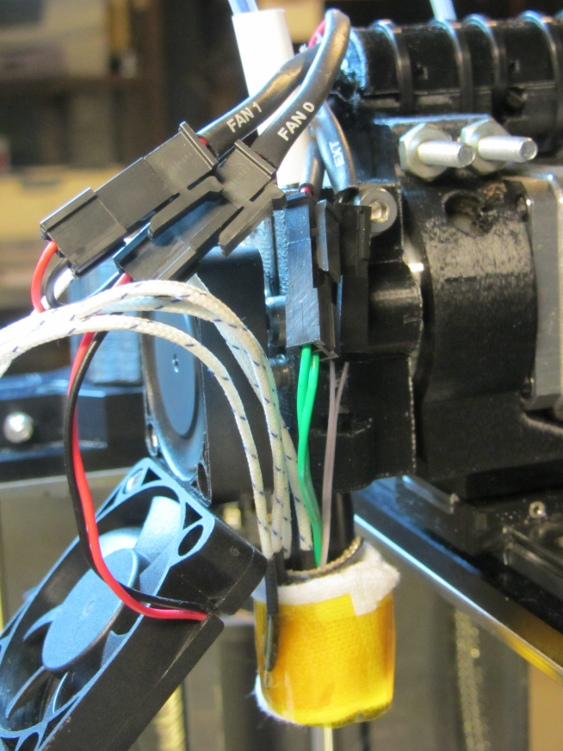
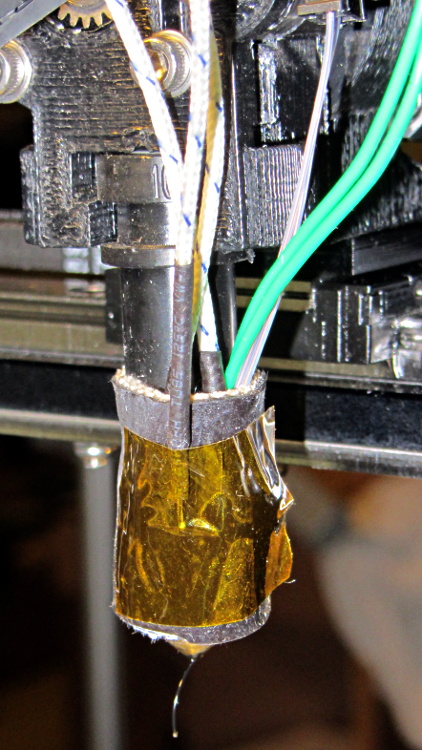
Knowing that all the thermocouples and amps and meters report more-or-less the same values, I tucked several of them around the hot end:
M2 Hot End Temperature Profile – Insulated
Their IDs and placement:
Nozzle TM – Makergear thermistor epoxied to nozzle
Nozzle TC – thermocouple epoxied to nozzle
Heater – thermocouple at heater, under insulating sleeve
Sleeve – thermocouple at heater, outside insulating sleeve
Surface – thermocouple taped to outside of cotton insulation
Although I intended to put the Heater thermocouple bead on the ceramic heater itself, I have no way of knowing exactly where it was, nor whether it actually made good contact with the heater body, because it’s tucked inside the fiberglass + silicone insulating sleeve. That sleeve will, perforce, be somewhat cooler than the heater, and that will certainly affect the results.
The sensors are stacked more-or-less radially outward from the center, which may or may not make any difference.
The upper fan (which runs constantly) does not blow directly on the leads, but air flow over the leads does change the reported temperatures: I haven’t taken that into account, even though it’s certainly significant, but the leads and fan remain in (approximately) the same position for the tests.
In the stock M2, the lower fan blows directly on the uninsulated hot end, the thermistor, and the nozzle; the G-Code controls when it’s turned on, so whatever effects it has are not constant. It was always off for these tests, but that’s certainly not the case while printing an object.
The cotton insulation wrap isn’t the same as I used earlier; it was easier to use a new length of cloth than to remove the Kapton tape from the old insulation. The new insulation was slightly thicker, as well, and did a better job of reducing heat loss. I took the Insulated measurements first, then removed the cloth for the Bare measurements. Although I tried to keep the thermocouples in the same positions, I certainly nudged the wires while peeling off the cloth:
M2 Hot End Temperature Profile – Bare
The Marlin firmware in the M2 normally uses thermistor Table 1. I adjusted those values to create Table 8, which exactly corrected the mismatch, at least with the earlier, thinner insulation.
After each temperature step, I waited until the temperature plot in the Pronterface graph had settled to a single pixel line for one minute. That didn’t mean the temperature was exactly at the setpoint, but it wasn’t changing very much at all, which is all I needed for this dataset.
Keeping all that in mind…
Graph 1 — Thermistor Table 1, bare (the as-shipped M2 configuration):
Hot End Temperature Profile Graph – Table 1 – Bare
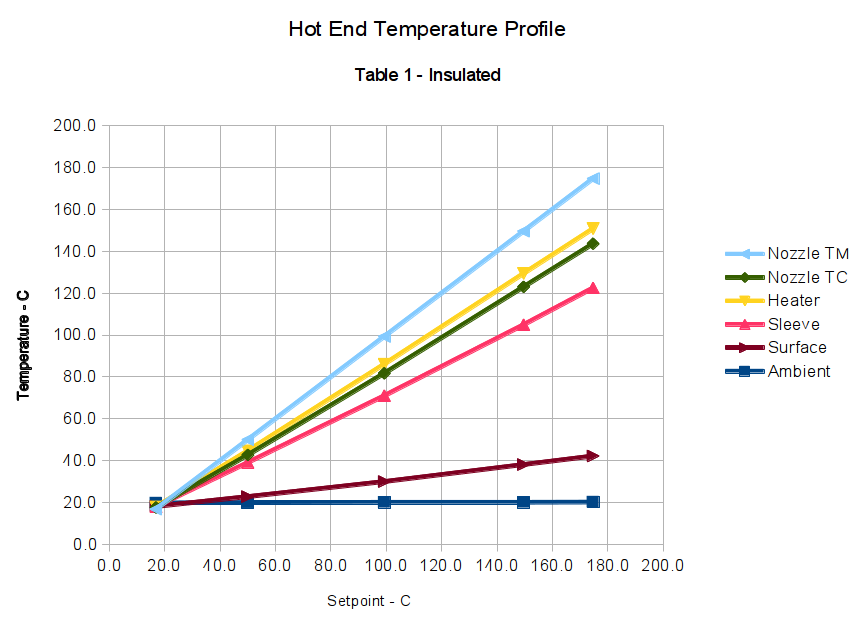
Graph 2 — Thermistor Table 1, with insulation:
Hot End Temperature Profile Graph – Table 1 – Insulated
Graph 3 — Thermistor Table 8, bare:
Hot End Temperature Profile Graph – Table 8 – Bare
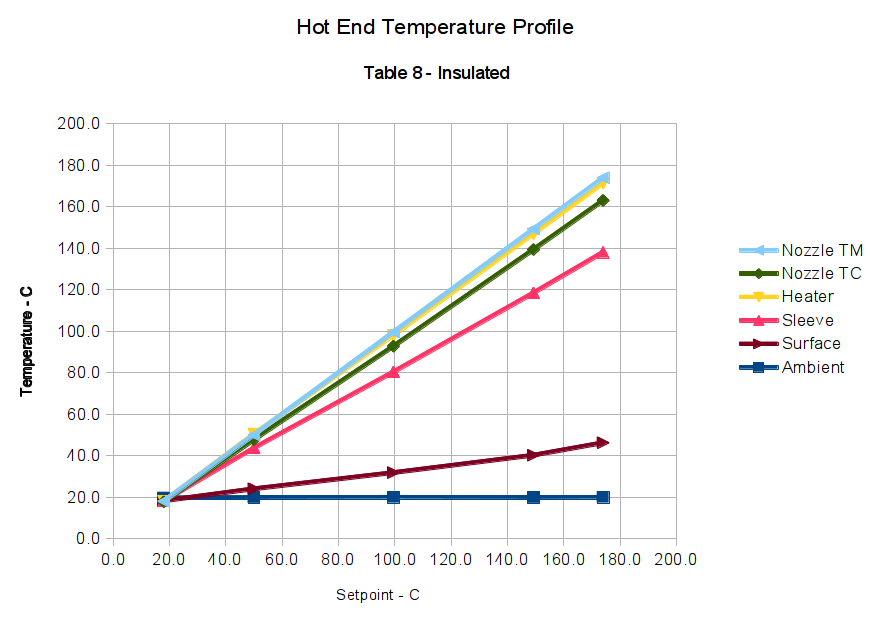
Graph 4 — Thermistor Table 8, with insulation:
Hot End Temperature Profile Graph – Table 8 – Insulated
The data in Graph 4 clearly show that the correction factor I used to create Table 8 doesn’t apply with a different insulation wrap around the hot end. Although the Nozzle TM and Nozzle TC lines are quite close, they aren’t the exact match I saw before.
When you compare Graph 1 with Graph 3, then Graph 2 with Graph 4, you’ll see that the thermocouple data remains consistent: the temperature differences at a specific temperature are the same, regardless of what the Nozzle TM indicates. For example, at the upper-right corner of Graph 1, when the Nozzle TM reports 175 °C, Nozzle TC is at 145 °C and the Heater is at 124 °C (use the Y axis values): Nozzle TC is 21 °C higher than the Heater. Looking in Graph 3 to the point where the Heater is 124 °C, the Heater is once again 21 °C hotter (again, using the Y axis values).
Although it seems odd, having the thermocouple on the bare Heater run cooler than the Nozzle TC is entirely possible, because the Heater thermocouple is in contact with the relatively thin sleeve, which is cooling the outside of the heater core. The Nozzle TC has a direct metallic + epoxy connection to the inside of the heater core, which will be hotter than its exterior surface.
Conversely, Graph 2 shows the insulated Heater running hotter than the Nozzle TM. That also makes sense: with less heat loss through the Sleeve, the exterior of the heater gets hotter than the threaded brass cylinder in the middle, which is losing heat at both ends.
Those correlations suggest the various thermocouples do indicate the actual temperatures and the nozzle thermistor doesn’t.
I believe bonding the thermistor to the nozzle with epoxy doesn’t affect that conclusion. It does make the results less subject to random changes due to the thermistor bead’s exact position and contact with the nozzle, though, and certainly makes the temperatures I record quite different from those found in other M2 hot ends. The fundamental rule here is that when you want to measure the temperature of something, the probe must make solid contact with the something, not dangle in mid-air somewhere nearby.
Based on some earlier (and rather crude) measurements, I proposed that the thermistor was gaining heat through its leads, because they pass over the heater core. That’s definitely not true, as the Nozzle TM and Nozzle TC have the same temperature difference between the bare and insulated cases: compare Graph 1 with Graph 2, then Graph 3 with Graph 4. If the thermistor gained heat, it would be relatively hotter than the thermocouple in the case with additional insulation, because the Heater would then run hotter and pipe more heat into the thermistor leads.
That’s why you make measurements…
Along those lines, I’ve asked several people I trust to measure their M2 hot ends [You know who you are. Thanks!] and the results are unequivocal: nobody sees any significant variation between the thermistor and a thermocouple tucked beside it. The only difference in the setups seems to be the solid connection between my sensors and the nozzle. I can’t explain it, either, and I’ve shot down several of my own proposals.









 The Smell of Molten Projects in the Morning