Ed Nisley's Blog: Shop notes, electronics, firmware, machinery, 3D printing, laser cuttery, and curiosities. Contents: 100% human thinking, 0% AI slop.
Now that Google encrypts your search terms (so they can sell the results to their customers), it’s harder to determine where folks come from. WordPress does report whatever search terms it can, though, and a recent search for plastic kitchen sink strainer caught my eye.
Here’s what you get (or, at least, what I got on that day) by feeding those words into Google Image Search:
Search engine optimization like that is to die for, eh?
The related post described a cleanup operation that didn’t really achieve very much in the long run:
Skimming the strainer
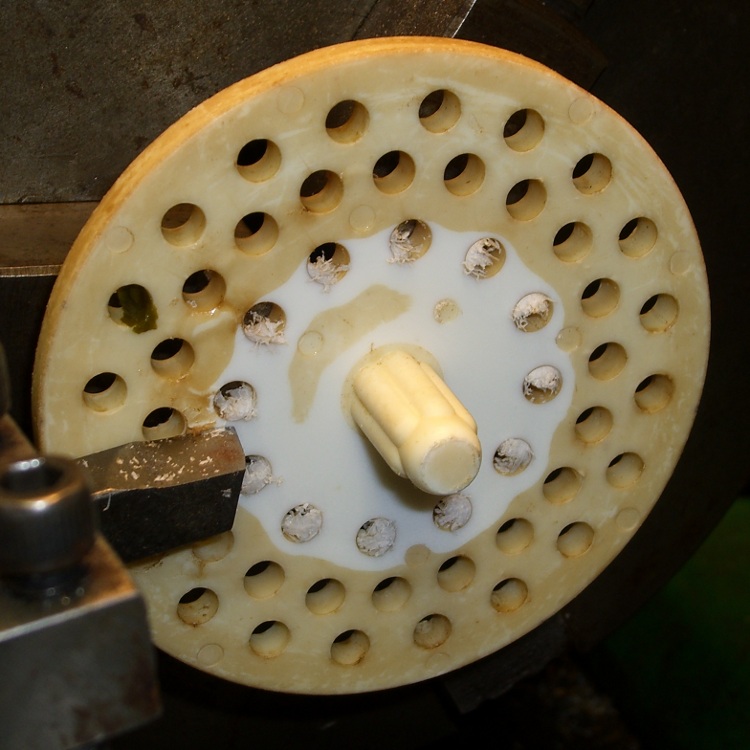
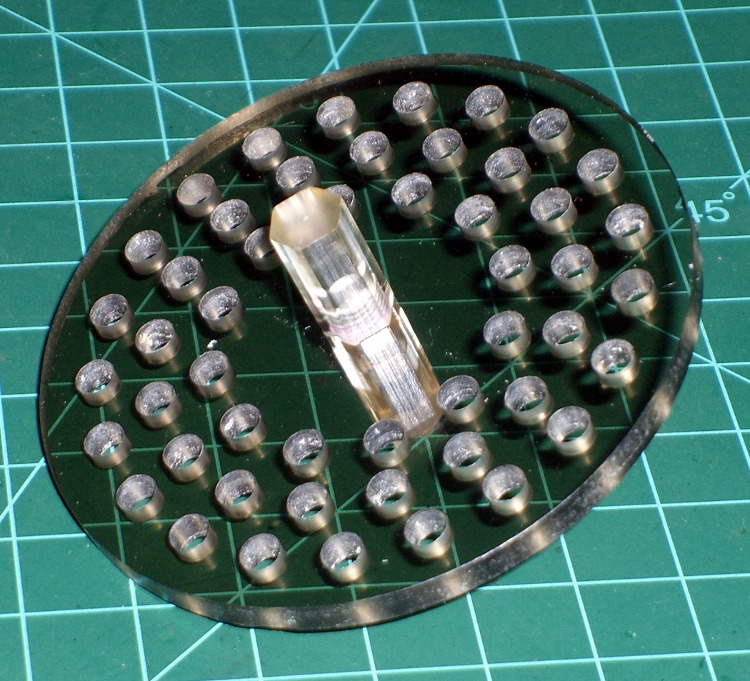
Some years ago I machined a pair of smoke gray acrylic sink strainers (using LinuxCNC / EMC2 loops and trig functions) on the Sherline and wrote it up for my Digital Machinist column. They came out quite nicely:
CNC Sink Strainer
Then I did a 3D printed version on the Thing-O-Matic:
A while back I bought a lifetime supply of silica gel beads from Sorbent Systems, with the intent of gradually replacing all of the miscellaneous desiccant packs floating around here. The catch is figuring out how to package 2 mm spherical beads, because the whole point of a desiccant pack is getting moist air in contact with the beads. I’m sure there’s a commercial solution for this out there, but …
Anyhow, here’s what 500 g of beads looks like, captured inside a 12×12 inch square of landscaping cloth folded in half:
Silica gel in landscape cloth bag
It really should be sewn along the three joined edges, but this is a quick-and-dirty prototype to see how it works; I simply folded the edges over twice and stapled through all six layers.
For the record, 500 g of beads occupies 700 ml in the measuring cup I used to weigh and pour them into the end of the bag. The bag + beads + staples weighs 508 g. The can holding the bulk beads has a humidity indicator card that shows the humidity is below 10%, so I’ll assume they’re pretty well dehydrated.
It’s now in the basement safe, presumably soaking up moist air at a frantic pace. I’ll check it in a week or two and see what’s actually happening.
For the record, those old desiccant granules (and their tray) weighed 853 g when they went into the safe and emerged at 916 g, having soaked up 63 g = 2 oz of water over the last five months.
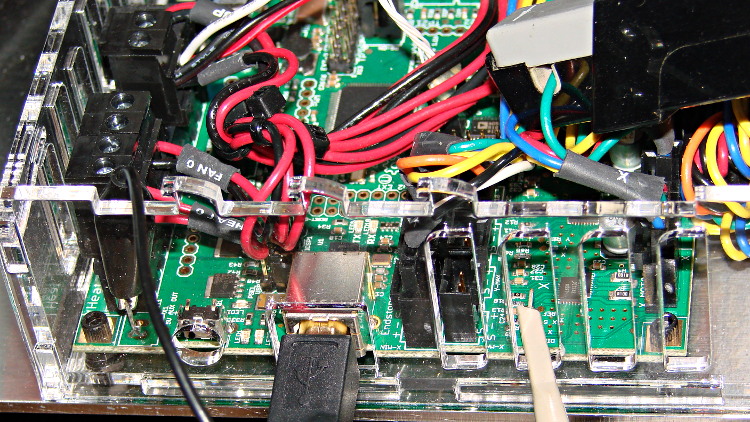
Based on the discussion attached to the post on Z axis numbers, I wanted to take a look at the points where Marlin switches from one step per interrupt to two, then to four, just to see what the timing looks like. The RAMBo board has neatly labeled test points, to which I tack-soldered a pin for the scope probe poked through one of the ventilation slots, and an unused power connector on the left edge of the PCB that provided a ground point (admittedly, much too far away for good RF grounding, but it suffices for CMOS logic signals). The Tek Hall-effect current probe leaning in from the top right captures the current in one of the X axis windings:
X axis Step and Current probes
I’ve reset the Marlin constants based on first principles, per the notes on distance, speed, and acceleration, so they’re not representative of the as-shipped M2 firmware. Recapping the XY settings:
Distance: 88.89 step/mm
Speed: 450 mm/s = 27000 mm/min
Acceleration: 5000 mm/s2, with the overall limit at 10 m/s2
The maximum interrupt frequency is about 10 kHz and the handler can issue zero, one, two, or four steps per axis per interrupt as required by the speed along each axis, up to a maximum of step rate of 40 kHz. There are complexities involved which I do not profess to understand.
The maximum 10 kHz step rate for one-step-per-interrupt motion corresponds to a speed of:
112.5 mm/s = (10000 step/s) / (88.89 step/mm)
The maximum 40 kHz step rate produces, naturally enough, four times that speed:
450 mm/s = (40000 step/s) / (88.89 step/mm)
Assuming constant acceleration, the distance required to reach a given speed from a standing start or to decelerate from that speed to a complete stop is: x = v2 / (2 * a)
The time required to reach that speed is: t = v/a
Accelerating at 5000 mm/s2:
112.5 mm/s = 6700 mm/min → 1.27 mm, 22.5 ms
150 mm/s = 9000 mm/min → 2.25 mm, 30 ms
450 mm/s = 27000 mm/min → 20.3 mm and 90 ms
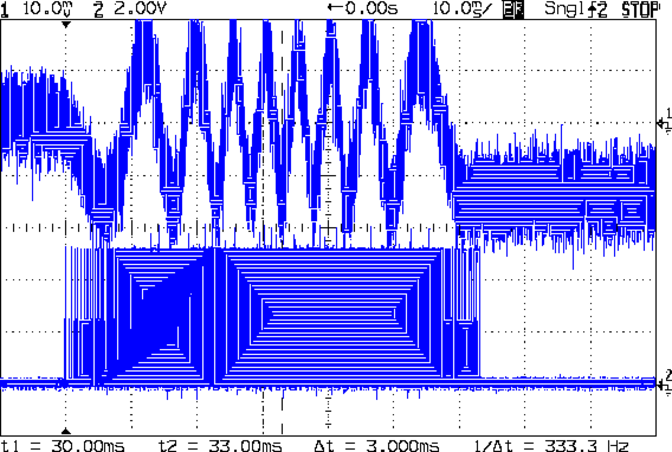
An overview of a complete 6 mm move at 150 mm/s shows the acceleration and deceleration at each end, with a constant-speed section in the middle:
X Axis 150 mm-s 6 mm – overview
The bizarre patterns in the traces come from hp2xx‘s desperate attempts to discern the meaning of the scope’s HPGL graphic data where the trace forms a solid block of color; take it as given that there’s no information in the pattern. I described the trace conversion process there.
The upper trace shows the X axis motor winding current at a scale of 500 mA/div, with far more hash than one would expect. The RAMBo drivers evidently produce much more current noise than the brick drivers I intend to use.
The lower trace is the X axis step signal produced by the Arduino microcontroller. You can barely make out the individual step signals at each end, but there’s not enough horizontal resolution to show them when the motor moves at a reasonable pace.
In round numbers, the acceleration and deceleration should require about 30 ms each. The overall move takes 63 ms, so the constant-speed section in the middle must be about 3 ms long. That’s probably not right…
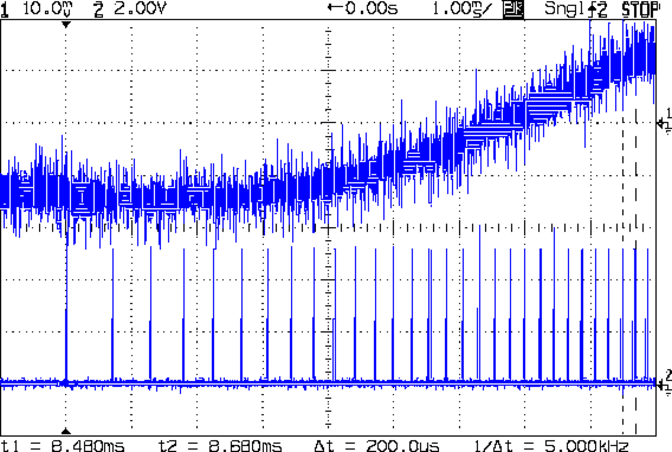
Here’s a closer look at the step pulses as the motion starts from zero on the way to 150 mm/s:
X Axis 150 mm-s 6 mm – 1 ms-div 0 ms dly
Over on the right, the 5 kHz step rate after 8.5 ms suggests a speed of 56 mm/s and counting 28 pulses says it moved 0.32 mm. Plugging those numbers into the equations:
a = v/t = 6600 mm/s2
a = (2 * x)/t2 = 8900 mm/s2
It’s not clear (to me, anyway) whether:
The firmware accelerates faster than the alleged 5000 mm/s2 limit
It’s accelerating near the overall limit of 10000 mm/s2
The acceleration isn’t constant: starts high, then declines
The measurement accuracy doesn’t support any conclusions
I understand what’s happening
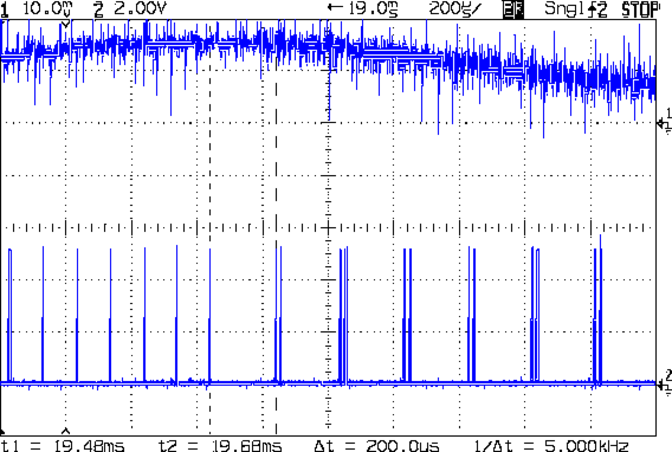
In order to see the double- and quad-step outputs, here’s a 50 mm move at 450 mm/s, with a 19 ms delay to the point where the interrupt handler transitions from single-step to double-step output:
X Axis 450 mm-s 50 mm – 200 us-div 19 ms dly
The interrupt frequency drops from just under 10 kHz to a bit under 5 kHz, with the doubled pulses about 16 μs apart. At the transition, the axis speed is 112.5 mm/s, pretty much as predicted.
If that’s the case, the overall acceleration to the transition works out to:
5800 mm/s2 = (113 mm/s) / (19.5 ms)
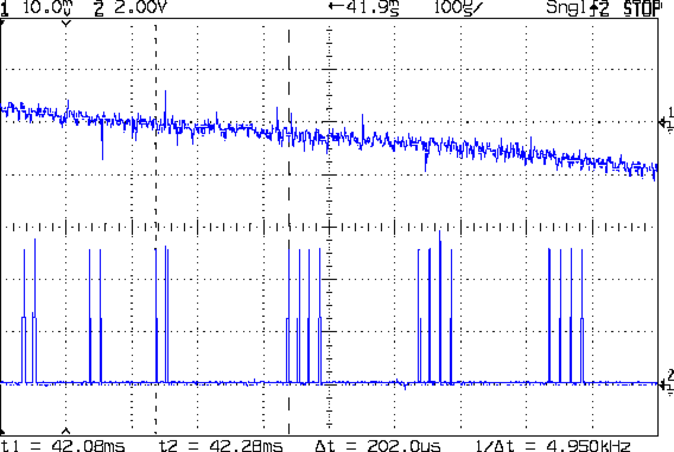
Delaying the traces to 41.9 ms after the motion starts shows the double-to-quad step transition:
X Axis 450 mm-s 50 mm – 100 us-div 41.9 ms dly
Once again, the pulse frequency drops from 10 kHz down to 5 kHz. The speed is now 225 mm/s, half the maximum possible speed, which also makes sense: at top speed, the pulses will be essentially continuous at 40 kHz.
The average acceleration from the start of the motion:
5300 mm/s2 = (225 mm/s) / (42.1 ms)
That implies the initial acceleration starts higher than the limit, but it evens out on the way to the commanded speed.
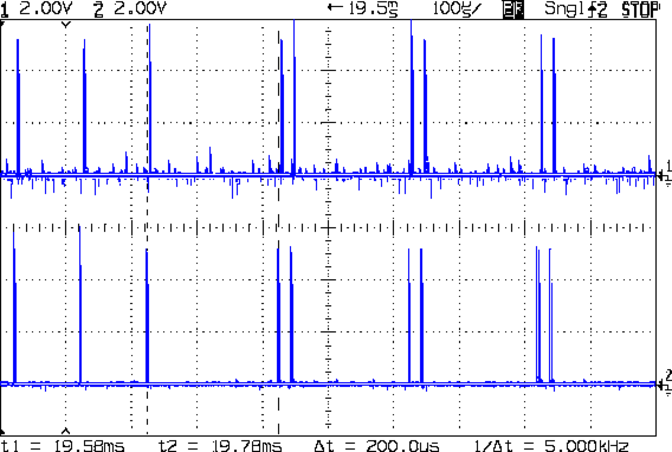
Those scope shots come from moving only the X axis. Moving both the X and Y axes, with Trace 1 now showing the Y axis output, for 50 mm at 450 mm/s, produces similar results; the Y axis output lags the X axis by a few microseconds:
XY 450 mm-s 50 mm – 100 us-div 19.5 ms dly
Once again, that’s at the single- to double-step transition at 19+ ms. The overall timing doesn’t depend on how many axes are moving, as long as they can accelerate at the same pace; otherwise, the firmware must adjust the accelerations to make both axes track the intended path.
None of this is too surprising.
For a motor running at a constant speed just beyond the single-to-double step transition at 112.5 mm/s or the double-to-quad transition at 225 mm/s, the rotor motion should have a 5 kHz perturbation around its nominal position: it coasts for nearly the entire period, then a pair of steps kicks it toward the proper position. At those transitions, the rotor turns at:
The perturbation should look like a 5 kHz oscillation (not exactly sinusoidal, maybe triangular?) superimposed on the nominal position, which is changing more-or-less parabolically as a function of time. I expect that the overall inertia damps it out pretty well, but I’d like to attach a rotary encoder to the motor shaft (or a linear encoder to the axis) to show the actual outcome, but I don’t have the machinery for that.
In any event, LinuxCNC’s step outputs should behave better, which is why I’m doing this whole thing in the first place…
For obscure reasons, I’m kibitzing on a project to rehabilitate an ancient Brother industrial sewing machine. It has a floppy disk drive that stored various custom stitch patterns, but it now crashes / jams / stalls after loading any of the patterns.
I booted an old PC that had a floppy drive using System Rescue CD, only to discover that /dev/fd0 didn’t exist. A bit of search-fu revealed that the floppy kernel module isn’t automagically loaded: a simple modprobe floppy did the trick, after which mount -o ro /mnt/floppy worked fine (it’s in fstab, even if the kernel module isn’t loaded).
The floppy was in IBM PC-DOS format, as you might expect in a system with ICs date-coded in the early 90s and an 8085 CPU (not an 8088 or 8086). Applying dd bs=512 if=/dev/fd0 of=/tmp/floppy.bin produced a measly 12 kB file containing the boot sector, many binary zeos, a line or two of pinball panic, and more binary zeros up to the 0x3000 file size, where it ended due to a hard read error.
So now we know there’s no point in trying to run from the floppy, because there’s nothing to run. According to the instructions, the sewing machine can write to the floppy, so we can examine some of those results to see what the data structures should be.
A new-to-me off-lease Dell Optiplex 760 that I just picked up (for the M2’s LinuxCNC controller) has a floppy drive, so I can let that old hulk go to the recycler. I don’t see a big duty cycle for the floppy, but ya gotta have stuff…
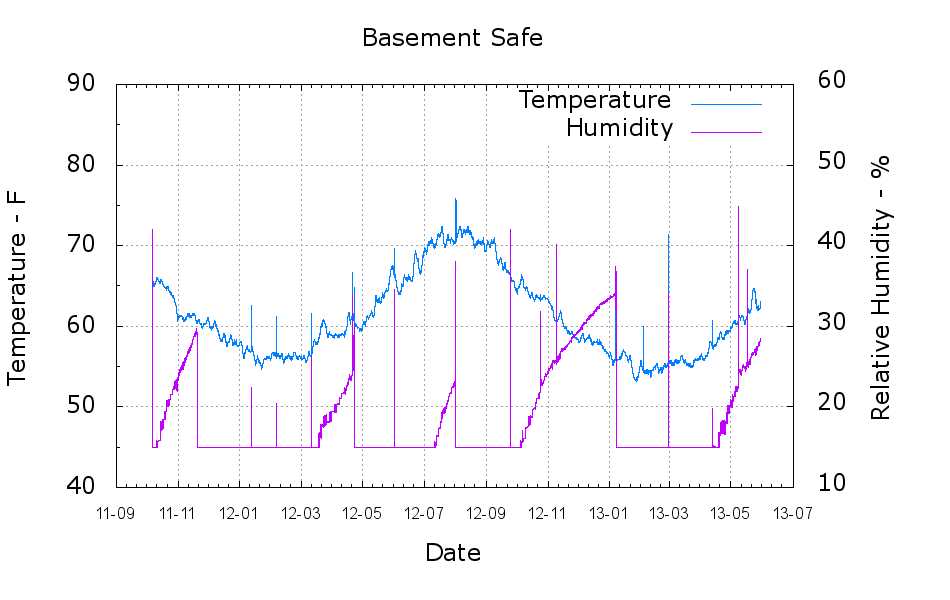
A plot of the temperature and humidity inside the basement safe over the last year-and-a-half:
Basement Safe
The tray of silica gel (or whatever those granules might be) holds the humidity firmly at 14 to 15 %, at least with a simple masking tape seal around the door opening that dates back to early 2012. Less water vapor gets through the door during the winter, due to the lower basement humidity when it’s cold outside, but it looks like four regenerations per year with just under a kilogram of desiccant in the tray.
Ordinarily, it’d be time for those granules to endure another oven session, but I just picked up a bunch of real silica gel beads and must conjure up some porous bags.
The Bash / Gnuplot script that cleaned the CSV files and produced the plot:
#!/bin/sh
#-- overhead
export GDFONTPATH="/usr/share/fonts/truetype/"
base="${1%.*}"
echo Base name: ${base}
ofile=${base}.png
tfile=$(tempfile)
echo Input file: $1
echo Temporary file: ${tfile}
echo Output file: ${ofile}
#-- prepare csv Hobo logger file
sed 's/^\"/#&/' "$1" | sed 's/^.*Logged/#&/' | sed 's/ ,/,/' | sed 's/\/\([0-9][0-9]\) /\/20\1 /' > ${tfile}
#-- do it
gnuplot << EOF
#set term x11
set term png font "arialbd.ttf" 18 size 950,600
set output "${ofile}"
set title "${base}"
set key noautotitles
unset mouse
set bmargin 4
set grid xtics ytics
set timefmt "%m/%d/%Y %H:%M:%S"
set xdata time
set xlabel "Date"
set format x "%y-%m"
#set xrange [1.8:2.2]
set xtics font "arial,12"
#set mxtics 2
#set logscale y
set ytics nomirror autofreq
set ylabel "Temperature - F"
set format y "%3.0f"
set yrange [40:90]
set mytics 2
set y2label "Relative Humidity - %"
set y2tics nomirror autofreq
set format y2 "%3.0f"
set y2range [10:60]
#set y2tics 32
#set rmargin 9
set datafile separator ","
#set label 1 "label text" at 2.100,110 right font "arialbd,18"
#set arrow from 2.100,110 to 2.105,103 lt 1 lw 2 lc 0
plot    \
    "${tfile}" using 2:3 axes x1y1 with lines lt 3 title "Temperature",\
    "${tfile}" using 2:4 axes x1y2 with lines lt 4 title "Humidity"
EOF
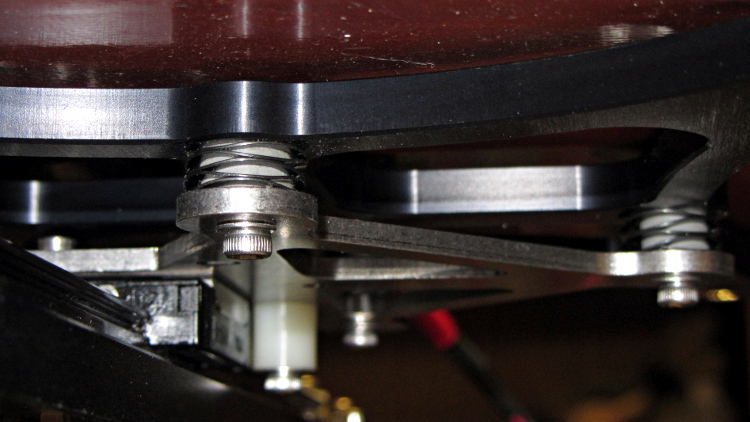
The M2’s build platform consists of an 8×10 inch glass slab atop an aluminum spider, all supported by a trio of fairly stiff springs. Back when I was experimenting with excessive acceleration, I inserted some silicone rubber cylinders to boost the spring constant and stabilize the platform
I removed the screws and springs one by one, tucked a cylinder inside the spring, and reinstalled it:
Silicone rubber pads for M2 platform – installed
The trick is to park the nozzle near the edge of the platform where it will rise without the screw holding it down, measure the distance twixt nozzle and platform, lower the platform by a (known!) 50 mm, install the cylinder, raise the platform, then tweak the screw to put the same distance between the nozzle and the platform as you started with.
This probably doesn’t make much difference with the default 3 m/s2 acceleration, but up around 10 m/s2 it seemed wobbly. No suprise: that’s over 1 G of lateral acceleration and the platform weighs a pound or so.



 The Smell of Molten Projects in the Morning