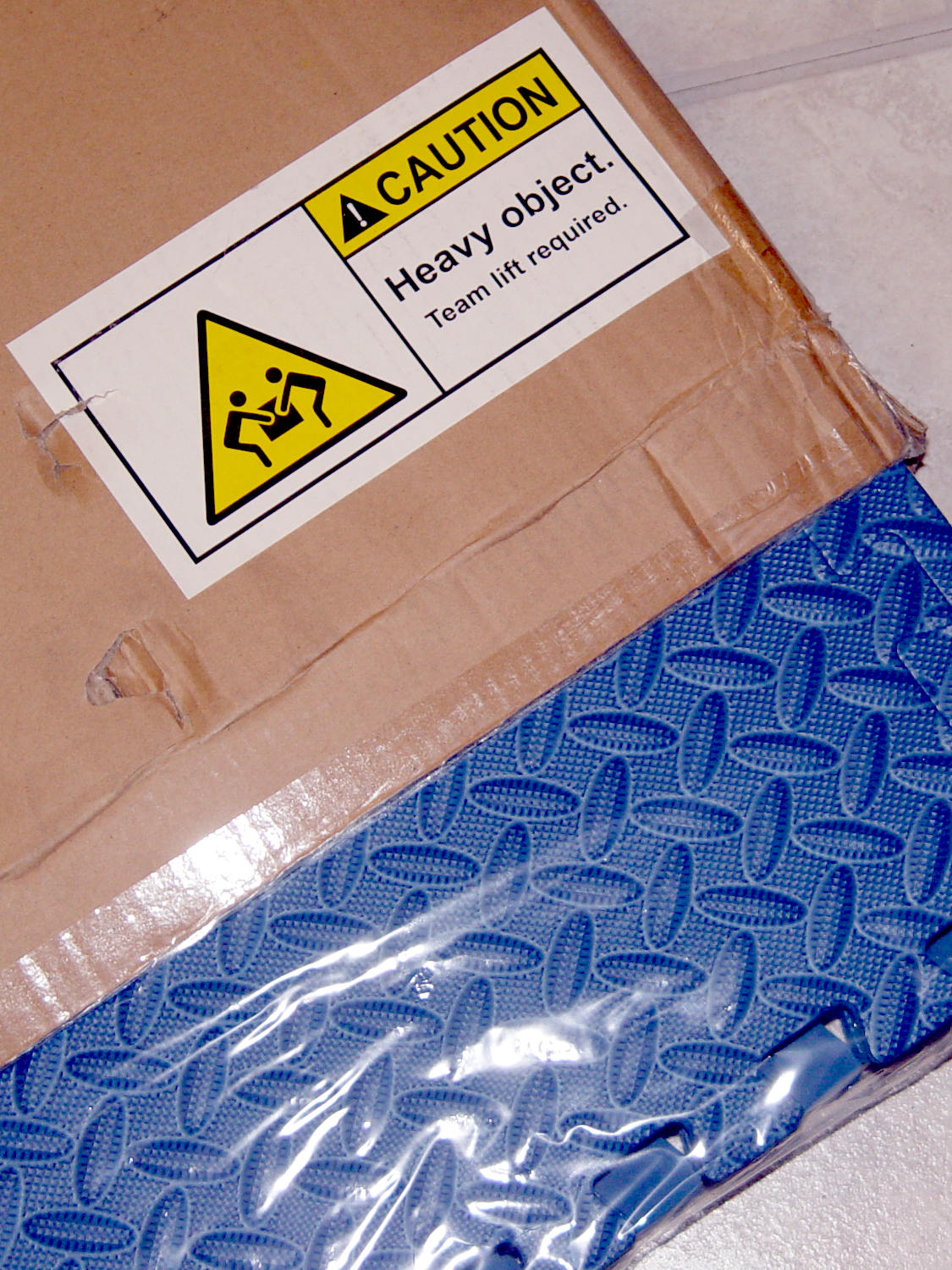
So says the label on a recent Amazon package:
It contains half a dozen foam floor mat sheets weighing a bit under a pound apiece.
I don’t begrudge anyone working in an Amazon warehouse a bit of humor …
The Smell of Molten Projects in the Morning
Ed Nisley's Blog: Shop notes, electronics, firmware, machinery, 3D printing, laser cuttery, and curiosities. Contents: 100% human thinking, 0% AI slop.
Things around the home & hearth
So says the label on a recent Amazon package:
It contains half a dozen foam floor mat sheets weighing a bit under a pound apiece.
I don’t begrudge anyone working in an Amazon warehouse a bit of humor …
Installing the Xiaomi Dafang Hacks firmware requires an MicroSD card in each camera and, my previous stock having run low, four more just arrived:
Prices have collapsed to the point where known-good (all four passed f3probe testing) cards direct from Samsung (as opposed to Amazon’s “commingled inventory” counterfeit situation) now cost $12-ish each with free shipping.
After I finish fiddling with the first camera, I’ll copy its card onto these four, unique-ify the IP addresses / hostnames /suchlike, and bring ’em all online.
Given a camera running Xiaomi Dafang Hacks software, you can set up motion-triggered image capture and save the images either locally or on an FTP server. The latter makes sense, as it automatically plunks the images where they’re more generally available.
Define the FTP server parameters in config/motion.conf:
# Configure FTP snapshots and videos
ftp_snapshot=true
ftp_video=false
ftp_video_duration=10
ftp_host="192.168.1.10"
ftp_port=21
ftp_username="ftp-user-id"
ftp_password="secret-password"
ftp_stills_dir="Cam4"
ftp_videos_dir="Cam4"
The FTP server should have the Cam4 directory in place and shared for read-write access before attempting to plunk files therein. Ahem.
The camera’s Services menu leads to the motion configuration page:
Limiting the detection region to the lower-left corner cuts out all the waving-in-the-breeze foliage in the yard, while covering the driveway. High sensitivity detects squirrel-sized objects in the foreground, although your mileage will certainly differ.
The camera seems rate-limited at 5 s/image, which may come from FTP transfer overhead; I don’t know if the code includes a built-in delay or if it just works like that. The NAS drive requires upwards of 7 s to spin up if it hasn’t been used for a while, but afterwards the transfers don’t take that long.
Mounting the NAS drive’s CIFS shared directory from my desktop PC works as before:
sudo mount -v -o rw,credentials=/root/.nas-id,vers=1.0,uid=ed -t cifs //192.168.1.10/Cam4 /mnt/part
Then view / edit / delete images as needed:
The camera has built-in IR LEDs, but they’re nowhere near powerful enough to illuminate the entire yard.
Motion detection works better in daylight:
Unlike the original Wyze firmware, the Xiaomi Dafang Hacks firmware & software keep all the images & metadata within my network and under my control.
The most recent iteration of ripping a book-on-CD to bits suitable for a small MP3 player begins by defining the metadata:
author="Whoever Wrote It"
title="Whatever It May Be About"
Set up a suitable directory for the MP3 files, with a subdirectory for the WAV files direct from the CD:
mkdir "$author - $title"
cd "$author - $title"
mkdir waves
Then unleash cdparanoia on each disk, but with its error checking dialed back to a minimum because most errors don’t produce much audible damage:
d=01 ; cdparanoia -v -Y --never-skip=1 -B "1-" waves/D$d.wav ; eject cdrom
In some cases, however, a nasty gouge (the previous owners being careless, alas) can jam cdparanoia midway through a track, so I fetch all the remaining tracks:
d=10 ; cdparanoia -v -Y --never-skip=1 -B "6-" waves/D$d.wav
Sometimes re-cleaning the disc and re-reading the offending track produces a better outcome:
d=10 ; cdparanoia -v -Y --never-skip=1 -B "5-5" waves/D$d.wav
With all the WAV files collected, I now know how to unleash multiple lame conversions for all the tracks on each disc:
for d in {01..12} ; do for t in {01..19} ; do if [[ -f waves/track$t.D$d.wav ]] ; then lame --silent --preset tape --tt "D${d}:T${t}" --ta "$author" --tl "$title" --tn $t --tg "Audio Book" --add-id3v2 waves/track${t}.D${d}.wav D${d}-T${t}.mp3 & fi ; done ; wait ; done
The disc and track ranges correspond to notes written on paper while ripping the CDs, there being no automagic way to collect the information.
That may be easier to read with the control structures spread out:
for d in {01..12}
do for t in {01..19}
do if [[ -f waves/track$t.D$d.wav ]]
then
lame --silent --preset tape --tt "D${d}:T${t}" --ta "$author" --tl "$title" --tn $t --tg "Audio Book" --add-id3v2 waves/track${t}.D${d}.wav D${d}-T${t}.mp3 &
fi
done
wait
done
Affixing an ampersand (&) to the lame command drops it into the background, where it runs as CPU time becomes available. The wait after the first loop stalls until all of the lame instances for each CD finish.
The kernel scheduler manages to keep the GUI responsive while a four-core CPU makes short work of the entire CD.
When it’s all done, transfer the MP3 files to the player:
cd ..
sudo mount -o uid=ed /dev/sde1 /mnt/part
rsync -vrtu --progress --exclude="waves" "$author - $title" /mnt/part/Music
sync
sudo umount /mnt/part
Fetching commands from history eliminates the need to remember all that, but now it’s written down where I can find it for the next desktop box.
Life is good!
The spam filters on my email account snagged a message with an impressive subject:
Be sure to read this message! Your personal data is threatened!
The sender used my very own email address, sending the message from a server with a Mumbai IP address:
Hello!
As you may have noticed, I sent you an email from your account.
This means that I have full access to your device.
I’ve been watching you for a few months now.
The fact is that you were infected with malware through an adult site that you visited.
If you are not familiar with this, I will explain.
Trojan Virus gives me full access and control over a computer or other device.
This means that I can see everything on your screen, turn on the camera and microphone, but you do not know about it.
I also have access to all your contacts and all your correspondence.
Why your antivirus did not detect malware?
Answer: My malware uses the driver, I update its signatures every 4 hours so that your antivirus is silent.
I made a video showing how you satisfy yourself in the left half of the screen, and in the right half you see the video that you watched.
With one click of the mouse, I can send this video to all your emails and contacts on social networks.
I can also post access to all your e-mail correspondence and messengers that you use.
If you want to prevent this, transfer the amount of $796 to my bitcoin address (if you do not know how to do this, write to Google: “Buy Bitcoin”).
My bitcoin address (BTC Wallet) is: 14tfS3 << redacted >> WH6Y
After receiving the payment, I will delete the video and you will never hear me again.
I give you 50 hours (more than 2 days) to pay.
I have a notice reading this letter, and the timer will work when you see this letter.
Filing a complaint somewhere does not make sense because this email cannot be tracked like my bitcoin address.
I do not make any mistakes.
If I find that you have shared this message with someone else, the video will be immediately distributed.
Best regards!
The threat uses Nigerian-scam grade English, evidently targeted at folks with both a guilty conscience and a tenuous grasp on how email works. I thought those same folks would have enormous difficulty converting dollars into Bitcoin.
However, feeding the wallet ID into a Block Explorer shows three transactions over the last two days, with the account now standing at 0.43069539 BTC = US$2269.44. I have no way of knowing how many emails went out, but obviously three people had sufficiently guilty consciences to (figure out how to) make a Bitcoin transaction.
I’m sure this has something to do with my recent IP camera adventures …
Update: The ransom payments tapered off after five days.

I don’t know how many different scams came from the same source, but $6700 (at today’s market rate) says this campaign paid better than most legal occupations outside the fintech sector.
The cover for Mary’s favorite seam ripper cracked long ago, has been repaired several times, and now needs a replacement:
The first pass (at the top) matched the interior and exterior shapes, but was entirely too rigid. Unlike the Clover seam ripper, the handle has too much taper for a thick-walled piece of plastic.
The flexy thinwall cover on the ripper comes from a model of the interior shape:
It’s not conspicuously tapered, but OpenSCAD’s perspective view makes the taper hard to see. The wedge on top helps the slicer bridge the opening; it’s not perfect, just close enough to work.
A similar model of the outer surface is one thread width wider on all sides, so subtracting the handle model from the interior produces a single-thread shell with a wedge-shaped interior invisible in this Slic3r preview:
The brim around the bottom improves platform griptivity. The rounded top (because pretty) precludes building it upside-down, but if you could tolerate a square-ish top, that’s the way to go.
Both models consist of hulls around eight strategically placed spheres, with the wedge on the top of the handle due to the intersection of the hull and a suitable cube. This view shows the situation without the hull:
The spheres overlap, with the top set barely distinguishable, to produce the proper taper. I measured the handle and cover’s wall thicknesses, then guesstimated the cover’s interior dimensions from its outer size.
The handle’s spheres have a radius matching its curvature. The cover’s spheres have a radius exactly one thread width larger, so the difference produces the one-thread-wide shell.
Came out pretty nicely, if I do say so myself: the cover seats fully with an easy push-on fit and stays firmly in place. Best of all, should it get lost (despite the retina-burn orange PETG plastic), I can make another with nearly zero effort.
The Basement Laboratory remains winter-cool, so I taped a paper shield over the platform as insulation from the fan cooling the PETG:
The shield goes on after the nozzle finishes the first layer. The masking tape adhesive turned into loathesome goo and required acetone to get it off the platform; fortunately, the borosilicate glass didn’t mind.
The OpenSCAD source code as a GitHub Gist:
| // Cover for old seam ripper | |
| // Ed Nisley – KE4ZNU | |
| // 2019-03 | |
| /* [Layout Options] */ | |
| Layout = "Build"; // [Show,Build] | |
| Part = "Handle"; // [Handle,CoverSolid,Cover] | |
| /* [Extrusion Parameters] */ | |
| ThreadWidth = 0.40; | |
| ThreadThick = 0.25; | |
| HoleWindage = 0.2; | |
| Protrusion = 0.1; | |
| //—– | |
| // Dimensions | |
| /* [Dimensions] */ | |
| WallThick = 1*ThreadWidth; | |
| CapInsideLength = 48.0; | |
| CornerRadius = 2.0; // handle at base | |
| Base = [11.0,5.5,0.0]; // handle at base | |
| Tip = [8.2,3.7,CapInsideLength]; // inferred at tip | |
| HandleOC = [Base – 2*[CornerRadius,CornerRadius,0.0], | |
| Tip – 2*[CornerRadius,CornerRadius,CornerRadius/2] | |
| ]; | |
| NumSides = 2*3*4; | |
| //—– | |
| // Useful pieces | |
| // Handle is basically the interior of the cover | |
| module Handle() { | |
| intersection() { | |
| hull() | |
| for (i=[-1,1], j=[-1,1], k=[0,1]) | |
| translate([i*HandleOC[k].x/2,j*HandleOC[k].y/2,k*HandleOC[k].z]) | |
| sphere(r=CornerRadius,$fn=NumSides); | |
| translate([0,0,-CornerRadius/2]) // chop tip for better bridging | |
| rotate([45,0,0]) | |
| cube([2*Base.x,CapInsideLength*sqrt(2),CapInsideLength*sqrt(2)],center=true); | |
| } | |
| } | |
| module CoverSolid() { | |
| hull() | |
| for (i=[-1,1], j=[-1,1], k=[0,1]) | |
| translate([i*HandleOC[k].x/2,j*HandleOC[k].y/2,k*HandleOC[k].z]) | |
| sphere(r=CornerRadius + WallThick,$fn=NumSides); | |
| } | |
| module Cover() { | |
| difference() { | |
| CoverSolid(); | |
| Handle(); | |
| translate([0,0,-CornerRadius]) | |
| cube(2*Base + [0,0,2*CornerRadius],center=true); | |
| } | |
| } | |
| //—– | |
| // Build things | |
| if (Layout == "Build") { | |
| Cover(); | |
| } | |
| if (Layout == "Show") | |
| if (Part == "Handle") | |
| Handle(); | |
| else if (Part == "CoverSolid") | |
| CoverSolid(); | |
| else if (Part == "Cover") | |
| Cover(); | |
Having an ancient flip phone in need of a battery, I ordered a Kyocera TXBAT10133 battery from eBay. Described as “new” (which, according to the Ebay listing, means “New: A brand-new, unused, unopened, undamaged item in its original packaging”), I was somewhat surprised to see this emerging from the box:
It obviously led a rather hard life before being harvested from somebody else’s obsolete flip phone and is definitely not “new”.
Not yet having a deep emotional attachment to the thing, I set it up for a capacity test:
Given a very light 100 mA load, it shows about the same capacity as the original battery in our phone:
Given the precarious contact arrangement, the glitches near the right end aren’t surprising.
The battery label claims a 900 mA·h rating, so both have nearly their nominal capacity at such a reduced load. In actual use, the phone has a low battery after a few hours of power-on time, far less than when it was new.
The seller promises a replacement. For all I know, there are no genuinely “new” batteries available for these phones.