Ed Nisley's Blog: Shop notes, electronics, firmware, machinery, 3D printing, laser cuttery, and curiosities. Contents: 100% human thinking, 0% AI slop.
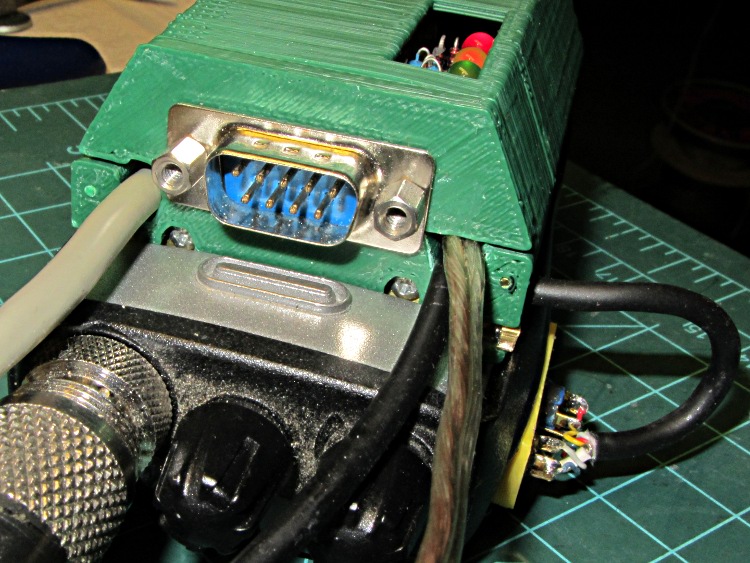
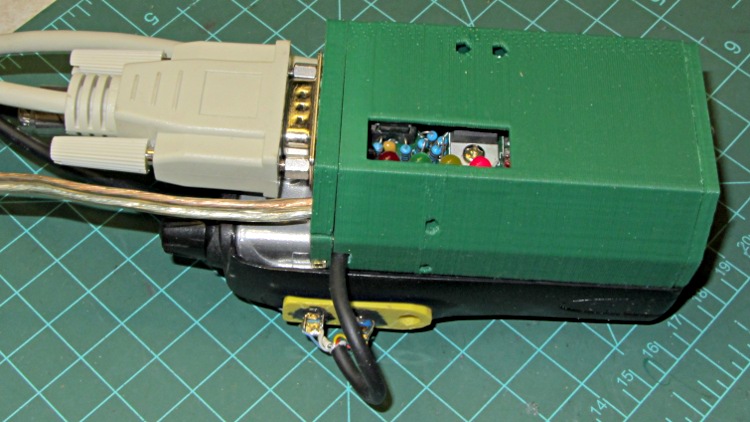
The robust wire I used for the external battery connection required a bit of diagonal cutter work to enlarge the hole in the top plate, but eventually everything fit together and the GPS interface box latched neatly onto the radio:
HT-GPS Case – cabled top view
The skein of cables:
Antenna: reverse SMA to UHF adapter = RG58 coax
GPS: TTL serial data from Byonics GPS2 receiver = DB-9 (OK, DE-9)
After a few rides to verify that this whole affair works, I must print up another case with slightly modified dimensions, add a plastic window over those cheerful LEDs on the TinyTrak3+ board, and mush an epoxy putty blob over the earphone and mic connections on that bright yellow plug plate. I’ve given up on the idea of having a cover for the top part of the battery compartment; there just isn’t enough space for such a thing and it’d be an impossibly delicate shell.
The radio seems happy enough being fed 9 V from a bench supply (to match the upconverted lithium packs I’ve been using on the bikes), rather than 7.4 V from its standard lithium pack. A freshly charged battery comes pretty close to 9 V, so they can’t be too fussy. It idles at about 100 mA, with periodic blips to 140 mA when (I think) the TinyTrak3+ tickles the GPS receiver, regardless of the supply voltage. Goosing it with 13.8 V surely wouldn’t have a happy outcome…
Lashed up like that on the bench, with the GPS receiver hanging out the basement window and the coax hitched to a bicone scanner antenna sitting inside the window, it generated APRS spots and the audio sounds OK, so the innards look good, too.
2012-04-11 20:09:08 EDT: KE4ZNU-9>APT311,WA2YSM-15,WIDE1*,WIDE2-1,qAR,K2MHV-6:>Ed - Bike PL100 UV3D
One downside: the TinyTrak3+ blurts its initial ID message instantly after being powered on, but the radio takes a few seconds to haul itself to its feet. As a result, the ID message never reaches the antenna. So it goes…
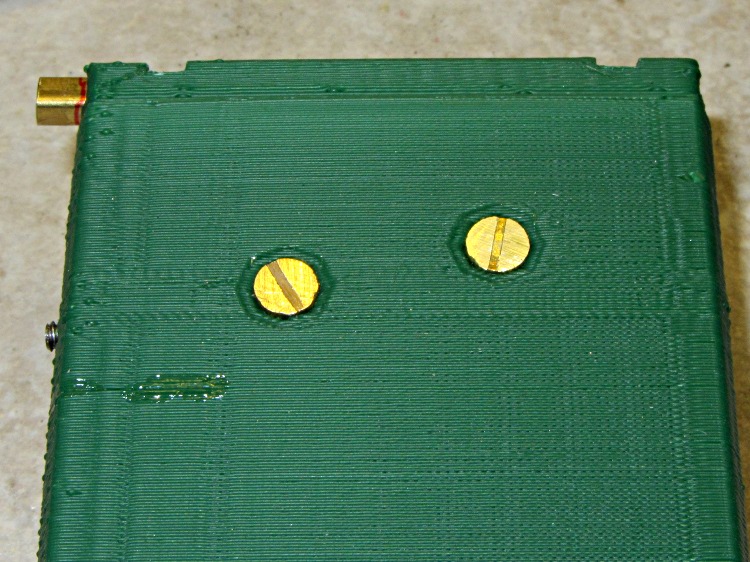
After considerable stalling, I filed the heads of two brass 4-40 screws down to about 1 mm, leaving just a hint of the slots in place. They’re a bit over 5 mm in diameter, smaller than the 7 mm I wanted to use, but have the compelling advantage of being Close Enough to get the rest of the hardware working. The gap between the interface PCB and the case is 3 mm, which turns out to be just about exactly the thickness of a 4-40 nut and flat washer, so I soldered a pair of them together as threaded spacers:
HT-GPS Case – radio battery contacts
The soldering looks worse than it really is; they’re secured all the way around.
For the external battery connectors on the top, I ran a #33 drill through a pair of miniature crimp ring lugs to get a slip fit, then soldered them atop a pair of nickel-plated nuts. In normal use they’d be captured by the nuts, but I can’t figure out how to assemble them inside the case:
HT-GPS Case – external power lugs
Those are stainless steel 4-40 screw cutoffs, which I used because solder doesn’t adhere to stainless… I tinned the nuts and connectors, clamped the screws in a small vise, heated the nuts with a soldering iron, and applied the contacts with a tweezer. They snapped right into place and the solder fillet wrapped neatly around the entire lug.
The heat from the soldering iron relaxed the insulator sleeves enough to remove nearly all trace of the crimping.
With all that in hand, I ran the brass screws through the case, into the spacer nut+washer combo, through the PCB, and into the battery contact nuts. A bit of tedious pliers work snugged the screws and got everything lined up, then I tightened the spacers against the PCB and battery nuts on the other side. That’s completely invisible inside the case, so there aren’t any pictures, but the idea is that the studs sit flush inside their case recesses and clamping the PCB between the nuts shouldn’t put any stress on the PCB. We shall see.
HT-GPS Case – radio contacts in place
The slots became so shallow that a screwdriver doesn’t get any traction…
Well, that fix didn’t take long to fail; they sure don’t make ’em like they used to:
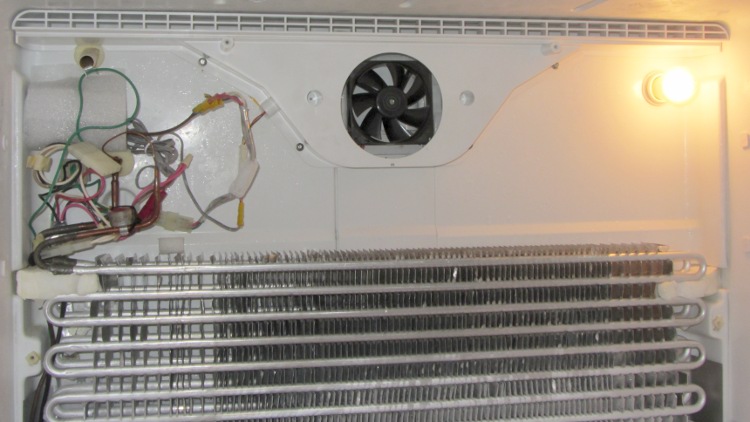
OEM Replacement fan in freezer
The “new” fan’s bearing failure sounded more like an owl than a dog, but it was certainly not what we wanted to hear in the middle of the night. A replacement fan costs on the order of $60, which seems like an absurdly high number for what’s basically a clock motor, a plastic fan blade, and some stamped steel.
After mulling the situation for a bit, I concluded that the refrigerator has reached that age where stuffing more money into it doesn’t make much sense: the compressor will drop dead in fairly short order. It’s time for a gonzo fix that also slightly reduces the clutter in the Basement Laboratory Warehouse: stick a PC case fan and wall wart into the freezer, ignore their temperature ratings, and see what happens.
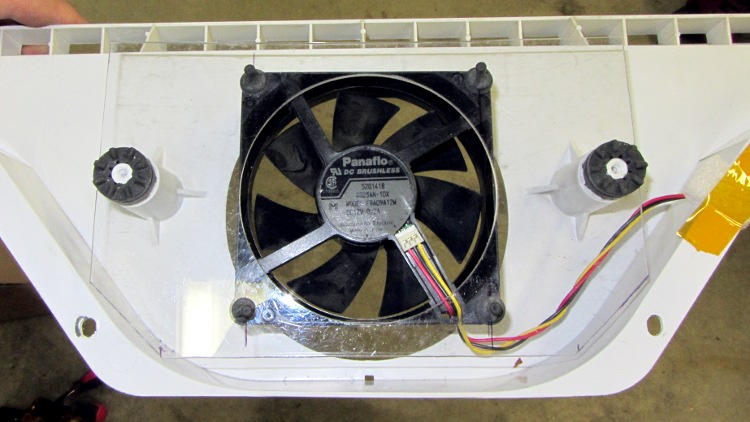
A polycarbonate sheet, a band saw, some step drills, a big hole saw, and an hour of Quality Shop Time produced a perfectly serviceable space transformer to mate the fan to the airflow director:
PC case fan in air flow director
The plate surrounds the squishy foam washers from the OEM motor mount, with the fan on its own rubbery posts: there won’t be any vibration transmitted to the plastic air flow director! The obligatory Kapton tape on the right holds a closed-cell foam wrap around the wires to prevent rattling; I’d done much the same when I tore the thing apart after the first OEM fan failure.
The air flow is toward you out of the screen: the fan draws air from the refrigerator compartment through the evaporator coils, then directly into a square duct that leads back to the refrigerator. Whatever doesn’t make it into the duct flows into the freezer compartment through the row of vents at the top of the picture.
I assume some serious modeling went into choosing the OEM fan blade configuration and spacing so as to optimize the distribution. I hope just moving some air in roughly the right direction will suffice; I have no way to measure any interesting numbers, so this is entirely cut-and-try.
The PC case fan expects 12 VDC, which comes from a standard wall wart conspicuously labeled “For Indoor Use Only”. Well, this is certainly indoor, even if it’s not quite what they expected. The wart plugs into a cobbled-together extension cord receptacle with male 1/4 inch quick-disconnect tabs that match the female QD connectors on the OEM wiring harness that originally plugged into the fan:
PC case fan with adapted wall wart
All that fits into the space behind the rear panel, with the wart wrapped in a sheet of closed-cell foam to prevent rattling and provide a bit of protection:
PC case fan installed in freezer
The rear panel covers the mess, exposing only the row of vent holes along the top. The air flow is upward through the evaporator coil and fins, through the fan, and back to the two compartments.
One question remains: will the fan continue to start below 0 °F (-20 °C)?
Given the ball bearings in the fan, it ought to remain quiet, but I’ve thought that before. Now, however, I have a generous supply of case fans and wall warts that plug into the mechanical and power adapters, so I can replace fans for a long time.
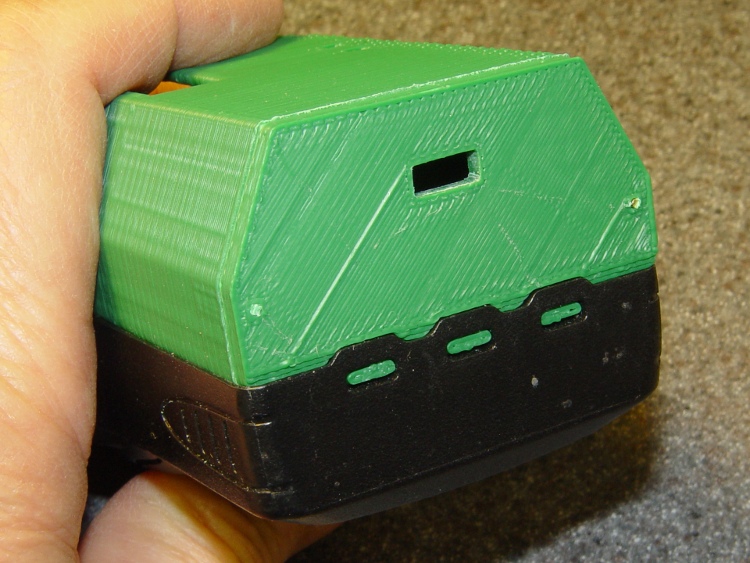
The latch is about the same as before, but the top endplate now has two cable ports and locating pins to take the force from the battery contact springs:
HT-GPS Case – latch detail
The bottom endplate has a hole for the TinyTrak3 Mode switch, plus two locating pins that hold the plate in place:
HT-GPS Case – Wouxun KG-UV3D base view
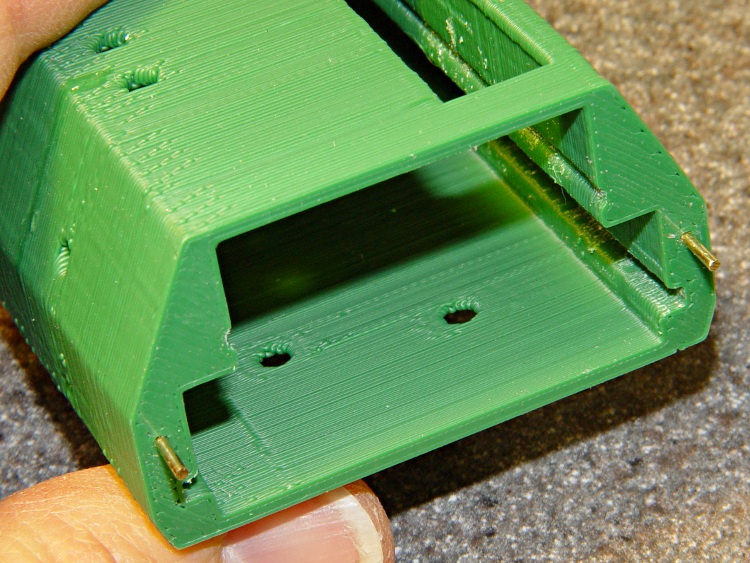
A detail shot of the two endplates shows the new holes:
HT-GPS Case – endplate detail
Snippets of brass rod became locating pins, each slipped into a hole atop a dab of epoxy to lock it in place:
HT-GPS Case – locating pin detail
The boards slide in pretty much the way you’d expect:
HT-GPS Case – Trial fit – rear view
The OpenSCAD code punches a third cable hole in the case for the HT wiring. I had high hopes that it would fit through the endplate, but …
Seen from the other end, there’s not much to see. The next case will have a slightly narrower LED opening:
HT-GPS Case – Trial fit – base view
The imperfection running down the side comes from a brief pause in the proceedings while the support plate fell out of the opening. As a consequence, I discovered that the LED window doesn’t need any support at all.
This view shows one of the battery contacts peeking through the hole for a yet-to-be-made stud:
HT-GPS Case – Wouxun KG-UV3D rear view
The solid model show some additional revisions, but it’s pretty close to the green plastic versions:
HT-GPS Case – holes and pins – solid model
The OpenSCAD source code:
// Wouxun KB-UV3D Battery Pack Case
// Ed Nisley KE4ZNU April 2012

include </home/ed/Thing-O-Matic/lib/MCAD/units.scad>
include </home/ed/Thing-O-Matic/Useful Sizes.scad>

// Layout options

Layout = "Fit";
					// Overall layout: Fit Show
					// Printing plates: Build1 .. Buildn (see bottom!)
					// Parts: TT3 Audio DSub Shell Base Top
					// Shapes: RadioBase Contact
					// Speaker-mic mount: PlugPlate

ShowGap = 20;		// spacing between parts in Show layout

//- Extrusion parameters must match reality!
//  Print with +1 shells and 3 solid layers

ThreadThick = 0.25;
ThreadWidth = 2.0 * ThreadThick;

HoleWindage = 0.2;

function IntegerMultiple(Size,Unit) = Unit * ceil(Size / Unit);

Protrusion = 0.1;			// make holes end cleanly

//----------------------
//- Dimensions

CaseOverallHeight = 31.5;				// from battery surface, must clear PCBs!
CaseOverallWidth = 56;
CaseOverallLength = 80.25;				// inside of base to end of compartment

BatteryClearance = 1.5;					// contact seal height = air gap to compartment

// Interface to radio battery contacts
//	Length = shell length
//		calculated after everything else, so as to fill the compartment

PlateWidthMin = 53.0;
PlateWidthMax = 54.5;
PlateThick = IntegerMultiple(2.0,ThreadThick);
PlateAngle = atan(PlateThick/(PlateWidthMax/2 - PlateWidthMin/2));

ContactDia = 7.0;				// use rounded contact for simplicity
ContactRecess = IntegerMultiple(0.5,ThreadThick);	// recess for contact plate
ContactGapX = 10.5;				// X space between contacts
Contact1Y = 52.5;				// offset from base to edge of contact
Contact2Y = 56.5;
ContactStudDia = Clear4_40;
ContactStudHead = Head4_40;
ContactStudHeadThick = Head4_40Thick;

// Offsets from battery surface to PCB centerlines
//	TT3 must be above HT back shell for DB9 clearance
//	These must cooperate with the numbers in the case shell module

TT3Offset = 17.5 + PlateThick;
AudioOffset = 4.0 + PlateThick;

// Plate interface to base alignment holes and notches

BaseWidthInner = PlateWidthMin;
BaseWidthOuter = CaseOverallWidth;
BaseLength = CaseOverallHeight;					// perpendicular to battery surface
BaseThick = IntegerMultiple(1.0,ThreadThick);	// minimum sheet thickness below teeth
BaseWidthTaper = 5.0;							// ramp across entire width

BaseOpeningMax = 43.0;
BaseOpeningMin = 33.0;
BaseOpeningY = 5.3;
BaseOpeningDepth = IntegerMultiple(2.25,ThreadThick);

BaseTotalThick = BaseThick + BaseOpeningDepth;
echo("Base min thick: ",BaseThick," total: " ,BaseTotalThick);

BaseTabWidth = 6.0;
BaseTabThick = 2.0;
BaseTabGap = 7.0;
BaseTabOC = BaseTabWidth + BaseTabGap;
BaseToothSection = 3*BaseTabWidth + 2*BaseTabGap;

BaseToothBase = 5.8;
BaseToothTip = 2.8;
BaseToothThick = 2.0;
BaseToothAngle = atan(BaseOpeningDepth/0.6);
BaseToothOC = BaseTabOC;

WedgeAngle = atan(BaseWidthTaper/((BaseWidthOuter - BaseWidthInner)/2));

BaseEndLip = ThreadThick;			// should be 0.25 mm or so
BaseEndWidth = (PlateWidthMin - 3*BaseToothBase - 2*BaseToothTip)/2;
BaseEndAngle = atan((BaseOpeningDepth - BaseEndLip)/BaseOpeningY);

SwitchBody = [8.6,3.7,3.3];			// mode switch

// Plate interface to HT battery latch, cables, and connectors

TopThick = IntegerMultiple(5.5,ThreadThick);	// plate thickness for stiffness behind latch bar
echo("Top plate thick: ",TopThick);

DB9Recess = TopThick - 4.0;			// recess to max TT3 PCB clearance behind DB9 plate

TabEngageLength = 1.6;				// tab engaging surface length
TabWidth = 3.0;						//  ... width
TabEngageHeight = 4.5;				//  ... above battery compartment floor
TabHeight = 7.5;					// tab ramp top above battery compartment floor
TabOC = 40.0;

LatchBarWidth = 3.4;				// sliding latch mechanism (brass L stock)
LatchBarDepth = 3.4;
LatchBarThick = 0.35;

echo(" ... minimum: ",TopThick - LatchBarDepth);

SplitOffset = TT3Offset - 3.5;

TopBevel = 1.0;						// bevel at top of battery compartment
TopBevelAngle = 45;

PinOffsetWidth = 2.5;				// choose to center in sides of case shell
PinOffsetHeight = 12.0;				// above baseplate bottom
PinDepth = 7.0;						// into case shell
PinDia = 1.2;

ShellLength = CaseOverallLength - BaseThick - TopThick;

echo("Shell length: ",ShellLength);

// Speaker-mic plug plate

PlugBaseThick = 2.5;				// recess depth
PlugFillThick = 3.0;				// outer plate thickness

//----------------------
// Useful routines

module PolyCyl(Dia,Height,ForceSides=0) {			// based on nophead's polyholes

  Sides = (ForceSides != 0) ? ForceSides : (ceil(Dia) + 2);

  FixDia = Dia / cos(180/Sides);

  cylinder(r=(FixDia + HoleWindage)/2,
           h=Height,
	   $fn=Sides);
}

module ShowPegGrid(Space = 10.0,Size = 1.0) {

  Range = floor(50 / Space);

	for (x=[-Range:Range])
	  for (y=[-Range:Range])
		translate([x*Space,y*Space,Size/2])
		  %cube(Size,center=true);

}

//-------------------
// Component parts

//-----
// TinyTrak3+ PCB and component envelope
//	Some dimensions should feed into the case shell, but don't

module TinyTrak3(Length = 1.0) {

PCBThick = 1.6;
PCBWide = 36.5;
TopHigh = 9.5;
TopWide = PCBWide - 1.5;
BotHigh = 2.5;
BotWide = 35.0;

PCBx = PCBWide/2;
PCBy = (PCBThick + HoleWindage)/2;
URx = TopWide/2;
URy = PCBy + TopHigh;
LRx = BotWide/2;
LRy = PCBy + BotHigh;

  linear_extrude(height=Length,center=false,convexity=2) {
	polygon(points=[[URx,URy],[URx,PCBy],[PCBx,PCBy],[PCBx,-PCBy],[LRx,-PCBy],[LRx,-LRy],
					[-LRx,-LRy],[-LRx,-PCBy],[-PCBx,-PCBy],[-PCBx,PCBy],[-URx,PCBy],[-URx,URy]
				   ]);
  }
}

//-----
// Interface PCB and component envelope
//	Some dimensions should feed into the case shell, but don't

module AudioInterface(Length = 1.0) {

PCBThick = 2.0;
PCBWide = 49.5;
TopHigh = 9.0 + Protrusion;
TopWide = 46.0;
BotHigh = 3.0;
BotWide = 44.0;

PCBx = PCBWide/2;
PCBy = (PCBThick + HoleWindage)/2;
URx = TopWide/2;
URy = PCBy + TopHigh;
LRx = BotWide/2;
LRy = PCBy + BotHigh;

  linear_extrude(height=Length,center=false,convexity=2) {
	polygon(points=[[URx,URy],[URx,PCBy],[PCBx,PCBy],[PCBx,-PCBy],[LRx,-PCBy],[LRx,-LRy],
					[-LRx,-LRy],[-LRx,-PCBy],[-PCBx,-PCBy],[-PCBx,PCBy],[-URx,PCBy],[-URx,URy]
				   ]);
  }
}

//-----
// DB-9 (DE-9) panel opening
// http://www.interfacebus.com/Connector_D-Sub_Mechanical_Dimensions.html
//  DB-9 shell mounts on outside surface of case
// This is for the solder terminal side

module DSubMin9(Length = 1.0) {

Holex = 0.984/2 * inch;
HoleDia = Tap4_40;

URx = 0.769/2 * inch;
URy = 0.432/2 * inch;

	linear_extrude(height=Length,center=false,convexity=3) {
	  polygon(points=[[URx,URy],[URx,-URy],[-URx,-URy],[-URx,URy]]);
	  for (x = [-1,1]) {
		translate([x*Holex,0,0])
		  rotate(45) circle(r=(HoleDia + HoleWindage)/2,$fn=4);
	  }
	}

}

//-----
// Central case shape
//	This *should* depend directly on the circuit board sizes, but doesn't
//	The "Offset" parameters attempt to bottle up all the board sizes
//	Support in LED window must be hand-fit to work correctly... and isn't needed!

module CaseShell(Length=(ShellLength),Holes="true") {

// Polygon coordinates are in XY plane

URx = 40.0/2;
URy = CaseOverallHeight;

MRx = CaseOverallWidth/2;
MRy = 15.0;

LRx = CaseOverallWidth/2;
LRy = (LRx - PlateWidthMin/2)*tan(PlateAngle);

BRx = PlateWidthMax/2;
BRy = PlateThick - 0*Protrusion;

PRx = PlateWidthMin/2;				// combined battery plate
PRy = 0;

ScrewOffset = 20.0;					// from top end of case

LEDWindow = [30.0,5.0,6];			// with case aligned vertically
LEDOffset = [15,URy,(Length + TopThick - 25.0)];

TrimPot1 = [-14,TT3Offset,(Length + TopThick - 30)];
TrimPot2 = [-14,TT3Offset,(Length + TopThick - 37.5)];

HTCableDia = 3.2;
HTCableOffset = AudioOffset + HTCableDia/2 + 1.0;

  rotate([90,0,180])
	union() {
	  difference() {

		  linear_extrude(height=Length,center=false,convexity=5)
			polygon(points=[[URx,URy],[MRx,MRy],[LRx,LRy],[BRx,BRy],[PRx,PRy],
							[-PRx,PRy],[-BRx,BRy],[-LRx,LRy],[-MRx,MRy],[-URx,URy]]);

		if (Holes) {
		  translate([0,AudioOffset,-Protrusion])
			AudioInterface(Length + 2*Protrusion);

		  translate([0,TT3Offset,-Protrusion])
			TinyTrak3(Length + 2*Protrusion);

		  for (y = [TT3Offset,AudioOffset])
			translate([-CaseOverallWidth,y,(Length - ScrewOffset)])
			  rotate([0,90,0])
				rotate(0)					// Z rotation puts point upward for printing
				PolyCyl(Tap4_40,CaseOverallWidth);

		  translate(LEDOffset)
			rotate([90,90,0])
			  translate([-LEDWindow[0]/2,-LEDWindow[1]/2,-Protrusion])
			  cube(LEDWindow,center=false);

		  for (p = [TrimPot1,TrimPot2])
			translate(p)
			  rotate([-90,90,0])				// Y rotation puts point upward for printing
				PolyCyl(3.0,URy);

		  for (x=[-1,1]) {
			translate([x*(CaseOverallWidth/2 - PinOffsetWidth),
					  PinOffsetHeight,
					  (Length - PinDepth)])
			  rotate(45)						// align hole sides with case sides
				  PolyCyl(PinDia,2*TopThick);
			translate([x*(CaseOverallWidth/2 - PinOffsetWidth),
					  PinOffsetHeight,
					  -PlateThick])
			  rotate(45)						// align hole sides with case sides
				  PolyCyl(PinDia,(PlateThick + PinDepth));
		  }

		  translate([-(ContactGapX/2 + ContactDia/2),0,(Contact1Y + ContactDia/2)])
			rotate([90,0,0])
			  Contact();
		  translate([+(ContactGapX/2 + ContactDia/2),0,(Contact2Y + ContactDia/2)])
			rotate([90,0,0])
			  Contact();

		  translate([CaseOverallWidth/2,HTCableOffset,(Length - HTCableDia/2)])
			rotate([0,90,0])
			  cube([(HTCableDia + Protrusion),HTCableDia,CaseOverallWidth],center=true);
		}
	  }

if (false)
	  if (Holes)
		translate(LEDOffset)						// support plug in LED window
		  rotate([90,90,0])
			translate([-0.95*LEDWindow[0]/2,-0.80*LEDWindow[1]/2,ThreadWidth/2])
			  cube([0.95*LEDWindow[0],0.80*LEDWindow[1],2*ThreadWidth],center=false);

	}

}

//-----
// Battery contact recess
//  This gets subtracted from the bottom plate in two places
// 	Align points to print upward

module Contact() {

if (true)
  union() {													// vertical printing with case
	translate([0,0,-(ContactRecess + Protrusion)/2])
	  PolyCyl(ContactDia,(ContactRecess + Protrusion),8);
	translate([0,0,-(PlateThick + Protrusion)])
	  rotate(60/2)
	  PolyCyl(ContactStudDia,PlateThick,6);
	translate([0,0,-(ContactRecess + ContactStudHeadThick/3)])
	  PolyCyl(ContactStudHead,ContactStudHeadThick,8);				// allow for solder blob
  }
else
    union() {												// horizontal printing alone
	translate([0,0,-(ContactRecess - Protrusion)/2])
	  PolyCyl(ContactDia,(ContactRecess + Protrusion),8);
	translate([0,0,-(PlateThick + Protrusion)])
	  PolyCyl(ContactStudDia,(PlateThick + 2*Protrusion));
	translate([0,0,-(ContactRecess + ContactStudHeadThick/3)])
	  PolyCyl(ContactStudHead,ContactStudHeadThick,8);				// allow for solder blob
  }

}

//-----
// Radio bottom locating feature
//  This polygon gets subtracted from the battery pack base

module RadioBase() {

linear_extrude(height=(BaseOpeningDepth + Protrusion),center=false,convexity=5)
  polygon(points=[
			[-BaseOpeningMax/2,-Protrusion],

			[-BaseOpeningMin/2,BaseOpeningY],
			[-(BaseToothOC/2 + BaseToothBase/2),BaseOpeningY],

			[-(BaseToothOC/2 + BaseToothTip/2),(BaseOpeningY - BaseToothThick)],
			[-(BaseToothOC/2 - BaseToothTip/2),(BaseOpeningY - BaseToothThick)],
			[-(BaseToothOC/2 - BaseToothBase/2),BaseOpeningY],

			[ (BaseToothOC/2 - BaseToothBase/2),BaseOpeningY],
			[ (BaseToothOC/2 - BaseToothTip/2),(BaseOpeningY - BaseToothThick)],
			[ (BaseToothOC/2 + BaseToothTip/2),(BaseOpeningY - BaseToothThick)],
			[ (BaseToothOC/2 + BaseToothBase/2),BaseOpeningY],
			[ BaseOpeningMin/2,BaseOpeningY],

			[ BaseOpeningMax/2,-Protrusion],

			[ (BaseTabOC + BaseTabWidth/2),-Protrusion],
			[ (BaseTabOC + BaseTabWidth/2),BaseTabThick],
			[ (BaseTabOC - BaseTabWidth/2),BaseTabThick],
			[ (BaseTabOC - BaseTabWidth/2),-Protrusion],

			[ BaseTabWidth/2,-Protrusion],
			[ BaseTabWidth/2,BaseTabThick],
			[-BaseTabWidth/2,BaseTabThick],
			[-BaseTabWidth/2,-Protrusion],

			[-(BaseTabOC + BaseTabWidth/2),-Protrusion],
			[-(BaseTabOC + BaseTabWidth/2),BaseTabThick],
			[-(BaseTabOC - BaseTabWidth/2),BaseTabThick],
			[-(BaseTabOC - BaseTabWidth/2),-Protrusion],
		  ],
		  convexity=5
  );
}

//-----
// Battery pack base

module Base() {

  difference() {

	rotate([-90,180,0])
	  CaseShell(BaseTotalThick,false);

	translate([0,0,BaseThick])
	  RadioBase();

	translate([-BaseWidthOuter,-(BaseThick + BaseEndLip)/tan(BaseEndAngle),0])
	  rotate([BaseEndAngle,0,0])
		difference() {
		  cube([2*BaseWidthOuter,3*BaseOpeningY,BaseOpeningDepth],center=false);
		  translate([(BaseWidthOuter - (BaseToothSection + 2*Protrusion)/2),0,0])
			cube([(BaseToothSection + 2*Protrusion),1.2*BaseOpeningY,BaseOpeningDepth],center=false);
		}

	translate([0,0,BaseThick])
	  rotate([(-90 + BaseToothAngle),0,0])
		translate([0,-0.5,0])
		  cube([(BaseToothSection + 2*Protrusion),1.0,10],center=true);

	for (x=[-1,1])
	  translate([x*(CaseOverallWidth/2 - PinOffsetWidth),PinOffsetHeight,-Protrusion])
		rotate(45)						// align hole side with plate side
		  PolyCyl(PinDia,2*TopThick);

	translate([(-SwitchBody[0]/2),TT3Offset,-SwitchBody[2]/2])
	  scale([1,1,2])
		cube(SwitchBody);

  }
}

//-----
// Top plate with latch
//	Split around TinyTrak3 serial connector
//	 ... which must be at the same height as in the shell!
//	The cable hole sizes & locations are entirely ad-hoc

module TopPlate() {

Cable1Dia = 5.0;
Cable2Dia = 5.0;
CableHoleLength = TopThick + 2*Protrusion;
CableHoleZ = -Protrusion;

DB9Plate = [32.0,13.5,1.25];					// plate surrounding connector body

  difference() {

	rotate([-90,180,180])
	  CaseShell(TopThick,false);

	translate([0,-TT3Offset,-Protrusion])
	  DSubMin9(TopThick + 2*Protrusion);

	translate([0,-TT3Offset,(TopThick - DB9Plate[2]/2)])
	  cube([DB9Plate[0],DB9Plate[1],(DB9Plate[2] + Protrusion)],center=true);

	translate([-CaseOverallWidth,-SplitOffset,-2*Protrusion])		// split the plate
	  cube([2*CaseOverallWidth,4*Protrusion,(TopThick + 2*Protrusion)]);

	translate([0,0,(TopThick - TopBevel)])
	  rotate([-TopBevelAngle,0,0])
		translate([-CaseOverallWidth,-TopThick,0])
		  cube([2*CaseOverallWidth,2*TopThick,2*TopThick],center=false);

	for (x=[-1,1])
	  translate([(x*TabOC/2),
				(-TabHeight/2 + Protrusion),
				(TopThick - TabEngageLength/2 + Protrusion/2)])
		rotate([90,0,0])
		  cube([TabWidth,
				(TabEngageLength + Protrusion),
				(TabHeight + Protrusion)],center=true);

	translate([-CaseOverallWidth,
			  -(TabEngageHeight + LatchBarWidth - BatteryClearance),
			  (TopThick - LatchBarDepth)])
	  cube([2*CaseOverallWidth,(LatchBarWidth + LatchBarThick),(LatchBarDepth + Protrusion)]);

	for (x=[-1,1])
	  translate([(x*CaseOverallWidth/4),
				-(TabEngageHeight + LatchBarWidth + Clear2_56/2 - BatteryClearance + Protrusion),
				0]) {
		translate([0,0,-Protrusion])
		  rotate(45)						// align sides with slot
			PolyCyl(Tap2_56,(TopThick + 2*Protrusion));
		translate([0,0,(TopThick - LatchBarDepth)])
		  rotate(60)						// align sides with slot
			PolyCyl((Head2_56 + Protrusion),TopThick,6);		// extra extra clearance
	  }

	for (x=[-1,1])
	  translate([x*(CaseOverallWidth/2 - PinOffsetWidth),-PinOffsetHeight,-Protrusion])
		rotate(45)						// align hole side with plate side
		  PolyCyl(PinDia,2*TopThick);

	for (x=[-1,1])						// coincidentally line up with latch tabs
	  translate([(x*TabOC/2),-(SplitOffset - 3.0),-Protrusion])
		scale([1,1.7,1])
		  PolyCyl(Cable1Dia,CableHoleLength,6);
  }

}

//-----
// Speaker-Mic plug mounting plate

module PlugPlate() {

JackOC = 11.20;						// 14.25 OD - (3.58 + 2.58)/2

JackScrewDia = 4.6;
JackScrewOffsetX = 1.00;
JackScrewOffsetY = 5.25;			//  mounting screw to edge of lower recess

PlugBaseWidth = 9.25;				// lower section of plate
PlugBaseLength = 22.0;
PlugBaseRadius = 1.75;

Plug3Offset = 5.25;					// edge of base recess to 3.5 mm jack

Plug2BezelDia = 7.1;				// 2.5 mm plug
Plug2BezelThick = 1.04;
Plug2ScrewDia = 6.0;
Plug3ScrewLength = 3.0;

Plug3BezelDia = 8.13;				// 3.5 mm plug
Plug3BezelThick = 1.6;
Plug3ScrewDia = 7.95;
Plug3ScrewLength = 4.0;

PlugFillOffsetX = JackScrewOffsetX - 0.5;		// base recess CL to fill CL
PlugFillOffsetY = -10.5;				//  ... to edge of fill plate
PlugFillWidth = 11.0;
PlugFillLength = 34.00;
PlugFillRadius1 = 1.5;
PlugFillRadius2 = 4.5;

PlugFillOffsetYTotal = 0;

  BaseX = PlugBaseWidth/2 - PlugBaseRadius;
  BaseY = PlugBaseLength/2 - PlugBaseRadius;

  difference() {
	union() {
	  linear_extrude(height=PlugBaseThick,center=false,convexity=3)
		hull() {
		  translate([-BaseX,-BaseY,0])
			circle(r=PlugBaseRadius,$fn=8);
		  translate([-BaseX, BaseY,0])
			circle(r=PlugBaseRadius,$fn=8);
		  translate([ BaseX, BaseY,0])
			circle(r=PlugBaseRadius,$fn=8);
		  translate([ BaseX,-BaseY,0])
			circle(r=PlugBaseRadius,$fn=8);
		}

	  translate([PlugFillOffsetX,
				(PlugFillLength/2 - PlugBaseLength/2 + PlugFillOffsetY),
				PlugBaseThick])
		linear_extrude(height=PlugFillThick,center=false,convexity=5)
		  hull() {
			translate([0,-(PlugFillLength/2 - PlugFillRadius2),0])
			  circle(r=PlugFillRadius2,$fn=10);
			translate([-(PlugFillWidth/2 - PlugFillRadius1),-PlugBaseLength/2,0])
			  circle(r=PlugFillRadius1,$fn=8);
			translate([-(PlugFillWidth/2 - PlugFillRadius1),
					  (PlugFillLength/2 - PlugFillRadius1),0])
			  circle(r=PlugFillRadius1,$fn=8);
			translate([(PlugFillWidth/2 - PlugFillRadius1),
					  (PlugFillLength/2 - PlugFillRadius1),0])
			  circle(r=PlugFillRadius1,$fn=8);
			translate([(PlugFillWidth/2 - PlugFillRadius1),-PlugBaseLength/2,0])
			  circle(r=PlugFillRadius1,$fn=8);
		  }
	}

	translate([0,-JackOC/2,-Protrusion])
	  rotate(360/16) {
		PolyCyl(Plug3BezelDia,(Plug3BezelThick + Protrusion),8);
		PolyCyl(Plug3ScrewDia,(PlugBaseThick + PlugFillThick + 2*Protrusion),8);
	  }

	translate([0,+JackOC/2,-Protrusion])
	  rotate(360/16) {
		PolyCyl(Plug2BezelDia,(Plug2BezelThick + Protrusion),8);
		PolyCyl(Plug2ScrewDia,(PlugBaseThick + PlugFillThick + 2*Protrusion),8);
	  }

	translate([JackScrewOffsetX,-(PlugBaseLength/2 + JackScrewOffsetY),0])
	  PolyCyl(JackScrewDia,(PlugBaseThick + PlugFillThick + Protrusion));
  }

}

//-------------------
// Build things...

ShowPegGrid();

if (Layout == "TT3")
  TinyTrak3();

if (Layout == "Audio")
  AudioInterface();

if (Layout == "DSub")
  DSubMin9();

if (Layout == "Shell")
  CaseShell(CaseOverallLength);

if (Layout == "Top")
  TopPlate();

if (Layout == "Base")
  Base();

if (Layout == "RadioBase")
  RadioBase();

if (Layout == "PlugPlate")
  PlugPlate();

if (Layout == "Contact")
  rotate([180,0,0])
	Contact();

if (Layout == "Show" || Layout == "Fit") {

  translate([0,-ShellLength/2,0]) {

	translate([0,(Layout == "Show")?-ShowGap:0,0])
	  rotate([90,0,0])
		color("SandyBrown") Base();

	translate([0,0,0])
	    color("Olive") render() CaseShell();

	translate([-(CaseOverallWidth/2 + 10),50,CaseOverallHeight/2])
	  rotate([0,-90,0])
		color("Brown") PlugPlate();

	translate([0,((Layout == "Show")?(ShellLength + ShowGap):ShellLength),0])
	  rotate([-90,0,0])
		color("Chocolate") TopPlate();
  }
}

if (Layout == "Build1") {

  translate([0,-CaseOverallHeight/2,ShellLength])
	rotate([-90,0,0])
		CaseShell();

}

if (Layout == "Build2") {

    translate([5 + CaseOverallHeight,0,0])
	rotate([0,0,90])
	  Base();

  translate([-(5 + CaseOverallHeight),0,0])
	rotate(90)
	  TopPlate();

}

if (Layout == "Build3") {

  translate([0,0,(PlugBaseThick + PlugFillThick)])
	rotate([180,0,0])
	  PlugPlate();

}
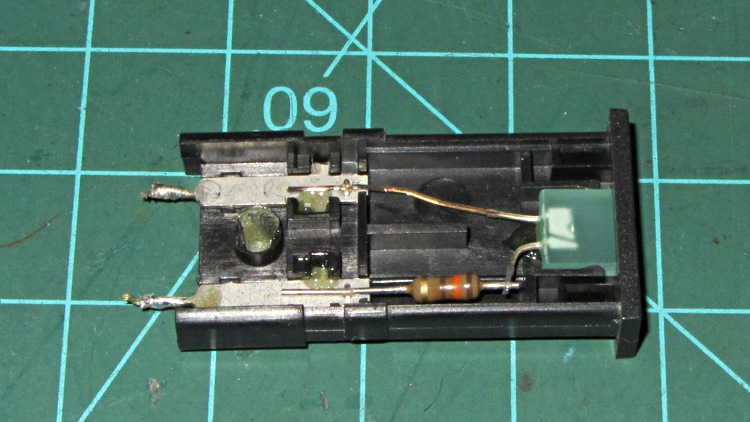
This panel-mount LED indicator glued to the Z-axis stage of my Thing-O-Matic had been dutifully showing a bright green glow when the extruder heater was active:
Failed LED panel indicator
Of late, it began flickering erratically whenever the heater turned on. It used to flicker when the PID loop (hacked to be a bang-bang controller) drove the extruder temperature past the switching threshold, but this was worse.
It’s rated for 5 VDC, 25 mA and has an internal resistor to make that happen. Channeling the true spirit of DIY 3D printer electronics, I deliberately connected it directly across the 12 V extruder power and let it burn at 80 mA. The poor thing was surprisingly bright for an ancient green LED ( the 8124 date code stamped on the side I pried off for the picture says it’s three decades old) and, even under that abuse, it lasted for a year: not to be sniffed at.
I’d expect the LED to fail open when a bond wire burned through, but you just never can tell. It worked fine on the bench, which is typical of all intermittent failures.
So I popped an identical indicator off the stack, conservatively added a 270 Ω series resistor to drop the excess voltage, and it’s all good again.
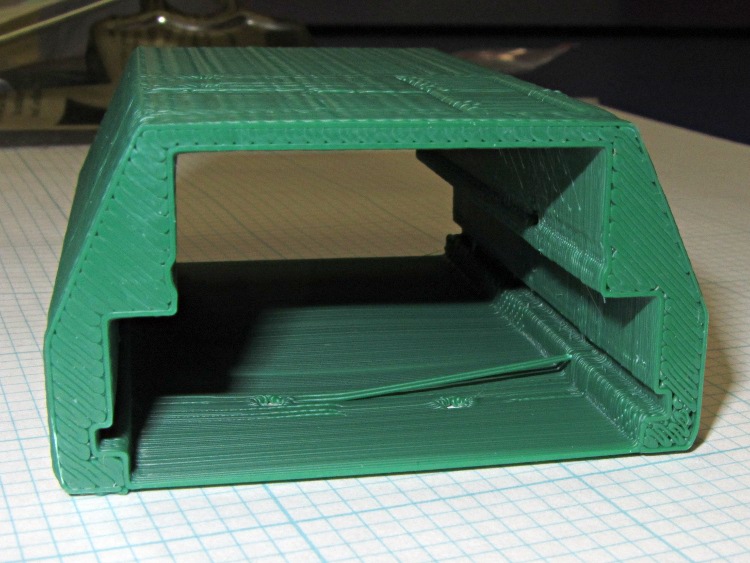
Unlike the previous kludge, this GPS interface case resembles an extrusion with the PCBs sliding into place, held by setscrews along the edges of the slots:
HT-GPS Adapter Case – end view
Those errant threads seem to arise from not quite bonding to the corner. The battery side of the case (bottom in this view) is one thread wide, which isn’t quite enough. Adding another thread makes it 1 mm wide, which seems excessive.
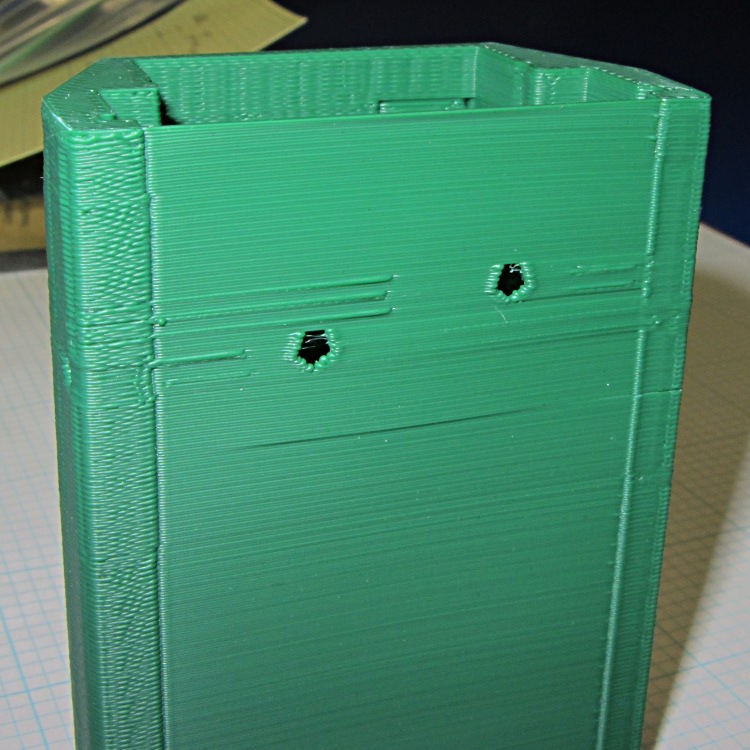
The idea was to glue the battery interface plate on that side, but printing the case vertically puts various flaws along that surface:
HT-GPS Adapter Case – bottom view
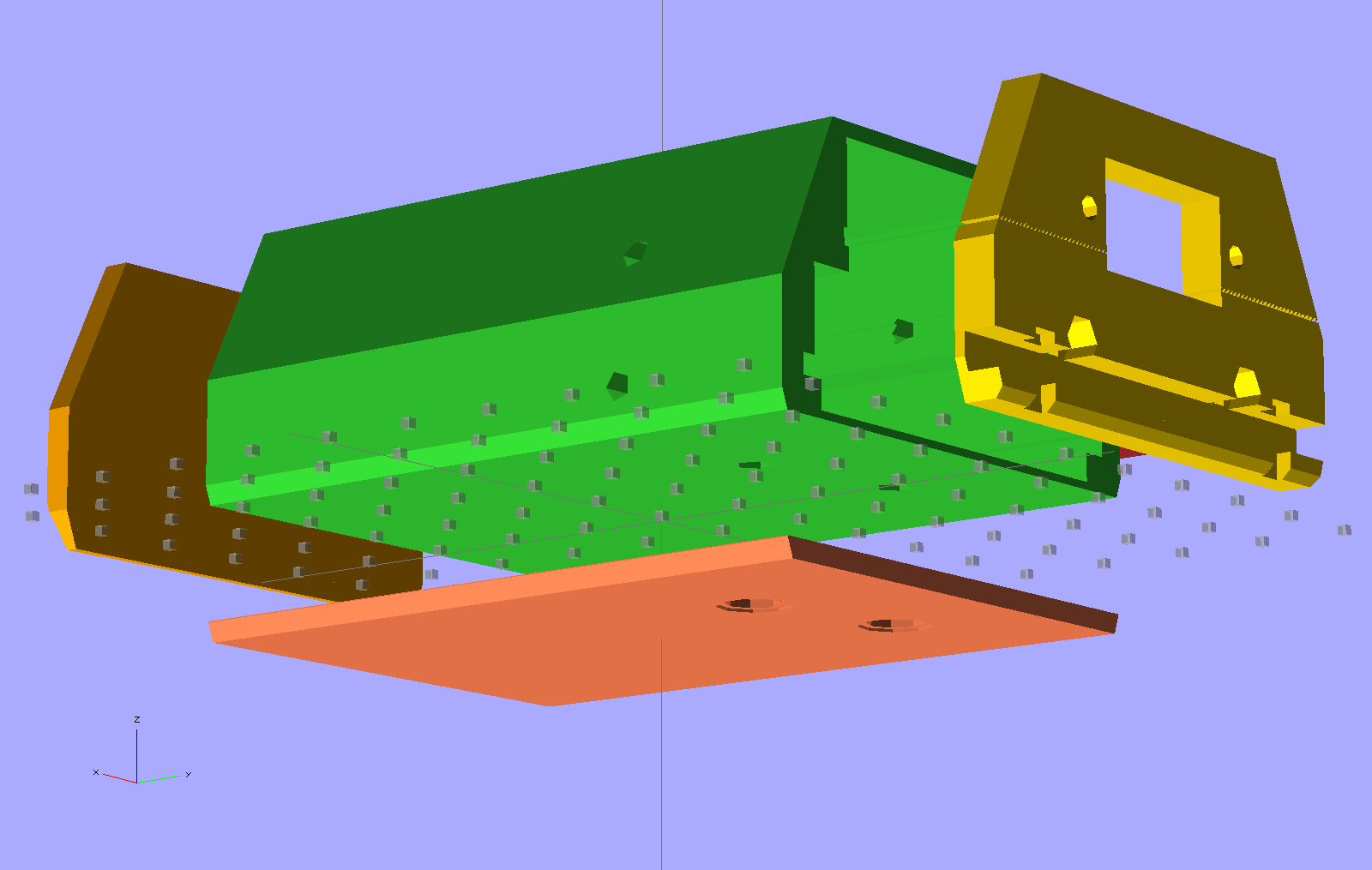
So the next iteration will merge the battery plate with the case and print the whole affair in one shot. This view shows all the parts separately:
HT-GPS Adapter Case – exploded bottom view
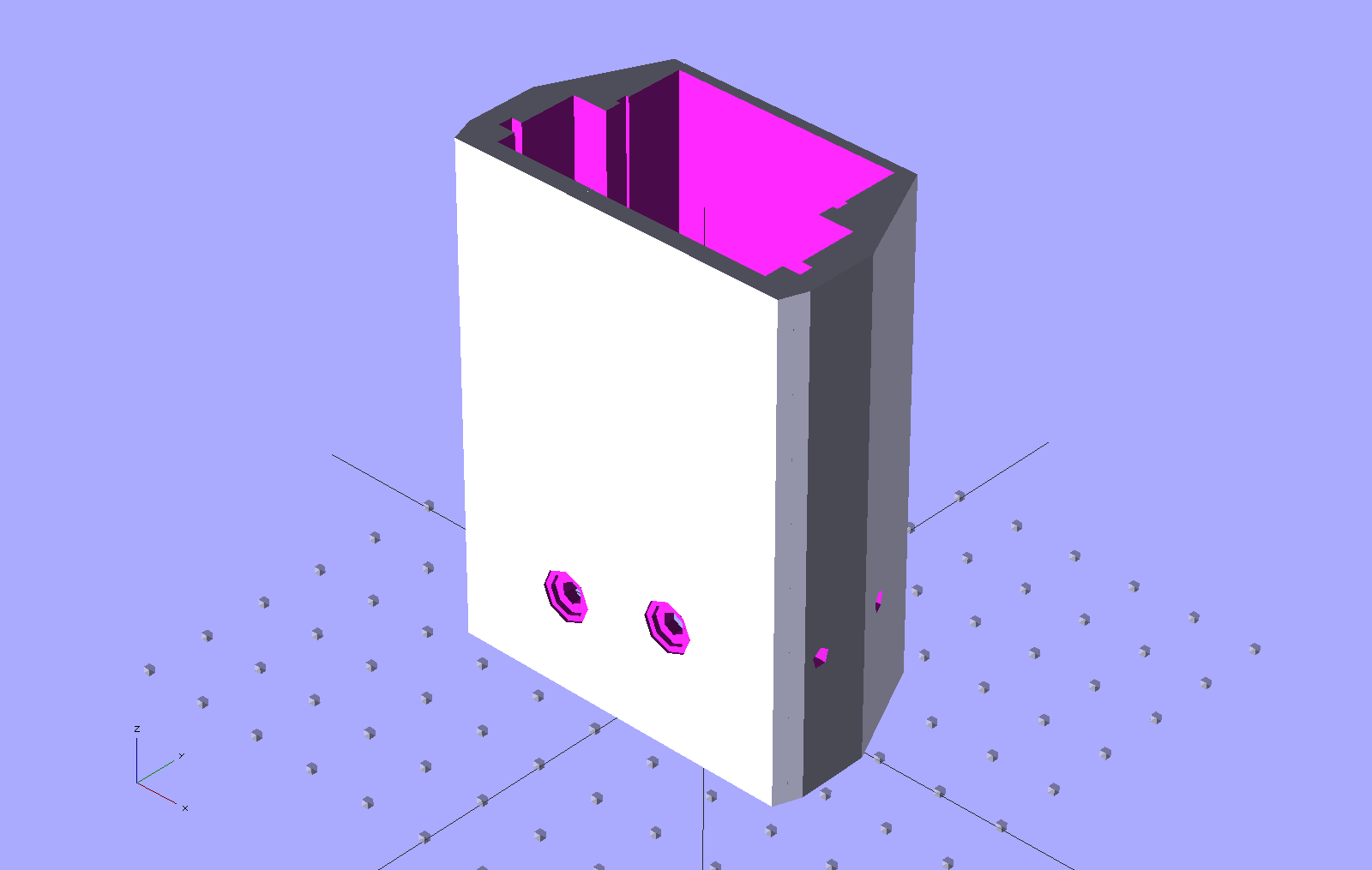
This shows the case joined with the battery plate, neatly aligned for printing:
HT-GPS Adapter Case – combined battery interface
The battery plate has a 0.1 mm extension into the case to avoid problems from objects with coincident planes. Unfortunately, however, that means the intersection between the base plate and the shell forms a line with three planes extending from it: the two outside walls (which are co-planar) and the plate extension inside the case. Skeinforge sometimes complains mightily about that, despite my having applied a union() to fuse the plate with the case: obviously I don’t quite understand how union() works.
I think the battery contact holes will come out close enough to being right; they all have points on the top edge to reduce the overhang problem.
One gotcha: the actual metallic contact studs for the battery. The contacts for the ICOM IC-Z1A case came from carefully shaped brass screws secured by nuts above the PCB and that’s what I’ve been designing around for this case. Unfortunately, the PCB must slide in before installing the studs, which means reaching into the depths of the case, with all the wiring in the way, to turn those nuts. Fortunately, the PCB has plenty of clearance in that direction, but … it’ll be awkward at best.
The studs also need a slot / socket / dingus to prevent rotation while tightening the nuts; right now the contact plate is circular-ish, but maybe I should rethink that.
Although I don’t often block-quote other sources, for this I’ll make an exception:
The Cassini Plasma Spectrometer (CAPS, off since June 2011) was powered back on on March 16 based on the unanimous agreement of the review board at the CAPS turn-on review held on March 8. All went as planned for both the instrument and the spacecraft during the turn-on. The high rail to chassis short internal to the instrument that was part of what prompted it to be turned off last June was not present, and no changes were seen in the bus voltages or currents when the turn-on occurred. On Tuesday, March 20, the high rail to chassis short in the CAPS instrument returned, generating the same condition that existed at the time the instrument was turned off. However, based on the tin whisker model developed by the NESC team, this condition is believed to be understood and is not expected to cause any problems for either the instrument or the spacecraft. The CAPS instrument has been left powered on and is sequenced to operate as originally planned for the 75 kilometer Enceladus flyby coming up on March 27.
Having seen a forest of tin whiskers myself, that’s a pretty scary diagnosis. One assumes NASA takes extensive precautions, based on their experience, but … 15 years in hard vacuum and free fall will do odd things to spacecraft.
Remember those Toyota unintended acceleration problems? Guess what caused some of them: yup. Read their report to find out what makes metal whiskers so hard to detect. Hint: combine a minimum threshold voltage with a very low current capacity.
You could subscribe to the Cassini Significant Events newsletter.