Ed Nisley's Blog: Shop notes, electronics, firmware, machinery, 3D printing, laser cuttery, and curiosities. Contents: 100% human thinking, 0% AI slop.
They’re rated at 600 mA·h, as are the much shorter 2/3 AA NiMH cells I also used for those phone packs:
Norelco T770 – rebuild
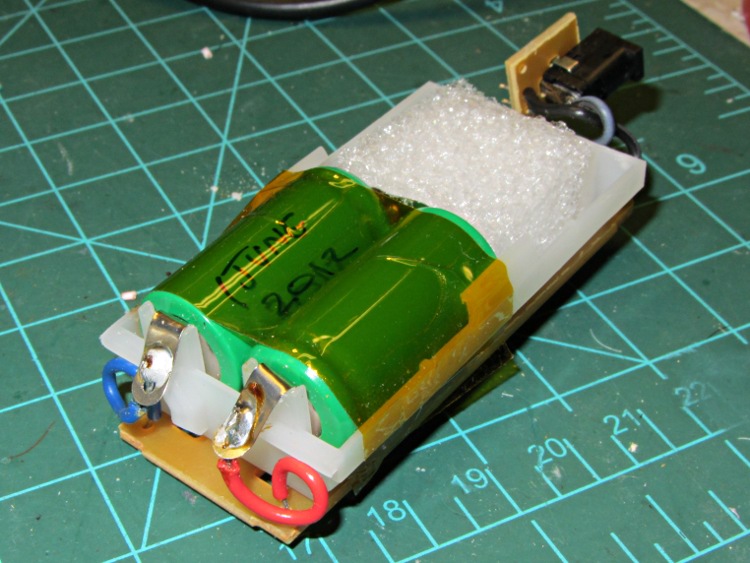
That’s a wrap of Kapton tape around the cells, plus a block of closed-cell foam to fill the cell holder. It’s not a high-stress environment, so this hack-job repair should work fine.
The trimmer’s charge / discharge cycle remains hostile to NiMH cells and I don’t expect a great lifetime from the new cells, either…
One of the batteries on the ancient Dell Inspiron 8100 laptop died completely and our Larval Engineer reports the other battery isn’t far behind; it gets her from outlet to outlet and not much more. Pursuant to that comment about harvesting reasonably good cells from dead batteries to build an extended-life external battery for the Canon SX230HS camera, I made a preliminary pack probe.
The label says it’s a 14.8 V battery, so you’d expect four 3.7 V lithium cells in series. The 3.8 A·h capacity suggests parallel cells:
Dell 75YUF battery – label
Indeed, peeling off the label shows four cells pairs in series:
Dell 75YUF battery – under label
The case joint seems firmly welded together and resisted simple attempts to crack it open. I might run a slitting saw around the edge, although I’ll probably just crunch it in the vise because the patient need not survive the operation.
A single cell should have a 1.9 A·h capacity, although in an awkward cylindrical form factor. The 3.5 A charging current would drop to 1.7 A for a (string of) single cells.
The Canon SX230HS uses a single 3.7 V, 1.1 A·h prismatic “battery”, which means replacing that with a single external cell wouldn’t be a major win; the size difference shows how much lithium energy storage tech has advanced in the last decade or so. A pair of cells in parallel would quadruple the runtime, which might be enough. Three in parallel would be fine, although that would require attention to matching their capacity; the nominal 5.2 A charging current (1.5 × 3.5 A) seems aggressive.
A long-forgotten toy emerged from the heap bearing a trio of corroded NiMH cells between the usual plated-steel contacts:
Corroded contacts – original
The toy wasn’t worth salvaging, but I extracted the contacts and applied Evapo-Rust to see what happened. After an overnight soak, some corrosion remained:
Corroded contacts – after Evapo-Rust
Scrubbing with a stainless-steel detail brush removed the flakes and left reasonably clean metal behind:
Corroded contacts – after brushing
Although it’s not beautiful, I think the contacts came out as well as one could expect. The longer contact plate has holes, thinned sections, and some corrosion inside the spring; I’d be mildly tempted to rebuilt the whole thing with some nickel shim stock and a new spring.
If I were salvaging the toy, I’d dab vinegar on the wiring to neutralize the creeping potassium hydroxide, rinse the whole thing with water, and clean out the case. Instead, it joined the consumer electronics recycling box with a thud…
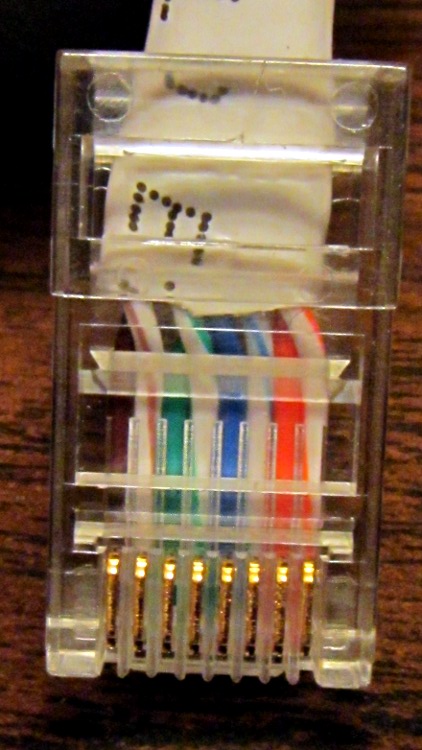
Yeah, the blue-stripe and green-stripe wires should be interchanged. Turns out the Link indicators on both ends lit up just fine, but no bits made it across the wire. Took quite a while to figure that one out, alas.
Turns out I was moving that router upstairs to get a better signal for folks out in the driveway and snaking the cable through the only suitable (i.e., existing) hole in the floor required cutting the molded-in-place connector off, then crimping a new one on. Both you and I know those wires must cross, but in the excitement of pushing all those wires into the connector, well … so it goes.
A useful explanation, including crossover and POE cable arrangements, lives there.
I did wrap silicone tape around the cable and connector butt for strain relief.
Memo to Self: just verifying the colors on the existing cable sometimes isn’t good enough!
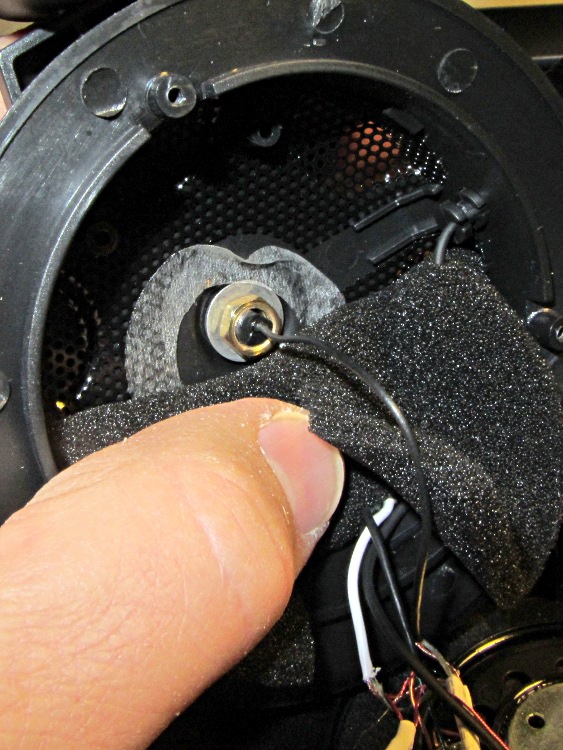
I picked up a Lenovo headset on sale and over the course of a few weeks the mic boom pivot worked itself loose, until I finally dismantled the left ear cup to see what was inside. Come to find out that the mic boom has a molded threaded section held into the cup with a simple nut and no locking mechanism at all:
Lenovo headset – OEM mic boom pivot nut
I think the metal washer was intended as a low-friction pivot atop the compliant silicone (?) washer underneath, but the net effect was that the nut unscrewed a little bit more every time the mic boom moved. By the time I got in there, the nut was completely off the threads.
The original nut left a thread or two showing, so I found a thicker replacement nut with a better grip. The obvious solution involves a dab of Loctite to jam the nut in position, but we all know that some plastics, most notably acrylic, react badly to threadlocker and tend to disintegrate. Although I considered just epoxying the nut in place, that seems so, well, permanent.
So I dutifully tested a dab of Loctite on an inconspicuous spot inside the ear cup, got no reaction at all, put a drop on the boom pivot threads, and reassembled everything:
Lenovo headset – replacement mic boom pivot nut
Alas, by the time I got back upstairs and hung the mic on the rack, the boom fell completely out of the earcup! Back in the Basement Laboratory, I dismantled the thing again and confronted this mess:
Lenovo headset- Acrylic plastic vs. threadlock
Huh. The ear cup isn’t made of the same plastic as the mic boom: one shrugs off threadlock, the other disintegrates.
That’s obvious in retrospect, eh?
The only threads that aren’t ruined lie completely within the ear cup frame, with just a stub sticking up around the wire. So I cleaned things up and did what I should have done originally: put a dab of epoxy inside the nut to bind the pivot firmly in place. A snippet of unshrunk heatshrink tubing around the wire provides a bit of strain relief:
Lenovo headset – boom pivot nut with epoxy
There’s no longer any space for the compliant washer in that stack, so we’ll see how long this lasts. The next repair will certainly venture far inside non-economical territory. I like the headphones, though.
Memo to Self: Check in an inconspicuous spot on the same material.
One of the battery packs I’d re-rebuilt failed in short order, which I wrote off to a bad cell and tossed it on the heap. Having recently found a small stack of Round Tuits, I’ve been cleaning off the bench and took the pack apart again. Turns out I blundered the solder joint between the positive cell terminal and the protective circuit board: the strap in the foreground joining those two points didn’t make a good connection to the cells.
That’s an awkward joint at best, because the protective circuit doesn’t come willingly out of the housing and you (well, I) must solder it without scorching the cells, the plastic case, or the PCB. It can be done, but it’s not easy.
Charged it up and it’s back in the A/B/C pack rotation again.
Memo to Self: Tough to find good repairmen these days, eh?
That circuit works pretty well for APRS tracking, I’d say, based on a 23 mile out-and-back ride over the Walkway:
KE4ZNU – Wouxun KG-UV3D – first ride
Had I gone further westward along Rt 299, however, the track would end: the bluffs on the east side of the Wallkill River Valley block much of the RF and Illinois Mountain (just to the west of Poughkeepsie) finishes the job. Evidently, nobody runs an APRS iGate or digipeater anywhere within sight of New Paltz…
FWIW, the Walkway’s hand-scrawled notice boards now entreat “Bicyclists: ride SLOW and YIELD to pedestrians.” OK, fair enough, but how about equal time: “WALKERS: keep RIGHT, remove earbuds, and PAY ATTENTION”. It’s amazing how four people can block nearly the entire width of a 25 foot path, then look startled after not hearing a bicycle bell that’s been dinging steadily for 15 seconds…