The Smell of Molten Projects in the Morning

Ed Nisley's Blog: Shop notes, electronics, firmware, machinery, 3D printing, laser cuttery, and curiosities. Contents: 100% human thinking, 0% AI slop.

Category: Electronics Workbench

Electrical & Electronic gadgets

  • Sony NP-FS11 Lithium Battery Rebuilds: 2016

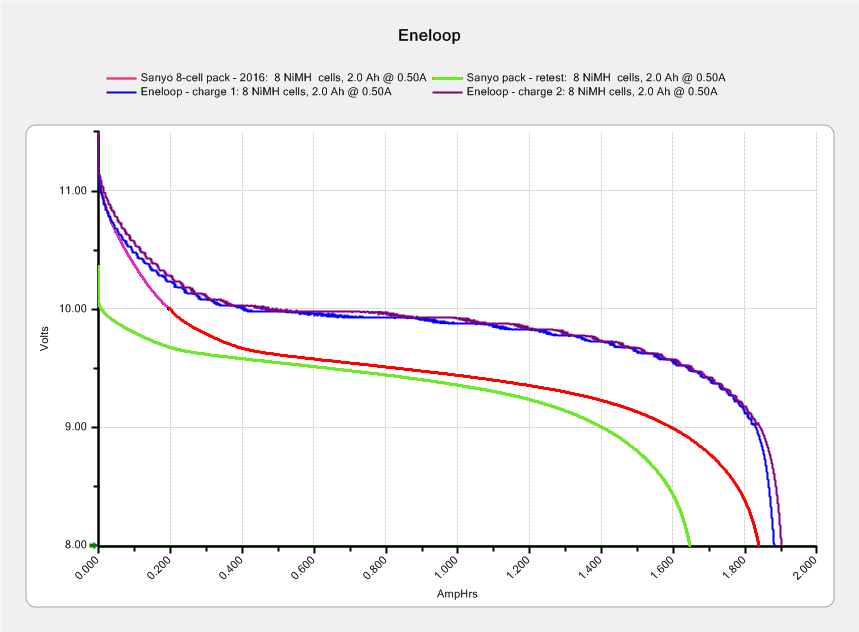
    It seems that two years is about as long as the NP-FS11 batteries last, as shown by the two lower curves from the ones I rebuilt in December 2013 with cells from 2011:

    Sony NP-FS11 2011-2016 Packs
    Sony NP-FS11 2011-2016 Packs

    The two middle curves with those same colors show the “back then” performance of those batteries: they’re shot in both total capacity and terminal voltage.

    I bought enough cells back in 2011 to leave two cells unused until now, which I built into a pack and charged. The green curve in the middle shows the result: those cells haven’t lost anything over the last five (!) years, as their performance still matches the other two batteries when they were new.

    The red curves come from a pair of batteries made with fresh new cells from batteryspace.com. They’re nominally 650 mA·h cells, so the NP-FS11 configuration (two parallel cells) should produce 1300 mA·h; surprisingly, they show 1500 mA·h with a nice voltage curve.

    So, although the 2011 cells work as well as their (now defunct) siblings, that pack can’t deliver the same capacity as the new cells. I expect I’ll rebuild it with 2016 cells in about a year.

    For whatever it’s worth, rebuilding these batteries goes much faster when I don’t have to saw them open. The Kapton tape wrapped around the case halves secures them well enough; there’s no need for fancy gluing.

    NP-FS11 Battery Rebuilds - 2016-03
    NP-FS11 Battery Rebuilds – 2016-03

    Yeah, I should make better labels. It’s hard to form a deep emotional attachment to the poor things, though.

    Here’s a case where something performs better than expected; I don’t always buy cheap junk from the usual eBay vendor…


  • Raspberry Pi Model 2: Canakit Case Reset Button Mod

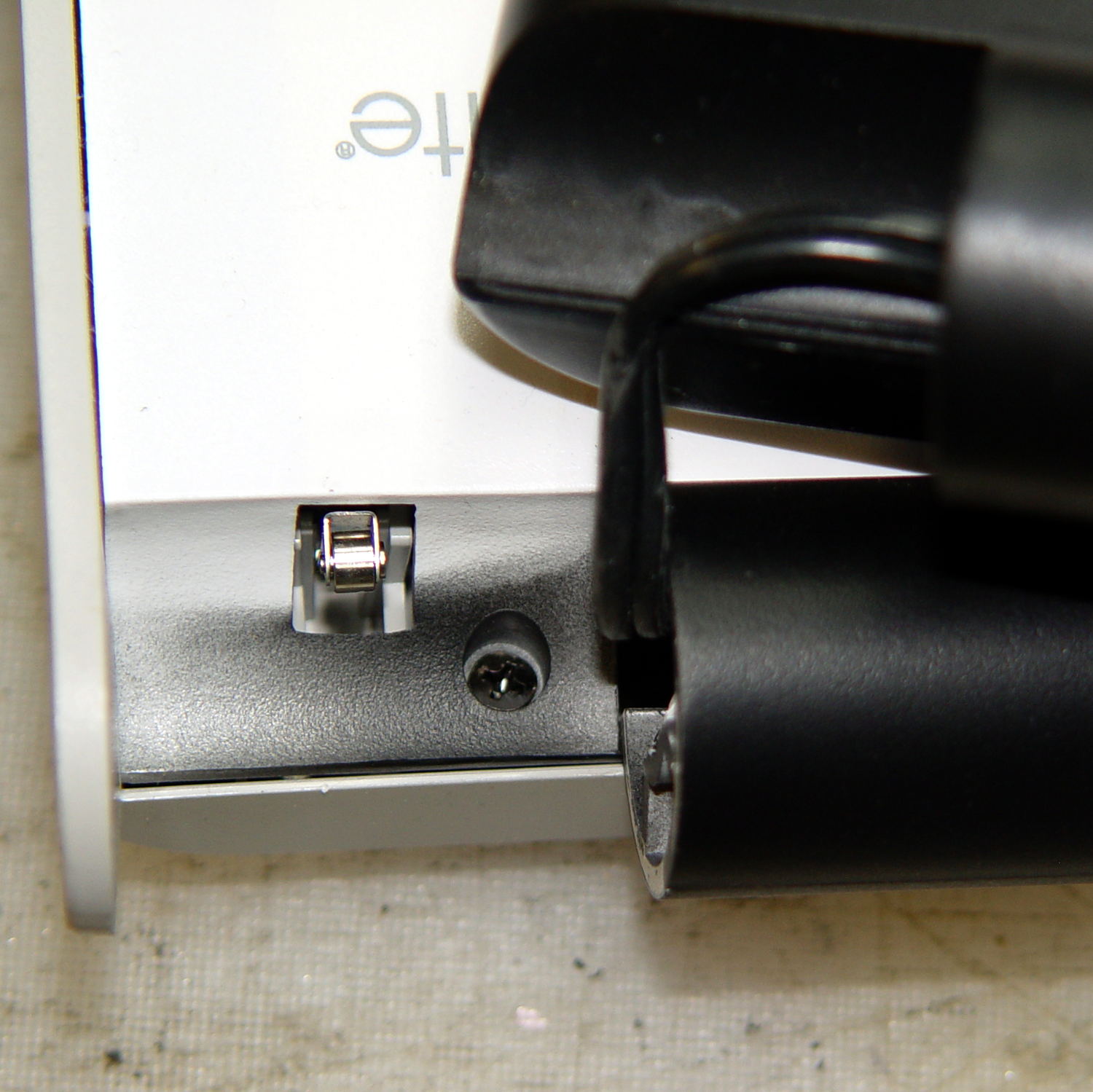
    Being a Linux box, a Raspberry Pi requires a tidy shutdown, but, because it uses so little power after that, I decided to forego a power switch and just blip the CPU reset line to start it up again. Canakit cases require a bit of flush-cutter hackage to accommodate a crude socket atop the RUN header:

    Canakit RPi Case - reset switch - header clearance
    Canakit RPi Case – reset switch – header clearance

    The switch originally had three terminals, but turned out to be SPST NO with one unused pin. Flush cutters and some hot melt glue to the rescue:

    Canakit RPi Case - reset switch - interior
    Canakit RPi Case – reset switch – interior

    The end result looks OK, modulo a few scuffs on the shiny black plastic:

    Canakit RPi Case - reset switch - exterior
    Canakit RPi Case – reset switch – exterior

    Yeah, a clumsy swipe could wipe that actuator right off the top; we’ll see how long it lasts…

  • OttLite LED Conversion

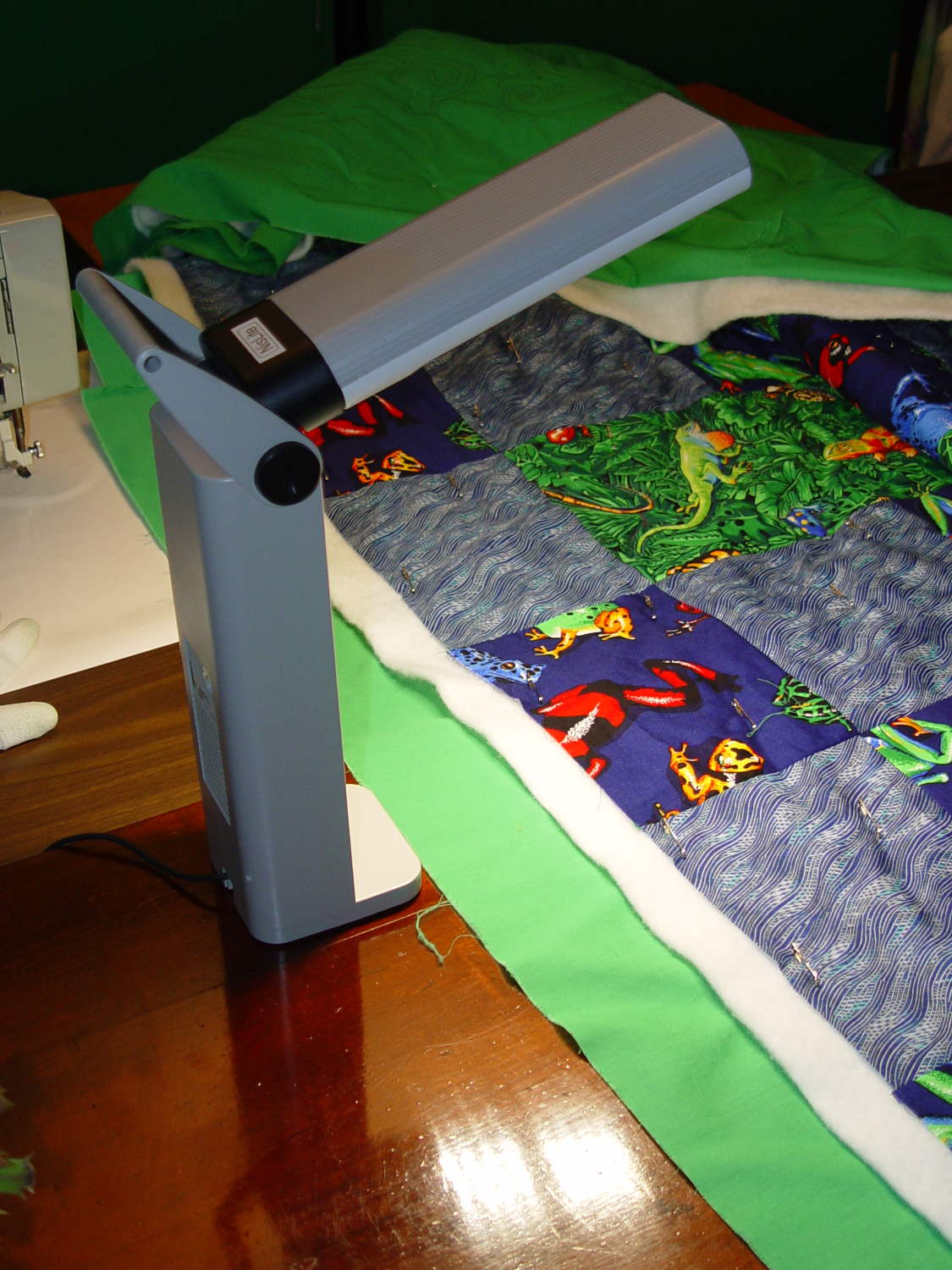
    Although Mary liked the illumination from her OttLite (an old 13 W fluorescent Folding Task Lamp), neither of us liked its tiny base and tippy nature. It recently fell / was dropped / jumped to its doom, smashing the CFL tube and wreaking havoc on the tiny plastic studs holding its large cast-iron weight and steel base in position. Given that the CFL ballast had started humming a while ago, I took it apart to see whether I could salvage anything from the rubble.

    Remove:

    • Four screws under the fuzzy felt feet
    • One screw under the label on the back
    • A final screw that becomes visible only after disemboweling the hinge assembly by unscrewing the obvious endcaps:
    OttLite LED Conversion - hinge screw
    OttLite LED Conversion – hinge screw

    Pull the hinge end of the white inside panel away from the outer stand at enough of an angle to disengage all three latches holding it to the base, then remove it just enough to let you start cutting wires around the ballast…

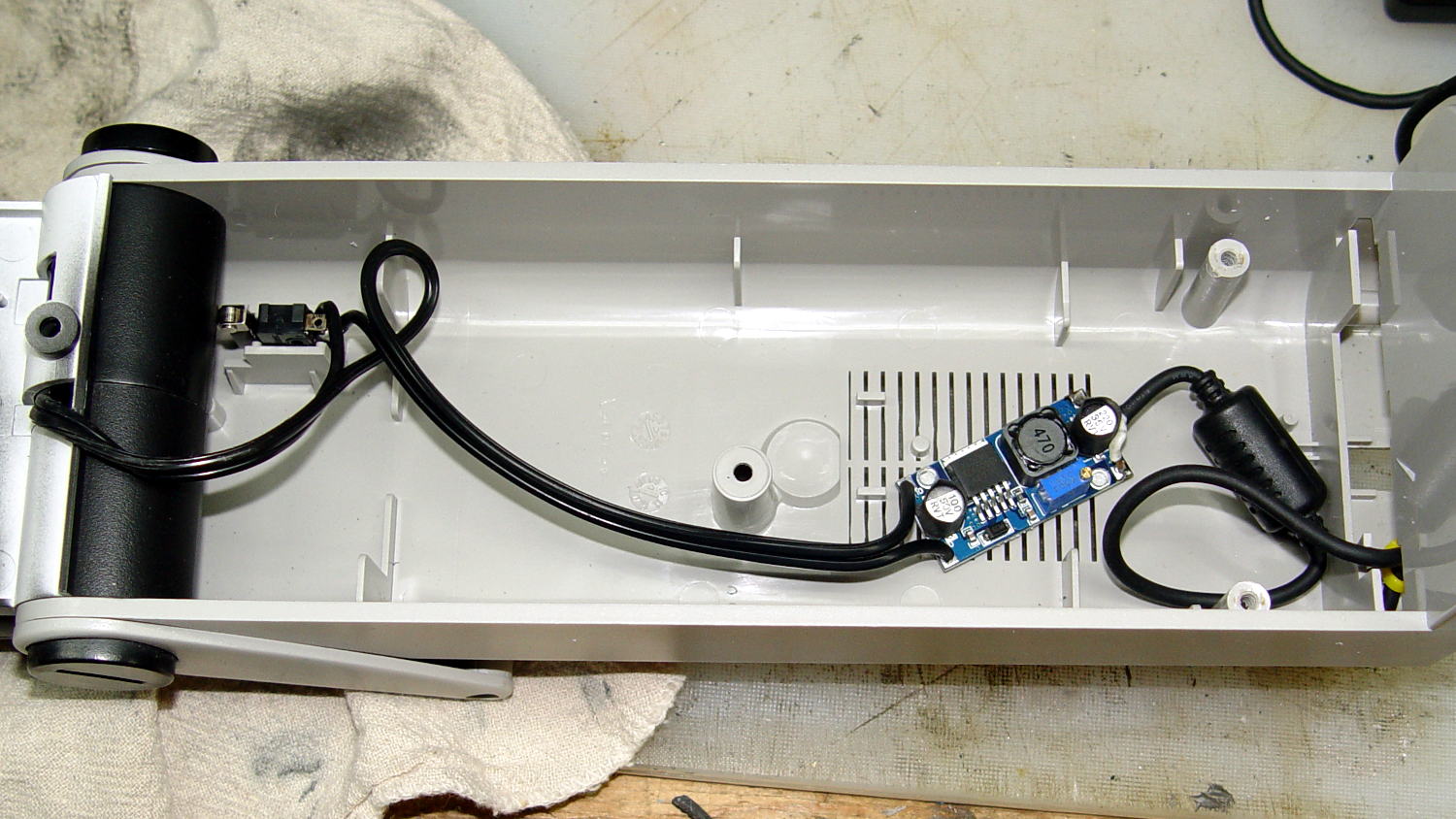
    I rebuilt the thing with a pair of 24 V 150 mA warm-white LED panels (good industrial surplus, not the usual cheap eBay crap) powered by a 19 V laptop adapter (from IBM, no less) through a (cheap eBay) boost converter sticky-foam-taped where the fluorescent ballast used to live:

    OttLite LED Conversion - boost supply wiring
    OttLite LED Conversion – boost supply wiring

    The power supply had only two conductors, the central wire surrounded by twisted shielding, and didn’t require a fussy interface. Hooray for simple bulk power supplies; I lopped off the connector and soldered the wires directly to the boost converter.

    The original lamp wiring has a 120 VAC switch inside the hinge that turned the lamp on as you raise the arm holding the CFL tube: exactly what I need for its new use. That eliminated figuring out how to crack the arm apart to rewire it.

    I harvested the base from a(nother) defunct CFL bulb:

    OttLite LED Conversion - harvested CFL base
    OttLite LED Conversion – harvested CFL base

    By soldering wires directly into the pins, I could reuse the existing CFL socket in the lamp arm, the existing wiring, and the switch.

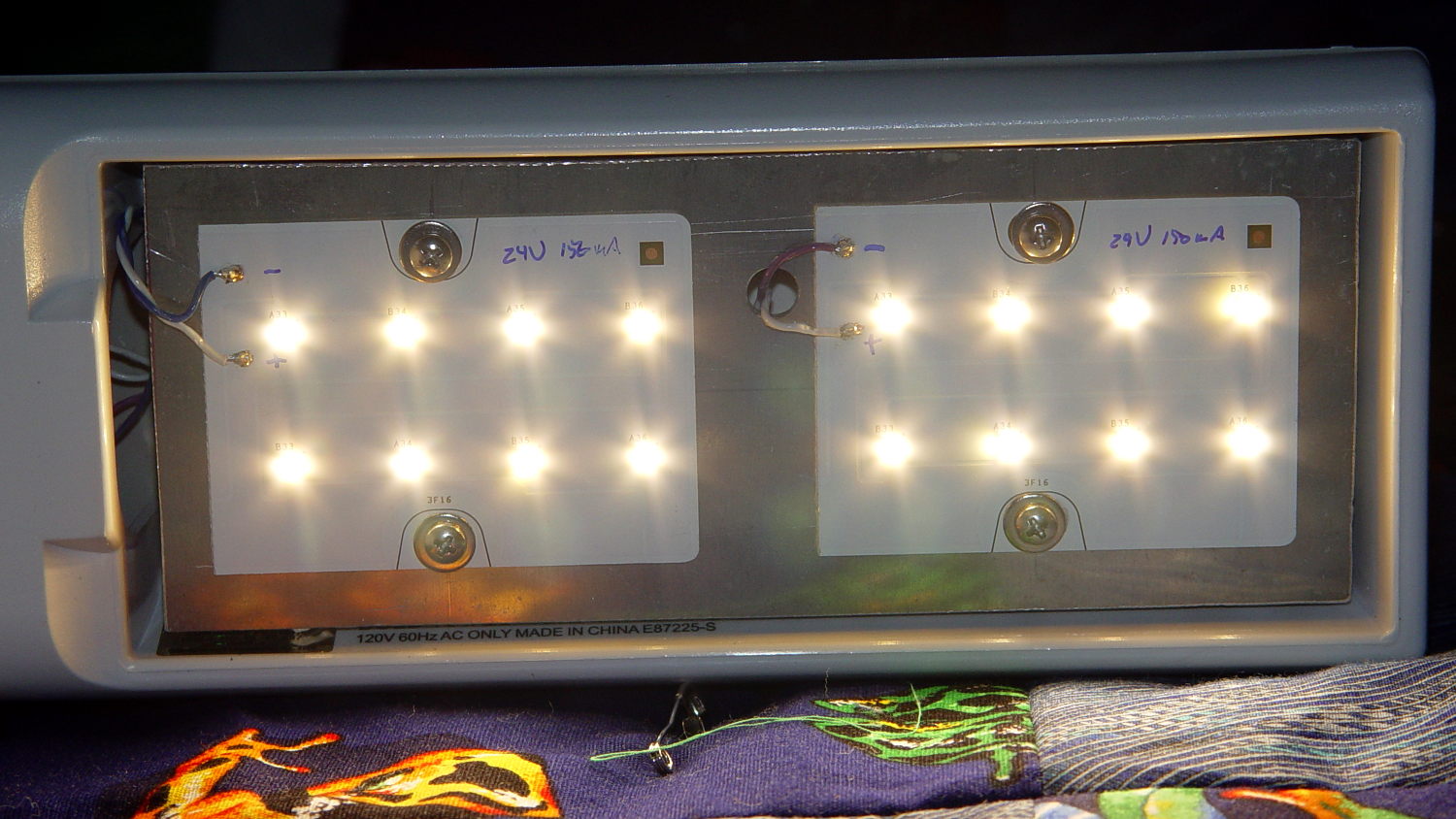
    The LED panels dissipate 3-ish W each:

    OttLite LED Conversion - LED panel layout
    OttLite LED Conversion – LED panel layout

    They’re mounted on a 0.1 inch aluminum sheet from the heap that required exactly one saw cut to fit into the space available, so I defined it to be perfect. The 4-40 screws holding the panels in place continue through the plate and 3/8 inch aluminum standoffs into a quartet of knurled inserts epoxied into eyeballometrically match-drilled holes in the lamp arm:

    OttLite LED Conversion - epoxied threaded inserts
    OttLite LED Conversion – epoxied threaded inserts

    The faint yellowish discoloration from the CFL tube’s heat and UV is much more visible in real life, but nobody will ever see it again. The scrawled blue (+) and (-) marks give the socket polarity; it’s not mechanically polarized and a bit of care is in order. The black rectangle is actually a shiny metal sheet intended to reflect heat from the CFL tube’s base away from the plastic arm.

    I set the boost converter to 23.5 V, at which point the LED panels draw about 100 mA each and get just over uncomfortably warm after an hour or two:

    OttLite LED Conversion - in action
    OttLite LED Conversion – in action

    The panels run 120 °F = 50 °C and the SMD LEDs probably exceed 150 °F = 65 °C. The scant surplus doc touted “No heatsink required” and the single-sided FR4 PCB insulates the LEDs from the aluminum sheet, but I still smeared some heatsink compound behind the panels in the hopes of spreading the heat out a bit.

    I glued the shattered base studs back in place with IPS #3, surrounded them with generous epoxy fillets, plunked the cast iron weight in place atop some waxed paper to mold the epoxy to fit (and let me remove it again, if needs be), screwed everything together, and stuck a foam sheet over the steel base plate. It’s as tippy as before, but at least the LEDs won’t shatter if when it falls. It really needs a larger base; a polycarbonate plate might work, if only I could figure out how to attach it.

    All in all, the lamp looks good and the warm-white LEDs with DC drive don’t produce that horrible fluorescent flicker.

    The lamp now sports a label identifying it as a NisLite; because P-Touch labeler.

  • Fluorescent Shoplight Capacitor: Wow!

    You just can’t make this stuff up:

    Fluorescent Shoplights - nasty cap termination
    Fluorescent Shoplights – nasty cap termination

    That shredded plastic can’t possibly be a Good Thing; the endcap contained plenty of loose shreds.

    Perhaps I’m overly critical, but I think the only way these fixtures could have a UL approval certificate was that somebody else didn’t notice their certificate went missing. Most likely, of course, the fixtures sent for approval looked lovely and bore no relation to the junk actually sold to Lowe’s / Home Depot.

    That emerged from the fourth defunct fluorescent fixture I converted to use LED tubes.

  • Raspberry Pi Streaming Radio Player: Marginally Viable Product

    The least horrible way to get events from the keypad turned out to be a simple non-blocking poll from Python’s select library, then sucking the event input queue dry; the main loop now does what might be grandiosely overstated as cooperative multitasking. Well, hey, it reads lines from mplayer’s output pipe and processes keypad events and doesn’t stall (for very long) and that’s multi enough for me.

    It extracts the stream title from the ICY Info line, but I still haven’t bothered with a display. It may well turn out that this thing doesn’t need a display. The stream title will be enclosed in single quotes, but it may also contain non-escaped and non-paired single quotes (a.k.a. apostrophes): the obvious parsing strategy doesn’t work. I expect titles can contain non-escaped semicolons, too, which will kill the algorithm I’m using stone cold dead. Some try - except armor may be appropriate.

    This code does not tolerate a crappy WiFi connection very well at all. I eventually replaced a long-antenna WiFi adapter with an actual Ethernet cable and all the mysterious problems at the far end of the house Went Away. Soooo this code won’t tolerate random network stream dropouts very well, either; we’ll see how poorly that plays out in practice.

    The hackery to monitor / kill / restart / clean up after mplayer and its pipes come directly from seeing what failed, then whacking that mole in the least intrusive manner possible. While it would be better to wrap a nice abstract model around what mplayer is (assumed to be) doing, it’s not at all clear to me that I can build a sufficiently durable model to be worth the effort. Basically, trying to automate a program designed to be human-interactive is always a recipe for disaster.

    The option for the Backspace / Del key lets you do remote debugging by editing the code to just bail out of the loop instead of shut down. Unedited, it’s a power switch: the Pi turns off all the peripherals and shuts itself down. The key_hold conditional means you must press-and-hold that button to kill the power, but don’t run this on your desktop PC, OK?

    Autostarting the program requires one line in /etc/rc.local:

    sudo -u pi python /home/pi/Streamer.py &
    

    AFAICT, using cron with an @REBOOT line has timing issues with the network being available, but I can’t point to any solid evidence that hacking rc.local waits until the network is up, either. So far, so good.

    I make no apologies for any of the streams; I needed streams behind all the buttons and picked stuff from Xiph’s listing. The AAC+ streams from the Public Domain Project give mplayer a bad bellyache; I think its codecs can’t handle the “+” part of AAC+.

    All in all, not bad for a bit over a hundred lines of code, methinks…

    More fiddling will happen, but we need some continuous experience for that; let the music roll!

    The Python program as a GitHub Gist:

    from evdev import InputDevice,ecodes,KeyEvent
    import subprocess32
    import select
    import re
    import sys
    Media = {'KEY_KP7' : ['Classical',['mplayer','-playlist','http://stream2137.init7.net/listen.pls'%5D%5D,
    'KEY_KP8' : ['Jazz',['mplayer','-playlist','http://stream2138.init7.net/listen.pls'%5D%5D,
    'KEY_KP9' : ['WMHT',['mplayer','http://live.str3am.com:2070/wmht1'%5D%5D,
    'KEY_KP4' : ['Dub 1',['mplayer','-playlist','http://dir.xiph.org/listen/2645/listen.m3u'%5D%5D,
    'KEY_KP5' : ['Dub 2',['mplayer','http://streaming207.radionomy.com:80/MiamiClubMusiccom'%5D%5D,
    'KEY_KP6' : ['WAMC',['mplayer','http://pubint.ic.llnwd.net/stream/pubint_wamc'%5D%5D,
    'KEY_KP1' : ['Oldies 1',['mplayer','http://streaming304.radionomy.com:80/keepfree60s'%5D%5D,
    'KEY_KP2' : ['Oldies 2',['mplayer','http://streaming207.radionomy.com:80/1000Oldies'%5D%5D,
    'KEY_KP3' : ['Soft Rock',['mplayer','http://streaming201.radionomy.com:80/SoftRockRadio'%5D%5D,
    'KEY_KP0' : ['Smooth',['mplayer','http://streaming202.radionomy.com:80/The-Smooth-Lounge'%5D%5D
    }
    CurrentKC = 'KEY_KP7'
    Controls = {'KEY_KPSLASH' : '/',
    'KEY_KPASTERISK' : '*',
    'KEY_KPENTER' : ' ',
    'KEY_KPMINUS' : '<',
    'KEY_KPPLUS' : '>'
    }
    # set up event input and polling
    k=InputDevice('/dev/input/keypad')
    kp = select.poll()
    kp.register(k.fileno(),select.POLLIN + select.POLLPRI + select.POLLERR)
    # set up files for mplayer pipes
    lw = open('/tmp/mp.log','w') # mplayer piped output
    lr = open('/tmp/mp.log','r') # … reading that output
    # Start the default stream
    print 'Starting mplayer on',Media[CurrentKC][0]," -> ",Media[CurrentKC][-1][-1]
    p = subprocess32.Popen(Media[CurrentKC][-1],stdin=subprocess32.PIPE,stdout=lw,stderr=subprocess32.STDOUT)
    print ' … running'
    #— Play the streams
    while True:
    # pluck next line from mplayer and decode it
    text = lr.readline()
    if 'ICY Info: ' in text:
    trkinfo = text.split(';')
    for ln in trkinfo:
    if 'StreamTitle' in ln:
    trkhit = re.search(r"StreamTitle='(.*)'",ln)
    TrackName = trkhit.group(1)
    print 'Track name: ', TrackName
    break
    elif 'Exiting…' in text:
    print 'Got EOF / stream cutoff'
    print ' … killing dead mplayer'
    p.kill()
    print ' … flushing pipes'
    lw.truncate(0)
    print ' … discarding keys'
    while [] != kp.poll(0):
    kev = k.read
    print ' … restarting mplayer: ',Media[CurrentKC][0]
    p = subprocess32.Popen(Media[CurrentKC][-1],stdin=subprocess32.PIPE,stdout=lw,stderr=subprocess32.STDOUT)
    print ' … running'
    continue
    # accept pending events from keypad
    if [] != kp.poll(0):
    kev = k.read()
    for e in kev:
    if e.type == ecodes.EV_KEY:
    kc = KeyEvent(e).keycode
    if kc == 'KEY_NUMLOCK':
    continue
    # print 'Got: ',kc
    if (kc == 'KEY_BACKSPACE') and (KeyEvent(e).keystate == KeyEvent.key_hold):
    if True:
    print 'Backspace = shutdown!'
    p = subprocess32.call(['sudo','shutdown','-HP',"now"])
    else:
    print 'BS = bail from main, ssh to restart!'
    sys.exit(0)
    if KeyEvent(e).keystate != KeyEvent.key_down:
    continue
    if kc in Controls:
    print 'Control:', kc
    try:
    p.stdin.write(Controls[kc])
    except Exception as e:
    print "Can't send control: ",e
    print ' … restarting player: ',Media[CurrentKC][0]
    p = subprocess32.Popen(Media[CurrentKC][-1],stdin=subprocess32.PIPE,stdout=lw,stderr=subprocess32.STDOUT)
    print ' … running'
    if kc in Media:
    print 'Switching stream to ',Media[kc][0]," -> ",Media[kc][-1][-1]
    CurrentKC = kc
    print ' … halting player'
    try:
    p.communicate(input='q')
    except Exception as e:
    print 'Perhaps mplayer died?',e
    print ' … killing it for sure'
    p.kill()
    print ' … flushing pipes'
    lw.truncate(0)
    print ' … restarting player: ',Media[CurrentKC][0]
    p = subprocess32.Popen(Media[CurrentKC][-1],stdin=subprocess32.PIPE,stdout=lw,stderr=subprocess32.STDOUT)
    print ' … running'
    print 'Out of loop!'
    view raw Streamer.py hosted with ❤ by GitHub
  • Vacuum Tube LEDs: Knockoff Neopixel Failure

    The knockoff Neopixel epoxied atop the big incandescent bulb just failed:

    Vacuum Tube LEDs - ersatz heatsink plate cap
    Vacuum Tube LEDs – ersatz heatsink plate cap

    It stopped changing colors and began blinking high-intensity bursts of the RGB LEDs. Which was interesting, I’ll grant you, but didn’t produce the desired, ah, mood.

    Differential diagnosis:

    • Reboot that sucker: fail
    • Shot of circuit cooler: fail
    • Failing LED with known-good Arduino Pro Mini: fail
    • “Failing” Arduino Pro Mini with known-good LED: work

    Looks like a permanent WS2812B controller failure this time around.

    It’s been plugged into a Kill-a-Watt meter that reports it ran for 415 hours and used 150 W·h of energy, for an average 360 mW dissipation. I think the actual power falls well below the meter’s lower limit, so I doubt the accuracy, but it’s a whole bunch less than a nightlight and much more interesting.

    Now, to break that epoxy bond without breaking the bulb …

  • Vacuum Tube LEDs: Fire in the Noval

    Replacing the original Noval socket in the string with the platter-friendly version, bracing the wiring with duct tape, balancing it on my desk, and firing it up:

    Noval socket - red phase
    Noval socket – red phase

    The green phase looks nice, too:

    Noval socket - green phase
    Noval socket – green phase

    Those screws are too big.

    The getter flash covers the entire top of the tube; shining an LED down through the evacuation tip won’t work and even a laser doesn’t do much. That saves me the trouble of trying to create a cap that doesn’t wreck the tube’s good looks.

    I originally planned to use white / natural PETG for the socket, but the more I see of those things, the more I think black is the new white. The sockets should vanish into the background, to let the tubes (and their reflections) carry the show.

    The (yet to be designed) base must vanish under the platter edge, too, which puts a real crimp on its overall height. I’m not sure how to fit an Arduino Pro Mini and an FTDI board beside the existing socket; perhaps this calls for a unified socket-base design held on by those screws, rather than a separate socket inside a base enclosure.

    Even though I know the tubes are inert and cool, I still hesitate before removing them from their sockets with the Neopixels running: you simply do not unplug a hot, powered device!