The Smell of Molten Projects in the Morning

Ed Nisley's Blog: Shop notes, electronics, firmware, machinery, 3D printing, laser cuttery, and curiosities. Contents: 100% human thinking, 0% AI slop.

Category: Electronics Workbench

Electrical & Electronic gadgets

  • Vacuum Tube LEDs: Another Knockoff Neopixel Failure

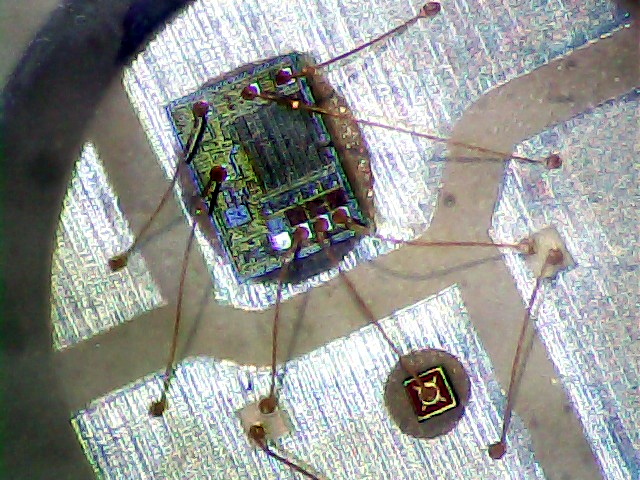
    The WS2812B controller in this knockoff Neopixel failed:

    Failed W2812B Ersatz Neopixel
    Failed W2812B Ersatz Neopixel

    It used to live in the Noval socket:

    Noval socket - red phase
    Noval socket – red phase

    As with the one atop the big incandescent bulb, it failed by emitting random flashes of primary colors. This time, the Octal and Duodecar sockets were downstream and I got to watch four randomly flashing RGB LEDs, which says the controller failed enough to corrupt the data stream, but not enough to make the downstream controllers regard it as completely invalid.

    I replaced it with another one, just like the other ones, and it’s been running happily ever since.

    Fairly obviously, cheap knockoff Neopixels aren’t a good deal; the strip and these PCB versions have racked up three or four (I’m losing track) out of less than a dozen deployed. I won’t hold the overtemperature failures against the strip versions, but, still …

  • Sony HDR-AS30V Camera: Power Requirement

    A recent ride got rained out after 27 minutes:

    Rain Riding - 2016-03-25
    Rain Riding – 2016-03-25

    We didn’t get much more than damp and planned the ride with a bail-out route home, so it was all good.

    The camera ran from STK Battery A, which had gone flat 37 minutes into a recent ride, so I popped it in the battery tester and drained the rest of its charge:

    Sony NP-BX1 - STK A 27 min vs full - 2016-03-25
    Sony NP-BX1 – STK A 27 min vs full – 2016-03-25

    The dotted section says it had 0.85 W·h remaining after 27 minutes. Hand-positioning a copy of that curve against the full charge and discharge curve says the camera required 2.8 W·h. Eyeballometrically averaging the voltage over the leading part of the curve as 3.8 V says the battery delivered 0.74 A·h = 2.8 W·h / 3.8 V, then dividing that by 27/60 says the camera draws 1.6 A. That’s less than the 2 A guesstimate from previous data, but I don’t trust any of this for more than about one significant figure.

    Running the camera for 27 minutes requires 2.8 W·h, meaning 37 minutes should require 3.8 W·h. The curve says that’s the capacity at the 2.8 V test cutoff, suggesting the camera also has a 2.8 V cutoff.

    Looking at the discharge curves from yesterday’s post:

    Sony NP-BX1 - STK ABCD - 2015-11-03 vs 2016-03-24
    Sony NP-BX1 – STK ABCD – 2015-11-03 vs 2016-03-24

    If all that hangs together, the C and D batteries should run the camera for just slightly longer than the A battery, but that doesn’t seem to be the actual result: they’re much better than that.

    More rides are indicated …

  • Monthly Science: Five Months of Lithium Cell Wear

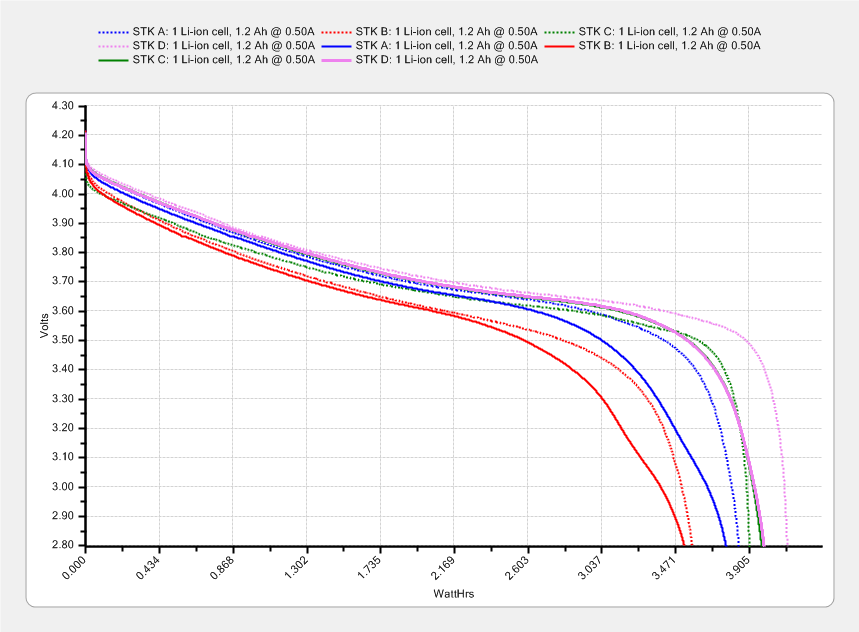
    I’ve marched the four STK NP-BX1 lithium batteries through the Sony HDR-AS30V camera in constant rotation since last November. The A battery drained 35 minutes into an ordinary ride on a pleasant day, so charging and measuring the entire set seemed in order:

    Sony NP-BX1 - STK ABCD - 2015-11-03 vs 2016-03-24
    Sony NP-BX1 – STK ABCD – 2015-11-03 vs 2016-03-24

    The dotted curves come from early November 2015, when the batteries were fresh & new, and the solid curves represent their current performance.

    It’s been a mild winter, so we’ve done perhaps 75 rides during the last 150-ish days. That means each battery has experienced under 20 discharge cycles, which ought not make much difference.

    The B battery started out weak and hasn’t gotten any better; I routinely change that one halfway into our longer rides.

    The A battery started marginally weaker than C and D, but has definitely lost its edge: the voltage depression at the knee of the curve might account for the early shutdown.

    Figuring that the camera dissipates 2.2 W, a battery that fails after 35 minutes has a capacity of 1.3 W·h. That suggests a cutoff voltage around 3.8 V, which makes absolutely no sense whatsoever, because the C and D batteries deliver at least 75 minutes = 2.8 W·h along similar voltage curves.

    The B battery goes in the recycle heap and we’ll see how the A battery behaves on another ride…

  • Raspberry Pi Power Heartbeat LED

    While looking for something else, I found a reference to the /boot/overlays/README file, wherein it is written:

            act_led_trigger         Choose which activity the LED tracks.
                                    Use "heartbeat" for a nice load indicator.
                                    (default "mmc")
    
            act_led_activelow       Set to "on" to invert the sense of the LED
                                    (default "off")
    
            act_led_gpio            Set which GPIO to use for the activity LED
                                    (in case you want to connect it to an external
                                    device)
                                    (default "16" on a non-Plus board, "47" on a
                                    Plus or Pi 2)
    
    ... snippage ...
    
            pwr_led_trigger
            pwr_led_activelow
            pwr_led_gpio
                                    As for act_led_*, but using the PWR LED.
                                    Not available on Model A/B boards.
    

    Although the power LED isn’t (easily) visible through the Canakit cases I’m using (it’s under the barely visible hole in front of the small hole near the hacked RUN connector), turning it into a heartbeat pulse distinguishes the CPU’s “running” and “halted” states; whether it will also distinguish “crashed” is up for grabs.

    It’s not at all clear what other choices you have.

    To enable heartbeating, add this to /boot/config.txt:

    # turn power LED into heartbeat
    dtparam=pwr_led_trigger=heartbeat
    #
    

    I expected a simple 50% duty cycle heartbeat, but it’s an annoying double blink: long off / on / off / on / long off. Fortunately, it still isn’t (easily) visible …

    While you have that file open, reduce the GPU memory to the absolute minimum for headless operation:

    # minimal GPU memory for headless operation
    gpu_mem=16
    #
    

    Some further ideas, including a way to turn off the HDMI interface.

  • LED Bulbs: Train Station Chandelier

    The three big chandeliers in the Poughkeepsie Train Station now sport LED bulbs:

    Poughkeepsie Train Station - LED bulbs
    Poughkeepsie Train Station – LED bulbs

    All three had 36 working bulbs and, with a bit of good QC, should continue that way for a long, long time.

    LED bulbs don’t have the intense point-source brilliance of clear tungsten bulbs and even the warm-white ones tend toward the cool end of the spectrum, but they’re Good Enough …

  • Bose QC20 Noise-cancelling Headphone Signals

    Bose QuietComfort QC20 Noise Canceling headphones (they’re actually earbuds) come in Apple and Android versions that (probably) differ only in the connector pinout. Given that the connector has four conductors, I was surprised to find only half a dozen different possibilities, with only two for purely audio connectors.

    These QC20 earbuds came in the Android flavor, also known as the CTIA/AHJ “standard”:

    Bose QC20 Earphones
    Bose QC20 Earphones

    The 3.5 mm plug connections:

    • Tip = left audio
    • Ring 1 = right audio
    • Ring 2 = ground
    • Sleeve = microphone and button signals

    The blue Mode button on the side of the splitter box switches the noise cancelling between “some” and “silent”. The latter works surprisingly well; it can knock our vacuum cleaner down to a bearable level.

    The three black buttons place resistive loads on the otherwise open-circuit microphone connection:

    1. Volume + = 220 Ω
    2. Answer/End = 56 Ω
    3. Volume – = 520 Ω

    Now, if only I had a device that would do something with those signals …

  • Panasonic Eneloop Pro NiMH Cells: First Charge

    The Sony DSC-H5 expects a much higher voltage from its pair of NiMH AA cells than the tired Sanyo Eneloops from 2010 can provide these days.

    Eneloop - 8-cell pack - 2010 - 2016 - merged
    Eneloop – 8-cell pack – 2010 – 2016 – merged

    The two upper curves show the first two charges for those eight cells back in 2010.

    The lower curve(s) started out with the wrong endpoint voltage (purple part of the middle curve), so I restarted the test (green curve) and edited the graph image to splice the two curves together into the purple/red curve.

    Although the capacity measured in mA·h isn’t much lower, the voltage depression reduces the available energy and trips the “low battery” alarm much earlier. In round numbers, the old cells were good for a few pictures, even hot off the charger, and didn’t have much energy left without being recharged before use.

    A quartet of Panasonic Eneloop Pro cells just arrived from BatterySpace, a nominally reputable supplier, all sporting a 14-05 date code suggesting they’re just shy of two years old. The packaging claims 85% charge retention after a year, so they should have a bit more than half of their rated 2.45 A·h “minimum” (or 2.55 mA·h “typical”, depending on whether you trust the label on the cell or the big print on the package) capacity remaining (although we don’t know the original state of charge, done from “solar power”). The lower curves say they arrived with 1 A·h remaining:

    Panasonic Eneloop - First Charge
    Panasonic Eneloop – First Charge

    However, the terminal voltage on those bottom curves would have any reasonable device reporting them as dead flat almost instantly, so you really can’t store Eneloops for two years: no surprise there.

    One pass through the 400 mA Sony charger produced the upper curves, with the dotted red curve from Cell A lagging in the middle. After that test, another pass through the charger brought Cell A back (upper solid red line) with the others, so I’ll assume it took a while to wake up.

    A pair of these in the camera will produce 2.2 V through 2.2 A·h, far better than the aged-out Sanyo Eneloops.

    Charging them at 400 mA = C/6 certainly counts as a slow charge. I’ve been charging the Sanyo cells in slow chargers in the hope that they’ll remain happier over the long term.

    The Panasonic Eneloops perform much better than some other cells you’ve seen around here, which may be due to the fact that I paid $5 each for them…