The Smell of Molten Projects in the Morning

Ed Nisley's Blog: Shop notes, electronics, firmware, machinery, 3D printing, laser cuttery, and curiosities. Contents: 100% human thinking, 0% AI slop.

Author: Ed

  • Dell Power Supply: Extracting Some AC

    The case from a Dell Optiplex GX270 will hold the Kenmore 158 sewing machine’s motor control electronics, because it has a well-grounded metal box inside the plastic shell that will protect fragile humans from line voltages. The GX270 power supply will suffice for the usual stuff, but the bridge rectifier, power transistor, and suchlike require a direct connection to the AC line.

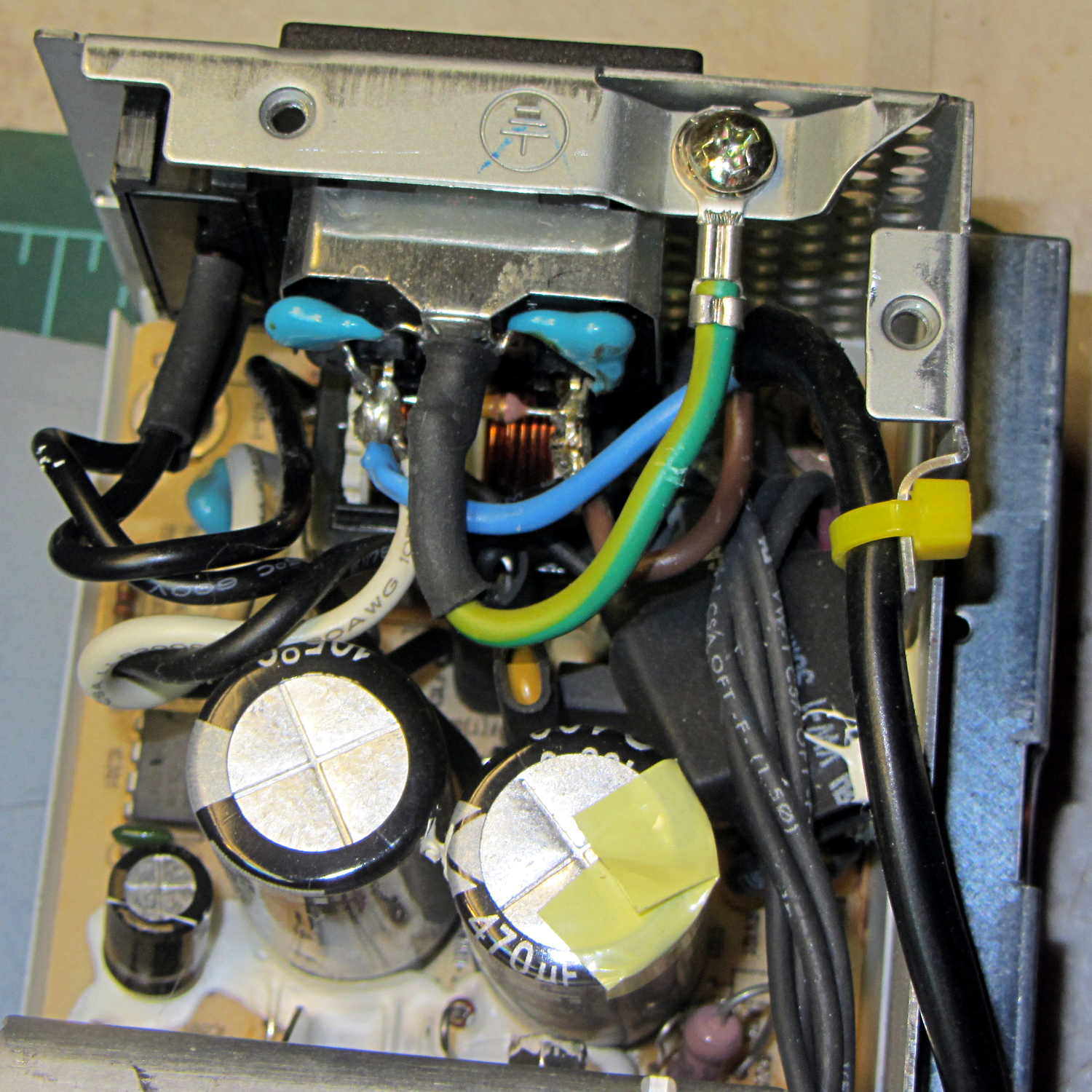
    Rather than add another plug, I soldered a nice two-wire line cord to the IEC socket terminals inside the GX270’s power supply:

    Modified Dell power supply - interior
    Modified Dell power supply – interior

    The cord follows the IEC/EU standard color code:

    • Blue – neutral
    • Brown – hot

    The power supply follows the US standard color code:

    • White – neutral
    • Black – hot

    The nice thing about standard color codes: everybody can have one!

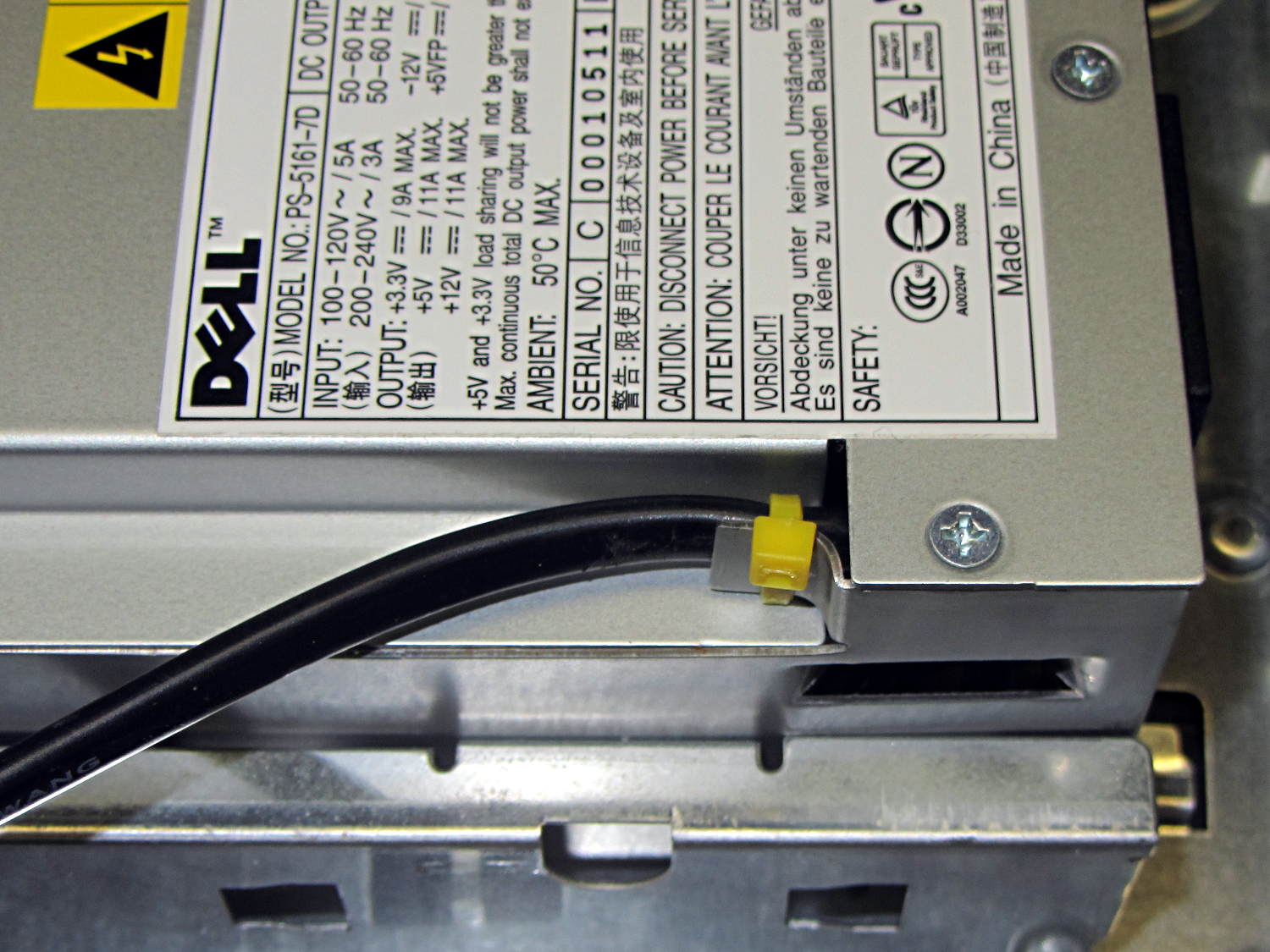
    The yellow cable tie anchors the cord to a metal tab that, when bent at right angles, provides a convenient exit from the power supply at exactly the right location:

    Modified Dell power supply - AC cord exit
    Modified Dell power supply – AC cord exit

    The power supply mounts with the label facing inward, directly adjacent to the PCI slot covers. The new cord emerges near the bottom, inside the recess that formerly accommodated the board.

    Definitely not UL approved, but we’re well beyond that stage anyway…

  • Tour Easy: Push-to-Talk Switch Rework

    The handlebar-mounted PTT button for the amateur radio on my bike once again went toes-up, most like due to the accumlation of road dust and rainwater over the years. Rather than replace the switch, which would require peeling off a massive glob of hot melt glue and resoldering the wires, I just carved the tops off the rivets holding the cover in place, pried off the cover, and removed the button to reveal the top of the switch dome:

    Handlebar PTT switch - corroded dome
    Handlebar PTT switch – corroded dome

    Blech!

    The dome flexes outward to contact the (rather crusty) terminals on either side, so all the action happens under the dome.

    A lineup of the plastic button, the inverted dome, and the cover plate:

    Handlebar PTT switch - components
    Handlebar PTT switch – components

    The top and bottom of the dome show some grit: that’s where it contacted the switch terminals.

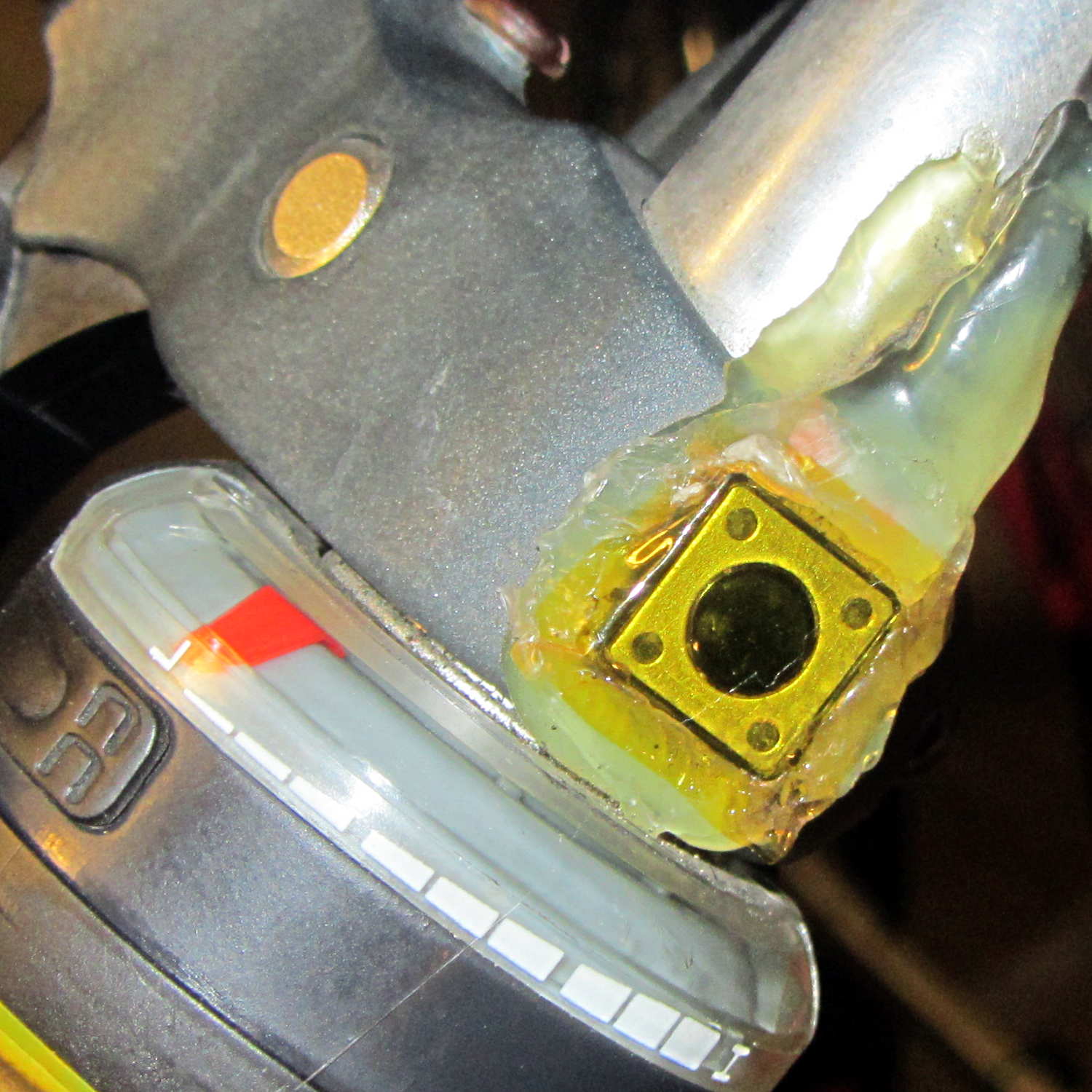
    Wiping the crud out of the switch body, scrubulating everything with contact cleaner, and putting it all back together restored the switch to working order. There’s (once again) a snippet of Kapton tape over the cover holding it in place, but I don’t expect this to last very long:

    Handlebar PTT switch - kapton cover
    Handlebar PTT switch – kapton cover

    But it works well enough for now …

  • Sony HDR-AS30V vs. ExFAT vs. Ext2 Times: Total Bafflement

    I’d like to overlay a timestamp on still images extracted from Sony HDR-AS30V camera videos, ideally including the frame number, to record exactly when the incident occurred. Movie players use relative time, with 00:00:00 at the beginning of the file, so we’ll need either the file timestamp or the timestamp recorded in the image’s Exif data, plus the frame number modulo 60 (or, shudder, 59.94 for NTSC).

    The ExFAT format used on 64 GB MicroSD cards stores the file’s creation time, its modification time (writing data), and the most recent access time (reading data). That’s similar to the Linux ext2/3/4 filesystem time and unlike plain old FAT, which omits the access time.

    The various FAT formats store local time, with no regard for time zones, Daylight Saving Time, or anything else. Linux stores times as UTC and converts to local time on the fly. This has catastrophic consequences for getting any of this right.

    It helps to have alias ls='ls -h --color=auto --time-style=long-iso' in your .bashrc file.

    The HDR-AS30V has a year-month-day calendar, a 24-hour clock, a Time Zone value, and a separate DST on/off setting.

    Turning DST on adds 1 hr to the Time Zone value, turning it off subtracts 1 hr. That has the side effect of changing the clock time: not what I expected. You must, therefore, set the TZ first, then DST, then the clock, which does not follow the menu’s natural order of things.

    The camera sets file timestamps as it creates the files, but Linux also meddles with the values while displaying them. Some doc suggests that Linux regards FAT file timestamps as UTC and applies DST correction, which seems to match what I see. There’s a mount option (-o tz=UTC) that seems to have no effect, as well as an undocumented time offset (-o time_offset=60) that also has no effect.

    Setting the TZ to GMT+0 (Sony uses GMT, not UTC) for simplicity, setting the clock to the correct local time, and twiddling DST shows that:

    • Rebooting (remove /insert battery) doesn’t change anything
    • Metadata in file = clock setting – DST setting (-1 on, +0 off)
    • MP4 / THM file create / modify times = always clock +1 hour
    • MP4 / THM file access times = as create / modify until next Linux access

    Under those conditions, with the clock set to (locally accurate) 1908, UTC+1, and DST off, then the Exif timestamp metadata for a movie created at that time look like this:

    exiftool /mnt/part/MP_ROOT/100ANV01/MAH00036.MP4 | grep -i date
    File Modification Date/Time     : 2014:09:01 20:08:09-04:00
    File Access Date/Time           : 2014:09:01 19:10:14-04:00
    File Inode Change Date/Time     : 2014:09:01 20:08:09-04:00
    Create Date                     : 2014:09:01 19:08:03
    Modify Date                     : 2014:09:01 19:08:08
    Track Create Date               : 2014:09:01 19:08:03
    Track Modify Date               : 2014:09:01 19:08:08
    Media Create Date               : 2014:09:01 19:08:03
    Media Modify Date               : 2014:09:01 19:08:08
    

    The corresponding filesystem values:

    ll /mnt/part/MP_ROOT/100ANV01/
    total 146M
    ... snippage ...
    -rwxr-xr-x 1 ed root  14M 2014-09-01 20:08 MAH00036.MP4
    -rwxr-xr-x 1 ed root 8.5K 2014-09-01 20:08 MAH00036.THM
    
    ll -c /mnt/part/MP_ROOT/100ANV01/
    total 146M
    ... snippage ...
    -rwxr-xr-x 1 ed root  14M 2014-09-01 20:08 MAH00036.MP4
    -rwxr-xr-x 1 ed root 8.5K 2014-09-01 20:08 MAH00036.THM
    
    ll -u /mnt/part/MP_ROOT/100ANV01/
    total 146M
    ... snippage ...
    -rwxr-xr-x 1 ed root  14M 2014-09-01 19:10 MAH00036.MP4
    -rwxr-xr-x 1 ed root 8.5K 2014-09-01 20:08 MAH00036.THM
    

    The THM file contains a 160×120 pixel JPG thumbnail image taken from the first frame of the corresponding MP4 file. For longer movies, it’s more obvious that the MP4 file creation date is the start of the movie and its modification date is the end. The maximum 4 GB file size of corresponds to exactly 22:43 of 1920×1080 movie @ 60 frame/sec (the metadata says 59.94).

    The +1 hour offset in the file create / modify times comes from the FAT timestamp being (incorrectly) adjusted by the Linux DST setting. When exiftool reads the MP4 file, that resets its access time to the actual time as seen by Linux, thereby crushing the bogus FAT time.

    Doing the seemingly sensible thing of setting the camera to have the correct local time (roughly 1930), the correct time zone, and the correct DST setting produces this jumble:

    exiftool /mnt/part/MP_ROOT/100ANV01/MAH00037.MP4 | grep -i date
    File Modification Date/Time     : 2014:09:01 20:33:15-04:00
    File Access Date/Time           : 2014:09:01 20:33:14-04:00
    File Inode Change Date/Time     : 2014:09:01 20:33:15-04:00
    Create Date                     : 2014:09:01 23:33:11
    Modify Date                     : 2014:09:01 23:33:14
    Track Create Date               : 2014:09:01 23:33:11
    Track Modify Date               : 2014:09:01 23:33:14
    Media Create Date               : 2014:09:01 23:33:11
    Media Modify Date               : 2014:09:01 23:33:14
    
    ll /mnt/part/MP_ROOT/100ANV01/MAH00037*
    -rwxr-xr-x 1 ed root  11M 2014-09-01 20:33 /mnt/part/MP_ROOT/100ANV01/MAH00037.MP4
    -rwxr-xr-x 1 ed root 8.2K 2014-09-01 20:33 /mnt/part/MP_ROOT/100ANV01/MAH00037.THM
    
    ll -c /mnt/part/MP_ROOT/100ANV01/MAH00037*
    -rwxr-xr-x 1 ed root  11M 2014-09-01 20:33 /mnt/part/MP_ROOT/100ANV01/MAH00037.MP4
    -rwxr-xr-x 1 ed root 8.2K 2014-09-01 20:33 /mnt/part/MP_ROOT/100ANV01/MAH00037.THM
    
    ll -u /mnt/part/MP_ROOT/100ANV01/MAH00037*
    -rwxr-xr-x 1 ed root  11M 2014-09-01 19:34 /mnt/part/MP_ROOT/100ANV01/MAH00037.MP4
    -rwxr-xr-x 1 ed root 8.2K 2014-09-01 20:33 /mnt/part/MP_ROOT/100ANV01/MAH00037.THM
    

    The only correct time in that mess is in the next-to-last line: the access time for the MP4 file. Every other timestamp comes out wrong, with the internal metadata values being off by +4 hours; that suggests the camera sets the internal timestamps to UTC.

    As nearly as I can figure, the only way to make this work requires setting the clock to the local time, TZ to UTC+0, and DST off. That will screw up the filesystem timestamps, but at least the Exif metadata will be correct, for some value of correct.

    The camera’s GPS receiver depends on the clock for its initial synchronization. I don’t know how the TZ and DST settings affect the clock’s correctness for that purpose.

    I do not know if / how / when the displayed times have been altered by the programs that display them.

    I think exiftool can extract the times from the internal metadata and fix up the filesystem times, but that’ll take more tinkering.

    Sheesh & similar remarks…
  • Monthly Science: Basement Safe vs. Summer Humidity

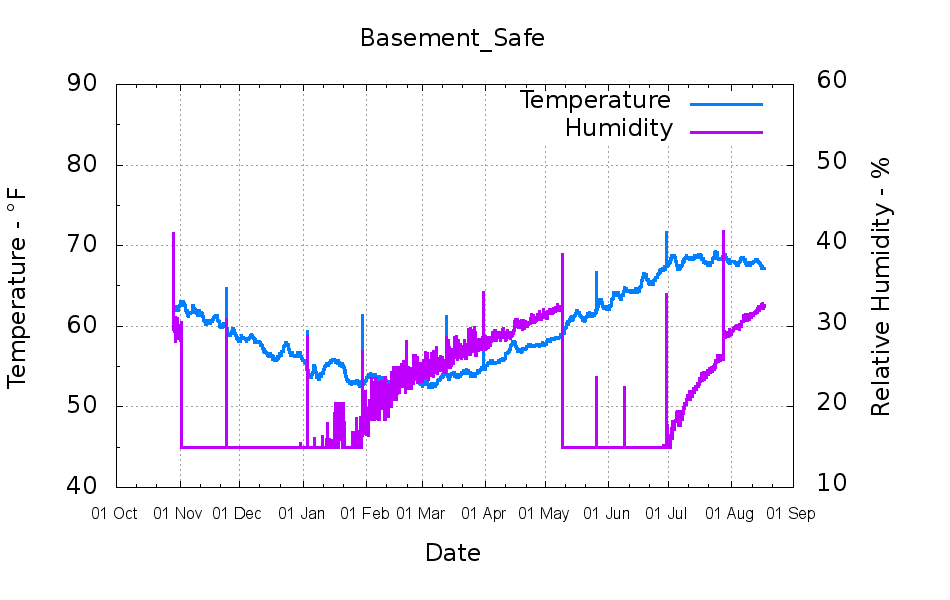
    So much for sealing the basement safe door:

    Basement_Safe
    Basement_Safe

    The desiccant definitely lasts longer during the winter, even though the dehumidifier fights the basement air to a standstill around 55%RH during the summer.

    Each desiccant bag contains 500 g of silica gel and the most recent one adsorbed 73 g of water.

  • Milkweed Tussock Moth

    Although we no longer see Monarch butterflies, our milkweed patch attracts Milkweed Tussock Moth caterpillars:

    Milkweed Tussock Caterpillar
    Milkweed Tussock Caterpillar

    This one apparently died on the patio step, half the house away from the milkweed patch, and the rear spines (on the right) have begun falling out. During the next week, I teleported two more from that step to the patch, under the assumption they’d be happier on a tasty leaf than on a slate slab.

    They were all early instars, very short and quite fuzzy. Later instars will be much longer, with more distinct tussocks.

    I wonder if you could shear them and use the “fur” for decoration? It wouldn’t spin into thread like wool, but someone, somewhere, has surely performed art with Tussock Caterpillar spines…

  • Real Estate Sale Signage

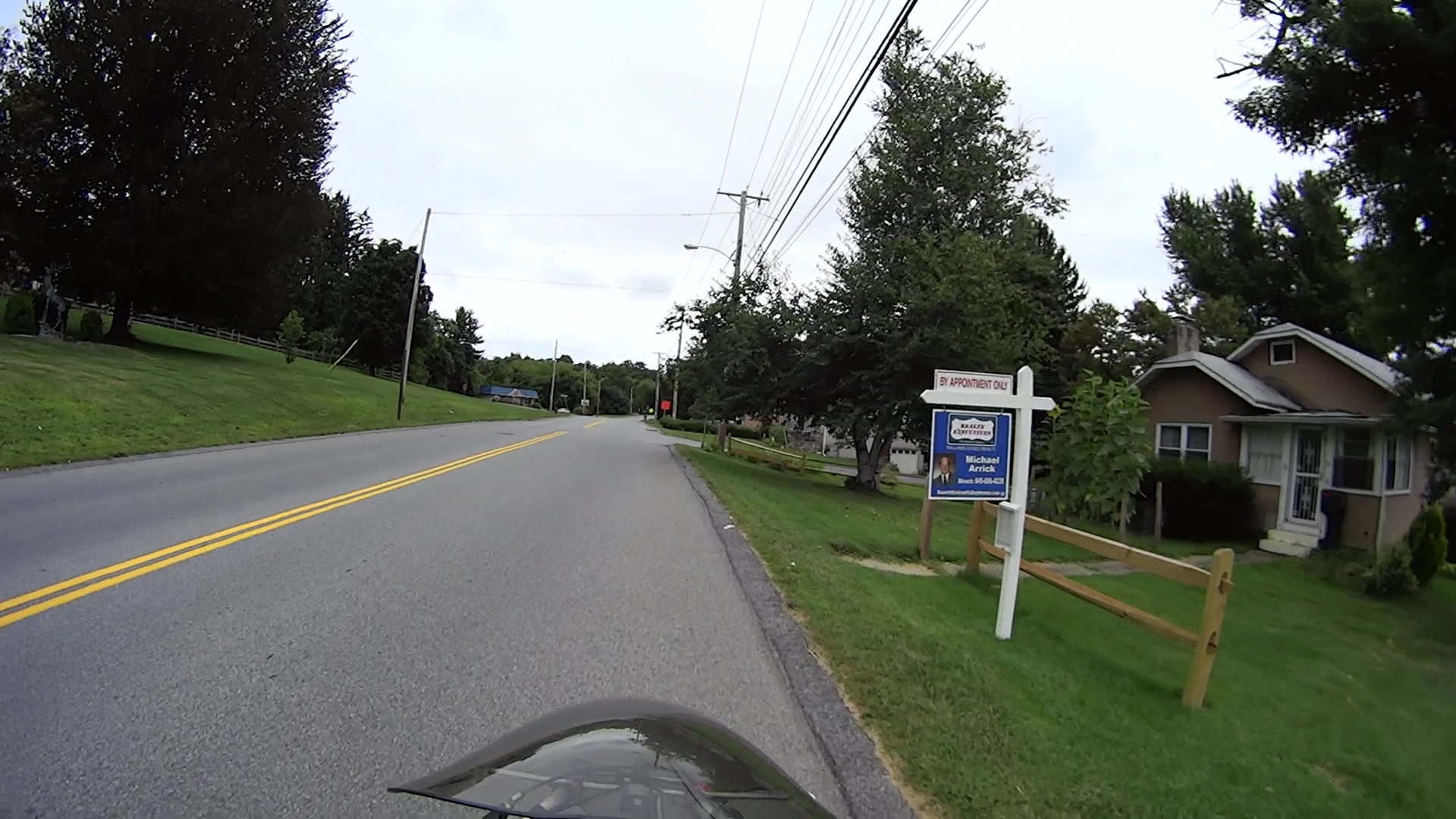
    Real Estate Agencies used to post property marker signs like this:

    FSReEx-168
    FSReEx-168

    Even far off to the side, a bright background color catches your eye:

    FSWeRe-107
    FSWeRe-107

    The signs sported primary colors, reasonably large type, and simple words, making them almost readable in those pictures and definitely legible from the driver’s seat. While not particularly handsome or stylin’, they got the message across: this house is for sale.

    Then a strange thing happened.

    Berkshire Hathaway somehow got into the real estate business and Borged several of the local agencies. BH being a Name Brand with a connotation of wealth & taste, their branding imposed a subtle touch on the new signage:

    FSBkHath-113
    FSBkHath-113

    No, you can’t quite read that in real life, either, although the agent’s name and number on the header come close to the old standard.

    One day, a old-school sign appeared along one of our usual routes:

    FSHoLa-127
    FSHoLa-127

    Although white and green don’t pop out of the background, the sign has enough contrast that you can read what’s needed.

    Then they became affiliated with Christie’s, the Big Name in the realm of high-end auctions. I have no idea what Christie’s has to do with real estate, but if Berkshire Hathaway can do it, it seems Christie’s thinks they can do it even better.

    In any event, the Christie’s Corporate Standard evidently calls for very, very subtle signage:

    FSShort-231

    That sign might mark a high-end bed and breakfast, but certainly does not tell me that the place is for sale: none of the text approaches readability from the street, certainly not at normal travel speeds, and nothing about it even suggests that I should take action.

    A few weeks later, two hang tags added a COMMERCIAL note (the property evidently has potential to become an office or retail space) and the agent’s name and phone number in minuscule type:

    FSBase-128
    FSBase-128

    After a while, a very bright red do-it-yourself HOUSE FOR SALE placard suggested the property owner wasn’t entirely satisfied with the results to date:

    FSSign-148
    FSSign-148

    The high-contrast black-on-white FOR SALE header definitely doesn’t match the rest of the sign, but its more legible information might motivate you to pause and puzzle out the rest. The red placard vanished a few days after the header appeared, leaving us with this peculiar mix:

    FSHeader-153
    FSHeader-153

    None of the (numerous) Christie’s signs in the area have a header, so this may be a case of a squeaky wheel getting greased. I won’t be surprised to see a corporate image change, including larger type, as these fancy signs weather away.

    Perhaps the correct conclusion to be drawn is that, in this Internet age, nobody buys a house based on the quaint custom of driving by a house-with-sign, thinking “Hey, that’s perfect for me!”, and calling the agent, so there’s no need for anything more than a pro-forma marker identifying a property that will be selected by filters applied to MLS / Zillow databases.

    The most recent change simplifies the sign to the bare minimum:

    FSMissing
    FSMissing

    Perhaps we’ve witnessed a falling-out over typography?

    This began as a test of the Sony HDR-AS30V camera’s resolution, with the obvious conclusion it wasn’t intended as a camera suitable for recording text.

  • ET227 Transistor DC Current Gain Variation

    A Squidwrench Weekly Doings being useful for short-attention-span projects, I measured the DC current gain for all five ET227 transistors. The test conditions fall far below the ET227’s 1 kV / 100 A ratings, but they’re roughly what the sewing machine motor controller calls for.

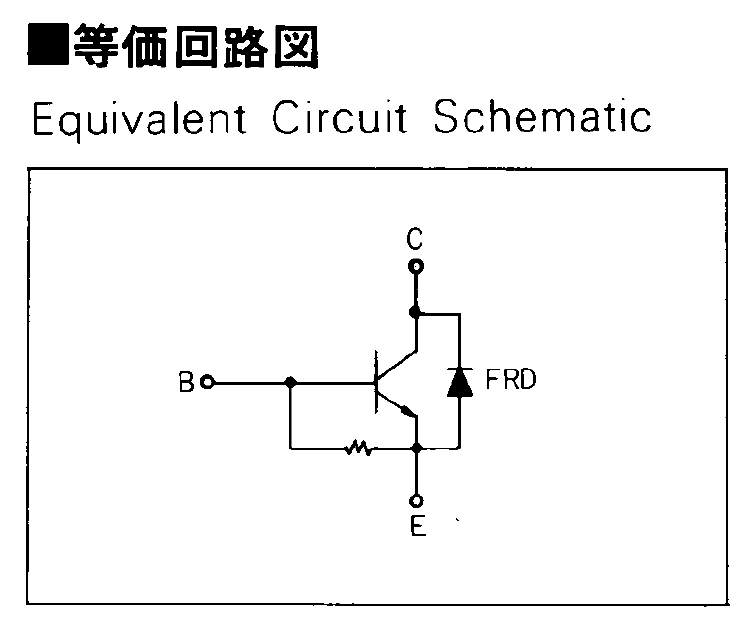
    The transistors don’t even begin to turn on until IB gets over about 50 mA, because there’s a 13 Ω shunt resistor (as measured, for either polarity) between the base and emitter terminal:

    Fuji ET227 - equivalent circuit
    Fuji ET227 – equivalent circuit

    In the ET227’s normal use, that resistor dumps the Miller effect charge injected from the collector (with the intent of improving the switching time), but you must ram nearly 70 mA into the resistor to get 900 mV at the base, so the actual transistor base current isn’t all that high for low collector currents. But you measure gain by dividing goes-outa by goes-inta, so that’s what I’ll do.

    The ET227 needs something like IB = 30 A to switch 100 A at the collector, so a few dozen mA into that resistor rounds off to zilch for its usual driver circuit. FWIW, with IB = 30 A, VBE tops out at 2 V: the resistor carries 150 mA and dissipates 300 mW.

    Anyhow, randomly labeling the transistors from A (on the heatsink) through E, then hitching them up to a 1.8 A bench supply with a 33 Ω resistor to the base terminal provided some readings at single-digit collector voltages.

    For IB = 72 mA:

    IB IC hFE
    A 72 490 6.8
    B 73 540 7.4
    C 74 480 6.5
    D 75 440 5.9
    E 76 520 6.8

    For IB = 108 mA, with one bumped-knob outlier:

    IB IC hFE
    A 108 1220 11.3
    B 101 1190 11.8
    C 108 1280 11.9
    D 108 1170 10.8
    E 108 1320 12.2

    Although the gain around 1 A comes out slightly higher than while running the motor, it’s in the same ballpark. This is not a high-gain device: it’ll need a driver after the optoisolator to squeeze enough current through the collector.

    Eks tried to unload a huge old Tek transistor curve tracer on me that would be ideal for this sort of thing. I’m still not tempted…