The Smell of Molten Projects in the Morning

Ed Nisley's Blog: Shop notes, electronics, firmware, machinery, 3D printing, laser cuttery, and curiosities. Contents: 100% human thinking, 0% AI slop.

Author: Ed

  • AADE LC Meter: AT26 Crystal Capacitance Fixture

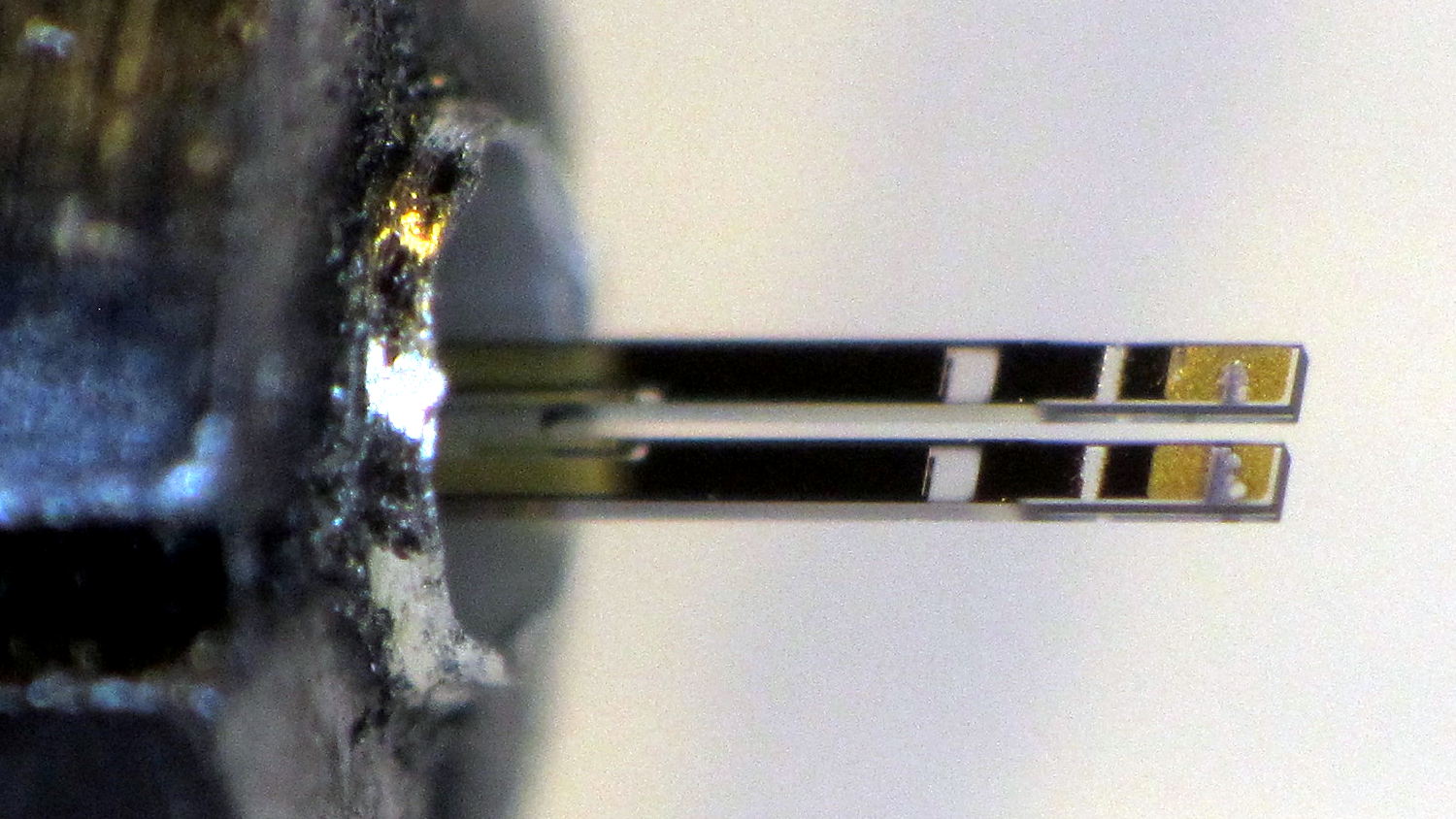
    Crystals (or resonators) in AT26 packages have vanishingly small capacitances, so I conjured a little fixture for my AADE L/C Meter IIB (*) that holds them securely under little fingers snipped from an EMI shield:

    AT26 crystal capacitance fixture - Cpar detail
    AT26 crystal capacitance fixture – Cpar detail

    The finger on the right sits atop a snippet of rectangular brass tube so it need not bend so far.

    The base is a snippet of double-sided PCB with copper tape soldered around the edges. I drilled the holes slightly oversize and soldered copper tape there, giving the top foil a direct connection to the terminals. The raggedy slot looks like it came from a hacksaw; no false advertising there.

    The meter reports 6.5 pF of stray capacitance and nulls it to zero as usual. Without the fixture, it shows 2.5 pF.

    With the crystal in that position, the meter measures Cpar, the parasitic capacitance from both terminals to the can, which should be (roughly) twice the capacitance from either terminal to the can.

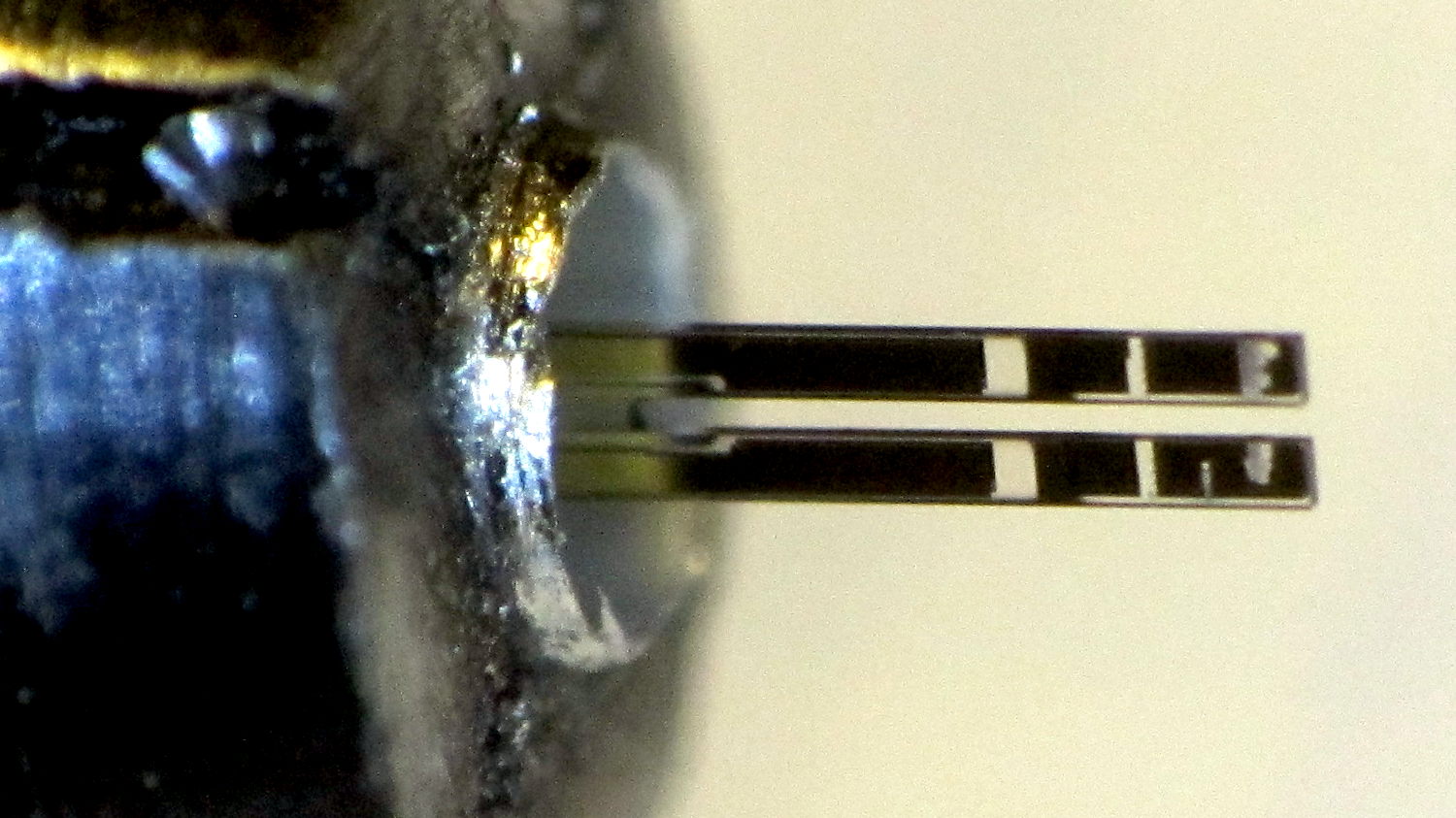
    Two more clips measure C0, the plate-to-plate capacitance:

    AT26 crystal capacitance fixture - C0 detail
    AT26 crystal capacitance fixture – C0 detail

    The meter drive is about 200 mV at 700 kHz, far away from resonance. Assuming the resonator’s effective series resistance is 25 kΩ (tuning forks aren’t crystals!), it’s dissipating 1.5 µW (and less as the ESR goes up). That may be slightly hot for some resonators, but it’s surely survivable.

    Some preliminary data on five 32.768 kHz crystals shows Cpar = 0.4 pF and C0 = 0.9 pF. I don’t trust those numbers very much, but they’re reproducible within 0.1-ish pF.

    (*) Almost All Digital Electronics and its website vanished after the owner died; the meter continues to work fine. The cheap knockoffs flooding eBay and Amazon may get you close to the goal.

  • Turkey on the Rail

    We’ve often seen turkeys perched on horizontal tree branches and split-rail fences, but this is new:

    Turkey on patio rail
    Turkey on patio rail

    Apparently she wanted to use the bird feeder atop the post festooned with plastic squirrel deterrence. Not being Elastigirl, she couldn’t quite stretch from rail to feeder, eventually gave up trying, and flapped to the driveway.

    We’ve been turkey-watching for nearly two decades, it’s been eight years since we saw a turkey on the patio, and a few days after I set up the yard camerashazam, this bird shows off for my friend in Raleigh while I’m in the Basement Laboratory. I’m insane with jealousy.

    In point of fact, turkeys seem perfectly aware of people inside the house, so it’s not surprising they avoid the patio. When we move close to a window, the flock decides it has business elsewhere and, generally without haste or confusion, flows over the hill and away.

    Obviously, I must set up motion detection and capture some images …

  • Snowplow vs. Plastic Fence

    We spotted this on our regular walk around the block:

    Plastic fence vs snow
    Plastic fence vs snow

    The horizontal rails have a latching ramp that’s good enough in most circumstances:

    Plastic fence - rail latch detail
    Plastic fence – rail latch detail

    Perhaps those latches released as designed under an overload. The snowplow would have been traveling toward us on that side of the road and pushed the snow against the fence panels hard enough to dislodge the rail latches from their sockets.

    I suppose they can zip the fence panels back in place, one by one, without rebuilding the whole affair.

  • Quartz Tuning Fork Resonator Teardown

    Thinking of a 60 kHz crystal filter front end for the WWVB receiver brought a little bag of 32.768 kHz crystals to the surface; I figured I could use them as crash test dummies while a bag of 60 kHz crystals travels around the planet. Come to find out they don’t behave quite like crystals and a bit of investigation shows the little cans contain tuning fork resonators, not crystal slabs.

    I had to see that, so I grabbed the base of one in a pin vise:

    Quartz resonator - pin vise
    Quartz resonator – pin vise

    I don’t know the part number for those resonators, but it’s something like AT26, where the “26” means a cylindrical can 2 mm OD and 6 mm long, more or less.

    Notching the can at the chuck with a triangular file, then wiggling the can with needle-nose pliers, eventually broke it off:

    Quartz resonator - A side
    Quartz resonator – A side

    The other side:

    Quartz resonator - B side
    Quartz resonator – B side

    A look through the microscope show they’re transparent, with laser trim scars on the ends:

    Quartz resonator - detail
    Quartz resonator – detail

    The “holes” are unplated quartz areas, clear as the finest glass.

    Not what I was expecting to see, at all!

  • Raspberry Pi Slowdown

    At first, the yard camera worked fine, but a few days later the stream of JPEG images would unpredictably stall. I connect to it through a public-key SSH session and, sometimes, the login would stall for tens of seconds and, with a session set up, various exciting operation like, say, htop would unpredictably stall; if I waited long enough, they’d complete normally.

    This seemed familiar:

    Samsung 16 GB Evo MicroSD card
    Samsung 16 GB Evo MicroSD card

    It’s a known-good card from a reputable supplier, not that that means much these days. The camera flash highlights the gritty silkscreen (?) texture of the orange overlay, but the production value seems high enough to pass muster.

    Popping the card in my desktop PC showed:

    • It remains functional, at least to the extent of being mount-able and write-able
    • 3probe --time-ops /dev/sdb showed it still held 16 GB
    • fsck -fv /dev/sdb[12] shows no problems
    • Both partitions looked good

    So I shrank the main partition to 7.5 GB, copied the image to the desktop PC’s SSD, fired up the Token Windows Laptop, ran the Official SD Card Formatter, and discovered that it thought the card had only 63 MB (yes, MB) available. That’s the size of the FAT boot partition, so I returned the card to the desktop PC, unleashed gparted on it, blew away the partitions, reformatted the whole thing to one 16 GB FAT32 partition, and stuck it back in the laptop, whereupon the Official Formatter agreed it had every byte it should.

    A format-with-overwrite then proceeded apace; the card doesn’t support format-with-erase.

    Back in the desktop, I copied the saved image back onto the card which, en passant, blew away the just-created FAT format and restored the Raspbian partition structure. The 8 GB of that copy proceeded at an average 12.1 MB/s. I did not watch the transfer closely enough to notice any protracted delays.

    Back in the Pi, the card booted and ran perfectly, sending an image every second to the laptop (now running its usual Mint Linux) on the guest network:

    Turkey flock in driveway - 2017-03-21
    Turkey flock in driveway – 2017-03-21

    SSH sessions now work perfectly, too, and commands no longer jam.

    So it seems a good-quality MicroSD card can experience protracted delays while writing data, to the extent of tens of seconds, stalling the Pi in mid-operation without producing data errors or any other symptoms.

    It’s not clear the Official Formatter does anything that simply copying the image back to the card wouldn’t also accomplish, although overwriting the entire 16 GB extent of the card exercises all the cells and forces the card controller to re/de/un/allocate bad blocks. If, indeed, the blocks are bad, rather than just achingly slow.

    Moral of the story: Don’t use MicroSD cards as mass storage devices, at least not for industrial applications that require consistent performance.

  • Vacuum Tube Lights: Duodecar Rebuild

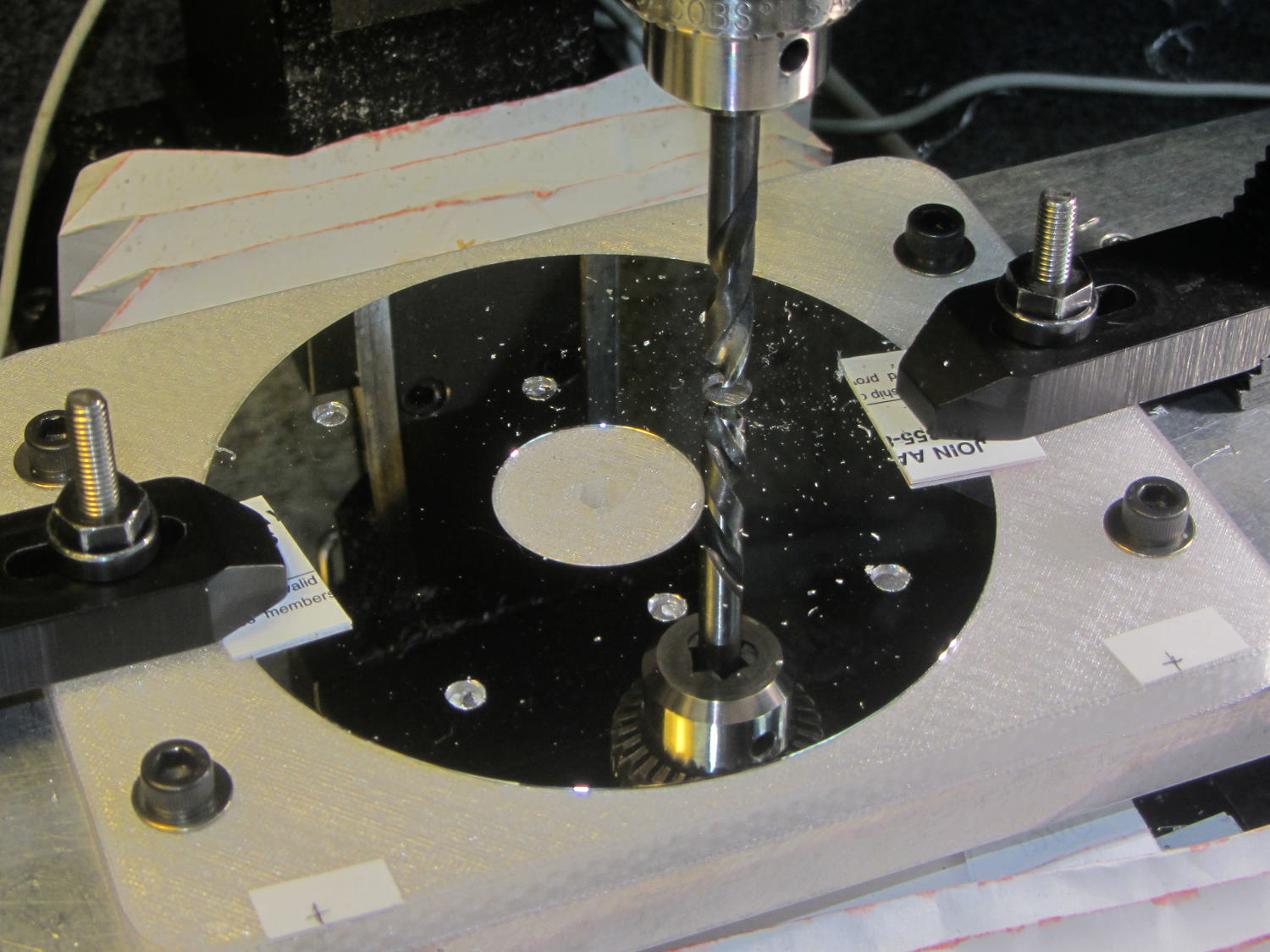
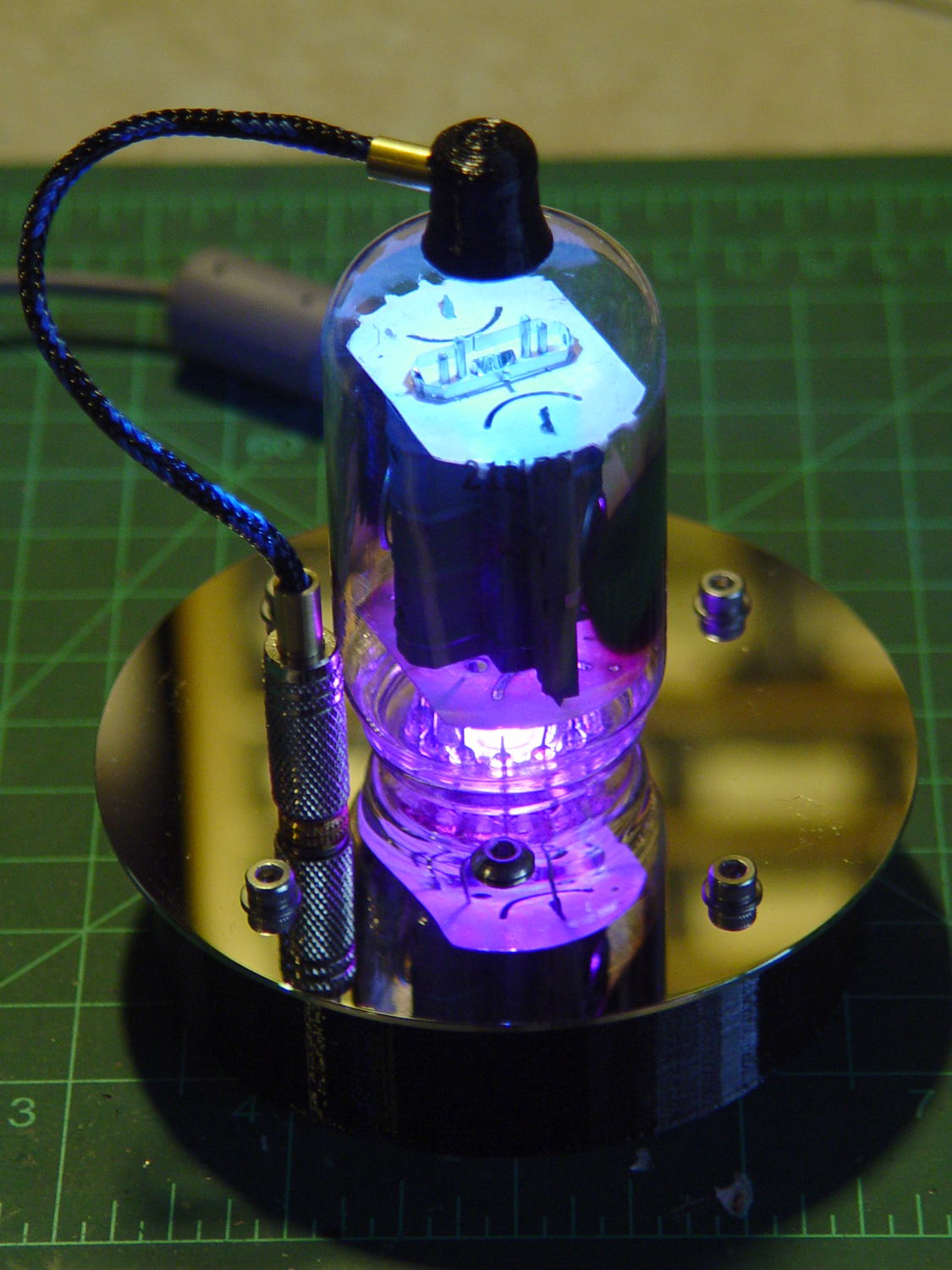
    You’ll recall the LED atop the 21HB5A tube failed, shortly after replacing the bottom LED and rewiring the ersatz plate lead, which led me to rebuild the whole thing with SK6812 RGBW LEDs. So I printed all the plastic parts again, because the duodecar tube socket’s pin circle can fit into a hard drive platter’s unmodified 25 mm hole, then drilled another platter to suit:

    Duodecar disk drilling
    Duodecar disk drilling

    The hole under the drill fits the 3.5 mm stereo socket for the ersatz plate lead, so it’s bigger than before.

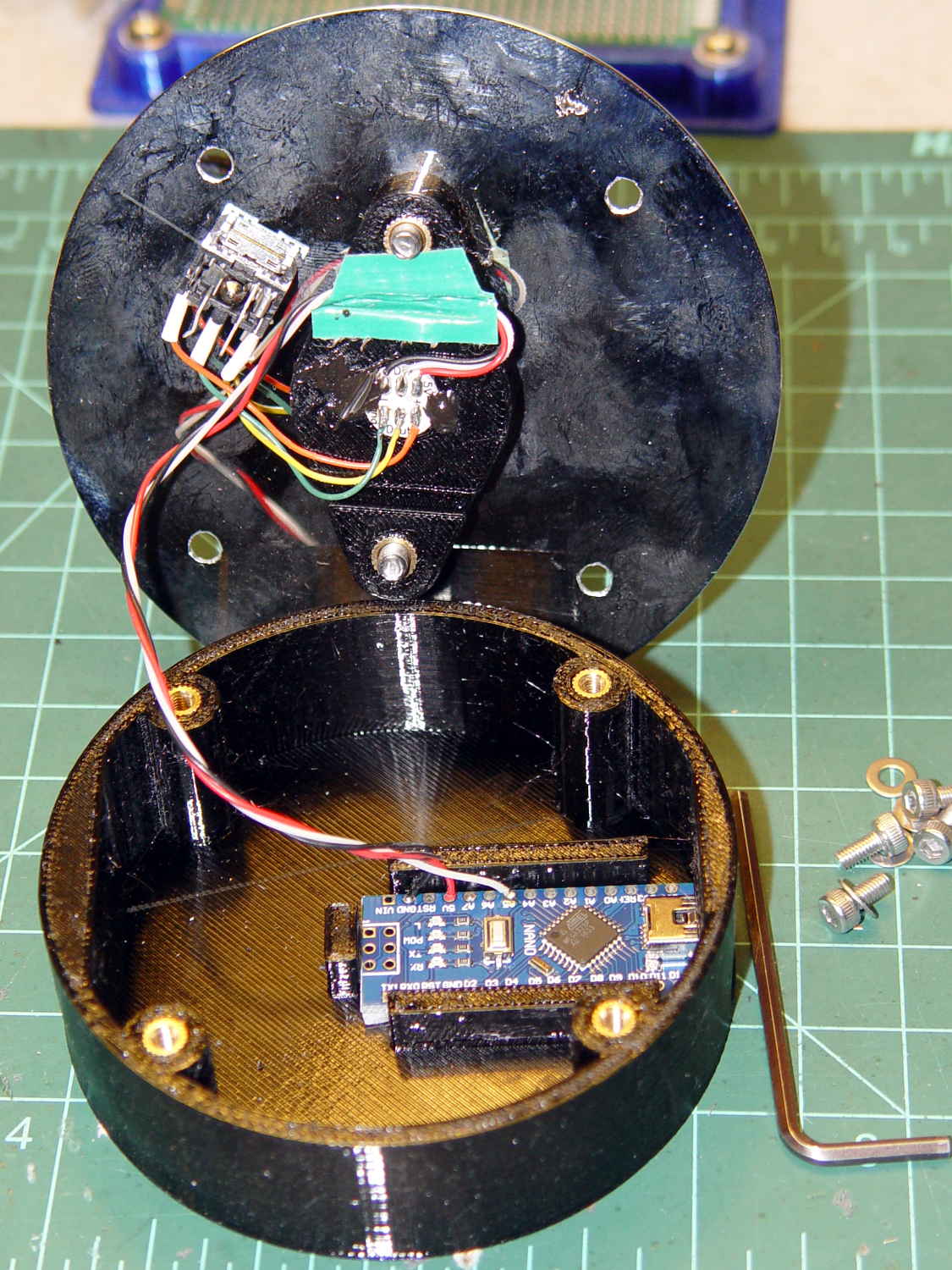
    I’ve switched from Arduino Pro Minis with a separate USB converter to Arduino Nanos with an on-board CH340 USB chip, because the fake FTDI chips on the converters are a continuing aggravation:

    21HB5A base - interior
    21HB5A base – interior

    Adding those wire slots to the sockets definitely helps tidy things up; the wires no longer need a crude cable tie anchoring them to the socket mounting screws.

    I wanted to drive the LEDs from the A7 pin, rather than the A3 pin I’d been using on the Pro Minis, to keep the wires closer together, but it turns out that A6 and A7 can’t become digital output pins. So I used A5, although I may come to regret the backward incompatibility.

    In any event, the 21HB5A tube looks spiffy with its new LEDs in full effect:

    21HB5A with RBGBW LEDs - cyan violet phase
    21HB5A with RBGBW LEDs – cyan violet phase

    I dialed the white LED PWM down to 32, making the colors somewhat pastel, rather than washed-out.

    The Arduino source code as a GitHub Gist:

    // Neopixel mood lighting for vacuum tubes
    // Ed Nisley – KE4ANU – June 2016
    // September 2016 – Add Morse library and blinkiness
    // October 2016 – Set random colors at cycle end
    // March 2017 – RGBW SK6812 LEDs
    #include <Adafruit_NeoPixel.h>
    #include <morse.h>
    #include <Entropy.h>
    //———-
    // Pin assignments
    const byte PIN_NEO = A5; // DO – data out to first Neopixel
    const byte PIN_HEARTBEAT = 13; // DO – Arduino LED
    #define PIN_MORSE 12
    //———-
    // Constants
    // number of pixels
    #define PIXELS 2
    // index of the Morse output pixel and how fast it sends
    boolean Send_Morse = false;
    #define PIXEL_MORSE (PIXELS – 1)
    #define MORSE_WPM 10
    // lag between adjacent pixel, degrees of slowest period
    #define PIXELPHASE 45
    // update LEDs only this many ms apart (minus loop() overhead)
    #define UPDATEINTERVAL 50ul
    #define UPDATEMS (UPDATEINTERVAL – 1ul)
    // number of steps per cycle, before applying prime factors
    #define RESOLUTION 500
    //———-
    // Globals
    // instantiate the Neopixel buffer array
    Adafruit_NeoPixel strip = Adafruit_NeoPixel(PIXELS, PIN_NEO, NEO_GRBW + NEO_KHZ800);
    uint32_t FullWhite = strip.Color(255,255,255,255);
    uint32_t FullOff = strip.Color(0,0,0,0);
    uint32_t MorseColor;
    struct pixcolor_t {
    unsigned int Prime;
    unsigned int NumSteps;
    unsigned int Step;
    float StepSize;
    float Phase;
    byte MaxPWM;
    };
    unsigned int PlatterSteps;
    byte PrimeList[] = {3,5,7,13,19,29};
    // colors in each LED
    enum pixcolors {RED, GREEN, BLUE, WHITE, PIXELSIZE};
    struct pixcolor_t Pixels[PIXELSIZE]; // all the data for each pixel color intensity
    uint32_t UniColor;
    unsigned long MillisNow;
    unsigned long MillisThen;
    // Morse code
    char * MorseText = " cq cq cq de ke4znu";
    LEDMorseSender Morse(PIN_MORSE, (float)MORSE_WPM);
    uint8_t PrevMorse, ThisMorse;
    //– Figure PWM based on current state
    byte StepColor(byte Color, float Phi) {
    byte Value;
    Value = (Pixels[Color].MaxPWM / 2.0) * (1.0 + sin(Pixels[Color].Step * Pixels[Color].StepSize + Phi));
    // Value = (Value) ? Value : Pixels[Color].MaxPWM; // flash at dimmest points for debug
    return Value;
    }
    //– Select three unique primes for the color generator function
    // Then compute all the step parameters based on those values
    void SetColorGenerators(void) {
    Pixels[RED].Prime = PrimeList[random(sizeof(PrimeList))];
    do {
    Pixels[GREEN].Prime = PrimeList[random(sizeof(PrimeList))];
    } while (Pixels[RED].Prime == Pixels[GREEN].Prime);
    do {
    Pixels[BLUE].Prime = PrimeList[random(sizeof(PrimeList))];
    } while (Pixels[BLUE].Prime == Pixels[RED].Prime ||
    Pixels[BLUE].Prime == Pixels[GREEN].Prime);
    do {
    Pixels[WHITE].Prime = PrimeList[random(sizeof(PrimeList))];
    } while (Pixels[WHITE].Prime == Pixels[RED].Prime ||
    Pixels[WHITE].Prime == Pixels[GREEN].Prime ||
    Pixels[WHITE].Prime == Pixels[BLUE].Prime);
    printf("Primes: %d %d %d %d\r\n",Pixels[RED].Prime,Pixels[GREEN].Prime,Pixels[BLUE].Prime,Pixels[WHITE].Prime);
    Pixels[RED].MaxPWM = 255;
    Pixels[GREEN].MaxPWM = 255;
    Pixels[BLUE].MaxPWM = 255;
    Pixels[WHITE].MaxPWM = 32;
    unsigned int PhaseSteps = (unsigned int) ((PIXELPHASE / 360.0) *
    RESOLUTION * (unsigned int) max(max(max(Pixels[RED].Prime,Pixels[GREEN].Prime),Pixels[BLUE].Prime),Pixels[WHITE].Prime));
    printf("Pixel phase offset: %d deg = %d steps\r\n",(int)PIXELPHASE,PhaseSteps);
    for (byte c=0; c < PIXELSIZE; c++) {
    Pixels[c].NumSteps = RESOLUTION * Pixels[c].Prime; // steps per cycle
    Pixels[c].StepSize = TWO_PI / Pixels[c].NumSteps; // radians per step
    Pixels[c].Step = random(Pixels[c].NumSteps); // current step
    Pixels[c].Phase = PhaseSteps * Pixels[c].StepSize;; // phase in radians for this color
    printf(" c: %d Steps: %d Init: %d Phase: %d deg",c,Pixels[c].NumSteps,Pixels[c].Step,(int)(Pixels[c].Phase * 360.0 / TWO_PI));
    printf(" PWM: %d\r\n",Pixels[c].MaxPWM);
    }
    }
    //– Helper routine for printf()
    int s_putc(char c, FILE *t) {
    Serial.write(c);
    }
    //——————
    // Set the mood
    void setup() {
    pinMode(PIN_HEARTBEAT,OUTPUT);
    digitalWrite(PIN_HEARTBEAT,LOW); // show we arrived
    Serial.begin(57600);
    fdevopen(&s_putc,0); // set up serial output for printf()
    printf("Vacuum Tube Mood Light – RGBW\r\nEd Nisley – KE4ZNU – March 2017\r\n");
    Entropy.initialize(); // start up entropy collector
    // set up pixels
    strip.begin();
    strip.show();
    // lamp test: a brilliant white flash
    printf("Lamp test: flash white\r\n");
    for (byte i=0; i<5 ; i++) {
    for (int j=0; j < strip.numPixels(); j++) { // fill LEDs with white
    strip.setPixelColor(j,FullWhite);
    }
    strip.show();
    delay(500);
    for (int j=0; j < strip.numPixels(); j++) { // fill LEDs with black
    strip.setPixelColor(j,FullOff);
    }
    strip.show();
    delay(500);
    }
    // get an actual random number
    uint32_t rn = Entropy.random();
    printf("Random seed: %08lx\r\n",rn);
    randomSeed(rn);
    // set up the color generators
    SetColorGenerators();
    // set up Morse generator
    Morse.setup();
    Morse.setMessage(String(MorseText));
    MorseColor = strip.Color(255,random(32,64),random(16),0);
    PrevMorse = ThisMorse = digitalRead(PIN_MORSE);
    printf("Morse enabled: %d at %d wpm color: %08lx\n [%s]\r\n",Send_Morse,MORSE_WPM,MorseColor,MorseText);
    MillisNow = MillisThen = millis();
    }
    //——————
    // Run the mood
    void loop() {
    if (!Morse.continueSending()) {
    printf("Restarting Morse message\r\n");
    Morse.startSending();
    }
    ThisMorse = digitalRead(PIN_MORSE);
    MillisNow = millis();
    if (((MillisNow – MillisThen) >= UPDATEMS) || // time for color change?
    (PrevMorse != ThisMorse)) { // Morse output bit changed?
    digitalWrite(PIN_HEARTBEAT,HIGH);
    if (Send_Morse && ThisMorse) { // if Morse output high, overlay flash
    strip.setPixelColor(PIXEL_MORSE,MorseColor);
    }
    PrevMorse = ThisMorse;
    strip.show(); // send out precomputed colors
    boolean CycleRun = false; // check to see if all cycles have ended
    for (byte c=0; c < PIXELSIZE; c++) { // compute next increment for each color
    if (++Pixels[c].Step >= Pixels[c].NumSteps) {
    Pixels[c].Step = 0;
    printf("Cycle %d steps %d at %8ld delta %ld ms\r\n",c,Pixels[c].NumSteps,MillisNow,(MillisNow – MillisThen));
    }
    else {
    CycleRun = true; // this color is still cycling
    }
    }
    // If all cycles have completed, reset the color generators
    if (!CycleRun) {
    printf("All cycles ended: setting new color generator values\r\n");
    SetColorGenerators();
    }
    for (int i=0; i < strip.numPixels(); i++) { // for each pixel
    byte Value[PIXELSIZE];
    for (byte c=0; c < PIXELSIZE; c++) { // … for each color
    Value[c] = (Pixels[c].MaxPWM / 2.0) * (1.0 + sin(Pixels[c].Step * Pixels[c].StepSize – i*Pixels[c].Phase));
    }
    UniColor = strip.Color(Value[RED],Value[GREEN],Value[BLUE],Value[WHITE]);
    strip.setPixelColor(i,UniColor);
    }
    MillisThen = MillisNow;
    digitalWrite(PIN_HEARTBEAT,LOW);
    }
    }
    view raw TubeMorse.ino hosted with ❤ by GitHub
  • Cheap WS2812 LEDs: Failure Waveforms

    The failed WS2812 pixel remains defunct:

    WS2812 array - failure 1
    WS2812 array – failure 1

    Attach scope probes to its data input and output pins (with the fixture face-down on the bench):

    WS2812 LED - fixture probing
    WS2812 LED – fixture probing

    The output no longer comes from the Land of Digital Signals:

    WS2812 Array Fail 1 - in vs out
    WS2812 Array Fail 1 – in vs out

    I immediately thought the broken bits occupied the first 24 bit times, when the WS2812 controller should be absorbing those bits from the incoming stream. The vertical cursors show the failed bits occupy 54 µs = 40-ish bit times at 800 kHz (or you can count them), so it’s worse than a simple logic failure.

    A closer look:

    WS2812 Array Fail 1 - in vs out - detail
    WS2812 Array Fail 1 – in vs out – detail

    At least for those bits, neither output transistor works well at all. On the other paw, the output shouldn’t even be enabled for the first 24 bits, so there’s that to consider.

    Lo and behold, it also fails the Josh Sharpie Test:

    WS2812 LED - test array failure 1 - ink test
    WS2812 LED – test array failure 1 – ink test

    You may recall it passed the leak test shortly before I assembled the test array a month ago. Evidently, just few days of operation suffices to wreck the seal, let air / moisture into the package, and kill the controller. Not a problem you’d find during a production-line test (assuming there is such a thing), but it should certain appear during the initial design & production qualification test phase (another assumption).

    Weirdly, a day after taking that photo, the controller began working perfectly again and the LEDs look just like they should: there is no explaining that!