The Smell of Molten Projects in the Morning

Ed Nisley's Blog: Shop notes, electronics, firmware, machinery, 3D printing, laser cuttery, and curiosities. Contents: 100% human thinking, 0% AI slop.

Author: Ed

  • Verizon FiOS at 1 Gb/s for $70? Really‽

    Jessica: Hi! I am a Verizon specialist, can I help you today?

    You (that would be me = Ed): Verizon has announced gigabit Internet service for $70/month. That isn’t listed as one of the my “upgrade” options. Is it available in this area? If not, why do the 25 and 50 Mb/s services cost 90 and $100/month?

    Jessica: By chatting with us, you grant us permission to review your services during the chat to offer the best value. Refusing to chat will not affect your current services. It is your right and our duty to protect your account information. For quality, we may monitor and/or review this chat.

    Jessica: Hey there! My name is Jessica. Happy to help!

    Jessica: Thank you for being a valued Verizon customer, I will be glad to check the information for you.

    Jessica: For security and protection of your account records, please provide your first and last name as it appears on your account, plus one of the following pieces of information. Either your:

    [redacted]

    You: [redacted]

    Jessica: Thank you for the information, Edward Nisley!

    Jessica: Please give me few minutes to check the information.

    Jessica: I appreciate your patience.

    Jessica: Thank you for safeguarding the account.

    Jessica: Thank you for your years of loyalty to Verizon!

    Jessica: It looks like you currently have just Verizon Fios Internet up to 25/25 Mbps plan.
    Just to confirm, are you looking to make upgrade for just Fios Gigabit Connection?

    You: That’s correct: I do /not/ want phone or TV service.

    Jessica: I have checked the information and it looks like Verizon Fios Gigabit Connection is not available for your location.

    However, you can make the upgrade for Verizon Fios Internet up to 100/100 Mbps and above speed plan.

    You: Which gives me the opportunity to pay twice as much for 10% of the bandwidth: definitely an unattractive offer.

    Jessica: We are offering different speed plan with different prices and great discounts.

    Jessica: It looks like you are currently paying just $45.99/mo. for your Verizon Fios Internet upto 25/25 Mbps plan.

    Jessica: Just to confirm, are you looking to make any upgrade?

    You: I was interested in 1 Gb/s for $70. I’m uninterested in bait-and-switch tactics for lower bandwith at higher prices. Based on the gigabit price, I should be getting 25 Mb/s for $1.75/month … what sort of discount can you offer to make up for that sort of overcharge?

    Jessica: I understand how you feel.

    Jessica: The availability of speed and price vary from location to location.

    You can get our Verizon Fios Internet up to 50/50 Mbps plan at just $59.99/mo. before taxes with new 2 year agreement.

    Jessica: The base price of this plan is $99.99/mo. before taxes. However, you will be getting $40 OFF for 24 months with new 2 year agreement plan.

    Jessica: So, its just $59.99/mo. before taxes.

    The estimated price would be just $62.48/mo. including taxes and fees.

    Jessica: Just to confirm, would you like to go ahead and make the upgrade for this speed plan?

    Jessica: I haven’t heard from you for a few moments. Would you like to continue chatting?

    You: That’s the bait-and-switch tactic I’m /not/ interested in; DO NOT change my service. Verizon tacks on a few bucks a month for a “Municipal Construction Charge” without actually building anything. Let me know when you can offer me a gigabit for $70, then we can talk. Before then, DO NOT CHANGE ANYTHING. Thanks …

    We are sorry, but the agent was disconnected, please wait for the agent to reconnect..

    We apologize for the unexpected delay, an agent should be with you very soon.

    Agent Carl enters chat

    Carl: Hi there! You have reached Carl. How may I help you today?

    You: Do you have access to the previous half hour of chat before Agent Jessica was mysteriously disconnected?

    Carl: It seems that the previous agent lost connection.

    Carl: I am sorry for the inconvenience caused to you. She might have faced some technical issues.

    Carl: Pleasure assured no changes will be made on your account without your consent.

    Carl: I read that you wish to check the availability of Gigabit speeds for your home. Correct?

    You: That’s what I asked, half an hour ago, and was told it’s not available, but I /can/ pay more than that (minus a teaser discount) for 10% of the bandwidth. If that’s still the best you can do, it’s not what I want.

    Carl: The availability of services and plans is address specific. I see that the previous agent informed the Gigabit speed is not available.

    Carl: The prices and promotions are time specific.

    Carl: You get discounts and promotions available at the time of signing up for new services.

    Carl: When you signed up for services 2 year back, you get the promotions available at that time.

    You: OK, we’re going in circles. Let me know when you can deliver what Verizon offers to other FiOS customers. Thanks …

    Carl: Right now, the customer who sign up for new service on a new account for 1st time, they get the offers available right now.

    Carl: You’re welcome.

    Carl: Is there anything else I can help you online today?

    You: Nope, we’re off to a concert. Have a good rest of the evening!

    Carl: You too have a great evening.

    Carl: If you need assistance in the future, visit us anytime on the My Fios App or at Verizon.com. Thank you for chatting with Verizon.

  • Arduino Joystick

    A bag of sub-one-dollar resistive joysticks arrived from halfway around the planet:

    Arduino UNO - resistive joystick
    Arduino UNO – resistive joystick

    A quick-and-dirty test routine showed the sticks start out close to VCC/2:

    Welcome to minicom 2.7
    
    OPTIONS: I18n
    Compiled on Feb  7 2016, 13:37:27.
    Port /dev/ttyACM0, 10:23:45
    
    Press CTRL-A Z for help on special keys
    
    Joystick exercise
    Ed Nisley - KE4ZNU - May 2017
    00524 - 00513 - 1
    

    That’s from minicom on the serial port, as the Arduino IDE’s built-in serial monitor ignores bare Carriage Return characters.

    The joystick hat tilts ±25° from its spring-loaded center position, but the active region seems to cover only 15° of that arc, with a 5° dead zone around the center and 5° of overtravel at the limits. This is not a high-resolution instrument intended for fine motor control operations.

    The analog input values range from 0x000 to 0x3FF across the active region. Aim the connector at your tummy to make the axes work the way you’d expect: left / down = minimum, right / up = maximum.

    The delay(100) statements may or may not be needed for good analog input values, depending on some imponderables that seem not to apply for this lashup, but they pace the loop() to a reasonable update rate.

    Pushing the hat toward the PCB activates the simple switch you can see in the picture. It requires an external pullup resistor (hence the INPUT_PULLUP configuration) and reports low = 0 when pressed.

    Those are 0.125 inch (exactly!) holes on a 19.5×26.25 mm grid in a 26.5×34.25 mm PCB. Makes no sense to me, either.

    The trivial Arduino source code as a GitHub Gist:

    // Joystick exercise
    #define JOYX A0
    #define JOYY A1
    #define BUTTON 7
    int JoyX,JoyY;
    boolean Button;
    //– Helper routine for printf()
    int s_putc(char c, FILE *t) {
    Serial.write(c);
    }
    void setup() {
    Serial.begin (9600);
    fdevopen(&s_putc,0); // set up serial output for printf()
    Serial.println ("Joystick exercise");
    Serial.println ("Ed Nisley – KE4ZNU – May 2017");
    pinMode(BUTTON,INPUT_PULLUP);
    }
    void loop() {
    JoyX = analogRead(JOYX);
    delay(100);
    JoyY = analogRead(JOYY);
    delay(100);
    Button = digitalRead(BUTTON);
    printf("%05d – %05d – %1d\r",JoyX,JoyY,Button);
    }
  • XTC-3D Epoxy Coating: Results

    Having figured the mixing ratios, found the mixing trays, and donned my shop apron, I buttered up several iterations of the badge reel case to see how XTC-3D epoxy works on the little things around here.

    In all cases, I haven’t done any sanding, buffing, or primping, mostly because I’m not that interested in the final surface finish.

    A single coat produces a glossy finish with ripples from the printed threads:

    XTC-3D - Hilbert - reflective
    XTC-3D – Hilbert – reflective

    Seen straight on, without the glare, a little speck toward the lower right corner shows that cleanliness is next to impossible around here:

    XTC-3D - lines - direct
    XTC-3D – lines – direct

    An additional coat atop a Hilbert-curve upper surface comes out somewhat smoother:

    XTC-3D - Hilbert - reflective 2
    XTC-3D – Hilbert – reflective 2

    Another view, with less glare, shows the pattern a bit better:

    XTC-3D - Hilbert - reflective 1
    XTC-3D – Hilbert – reflective 1

    With no glare, the 3D Honeycomb infill shows through the surface:

    XTC-3D - Hilbert - direct
    XTC-3D – Hilbert – direct

    Coating the surface with epoxy definitely makes it more transparent / less translucent by filling in the air gaps.

    The sides of that part have only one coat and still show typical 3D printed striations.

    Three coats wipe out the striations, along with all other surface detail:

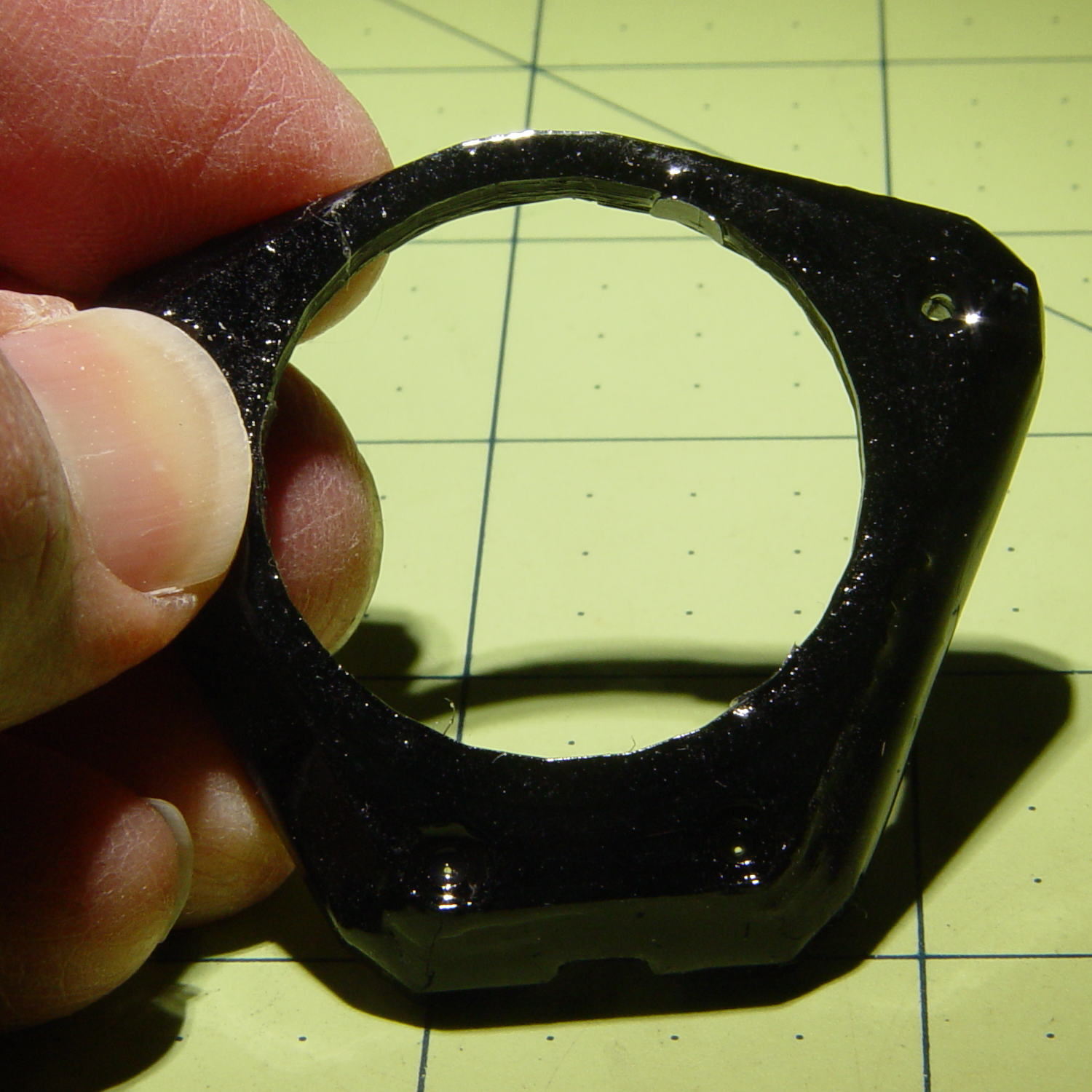
    XTC-3D - Bezel - front oblique
    XTC-3D – Bezel – front oblique

    The bolt head recesses collected enough epoxy to require reaming / milling, which certainly isn’t what you want in that situation. The bolt holes also shrank, although my usual hand-twisted drill would probably suffice to clear the epoxy.

    Another view shows a glint from the smooth surface filling the upper-right recess:

    XTC-3D - Bezel - front
    XTC-3D – Bezel – front

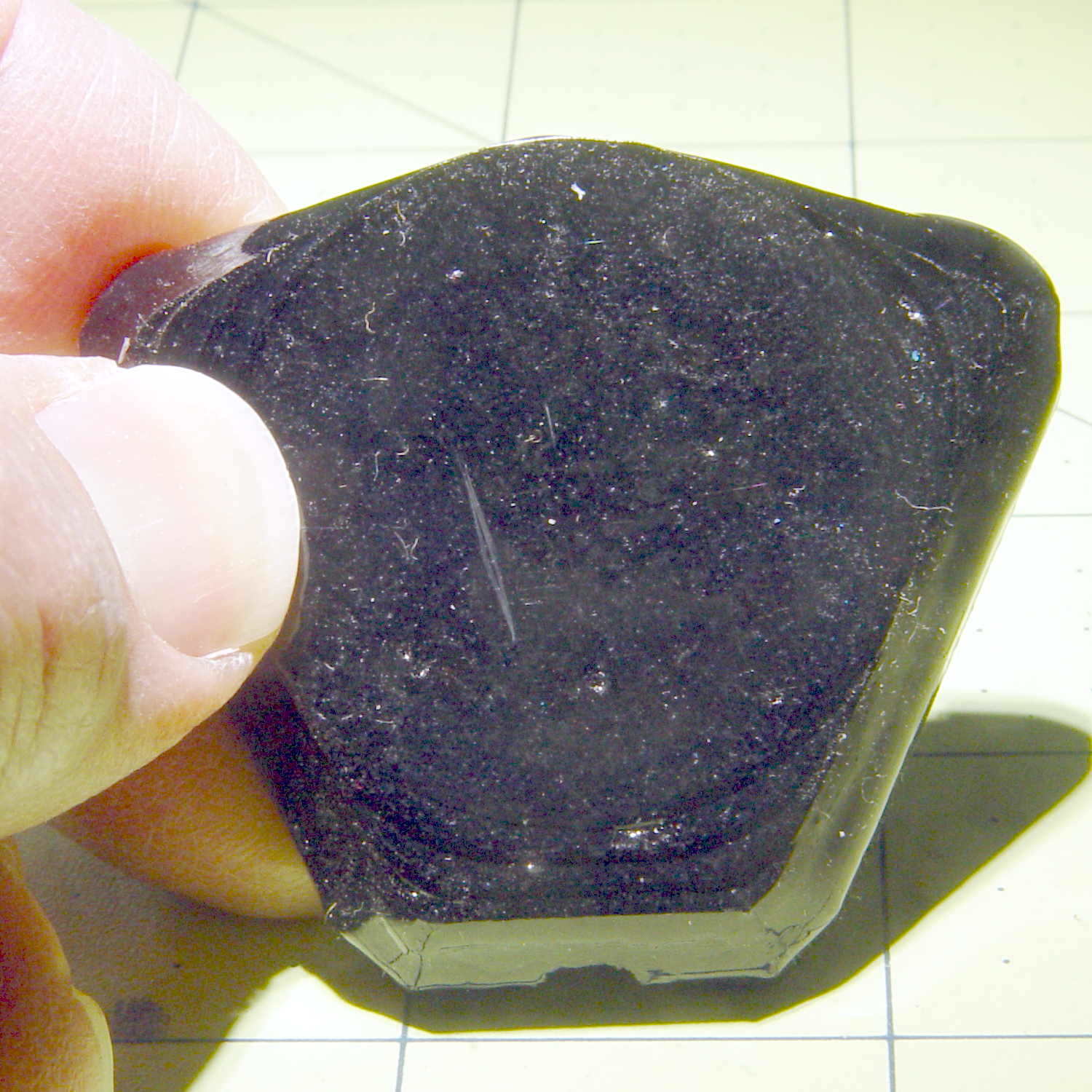
    Three coats definitely hides the 3D printed threads, although you can see some ridges and edges:

    XTC-3D - heavy - oblique
    XTC-3D – heavy – oblique

    The epoxy isn’t perfectly self-leveling, probably due to my (lack of) technique:

    XTC-3D - heavy - reflection
    XTC-3D – heavy – reflection

    Blowing out the contrast shows the surface finish:

    XTC-3D - heavy - direct - boost
    XTC-3D – heavy – direct – boost

    Those scratches come from fingernails, after the overnight curing time. The surface is hard, but not impervious to scratching, which is about what you’d expect for a clear epoxy.

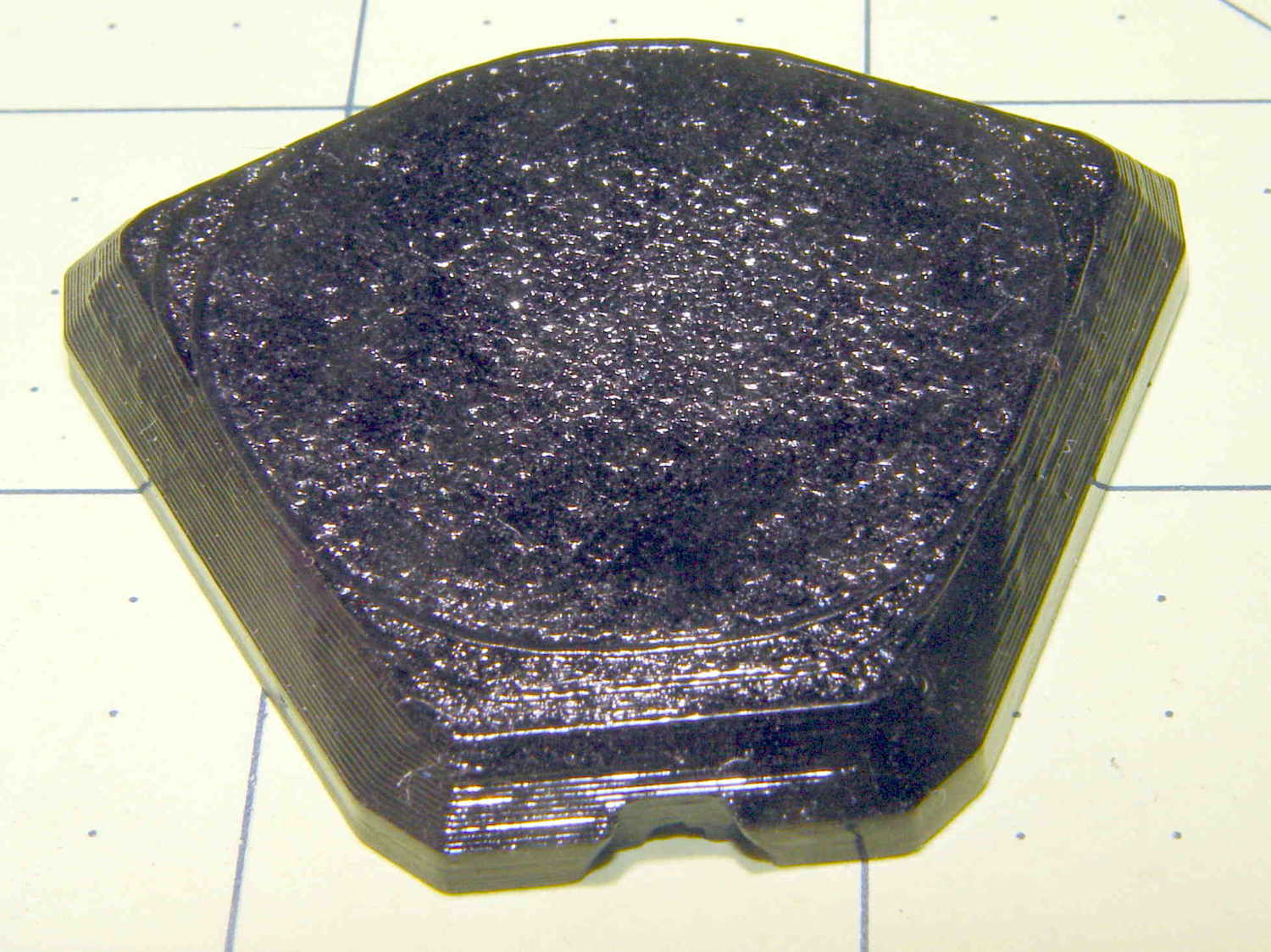
    Slightly over-thinning the XTC-3D with denatured alcohol in a 0.7 : 0.3 : 0.3 by weight ratio produced a watery liquid that penetrated directly into the surface:

    XTC-3D - thinned - oblique
    XTC-3D – thinned – oblique

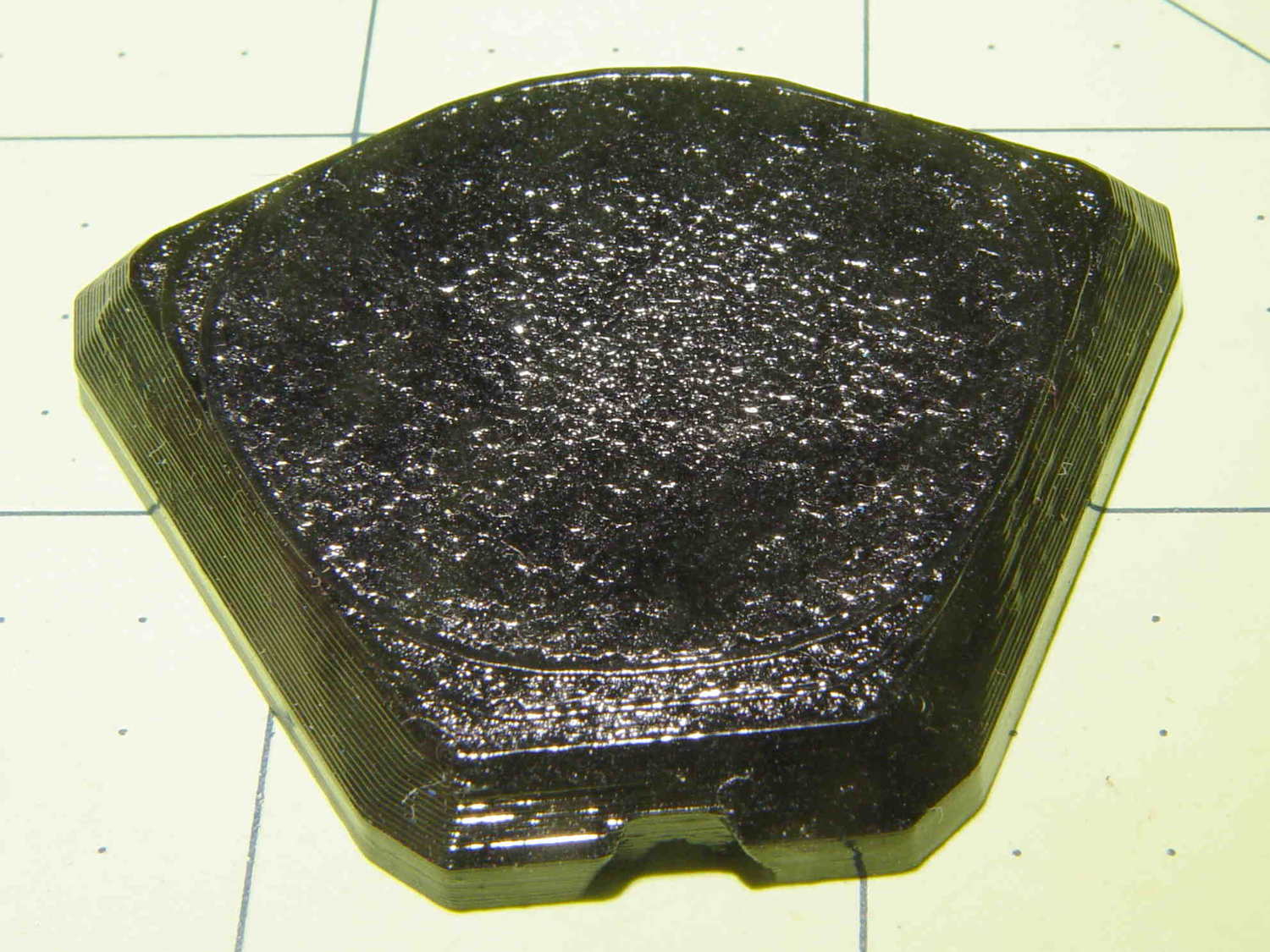
    The finish depends critically on what’s below the surface and how much epoxy you apply. I tried to spread it uniformly with a foam brush, but the center came out somewhat rougher than the outer edge:

    XTC-3D - thinned - oblique
    XTC-3D – thinned – oblique

    The striations along the sides filled in a bit, but surely not enough to satisfy anybody who worries about such things.

    A specular reflection shows the changing surface smoothness:

    XTC-3D - thinned - oblique reflective
    XTC-3D – thinned – oblique reflective

    Perhaps two coats of thinned epoxy would produce a watertight / airtight part, without changing the overall dimensions by very much. The mechanical properties depend almost entirely on the plastic-to-plastic bond, so I doubt a thin epoxy layer would improve its pressure-handling capabilities.

    Few of the parts I make will benefit from an epoxy coating and I definitely don’t want to get into post-processing the parts just to improve their looks!

  • Wearable LED vs. Astable Multivibrator vs. Dead Lithium Cells

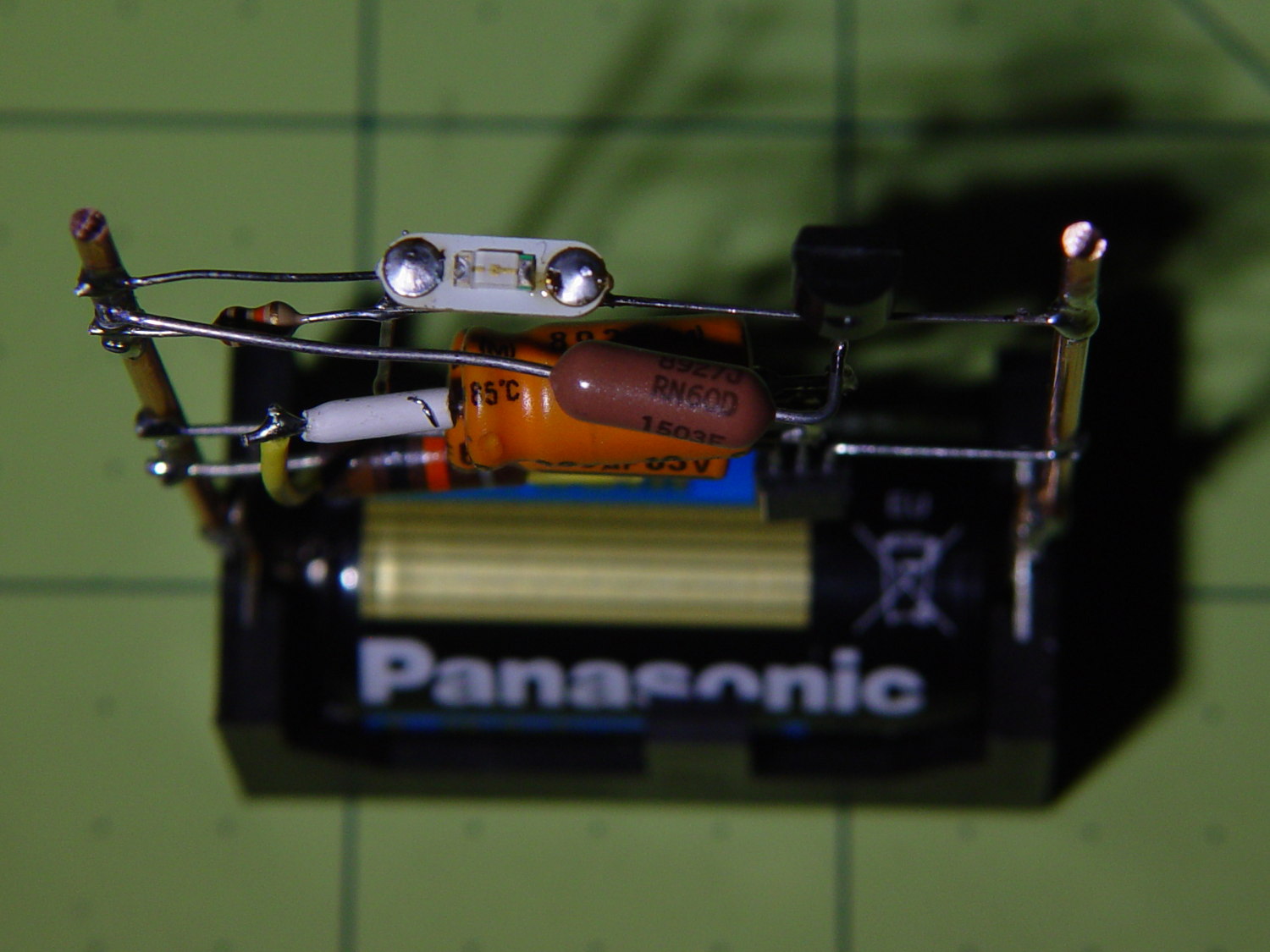
    Mashing the wearable LED from the completely dead CR2032 cell with a classic astable multivibrator circuit and a not-dead-yet CR123 cell produced a pure-analog desktop blinky:

    CR123A Astable - front
    CR123A Astable – front

    Of course, I managed to swap the base resistors, which meant the LED stayed on most of the time, which accounts for the slightly off-kilter brown resistor just under the LED.

    It doesn’t look like much with the LED off:

    CR123A Astable - top - off
    CR123A Astable – top – off

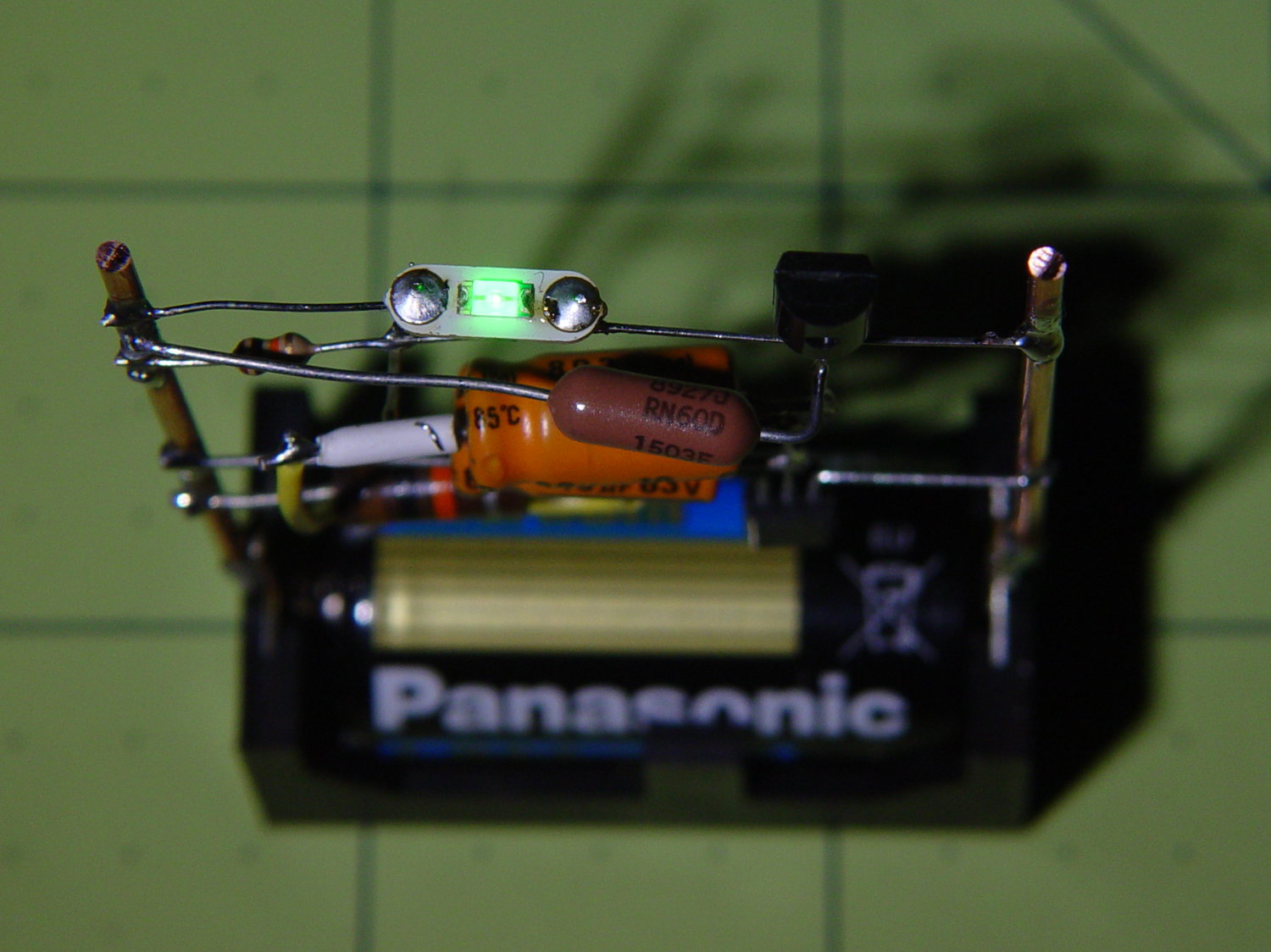
    Running from a 2.8 V (= dead) lithium cell, the LED lights a dark room at 3 mA:

    CR123A Astable - top - on
    CR123A Astable – top – on

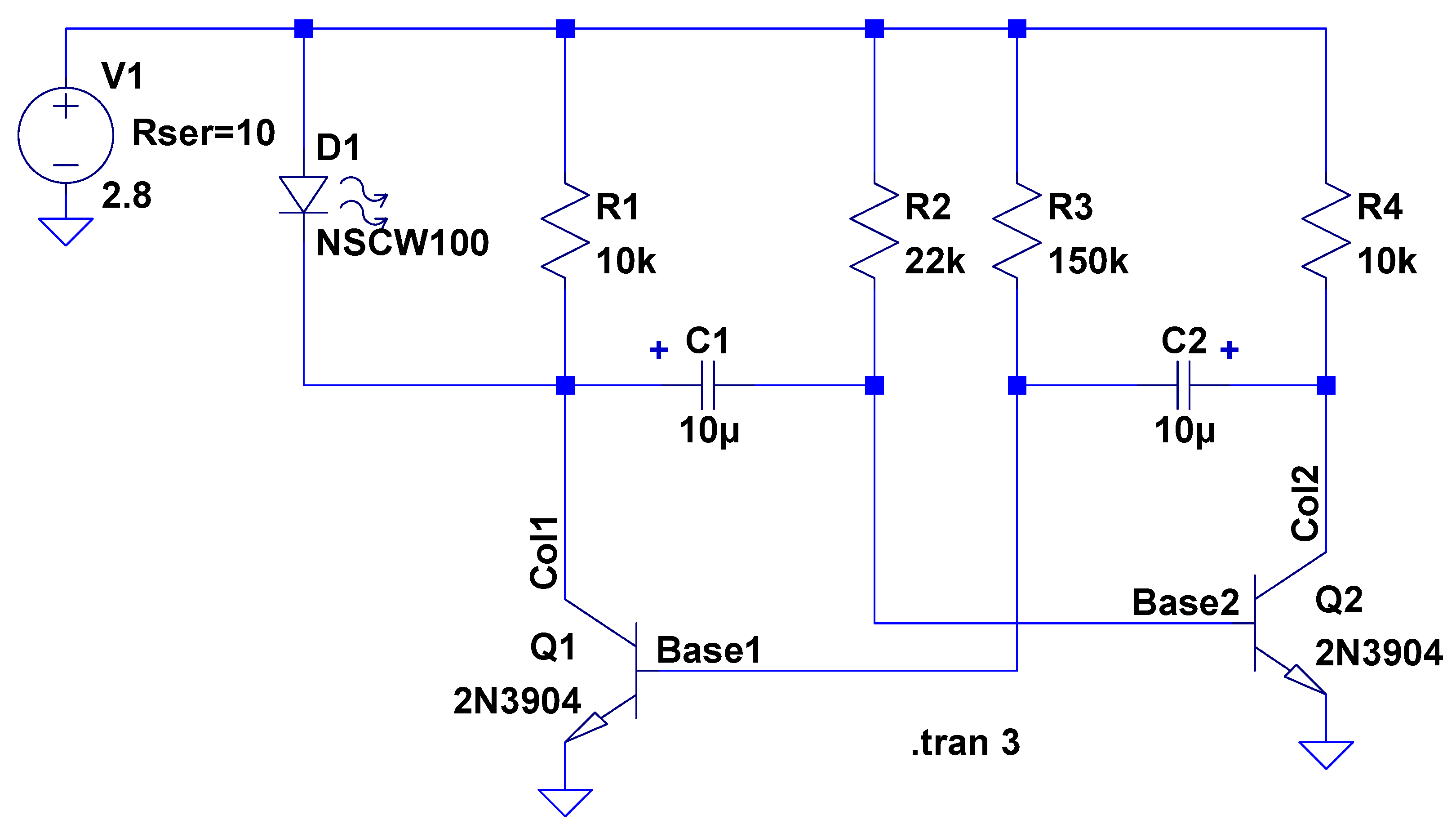
    The LTSpice schematic gives the details:

    Astable Multivibrator - CR2032 - schematic
    Astable Multivibrator – CR2032 – schematic

    The LED definitely didn’t come from Nichia and the 2N3704 transistors aren’t the 2N3904s found in the LTSpice library, but, by and large, this is the kind of circuit where nearly anything will work.

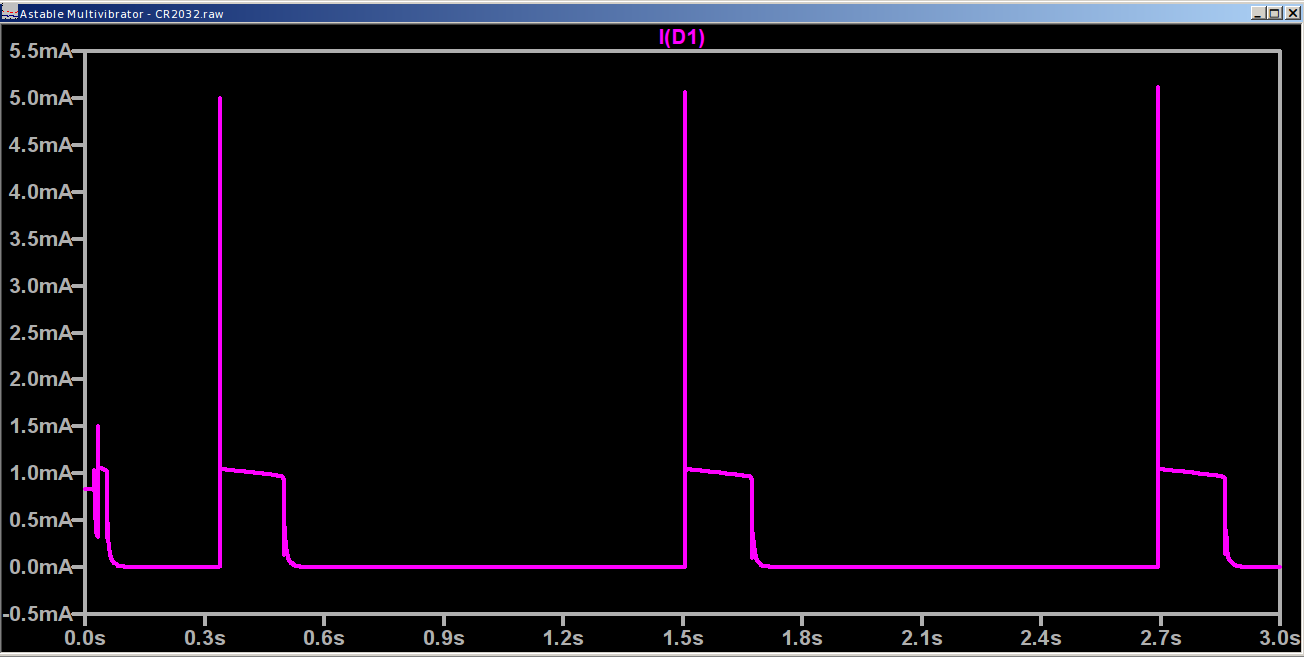
    The actual LED current obviously depends critically on the particular LED and the cell voltage, so this represents more of a serving suggestion than an actual prediction:

    Astable Multivibrator - CR2032 - waveform
    Astable Multivibrator – CR2032 – waveform

    Indeed, a Tek current probe clamped around one of those 10 AWG copper wires shows a much more enthusiastic LED current (1 mA/div):

    Astable - CR123A 2.8 V - 1 mA -green
    Astable – CR123A 2.8 V – 1 mA -green

    I don’t trust the baseline very much. The simulation & back of the envelope agree: the LED-off current should be around 400 µA (which doesn’t depend on the LED at all), so it’s in the right ballpark.

    Your mileage will definitely differ.

    It runs without a trace of software, which everybody at Squidwrench thought was wonderful …

  • Relics of the Empire: Bearing Samples

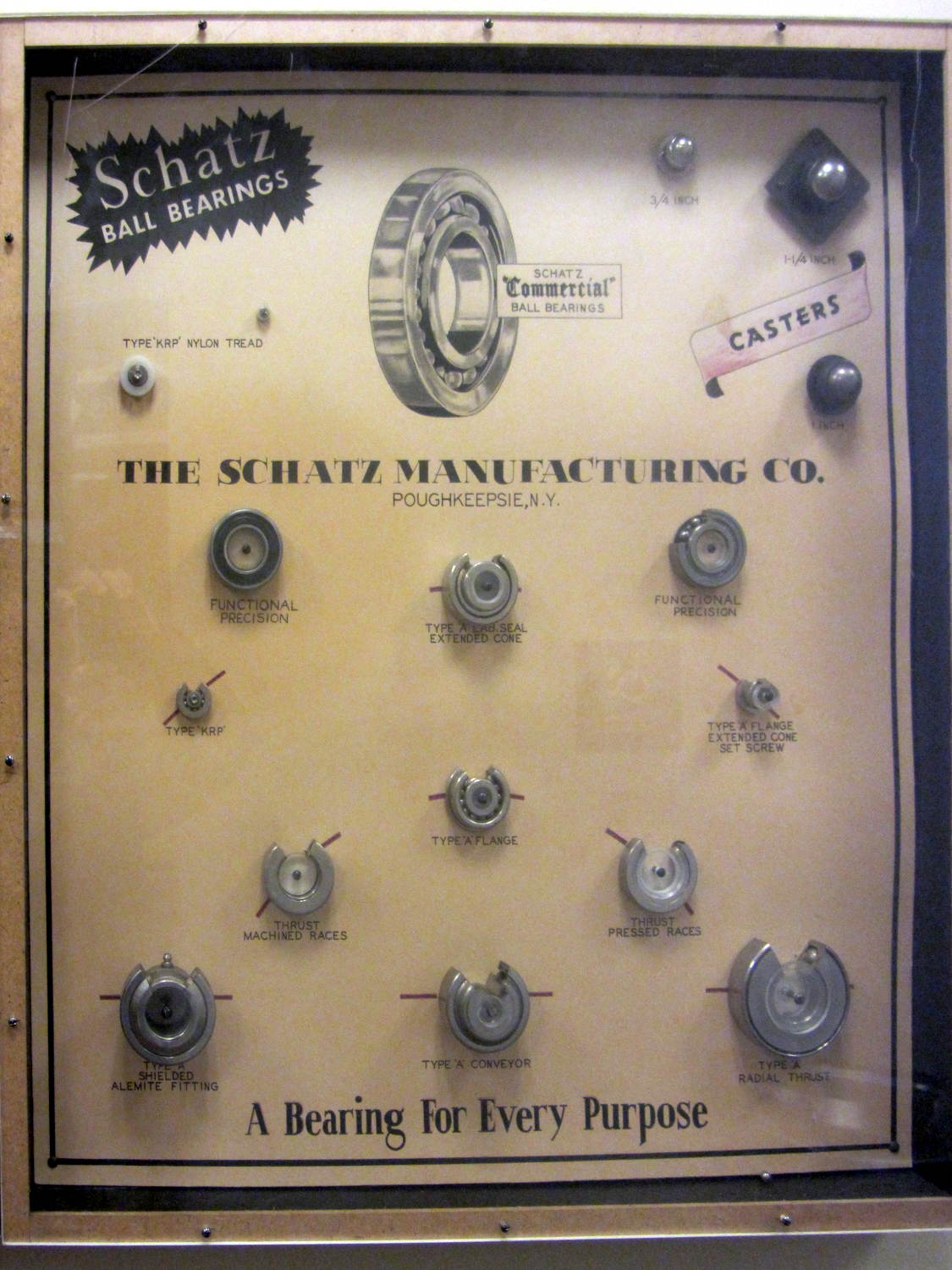
    Schatz Manufacturing, a major bearing producer in Poughkeepsie, made a sample case to show off their wares:

    Schatz Ball Bearings
    Schatz Ball Bearings

    You can tell by the yellowed backing paper that these have been around for a looong time.

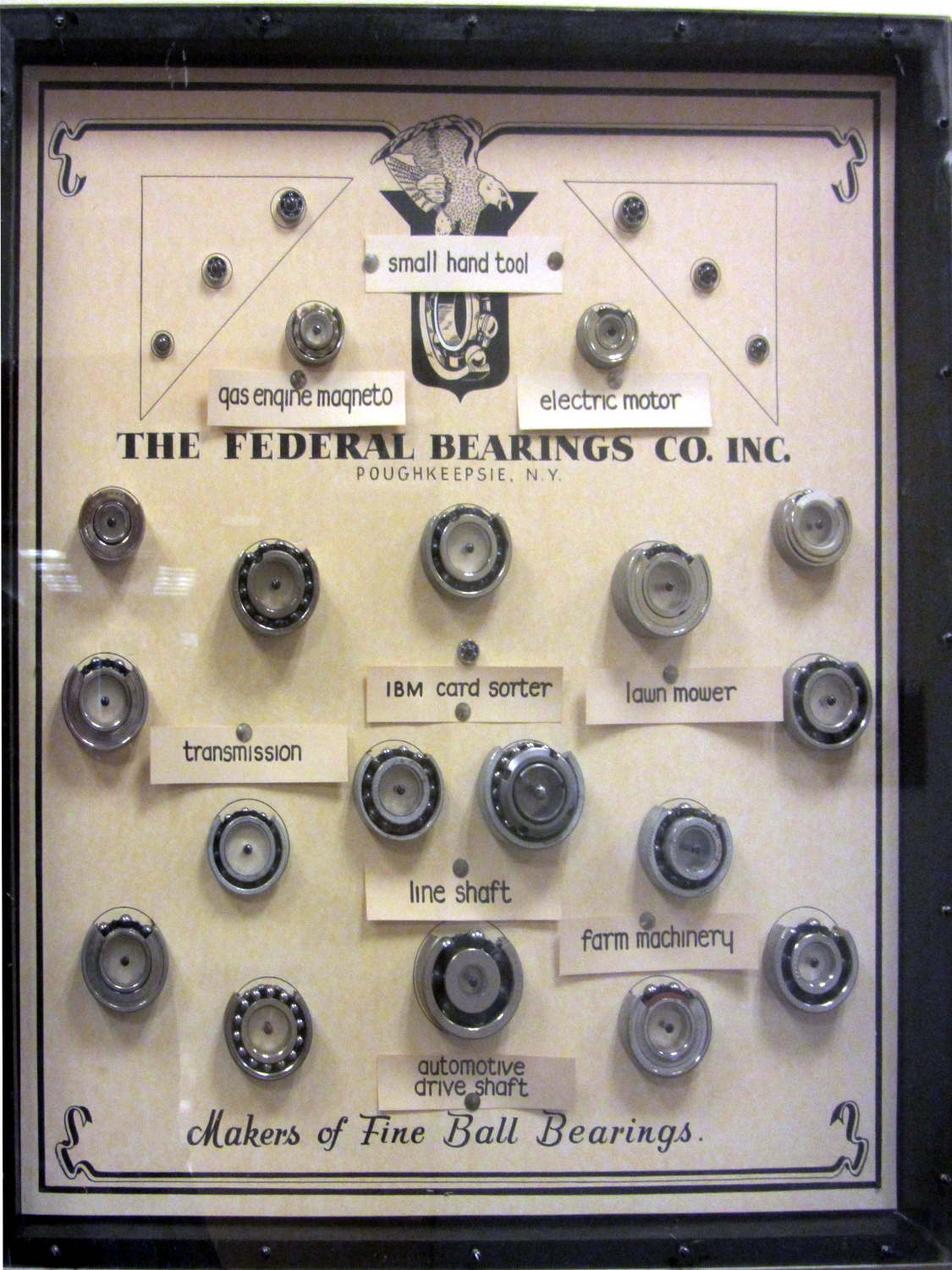
    It turns out that Poughkeepsie had two bearing manufacturers. Federal Bearings went into the products of other locally important industries:

    Federal Bearings
    Federal Bearings

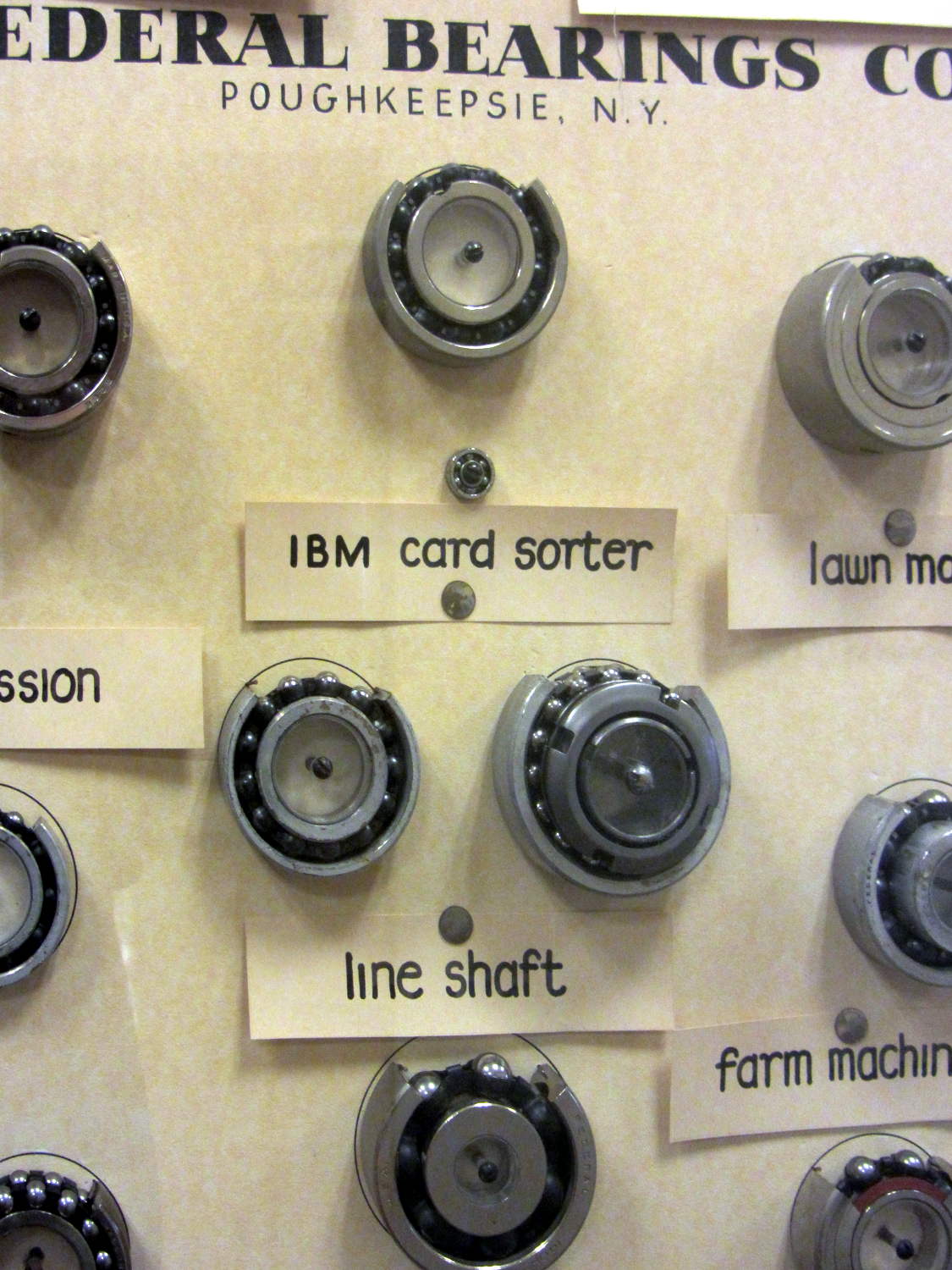
    A detailed look shows what was important, back in the day:

    Federal Bearings - Detail - IBM Card Sorter
    Federal Bearings – Detail – IBM Card Sorter

    Schatz and Federal later merged into Shatz Federal Bearings, eventually become Shatz Bearings, and still operate in Poughkeepsie. Some of their industrial waste remains here, too.

    Out in the garage I still have a few grease pilots (*) from the final Schatz Federal downsizing / going-out-of-business / moving / whatever sale. A friend bought several sets of heavy-duty steel chests-of-drawers which contained, very much to his surprise, a huge assortment of grease pilots, ranging in size from fit-on-your-thumb to cover-a-dinner-plate, which he obviously had no use for. He unloaded them on me with a phrase that has lived on forevermore:

    They’re a buck apiece, unless you take all of them, in which case they’re free.

    You’ll find the sample cases on the top floor of Adriance Library, should you ever be in town.

    Taken handheld in ambient light to avoid harsh flash shadows, then perspective-distorted to make them look like I was standing directly in front of the reflective plastic covers.

    (*) Different from a “pilot bearing”. A “grease pilot” is a two-part circular steel assembly used to inject grease into the bearing races before snapping the shields in place. They’re painstakingly machined to cup the balls and fill the gaps, with a pipe fitting on the back surface for the grease pump.

  • Dropbox Tour: To Keep Learning, Click Cancel

    After copying a Digital Machinist column to my Dropbox folder, I went to the site to get the link, discovered they improved the UI, declined a Flash-based tour of the new features, and got this baffling confirmation dialog:

    Dropbox - tour exit dialog
    Dropbox – tour exit dialog

    So. Many. Wrongs.

  • Arduino vs. Significant Figures: BigNumber Library

    The BigNumber library wraps the bc arbitrary precision calculator into a set of Arduino routines that seem like a reasonable basis for DDS calculations requiring more than the half-dozen digits of a floating point number or the limited range of scaled fixed point numbers tucked into an long int.

    Treating programming as an experimental science produces some Arduino source code and its output as a GitHub Gist:

    // BigNumber exercise
    #include "BigNumber.h"
    //– Helper routine for printf()
    int s_putc(char c, FILE *t) {
    Serial.write(c);
    }
    void setup ()
    {
    Serial.begin (115200);
    fdevopen(&s_putc,0); // set up serial output for printf()
    Serial.println ("BigNumber exercise");
    Serial.println ("Ed Nisley – KE4ZNU – April 2017");
    #define WHOLES 10
    #define FRACTS 10
    printf("Fraction digits: %d\n",FRACTS);
    BigNumber::begin (FRACTS);
    char *pBigNumber;
    #define BUFFLEN (WHOLES + FRACTS)
    char NumString[BUFFLEN];
    BigNumber Tenth = "0.1"; // useful constants
    BigNumber Half = "0.5";
    BigNumber One = 1;
    BigNumber Two = 2;
    BigNumber ThirtyTwoBits = Two.pow(32);
    Serial.println(ThirtyTwoBits);
    BigNumber Oscillator = "125000000";
    Serial.println(Oscillator);
    BigNumber HertzPerCount;
    HertzPerCount = Oscillator / ThirtyTwoBits;
    Serial.println(HertzPerCount);
    BigNumber CountPerHertz;
    CountPerHertz = ThirtyTwoBits / Oscillator;
    Serial.println(CountPerHertz);
    BigNumber TestFreq = "60000";
    Serial.println(TestFreq);
    BigNumber DeltaPhi;
    DeltaPhi = TestFreq * CountPerHertz;
    Serial.println(DeltaPhi);
    long DeltaPhiL;
    DeltaPhiL = DeltaPhi;
    printf("Long: %ld\n",DeltaPhiL);
    Serial.println("0.1 Hz increment …");
    Serial.println(TestFreq + Tenth);
    DeltaPhi = (TestFreq + Tenth) * CountPerHertz;
    Serial.println(DeltaPhi);
    TestFreq = DeltaPhi * HertzPerCount;
    Serial.println(TestFreq);
    Serial.println("Rounding DeltaPhi up …");
    DeltaPhi += Half;
    Serial.println(DeltaPhi);
    TestFreq = DeltaPhi * HertzPerCount;
    Serial.println(TestFreq);
    pBigNumber = DeltaPhi.toString();
    printf("String: %04x → %s\n",pBigNumber,pBigNumber);
    free(pBigNumber);
    DeltaPhiL = DeltaPhi;
    printf("Unsigned: %ld\n",DeltaPhiL);
    pBigNumber = "59999.9";
    TestFreq = pBigNumber;
    Serial.println(TestFreq);
    DeltaPhi = TestFreq * CountPerHertz;
    Serial.println(DeltaPhi);
    Serial.println("Rounding DeltaPhi up …");
    DeltaPhi = TestFreq * CountPerHertz + Half;
    Serial.println(DeltaPhi);
    DeltaPhiL = DeltaPhi;
    int rc = snprintf(NumString,BUFFLEN,"%ld",DeltaPhiL);
    if (rc > 0 && rc < BUFFLEN) {
    printf("String length: %d\n",rc);
    }
    else {
    printf("Whoops: %d for %ld\n",rc,DeltaPhiL);
    strncpy(NumString,"123456789",sizeof(NumString));
    NumString[BUFFLEN-1] = 0;
    printf(" forced: %s\n",NumString);
    }
    printf("Back from string [%s]\n",NumString);
    DeltaPhi = NumString;
    Serial.println(DeltaPhi);
    TestFreq = DeltaPhi * HertzPerCount;
    Serial.println(TestFreq);
    }
    void loop () {
    }
    view raw BigNumTest.ino hosted with ❤ by GitHub
    BigNumber exercise
    Ed Nisley – KE4ZNU – April 2017
    Fraction digits: 10
    4294967296
    125000000
    0.0291038304
    34.3597383680
    60000
    2061584.3020800000
    Long: 2061584
    0.1 Hz increment …
    60000.1000000000
    2061587.7380538368
    60000.0998830384
    Rounding DeltaPhi up …
    2061588.2380538368
    60000.1144349536
    String: 045e → 2061588.2380538368
    Unsigned: 2061588
    59999.9
    2061580.8661061632
    Rounding DeltaPhi up …
    2061581.3661061632
    String length: 7
    Back from string [2061581]
    2061581
    59999.9037798624
    view raw BigNumTest.txt hosted with ❤ by GitHub

    All that happened incrementally, as you might expect, with the intent of seeing how it works, rather than actually doing anything.

    Some musings, in no particular order:

    The library soaks up quite a hunk of program space:

    Sketch uses 13304 bytes (43%) of program storage space. Maximum is 30720 bytes.
    

    I think you could cut that back a little by eliminating unused bc routines, like square root / exponential / modulus.

    That test code also blots up quite a bit of RAM:

    Global variables use 508 bytes (24%) of dynamic memory, leaving 1540 bytes for local variables. Maximum is 2048 bytes.
    

    All the BigNumber variables live inside the setup() function (or whatever it’s called in Arduino-speak), so they count as local variables. They’re four bytes each, excluding the dynamically allocated storage for the actual numbers at roughly a byte per digit. With 10 decimal places for all numbers, plus (maybe) an average of half a dozen integer digits, those ten BigNumbers soak up 200 = 10 × (4 + 16) bytes of precious RAM.

    You can load a BigNumber from an int (not a long) or a string, then export the results to a long or a string. Given that controlling a DDS frequency with a knob involves mostly adding and subtracting a specific step size, strings would probably work fine, using snprintf() to jam the string equivalent of a long into a BigNumber as needed.

    You must have about ten decimal places to hold enough significant figures in the HertzPerCount and CountPerHertz values. The library scale factor evidently forces all the numbers to have at least that many digits, with the decimal point stuck in front of them during string output conversions.

    The biggest integers happen in the Oscillator and ThirtyTwoBits values, with 9 and 10 digits, respectively.

    It looks useful, although I’m uncomfortable with the program space required. I have no way to estimate the program space for a simpleminded DDS controller, other than knowing it’ll be more than I estimate.

    While poking around, however, I discovered the Arduino compiler does provide (limited) support for long long int variables. Given a 64 bit unit for simple arithmetic operations, a simpler implementation of fixed point numbers may be do-able: 32 bits for the integer and fraction should suffice! More on that shortly.