The Smell of Molten Projects in the Morning

Ed Nisley's Blog: Shop notes, electronics, firmware, machinery, 3D printing, laser cuttery, and curiosities. Contents: 100% human thinking, 0% AI slop.

Author: Ed

  • Tektronix AM503: Baseline Offset Digression

    Tektronix AM503: Baseline Offset Digression

    One of my Tek AM503 current probe amplifiers (SN B064098) suffered from DC offsets in the AC / GND / DC modes, to the extent that zeroing the GND (more formally known as “CAL DC LEVEL”) offset wouldn’t keep the other two baselines on the scope screen. Kibitizing with another AM503 owner with a different problem clued me to apply a change made in later units: replace the 1 kΩ resistor at R220 with a 470 kΩ resistor to reduce the source impedance changes between the switch positions:

    AM503 - R220 change
    AM503 – R220 change

    For the record, R220 sits parallel to the attenuator shield above and to the right of Q230 (in the black clip-on heatsink):
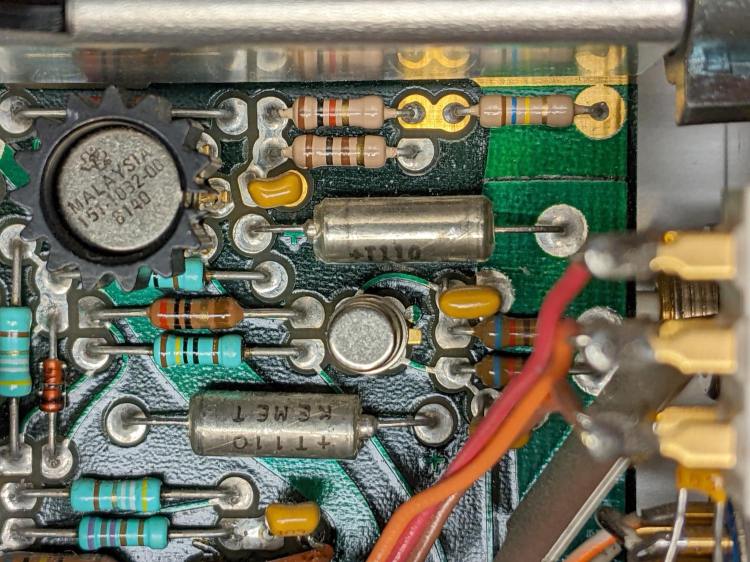
    Tek AM503 - R220 detail
    Tek AM503 – R220 detail

    The new resistor somewhat reduced the offset problem, but also dramatically increased the noise level I’d been studiously ignoring, to the point where the AM503 output was unusable:
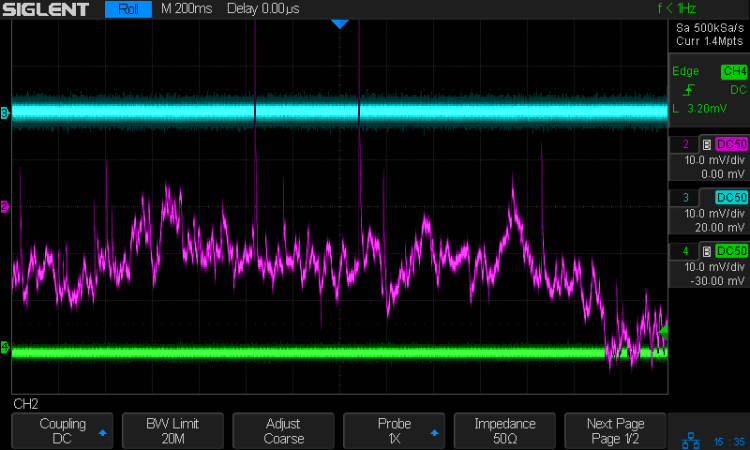
    Tek AM503 - three amps - GND
    Tek AM503 – three amps – GND

    The rule of thumb is that it’s always a connector or, perhaps, a similar metallic contact in the signal path. The AM503 has a breathtakingly aggressive switched attenuator covering the 94 dB range from 1 mA/div to 50 A/div:
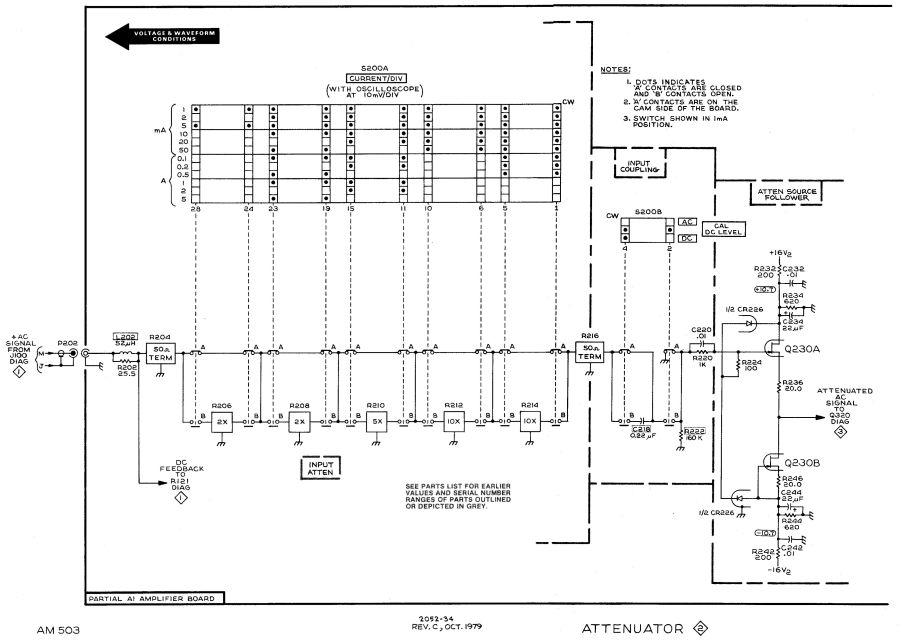
    AM503 - Current Probe Amplifier Schematic - Attenuator - Diag 2
    AM503 – Current Probe Amplifier Schematic – Attenuator – Diag 2

    The switches are cam-driven bifurcated gold-plated spring fingers contacting gold-plated PCB pads under that aluminum shield:
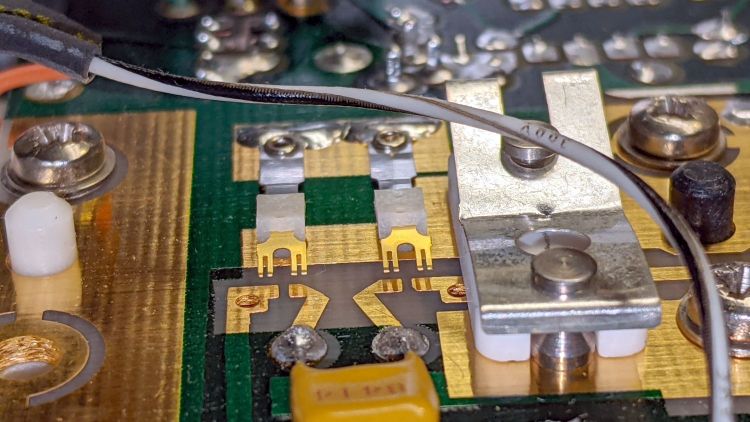
    Tek AM503 - Attenuator Contacts - detail
    Tek AM503 – Attenuator Contacts – detail

    The spring-loaded thing to the right is R206, the first 50 Ω 2× attenuator in the form of thin-film elements fired on a ceramic substrate. The two switches put C218 into the signal path in AC mode.

    You (well, I) clean the fingers by very gently pulling a strip of lens cleaner moistened with isopropyl alcohol through the closed contacts:
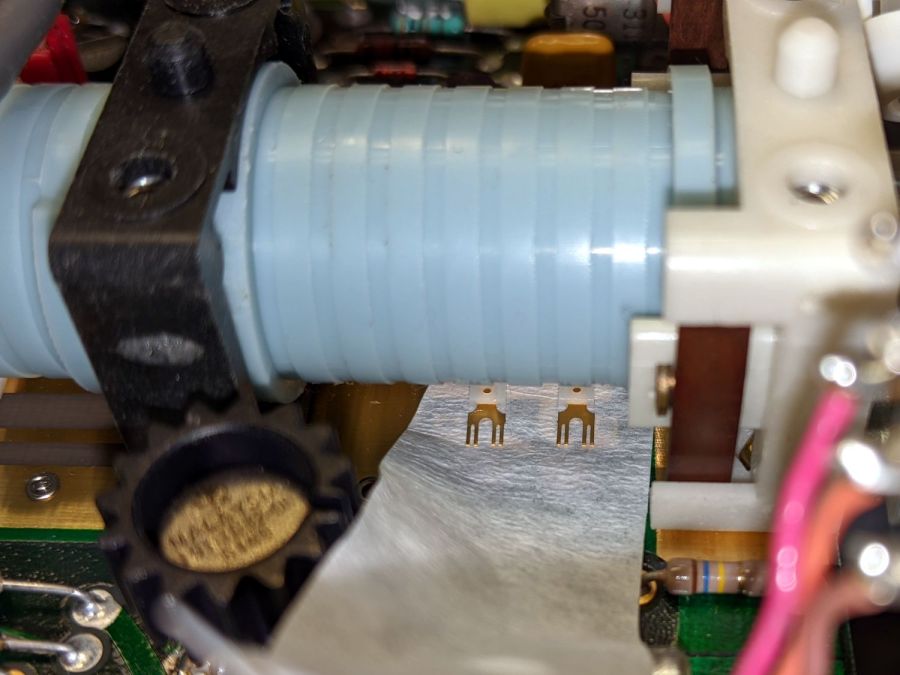
    Tek AM503 - Attenuator Contact Cleaning
    Tek AM503 – Attenuator Contact Cleaning

    The pale blue cylinder is the attenuator cam roller extending across the PCB behind the front-panel knob. The two switches bypass C218 in DC mode and connect R220 to ground in GND mode.

    Clean gold-on-gold contacts are about as good as it gets and those things looked absolutely pristine. After wiping the contact connecting R220 to ground had no effect, it finally penetrated my thick skull that the problem wasn’t in the attenuator contacts and had to be downstream in the amplifier and filter chain.

    Reseating all the cable connectors and jostling the (socketed!) semiconductors also had no effect.

    Could one of the semiconductors have gone flaky after four decades?

    More tomorrow. Spoiler: yup.
  • XFCE: Remote Desktop via X11vnc Through an SSH Tunnel

    For the first time in a loooong time I (had to) set up remote desktop sharing, starting from an existing SSH login through a single-port pinhole in an immutable router firewall.

    The remote PC runs Xubuntu 20.4 LTS and I verified it already had x11vnc installed. If that’s not the case, make it so.

    In order to share / control the desktop of a different user (hereinafter known as kay), I must SSH into that PC as kay. My SSH session uses public key authentication and kay has no need for outbound SSH, so just use my PC’s public key in kay‘s authorized_keys file. On the remote PC, where I am signed in as me:

    cd ~
    sudo mkdir /home/kay/.ssh        # kay does not have a public key
    sudo cp .ssh/authorized_keys /home/kay/.ssh     # so just copy mine
    sudo chown -R kay:kay /home/kay/.ssh     # transfer ownership
    sudo chmod go-rwx /home/kay/.ssh     # set proper permissions
    

    From my local PC, I can now SSH into the remote PC as kay and start x11vnc through the SSH tunnel:

    ssh -v kay@remote.address -L 5900:localhost:5900 "x11vnc -display :0 -noxdamage -ncache 10 -ncache_cr -nopw"
    

    Still on my PC, aim a VNC client at the local end of the tunnel:

    novnc localhost:5900
    

    Using novnc presents the remote desktop as a web page in a browser, although you may prefer something more traditional.

    Somewhat to my surprise, It Just Worked™.

  • Blog Summary: 2021

    The overall page view count may be down, but people have been replacing water heater anode rods at an increasing pace:

    Home page / Archives23775
    Water Heater Anode Rod Access Done Right8432
    CNC 3018-Pro: GRBL Configuration5301
    G-Code and M-Code Grand Master List5049
    Why You Need a 6-Point Socket to Remove a Water Heater Anode Rod4300
    American Standard Elite Kitchen Faucet Disassembly2621
    Toyota Sienna: ABS Trouble Codes2531
    Raspberry Pi: Forcing VNC Display Resolution2011
    CNC 3018-ProXL: Y-axis Extension1641
    Subaru Forester Fuse Boxes1276
    Broom Handle Screw Thread: Replacement Plug1239
    Removing a Water Heater Anode Rod1221
    Auto-V.I.N Gauge Scam1029
    Low Budget Bench Power Supply984
    CNC 3018-Pro: DRV8825 Hack for 1:8 Microstep Mode980
    Kensington Expert Mouse Trackball: Scroll Ring Troubles929
    Whirlpool Water Heater “Lifetime” Warranty: The Good and the Bad917
    Digital Tattoo Power Supply: Polarity Doesn’t Matter912
    Bed Bugs: Thermal Kill908
    Review Phreesia Authorization834
    Huion H610Pro (V2) Tablet vs. Ubuntu 18.04821
    Kenmore 158.17032 Handwheel Clutch Disassembly799
    Shimano SPD Pedals: Creaking Resolved788
    2000 Toyota Sienna: Replacing the Bank 1 Sensor 2 Oxygen Sensor753
    Schwab / Symantec VIP Access vs. Yubikey751
    Toyota Sienna: Rear ABS / Speed Sensor Failure729
    HP-48GX Calculator Disassembly: Case Rivets688
    Reversible Belt Buckle: Post Restaking683
    Kensington Expert Mouse Scroll Ring Fix629
    Makerbot-style Endstop Power Adapter for Protoneer Arduino CNC Shield616
    Displaying Variables in Gnuplot614
    Kohl’s Guest WiFi Terms & Conditions: The Short Version613
    Replacing Phil Wood Hub Bearings595
    Magnesium Water Heater Anode Rod: Seven Years Later576
    Adding a Device to LTSpiceIV564
    Philips Sonicare Essence 5000: Battery Replacement550
    Browning Hi-Power Magazine Dimensions545
    MPCNC: Emergency Stop / Feed Hold / Resume Pendant544
    Raspberry Pi Interrupts vs. Rotary Encoder538
    CNC 3018-Pro: Home Switches534
    Resistance Soldering: Transformer510
    Adafruit Touch-screen TFT LCD Rotation489
    Quick-and-easy IR-passing / Visible-blocking Optical Filter476
    Dis-arming a Steelcase Leap Chair471
    Icecast and Ezstream Configuration470
    Why You Shouldn’t Use Heat Pumps in the Northeast US465
    Baofeng UV-5R Squelch Settings460
    Mini-Lathe Tailstock: Alignment449
    Homebrew Magnetizer-Demagnetizer446
    Arduino Serial Optical Isolator444
    Mysterious Noise in Toyota Sienna Minivan: Fixed!444
    Baofeng UV-5: Squelch Pop Suppression434
    bCNC Probe Camera Calibration432
    Demolition Card GTA 5-10-9431
    Multimeter Range Switch Contacts: Whoops!425
    Realigning Tweezer Tips421
    Schwalbe Marathon Plus and Michelin Protek vs. Glass Chip418
    Kenmore Model 158 Speed Control: Carbon Disk Replacement417
    Kenmore Electric Dryer: Power Resistor Replacement416
    Old Kenmore Sewing Machine Foot Control Repair414
    Closing the Dmesg Audit Firehose400
    Blog Page Views

    That adds up to 200 k page views from 122 k visitors, for an average of 1.6 pages / visitor, down slightly from last year. For a variety of reasons, I wrote only 242 posts over the course of the year, so more folks read only the single post matching their search terms.

    To give you an idea of how awful online advertising has become, WordPress shoveled 817 k ads at those readers, slightly more than four ads per view. Given the toxicity of online advertising, I just started paying $50/year for a “personal” plan to get a few more gigabytes of media storage, which also let me turn off the ads. Most of you won’t notice, as you already run ad blockers, but it will calm the results for everybody else.

    Fortunately, losing the $250 / year income from those ads won’t significantly affect my standard of living.

  • Auvon TENS/EMS: Modulation Waveforms

    Auvon TENS/EMS: Modulation Waveforms

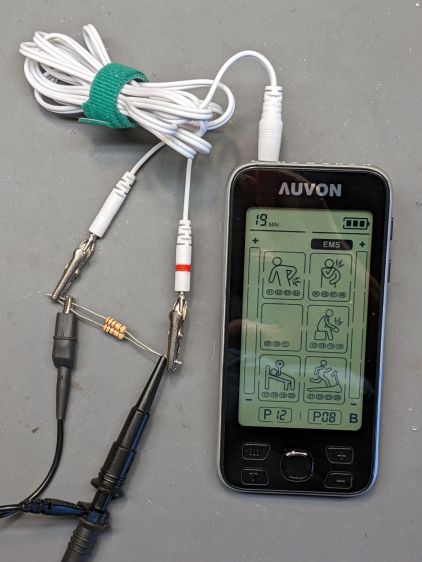
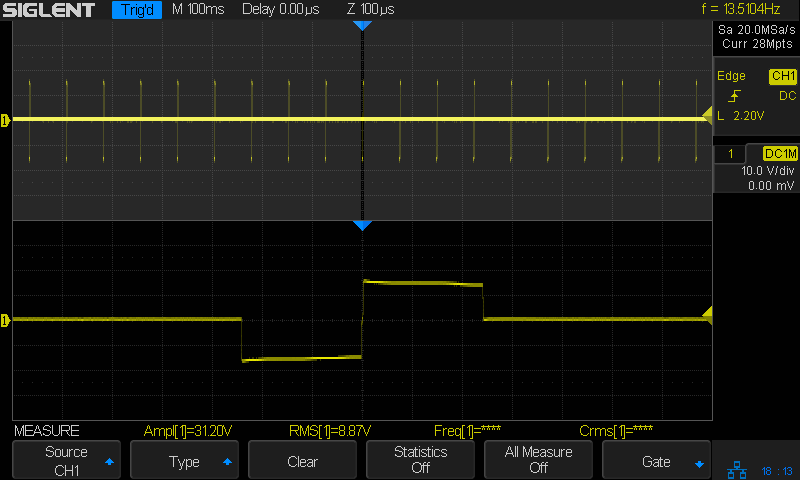
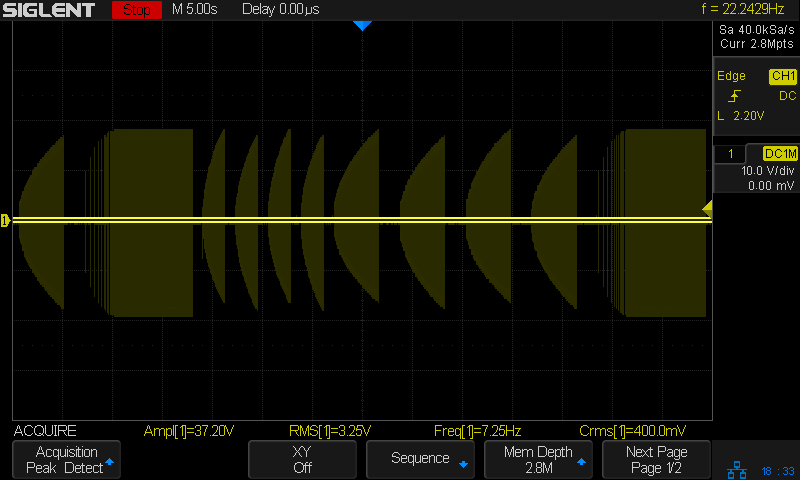
    These scope screen shots use the same test setup as the pulse measurements:

    Auvon AS8016 - test setup
    Auvon AS8016 – test setup

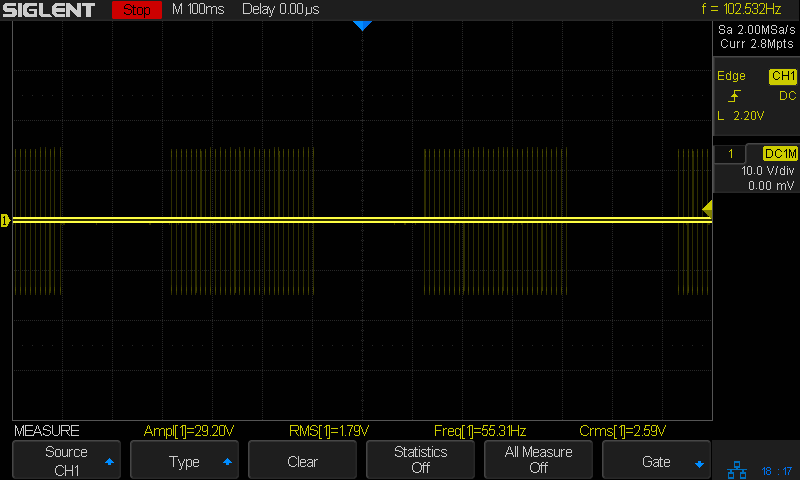
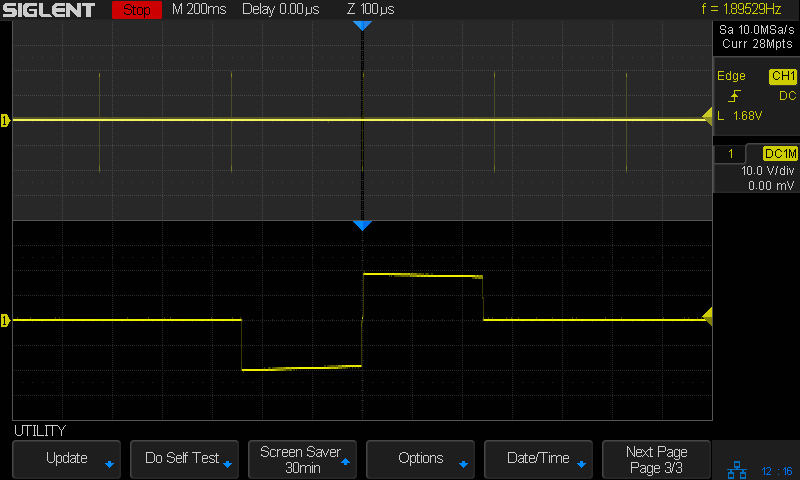
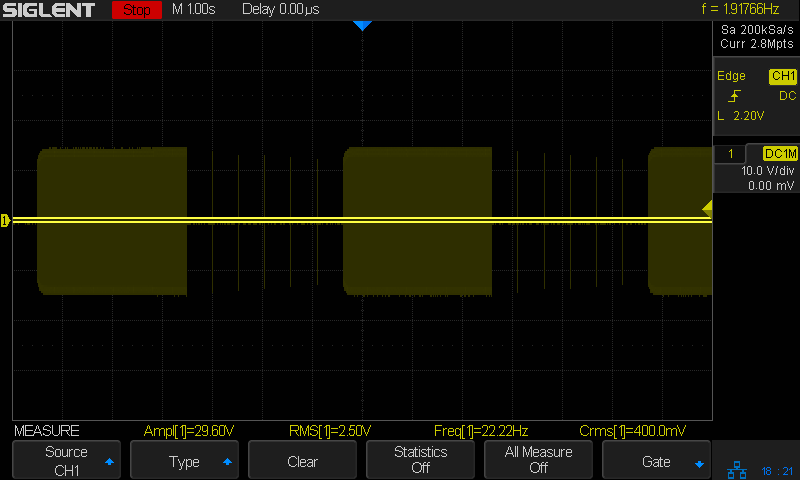
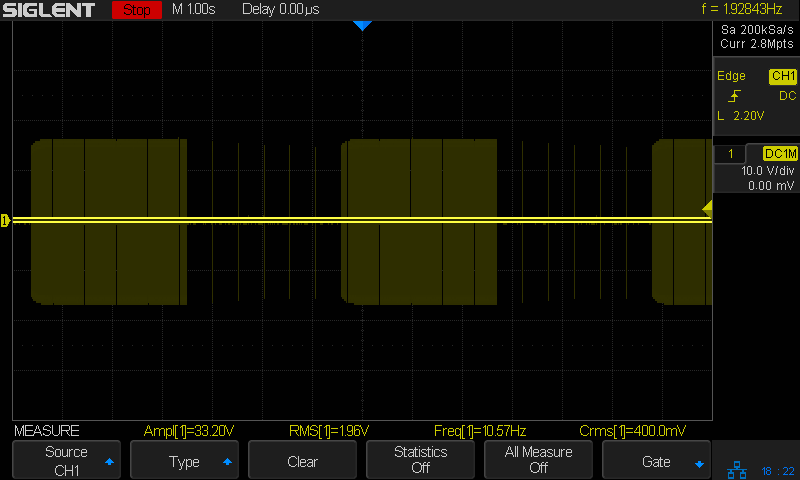
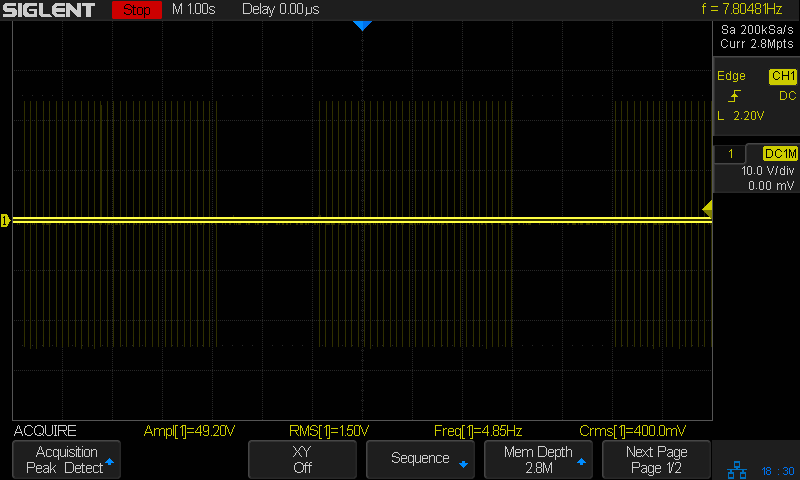
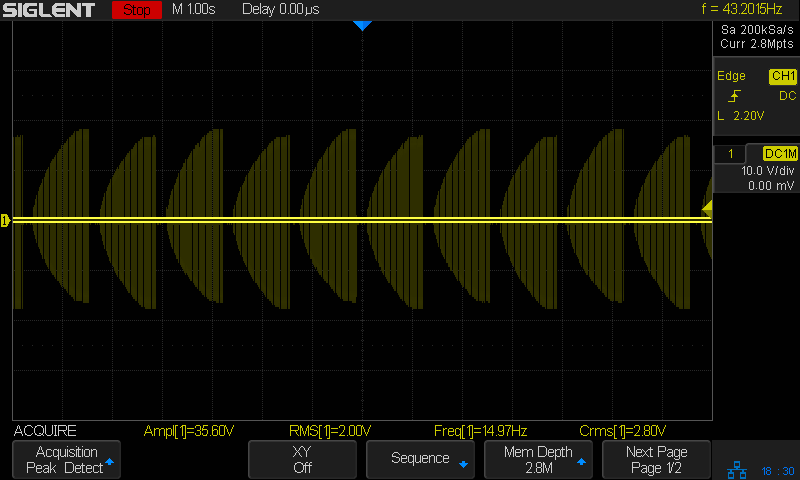
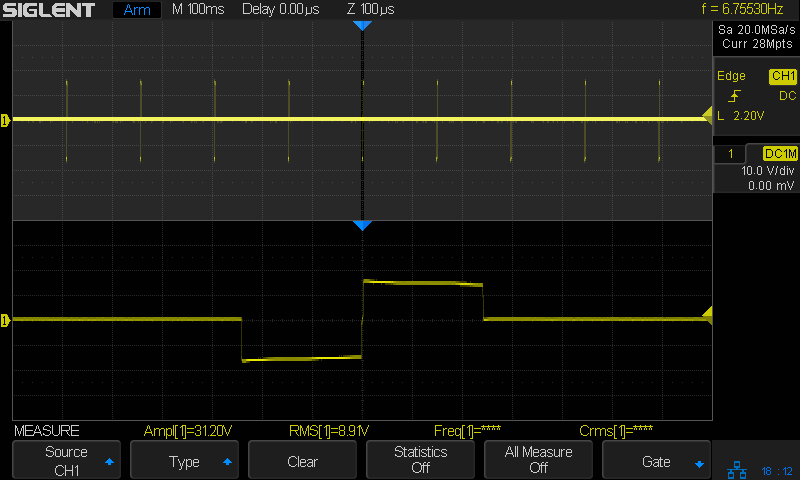
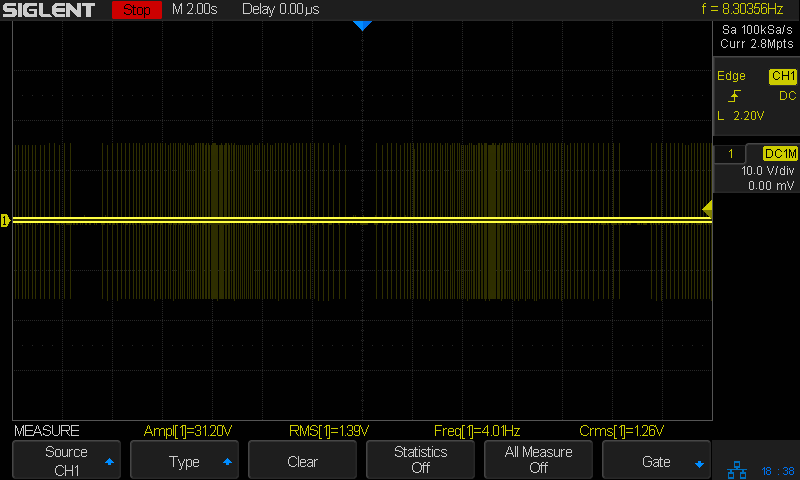
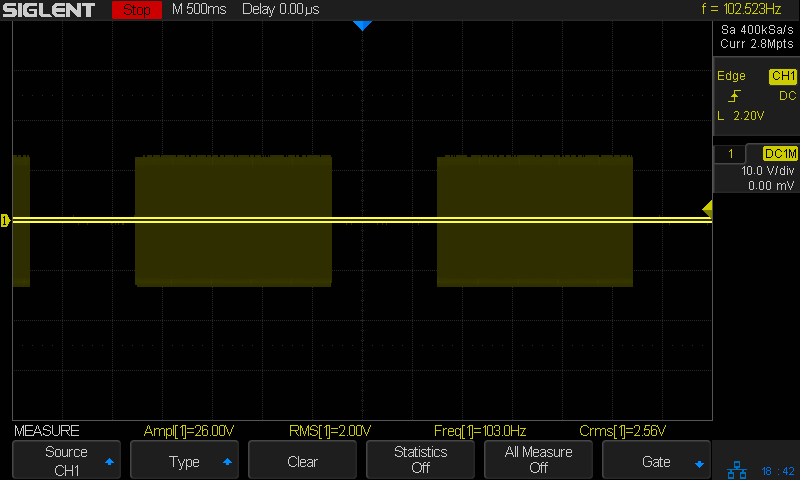
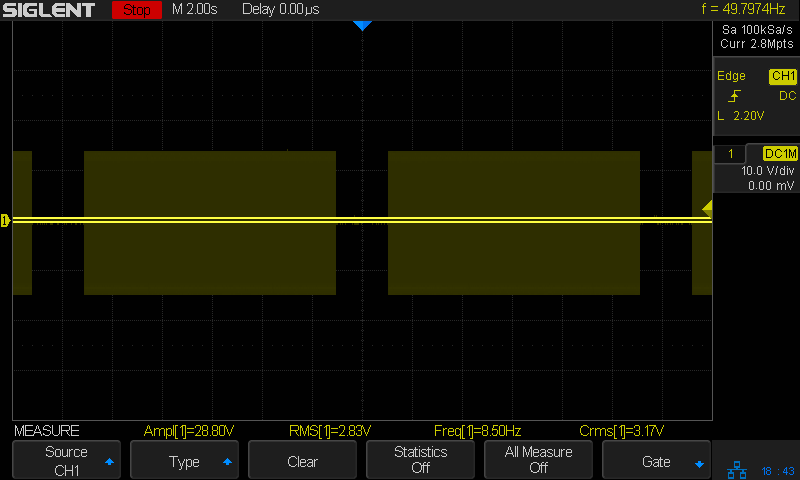
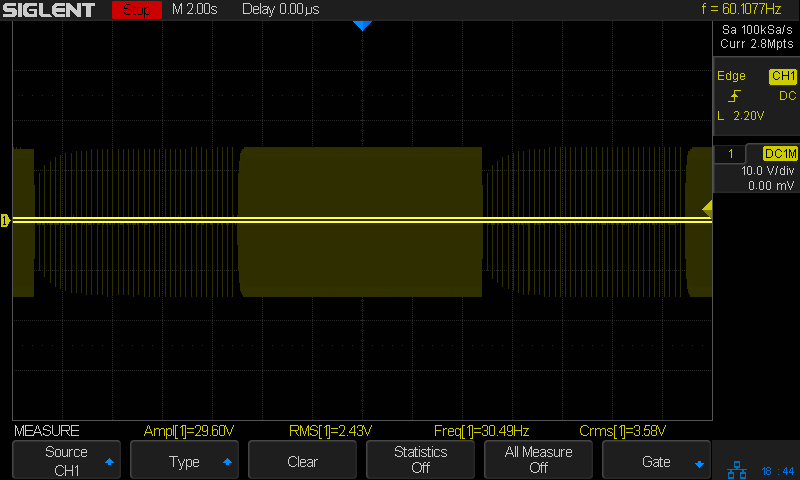
    The sweep speeds run much slower to capture the complete envelope, which can be up to a minute long, with enough left over to show the end of the previous sequence and the start of the next. The Moire patterns come from the scope sampling rate, the display resolution, or changes in the pulse repetition frequency. Blame Siglent for not making the scope’s digital data accessible through the network; screen shots are the best I can do.

    The descriptive headings for each screen shot come from The Auvon AS8016 Fine Manual, a PDF version of which you can get from Auvon’s support staff by asking nicely. I identify the modes as Mxx, rather than their Pxx, for reasons that made sense at the time.

    Patterns 1 through 16 correspond to the TENS (Transcutaneous Electrical Nerve Stimulation) label and are intended for pain relief / suppression; they should not make your muscles twitch.

    P1 – Continuous comfortable tingling.

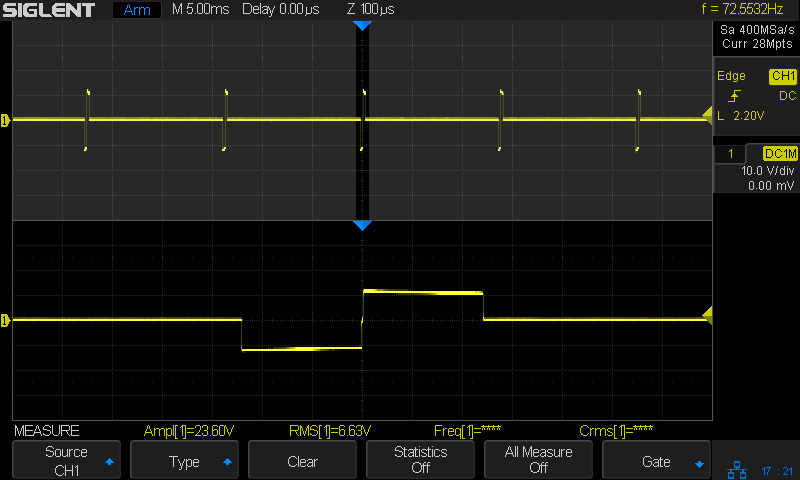
    Continuous 200 µs pulse at 87 Hz

    Auvon M01 Pulse
    Auvon M01 Pulse

    P2 – Comfortable tingling and pulsing sensation.

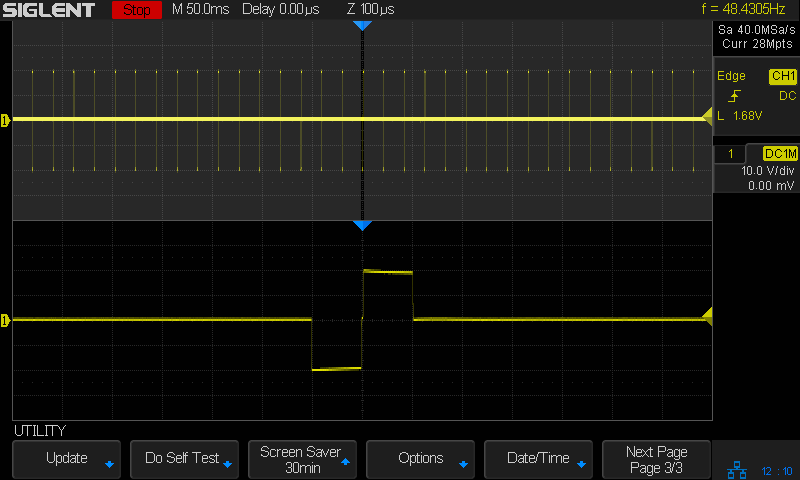
    Continuous 100 µs pulse at 48 Hz

    Auvon M02 Mod
    Auvon M02 Mod

    P3 – Comfortable rhythmic tingling.

    Blocks of 300 ms on/200 ms off, with 150 µs pulse at 48 Hz

    Auvon M03 Mod
    Auvon M03 Mod

    P4 – Continuous comfortable tingling.

    Continuous 100 µs pulse at 48 Hz

    Auvon M04 Pulse
    Auvon M04 Pulse

    P5 – Comfortable and slow tingling firstly, then the frequency is significantly increased, and it becomes a noticeable tingling sensation.

    Continuous 250 µs pulses, stepping from 10 to 102 Hz and back down

    Auvon M05 Pulse
    Auvon M05 Pulse

    P6 – Low frequency beating with a slight tingling sensation.

    Continuous 250 µs pulses at 2 Hz

    Auvon M06 Mod
    Auvon M06 Mod

    P7 – Low frequency slight beating firstly and then continuous comfortable tingling.

    Bursts of 150 µs pulses for 3 s separated by isolated 200 µs pulses

    Auvon M07 Mod
    Auvon M07 Mod

    P8 – Low frequency slight beating firstly and then comfortable pulsing sensation.

    Bursts of 150 µs pulses for 3 s separated by isolated 200 µs pulses. Seems identical to P7, although the bursts may be slightly different.

    Auvon M08 Mod
    Auvon M08 Mod

    P9 – Comfortable tingling from shallow to deep with 3-4 seconds pause.

    Auvon M09 Mod
    Auvon M09 Mod

    P10 – Comfortable pulsing sensation from shallow to deep with 3-4 seconds pause.

    Auvon M10 Mod
    Auvon M10 Mod

    P11 – Variable comfortable tingling, slight beating and scrapeing [sic] sensation.

    Auvon M11 Mod
    Auvon M11 Mod

    P12 – Comfortable slight tingling from shallow to deep with 3-4 seconds pause.

    Auvon M12 Mod
    Auvon M12 Mod

    P13 – Comfortable tingling and pulsing sensation from shallow to more deep with 3-4 seconds pause.

    Auvon M13 Mod
    Auvon M13 Mod

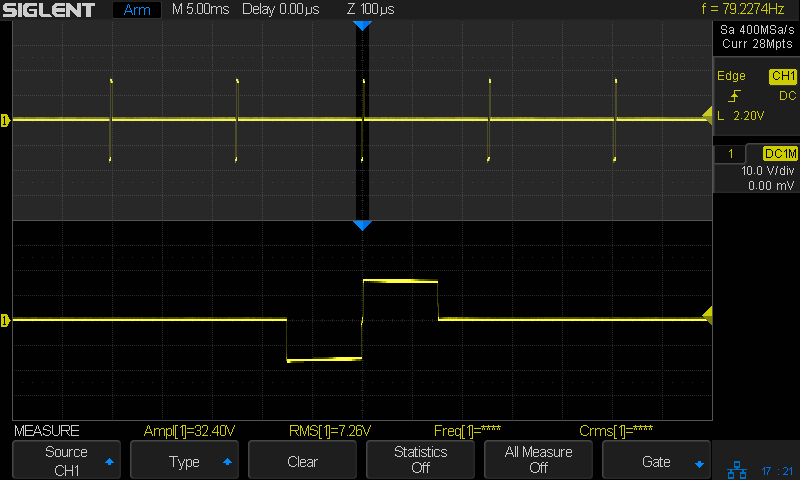
    P14 – Rhythmic continuous beating.

    Much higher voltage pulses!

    Auvon M14 Mod
    Auvon M14 Mod

    P15 – Rhythmic scrapeing [sic] sensation.

    Auvon M15 Mod
    Auvon M15 Mod

    P16 – Quick slight beating first, then comfortable tingling.

    Auvon M16 Mod
    Auvon M16 Mod

    Patterns 17 through 24 sport the EMS (Electrical Muscle Stimulation) label and should make your muscles twitch in various ways.

    P17 – Low frequency slight beating.

    Continuous 250 µs pulse with idle time at 4.8 Hz.

    Auvon M17 Pulse
    Auvon M17 Pulse

    P18 – Low frequency beating.

    Continuous 250 µs pulse at 6.8 Hz.

    Auvon M18 Pulse
    Auvon M18 Pulse

    P19 – Beating from low frequency to a little high frequency.

    Auvon M19 Mod
    Auvon M19 Mod

    P20 – Muscle twitches at a very low frequency. It feels like a tapping massage.

    Continuous 250 µs pulse at 13.5 Hz.

    Auvon M20 Pulse
    Auvon M20 Pulse

    P21 – This program activates the muscle in a short tingling cycle. It is smoother than P1/P2.

    Auvon M21 Mod
    Auvon M21 Mod

    P22 – This program gently warms up the muscles prior to exercise; it feels like a rhythmic massage. Increase intensity until you get a strong but comfortable muscle movement.

    Auvon M22 Mod
    Auvon M22 Mod

    P23 – This program uses a pulse frequency appropriate to fast twitching muscle fibers. It improves their anaerobic capacity and is used for improving maximum muscle strength.

    Auvon M23 Mod
    Auvon M23 Mod

    P24 – This program gently warms up the muscles prior to exercise; it feels like a rhythmic beating and comfortable tingling. Increase intensity until you get a strong but comfortable muscle movement.

    Auvon M24 Mod
    Auvon M24 Mod

    Despite the icons on the unit’s display, the manual suggests you can apply pretty nearly any pattern to any muscle, but now we all know what’s coming out of those jacks …

  • Auvon TENS/EMS: Pulse Waveforms

    Auvon TENS/EMS: Pulse Waveforms

    The Auvon AS8016 TENS/EMS unit produces bipolar pulses with no net DC offset, so the UI controls the negative and positive amplitudes equally. The range has 20 steps, with the screen shots here set to 10 units. The actual output voltage depends on the mode, with some modes producing a peak voltage well above the others at the same UI setting.

    It’s worth noting the effect comes from current passed through skin and muscle, rather than voltage applied to it. The test setup uses a 500 Ω resistance to make the current vary linearly with the voltage (which is definitely not the case with human bodies): a 20 V pulse passes 40 mA through the resistor:

    Auvon AS8016 - test setup
    Auvon AS8016 – test setup

    The simplest bipolar pulses always start with the negative phase. The shortest pulse width is 100 µs:

    Auvon M02 Pulse
    Auvon M02 Pulse

    And 150 µs:

    Auvon M03 Pulse
    Auvon M03 Pulse

    And 200 µs:

    Auvon M01 Pulse
    Auvon M01 Pulse

    Up to 250 µs:

    Auvon M06 Pulse
    Auvon M06 Pulse

    Some modes have a short zero-voltage pause between the negative and positive phases:

    Auvon M17 Pulse
    Auvon M17 Pulse

    The pause can be the same duration as the negative and positive phases:

    Auvon M14 Pulse
    Auvon M14 Pulse

    Some modes have pulses starting with the positive phase, others switch the leading phase during the course of the output modulation.

    My casual survey of the consumer-grade field suggests the pulse waveform has less to do with well-tested effects and more to do with marketing or straight-up woo, but I admit to being a cynic.

  • Auvon TENS/EMS: Lead Identification

    Auvon TENS/EMS: Lead Identification

    One of Santa’s myriad helpers recently handed me an Auvon AS8016 TENS/EMS Unit. The manual is, shall we say, light on tech details, but some casual searching turns up the general specs for medical-grade units found in physical therapy offices, plus adjacent Rule 34 compliant (i.e. NSFW) offerings.

    Being that type of guy, I had to look at the electricity. Somewhat to my surprise, the reference load turns out to be a pure 500 Ω resistance, which is easy enough to cobble up from a pair of 1 kΩ resistors:

    Auvon AS8016 - test setup
    Auvon AS8016 – test setup

    The alligator clips crunched around the 2 mm pins are not appropriate for even a brutal e-stim session; they’re from the Small Drawer of Test Connectors, to which they shall return unblooded.

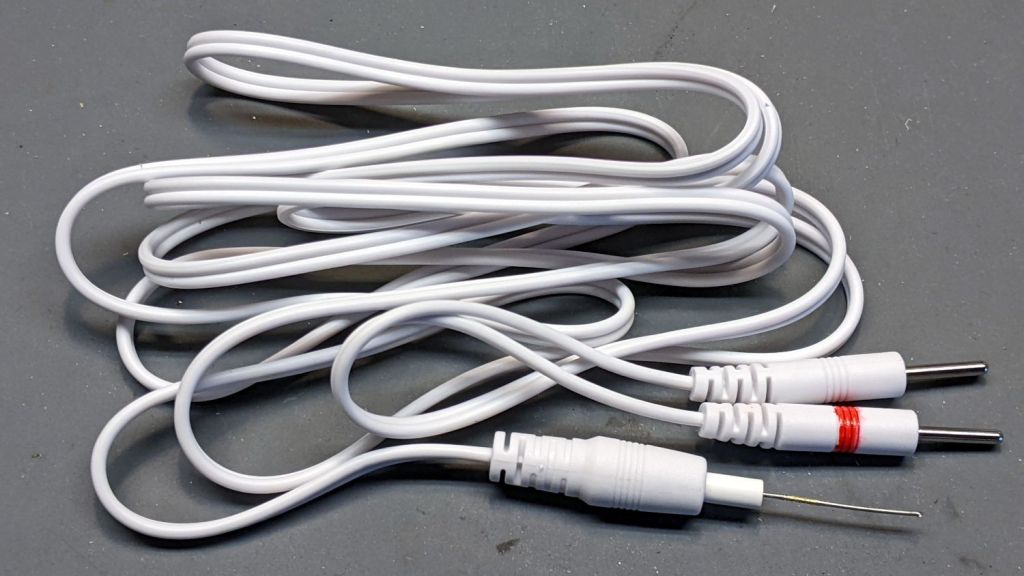
    The red Sharpie highlight around one pin identifies the center conductor of the two-wire cable, as determined by simple continuity testing:

    Auvon AS8016 - marked cable
    Auvon AS8016 – marked cable

    The 22 mil = 0.5 mm wire (from the Little Tin o’ Snippets) fits snugly into the coaxial connector’s center contact; one could probably slip a rounded shim between the shell and the outer contact, perhaps to debug an intermittent connection. Note that the connectors on both ends of the wires are not standardized among various TENS/EMS manufacturers.

    The AS8016 has two pairs of connectors:

    Auvon AS8016 - wire jacks
    Auvon AS8016 – wire jacks

    The A1 and A2 jacks are wired in parallel, as are the B1 and B2 jacks, with the A pair galvanically isolated from the B pair. You can set the modes / programs / pulse parameters differently for A and B. Although the manual doesn’t mention it, using the A and B channels (perhaps with the same settings) prevents a galvanic connection (and thus any current) from flowing between the A and B electrodes; this seems important for electrode pairs placed on opposite sides of your body to prevent current through your heart.

    The pulses have no DC component, so the actual wire polarity doesn’t really matter, but a foolish consistency definitely simplifies going back to re-measure things. Subsequent waveforms show the voltage with respect to the unmarked (outer) conductor.

    Suppressing the DC bias prevents ionic migration between / under the electrode pads. The classic RC-equivalent output circuit uses a series capacitor, resulting in an asymmetric pulse waveform with zero net DC voltage:

    Capacitor Coupled Pulse
    Capacitor Coupled Pulse

    There’s no DC path between the center and outer conductors, but in this day and age the circuitry could be a completely isolated bipolar FET driver:

    Auvon M01 Pulse
    Auvon M01 Pulse

    With all that sorted out, I can make measurements!

  • Christmas Bonus

    Christmas Bonus

    An email arrived yesterday:

    Subject: [redacted] review blog invitation about bluetooth programmer

    Message: Hi dear,

    Thanks for taking time to read this email.

    I am Colleen from [redacted] brand, we sell two way radio on Amazon. I learned that you have wrote two way radio review blog before and I think your blog was written well.

    Now we have a product named bluetooth programmer that need to be reviewed. […] We would like to invite you to write a review blog about it.

    Your can earn $2 from each product sold! We promise it. Just put the link we provided you in your blog and the Amazon backstage will count the data. And we will pay you $2 for per product sold by your link through PayPal on the 30th of every month. (Please provide your PayPal account)

    If you are willing to help us write a blog, please tell us if you have a radio and your address we will send you the product for free to review.

    You can view more detailed information through this link:

    [redacted]

    Perhaps this “review” caught their eye:

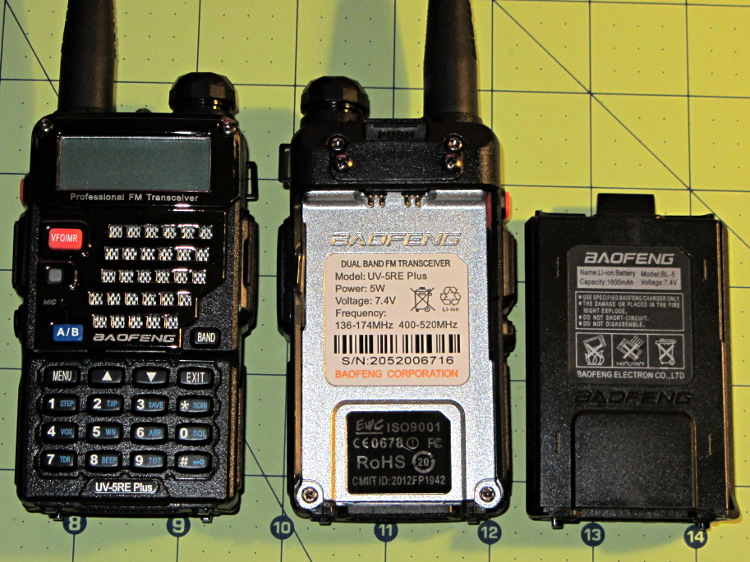
    Baofeng UV-5RE radio - overview
    Baofeng UV-5RE radio – overview

    Or maybe it was my opinion of the Baofeng intermod problem?

    Most likely, it’s just the result of an ordinary web search.

    You might think everybody would know about Amazon’s crackdown on out-of-band review kickback scams, but either word hasn’t gotten around or the rewards still exceed the penalties. I think the latter applies, particularly when the offender (or its parent company) can spin up another randomly named Amazon seller with no loss of continuity.

    “Earning” two bucks on a few purchases during the course of a year won’t move my Quality of Life needle, so I reported them to Amazon and that might be that.

    For future reference, the chat with Amazon’s Customer Support rep produced a deep-ish link to their otherwise un-discoverable “Report Something Suspicious” page; the randomly named nodeld is a nice touch.

    Speaking of randomly named sellers, it’s highly likely any Brand Name you remember from the Good Old Days has been disconnected from the tool / hardware / service you remember. Perusing a snapshot of the who-owns-who tool landscape as of a few years ago may be edifying: I didn’t know Fluke and Tektronix now have the same corporate parent.

    Enjoy unwrapping your presents and playing with your toys …