The Smell of Molten Projects in the Morning

Ed Nisley's Blog: Shop notes, electronics, firmware, machinery, 3D printing, laser cuttery, and curiosities. Contents: 100% human thinking, 0% AI slop.

Month: January 2021

  • Tek Circuit Computer: 3D Printed Cursor Milling Fixture

    Tek Circuit Computer: 3D Printed Cursor Milling Fixture

    The original Tektronix Circuit Computer cursor was probably die-cut from a larger sheet carrying pre-printed hairlines:

    Tek CC - genuine - detail
    Tek CC – genuine – detail

    Machining a punch-and-die setup lies well beyond my capabilities, particularly given the ahem anticipated volume, so milling seems the only practical way to produce a few cursors.

    Attaching a cursor blank to a fixture with sticky tape showed that the general idea worked reasonably well:

    Tek CC - Cursor blank on fixture
    Tek CC – Cursor blank on fixture

    However, the tape didn’t have quite enough griptivity to hold the edges completely flat against milling forces (a downcut bit might have worked better) and I found myself chasing the cutter with a screwdriver to hold the cursor in place. Worse, the tape’s powerful attraction to swarf made it a single-use item.

    Some tinkering showed a single screw in the (pre-drilled) pivot hole, without adhesive underneath, lacked enough oomph to keep the far end of the cursor in place, which meant I had to think about how to hold it down with real clamps.

    Which, of course, meant conjuring a fixture from the vasty digital deep. The solid model includes the baseplate, two cutting templates, and a clamping fixture for engraving the cursor hairline:
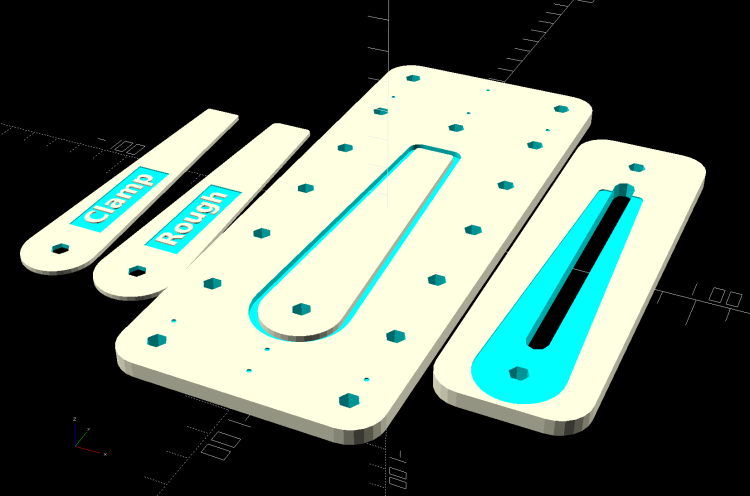
    Cursor Fixture - build layout
    Cursor Fixture – build layout

    The perimeter of the Clamp template on the far left is 0.5 mm inside the cursor perimeter. Needing only one Clamp, I could trace it on a piece of acrylic, bandsaw it pretty close, introduce it to Mr Belt Sander for final shaping, and finally drill the hole:

    Tek CC Cursor Fixture - clamp drilling
    Tek CC Cursor Fixture – clamp drilling

    The Rough template is 1.0 mm outside the cursor perimeter, so I can trace those outlines on a PET sheet:
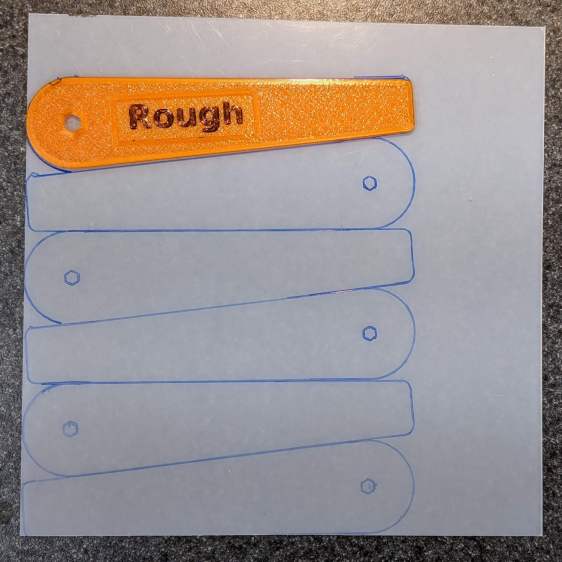
    Tek CC Cursor Fixture - Rough template layout
    Tek CC Cursor Fixture – Rough template layout

    Then cut the patterns with a scissors, stack ’em up, and tape the edges to keep them aligned:

    TekCC Cursor Fixture - Rough template
    TekCC Cursor Fixture – Rough template

    Align the stack by feel, apply the Clamp to hold them in place, and secure the stack with a Sherline clamp:

    Tek CC Cursor Fixture - outline rear clamp
    Tek CC Cursor Fixture – outline rear clamp

    The alert reader will note it’s no longer possible to machine the entire perimeter in one pass; more on that in a while.

    The baseplate pretty much fills the entire Sherline tooling plate. It sports several alignment pips at known offsets from the origin at the center of the pivot hole:

    Tek CC Cursor Fixture - touch-off point
    Tek CC Cursor Fixture – touch-off point

    Dropping the laser alignment dot into a convenient pip, then touching off X and Y to the known offset sets the origin without measuring anything. Four screws in the corners align the plate well enough to not worry about angular tweakage.

    The OpenSCAD source code as a GitHub Gist:

    // Machining fixtures for Tek Circuit Computer cursor
    // Ed Nisley KE4ZNU Jan 2021
    Layout = "Show"; // [Show, Build, Cursor, Clamp, Rough, Engrave]
    /* [Hidden] */
    ThreadThick = 0.25;
    ThreadWidth = 0.40;
    HoleWindage = 0.2;
    Protrusion = 0.1; // make holes end cleanly
    inch = 25.4;
    function IntegerMultiple(Size,Unit) = Unit * ceil(Size / Unit);
    module PolyCyl(Dia,Height,ForceSides=0) { // based on nophead's polyholes
    Sides = (ForceSides != 0) ? ForceSides : (ceil(Dia) + 2);
    FixDia = Dia / cos(180/Sides);
    cylinder(d=(FixDia + HoleWindage),h=Height,$fn=Sides);
    }
    //———————-
    // Dimensions
    CursorHubOD = 1.0*inch; // original Tek CC was hard inch!
    CursorTipWidth = (9.0/16.0)*inch;
    CursorTipRadius = (1.0/16.0)*inch;
    CursorThick = 0.5; // plastic sheet thickness
    CutterOD = 3.175; // milling cutter dia
    CutterDepth = 2.0; // … depth of cut
    CutterLip = 0.5; // … clearance under edge
    ScribeOD = 3.0; // diamond scribe shank
    StudOC = [1.16*inch,1.16*inch]; // Sherline tooling plate grid
    StudClear = 5.0; // … screw clearance
    StudWasher = 11.0; // … washer OD
    CursorOffset = [-2*StudOC.x,0,0]; // hub center relative to fixture center
    // must have even multiples of stud spacing to put studs along centerlines
    BasePlateStuds = [6*StudOC.x,2*StudOC.y]; // fixture screws
    echo(str("Stud spacing: ",StudOC));
    CornerRad = 10.0; // corner radius
    BasePlate = [2*StudWasher + BasePlateStuds.x,2*StudWasher + BasePlateStuds.y,5.0];
    echo(str("Base Plate: ",BasePlate));
    EngravePlate = [5*StudOC.x,1.5*StudOC.y,BasePlate.z];
    echo(str("Engrave Plate: ",EngravePlate));
    TemplateThick = 6*ThreadThick;
    LegendThick = 2*ThreadThick;
    Gap = 3.0;
    //———————-
    // Import SVG of cursor outline
    // Requires our hub OD to match reality
    // Hub center at origin
    module CursorSVG(t=CursorThick,od=0) {
    hr = CursorHubOD/2;
    translate([-hr,-hr,0])
    linear_extrude(height=t,convexity=3)
    offset(r=od/2)
    import(file="/mnt/bulkdata/Project Files/Tektronix Circuit Computer/Firmware/TekCC-Cursor-Mark.svg",center=false);
    }
    //———————-
    // Milling fixture for cursor blanks
    module Fixture() {
    difference() {
    hull() // basic plate shape
    for (i=[-1,1], j=[-1,1])
    translate([i*(BasePlate.x/2 – CornerRad),j*(BasePlate.y/2 – CornerRad),0])
    cylinder(r=CornerRad,h=BasePlate.z,$fn=24);
    translate(CursorOffset + [0,0,BasePlate.z – CutterDepth])
    difference() {
    CursorSVG(CutterDepth + Protrusion,1.5*CutterOD);
    CursorSVG(CutterDepth + Protrusion,-CutterLip);
    }
    translate(CursorOffset + [0,0,BasePlate.z – 2*ThreadThick]) { // alignment pips
    for (x=[-20.0,130.0], y=[-30.0,0.0,30.0])
    translate([x,y,0])
    cylinder(d=4*ThreadWidth,h=1,$fn=6);
    for (x=[-30.0,130.0,150.0])
    translate([x,0,0])
    cylinder(d=4*ThreadWidth,h=1,$fn=6);
    }
    for (i=[-1,1], j=[-1,1]) // mounting stud holes
    translate([i*BasePlateStuds.x/2,j*BasePlateStuds.y/2,-Protrusion])
    rotate(180/6)
    PolyCyl(StudClear,BasePlate.z + 2*Protrusion,6);
    translate(CursorOffset + [0,0,-Protrusion]) // hub clamp hole
    rotate(180/6)
    PolyCyl(StudClear,BasePlate.z + 2*Protrusion,6);
    translate([2*StudOC.x,0,-Protrusion]) // tip clamp hole
    rotate(180/6)
    PolyCyl(StudClear,BasePlate.z + 2*Protrusion,6);
    for (i=[-2:2], j=[-1,1]) // side clamp holes
    translate([i*StudOC.x,j*StudOC.y,-Protrusion])
    rotate(180/6)
    PolyCyl(StudClear,BasePlate.z + 2*Protrusion,6);
    }
    }
    //———————-
    // Show-n-Tell cursor
    module Cursor() {
    difference() {
    CursorSVG(CursorThick,0.0);
    translate([0,0,-Protrusion])
    rotate(180/6)
    PolyCyl(StudClear,TemplateThick + 2*Protrusion,6);
    }
    }
    //———————-
    // Template for rough-cutting blanks
    module Rough() {
    bb = [40,12,LegendThick];
    difference() {
    CursorSVG(TemplateThick,1.0);
    translate([0,0,-Protrusion])
    rotate(180/6)
    PolyCyl(StudClear,TemplateThick + 2*Protrusion,6);
    difference() {
    translate([bb.x/2 + CursorHubOD/2,0,TemplateThick – bb.z/2 + Protrusion])
    cube(bb + [0,0,Protrusion],center=true);
    translate([bb.x/2 + CursorHubOD/2,0,TemplateThick – bb.z])
    linear_extrude(height=bb.z,convexity=10)
    text(text="Rough",size=7,spacing=1.00,font="DejaVu Sans:style:Bold",halign="center",valign="center");
    }
    }
    }
    //———————-
    // Template for aluminium clamping plate
    module Clamp() {
    bb = [40,12,LegendThick];
    difference() {
    CursorSVG(TemplateThick,-1.0);
    translate([0,0,-Protrusion])
    rotate(180/6)
    PolyCyl(StudClear,TemplateThick + 2*Protrusion,6);
    difference() {
    translate([bb.x/2 + CursorHubOD/2,0,TemplateThick – bb.z/2 + Protrusion])
    cube(bb + [0,0,Protrusion],center=true);
    translate([bb.x/2 + CursorHubOD/2,0,TemplateThick – bb.z])
    linear_extrude(height=bb.z,convexity=10)
    text(text="Clamp",size=7,spacing=1.00,font="DejaVu Sans:style:Bold",halign="center",valign="center");
    }
    }
    }
    //———————-
    // Engraving clamp
    module Engrave() {
    difference() {
    hull() // clamp outline
    for (i=[-1,1], j=[-1,1])
    translate([i*(EngravePlate.x/2 – CornerRad),j*(EngravePlate.y/2 – CornerRad),0])
    cylinder(r=CornerRad,h=EngravePlate.z,$fn=24);
    translate(CursorOffset + [0,0,-Protrusion])
    CursorSVG(CursorThick + Protrusion,0.5); // pocket for blank cursor
    translate(CursorOffset + [0,0,-Protrusion])
    rotate(180/6)
    PolyCyl(StudClear,EngravePlate.z + 2*Protrusion,6);
    translate([2*StudOC.x,0,-Protrusion])
    rotate(180/6)
    PolyCyl(StudClear,EngravePlate.z + 2*Protrusion,6);
    hull() {
    for (i=[-1,1])
    translate([i*1.5*StudOC.x,0,-Protrusion])
    PolyCyl(2*ScribeOD,EngravePlate.z + 2*Protrusion,8);
    }
    }
    }
    //———————-
    // Build it
    if (Layout == "Cursor") {
    Cursor();
    }
    if (Layout == "Clamp") {
    Clamp();
    }
    if (Layout == "Rough") {
    Rough();
    }
    if (Layout == "Engrave") {
    Engrave();
    }
    if (Layout == "Show") {
    Fixture();
    color("Green",0.3)
    translate(CursorOffset + [0,0,BasePlate.z + Protrusion])
    Cursor();
    color("Orange")
    translate(CursorOffset + [0,0,BasePlate.z + 10])
    Rough();
    color("Brown")
    translate(CursorOffset + [0,0,BasePlate.z + 20])
    Clamp();
    color("Gold")
    translate(0*CursorOffset + [0,0,BasePlate.z + 40])
    Engrave();
    }
    if (Layout == "Build"){
    rotate(90) {
    Fixture();
    translate([0,-((BasePlate.y + EngravePlate.y)/2 + Gap),EngravePlate.z])
    rotate([180,0,0])
    Engrave();
    translate(CursorOffset + [0,(BasePlate.y + CursorHubOD)/2 + Gap,0])
    Rough();
    translate(CursorOffset + [0,(BasePlate.y + 3*CursorHubOD)/2 + 2*Gap,0])
    Clamp();
    }
    }

    The original doodle with some notions and dimensions that didn’t survive contact with reality:
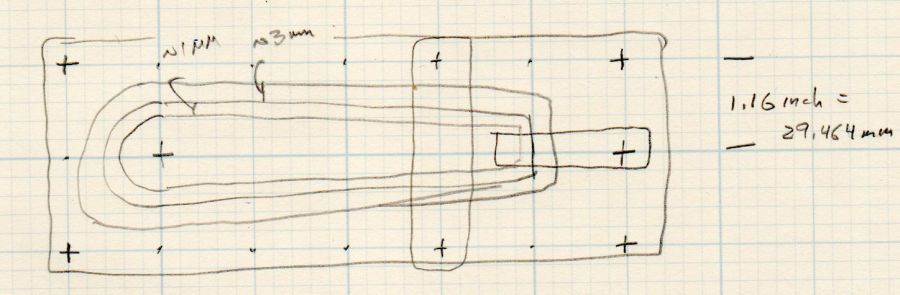
    Cursor Fixture doodle
    Cursor Fixture doodle

    I have no idea why the Sherline tooling plate has a 10-32 screw grid on 1.16 inch = 29.46 mm centers, but there they are.
  • Astable Multivibrator: Red RGB Piranha

    Astable Multivibrator: Red RGB Piranha

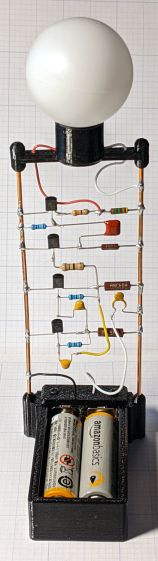
    A red LED has a sufficiently low forward voltage to run with a MOSFET astable multivibrator and a pair of run-down AA alkaline cells:

    Astable AA Alkaline - red
    Astable AA Alkaline – red

    The red LED is actually part of an RGB Piranha, just to see how it compares to an as-yet-unbuilt version with a single red LED in the same package.

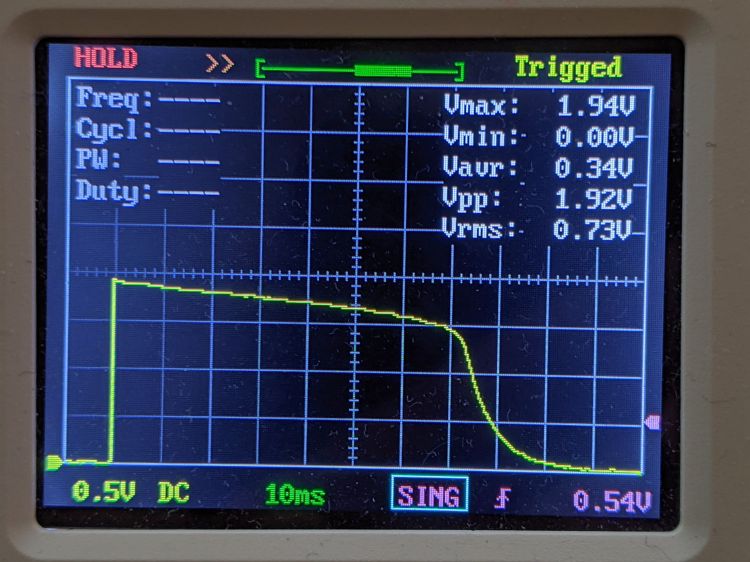
    The LED drops 1.9 V of the 2.75 V from the mostly used-up AA cells:

    Astable Piranha Red - 2.75 alkaline - V LED
    Astable Piranha Red – 2.75 alkaline – V LED

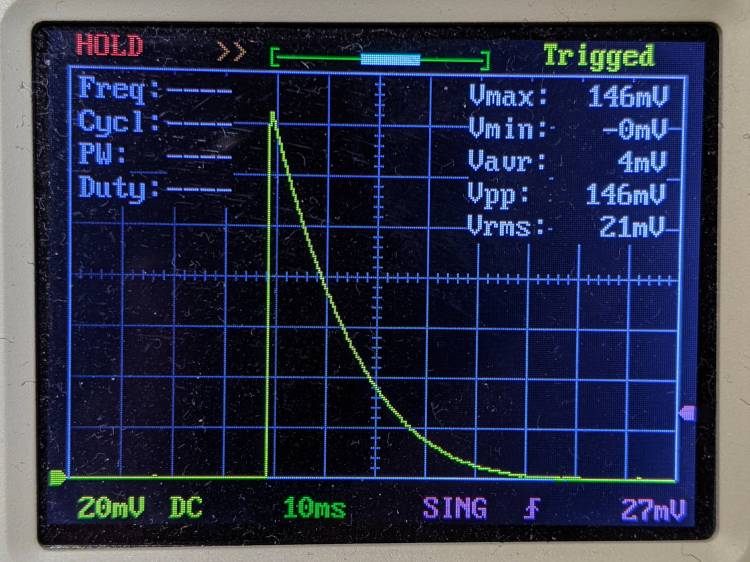
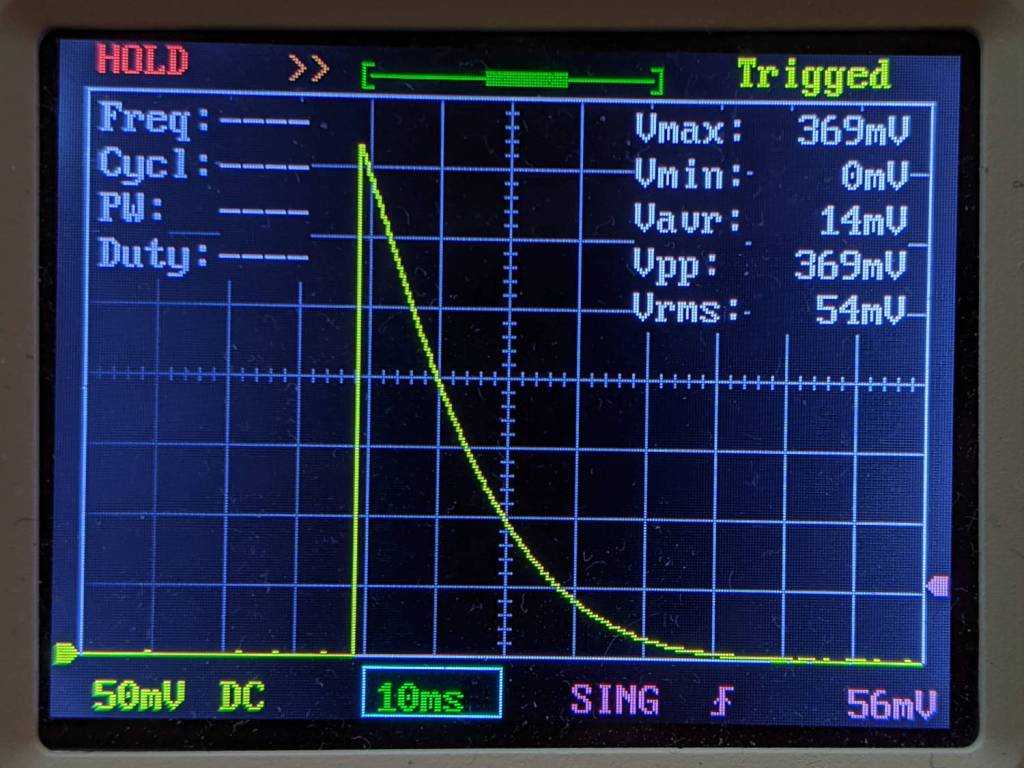
    The original 33 Ω ballast resistor showed a peak current of 11 mA in a 30 ms pulse:

    Astable Piranha Red - 2.75 alkaline - V 33 ohm
    Astable Piranha Red – 2.75 alkaline – V 33 ohm

    Replacing it with a 12 Ω resistor boosts the current all the way to 12 mA:

    Astable Piranha Red - 2.75 alkaline - V 12 ohm
    Astable Piranha Red – 2.75 alkaline – V 12 ohm

    The 2N7000 gate sees a just bit more than 2 V, barely enough to get the poor thing conducting, which makes the ballast resistor mostly decorative. The MOSFET datasheet puts its 1 mA threshold somewhere between 0.8 and 3 V, so it could be worse.

    Keep in mind the DSO150’s 1 MΩ input impedance sat in parallel with the 1 MΩ gate pulldown resistor forming the RC differentiator when I measured the gate voltage; I’ll leave the simulation as an exercise for the interested reader. The blinks were noticeably dimmer and perhaps a bit shorter, although eyeballometric calibration is notoriously hard.

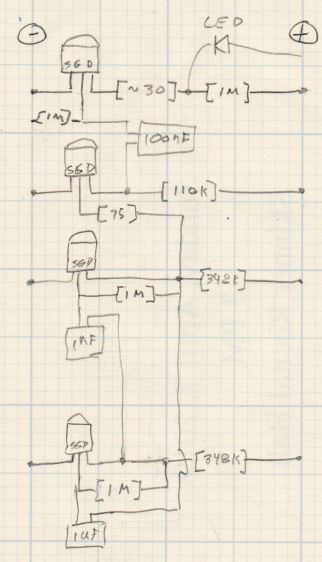
    The slightly revised schematic-layout doodle stacks the transistors along the negative bus bar:

    Astable wiring layout - stacked 2N7000
    Astable wiring layout – stacked 2N7000

    Flipping the bottom transistor over to snuggle the two timing caps next to each other would eliminate the long jumper wire and probably look better.

  • Homage Tektronix Circuit Computer: Laser Printed Scales

    Homage Tektronix Circuit Computer: Laser Printed Scales

    Given the proper command-line options, GCMC can produce an SVG image and, after some Bash fiddling and a bank shot off Inkscape, the same GCMC program I’ve been using to plot Homage Tektronix Circuit Computer decks can produce laser-printed decks:

    Tek CC - laser - detail
    Tek CC – laser – detail

    Pen-plotting on yellow Astrobrights paper showed how much ink bleeds on slightly porous paper, but laser-printing the same paper produces crisp lines:

    Tek CC - laser - yellow detail
    Tek CC – laser – yellow detail

    Laser printing definitely feels like cheating, but, for comparison, here’s a Genuine Tektronix Circuit Computer:

    Tek CC - genuine - detail
    Tek CC – genuine – detail

    Plotting the decks on hard mode was definitely a learning experience!

    Obviously, my cursor engraving hand remains weak.

  • KeyboardIO Atreus: LED Diffuser

    KeyboardIO Atreus: LED Diffuser

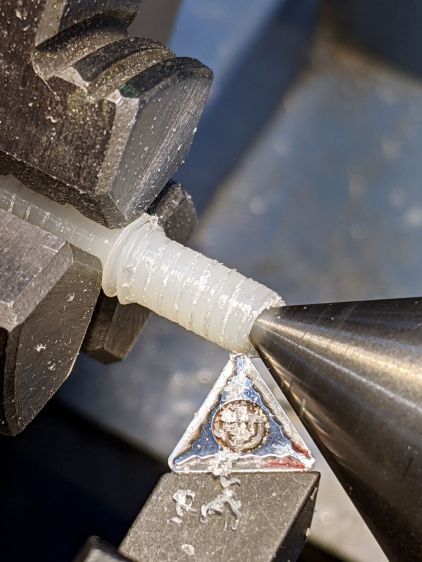
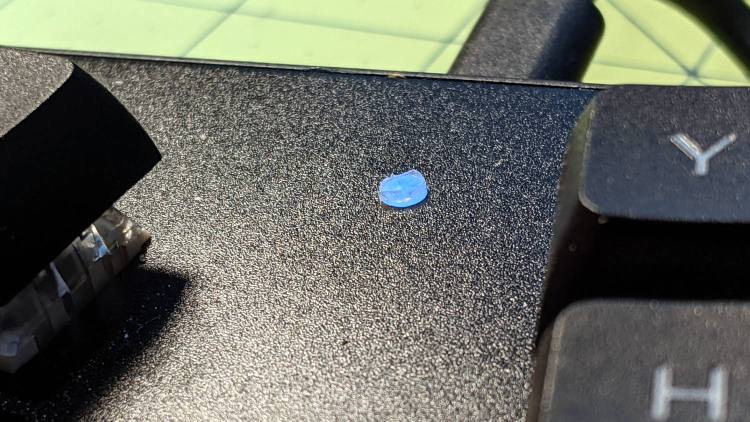
    After staring at the RGB LED I installed in my Atreus keyboard for a while, I converted the stub of a ¼-20 nylon screw into a light diffuser:

    Atreus keyboard - LED diffuser
    Atreus keyboard – LED diffuser

    It stands slightly proud of the surface plate so I can extract it without dismantling the whole keyboard again:

    Atreus keyboard - LED diffuser installed
    Atreus keyboard – LED diffuser installed

    I’ll eventually make a better-looking diffuser from a recently arrived translucent acrylic rod, but this will reduce the accumulation of fuzz inside the keyboard until the matching Round Tuit arrives.

  • Floor Lamp Rebasing

    Floor Lamp Rebasing

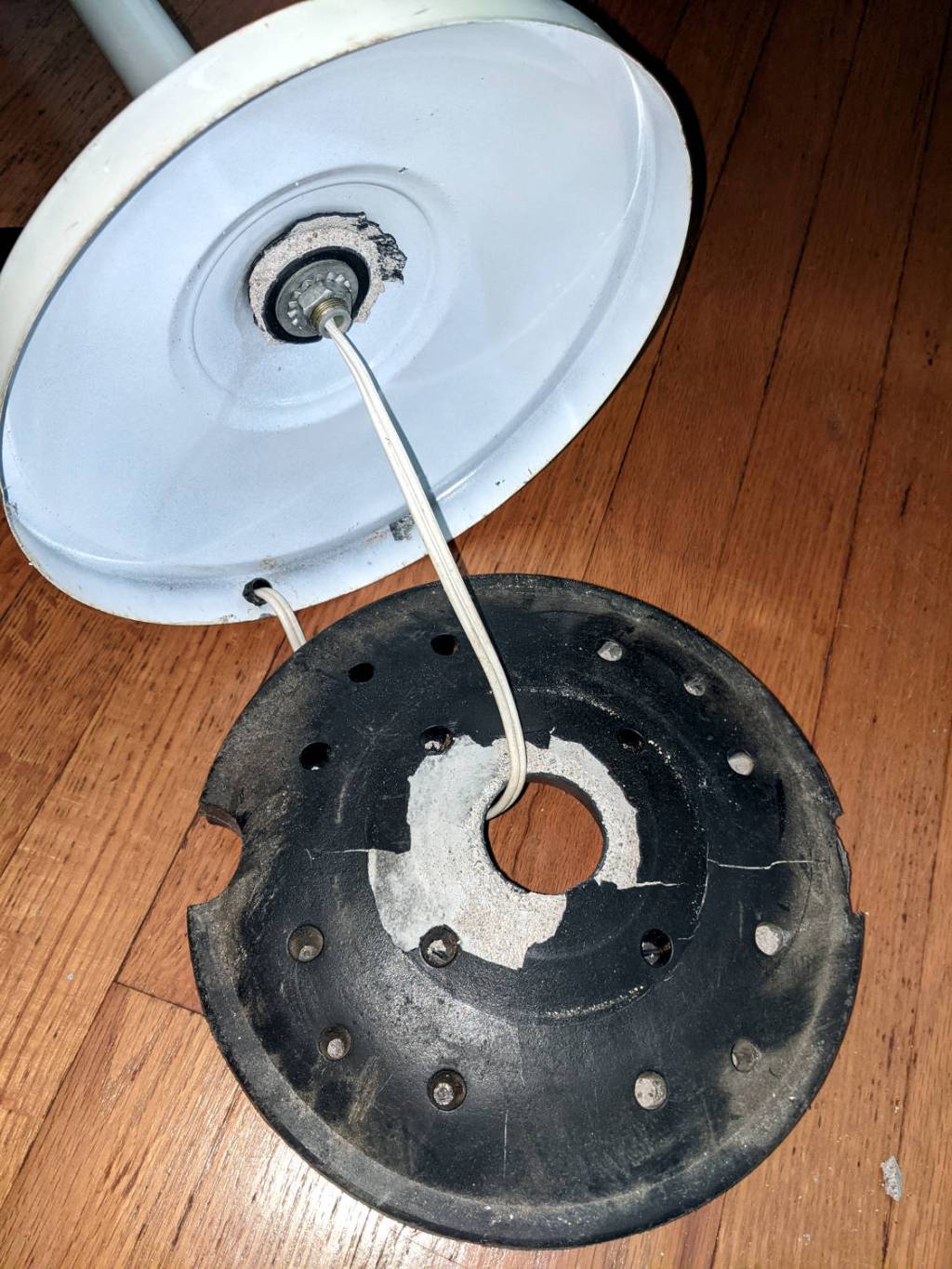
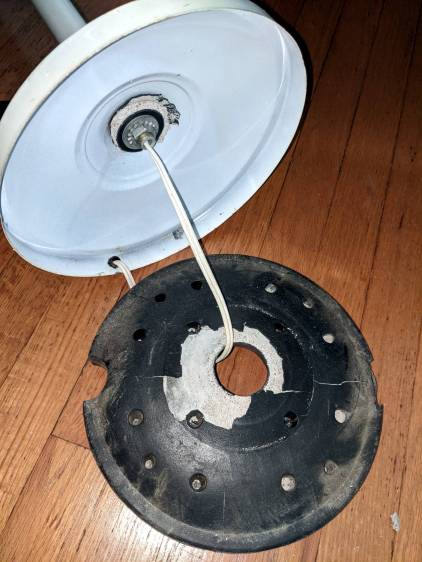
    The torchiere floor lamp in the sewing room suffered a catastrophic failure:

    Floor lamp - failed plastic base shell
    Floor lamp – failed plastic base shell

    Contrary to what you might think from seeing the shattered plastic base, we didn’t use the lamp as a club or battering ram. Apparently the designer expected the thin plastic surrounding the hole to withstand all the torque produced by the long pole against the cheap concrete / mortar / grout / whatever lump in the base. As we can recall, this lamp came to us from either a yard sale or a roadside debris harvest, so I suppose the hardware outlasted any reasonable expectation.

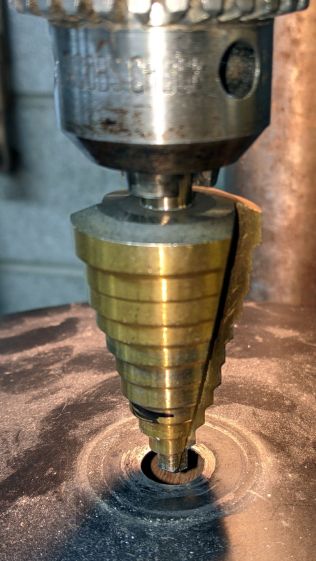
    The Basement Laboratory Warehouse disgorged the pole and base from a similar lamp, albeit sporting black paint and a smaller rod connecting its pole to its somewhat larger weight. Not being too fussy about decor, I embiggened the hole in the black base to fit the white lamp’s threaded rod:

    Floor lamp - enlarging replacement base
    Floor lamp – enlarging replacement base

    The dust on the base shows why you shouldn’t stand motionless in the Basement Laboratory for very long.

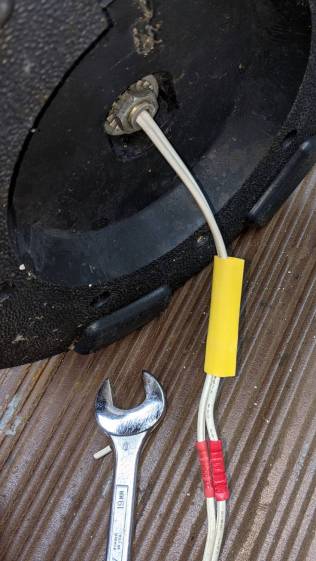
    The alert reader will have noted the cord passing through a strain relief grommet in the white base. Rather than dismantle the entire lamp, I just cut the cord, ran it through the new base weight, reinstalled the washer + nut, then crimped on a pair of solderless connectors:

    Floor lamp - cord splice
    Floor lamp – cord splice

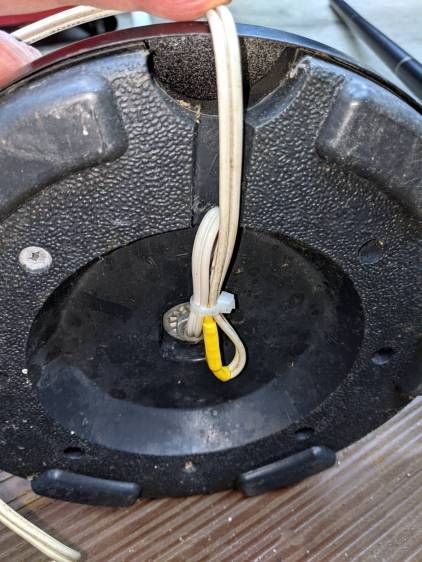
    The new base doesn’t offer much in the way of attachment points, so I added a cable tie to keep the strain off the connectors:

    Floor lamp - cord strain relief
    Floor lamp – cord strain relief

    A strip of genuine 3M duct tape with double-thick adhesive now traps the cord inside that small channel and, given that the lamps spends most of its time standing quietly in a corner, the cord should be fine for long enough.

  • Off To A Good Start

    Off To A Good Start

    This could happen:

    Flying Pig
    Flying Pig

    It vanished a few hours after appearing at the end of a neighbor’s driveway: a pig must be flying somewhere!

  • Review Phreesia Authorization

    “Preregistering” for a medical appointment started by clicking a link in an email to reach a website with no obvious relation to the medical office, filling in a selection of my private bits, then being confronted by this wall of text:

    ———- Wall of text begins ———-

    Review Phreesia Authorization
    Please review the authorization below. A copy of this authorization form will be available at the front desk.
    Authorization for Uses and Disclosures of Protected Health Information
    Health-Related Materials

    I hereby authorize my healthcare provider to release to Phreesia’s Check-in system my health information entered during the automated Check-in process, or on file with my healthcare provider, to help determine the health-related materials I will receive as part of my use of Phreesia. The health-related materials may include information and advertisements related to treatments and therapies specific to my health status. The materials may be provided by my health insurance plan, a pharmaceutical manufacturer or another healthcare entity. Phreesia may receive a payment for making such information available to me through the Check-in System or Phreesia’s Patient Communication Services including items such as newsletters, patient reminders for visits, medication/treatment adherence and other practice-related services.

    If I am presented with an advertisement pursuant to this Authorization and I choose to request certain information and/or samples as described in the advertisement, then I further authorize Phreesia to disclose my protected health information to the advertiser as designated in the advertisement, such as my name, email address, mailing address, or phone number in order to receive such information and/or samples. Phreesia may receive a payment for releasing my personal information. The use and disclosure of my protected health information solely as set forth in this paragraph is valid only for purposes of when I choose to receive the information and/or samples, as described in the advertisement and until I receive such information and/or samples.

    My healthcare provider is using Phreesia’s secure platform to enhance the patient-provider experience and eliminate inefficiencies associated with Check-in.

    The following is the Authorization to provide me personalized educational health content and to allow Phreesia, on behalf of my healthcare provider, to conduct analytics using some of the information that I provide to gain insight into and support the effectiveness of this educational health content.

    Utilizing Federal guidelines and its corporate policy, Phreesia, on behalf of my healthcare provider, ensures that all patient-related health information is protected by administrative, technical, and physical safeguards.

    Phreesia will safeguard my personal information and will not use it for any purpose, other than to: provide health-related materials to me; anonymously analyze health outcomes in support of that educational health content, as well as to measure the effect of the health-related materials furnished to me on my communications with me or my family member’s healthcare provider (this analysis is computer-automated and involves no human review of my protected health information); and carry out any use or disclosure otherwise permitted by this Authorization.

    Although there is the potential for information disclosed pursuant to this Authorization to be subject to redisclosure by the recipient and no longer be protected by federal privacy rules, Phreesia maintains administrative, technical, and physical safeguards as required by the Federal Government’s Health Information Privacy Rule, or “HIPAA,” to protect each patient’s confidential information. Phreesia does not disclose personally identifiable information to anyone other than each patient’s healthcare provider without this Authorization or as governed, permitted or required by law.

    I do not have to grant this Authorization but, if I do not, I will not receive personalized health-related material or, as applicable, receive the materials as described in the advertisement. I understand that my healthcare provider will treat me regardless of whether I grant this Authorization.

    I have a right to receive a copy of this Authorization. I may change my mind and revoke (take back) this Authorization at any time, except to the extent that my healthcare provider or Phreesia has already acted based on this Authorization. To revoke this Authorization, I must contact my healthcare provider c/o Phreesia in writing (including my name, date of birth, gender, home address and healthcare provider’s name) at: Privacy Officer, Phreesia, Inc., 434 Fayetteville Street, Suite 1400, Raleigh, NC 27601; or PrivacyOfficer@Phreesia.com. This information will not be used for any purposes other than to verify my identity in order to revoke this Authorization.

    This Authorization is valid for the following time periods:

    • One year from the date on which I grant this Authorization – for use in delivering personalized health-related materials from my healthcare provider on the Phreesia platform;
    • When the Patient Communication Services Program concludes – for use in delivering Phreesia’s Patient Communication Services on behalf of my healthcare provider; and
    • When the Analytics conclude – for use in Phreesia’s analytics programs

    Phreesia is a business associate of my healthcare provider and is bound by federal law to protect and safeguard my privacy.

    Authorization signed by: The patient, [me]

    ———- Wall of text ends ———-

    I assume your eyes glazed over immediately upon seeing the text and it’s entirely reasonable to assume most folks simply select the “Agree” button (which doesn’t appear here), sign the form, and move on.

    Having actually read the damn thing, it turns out to be an agreement to let Phreesia (apparently, all the good names were used up) spam me with medical advertising vaguely related to my current malady.

    Look at that first paragraph again:

    I hereby authorize my healthcare provider to release to Phreesia’s Check-in system my health information entered during the automated Check-in process, or on file with my healthcare provider, to help determine the health-related materials I will receive as part of my use of Phreesia. The health-related materials may include information and advertisements related to treatments and therapies specific to my health status. The materials may be provided by my health insurance plan, a pharmaceutical manufacturer or another healthcare entity. Phreesia may receive a payment for making such information available to me through the Check-in System or Phreesia’s Patient Communication Services including items such as newsletters, patient reminders for visits, medication/treatment adherence and other practice-related services.

    “May receive a payment” indeed. I declined and haven’t died yet.

    This could happen:

    … there is the potential for information disclosed pursuant to this Authorization to be subject to redisclosure by the recipient and no longer be protected by federal privacy rules …

    Scum, the lot of them.