The Skeinforge Craft window presents a formidable array of buttons, one for each possible plugin:
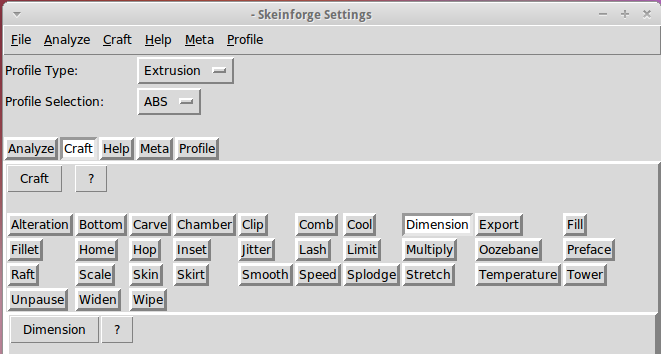
I’ve disabled many of those plugins because, for example, limiting Z-axis speed isn’t relevant on my printer. If you’re sure you won’t use some of the plugins, remove them by editing /where-it's-installed/skeinforge_application/skeinforge_plugins/profile_plugins/extrusion.py thusly…
In getCraftSequence(), located at about the midpoint of that file, duplicate the line that lists the plugins and add an octothorpe (OK, a hash) to make one line a Python comment, then remove the plugins you don’t care about from the other line:
def getCraftSequence():
	'Get the extrusion craft sequence.'
#	return 'carve scale bottom preface widen inset fill multiply speed temperature raft skirt chamber tower jitter clip smooth stretch skin comb cool hop wipe oozebane splodge home lash fillet limit unpause dimension alteration export'.split()
	return 'carve scale preface inset fill multiply speed temperature raft skirt jitter clip smooth skin cool dimension alteration export'.split()
This being Python, do not change the indentation. If you get overenthusiastic and toss something useful overboard or just pine for the Good Old Days, swap the octothorpe to your modified line to restore the original plugin assortment.
Save the result and you’ll see only the useful buttons:
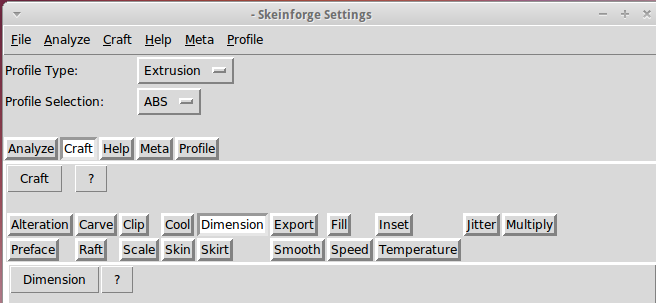
There, now, wasn’t that easy?
 The Smell of Molten Projects in the Morning
Comments
3 responses to “Skeinforge: Simplified Plugin Selection Page”
Or you could just use Slic3r. :-)
Tried that some months back, but it didn’t have quite enough knobbage for my setup at the time.
The 12.15 feature list looks much better; it’s back on my to-do list…
[…] turns out to be not nearly so intimidating as one might be led to believe. Admittedly, a bit of option pruning helps, but after that you’re left with knobs controlling those things that need […]