The Smell of Molten Projects in the Morning

Ed Nisley's Blog: Shop notes, electronics, firmware, machinery, 3D printing, laser cuttery, and curiosities. Contents: 100% human thinking, 0% AI slop.

Tag: Sherline

Sherline CNC mill

  • Broken Tap Removal: The CNC Way

    Having successfully drilled and tapped eight 4-40 holes for the MOSFETs and two 8-32 holes for the heatsink clamps, I needed four more holes for the 6-32 standoffs that will mount the heat spreader to the base. As is always the case, the tap broke in the next-to-last hole…
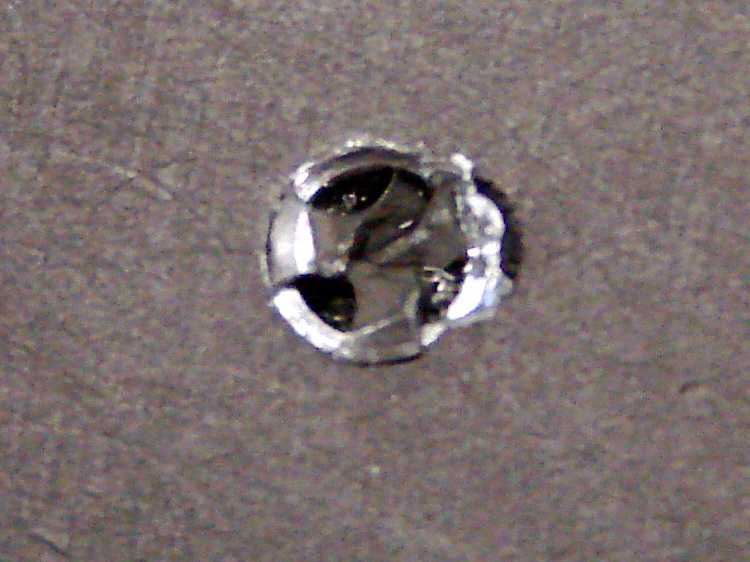
    Broken tap
    Broken tap

    This is a three-flute tap, the break is recessed below the surface, and it looks like it’s cracked along one of the flutes. Bleh! I don’t have any tap extractors, mostly because I don’t do that much tapping, and I doubt the extractors work all that well on tiny taps.

    I tried something I’d never done before: slit the top of the tap with an abrasive wheel and unscrew it. That didn’t work, of course, but it’s a useful trick to keep in mind. I think the tap was cracked lengthwise and, in any event, a three-flute tap doesn’t have the proper symmetry for a slot. Better luck with larger four-flute taps.

    Slotted tap
    Slotted tap

    So I must dig the mumble thing out…

    Starting the moat
    Starting the moat

    The overall plan:

    • Clamp the heat spreader to the Sherline tooling plate
    • Helix-mill a trench around the tap
    • Grab the stub with Vise-Grips
    • Unscrew it
    • Repair the damage

    The clearance hole for a 6-32 screw is 0.1405 inch and that’s a 3/16-inch end mill: 70 + 93 = 163 mil radius, call it 0.170 inch. You really don’t want to kiss the tap flutes with the end mill, so you could make that the ID a bit larger.

    Manual CNC, feeding commands into Axis and using the history list to chew downward 20 mils on each pass. With the origin in the middle of the broken tap and the cutter starting at (-0.170,0), the code looks like:

    G2 I+0.170 Z=-0.020
    G2 I+0.170 Z=-0.040
    ... and so on ...
    

    About 3000 rpm and 2 inches per minute feed; the feed was too slow, because the aluminum chips were much too fine. I actually used cutting lube for this job: the heat spreader got nice and warm.

    Coolant
    Coolant

    I stopped at Z=-0.100 and made a final pass around the bottom of the hole to clean out the ramp. Then, try unscrewing the tap…
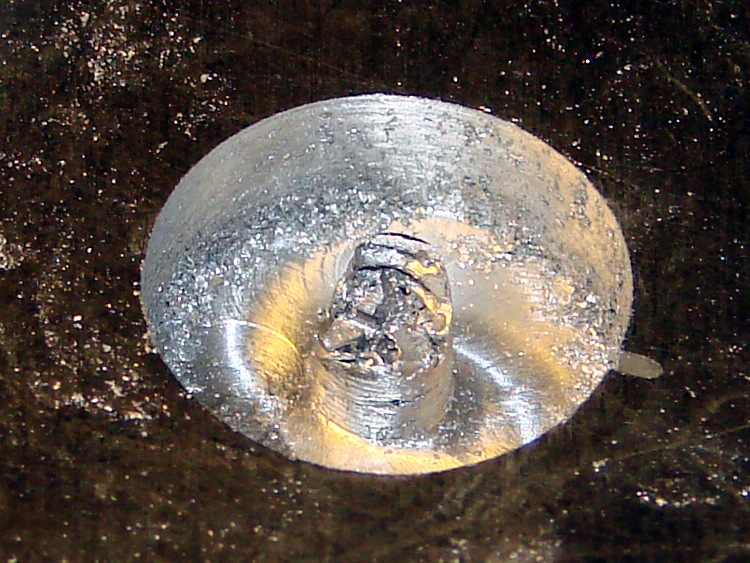
    Tap stub - first attempt
    Tap stub – first attempt

    Of course, the stub broke off more or less flush with the bottom of the hole, so I continued milling downward to Z=-0.260, a bit more than halfway through the plate. This time, the needle-nose Vise-Grips got a good grip on an uncracked section and the remains twisted out with very little effort.

    Grabbing the stub
    Grabbing the stub

    Although the central pillar is outside the tap’s OD, leaving a solid aluminum shell, there’s not much meat to it. The shell broke off with the first twist and came out with the tap.

    Those are not, by the way, gold-plated Vise-Grips. It’s a flash picture and the worklight is a warm-white compact fluorescent: the color correction that makes the aluminum look neutral gray turns the reflected CFL into gold.
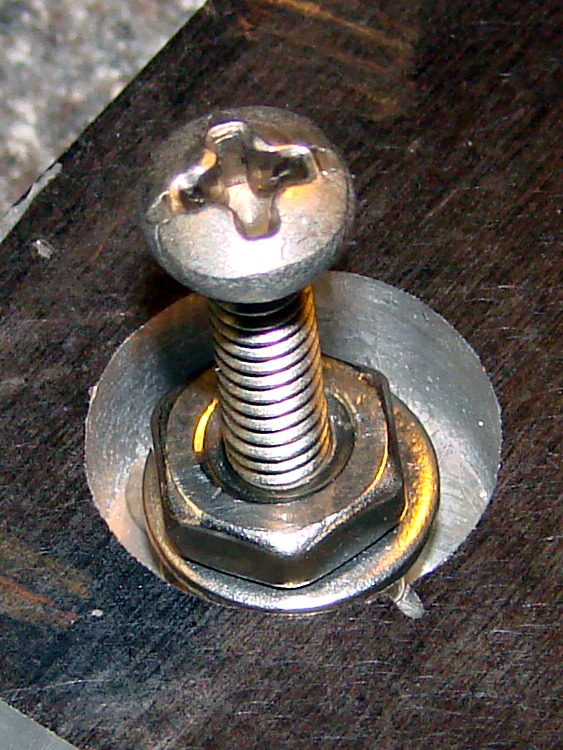
    Aligning replacement nuts
    Aligning replacement nuts

    I milled off the remains of the shell around the tapped hole, leaving a more-or-less flat bottom. If I cared enough, I’d machine a snug-fitting replacement aluminum plug, epoxy it into place, then (attempt to) drill-and-tap the hole again.

    Instead, because the hole was deep enough for a pair of 6-32 nuts and a washer, I simply aligned those on a screw and filled the hole with JB Weld epoxy.

    It doesn’t show in the picture, but the screw is well-lubricated with silicone grease to prevent it from becoming one with the nuts.

    I eased epoxy into the recess, chasing out the inevitable air bubbles, and then scraped off most of the excess.

    Epoxy fill
    Epoxy fill

    Let it cure overnight, scrub it on some sandpaper atop the sacrificial side of the surface plate, and it’s all good again…
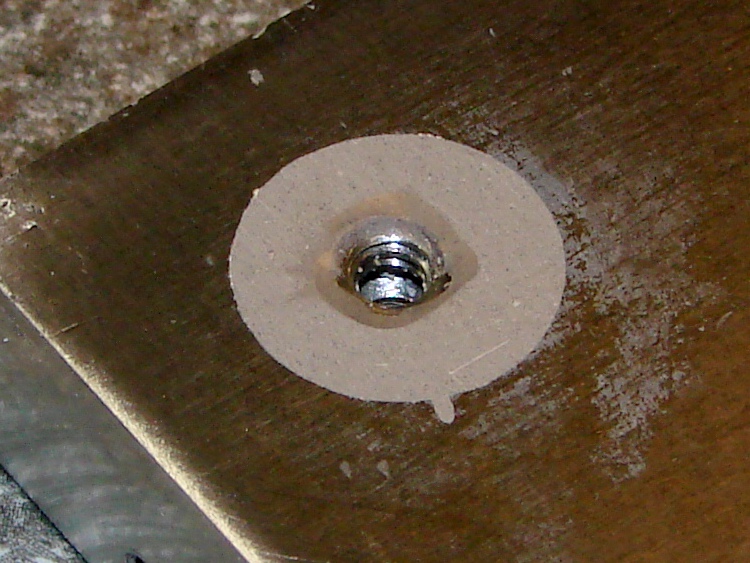
    Sanded flat
    Sanded flat

    The little finger of epoxy sticking out to the front fills the end of the slit I carved into the top of the tap, which is visible in the other pictures if you look closely. The area around the hole isn’t stained; that’s smooth epoxy.

    Of course, the thermal conductivity of epoxy is a lot less than that of solid aluminum. I’m not really pushing the limits of TO-220 packages, so this kludge will work fine in this application. It’s also nice that the repair is on the bottom of the heat spreader, where nobody will ever know I screwed up…

    Now, to return to the project at hand, with even more motivation to avoid tapping holes in the future!
  • CPU Heatsink: Flattening Thereof

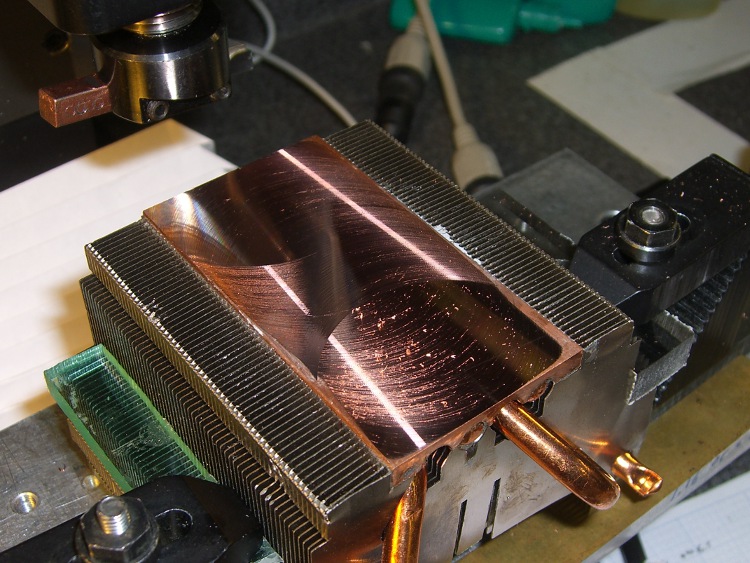
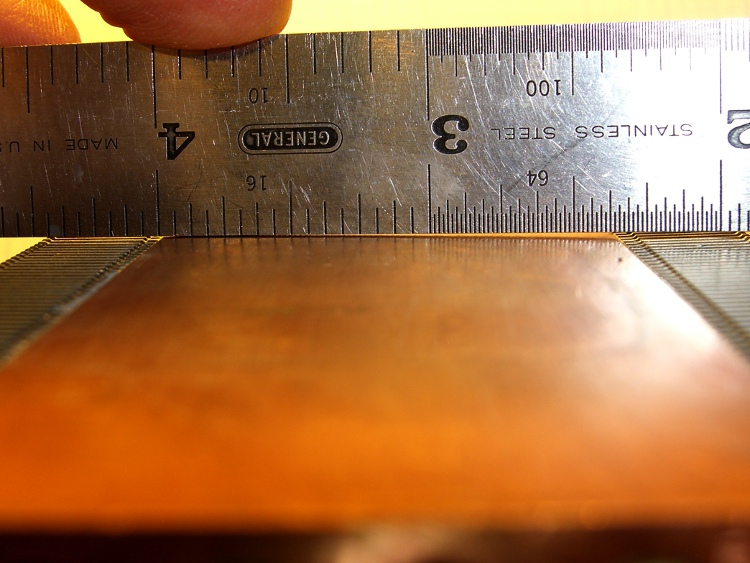
    I suppose I should have known better: the bottom of that heatsink wasn’t anywhere near flat. I think it mated directly with the top of the CPU through thermal grease, not a compliant pad.

    Curved copper heatsink surface
    Curved copper heatsink surface

    The obvious solution is to flycut the thing, which is where the Sherline’s limited Y-axis travel and teeny table put a cramp on your style. Normally, you’d put the length of the heatsink parallel to the X axis so the flycutter would clear on both ends, but there’s no obvious (read: quick and easy) way to clamp the thing that way.

    So I mounted it parallel to the Y axis, which meant I couldn’t get the flycutter completely off the near end. The first pass at Z=-0.1 mm, however, showed that not only was the surface curved, but it wasn’t parallel to the top of the fins (which were flat on the tooling plate). I suppose I should have expected that.

    This cut is has Z=-0.1 mm referred to the front end. It completely missed the other end:

    First flycut pass
    First flycut pass

    I flipped the heatsink around, measured the front-to-back tilt (about 0.16 mm), stuck a couple of brass shims under the front, and the second pass at Z=-0.05 mm from the new low point did the trick. Copper is nasty stuff and I did these cuts dry: the chips visible near the front are stuck firmly to the surface.

    Final flycut pass
    Final flycut pass

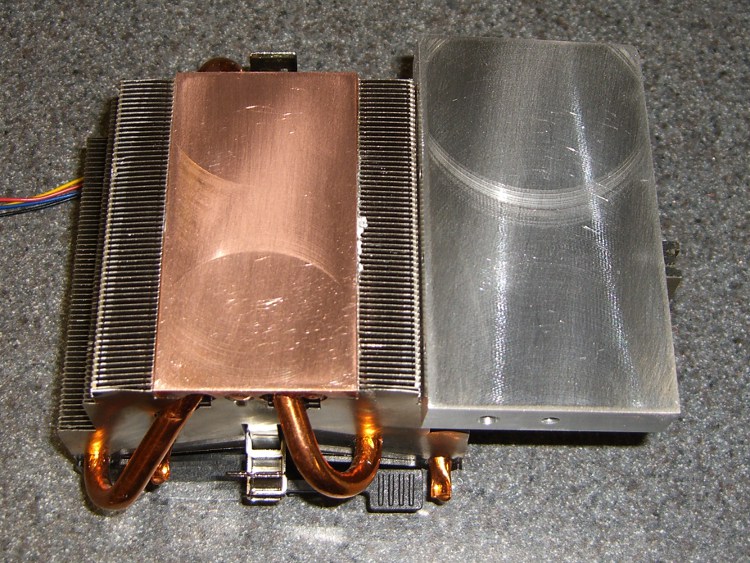
    I scrubbed both the heatsink and the spreader plate on some fine sandpaper atop the sacrificial side of my surface plate until they were all good. I can see the remaining flycutter marks, but I can’t feel them, and the plates slap solidly together with a pffff of escaping air:

    Flattened heatsink and spreader
    Flattened heatsink and spreader

    A dab of heatsink compound should work wonders; the maximum dissipation will be under 20 W, roughly comparable to that old K6 CPU, but now the heatsink will be contacting the entire hot surface.

  • Erasing a Hole

    Turning the plug OD
    Turning the plug OD

    The scrap pile disgorged a chunk of aluminum plate exactly the correct size for a heat spreader that will mate eight power FETS to that heatsink. The catch: a 1-1/4-inch deep hole tapped 1/4-20 for about 3/4 inch at almost the right spot along one end. Rather than sawing off Yet Another Chunk from the original plate, I figured it’d be more useful to just plug the hole.

    Note that this is somewhat different than the situation described there, where I screwed up by putting a hole in the wrong place. Here, I’m just being a cheapskate by making a piece of junk good enough to use in a project, rather than having it kick around in the scrap pile for another decade.

    Anyway.

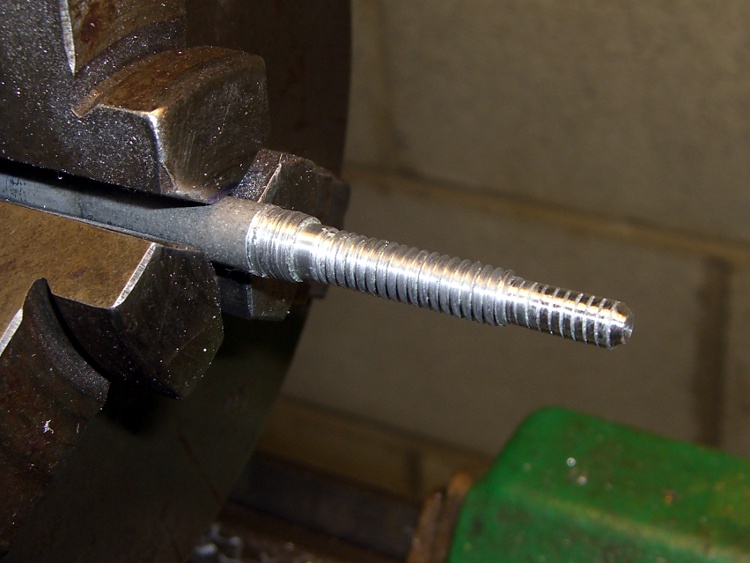
    I turned a 3/8-inch diameter aluminum rod down to 1/4 inch for the threaded part and a bit under 0.200 inch to fit into the partially threaded end.

    A real machinist would single-point the thread, but I just screwed a die over it. The narrow end is slightly larger than the minor thread diameter, which helped get things started. Then a trial fit, saw off the excess on the skinny end, and apply a touch of the file to shape the end to mate with the hole’s drill-point bottom:

    Threaded hole plug
    Threaded hole plug
    Plug epoxied in place
    Plug epoxied in place

    I buttered up the plug with a generous helping of JB Weld epoxy and screwed it in. Toward the end of that process, the air trapped in the end became exceedingly compressed, to the extent I had to stop after each quarter-turn to let it ooze outward; eventually the hole gave off a great pffft as the remaining air pooted out. Unscrewed slightly to suck some epoxy back in, screwed it tight, and let it cure overnight.

    Squared-up block with plugged hole
    Squared-up block with plugged hole

    Sawed off the plug, filed the rubble more-or-less smooth, then squared it in the Sherline mill. The heatsink prefers to sit on a nice, smooth metal surface, so I flycut the other side of the block to get rid of a few dings and the entire anodized layer while I was at it.

    The epoxy ring doesn’t have a uniform width, because you’re looking at a cross section of the thread. The skinny part is the crest of the plug thread, the wide part is along one flank. Barely a Class 1A fit, methinks.

    New hole
    New hole

    Locate the midpoint of the block’s end, center-drill, then poke a new #29 hole 20 mm deep (I really do prefer metric!) for an 8-32 screw. The plug didn’t move at all during this process, pretty much as you’d expect. The chips came out of this hole in little crumbles, rather than the long stringy swarf from the solid aluminum on the other end.

    Using a simple peck drill canned cycle is just downright wonderful:

    G83 Z-20 R1 Q3 F100
    

    The rule of thumb is 3000 RPM with a feed 100 times the drill diameter. In this case, the drill is about 3 mm and calls for 300 mm/min, but the Sherline is happier with slower feeds. Maybe if I was doing production work, I’d push it harder.

    A real machinist would have a milling machine with a servo-driven spindle for rigid tapping, but I just screwed an ordinary hand tap into the holes.

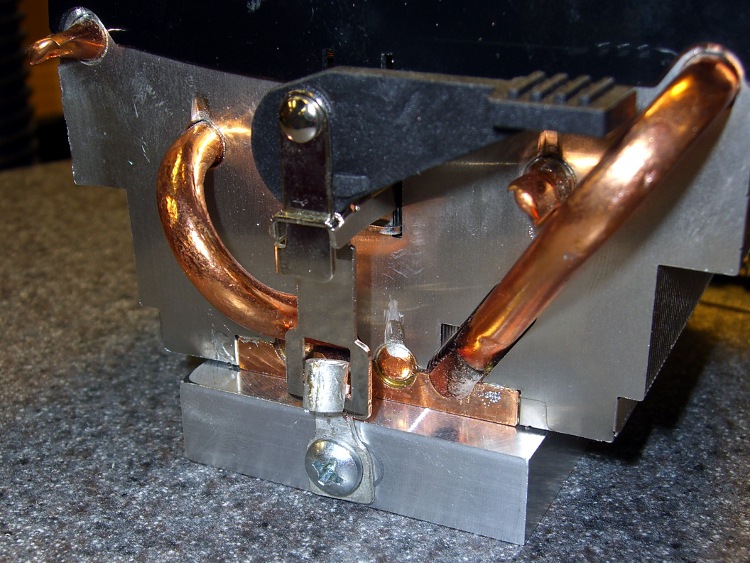
    A bit of futzing converted a pair of solderless connectors into clips that capture the hooks on the ends of the heatsink’s springy wiffletree to secure the spreader to the heatsink. You can see the flycut surface peeking out from below the end of the heatsink. I should hit it with some fine abrasive to polish it out, but I think heatsink compound alone will do the trick.

    Heat spreader on heatsink
    Heat spreader on heatsink

    The next step: drilling-and-tapping eight more blind holes along the sides for the FETs. It’d be really neat to have a servo spindle…

  • Third Eye Hardshell Mirror Repair

    Alas, the mirror I installed this spring didn’t survive our bicycling vacation; it succumbed to the second of three stuff-all-the-bikes-in-a-truck schleps arranged by the tour organizers. Being that sort of bear, I had a spare mirror, duct-taped it in place, lashed it down with some cable ties, and we completed the mission.

    So.

    Back to the Basement Laboratory Plastic Repair Wing.

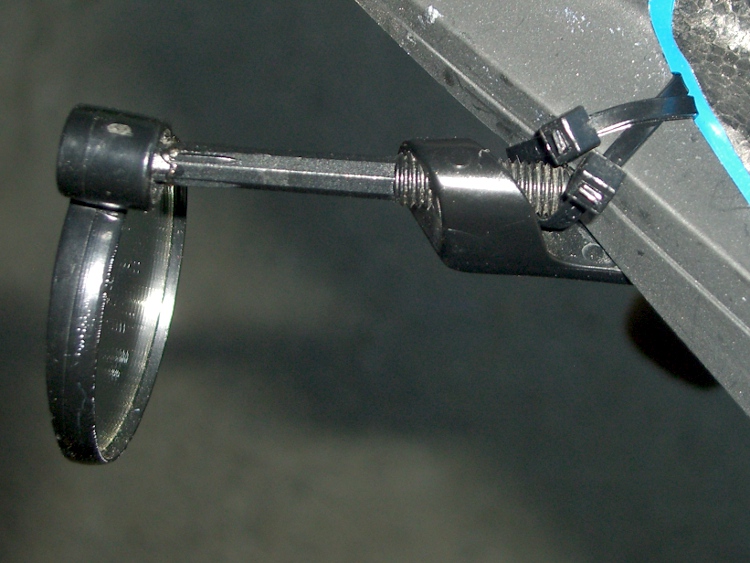
    The strut broke just behind the ball at the mirror, which implies the mirror plate got stuffed against something, rather bending the strut. The ball joint still worked, so I maneuvered the stub perpendicular to the mirror.

    Drilling the strut
    Drilling the strut

    Normally I’d try to re-glue the joint as-is to get the best fit, but past experience shows that if it breaks once, it’ll break there again. I wanted to put some reinforcement into the strut, not just depend on a solvent glue joint. Some rummaging in the brass tubing stock produced a 1/16-inch diameter aluminum (!) tube about 18 mm long: just what’s needed.

    So I filed the deformed plastic flat & perpendicular to the stubs, mounted the strut in the 3-jaw chuck on the Sherline’s table, lined the spindle up with the axis, and poked a 1/16-inch hole into the strut. The alignment looks decidedly off in the picture, but it’s actually spot on: what you’re seeing is some swarf clinging to the far edge. Honest!

    Then I grabbed the mirror plate in the 3-jaw, lined up on the stub, and drilled maybe 4 mm down, which was roughly to the middle of the ball. The tubing was a firm push-fit in the hole and I hope it won’t over-stress the plastic into cracking.

    Gluing the mirror strut
    Gluing the mirror strut

    Run the spindle up, remove the drill, grab the strut in the chuck (actually, I had to swap in the larger chuck first), dab some Plastruct solvent glue on both ends, align the strut with the stub (they’re actually square in that section), run the spindle down to ram the tubing into the strut, then a bit more to apply pressure to the joint. I made the total hole depth about 2 mm longer than the tubing, so as to avoid the embarrassment of having the ends not quite meet in the middle.

    No CNC; pure manual Joggy Thing action.

    Let it cure overnight.

    It’s now back on Mary’s helmet, with a pair of black cable ties ensuring that it won’t pop off, and seems to be working fine. I’m sure the ball joint will fail later this year, although that won’t be due to this repair.

    Mirror on helmet again
    Mirror on helmet again
  • Improved Tour Easy Chain Tensioner

    A discussion on that post reminded me of this old project: replacing the chain pulleys in the midships chain tensioner on my Tour Easy recumbent.

    The problem is that the original pulleys used steel bearings in a plastic race, for reasons that I cannot fathom. They last for a few thousand miles, then get very wobbly and noisy. The solution, as nearly as I can tell, is to replace them with pulleys using cartridge bearings.

    This is what one looks like after four years slung below my bike. Surprisingly, the bearings still feel just fine, even though they’re not really sealed against the weather.

    Tour Easy - Cartridge Bearing Chain Tensioner
    Tour Easy – Cartridge Bearing Chain Tensioner

    Gotcha: the OEM pulleys are not the same OD / number of teeth as pulleys found in rear derailleurs.

    Soooo, after a bit of Quality Shop Time, I had these…

    Tour Easy Replacement Idler Pulley
    Tour Easy Replacement Idler Pulley

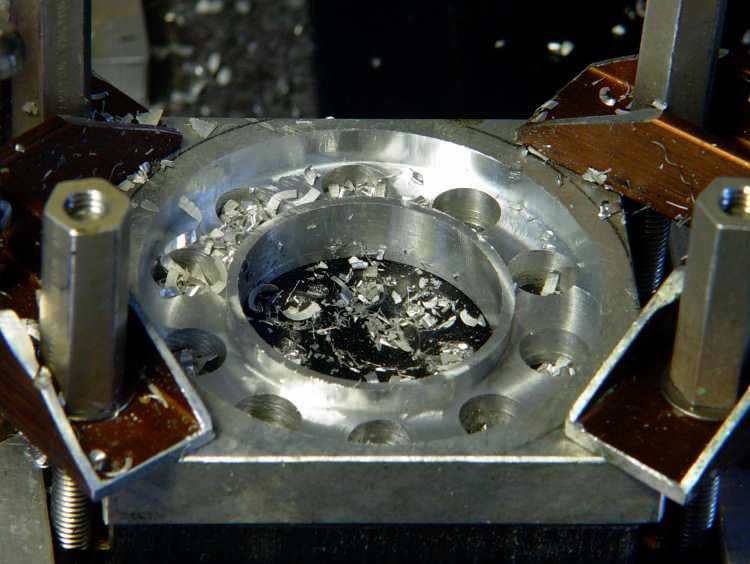
    This is where you really want an additive machining process, as I turned most of a big slab of aluminum into swarf while extracting each pulley.

    The first step is to drill holes around the perimeter where the chain rollers will fit, plus drill out as much of the center bore as possible. Then mill down to the finished thickness across the roller holes and helix-mill the bore to size.

    Side 1
    Side 1

    Flip it over and mill the other side to the proper thickness.

    Run it through the bandsaw to chop off all the material beyond the outer diameter.

    Grab what’s left in the three-jaw chuck and mill around the perimeter to get a nice clean edge.

    Side 2
    Side 2

    And then it Just Works. I made another for Mary’s bike, but she said it was too noisy (which is why they used plastic rather than aluminum) and I swapped it for a Terracycle idler.

    This is from back in the Bad Old Days before EMC2’s version of G-Code supported loops. You don’t need to see that code, trust me on this.

  • External Li-Ion Pack Intermittent Connection: Dismantling the Pack

    The power lead into the Li-Ion pack I’m using for the bike radio became badly intermittent on a recent ride. When I got back I swapped in a different pack and the problem Went Away, but I noticed that the coaxial power plug didn’t seem to seat all the way into the jack on the failed pack. I’d noticed that before, although I attributed it to getting two different sets of the packs; it didn’t seem to make any difference.

    Given that I was going to have to either repair or replace the jack, dismantling the offending pack was next on the list. Some preliminary poking showed that there were no screws concealed under the label, so the two halves of the pack were either snapped or bonded together.

    The case didn’t respond to the usual wedging and prying by revealing an opening, which suggested that it was bonded. That meant I must saw the thing apart.

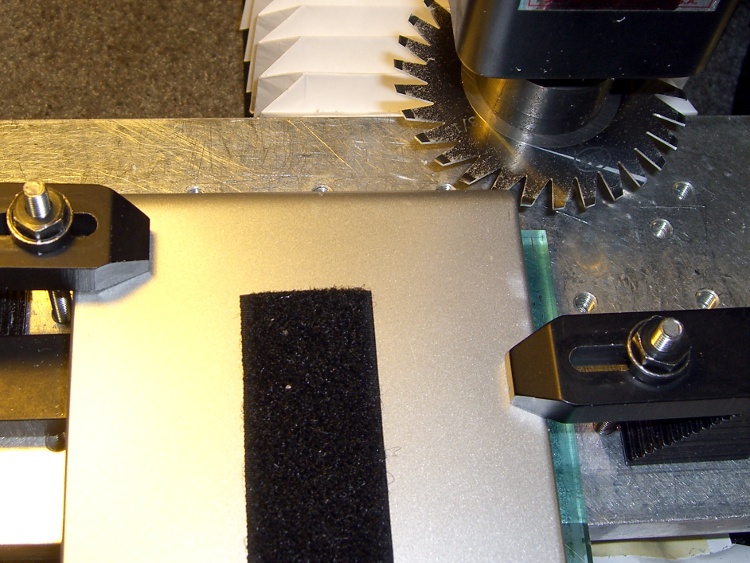
    I set up a 31-mil slitting saw on the Sherline and clamped the pack atop a random plastic slab atop the tooling plate. The Sherline’s limited throat depth meant I had to cut the far side of the pack. I aligned the saw to the Z-axis level of the joint along the middle of the pack by eyeballometric guesstimation.

    Slitting saw setup
    Slitting saw setup

    Key point:

    • You absolutely do not want to saw into a lithium-ion cell, not even a little bit.

    Therefore:

    • The pack must be aligned parallel to the cutter’s travel
    • The cuts must proceed in tiny increments, and
    • You must verify that each cut doesn’t reveal any surprises.

    In this setup, the pack aligns against a clamp on the left side and to a parallel block (removed while cutting) along the rear edge of the tooling plate. I could then unclamp the pack, rotate it to put the next edge in place, and use the same XYZ origin with the edge parallel to X.

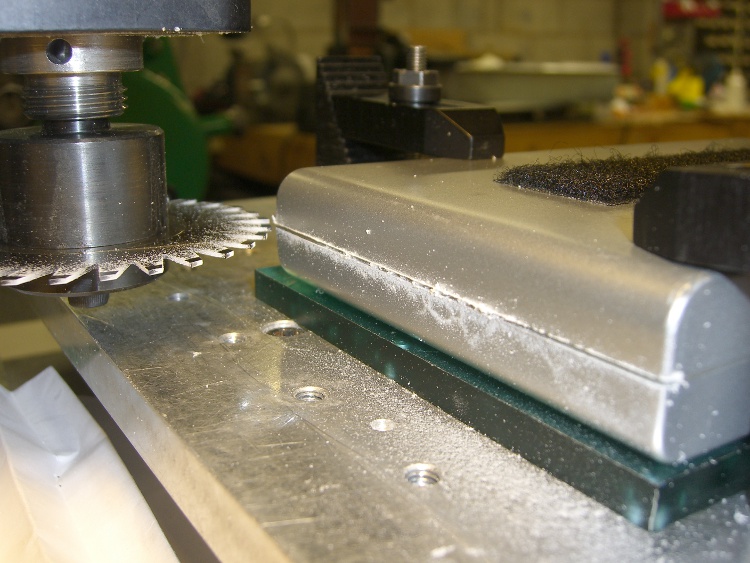
    Here’s the view from the back of the table.

    Sawing the case
    Sawing the case

    I ran the spindle at 5 k RPM and cut about 15 inch/secminute. I’m sure the pros do it faster, but that was enough to warm up the blade and that’s fast enough for me. [Update: typo on the units. Thanks!]

    Cuts were 0.020 inch per pass, which is about 0.5 mm. I expected the case to be some hard-metric dimension and wasn’t disappointed.

    After the cuts reached 0.060 inch, I manage to pry the remaining plastic in the joint apart and split the halves apart along the connectors and LEDs at the front where I couldn’t do any sawing.

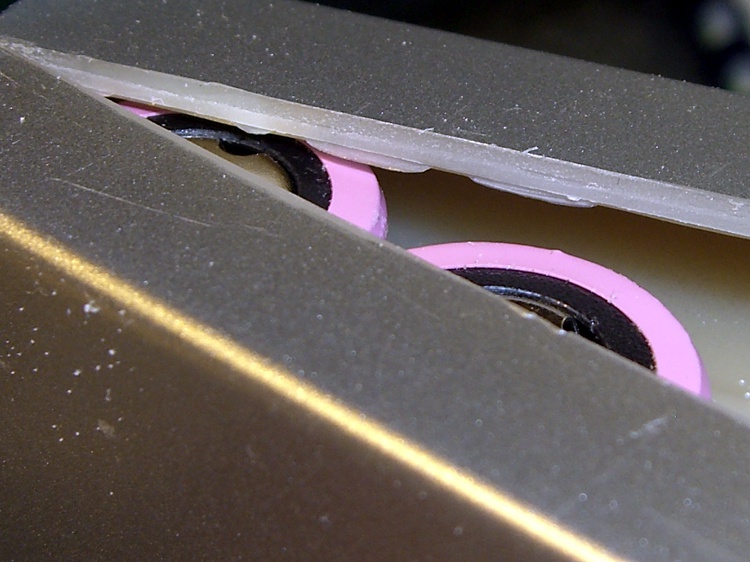
    Here’s a close look at the cut, just above the battery terminals. The case turned out to be 2 mm thick, about 0.080 inch, so I was just about all the way through. The cut was perfectly aligned with the case and cracked open neatly along the entire length.

    Tight tolerance on the cut depth
    Tight tolerance on the cut depth

    An interior view, showing that the cells adhered to the left half of the case and the electronics to the right: of course. I pried the cells loose from the left side, which provided enough access to unsolder the things, as the terminals were against the case. Notice that there’s absolutely nothing between the inside of the case and the outside of the cell, so cutting just slightly too deep would be a Bad Thing™.

    First look inside the case
    First look inside the case

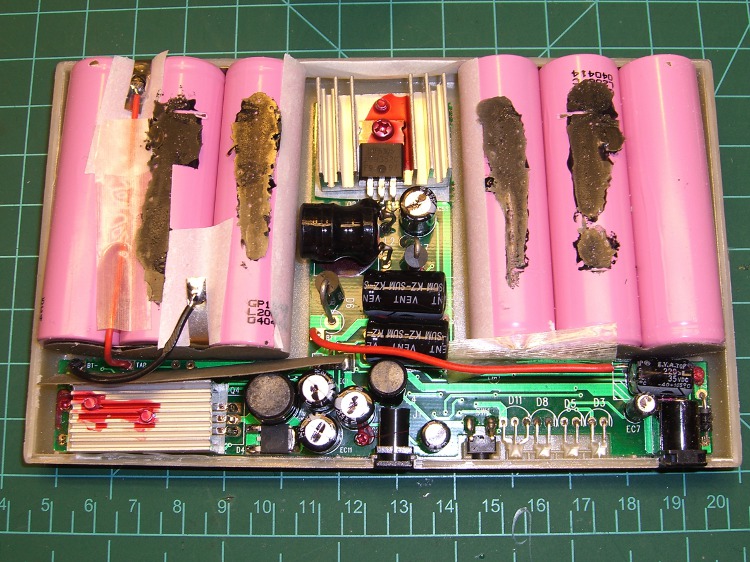
    After a bit of work, here’s the entire layout…

    Battery pack internal layout
    Battery pack internal layout

    Much to my surprise, the battery consists of two series-connected sets of three cells: 2 x 3.7 V = 7.4 V. I expected three series sets for about 3 x 3.7 = 11.1 V, with a linear regulator down to the 9.0 V output.

    As it turns out, they used two switching regulators: the one between the two triplets controls the charging voltage and the one to the lower-left boosts the battery to the pack’s 9.0 V output. I had hoped for a resistor divider that I could tweak to get 9.6 V out, but it certainly wasn’t obvious.

    I unsoldered the cells, dismounted the circuit board, and puzzled over it for a bit, after which the problem was obvious.

    The story continues tomorrow, with a dramatic denouement…

  • Pin Spanner for 3.5 mm Audio Jack Nut

    The external antenna jack on the Totally Featureless Clock is, by necessity, recessed way down in a hole (because I can’t get to the inside of the now-finished half-inch-thick case to gnaw it out from there). Perforce, that puts the locking nut out of reach.

    Solution: a pin spanner wrench. I’m sure they’re available commercially, but what’s the fun in that?

    The male threaded part of the jack is 0.230 inch OD, the nut is 0.313 OD, and the notches are 0.030 wide and 0.020 deep. Raw material is about two inches of 5/16-inch air-hardening drill rod, not that I’m actually going to heat treat it for this application.

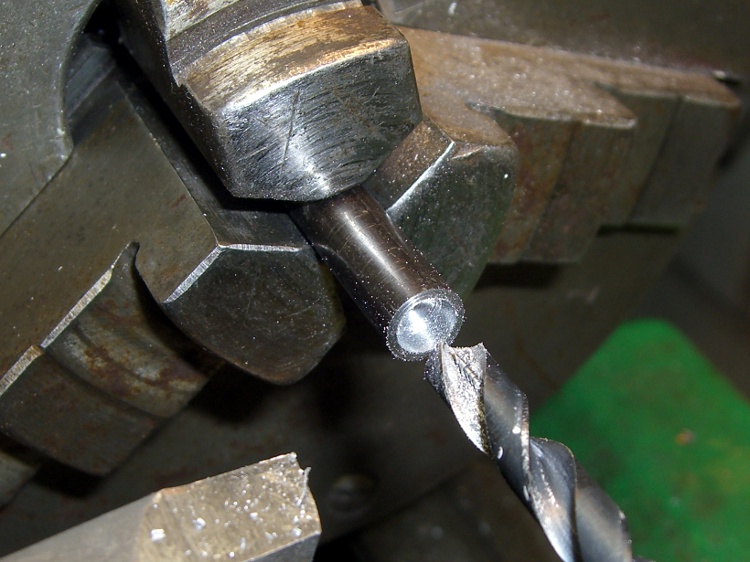
    Face off the end and drill the guts out with a 15/64-inch drill.

    Drilling central recess
    Drilling central recess

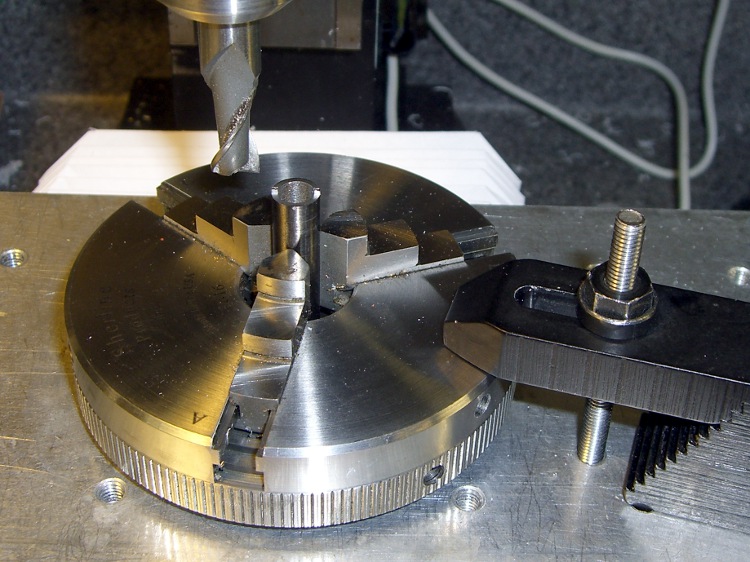
    Grab it in the 3-jaw chuck bolted firmly to the table, then mill off anything that isn’t a pin. Don’t grab it in the milling vise, which doesn’t have enough oomph to hold a slick steel cylinder in place; don’t ask how I know this.

    Milling pins in 3-jaw chuck
    Milling pins in 3-jaw chuck

    Set Z=0 at the top surface of the spanner-to-be and XY = 0 on the axis of the cylinder, of course.

    Manual CNC, feeding the commands into EMC2’s MDI slot and then mouse-clicking the stored commands to avoid reduce typing errors. For my setup, Y=±0.171 to produce the 30-mil pin and  X=±0.4 to clear on both sides.

    After cutting the first side at 3 k RPM, feed 2 inches/min, and 10 mils per pass, I whacked the other side off in one giant 20-mil bite. I’m such a sissy…

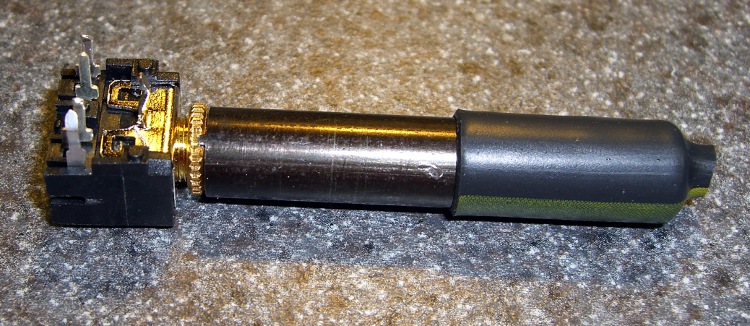
    A bit of heatshrink tubing improves the griptivity and it’s all good.

    Finished spanner engaged in nut
    Finished spanner engaged in nut

    This is the sort of thing you do once, drop in the baggie with the rest of the connector nuts, and use for years thereafter. I should’a done it years ago, but I’ve been able to not quite butcher the nuts with a needle-nose pliers…

    [Update: It turns out a commercial nut driver was available, at least in one special shop in one special place, but no longer. For my delicate uses, that shaft into the jack isn’t really needed.]