Ed Nisley's Blog: Shop notes, electronics, firmware, machinery, 3D printing, laser cuttery, and curiosities. Contents: 100% human thinking, 0% AI slop.
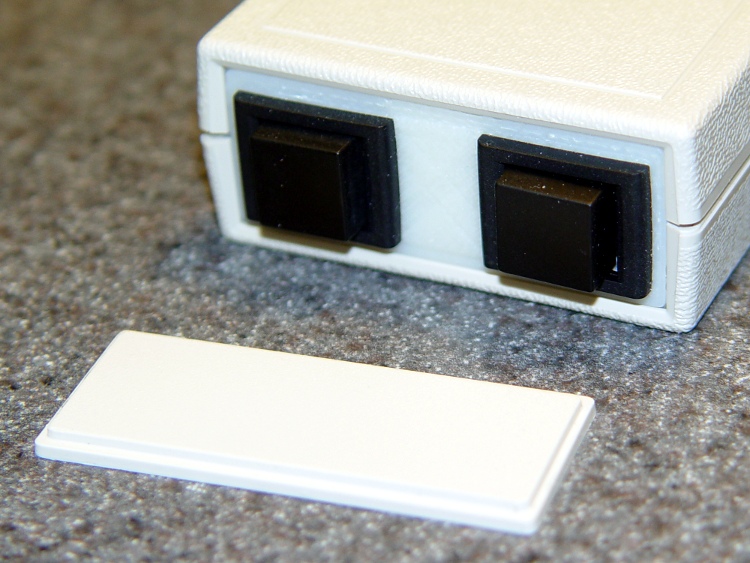
As part of the Thermal Lockout project, I planned to put a pair of big pushbutton switches on the end of a little Pactec box, thusly:
Pactec box – printed panel
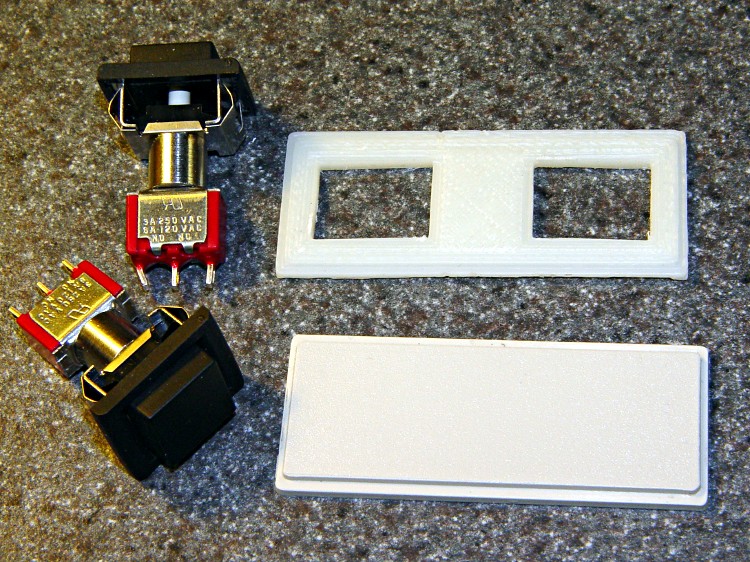
I was in the midst of figuring out how to clamp that tiny panel to the Sherline milling machine’s table and gnaw out those big holes, when I realized I could just print out a new panel with the holes already in place:
Pactec panels with switches
No muss, no fuss, no exciting chips… and no tedious corner filing, either.
The 3D model has the hole for an LED that I added later; the panel shown above acquired that hole during a brief conference with Mr Drill Press.
Thermal Cutout Box – switch plate model
In actual point of fact, I had to do a bit of edge filing for the switches, as the holes came out slightly undersized. The HoleWindage setting should take care of that for the next time around. The panel was a drop-in replacement for the original: all the outside dimensions & thicknesses were spot on.
The OpenSCAD source code:
// End panel for PacTec 61191-01 box
//    Panel 61580-01
// Ed Nisley - KE4ZNU - Feb 2011

Layer1Z = 1.50;
Layer2Z = 1.00;

HoleWindage = 0.55;                // approximately equal to extrusion width
Protrusion = 0.1;                // stick out over top and bottom

SwitchOffsetX = 15.0;

SwitchX = 16.0 + HoleWindage;
SwitchY = 12.0 + HoleWindage;
SwitchZ = Layer1Z + Layer2Z;

LedR = (5.0 + HoleWindage)/2;
LedZ = SwitchZ;

difference() {
 union() {
 translate([0,0,Layer1Z/2]) cube([55,22.5,Layer1Z],center=true);
 translate([0,0,(Layer1Z + Layer2Z)/2]) cube([52.6,19.5,Layer1Z + Layer2Z],center=true);
 }

 translate([SwitchOffsetX,0,SwitchZ/2])
 cube([SwitchX,SwitchY,SwitchZ + 2*Protrusion],center=true);

 translate([-SwitchOffsetX,0,SwitchZ/2])
 cube([SwitchX,SwitchY,SwitchZ + 2*Protrusion],center=true);

 translate([0,0,LedZ/2])
 cylinder(r=LedR,h=LedZ + 2*Protrusion,center=true,$fn=10);

}
Although that collet pusher works fine, the locking pin holder often teleported itself inside the vacuum cleaner. It recently reappeared on the far end of the main workbench, a good 15 feet away from the Sherline as the swarf flies. This, to misquote Churchill, is an impertinence up with which I shall not put.
Herewith, a replacement offering several advantages:
Won’t fit up the vacuum’s snout
Easy to grip
Perfect pin alignment
3D printing FTW!
It’s a flat block resting on the flat top of the pulley, with a nice arc matching the pusher’s OD. A small hole for the pin at exactly the right altitude makes the whole thing rock-solid stable: it slides firmly into position.
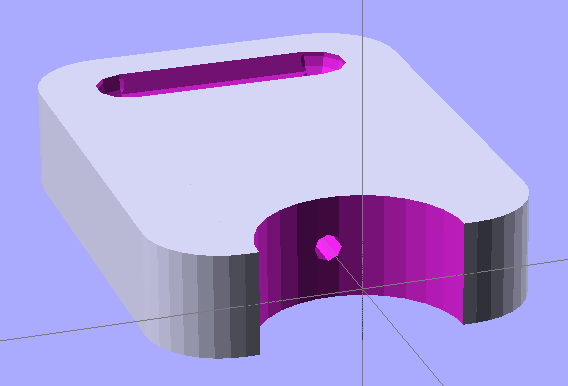
The 3D model looks like you’d expect:
Pin holder – OpenSCAD model
The finger grips were just for pretty, as you don’t need that much traction to extract the thing.
A similar view of the real object with the bottom surface up and some flash around the edges:
Locking pin holder – spindle end view
The as-printed block put the pin about 0.2 mm above the spindle hole, so I rubbed it on Mr Belt Sander (with the power off) until it fit. I printed the block on the aluminum plate platform; the Z height home setting evidently needs a tweak. However, the hole was exactly the correct distance from the top surface: flipping the block over fit perfectly.
This is a variation of Thing 6384: an aluminum plate sitting atop the Automated Build Platform’s bare heat spreader, minus the belt. HIs truly ingenious idea was to cover the plate with a thin layer of ABS to ensure adhesion: an ABS filament bonds very well to ABS!
Aluminum build plate in action
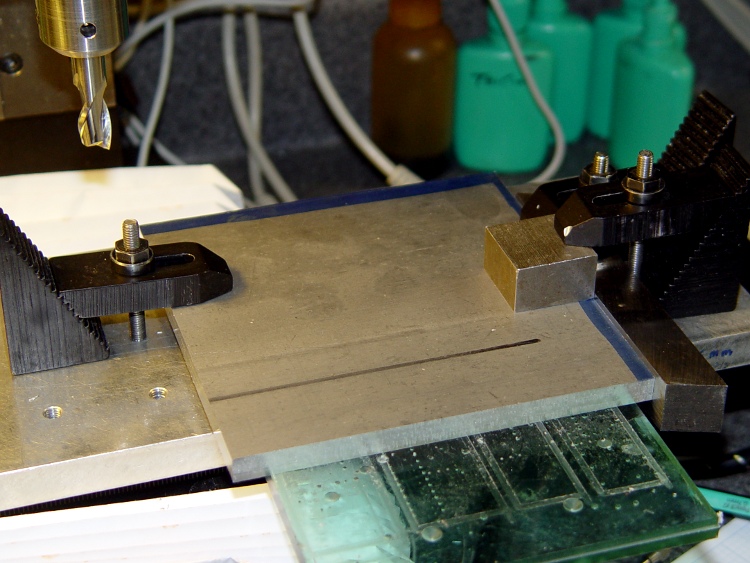
I started with a big sheet of 3/32 inch aluminum, a bit thinner than the 1/8 inch sheet he used, which is what I had in the Parts Heap. Bandsawed three chunks to rough shape, squared up the edges on the Sherline with manual CNC:
Squaring the sheets
That was complicated by the Sherline’s cramped work envelope. The 5/8 inch lathe bit on the right sits at exactly right angles to the X axis and serves as the reference plane. To make it happen:
Stack the three plates, clamp to table aligned against lathe bit
Whack off the far edge
Put clean edge against lathe bit
Whack off another edge
Measure / scribe 120 mm from each new edge (thus the blue stripes)
Align & cut
That actually worked quite well, although you’d think the angular error would build up as I rotated the plates. I checked and tweaked the angle after the first cut and it was all good.
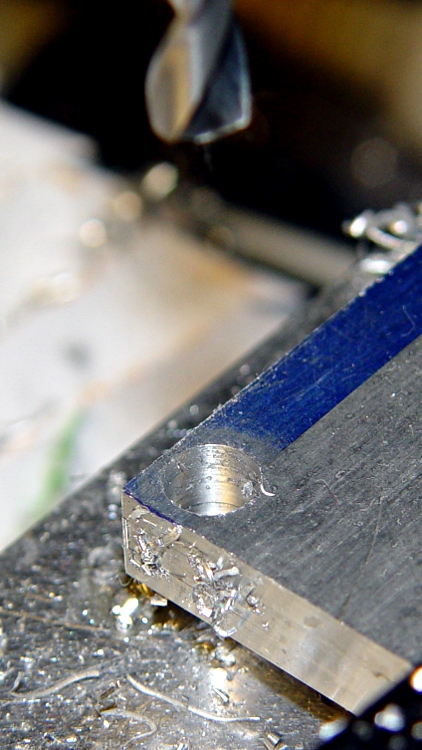
Tight hole clearance
Then drill six clearance holes for the socket head cap screws holding the heater plate to the ABP; a #1 drill gave a few mils clearance, which is all it needs. The holes are 4 mm in from the edges of the 120 mm square, with the two middle ones at, yes, 60 mm.
However, there’s not much meat between the edge of the plate and the holes: call it 1.1 mm. If you do this, using 122 mm plates would produce less scary-close results. That’s why I like manual CNC for this stuff: no need to lay it out, tap in the numbers and it just Works.
My APB heater has a static drain connected to the heat spreader, so I milled a 2 mm recess around the right-hand screws to clear the lugs, wires, and Wire Glue blob. The silicone wiper gets its own cutout, which I made a snug fit so that the rubber would push the plate against the screw heads and hold it in place.
Milled recesses
I machined recesses on only one plate, so I could incorporate any changes in the other two. The initial setup was atop a scrap plastic sheet which, as it turned out, wasn’t particularly flat. The edges of that not-quite-complete hole on the left were nasty-sharp.
Thin-shaved plate edge
Then clean off the ink with xylene, scrub the plate with a 220-grit sanding sponge, and it looks really nice. Impossible to photograph a uniform gray surface, though: the autofocus goes nuts.
While all that was going on, I’d dumped some MEK into a polyethylene jar along with a handful of calibration cubes and similar debris. I used MEK, rather than acetone, because it’s somewhat less aggressively flammable while still being a good solvent for ABS. Right now, the gunk has the consistency of thin honey, which may be too thick to spread easily; I’m still figuring this out. I apply the gunk with a folded coffee filter: scrape the puddle around to cover the whole plate, then let it dry. This is best done outdoors, except that right now it’s well below freezing out there.
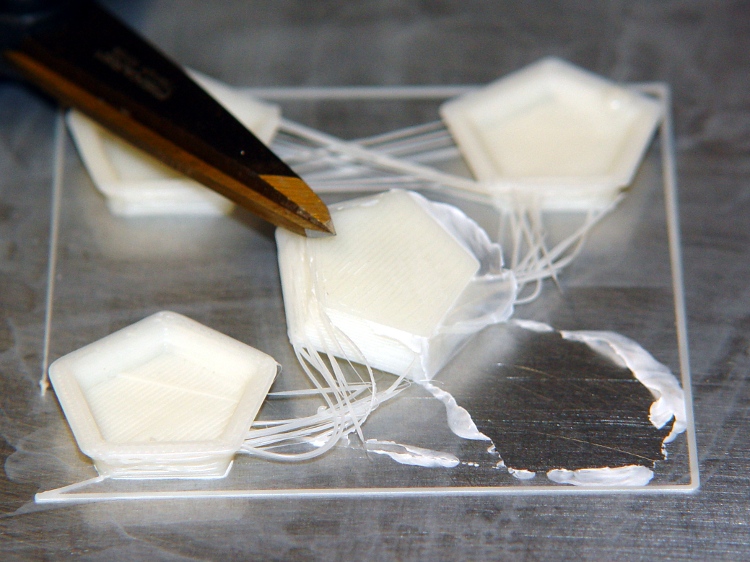
Here’s what the film looks like under the start of a quartet of dodecahedrons I ran off to see if they stuck properly:
ABS coating on aluminum build plate
The bottom surface looks like it was machined: dead flat,nice edges, good thread definition. The parts stick like they were glued to the surface, with no tendency to pull up at the corners.
The Outline thread shows some adhesion trouble for the first 10 mm or so. After that, it’s nailed right to the ABS film. That’s why I use Outline, at least until I figure out a better way to start the thread.
After I finish the next two plates, I’ll have a somewhat quick-change build platform: pull the hot plate off (holding it with pliers!) and slap a new one on. Not as convenient as the ABP, but much better for building precision parts like gears and extruder motor mounts.
MBI sent me a selection of 1/4-inch cartridge heaters to evaluate, seeing as how I’ve been such a pest on the subject of those poor aluminum-case power resistor heaters. Thanks, Zach!
I initially thought I could punch the cores out of the resistors and slip the cartridge heaters into the holes, but it turns out the resistor bodies aren’t quite the right size: slightly too short with slightly too large holes. So it goes. Some earlier thoughts live there.
This is a first pass at building mounting blocks to attach cartridge heaters to a stock MK5 Thermal Core. Ideally, you want a solid Thermal Core with a hole or two for the heaters next to the filament extrusion nozzle, but that requires fancier machining that I’m ready for right now. The fabled nophead shows how that looks for a ceramic power resistor.
The obvious question is whether you want a single high-wattage cartridge heater or a pair of low(er)-wattage units. I think a core-with-hole can get away with a single heater, which is also the lower-cost option. My thermal measurements suggest the Core is pretty much isothermal, so there’s no problem with distributing the heat evenly from one side to the other.
However, adding two lower-wattage heaters to a stock MK5 Thermal Core makes more sense, because the interface between the blocks and the Core seems to run a bit under 1 °C/W. A single 40 W heater would thus run 30-40 °C higher than the Core: call it 260 °C. IMO, that’s much too high for something an inch away from a plywood frame and an acrylic support structure.
A pair of 25 W heaters would run at 245 °C-ish. That’s still pretty hot, but every little bit helps. I’ll start with that arrangement and see how it works.
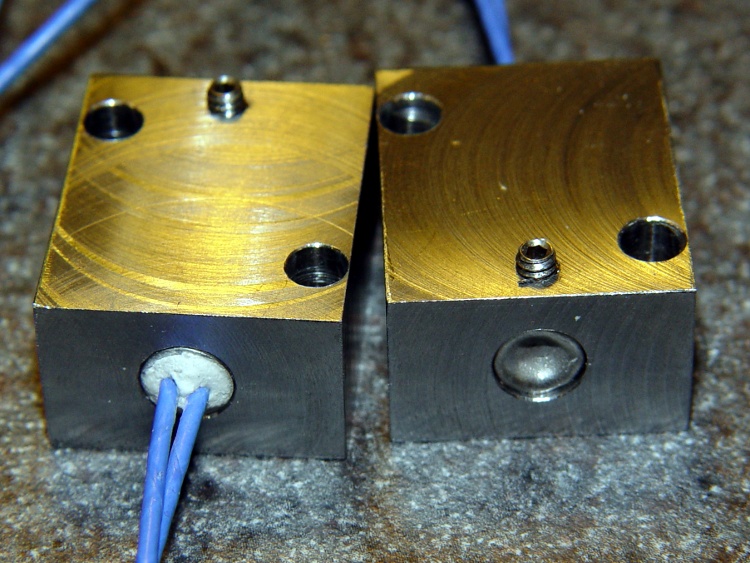
Block top and bottom
The blocks are ordinary steel from the Scrap Box: a convenient length of 1×1-inch bar stock that somebody else had made into something else a long time ago. I bandsawed off four 1×1-inch slabs, each about 5/8″ thick. A second bandsaw cut turned the square slabs into rectangles. I finished two blocks; the other two slabs await more experience with how these work.
I squared up the blocks with a flycutter in the Sherline, then sanded down the bottom surface a bit. The thermal tests suggest the contact is Good Enough with a reasonably flat surface, so I settled for a used-car finish: high shine and deep scratches. They’re actually smoother than the pictures would have you believe.
The Thermal Core has hard inch dimensions (minus cleanup cuts): 1 inch front-to-back and 13/16 inch tall. I generally work in metric, so the sketch at the bottom has everything in millimeters.
The mounting blocks have holes matching the resistor footprint. I drilled clearance holes for the heads of the original M2 socket head cap screws, ran an end mill down the hole to flatten the bottom, then drilled clearance holes for the threads. Those holes are perilously close to the edge, but the blocks really don’t want to be any taller. Perhaps use a less-generous clearance?
The alternative would be to mill a flange along the edge to match the resistor mounts and put the SHCS heads in free air, but that seemed like more work and it would cramp the thermal path from cartridge to block.
I also thought about chamfering the edges to make the blocks look less, well, blocky, but that’s in the nature of fine tuning.
The cartridge heaters slip-fit into a nominal 0.250 hole; the samples are 0.247 to 0.248 and (from what I read) the diameter tolerance stays on the minus side of 0.250. I don’t have a 0.250 reamer, which is how you get a precise hole ID, so I’ll go with drilled holes. Fortunately, I have a set of letter-size drills in nearly new condition:
A drill = 0.234 to poke a hole in the block
E drill = 0.250 to get the final diameter
The final holes worked out to be exactly 0.250 inch, to the limits of my measurement ability, which I will declare to be Good Enough. The cartridges have a loose slip fit with no side-to-side play.
The cartridges expand when heated and squeeze against the hole to make good thermal contact. While cool, however, they can slide out without much urging, so I added a 4-40 setscrew. It’s on the butt end of the cartridge heater shell, away from the leads, so if a cartridge becomes one with the block I can drive it out with a pin punch. Putting the setscrew at the end with the wire leads makes more sense (it’s cooler there), but then you’d be beating the entire length of the cartridge out past the setscrew hole.
The setscrew and the M2 SHCSs get a liberal dose of anti-seize grease before assembly.
Here’s what the holders looked like, just before bolting them in place:
Cartridge heaters in blocks
Doodles with the more-or-less as-built dimensions:
This is a better view of the alignment process that I endure once a year when I haul my Sherline mill back from Cabin Fever. The whole thing depends on a laser level that I’ve gutted and clamped to the floor joists over the mill, as described there.
The first step uses a plumb bob to position the hacked laser level lens directly over the Sherline’s spindle bore. I’ve shimmed the countertop under the mill to be pretty much level, so a vertical line from the bore determines where the lens must be.
Then I fiddle around to get the beam directly in the middle of the spindle bore, using a slip of paper to figure out where it’s going. The top picture shows the result.
Having done this a few times, the laser level starts out pretty much aligned, but the first setup required quite a bit of back-and-forth twiddling of the screws.
Then I put a mirror flat on the Sherline’s table / tooling plate to reflect the beam back up the spindle. More fiddling around gets the reflected spot pretty close to the outgoing beam; this picture shows the spot just off-center near the top (actually, toward the base of the laser level’s frame) of the aperture.
Reflected spot near laser aperture
When the outgoing and reflected beams converge, then I put the bushing (without the polarizing filter) in the top of the spindle bore to reduce the beam size and fine-tune the positions & angles.
Surprisingly, it stays in position quite solidly. I do twiddle it every now & again, but as long as the beam gets through the bore it’s close enough.
A display across the aisle from the CNC Ghetto at Cabin Fever featured a nice Laser Center Edge Finder with their new polarizing attachment. I played with it for a while and decided that, although my crude lashup gave similar results, I just had to have a polarizing filter, too.
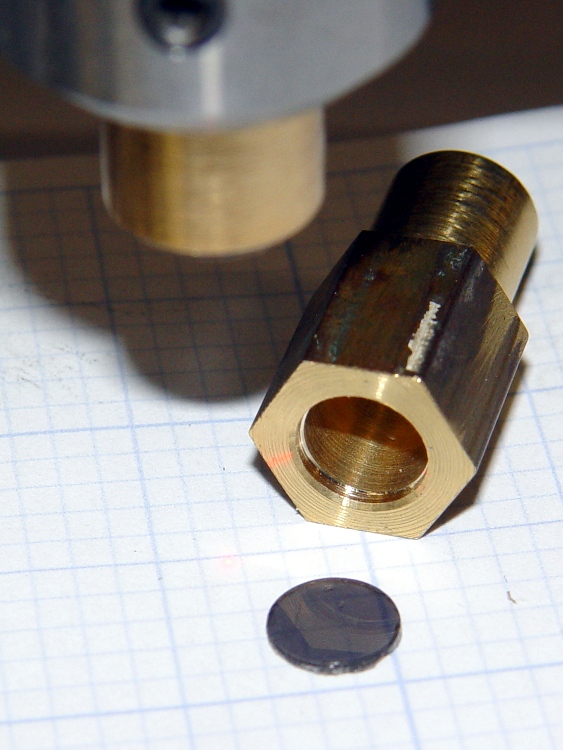
I’d already made a bushing to fit the top of the spindle bore with a small aperture that aids in lining up the laser, so I just added a small recess for a disk of polarizing film. I have, for reasons that should not require any explanation by now, a lifetime supply of polarizing film…
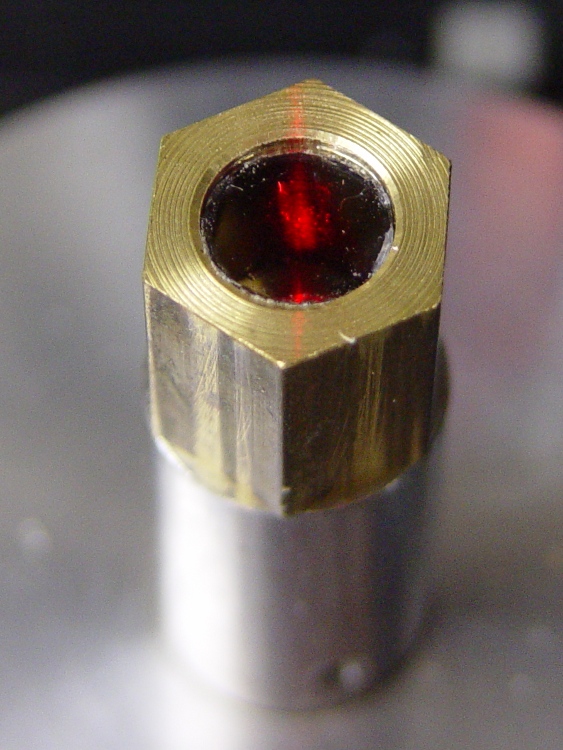
Anyhow, the new polarizing filter sits neatly atop the spindle. The main laser beam lights up the middle of the filter, with junk light spilling on the bushing to the front and rear.
Polarizing film in upper bushing
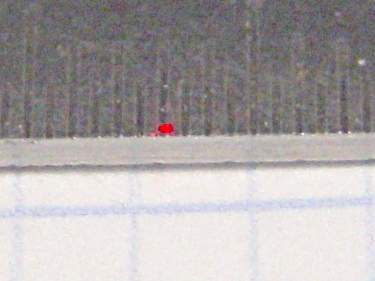
Getting a good photograph of the spot size poses some problems, but here goes. This is the original, un-attenuated spot on a scale with 0.5 mm divisions: in round numbers, it’s half a millimeter across.
Normal laser spot size
Cross-polarizing the beam produces this attenuated spot on the same scale: it’s 0.25 mm in diameter, maybe a bit less. Call it 10 mils.
Attenuated laser spot size
Obviously, what you’re seeing are overexposed more-or-less Gaussian spots, so their diameters aren’t fixed numbers. But at this level, the inaccuracies of my Orc Engineering lens mount are comparable to the spot size, so reducing the spot any further isn’t going to improve the overall positioning accuracy.
It’s worth noting that the spot size isn’t the same as the positioning accuracy: you can visually align a workpiece mark to less than 1/4 the spot diameter. Claiming 1/10 the diameter would be more brag than fact, at least for me, but somewhere around 2 mils is close. That’s good enough for most of what I do.
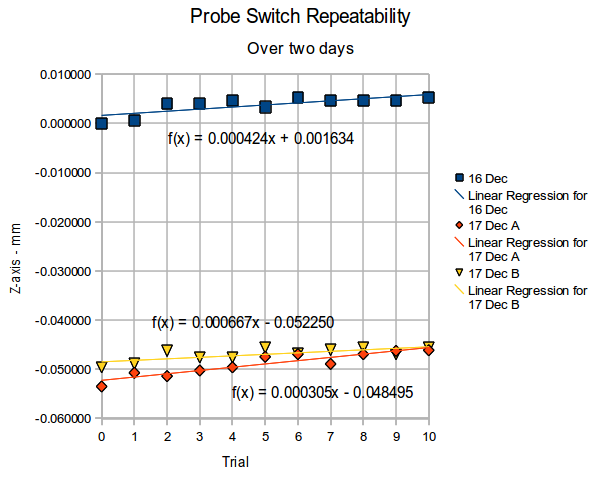
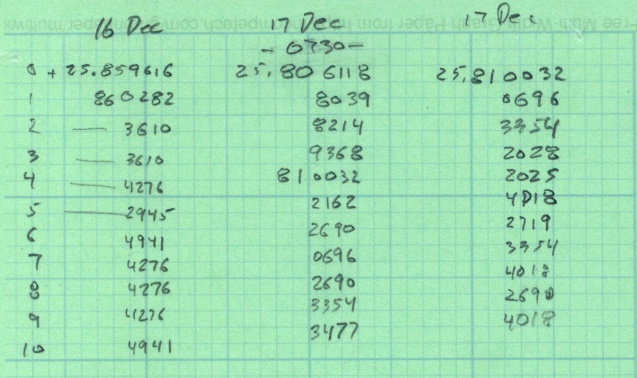
Re-running that probe length switch test a few weeks later produced these results for three trials over the course of two days.
Probe Repeatability – Dec 2010
The Z-axis differences are all relative to the first reading on the first day, so this includes whatever Z-axis changes take place without doing anything else on the mill in between the tests. I turned the power off after making the first set of measurements, so the steppers restarted with up to a plus-or-minus one full step offset; that works out to:
(0.050 inch) * (1 rev / 200 steps) = 0.00025 in = 0.0064 mm
Because EMC2 doesn’t actually know where the stepper is, any uncommanded motion will show up as an offset when the probe switch trips, which is exactly what we see here.
Two things of interest:
The -0.05 mm offset between the two days could well be part of a single step offset
Successive probe positions during a single test don’t change by hardly anything at all
(I’m giving a talk and show-n-telling my Sherline CNC milling machine at Cabin Fever Expo right about now, so having this data readily available seemed prudent. The talk & handouts are there.)











 The Smell of Molten Projects in the Morning