The Smell of Molten Projects in the Morning

Ed Nisley's Blog: Shop notes, electronics, firmware, machinery, 3D printing, laser cuttery, and curiosities. Contents: 100% human thinking, 0% AI slop.

Tag: Repairs

If it used to work, it can work again

  • Amazon Laminator Wiring

    Amazon Laminator Wiring

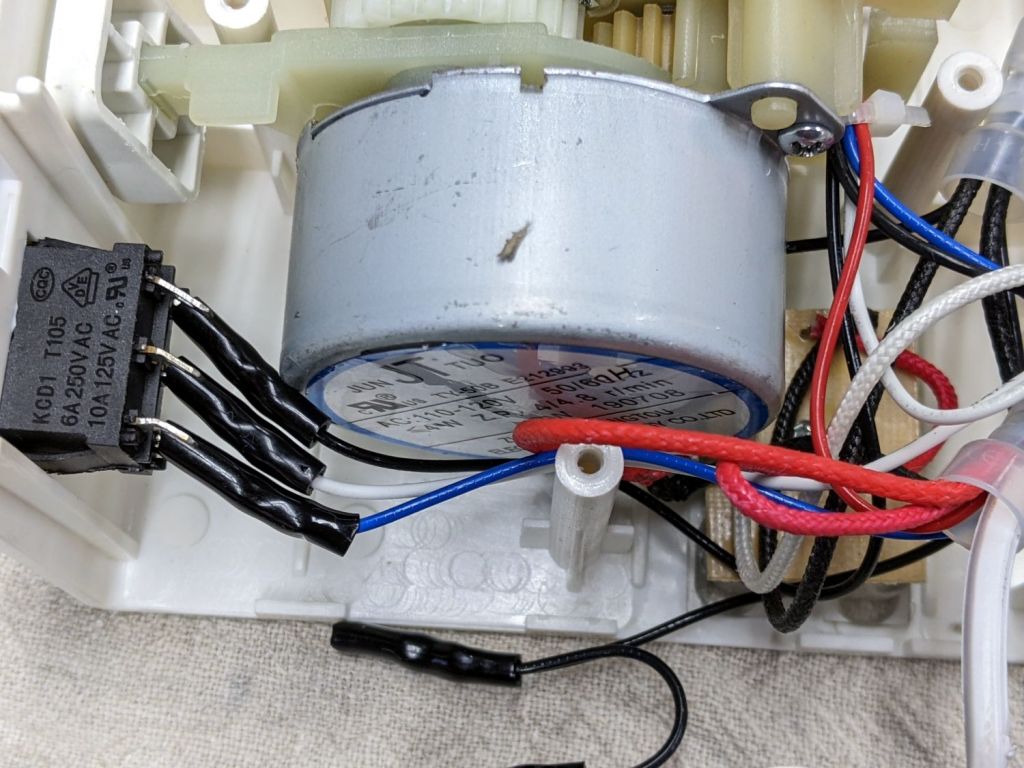
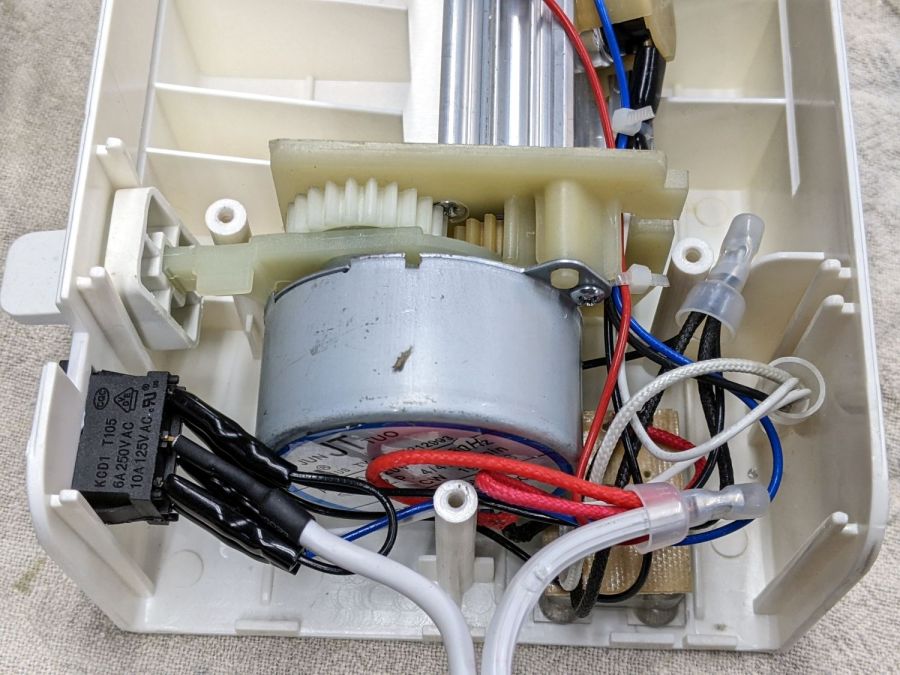
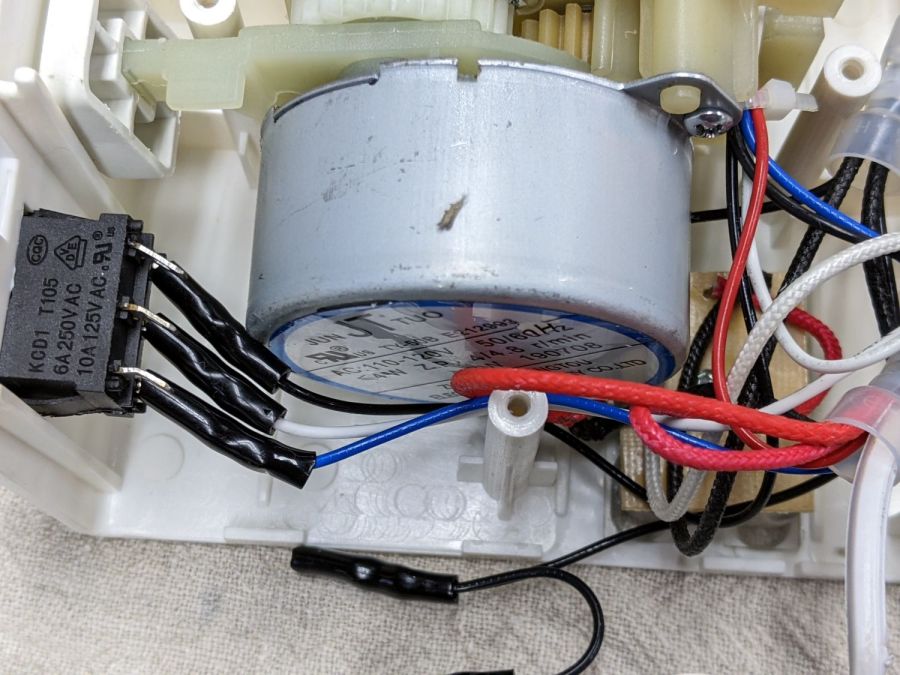
    Someone with a jammed Amazon laminator inadvertently dislodged the switch wiring, so I took a few more pictures to help. Note: I see absolutely no reason to assume any two laminators will have the same wire colors, but the overall functions should be the same.

    The top set of three switch terminals control the overall power to the laminator:

    Amazon Laminator - switch wiring
    Amazon Laminator – switch wiring

    The center terminal comes from the unmarked (no ridges) wire in the line cord. The two outer terminals are connected together with a short jumper from the terminal nearest the motor, with a longer black wire to the wire nut binding other black wires.

    The bottom set of terminals select the temperature:

    Amazon Laminator - switch bottom contacts
    Amazon Laminator – switch bottom contacts

    The white wire on the center terminal goes to the wire nut holding the other white wires and a black wire (!) going to the middle of the three thermostats on the extrusion. The black and blue wires on the outer switch terminals go to the thermostats on the aluminum extrusion to the heater.

    Verily, it is written: There’s nothing like a good new problem to take one’s mind off all one’s old problems.

  • Tektronix AM503: Q230 Dual JFET Replacement

    Tektronix AM503: Q230 Dual JFET Replacement

    Some suggested 151-1032-00 replacements obviously won’t work, such as Tekwiki’s 2N5397 single JFET. Bonding a pair into a single heatsink might suffice, but two separate cans generally aren’t identical enough for the purpose.

    Curiously, Tekwiki also lists the 2N5911 as a 151-1032-00 replacement, which (being an actual dual JFET) looks more promising. This agrees with another cross-reference, although the “Sim[ilar] to” suggests considerable caution.

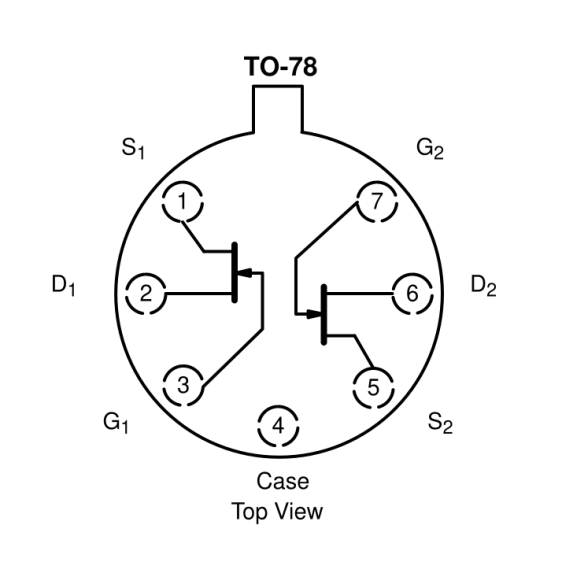
    The 2N5911 pinout, as taken from its datasheet:

    2N5911 Dual JFET pinout
    2N5911 Dual JFET pinout

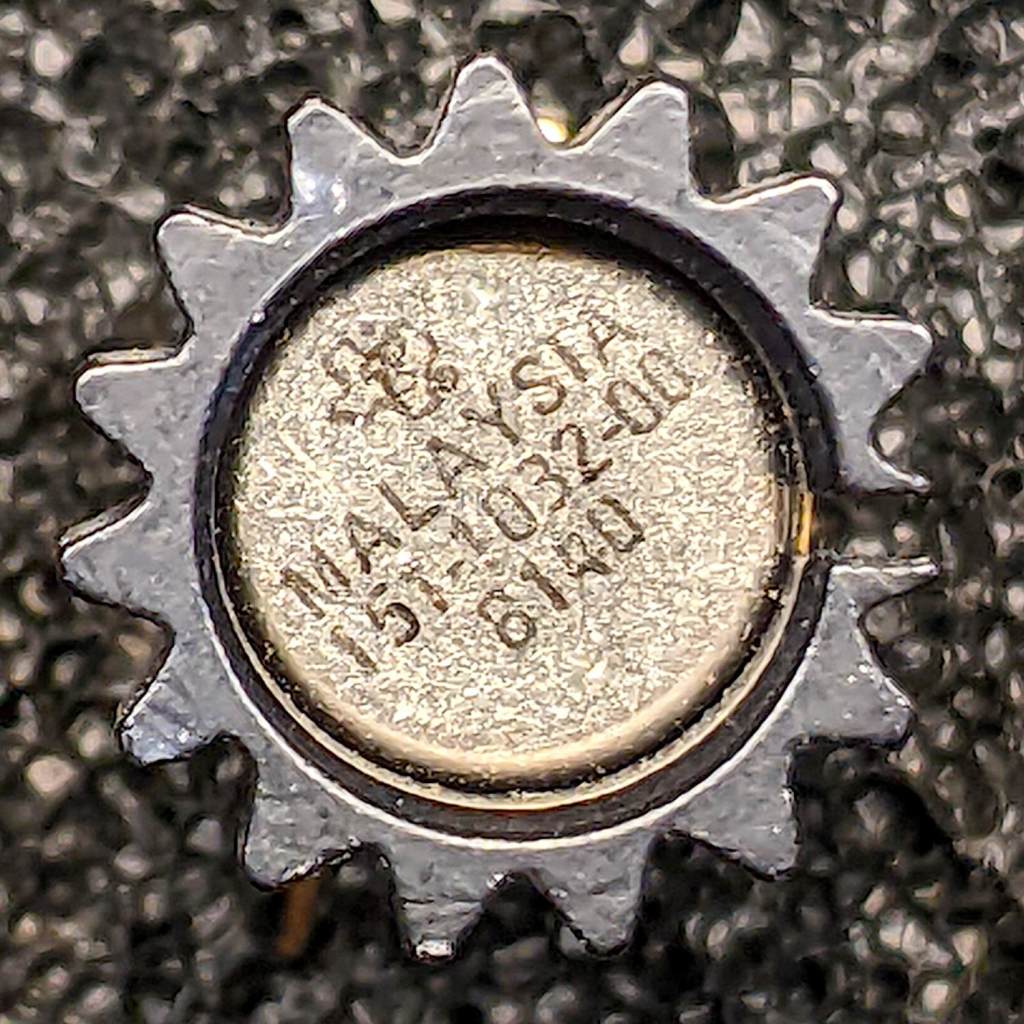
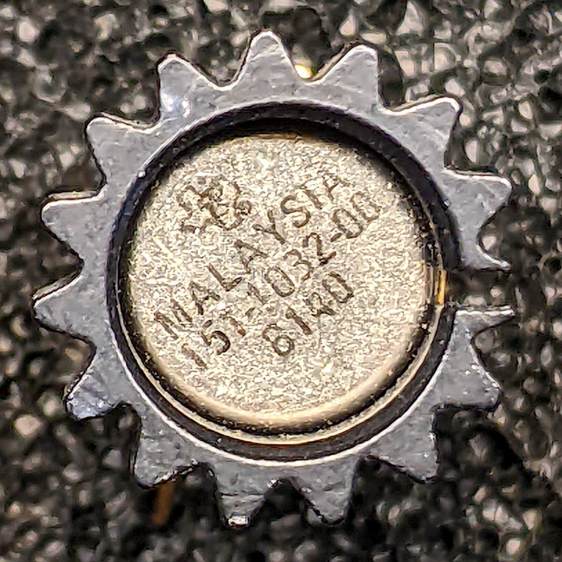
    The actual Tek 151-1032-00 can in its heatsink, oriented with the tab at the top (just visible to the right of the heatsink fin):

    Tek 151-1032-00 - top view
    Tek 151-1032-00 – top view

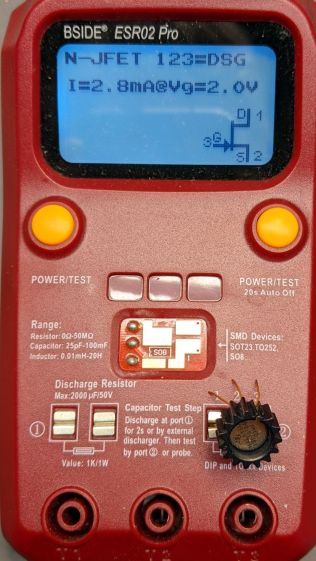
    Testing one side (with the tab on the left):

    Tek 151-1032-00 test side A
    Tek 151-1032-00 test side A

    And the other side (tab still on the left):

    Tek 151-1032-00 test side B
    Tek 151-1032-00 test side B

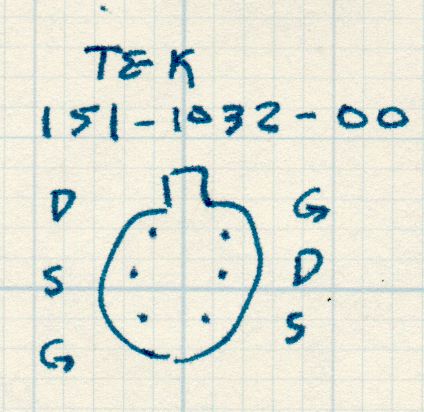
    A picture being worth a kiloword:

    Tek 151-1032-00 - measured pinout
    Tek 151-1032-00 – measured pinout

    The drain and source over on the left side seem to be swapped compared to the 2N5911, although both gates are on the proper pins. This being a JFET, the source and drain may be electrically identical and it’s possible the tester labelled them backwards. The only way to be sure Tek wasn’t tragically clever is to poke around the PCB to figure out which pins connect to which other components.

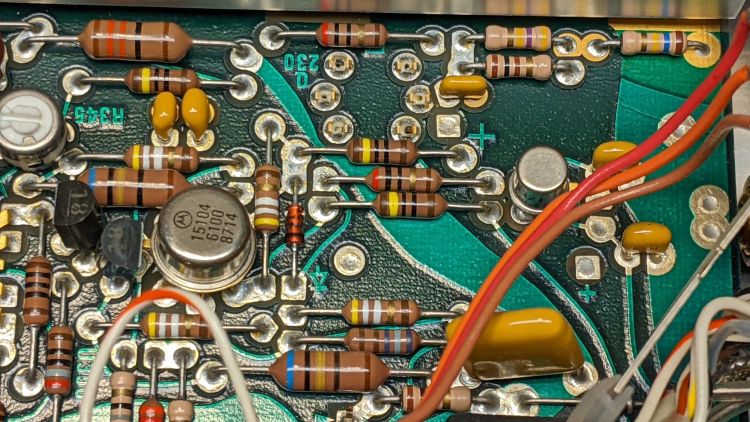
    So take a picture of the component neighborhood around the Q230 sockets:

    PXL_20220105_210538214
    PXL_20220105_210538214

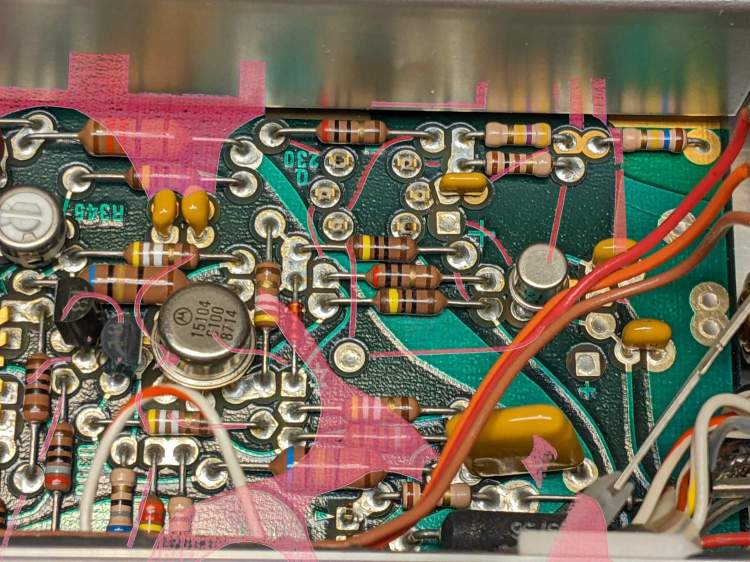
    Overlay it with a similar picture of the solder side, suitably reversed / recolored / transformed to match:

    Tek AM503 - 151-1032-00 area - X-ray traces
    Tek AM503 – 151-1032-00 area – X-ray traces

    The copper-side traces aren’t complete, as the red coloring marks only traces under the soldermask and omits bare solder-coated traces. Some traces on the component side run invisibly under parts. If I were doing it for money, not love, I’d pay more attention to the details.

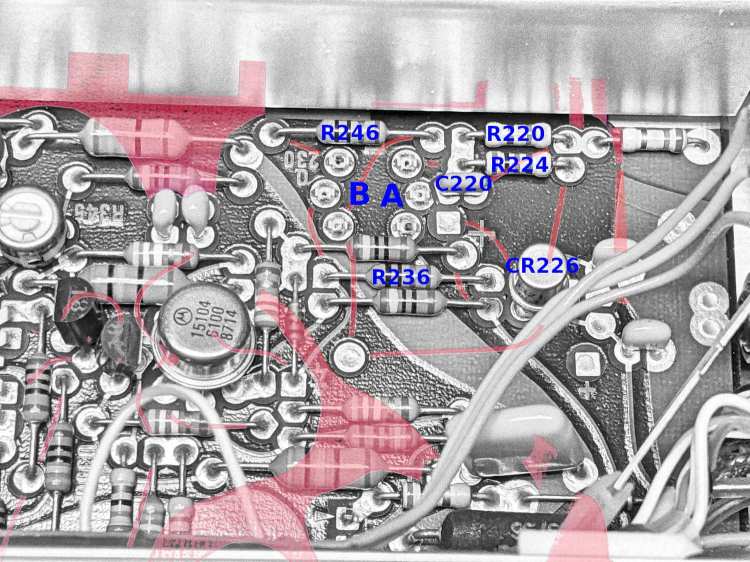
    Devote some time to tracing the traces and labeling the parts:

    Tek AM503 - 151-1032-00 area - part IDs
    Tek AM503 – 151-1032-00 area – part IDs

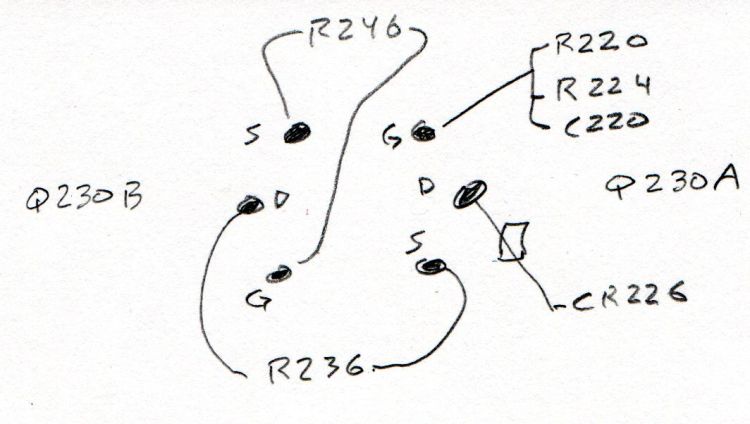
    Then doodle out the actual connections:

    Tek 151-1032-00 - part connections
    Tek 151-1032-00 – part connections

    R246 shows Q230B lives in the left side of the can, because it’s connected between the B gate and B source pins, and confirms the tester swapped the B source and B drain pins. Whew!

    R236 connects the B drain and the A source, confirming the pinout matches the 2N5911.

    Comfortingly, the A side gate goes to all those other parts as it should.

    So a 2N5911 will drop right into the Q230 socket with the proper pins going to the proper places. Whether it’s electrically Close Enough™ to the Tek spec, whatever it might have been, remains to be seen, but a good transistor circuit won’t depend too much on the actual transistor parameters.

  • Tektronix AM503: Noisy Q230 Dual JFET

    Tektronix AM503: Noisy Q230 Dual JFET

    The fact that changing R220 also changed the noise should have pinpointed the noise source, but such things are always more obvious in retrospect than in real time running. This post should help me start the next debugging spree a bit further up the learning curve.

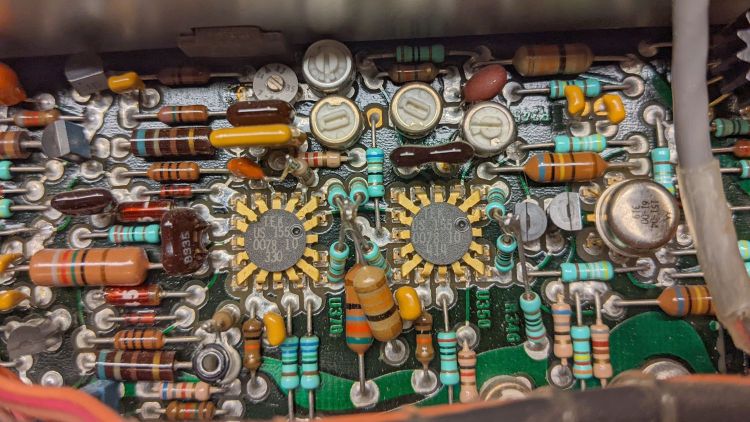
    The AM503 signal path includes a pair of … unique … differential amplifier ICs made by Tektronix back in the early days of integrated circuitry:

    Tek AM503 - U370 U350 detail
    Tek AM503 – U370 U350 detail

    The picture has the signal flowing right-to-left through U350 and U370, starting with the Q310 dual NPN in the metal can and the Q315/325 PNP pair (both over on the right side near the cable).

    The schematic goes left-to-right:

    AM503 - Current Probe Amplifier Schematic - Output Amp - Diag 3
    AM503 – Current Probe Amplifier Schematic – Output Amp – Diag 3

    This AM503 PCB does not have the change that split Q310 into two separate transistors, as shown in the upper left of the schematic.

    The single-ended input signal comes from Q230 at the output of the attenuator on the previous schematic page:

    AM503 - Current Probe Amplifier Schematic - Attenuator - Diag 2
    AM503 – Current Probe Amplifier Schematic – Attenuator – Diag 2

    Here, U350 mashes the signal together with the DC offset control and makes it differential, U370 filters it, then Q390 produces a single-ended signal for the scope output. The architecture makes sense when you realize the AM503 started out as a mainframe oscilloscope plugin and became a TM500 plugin as the result of a mid-flight product pivot; think of it as the hardware version of technical debt.

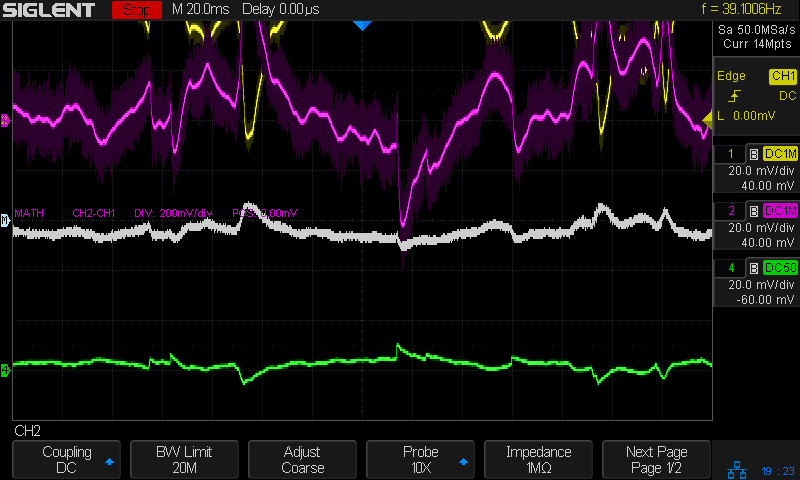
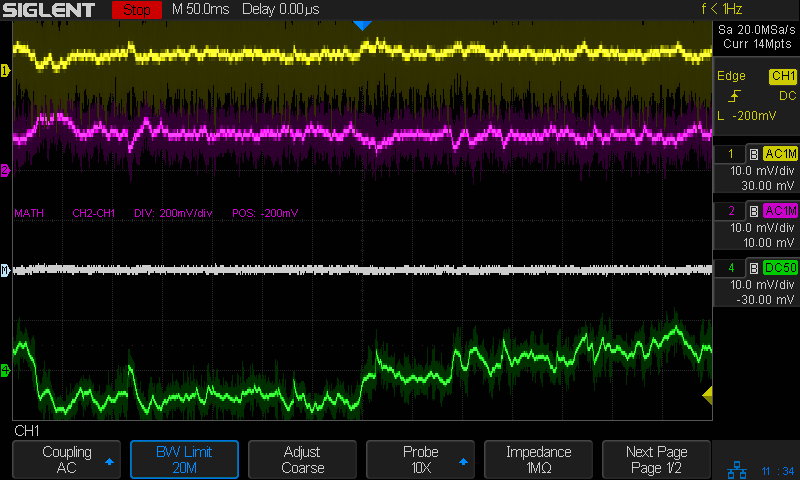
    Anyhow, the differential output of U370 shows the noise across pins 6 and 8 (yellow and magenta):

    Tek AM503 - diff output U370.6-U370.8
    Tek AM503 – diff output U370.6-U370.8

    Again in retrospect, pins 9 and 5 would have been a better choice.

    The white line is the difference between the two pins and resembled the scope output in the bottom trace well enough to satisfy me.

    The differential input to U350 on pins 16 and 14 also shows a distinct similarity to the output noise:

    Tek AM503 - diff input U350.16-U350.14
    Tek AM503 – diff input U350.16-U350.14

    It’s essentially impossible to snap a scope probe around those IC pins, but merely extraordinarily difficult to securely grab the tails of the pin sockets extending beyond the solder side of the PCB.

    Finally, a look across R317, the emitter resistor between the halves of Q310:

    Tek AM503 - diff input - R317
    Tek AM503 – diff input – R317

    That was enough to finally convince me the problem lay upstream of Q310.

    Ruling out the DC level pot required balancing another AM503 atop this one to plug its cable into the PCB, which showed same output noise.

    Hat tip to Sherlock Holmes:

    “When you have eliminated all which is impossible, then whatever remains, however improbable, must be the truth.”

    https://www.goodreads.com/quotes/1196-when-you-have-eliminated-all-which-is-impossible-then-whatever

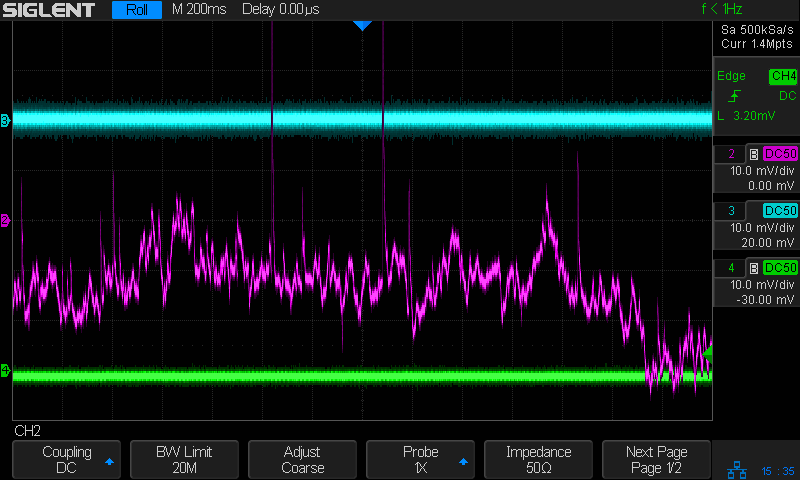
    Because Q230 is socketed, I pulled it out and popped it into another AM503, whereupon the noise followed the transistor:

    Tek AM503 - three amps - GND
    Tek AM503 – three amps – GND

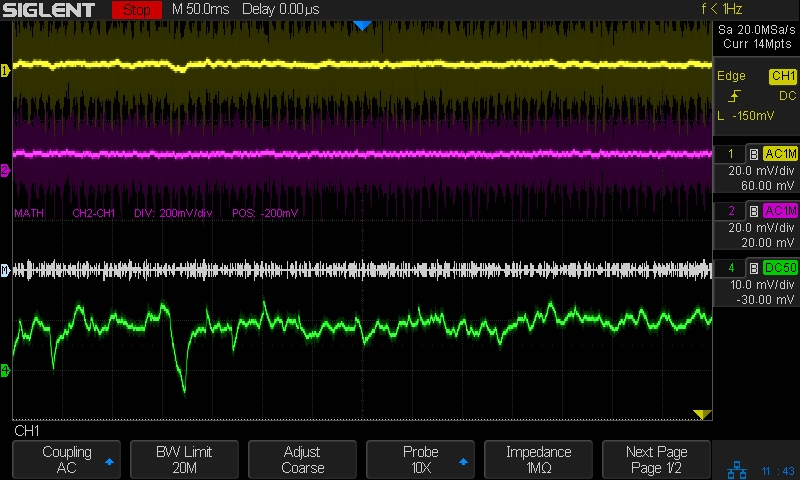
    All three AM503 amps are set to GND / DC LEVEL CAL. The cyan trance is the formerly noisy amp (now with a good Q230), the magenta trace is the formerly good amp (now with the bad Q230) , and the green trace is the best of the three AM503 amps (untouched, for well and good reason) in my collection.
    So I must replace a four decade old dual JFET sporting Tek part number 151-1032-00. Such things are available, but in rather grisly as-is condition or as New Old Stock collectibles.

    Perhaps a middle ground would suffice? A couple of those should arrive in a while, but it’s not clear they’re a drop-in replacement.

  • Tektronix AM503: Baseline Offset Digression

    Tektronix AM503: Baseline Offset Digression

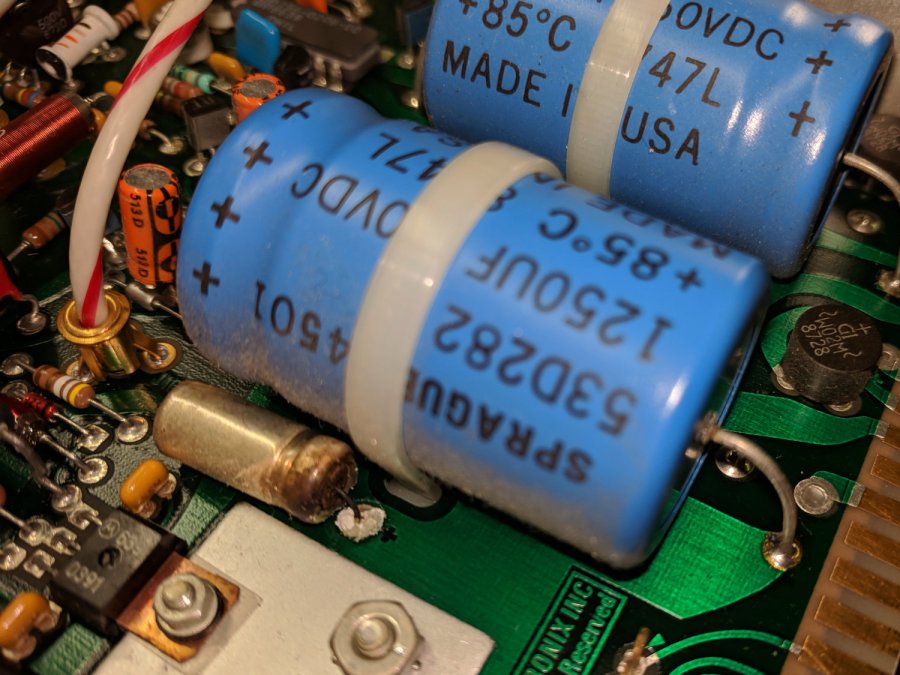
    One of my Tek AM503 current probe amplifiers (SN B064098) suffered from DC offsets in the AC / GND / DC modes, to the extent that zeroing the GND (more formally known as “CAL DC LEVEL”) offset wouldn’t keep the other two baselines on the scope screen. Kibitizing with another AM503 owner with a different problem clued me to apply a change made in later units: replace the 1 kΩ resistor at R220 with a 470 kΩ resistor to reduce the source impedance changes between the switch positions:
    AM503 - R220 change
    AM503 – R220 change

    For the record, R220 sits parallel to the attenuator shield above and to the right of Q230 (in the black clip-on heatsink):

    Tek AM503 - R220 detail
    Tek AM503 – R220 detail

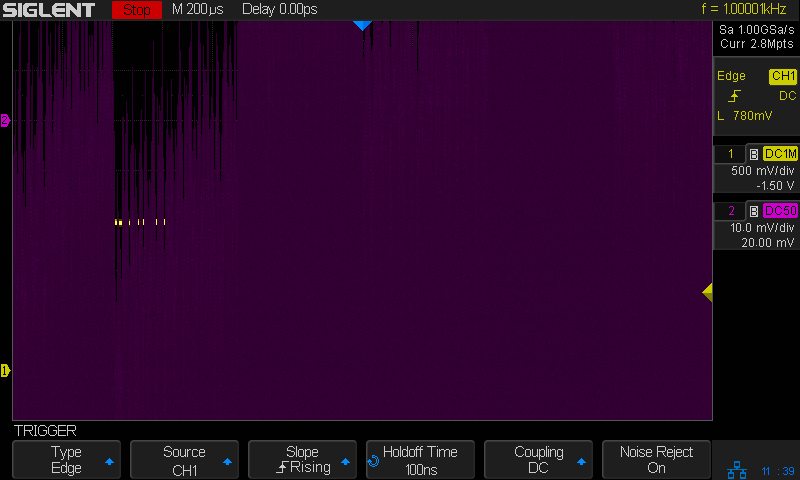
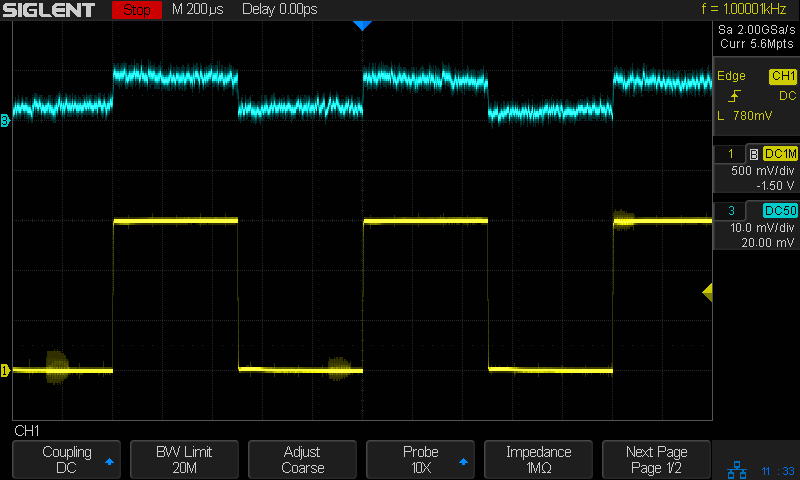
    The new resistor somewhat reduced the offset problem, but also dramatically increased the noise level I’d been studiously ignoring, to the point where the AM503 output was unusable:

    Tek AM503 - three amps - GND
    Tek AM503 – three amps – GND

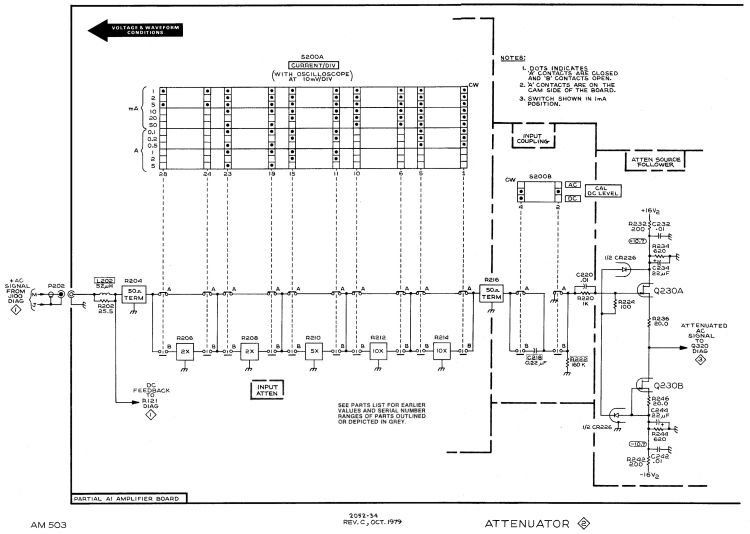
    The rule of thumb is that it’s always a connector or, perhaps, a similar metallic contact in the signal path. The AM503 has a breathtakingly aggressive switched attenuator covering the 94 dB range from 1 mA/div to 50 A/div:
    AM503 - Current Probe Amplifier Schematic - Attenuator - Diag 2
    AM503 – Current Probe Amplifier Schematic – Attenuator – Diag 2

    The switches are cam-driven bifurcated gold-plated spring fingers contacting gold-plated PCB pads under that aluminum shield:

    Tek AM503 - Attenuator Contacts - detail
    Tek AM503 – Attenuator Contacts – detail

    The spring-loaded thing to the right is R206, the first 50 Ω 2× attenuator in the form of thin-film elements fired on a ceramic substrate. The two switches put C218 into the signal path in AC mode.

    You (well, I) clean the fingers by very gently pulling a strip of lens cleaner moistened with isopropyl alcohol through the closed contacts:

    Tek AM503 - Attenuator Contact Cleaning
    Tek AM503 – Attenuator Contact Cleaning

    The pale blue cylinder is the attenuator cam roller extending across the PCB behind the front-panel knob. The two switches bypass C218 in DC mode and connect R220 to ground in GND mode.

    Clean gold-on-gold contacts are about as good as it gets and those things looked absolutely pristine. After wiping the contact connecting R220 to ground had no effect, it finally penetrated my thick skull that the problem wasn’t in the attenuator contacts and had to be downstream in the amplifier and filter chain.

    Reseating all the cable connectors and jostling the (socketed!) semiconductors also had no effect.

    Could one of the semiconductors have gone flaky after four decades?

    More tomorrow. Spoiler: yup.

  • Bafang Battery Charge Port: Battery Reset Tool

    Bafang Battery Charge Port: Battery Reset Tool

    A lithium battery management system can (and should!) disable the battery output to prevent damage from overcurrent or undervoltage, after which it must be reset. The inadvertent charge port short may have damaged the BMS PCB, but did not shut down the battery’s motor output, which means the BMS will not should not require resetting. However, because all this will happen remotely, it pays to be prepared.

    A description of how to reset the BMS in a similar battery involves poking bare hot wires into the battery terminals, which IMO is akin to Tickling The Dragon’s Tail. The alert reader will note that the “Shark” battery shown on that page has its terminal polarity exactly opposite of the “Ultra Slim Shark” battery on our bikes. Given the energies involved, eliminating any possible errors makes plenty of sense.

    The battery connector looks like this:

    Bafang battery - Ultra-Slim Shark connector
    Bafang battery – Ultra-Slim Shark connector

    For this battery, the positive terminal is on the right, as shown by the molded legend and verified by measurement.

    A doodle with various dimensions, most of which are pretty close:

    Bafang battery - connector dimension doodle
    Bafang battery – connector dimension doodle

    Further doodling produced a BMS reset adapter keyed to fit the battery connector in only one way:

    Bafang battery - adapter doodle
    Bafang battery – adapter doodle

    Which turned into the rectangular lump at the top of the tool kit, along with the various shell drills and suchlike discussed earlier:

    Bafang battery tools
    Bafang battery tools

    Looking into the solid model from the battery connector shows the notches and projections that prevent it from making incorrect contact:

    Battery Reset Adapter - show front
    Battery Reset Adapter – show front

    The pin dimensions on the right, along with a mysterious doodle that must have meant something at the time :

    Bafang battery - adapter pin doodle
    Bafang battery – adapter pin doodle

    The pins emerged from 3/16 inch brass rod, with pockets for the soldered wires:

    Bafang battery - reset tool - pins
    Bafang battery – reset tool – pins

    The wires go into a coaxial breakout connector that’s hot-melt glued into the recess. The coaxial connectors are rated for 12 V and intended for CCTV cameras, LED strings, and suchlike, but I think they’re good for momentary use at 48 V with minimal current.

    I printed the block with the battery connector end on top for the best dimensional accuracy and the other end of the pin holes held in place by a single layer of filament bridging the rectangular opening:

    Bafang battery - reset tool - hole support layer
    Bafang battery – reset tool – hole support layer

    I made a hollow punch to cut the bridge filaments:

    Bafang battery - reset tool - pin hole punch
    Bafang battery – reset tool – pin hole punch

    The holes extend along the rectangular cutout for the coaxial connector, so pressing the punch against the notch lines it up neatly with the hole:

    Bafang battery - reset tool - hole punching
    Bafang battery – reset tool – hole punching

    Whereupon a sharp rap with a hammer clears the hole:

    Bafang battery - reset tool - hole cleared
    Bafang battery – reset tool – hole cleared

    A dollop of urethane adhesive followed the pins into their holes to lock them in place. I plugged the block and pins into the battery to align the pins as the adhesive cured, with the wire ends carefully taped apart.

    After curing: unplug the adapter, screw wires into coaxial connector, slobber hot melt glue into the recess, squish into place, align, dribble more glue into all the gaps and over the screw terminals, then declare victory.

    It may never be needed, but that’s fine with me.

    [Update: A few more doodles with better dimensions and fewer malfeatures appeared from the back of the bench.]

    Bafang battery - adapter better doodle
    Bafang battery – adapter better doodle
    Bafang battery - adapter dimension doodle
    Bafang battery – adapter dimension doodle
    Bafang battery - connector key doodle
    Bafang battery – connector key doodle

    The OpenSCAD source code as a GitHub Gist:

    // Adapter to reset Bafang battery management system
    // Ed Nisley KE4ZNU Dec 2021
    Layout = "Block"; // [Show, Build, Pins, Block, CoaxAdapter, Key]
    Gap = 4.0;
    /* [Hidden] */
    ThreadThick = 0.25;
    ThreadWidth = 0.40;
    HoleWindage = 0.2;
    Protrusion = 0.1; // make holes end cleanly
    inch = 25.4;
    function IntegerMultiple(Size,Unit) = Unit * ceil(Size / Unit);
    module PolyCyl(Dia,Height,ForceSides=0) { // based on nophead's polyholes
    Sides = (ForceSides != 0) ? ForceSides : (ceil(Dia) + 2);
    FixDia = Dia / cos(180/Sides);
    cylinder(d=(FixDia + HoleWindage),h=Height,$fn=Sides);
    }
    ID = 0;
    OD = 1;
    LENGTH = 2;
    //———————-
    // Dimensions
    WallThick = 3.0;
    PinSize = [3.5,4.75,9.0 + WallThick]; // LENGTH = exposed + wall
    PinFerrule = [3.5,4.75,10.0]; // larger section for soldering
    PinOC = 18.0;
    PinOffset = [-9.0,0,9.0];
    Keybase = 4.0; // key bottom plate thickness
    KeyBlockSize = [15.0,50.0,15.0];
    CoaxSize = [35.0,15.0,11.0];
    CoaxGlue = [0,2*2,1];
    // without key X section
    BlockSize = [CoaxSize.x + WallThick + PinFerrule[LENGTH],KeyBlockSize.y,KeyBlockSize.z + WallThick];
    echo(BlockSize=BlockSize);
    //———————-
    // Battery connection pin
    // Used to carve out space for real brass pin
    // Long enough to slide ferrule through block
    module Pins() {
    for (j=[-1,1])
    translate(PinOffset + [0,j*PinOC/2,0])
    rotate([0,90,0])
    rotate(180/6) {
    PolyCyl(PinSize[ID],BlockSize.x,6);
    translate([0,0,PinSize[LENGTH]])
    PolyCyl(PinSize[OD],BlockSize.x,6);
    }
    }
    //———————-
    // Coaxial socket adapter nest
    // X=0 at left end of block, Z=0 at bottom
    // includes glue, extends rightward to ensure clearance
    module CoaxAdapter() {
    translate([0,0,CoaxSize.z])
    cube(CoaxSize + CoaxGlue + [CoaxSize.x,0,CoaxSize.z],center=true);
    }
    //———————-
    // Block without key
    // X=0 at connector face, Z=0 at bottom of block
    module BareBlock() {
    difference() {
    translate([BlockSize.x/2,0,BlockSize.z/2])
    cube(BlockSize,center=true);
    Pins();
    translate([BlockSize.x,0,Keybase])
    CoaxAdapter();
    }
    translate([BlockSize.x – CoaxSize.x,0,BlockSize.z/2]) // bridging layer
    cube([ThreadThick,BlockSize.y,BlockSize.z],center=true);
    }
    //———————-
    // Complete block
    module Block() {
    BareBlock();
    BatteryKey();
    }
    //———————-
    // Battery connector key shape
    // Chock full of magic sizes
    // Polygons start at upper left corner
    module BatteryKey() {
    // base outline
    kb = [[-15,KeyBlockSize.y/2],[0,KeyBlockSize.y/2],[0,-KeyBlockSize.y/2],[-15,-KeyBlockSize.y/2]];
    // flange cutout
    kf = [[kb[0].x,20],[-3,20],[-3,15],[-8,15],[-8,-15],[-3,-15],[-3,-20],[kb[0].x,-20]];
    // sidewalls
    kw = [[-15,KeyBlockSize.y/2],[0,KeyBlockSize.y/2],[0,20],kf[0]];
    linear_extrude(height=Keybase)
    difference() {
    polygon(kb);
    polygon(kf);
    }
    linear_extrude(height=KeyBlockSize.z)
    polygon(kw);
    mirror([0,1,0])
    linear_extrude(height=KeyBlockSize.z)
    polygon(kw);
    translate([0,0,KeyBlockSize.z])
    linear_extrude(height=BlockSize.z – KeyBlockSize.z)
    polygon(kb);
    }
    //———————-
    // Build it
    if (Layout == "Block") {
    BareBlock();
    }
    if (Layout == "Pins") {
    Pins();
    }
    if (Layout == "Key") {
    BatteryKey();
    }
    if (Layout == "CoaxAdapter") {
    CoaxAdapter();
    }
    if (Layout == "Show") {
    Block();
    color("Brown",0.3)
    Pins();
    }
    if (Layout == "Build") {
    rotate([0,90,0])
    translate([-BlockSize.x,0,0])
    Block();
    }

  • Bafang Battery Charge Port: Shell Drills

    Bafang Battery Charge Port: Shell Drills

    Continuing to mull the problem of removing a brass nugget fused to the center pin of the Bafang battery’s charge port without the risk of causing further damage suggested a shell drill fitting over the pin and guided by an insulating bushing:

    Bafang battery - shell drill test fit
    Bafang battery – shell drill test fit

    That’s our undamaged battery, now sporting labels inspired by my friend’s mishap.

    The first pass was a 3 mm (actually, 1/8 inch) brass tube rammed into a printed handle descending from the Sherline Tommy Bar handles:

    Bafang battery - brass shell grinder - grit load
    Bafang battery – brass shell grinder – grit load

    The black stuff is coarse grinding compound held on by a dot of oil, with a pair of notches filed into the tip for a little griptivity.

    This worked surprisingly well, at least if you weren’t in much of a hurry, although the grinding compound also erodes the drill:

    Bafang battery - brass shell grinder - tip wear
    Bafang battery – brass shell grinder – tip wear

    I hadn’t thought this through enough to realize there’s no good way to convince the grit to not work its way up into the acetal bushing and jam the rod. While this might be good for final polishing, it’s not going to work well against the nugget, so it’s time for a harder drill with real teeth.

    Drilling a 2.3 mm hole into the end of some non-hardened 3 mm (for real!) ground rod provided enough clearance for the charge port pin and a pair of cross-drilled holes laid the groundwork for a shell drill:

    Bafang battery - steel shell drill - raw holes
    Bafang battery – steel shell drill – raw holes

    I filed the end off down to leave about 3/4 of the holes, then applied a Swiss pattern file with a safe edge to cut some relief behind the tips:

    Bafang battery - shell drill detail
    Bafang battery – shell drill detail

    It would be better to harden the end of the rod, but this is a single-use tool.

    Ram the shank into another printed handle:

    Bafang battery - shell drill - guide
    Bafang battery – shell drill – guide

    The new drill is long enough to reach past the wounded end of the pin and short enough to not bottom out inside the connector.

    A few minutes of twirling and re-filing the tiny teeth improved the cut enough to produce a convincing result in the simulated connector:

    Bafang battery - shell drill - test results
    Bafang battery – shell drill – test results

    I’m reasonably sure the ID of the acetal bushing won’t fit over the nugget, but that’s easy enough to drill out while leaving an insulating shell.

    The charge port’s center pin probably can’t withstand too much torque, so the drill must take small cuts.

    Vacuuming out the chips while cutting will be critical, as you don’t want an accumulation of conductive chaff down in the hole!

  • Bafang Battery Charge Port: Mechanical Simulator

    Bafang Battery Charge Port: Mechanical Simulator

    Rather than poke things into the undamaged charge port of our battery, I built a quick-and-dirty mechanical duplicate:

    Bafang battery - charge port simulator
    Bafang battery – charge port simulator

    The “center pin” is a snippet of what’s almost certainly 5/64 inch brass tube measuring Close Enough™ to 2.1 mm, with a few millimeters of 3/32 inch tube soldered on the end to simulate the nugget.

    The aluminum rod has a 5.5 mm hole matching the coaxial jack’s diameter and depth, with a smaller through hole for the “pin” and a dab of Loctite bushing adhesive.

    Then I turned the end of a 3/8 inch acetal rod down to a 5.5 mm bushing that completely fills the jack:

    Bafang battery - guide bushing - dummy jack
    Bafang battery – guide bushing – dummy jack

    It has a 3 mm hole down the middle to aim homebrew shell drills directly at the pin, while preventing a short to the side contact.

    The first test looked encouraging:

    Bafang battery - shell drill - test results
    Bafang battery – shell drill – test results

    The nugget in the damaged jack is definitely larger than my soldered brass tube, but this was in the nature of exploratory tinkering while mulling the problem.