The Smell of Molten Projects in the Morning

Ed Nisley's Blog: Shop notes, electronics, firmware, machinery, 3D printing, laser cuttery, and curiosities. Contents: 100% human thinking, 0% AI slop.

Tag: Repairs

If it used to work, it can work again

  • Farberware Blender Switch Repair

    I use a blender to mix up the pancake batter every few days. Over the last week or so, the rotary switch Pulse position wasn’t returning to Off all by itself. After having replaced the impeller bearings, I couldn’t just ditch the mumble thing without at least trying to fix it…

    A search for replacement parts reveals that Farberware kitchen appliances are disposable crap: they’re so cheap nobody stocks repair parts. IIRC, this blender was maybe ten or twenty bucks after rebate, which gets you through the shipping charge for the repair part. I would love to believe that paying more for kitchen appliances actually bought better quality.

    Switch wire connections
    Switch wire connections

    As you’d expect, the four silicone rubber feet pop off to reveal machine screws that hold the plastic base to the metal body. This picture shows the wire connections to the switch:

    • L = brown
    • 1 = orange
    • 2 = no connection
    • 3 = red

    I couldn’t pull the switch knob off the shaft, so I dismantled enough of the motor mount to ease it to one side, apply a right-angle screwdriver to the switch body screws, and loosen the switch. That gave me enough room to jam a screwdriver between the switch and the mounting bracket to pry the knob off. It’s a plastic-on-plastic friction fit.

    After the fact, it turns out that two screws behind the knob secure the mounting bracket to the bezel. Remove those screws, the bracket comes off, and it’s trivially easy to remove the switch screws.

    The wires attach through those horrible spring-loaded push-and-pray connections: jam the wires in, pull back, and it’s supposed to be a gas-tight joint forever. I don’t believe a word of it. Remove the wires by poking a small screwdriver into the opening and forcing the brass tab away from the wire. Yuch!

    Opening switch with slitting saw
    Opening switch with slitting saw

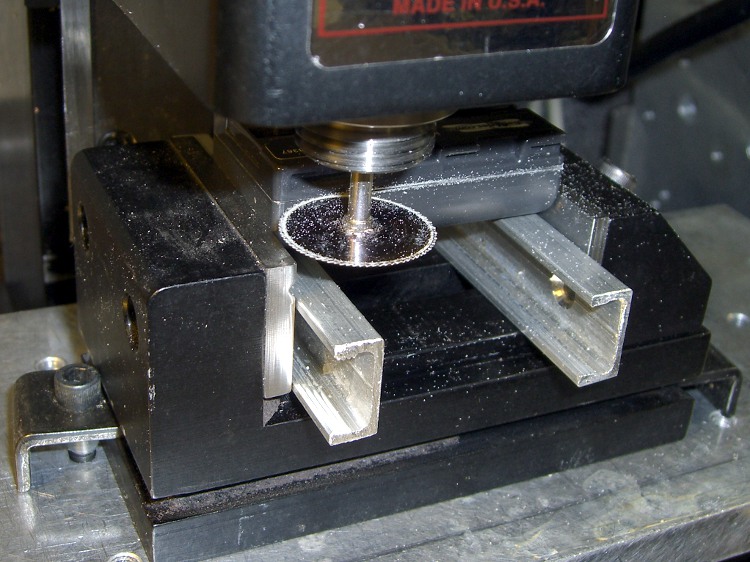
    The switch body parts are, of course, bonded firmly together: no user serviceable parts inside. I deployed a slitting saw on the Sherline mill, grabbed the switch in the vise, and sliced 2.5 mm deep along the line between the two body parts.

    The switch is some sort of engineering plastic, so I ran the saw at about 2000 rpm, cut at 100 mm/min, and dribbled water on the blade to keep it cool. You can see the grayish-brown residue under the switch.

    The thing came apart easily enough after that…

    Switch Guts
    Switch Guts

    These pics show the switch components. Note how the spring fits in the body and the four cunningly folded brass strips that simultaneously attach the wires, make the switch contacts, and spring-load the rotary detents.

    I took the liberty of bending the strips to restore the clamping force on the wires; poking the tabs with a screwdriver tends to bend them a bit.

    So it goes.

    There wasn’t anything obviously wrong inside, but after a bit of puzzling, I discovered the problem residing in the coil spring that returns the switch to Off

    Cracked spring
    Cracked spring

    The spring wire is 1 mm diameter. A bit of rummaging in Small Spring Box Number Two disgorged a bag of spring-clip thingies with the proper wire size and just about the right coil diameter, too.

    The right way to make a spring is to start with straight music wire, anneal it, make a mandrel, bend up a spring, then heat-treat the spring to make it just the right hardness and toughness for the job.

    Spring iterations
    Spring iterations

    I deployed my wire-bending pliers, made a few trial runs (well, OK, they weren’t trial runs when I started…), and got close enough by the third attempt (lower right).

    Yup, cold-bending spring steel. It is to shudder, huh?

    I bent the wire just off straight and worked my way around the coil about 0.5 mm per bend to produce a rather lumpy coil spring. This is definitely the wrong way to go, because the wire’s much too hard for that treatment: it wants to stay straight and doesn’t like those right-angle bends to form the end tabs. I think this will work well enough for long enough, though.

    The spring’s chirality turns out to be important; the coil wants to tighten around the shaft when the knob’s in the Pulse position. The spring-clip thing has two ends; only one produces the correct result, which is perfectly obvious in retrospect.

    Spring on switch rotor
    Spring on switch rotor

    The spring fits on the rotor like this, but with a whole lot more preload tension than you’d expect. The end result was a somewhat smaller coil diameter than I started with; I shrank the coil, re-bent a new tab on one end, chopped off about 4 mm of wire, and it was all good.

    I also backed off the ramp on the notches that engage the brass contacts in the Pulse position so the switch wasn’t so prone to hang up. That was what motivated me to fix the thing: one morning I manged to leave the switch in Pulse because it didn’t quite snap back to Off, took the lid off the bowl, and the blender started up again. Fortunately, the batter is too thick to jump out of the bowl, but it was a near thing.

    Here are the four switch positions and their contacts, in order from Pulse (most counterclockwise) to Speed 2 (most clockwise). You could, I suppose, conjure up a replacement switch if you puzzled out the connections; all the rotor tabs are connected together.

    Switch contacts - Pulse
    Switch contacts – Pulse
    Switch contacts - Off
    Switch contacts – Off

    Notice that, although switch contact 2 is unused, it is connected when the switch is in the Off position.

    Switch contacts - Speed 1
    Switch contacts – Speed 1
    Switch contacts - Speed 2
    Switch contacts – Speed 2

    The back of the switch body takes pressure on the switch knob, as well as engaging the end of the rotor to hold it in the middle of the body. I wasn’t comfortable just gluing the body together again, because I suspect none of my adhesives will actually bond to the plastic.

    So I chopped off a length of aluminum U-channel, poked two holes it in, shortened a pair of salvaged screws, and made a clamp for the switch body’s back. The body has three locating pins, so the two parts aren’t shifting with respect to each other, and the clamp holds the back firmly in position.

    Repaired switch with back clamp
    Repaired switch with back clamp

    Reassembly is in reverse order, paying a bit of attention to securing the wires in those crappy push-and-pray contacts and keeping everything away from the cooling fan as the bottom snaps into place.

    Done!

    The economics of this sort of repair make absolutely no sense at all, but I hate throwing stuff away just because some cheap part failed. In this case, I’d be happy to replace the switch… let me know where you can find one with the requisite contacts and spring arrangement!

  • WWVB Antenna: Oops!

    Ferrite inductor cores are notoriously fragile: they do not withstand much abuse at all. Given the amount of fiddling I’ve been doing with the Totally Featureless Clock, it was inevitable that I’d manage to drop the antenna…

    Broken ferrite bar antenna
    Broken ferrite bar antenna

    Gluing it back together with cyanoacrylate demonstrated that some things just never work the same. The antenna depends on a continuous flux path through the winding and even the minute gap introduced by the adhesive is enough to ruin the antenna.

    What they say about hearts and wheels is also true of ferrite bar antennas:

    “Once you bend it, you can’t mend it…”

  • The CD That Wouldn’t Play

    Misshapen CD Hole
    Misshapen CD Hole

    Mary popped a CD into the boom box, poked the Go button, and the display read “No Disc”… which was odd, as the larger player in the living room had gotten halfway through it with no trouble.

    A bit of diagnostic winnowing revealed a ding on one side of the CD’s hole, as though it had been mashed by a heavy object. These CDs (it’s 13 of 16 in an audio book) aren’t new, but they’ve been reasonably well treated by all parties. It looks like it might have been crunched in a player, which you’d think would be impossible.

    The disc seemed to seat firmly on the player’s hub, so I suspect the ding put the CD far enough off-center to defeat the player’s track acquisition and following algorithm.

    A long time ago I wrote exactly that firmware for a prototype video disk player: find a one-micron track with a one-micron beam while the track wobbulates a few hundred microns as the disk spins at 3600 rpm. After that, mapping the track eccentricity and following it around the disk was a simple matter of software…

    In this case, a bit of razor-knife surgery removed the plastic intruding into the hole and set everything to rights.

  • Sears Craftsman Radial Saw Elevation Knob Handle

    Broken Knob
    Broken Knob

    Mary’s folks visited us for Christmas and her father brought along a shelf that needed cutting; their apartment doesn’t have room for his shop equipment, alas. I cleared the crap off the radial saw, grabbed the elevation knob to crank the blade up to get it set for ripping, and … the handle broke off.

    That’s not the first time this has happened, so I wasn’t entirely surprised. The knob is large enough that I could complete the mission just by grabbing the rim, but it was a near thing.

    The handle is made of some wonderful engineering plastic that doesn’t solvent-bond well with anything in my armory, although Plastruct had enough bite to make me think it would work. That repair actually lasted several years of admittedly low-duty-cycle use, but obviously this couldn’t continue.

    Stress raiser
    Stress raiser

    The problem seems to be built into the handle design. This pic shows that the fracture spans a high-stress part of the handle: between the inside right-angle corner (upper left) that rests on the outside of the knob, across the handle’s web, to the corner of the recess in the flange at the bottom of the picture.

    The red hoodickie is the latch that secures the handle in its deployed position, wherein it sticks out at exactly crotch height for average human males. That accounts for the fluorescent red tape around the handle.

    Broken surface
    Broken surface

    You can see how the latch recess triggered the crack: that notch where the latch wraps around must be the highest-stress part of the handle. I suspect the original design didn’t have the latch (or had something different) and the fat web near the round feature on the left extended all the way to the angled flange on the right.

    That would work!

    I epoxied a pair of rectangular brass tubes across the fracture inside the web, where they fit neatly below the latch. I roughed up the web with an awl to give the epoxy more surface to grab.

    Incidentally, this is one of those cases where you might think a cyanoacrylate adhesive would work. It won’t: too much shock, too much pressure. I used it to hold the parts together while the epoxy cured, but that’s about as far as I’d trust it.

    I’d like to add something to the notch, but I’m not convinced a right-angle brass flange and some epoxy will have enough grip to make any difference. It would certainly require changing the latch, perhaps by thinning the left side, which would make that weaker. On the other paw, I can probably eke out a miserable existence without the latch.

    Brass internal reinforcement
    Brass internal reinforcement

    The picture shows the clamping in operation. A snippet of polypropylene (from some random consumer packaging) under the tip of the clamp prevents it from becoming one with the project; the clamp tip is slippery plastic, but you never know.

    Perhaps this fix will last for a few more years…

    Y’know, I’m beginning to believe that finite-element analysis will be the death of us all. Obviously this handle was modeled to a fare-thee-well, with only enough material to meet the expected stresses in the expected directions. Unfortunately, the real world doesn’t cooperate: the forces are always larger, the conditions always worse, and the materials always weaker than the design anticipated. A “safety factor” of three or four or maybe even ten just isn’t enough!

  • Rudy Sunglasses: Back From the Dead

    Clear lens installed
    Clear lens installed

    As expected, the uni-lens on Mary’s Rudy Project sunglasses cracked right up the middle as that stress crack above the nosepiece opened up. The sunglasses came with interchangeable lenses, so I swapped in the clear lens.

    Having used urethane adhesive to mechanically lock the defunct gray lens in place, the broken bits were pretty firmly bonded. I applied a brass hammer and small drift punch to the remaining tabs, pried the debris out of the temples, cleaned the adhesive from the recesses, and snapped the new lens in place. Surprisingly, it popped in and locked securely.

    The nosepiece has never worked satisfactorily: there’s nothing locking the flexible blue-silicone pad to the straight-sided posts that are supposed to hold it. As a result, it tends to pop off at the most inopportune moments.

    Rudy nosepiece
    Rudy nosepiece

    I dotted the posts on one side with cyanoacrylate and the other pair with epoxy to see if either will bond well enough to make a difference. If those fail, I’ll try urethane, although I’m not sure what will happen as the urethane expands in the sockets.

    Anyhow, she now has glasses suitable for biking on cloudy and rainy days… which is much better than a sharp stick (or a bug) in the eye, as we see it.

  • Micropositioner Rehabilitation: Z-axis Slide

    With the planetary reducer off, I could remove all the bits and pieces holding the Z-axis slide to the rest of the positioner.

    Rack drive casing
    Rack drive casing

    Note carefully the three spacing washers near each mounting screw. They hold the slide off the casting body by a very precise amount: they’re each 4 mils thick and prone to vanish in a light breeze. I discovered that each screw had three washers when I flicked one off the workbench and discovered two on the floor.

    The metal plate holding the pinion in place has two flat-head screws to the left and two ramps to the right. The conical points of the two long setscrews on the right bear on the ramps, providing a convenient, if obscure from the outside, way to adjust the slide friction by clamping the pinion shaft. One of the setscrews was partially removed, so a previous owner had evidently tried to reduce the overwhelming stickiness.

    With the washers in a safe place, the pinion cover comes off with only slight encouragement.

    Pinion parts
    Pinion parts

    Plenty of congealed lubricating oil to be found.

    Even without the pinion gear, it was exceedingly difficult to urge the two parts of the slide apart: more congealed oil. Much to my surprise, the slide does not have adjustable gibs: it’s one of those precision-ground gadgets that Just Works. This picture shows all the parts in their gunky glory. Note the random dirt in the rack teeth, along with the goo on the pinion shaft.

    Rack and pinion - disassembled
    Rack and pinion – disassembled

    With everything apart, removing the gunk was a simple matter of toxic solvents and mechanical poking with wood picks and splints

    I filed off the burrs on the shafts, thought briefly about grinding some flats for the setscrews, and decided to leave well enough alone.

    A few dabs of clock oil here & there, reassemble everything in reverse order, and the Z-axis moves gracefully with minimal knob torque. It’s very sensitive to the clamping force of those pointed setscrews, though.

    It’s now easy to discover that the planetary reducer has a 5:1 ratio and the Z-axis moves about 6 mm per turn. Because the reducer uses balls, it slips when the slide jams against something, rather than strip its gears.

    I should clean the other two slides, but a dot of clock oil on each cheered them up enough to let me punt that for a while…

    I like it!

    Micropositioner
    Micropositioner
  • Micropositioner Rehabilitation: Planetary Reducer

    Micropositioner
    Micropositioner

    An old 3-axis micropositioner recently found itself on my electronics workbench, where it should come in handy for SMD soldering, microscopic examination, and similar projects requiring the ability to move something in tiny, precise increments. This picture gives you the general idea; it’s mounted on a magnetic base stuck to a random chunk of sheet steel.

    The knob on the front drives the vertical (Z) axis, with the other two controlling the front-to-back (Y) and left-to-right (X) axes. A rotary joint between the X and Y axes, plus another at the tip of the arm, mean you’re not restricted to orthogonal axes; that may be either a blessing or a curse, depending on what you’re trying to accomplish.

    Unfortunately, the Z axis was essentially immovable: that big knurled knob took a remarkable amount of force to drive the slide. Some Quality Shop Time was in order.

    Planetary reducer - cover
    Planetary reducer – cover

    The thing is a chunk of old-school German engineering: nary a gratuitous plastic part to be seen. The planetary reducer has a cast metal cover secured to the torque arm with an acorn nut, which had obviously been removed several times before, as the cover was somewhat chewed beneath the nut.

    I loosened the two setscrews holding the knob in place, gave it a pull, and … nothing. After a protracted struggle and considerable sub-vocal muttering, the knob came off to reveal a thoroughly scarred shaft. Contrary to what I expected, the shaft did not have flats below the setscrews, so the inevitable screw burrs locked the shaft to the knob.

    Planetary reducer - torque arm
    Planetary reducer – torque arm

    The picture to the left shows the planetary drive and torque arm after I filed off the burrs. Two plastic washers (the top one sits on the spring; it’s not shown here) provide smooth bearing surfaces that hold the knob under firm spring pressure, which prevents the Z axis from descending unless you turn the knob manually.

    Planetary drive output shaft screws
    Planetary drive output shaft screws

    Two more setscrews secure the planetary drive’s output bushing to the Z axis pinion shaft. The picture to the right shows that they’re pretty much inaccessible; one was directly behind a tab holding the drive together, the other was aimed at the shoulder of the casting holding the Z axis slide.

    And, of course, even with the knob in place, I can’t turn the mumble shaft, which is why I’m doing this in the first place. The planetary drive uses balls, rather than gears, and the lubricating oil had long since turned into gummy varnish. I slobbered enough light oil into the drive to loosen the gunk enough to make the drive turn-able, albeit with considerable effort. I urged the input shaft barely enough this-a-way and that-a-way to get access to both of the screws.

    Pinion shaft
    Pinion shaft

    As you’d expect, removing the drive required even more muttering and the application of dangerous tools. The pinion shaft was badly scarred in several places, so this poor thing has been dismantled several times before.

    That was entirely enough for one day. Tomorrow, disassembling the Z-axis slide and cleaning things up…