Ed Nisley's Blog: Shop notes, electronics, firmware, machinery, 3D printing, laser cuttery, and curiosities. Contents: 100% human thinking, 0% AI slop.
As expected, my crude bearing repairs on our Whirlpool refrigerator’s freezer fan didn’t last forever; the freezer dog crept back inside over the course of a few months. I recently ordered another replacement fan (yes, sixty bucks for an open-frame fan!), installed it, and have some interesting data points.
The OEM fan in the Whirlpool refrigerator was made by FSP and has no country of origin. The date code on the winding insulation reports 1993 and it lasted for the better part of a dozen years.
The replacement fan, which never sounded quite right and failed in short order, was made by Exact Replacement Parts and has no country of origin. I scrawled 2006 on it, although the bearing noise caused me to remove it almost immediately and re-fix the OEM fan bearings.
The new fan is once again made by FSP, comes with Whirlpool logos on the screw-and-bushing kit bag, and sports Made In Mexico on the winding insulation. So far, it’s sounded OK, although the normal fan whir seems a bit louder & growlier than before. No howls, though, and that counts for a lot.
I infer that the ERP fans weren’t entirely satisfactory, but that’s just a guess.
For whatever reason, X no longer automagically determines the dots/inch value for the right-hand portrait monitor and, for lack of anything better, defaults to 75 DPI. That scales everything down by 25% 33%, makes the menu fonts eye-crackingly small, and squinches the monospaced terminal font. The fix requires jamming the proper value directly into /etc/X11/xorg.conf along with all the other stuff:
So the outdoor thermometer hanging over my desk became very, very faint, which suggested it was time for a new alkaline cell. The last time that happened, the insides were pretty bad, so I expected the worst, but, surprisingly, neither the cell nor the negative contact spring were corroded. So I popped in a new cell, buttoned it up, and … it didn’t work. At all. As in: blank display.
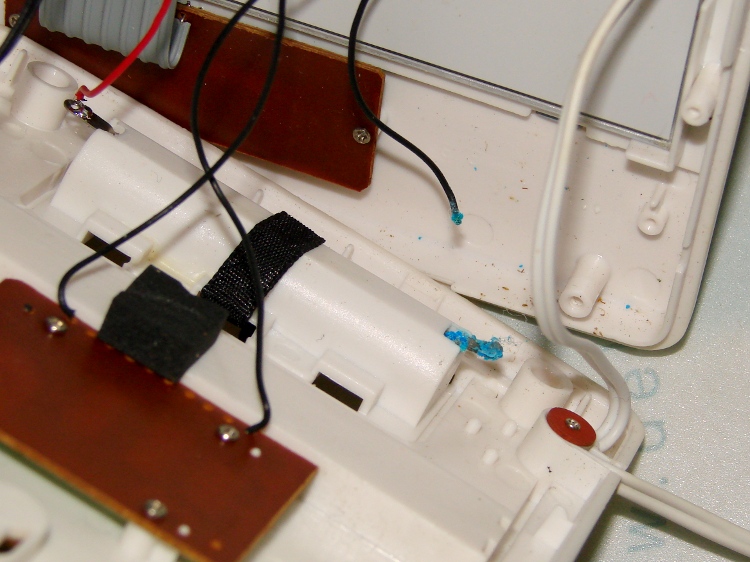
Taking the back off revealed the simple cause:
Outdoor thermometer – corroded battery lead
Evidently, the negative terminal wire had corroded completely through and popped off when I replaced the cell. There’s plenty of green-blue corrosion on the terminal inside the case, where it can’t be seen from outside; three years ago I cleaned up both the outside and inside, so this is new news.
The negative wire was discolored all the way from end to end and couldn’t be soldered. I think the corrosion products are just slightly hygroscopic and wick their way along the copper strands inside the insulation: the solder pad on the circuit board was also discolored.
I removed the terminal, neutralized the alkaline corrosion, ran it through an Evapo-Rust bath, scrubbed it clean, installed it, replaced both the positive and negative wires, resoldered everything, and it works perfectly again.
Somehow, one of the brackets that supports the small shelf inside the freezer of our Whirlpool refrigerator went missing over the many intervening years and repairs; we never used that shelf and stashed it in a closet almost immediately after getting the refrigerator, so not having the bracket didn’t matter. We recently set up a chest freezer in the basement for all the garden veggies that used to fill all the space available and decided to (re-)install the shelf, which meant we needed a bracket.
It’s impossible to figure out exactly which “shelf stud” in that list would solve the problem, but one of the upper-left pair in that set seems to be about right. On the other paw, I don’t need all the other brackets and doodads and screws, sooo… I can probably make one.
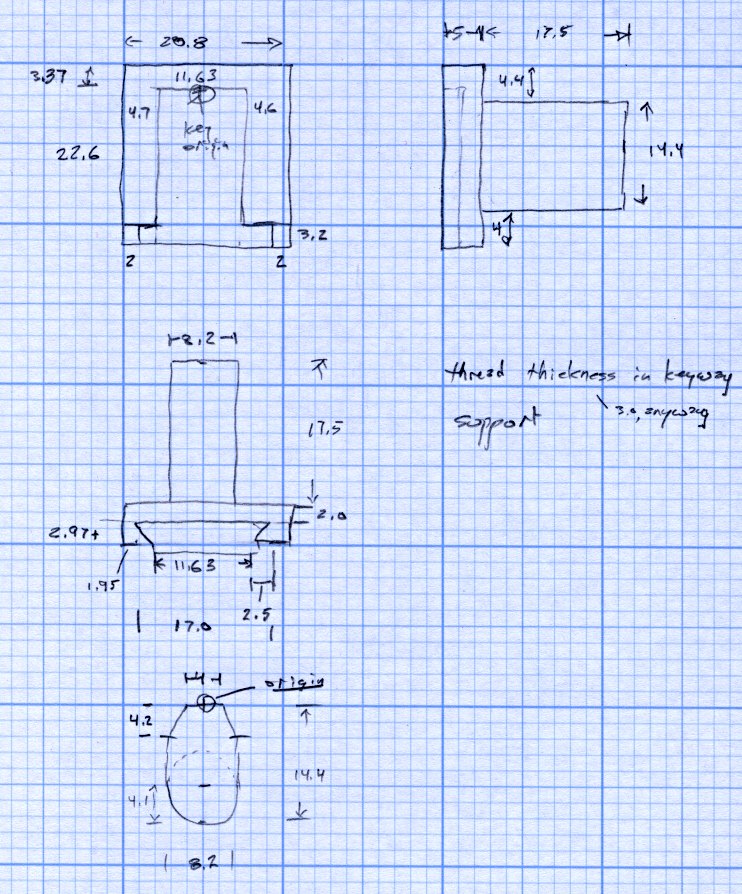
Start with a few measurements, then doodle up the general idea:
Refrigerator Bracket – dimension doodlet’s time to conjure up a solid model:
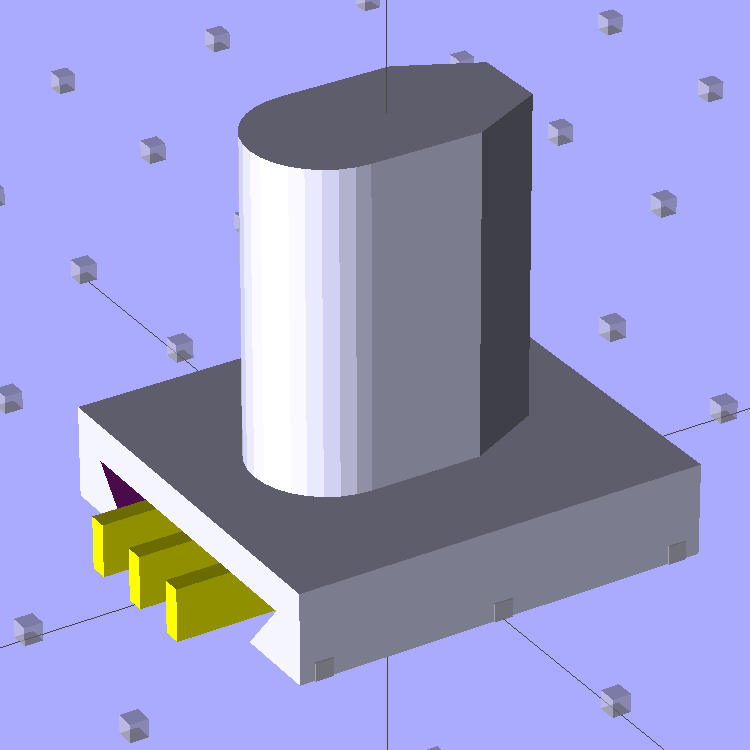
A bit of OpenSCAD solid modeling:
Refrigerator Bracket Pin – solid model
The yellow bars support the ceiling of that big dovetail, which would otherwise sag badly. The OEM bracket has nicely rounded corners on the base and a bit of an overall radius at the end of the post; this was pretty close and easier to do.
Now it’s time to Fire the Thing-O-Matic…
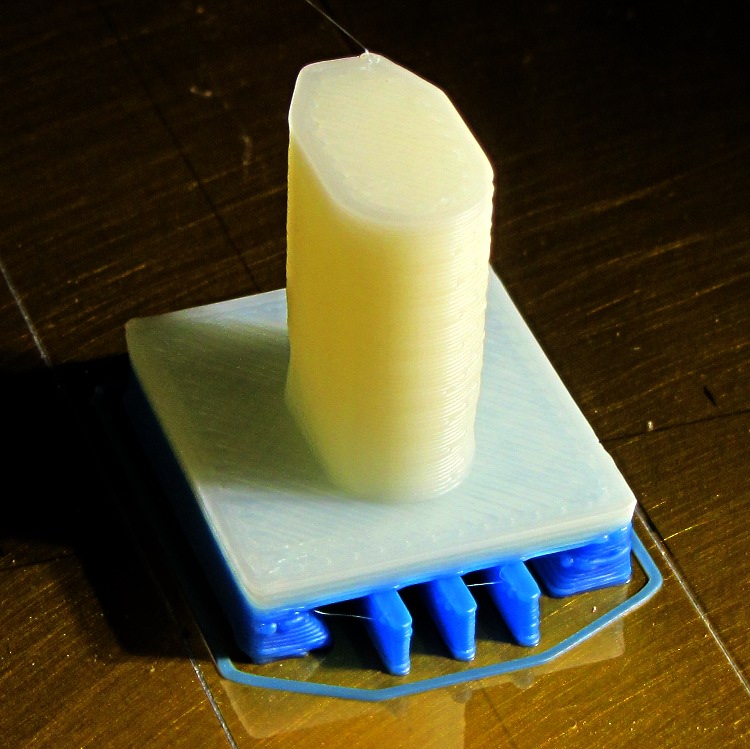
I switched from blue to white filament during the print, because I figured I’d print another one after I got the sizes right, so it emerged with an attractive blue base:
Bracket on build platform
A better view of the support structure:
Bracket – dovetail support structure
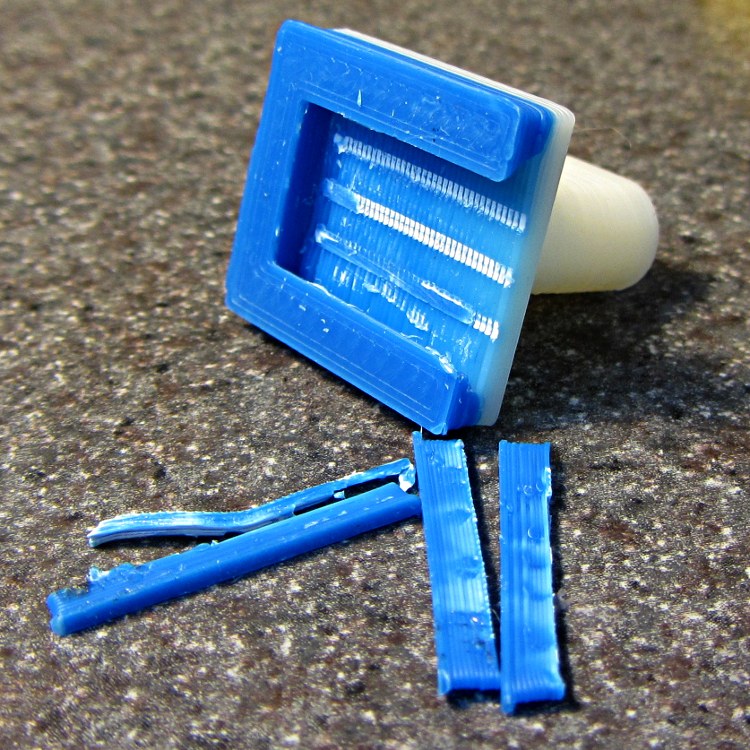
Two of the bars snapped off cleanly, but the third required a bit of scraping:
Bracket – support scars
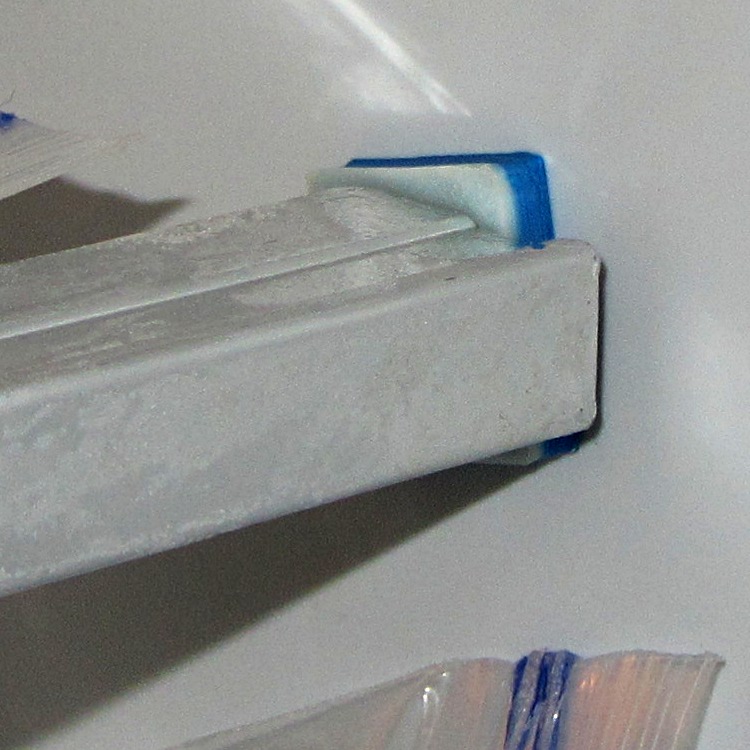
Somewhat to my surprise, Prototype 001 slipped snugly over the matching dovetail on the freezer wall, with about the same firm fit as the OEM brackets:
Refrigerator bracket – installed
And it works perfectly, apart from that attractive blue base that I suppose we’ll get used to after a while:
Refrigerator bracket – in use
I have no idea whether ABS is freezer-rated. It seems strong enough and hasn’t broken yet, so we’ll declare victory and keep the source code on tap.
The whole project represents about an hour of hammering out OpenSCAD code for the solid model and another hour of printing, which means I’d be better off to just buy the parts kit and throw away the unused bits. Right?
I loves me my Thing-O-Matic…
The OpenSCAD source code:
// Shelf support bracket
// for Whirlpool freezer
// Ed Nisley KE4ZNU Octoboer 2012

//include </mnt/bulkdata/Project Files/Thing-O-Matic/MCAD/units.scad>
//include </mnt/bulkdata/Project Files/Thing-O-Matic/Useful Sizes.scad>

// Layout options

Layout = "Build";
 // Overall layout: Show Build
 // Printing plates: Build
 // Parts: Post Base Keystone Support

ShowGap = 10; // spacing between parts in Show layout

//- Extrusion parameters must match reality!
// Print with +1 shells and 3 solid layers

ThreadThick = 0.25;
ThreadWidth = 2.0 * ThreadThick;

HoleWindage = 0.2;

function IntegerMultiple(Size,Unit) = Unit * ceil(Size / Unit);

Protrusion = 0.1; // make holes end cleanly

//----------------------
// Dimensions

PostLength = 17.5;
PostWidth = 8.2;
PostHeight = 14.4;
PostOffset = 4.4;

PostTopWidth = 4.0;
PostTopHeight = 4.2;

BaseLength = 22.6;
BaseWidth = 20.8;
BaseThick = 5.0;

KeystoneOffset = 3.4;
KeyThick = IntegerMultiple(3.0,ThreadThick);
KeyBase = 2.5;
SlotOpening = 11.63;
//----------------------
// Useful routines

module PolyCyl(Dia,Height,ForceSides=0) { // based on nophead's polyholes

Sides = (ForceSides != 0) ? ForceSides : (ceil(Dia) + 2);

FixDia = Dia / cos(180/Sides);

cylinder(r=(FixDia + HoleWindage)/2,
 h=Height,
 $fn=Sides);
}

module ShowPegGrid(Space = 10.0,Size = 1.0) {

 Range = floor(50 / Space);

 for (x=[-Range:Range])
 for (y=[-Range:Range])
 translate([x*Space,y*Space,Size/2])
 %cube(Size,center=true);

}

//-------------------
// Component parts

//--- Post

module Post(h=PostLength) {

PostTopAngle = atan((PostWidth - PostTopWidth)/(2*PostTopHeight));
PostBottomRadius = PostWidth/2;

PostPolyTop = [PostTopWidth/2,0];
PostPolyBottom = [PostWidth/2,-PostTopHeight];

hull() {
 linear_extrude(height=h) {
 polygon(points=[
 [-PostPolyTop[0],PostPolyTop[1]],
 PostPolyTop,
 PostPolyBottom,
 [-PostPolyBottom[0],PostPolyBottom[1]]
 ]);
 translate([0,-PostHeight + PostBottomRadius])
 circle(r=PostBottomRadius,$fn=4*8);
 }
 }
}

//--- Base block

module Base() {

 linear_extrude(height=BaseThick)
 square([BaseWidth,BaseLength],center=true);

}

//-- Keystone slot

module Keystone() {

Tx = SlotOpening/2 + KeyBase;

 rotate([90,0,0])
 linear_extrude(height=BaseLength)
 polygon(points=[
 [-Tx,KeyThick],
 [ Tx,KeyThick],
 [ SlotOpening/2,0],
 [ SlotOpening/2,-Protrusion],
 [-SlotOpening/2,-Protrusion],
 [-SlotOpening/2,0]
 ]);
}

//--- Support structure

module Support() {

SupportLength = BaseLength - 2*ThreadWidth;
SupportWidth = 2*ThreadWidth;
SupportHeight = KeyThick - Protrusion;

SupportPeriod = 7.0*ThreadWidth;

SupportBeams = 3; // must be odd -- choose to fit
SIndex = floor((SupportBeams - 1)/2);

for (i=[-SIndex:SIndex])
 translate([(i*SupportPeriod - SupportWidth/2),-(SupportLength + ThreadWidth),0])
 color("Yellow") cube([SupportWidth,SupportLength,SupportHeight]);
}

//--- The whole thing!

module Bracket(ShowSupp) {

 union() {
 difference() {
 Base();
 translate([0,(BaseLength/2 - KeystoneOffset),0])
 Keystone();
 }
 translate([0,(BaseLength/2 - PostOffset),BaseThick - Protrusion])
 Post(h=(PostLength + Protrusion));
 }

 if (ShowSupp)
 translate([0,(BaseLength/2 - KeystoneOffset),0])
 Support();

}

//----------------------
// Build it!

ShowPegGrid();

if (Layout == "Show")
 Bracket(false);

if (Layout == "Build")
 Bracket(true);

if (Layout == "Post")
 Post();

if (Layout == "Base")
 Base();

if (Layout == "Keystone")
 Keystone();

if (Layout == "Support") {
 Support();
% Keystone();
}
After that rebuild, the first five recharges went like this: 21, 21, 21, 23, and 20 days. The last interval included seven days of vacation, during which the battery suffered just the usual self-discharge common to NiMH cells.
That’s about what the OEM battery delivered, back when it was new, so the new 600 mA·h cells seem to be about the right capacity. Obviously, the end of the OEM battery wasn’t nearly so pretty.
In round numbers, the wireless charger requires one hour to restore the energy drawn by one two-minute brushing: the thing charges for about 21 hours. There’s additional loss from three weeks of self-discharge in there: if 7 days of non-use = 1 brushing, then the usual 21 days = 3 brushings -> 14% loss due to self-discharge.
I’d take a large grain of salt with those numbers…
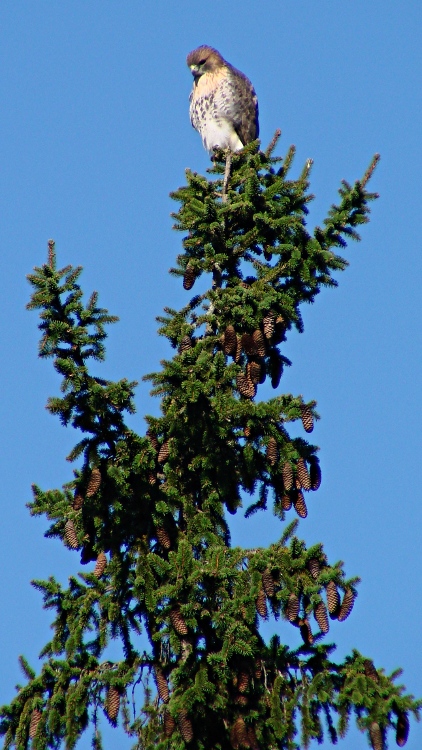
This looks like a juvenile Cooper’s Hawk, perched high atop that tree. It seems the pair we spotted last year had a successful hatching!
We always wish “our” hawks, whatever and wherever they may be, good hunting…
This came from the first set of real pictures using the repaired Sony DSC-H5 zoomed to 12× with the 1.7× tele conversion lens, cropped down a bit: plenty of artifacts to choose from.
For quite some time, the Canon S630 printer connected to the file server downstairs has been printing some documents in what looks like garbled reverse video: all of the text areas render as white characters on a black background, with peculiar graphic gibberish filling the space to the right margin. I’d provide a picture, but it wouldn’t be too informative; suffice it to say that if I wasn’t using bulk ink the pages would cost about a buck each.
Printing documents with two-up pages (two document pages on one paper sheet) generally resulted in the first sheet coming out garbled with the remainder emerging unscathed, but sometimes I found an entire stack of black paper. Ouch!
This usually affected documents printed from Web pages, but sometimes clobbered pure PDF documents. Given that Linux printing involves multiple transformations between Postscript / Ghostscript / PDF / PNG / what-have-you, it’s impossible to pin down a common cause.
Searching for the obvious keywords showed other folks had similar problems with different printers and different drivers. None of the threads had any resolution.
Printing the same document on the Epson R380 worked perfectly.
One recent morning I had four out of six documents fail, so I tried some of this and a little of that, before it occurred to me that I should switch the driver. I had chosen the default recommended printer driver during installation: the oddly named bj8xxyyz.upp file produced by the Ghostscript folks. Switching to the Gutenprint 5.2.7 driver seems to have solved the problem; all four failing documents printed perfectly and the problem hasn’t returned in a week of printing.
The R380 was already using the Gutenprint driver, which (in retrospect) should have been a big, fat hint.
I’d file a bug report, but to which project about what? [sigh]


 The Smell of Molten Projects in the Morning