The Smell of Molten Projects in the Morning

Ed Nisley's Blog: Shop notes, electronics, firmware, machinery, 3D printing, laser cuttery, and curiosities. Contents: 100% human thinking, 0% AI slop.

Tag: Rants

And kvetching, too

  • Kindle Fire Security: Burn Them. Burn Them All.

    My Kindle Fire automagically updates itself whenever Amazon decides it should. Sometimes an update produces a notice that an app (why don’t we call them “programs” these days?) needs more permissions, but the process generally goes unremarked.

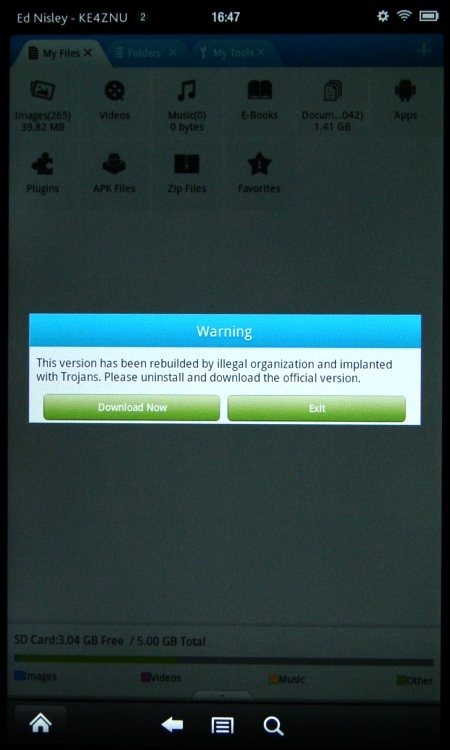
    This one wasn’t subtle at all:

    Kindle Fire - File Expert Trojan warning
    Kindle Fire – File Expert Trojan warning

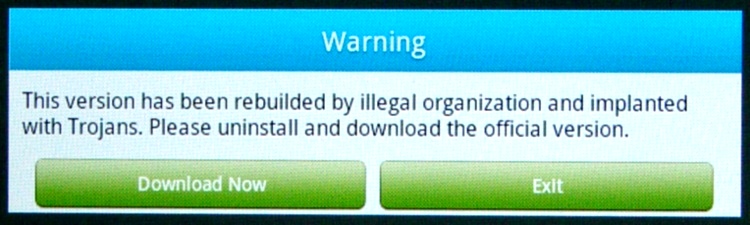
    I had just fired up File Expert, which immediately dimmed the screen and presented a dialog box with only two unpalatable choices. Here’s a closeup:

    Kindle Fire - File Expert Trojan warning - detail
    Kindle Fire – File Expert Trojan warning – detail

    Well, what would you do?

    Needless to say, I didn’t press the Download Now button; it probably wouldn’t have worked anyway, because I turned off the Allow Installation of Applications from Unknown Sources option a long time ago. Pressing Exit bails out of the program app and returns to the Home screen.

    Some questions immediately spring to mind:

    • If the app has been compromised, exactly how did it regain control and complain about the situation?
    • If this is truly a compromised app, why wouldn’t the Trojan just download malware without asking?
    • How did this pass the ahem QC and auditing that allegedly justifies having a sole-source Amazon App Store? After all, I can load random crap from the Interweb onto a PC all by myself.
    • How does one validate the origin of those random security questions that regularly appear on various computer screens? Why wouldn’t malware just pop up a random dialog box asking for the password, any password, and gleefully use whatever you type?

    This appears to be a false positive, as explained there. I assume that any malware worth its salt would also kill off any built-in integrity checking, but what do I know? It’s gone missing from the storefront, probably cast forth into the outer darkness away from the light of Kindle Fires…

  • Xubuntu 12.04: Some Steps Forward, Some Steps Back

    The continuing saga of trying to run a Linux desktop with two monitors (one rotated in portrait mode), separate X sessions, two trackballs, and a Wacom graphics tablet continue with Xubuntu 12.04. KDE continues to not work quite right with dual monitors, Gnome seems to be dead in the water, Unity wants to be a touch-screen UI when it grows up, and Linux Mint introduces yet another not-quite-baked UI. The breathtaking churn in Linux infrastructure continues, rendering everything I’d figured out with respect to FDI / HAL / udev configuration lagely irrelevant.

    For lack of a better alternative, I’ve installed Xubuntu, which is now a deprecated (available, but unsupported) version of Ubuntu. Configuring separate X sessions on two monitors requires the proprietary nVidia driver. The XFCE display configurator falls over dead when confronted with two screens and the xrandr extension seems unworkable. Fortunately, I’d left a bit of commented-out cruft in the xorg.conf file that worked in Xubuntu 10.10 and could copy the whole file over with only one change:

    Section "Screen"
        Identifier     "Portrait"
        Device         "GF9400_1"
        Monitor        "Dell2005FP"
        DefaultDepth    24
        Option         "TwinView" "0"
        Option         "metamodes" "DFP-1: 1680x1050 +0+0"
        Option         "NoLogo" "Off"
    #    Option         "RandRRotation" "On"
        Option         "Rotate" "CCW"
        SubSection     "Display"
            Depth       24
        EndSubSection
    EndSection
    

    Configuring two trackballs with the XFCE utility remains surprisingly easy: the Kensington is left-handed and the Logitech is right-handed.

    Swapping buttons 2 and 3 on the Wacom stylus poses a bit more of a challenge. Doing it on a per-session basis seems straightforward:

    xsetwacom set "Wacom Graphire3 6x8 stylus" button 2 3
    xsetwacom set "Wacom Graphire3 6x8 stylus" button 3 2
    

    You’d put those into a script and tell XFCE to auto-run it when you sign in, but that doesn’t handle hotplugging. I don’t hotplug the tablet, but random static glitches knock the USB hub into a tailspin and cause the same effect, so I jammed the lines that used to be in xorg.conf into /usr/share/X11/xorg.conf.d/50-wacom.conf:

    Section "InputClass"
            Identifier "Wacom class"
            MatchProduct "Wacom|WACOM|Hanwang|PTK-540WL|ISD-V4"
            MatchDevicePath "/dev/input/event*"
            Driver "wacom"
            Option "Button2" "3"
            Option "Button3" "2"
    EndSection
    

    I’m certain there’s a different location for those that fits in with whatever the overall design might be these days, but I’m kinda tired of figuring this stuff out.

    The Wacom drivers in Ubuntu 12.04 no longer permit restricting the tablet’s range to a single X session (xsetwacom set ... MapToOutput "HEAD-0" assumes you’re using xinerama with a single X session across two monitors), which sprawls the tablet’s limited resolution across both screens and leaves a big unusable rectangle in the lower third of the left side. This is not progress in a positive direction, but there’s no workaround.

    That workaround for the upstart Pachinko machine also applies to this box. The minute-long pause while NFS hauls itself to its feet isn’t attractive: you see VT 1 with the bare white-on-black command-line login prompt, but if you actually log in, things get very ugly, very quickly.

    Restoring the usual verbose Unix-oid startup messages requires tweaking /etc/default/grub to set noquiet nosplash, then running update-grub.

    Search the blog with the obvious keywords to get my earlier posts on all these topics…

  • Beware the Lurking Lorem Ipsum

    Fusion Hotspot Scrach-off Card
    Fusion Hotspot Scrach-off Card

    One of the motels we stayed at had a new (to me, at least) approach to the ubiquitous Free WiFi offering, which involved a small card with scratch-off fields:

    Being the curious sort, I checked their website to see what they were up to. The main heading, across the top of the page, read:

    Bringing wireless Internet capabilities to your property

    Visus, in vut eu in auctor mus sit odio ac habitasse non! Vut et ac ultricies urna, mauris enim magna mus ac urna arcu, etiam vel,

    Huh.

    The rest of the page has Lorem ipsum filler under every heading, including:

    24/7 Support

    Tincidunt ultricies magnis adipiscing. Natoque, augue mattis pid placerat mattis pellentesque adipiscing dis, habitasse scelerisque aliquet, ultricies lundium, lectus cras mus, sit? Magna turpis duis placerat massa in integer porta, sit, phasellus, nec, elementum, scelerisque in?
    Read More

    Clicking that attractive Read More link produces pretty much what you’d expect by now:

    Error 404 – Page not found!

    The page you trying to reach does not exist, or has been moved. Please use the menus or the search box to find what you are looking for.

    All the other links behaved the same way, including the Support header.

    Oddly, the Contact Us item hidden in the About us pulldown produced a form, so I sent off a message. Haven’t gotten anything back yet and really don’t expect to, either.

    It does give one pause to consider what happens to the bitstream between one’s tablet and the website. I make it a practice to not sign in to vital accounts while traveling…

    At least they didn’t use the Samuel L. Jackson slipsum generator

  • Unit Pricing: Fiddling the Unit of Measure

    Another trip to WalMart, another unit pricing puzzle

    Here’s the house brand towel:

    WM Deco Towel - unit price
    WM Deco Towel – unit price

    And here’s the name-brand towel for a mere one cent more per hundred towels:

    Bounty Select-a-Size Towel - unit price
    Bounty Select-a-Size Towel – unit price

    How can this be?

    Easy! Notice that the name-brand towel allows you to tear off a smaller sheet, which is actually a good idea. Even better, at least from their perspective: more sheets per package = lower unit price! I didn’t check the actual mini-towel size, but surely it’s less than half the usual size, so the comparable unit prices is more than a factor of two higher than shown.

    I suppose it’s only a matter of time before WalMart slices their towels in half to get an even better unit price.

    Carpet and floor tile used to be priced per square yard. Now it’s roughly the same dollar amount per square foot.

  • NYS DOT Repair Quality Control

    The paving along Rt 376 just south of Raymond Avenue developed transverse ridges; evidently the old concrete roadway below the more recent asphalt cap is shifting. Bumps in the travel lane are not to be tolerated, so they milled off all the ridges. Problem solved!

    Of course, the remaining asphalt isn’t thick enough to withstand any stress and promptly crumbles:

    NYS DOT joint milling quality
    NYS DOT joint milling quality

    Although the shoulder may appear to be wide enough for bicycle traffic, the debris strewn along it makes for a perilous journey: the larger chunks are bigger than my fist. Several of the milled joints along the unimproved section of Raymond and that stretch of 376 are disintegrating, so it’s not like they got just this one wrong.

    Doesn’t bother the DOT one little bit, because their idea of a “shared use facility” is a sign with a picture of a bicycle, labeled Share The Road. As long as the travel lane seems mostly passable by automobiles, their job is done.

  • Making a Black-on-Black Control User-Friendly

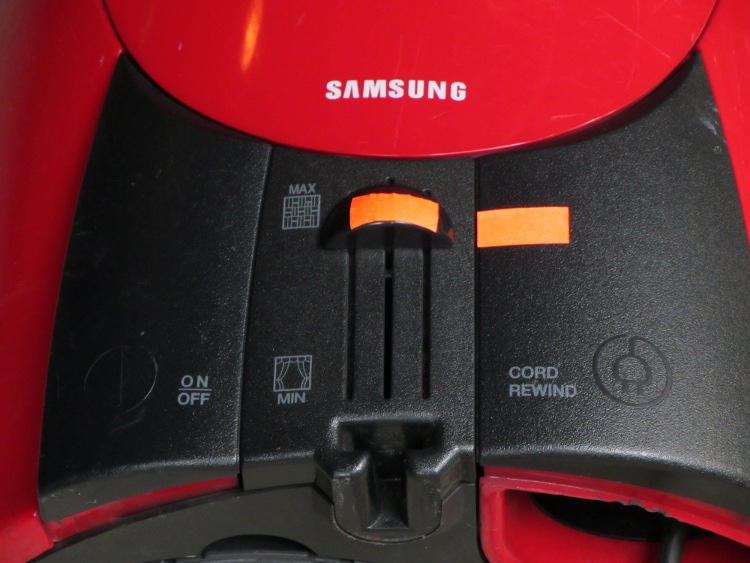
    After having discovered, once again, that the vacuum cleaner wasn’t cleaning very well because the suction control was knocked halfway down the scale, I made the normal setting on the damn thing visible:

    Samsung vacuum cleaner control labeling
    Samsung vacuum cleaner control labeling

    I don’t know why a label in dark-gray-on-black is such a wonderful idea, given that SAMSUNG stands out in pure white-on-red. Designers love subtle touches; I suppose they expect you to just puzzle it out and memorize the right answer.

    The embossed / raised black-on-black symbols don’t work for me, either. Did you spot the one to the left of the ON/OFF label? Didn’t think so.

    Those reflective tape snippets on unmarked stove knobs have survived many trips through the dishwasher; that idea is a keeper.

  • Subscription Billing Service: Scam by Mail

    This sort of thing arrives quite often, looking very official with all its Control Numbers, three-color printing, good production values, and suchlike:

    Subscription Billing Service - front
    Subscription Billing Service – front

    Generally, Subscription Billing Service offers subscriptions / renewals to magazines I’d never subscribe to. As it turns out, we actually subscribe to Science News and their subscription reminder arrived a few days later, which gave me the opportunity to fish the SBS form out of the recycling bin and compare prices. Turns out that the SBS  “one of the lowest available rates we can offer” deal is just about exactly twice what you’d pay directly to Science News.

    Huh. What a surprise.

    The Fine Print on the back of the SBS form shows how they get away with this nonsense, at least given an unending supply of new suckers to exploit. You have seven days to “cancel” and you’ll pay $20 for the privilege of not having a middleman double the price:

    Subscription Billing Service - back
    Subscription Billing Service – back

    I do wonder how they can act as an “agent” without having a “direct relationship with the publishers”. Just one of those little mysteries of the universe, somewhat like how dark matter can be everywhere and nowhere at once.

    It’s a perfectly legitimate business, I suppose, but that doesn’t mean they’re not scum…