The Smell of Molten Projects in the Morning

Ed Nisley's Blog: Shop notes, electronics, firmware, machinery, 3D printing, laser cuttery, and curiosities. Contents: 100% human thinking, 0% AI slop.

Tag: Laser Cutter

  • OMTech 60 W Laser: Laser Power Indicator

    OMTech 60 W Laser: Laser Power Indicator

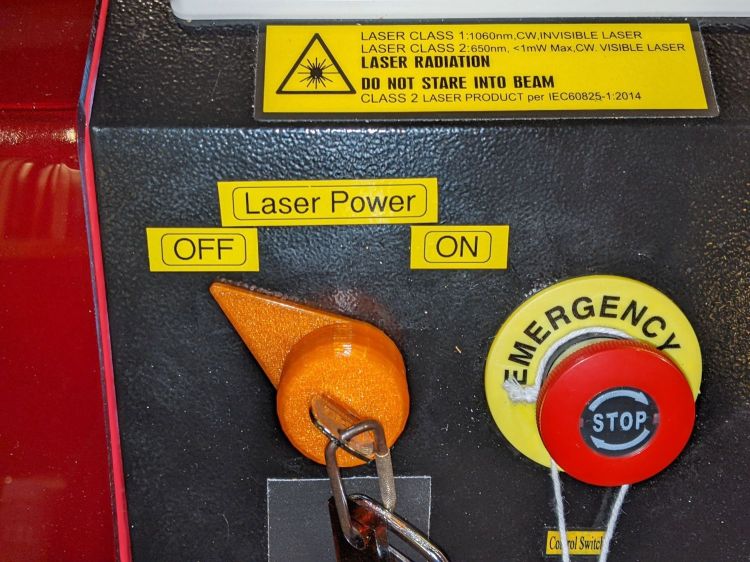
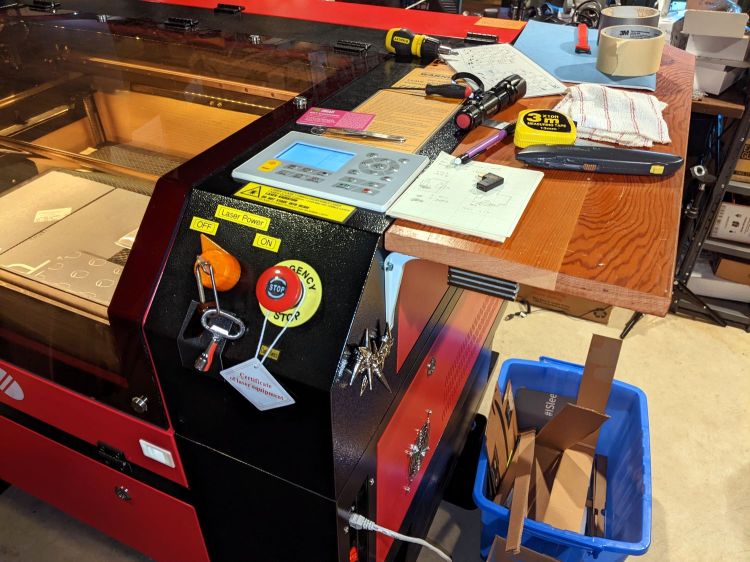
    Although the OMTech laser controls the laser power supply with a key-lock switch, there’s little visible difference between the OFF and ON positions. Having occasionally mistaken it in both directions, this seemed like a useful addition:

    Laser Power Lock Indicator - installed
    Laser Power Lock Indicator – installed

    The strip of black duct tape below the lock muffles the rattle of the triangle hatch key against the metal cabinet.

    Two snippets of foam tape hold the knob to the lock cylinder, making an admittedly tenuous connection, but the knob fits around the outside of the switch housing with minimal clearance and doesn’t shouldn’t suffer any torque or pulling, so it might work.

    The solid model looks about like you’d expect:

    Laser Power Lock Indicator - solid model
    Laser Power Lock Indicator – solid model

    Unfortunately, it has no good orientation for printing, so I let PrusaSlicer generate support material inside the knob:

    Laser Power Lock Indicator - Support structures
    Laser Power Lock Indicator – Support structures

    Suffice it to say: removing all that plastic did not go well.

    I eventually grabbed the knob in the lathe and bored the interior out to its more-or-less proper dimensions, figuring nobody would ever notice the carnage, and it worked reasonably well. In the unlikely event I need another pointer, I’ll add a support spider to hold up the interior with minimal contact and less plastic.

    Yeah, the laser really needs a stack light showing its condition and safety status …

    The OpenSCAD source code as a GitHub Gist:

    // Indicator for OMTech laser power lock
    // Ed Nisley KE4ZNU 2022-04-09
    KnobOD = 35.0;
    KnobHeight = 22.0;
    KnobTaper = 4.0;
    PointerLength = 45.0;
    PointerThick = 3.0;
    TipOD = 2.0;
    /* [Hidden] */
    //——
    Protrusion = 0.1; // make holes end cleanly
    HoleWindage = 0.2;
    module PolyCyl(Dia,Height,ForceSides=0) { // based on nophead's polyholes
    Sides = (ForceSides != 0) ? ForceSides : (ceil(Dia) + 2);
    FixDia = Dia / cos(180/Sides);
    cylinder(d=(FixDia + HoleWindage),h=Height,$fn=Sides);
    }
    //———-
    // Create part
    // Plenty of magic numbers from actual measurements
    module Pointer() {
    difference() {
    union() {
    linear_extrude(height=PointerThick)
    hull() {
    circle(d=KnobOD,$fn=24);
    translate([PointerLength – TipOD/2,0])
    circle(d=TipOD,$fn=12);
    }
    cylinder(d=KnobOD,h=KnobHeight – KnobTaper,$fn=24);
    translate([0,0,KnobHeight – KnobTaper – Protrusion])
    cylinder(d1=KnobOD,d2=KnobOD – 3.0,h=KnobTaper + Protrusion,$fn=24);
    }
    translate([0,0,-Protrusion]) {
    PolyCyl(29.0,14.0 + Protrusion,24);
    PolyCyl(24.0,14.0 + 5.0 + Protrusion,24); // leaves clearance under pointer
    }
    translate([0,0,KnobHeight])
    cube([12.0,2.0,2*KnobHeight],center=true);
    }
    }
    //———-
    // Build it
    Pointer();

    And doodles giving the dimensions of the key lock, not all of which can be true at the same time:

    Laser Power Lock Indicator - Dimension Doodles
    Laser Power Lock Indicator – Dimension Doodles
  • OMTech 60 W Laser: Air Assist Flowmeter

    OMTech 60 W Laser: Air Assist Flowmeter

    With the solid state relay switching the air assist pump, an air flowmeter seemed like it would come in handy:

    OMTech Laser - air flowmeter installed
    OMTech Laser – air flowmeter installed

    It’s stuck to the lip inside the top hatch on the right side of the cabinet, which may not be the most convenient location, but keeps it out of the way and doesn’t require much additional tubing.

    The 6 mm tube kit included some (1/8 NPT?) push fittings that came heartbreakingly close to matching the flowmeter’s internal threads:

    OMTech Laser - air flowmeter - push tube fittings
    OMTech Laser – air flowmeter – push tube fittings

    Given that the air pump doesn’t produce much pressure, two snippets of 1/4 inch silicone tubing suffice to couple the blue 6 mm tubing to the flowmeter’s barbs:

    OMTech Laser - air flowmeter - silicone tube adapter
    OMTech Laser – air flowmeter – silicone tube adapter

    The run from the air pump to the flowmeter is now new blue tubing, with the original black tubing running through the drag chain to the laser nozzle:

    OMTech Laser - air flowmeter - tube layout
    OMTech Laser – air flowmeter – tube layout

    Replacing a number of overly tight cable ties along the way may remove enough restrictions to counterbalance the additional tubing.

    Opening the flowmeter’s valve all the way puts 14 l/m = 0.5 CFM through the nozzle. I have no idea of the proper rate, other than more is better while cutting and less is better for engraving.

    Four years ago, Russ Sadler laid out the plumbing required to automatically select high and low flow air assist, which seems like a worthwhile project.

  • OMTech 60 W Laser: MDF Honeycomb Pins

    OMTech 60 W Laser: MDF Honeycomb Pins

    Contrary to what I thought, the OMTech 60 W laser’s honeycomb platform gridwork isn’t spot-welded. Instead, it’s many corrugated strips aligned with rods inserted parallel to the Y axis through the strips:

    OMTech 60 W Laser - Honeycomb platform structure
    OMTech 60 W Laser – Honeycomb platform structure

    The silvery rod over on the right passes through holes punched in the grid strips. The black thing in the middle is one of the knife edge bars below the platform; it supports the honeycomb grid and can also hold chunky objects.

    Because the grid isn’t a rigid structure in the XY plane, you simply jam a solid spike into one of the openings and have the grid realign itself just enough to grip it firmly:

    OMTech 60 W Laser - MDF Honeycomb spike - detail
    OMTech 60 W Laser – MDF Honeycomb spike – detail

    The shape is inspired by the spikes in AC Wright’s kit of laser workholding widgets, greatly simplified and resized to fit this honeycomb. In particular, there’s no need for a compression slit in the stem, because the grid resizes itself around the solid stem.

    Eventually, the corners wear off the stem and it won’t fit securely in the grid, whereupon you throw it out. They’re easy enough to cut from whatever MDF scraps you have lying around, so you won’t form a deep emotional bond.

    Likewise, after only a few uses, the sharp point vanishes; a blunt tip would make more sense.

    The bottom of the arms locate the top point a fixed distance over the honeycomb, which seems to be sufficiently flat and well-aligned for most (well, my current) purposes. The slanted top of the arms feels more comfortable to push than a hard right angle, at least to my fingers.

    These work well when the fumes from cutting MDF / plastic / whatever would blowtorch a cardboard sheet holding metal spikes:

    OMTech 60 W Laser - MDF Honeycomb spikes
    OMTech 60 W Laser – MDF Honeycomb spikes

    The cardboard sheets surrounding the victim maintain airflow from the front opening over the platform surface to where it’s needed, rather than letting it vanish through the honeycomb.

    Update: Obligatory Sadler video.

    The SVG image as a GitHub Gist:

    Loading
    Sorry, something went wrong. Reload?
    Sorry, we cannot display this file.
    Sorry, this file is invalid so it cannot be displayed.
  • OMTech 60 W Laser: Spike Plates

    OMTech 60 W Laser: Spike Plates

    Mash all these together:

    To get a cardboard spike plate:

    Laser spike plate - pristine
    Laser spike plate – pristine

    The punk spikes stick to a layer of ordinary masking tape across the back surface which lets them sit flat on the honeycomb and support a sheet parallel to the platform. They’re nominally an inch tall, which works out to a very consistent 24 mm, and come with a matching set of 6 mm M3×0.5 truss-head screws now residing in a ziplock bag against future need.

    The spike plate works well under thin paper-like sheets requiring high cutting speed and low power, where the defocused beam just scorches tracks across the cardboard without setting it on fire:

    Laser spike plate - scarred surface
    Laser spike plate – scarred surface

    Nota bene: a cardboard sheet makes a terrible backing plate under material requiring slow speed and high power, like MDF / plywood / acrylic, where the cloud of combustible gases under the victim forms a very effective flamethrower. You have been warned.

    Obviously, you need not fill every hole. Leaving some holes vacant doesn’t (seem to ) allow much smoke removal downward through the honeycomb, perhaps because there’s insufficient perimeter area to get enough wind into the center section.

    Eventually, the cardboard becomes sufficiently scarred to justify making another one, which is easy enough:

    Laser spike plate - hole cutting
    Laser spike plate – hole cutting

    The motivation for raising the target above the platform is to provide good airflow to remove the smoke / fumes / smog from the area, thereby reducing unsightly deposits on the lower surface. Given decent airflow across the platform, this works surprisingly well:

    Laser spike plate - smoke plumes
    Laser spike plate – smoke plumes

    That picture comes through the laser’s tinted polycarbonate window, so it’s somewhat blurred, but shows smoke streamers emerging from the victim’s corrugations and across its surface.

    All in all, it’s quick, easy, and effective.

  • OMTech 60 W Laser: Airflow Control

    OMTech 60 W Laser: Airflow Control

    Russ Sadler points out that Chinese CO2 lasers lack air inlets matching their 6 inch = 150 mm outlet port, so fumes accumulate over the workpiece as air leaks in through various panel / hatch gaps and small openings. The simplest solution, at least for my OMTech 60 W laser, seems to be opening the front passthrough hatch:

    Laser spike plate - side view
    Laser spike plate – side view

    The opening is 33×4 inch = 0.9 ft² with an airflow of just under 1 m/s into the exhaust fan at full throttle, so it’s venting at about 180 CFM. That’s half the duct fan’s 400 CFM in more-or-less free air, but the laser cabinet outlet vent has a perforated cover with maybe 50% clear opening:

    OMTech 60W laser - modified vent
    OMTech 60W laser – modified vent

    It’s not exactly a flame arrester.

    Directing the air flow across the platform from front to rear requires sealing the gaps along the front of the cabinet:

    OMTech 60 W laser - front gap seal
    OMTech 60 W laser – front gap seal

    And the huge openings on either side of the exhaust duct:

    OMTech 60 W laser - vent box seal
    OMTech 60 W laser – vent box seal

    Yes, all those are cardboard sheets and, no, they’re not the final implementation. This is all in the nature of figuring out what works, so being able to cut-to-fit is a Good Idea.

    The large gap along the rear edge (on the right, above) for the rear feedthrough opening got a cardboard sheet after engraving some MDF.

    Early indications are that it works fine, as witness the smoke streaming off the rear of a cardboard test piece:

    Laser spike plate - smoke plumes
    Laser spike plate – smoke plumes

    Cutting MDF produces copious smoke that fills the cabinet, but it clears quickly and doesn’t escape into the Basement Laboratory if I wait a little longer than I really want to after the cutting stops.

    Blocking the unused areas of the honeycomb helps direct airflow in the proper direction:

    COB LED Shade - overview
    COB LED Shade – overview

    All in all, it works well.

  • OMTech 60 W Laser: COB LED Shades

    OMTech 60 W Laser: COB LED Shades

    Adding LED strips around the interior of the laser platform definitely improved the visibility of things on the honeycomb platform:

    OMTech 60W laser - COB LED strips
    OMTech 60W laser – COB LED strips

    However, all that upward-directed light goes directly into my glare-sensitive eyeballs, so I added shades above the strips:

    COB LED Shade - installed
    COB LED Shade – installed

    They’re cut from corrugated cardboard because I have an essentially infinite supply and I’m still working out speeds and intensities. Eventually they’ll become something like black acrylic.

    The brackets emerged from the vasty digital deep through the miracle of 3D printing:

    COB LED Shade Brackets - slice preview
    COB LED Shade Brackets – slice preview

    They’re stuck to the laser cabinet and the cardboard with double-sided duct tape. If you’re careful, they will line up along one edge of the tape, roll over neatly to stick their other face, then a single razor knife cut can separate each pair of neighbors.

    The underside sports an aluminized mylar strip to redirect the wasted light in a more useful direction:

    COB LED Shade - aluminized Mylar reflector
    COB LED Shade – aluminized Mylar reflector

    The tapeless sticky shipped with the laser holds the reflector in place, while its 20 mm width sets the 21 mm shade dimension. Although you want a reasonably smooth layer, it need not be mirror-flat.

    Now it’s really bright in there:

    COB LED Shade - overview
    COB LED Shade – overview

    While I had my head under the hood, I stuck a fourth strip of COB LEDs on the lip along the rear edge of the opening; it’s bright enough to cast the shadow just forward of the laser head despite the OEM under-gantry LED strip. Because the rear strip is aimed downward, it didn’t need a shade.

    The perforated cardboard sheet on the left is a spike plate: more about that later.

    The SVG drawings as a GitHub Gist:

    Loading
    Sorry, something went wrong. Reload?
    Sorry, we cannot display this file.
    Sorry, this file is invalid so it cannot be displayed.

    The OpenSCAD source code as a GitHub Gist:

    // Bracket for COB LED shade
    // Ed Nisley KE4ZNU 2022-03-24
    BaseLength = 20.0;
    /* [Hidden] */
    ThreadThick = 0.25;
    ThreadWidth = 0.40;
    HoleWindage = 0.2;
    Protrusion = 0.1; // make holes end cleanly
    WebThick = 4*ThreadWidth;
    BasePlate = [BaseLength,5*WebThick,WebThick];
    //———-
    // Create parts
    module Bracket() {
    R = BaseLength/3;
    N = 36;
    union() {
    rotate([90,0,0])
    translate([0,0,-WebThick/2])
    linear_extrude(height=WebThick,convexity=2)
    difference() {
    intersection() {
    union () {
    square(2*R,center=false);
    translate([0,2*R])
    rotate(180/N)
    circle(r=R,$fn=N);
    translate([2*R,0])
    rotate(180/N)
    circle(r=R,$fn=N);
    }
    square(3*R,center=false);
    }
    translate([2*R*cos(180/N),2*R*cos(180/N)])
    rotate(180/N)
    circle(r=R,$fn=N);
    }
    rotate([0,-90,0])
    translate([0,-BasePlate.y/2,-BasePlate.z])
    cube(BasePlate,center=false);
    translate([0,-BasePlate.y/2,0])
    cube(BasePlate,center=false);
    }
    }
    //———-
    // Build them
    Bracket();
  • OMTech 60 W Laser: Ris(er)ing to the Occasion

    OMTech 60 W Laser: Ris(er)ing to the Occasion

    Nearly everybody with a floor-standing laser cutter eventually decides it’s much too low for comfort:

    OMTech Laser - leg risers
    OMTech Laser – leg risers

    Those are the 5 inch sections of a furniture riser set (the 3 inch sections are visible at the left rear of the picture, ready for deployment). With the legs extended to their full length, they put the laser’s honeycomb platform about 30 inches from the floor, so the complete set will raise it to 33-ish inches.

    I went full-frontal Archimedes by levering each end of the cabinet up an inch at a time using one of those maple shelves atop an increasingly tall fulcrum made of various planks, then lowering the ever-lengthening legs atop stacks of plywood. Eventually I could roll a floor jack under the end beam to simplify the rest of the lift.

    Protip: lock the casters to prevent movement.

    More height makes reaching inside the machine much more comfortable!

    At least for me. Mary says it’s now much too high for her …