Ed Nisley's Blog: Shop notes, electronics, firmware, machinery, 3D printing, laser cuttery, and curiosities. Contents: 100% human thinking, 0% AI slop.
Tag: Improvements
Making the world a better place, one piece at a time
Having bought some low-budget Walmart vanilla extract that smells nothing at all like vanilla, I figured it’s time to get serious about this stuff. Recipes for DIY vanilla extract abound on the Internet, but as nearly as I can tell, the basic idea is to put vanilla beans in contact with ethanol, shake occasionally for a couple of months, then enjoy. Uh, by the teaspoonful, that is.
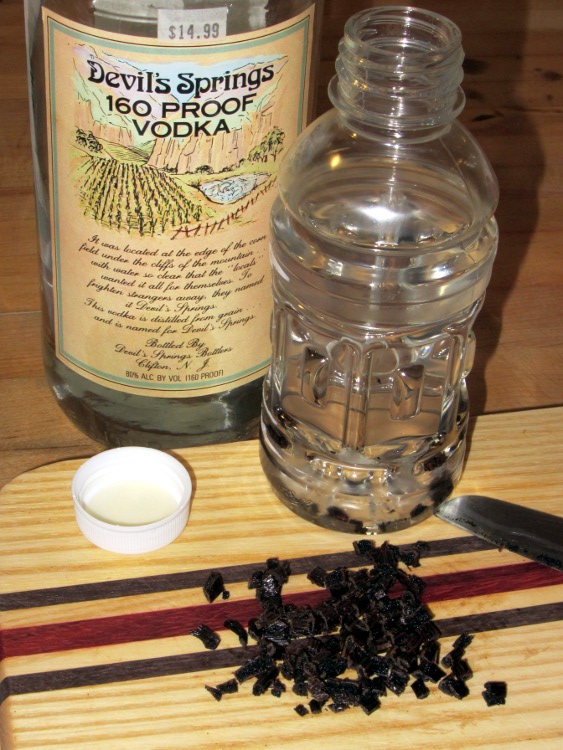
Quite some years ago I discovered that NYS prohibits the sale of grain alcohol, so you must buy stiff vodka to get high-test ethanol. That glass bottle contains the cheapest 160 proof vodka I could find in the waning years of the last millennium; I figured it was likely to have fewer additives around its 80% ethyl alcohol than anything else in the liquor store. After more than a decade on the Basement Laboratory’s Solvents Shelf (I don’t use a lot of ethanol), a dollop in a saucer burns with an ethereal blue flame: it’s in fine shape.
The plastic bottle originally held some weird alien fruity liquid (which, IIRC, I picked up while doing amateur radio duty at a charity event) and has the desirable attribute of a tight sealing lid. It’d be better to use glass and I suppose amber beats clear, but this stuff will spend its entire life in a dark cupboard with all the other spices. Although some recipes call for sterilizing the bottle in boiling water, I figure any bug that can survive 80% ethanol will shrug off hot water… and the vanilla beans probably aren’t all that sterile, anyway.
A cup of neat vodka, three slit-and-chopped vanilla beans, and away we go. It should be ready for the Christmas baking season.
If this works, I’ll get a substantial quantity of vanilla beans from the usual eBay supplier and make some really stiff extract. Two bucks a bean at the local grocery store: ouch.
In that version of the GPS+voice interface, I sprinkled 100 nF and 100 pF SMD caps across the input lines in the hope that they’d reduce EMI on the audio board. The board worked fine for years, but now that it’s time to build another board & box, I figured it’d be good to know a bit more about their actual response.
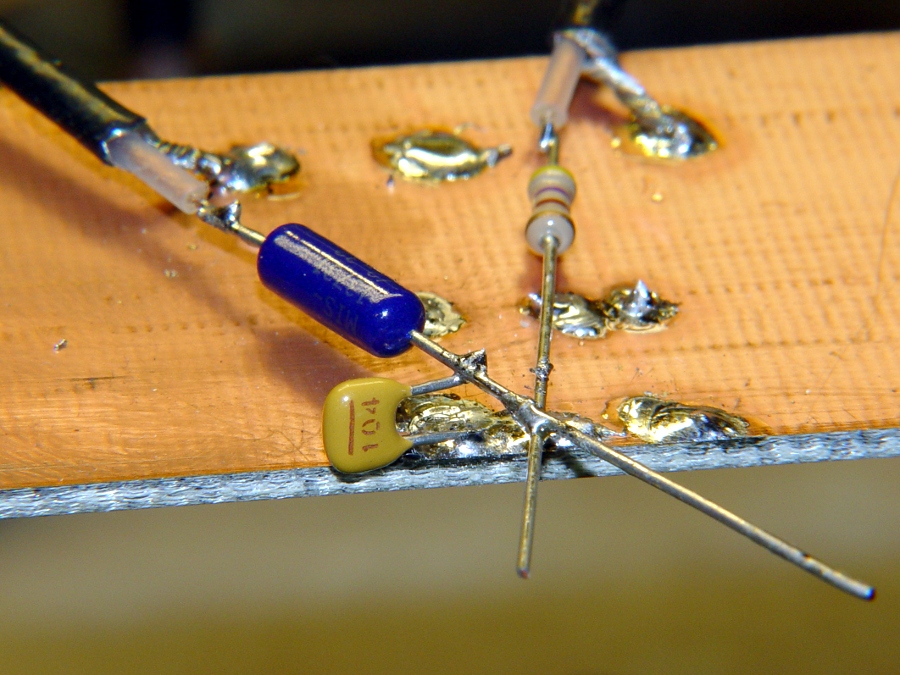
So I cobbled up a test fixture with a 3 dB pad from the tracking generator output and a 20 dB pad to the spectrum analyzer input (both of those are bogus, because the cap impedance varies wildly, but work with me on this):
Ceramic 100 nF cap on copper
Pulled an assortment of 100 nF ceramic caps from the stockpile:
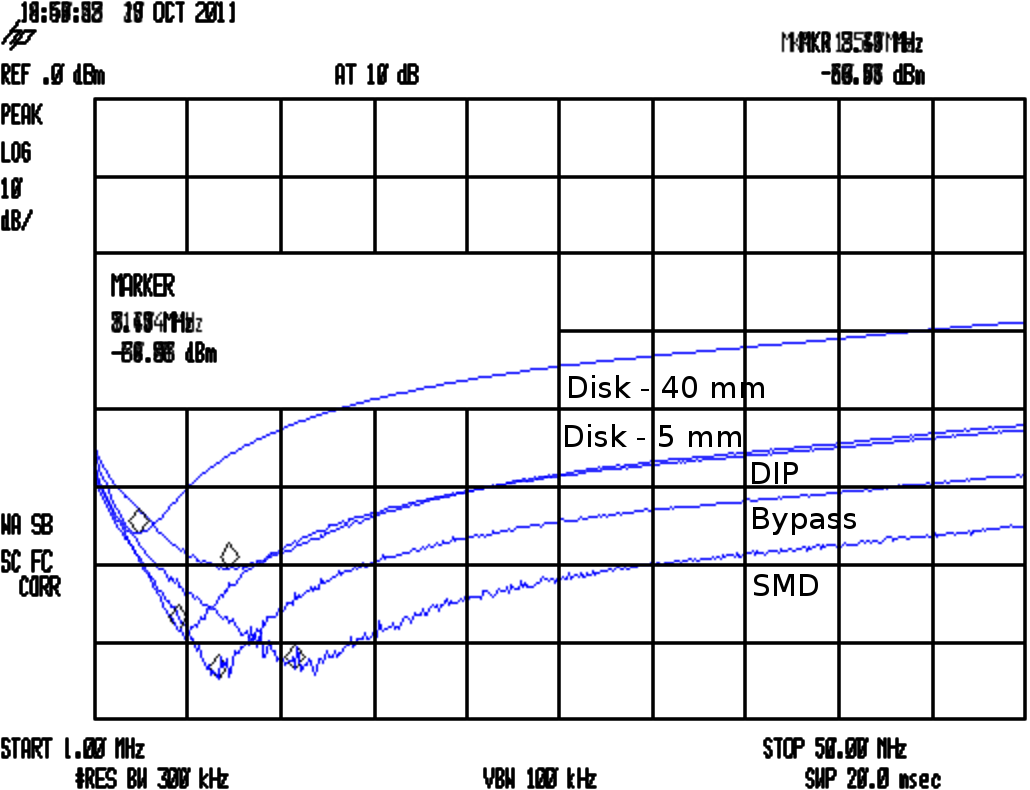
Their self-resonant frequencies are much lower than I expected:
Cap Comparison
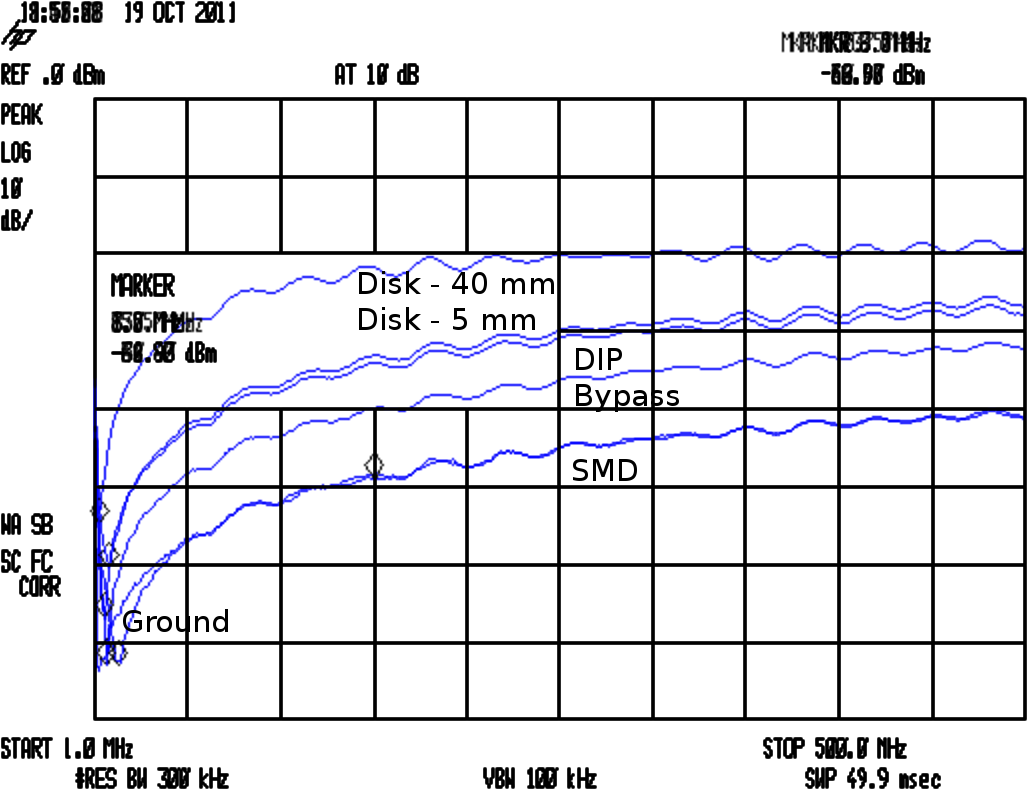
The attenuators produce about 17 dB of loss with no cap in the circuit, so the disk caps are pretty much asleep at the switch from VHF on up. The small bypass cap in the top photo is OK and the SMD cap is pretty good, but they’re all well past their self-resonant frequency and acting like inductors.
The relevant equations:
FR = 1/(2π √(LC))
XC = 1/(2π f C)
Q = FR / BW
ESR = XC / Q
The drill goes a little something like this:
Find resonant frequency FR and 3 db bandwidth BW
Knowing FR and C, find parasitic L
Knowing FR and BW, find Q
Knowing XC and Q, find ESR
In round numbers, the 100 nF SMD cap has L=2 nH and ESR=60 mΩ.
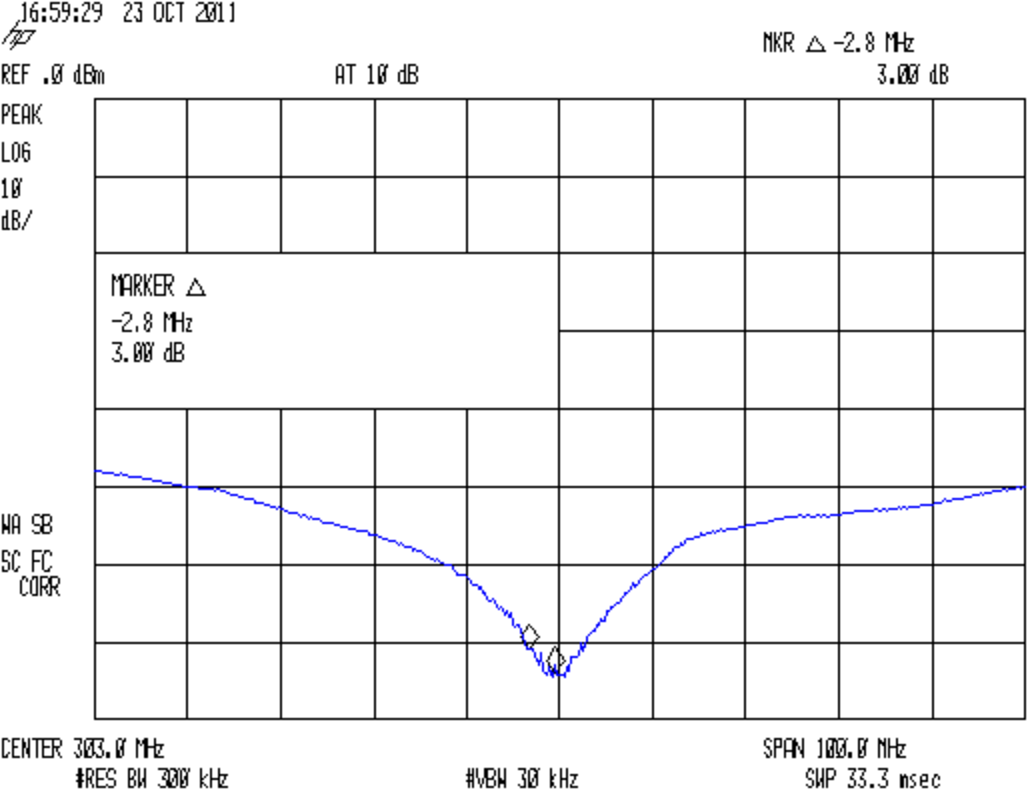
Now, it turns out a 100 pF SMD cap resonates up at 300 MHz, between the VHF and UHF amateur bands:
SMD – 100 pF Bandwidth
So I think the way to do this is to pick the capacitance to put the self-resonant frequency in the VHF band, parallel another cap to put a second dip in the UHF band, and run with it. A back of the envelope calculation suggests 470 pF and 47 pF, but that obviously depends on a bunch of other imponderables and I’ll just interrogate the heap until the right ones step forward.
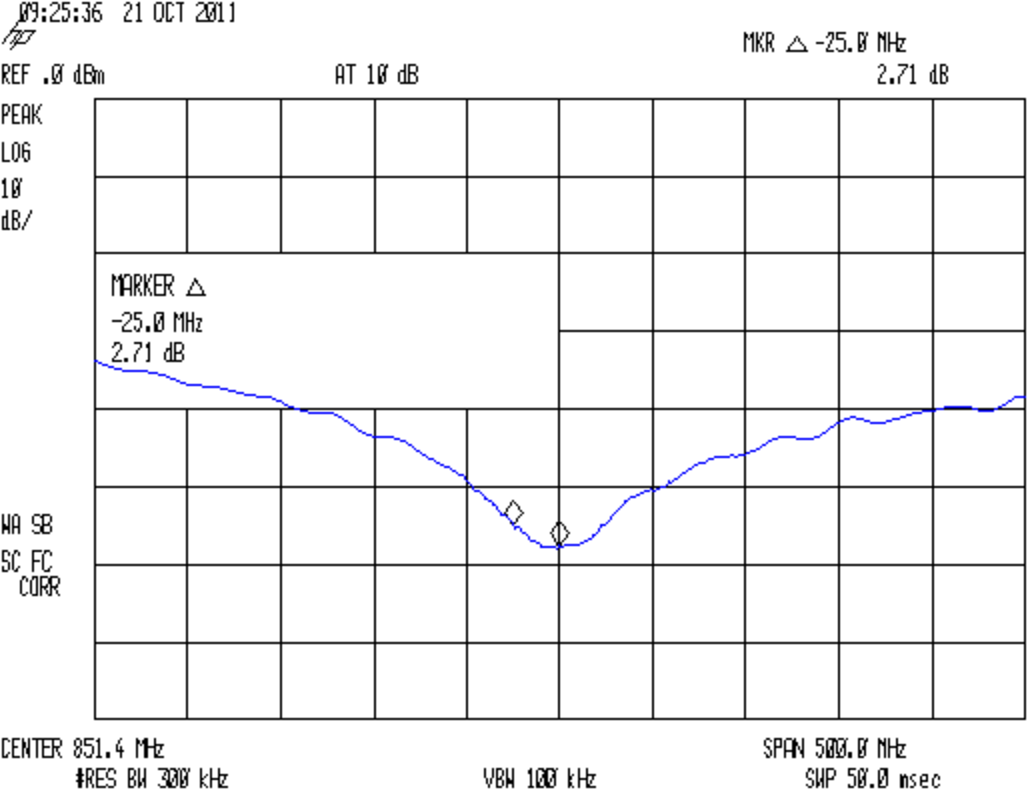
Just to show the test fixture isn’t a complete piece of crap, here’s a 12 pF cap resonating up around 850 MHz:
SMD – 12 pF Bandwidth
For the combination of components, sweep speeds, bandwidths, and suchlike in effect, the spectrum analyzer’s noise floor is down around -75 dBm. I think the 12 pF cap is actually better than it looks, but I didn’t fiddle around with a narrower resolution bandwidth.
A cheap auto escape hammer (IIRC, free in the bottom of a tag-sale box filled with stuff I could actually use) has been kicking around the back of the bench for far too long; it had a feeble single-cell incandescent bulb flashlight with the cheapest possible non-switch. I ripped all that out, carved out enough plastic to fit a CR123 lithium cell, hot-melt-glued a real pushbutton switch and 10 mm white LED in place, and soldered it up:
Lithium cell hacked into auto escape tool
The CR123 puts out enough juice to light up the LED, but it’d be happier with a bit more current. There’s no limiting resistor, so the LED gets what it gets.
Augment the screws with a few snippets of Kapton tape, use some real 3M Velcro tape, and it’s all good (albeit ugly on a stick):
Hacked auto escape hammer
Now, there’s no way to test the hammer part of it (perhaps I could visit a junkyard and whack out a few windows for practice?), but at least now we have a disposable flashlight in the van…
The Logitech notebook webcam that peers into the Thing-O-Matic has terrible dynamic range compensation; turning on the LED ring light washes out the image something awful. An old Logitech ball camera seems better, but it sits atop a rubbery dingus adapted to grip huge old laptops. So I built an adapter with a standard 1/4-20 tripod screw thread in the bottom that ought to make it more useful.
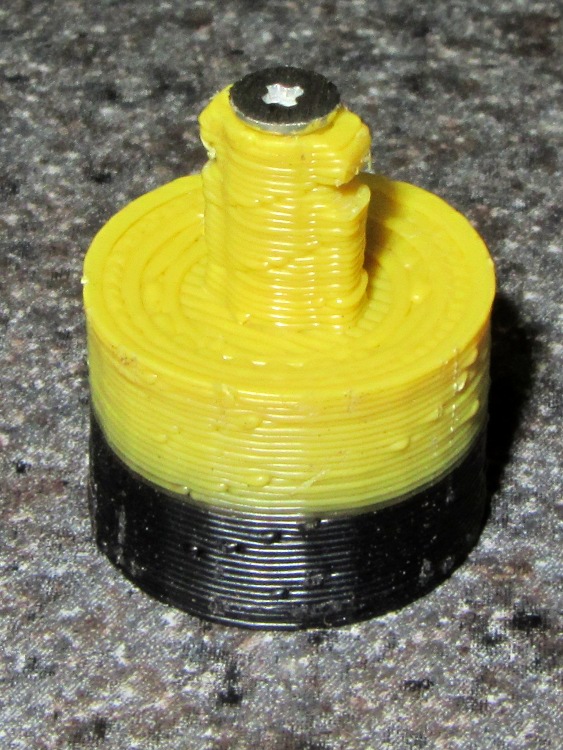
The old & new mounts compared:
Logitech ball camera mounts
The color change comes from switching to yellow filament for an upcoming larger object.
The solid model shows those tiny little notches will require a bit of riffler file work:
Logitech camera tripod adapter – solid model
The bottom has a blind 1/4-20 tapped hole. Lacking a bottoming tap, not having any broken 1/4-20 taps, and being unwilling to grind the end off a perfectly good taper tap, I filed three notches along a bolt. Ran the taper tap in until it hit bottom, ran the bolt in likewise, and defined the result to be Good Enough:
Homebrew bottoming tap
On the other end, the most probable failure will leave that delicate little post jammed firmly inside the camera’s socket. There’s not enough post to allow printing a small guide hole, but there’s no real need for one; I drilled a #50 hole right down the middle, ran a 2-56 screw into it without tapping the hole, and filed the screw head flat:
Camera mount with filed screw
After cleaning up those notches, it snapped solidly into place:
Logitech ball camera with mount
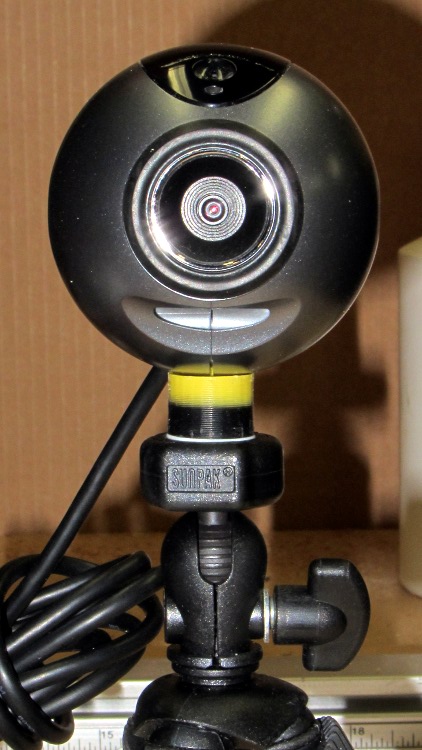
And then the camera sits neatly atop a cheap Gorillapod knockoff:
Logitech ball camera on tripod
That tiny reddish dot in the middle of the imposing set of rings marks the actual lens, so it’s more of a pinhole camera than anything else. The fixed focus kicks in beyond a meter, but a bit of rummaging in the Box o’ Lenses produced a random meniscus lens that pulled the focus in to maybe 100 mm. Alas, that means the camera must float in mid-air about 15 mm inside the Thing-O-Matic’s box. If I can conjure up a mount that holds the ball inside the box, above-and-forward of the stage, that’d work great. VLC can allegedly rotate the image upside-down, so maybe I can mount it bottom-up.
Here’s everything I know about those two cameras, with the ball camera on top and the webcam on the bottom:
Logitech ball and notebook webcam data
Apparently it’s easier to put that information on a tag than provide a good old data plate on the camera body.
The OpenSCAD source code:
// Tripod mount for Logitech ball camera
// Ed Nisley KE4ZNU - Oct 2011

include </home/ed/Thing-O-Matic/lib/MCAD/units.scad>
include </home/ed/Thing-O-Matic/Useful Sizes.scad>
include </home/ed/Thing-O-Matic/lib/visibone_colors.scad>

//-------
//- Extrusion parameters must match reality!
//  Print with +0 shells and 3 solid layers

ThreadThick = 0.33;
ThreadWidth = 2.0 * ThreadThick;

HoleFinagle = 0.2;
HoleFudge = 1.02;

function HoleAdjust(Diameter) = HoleFudge*Diameter + HoleFinagle;

function IntegerMultiple(Size,Unit) = Unit * ceil(Size / Unit);

Protrusion = 0.1;			// make holes end cleanly

//-------
// Dimensions

BallDia = 60.0;				// camera ball
BallRad = BallDia/2;

BaseDia = 16.0;				// interface at tripod surface
BaseRad = BaseDia/2;

BaseLength = 10.0;			// to base of ball

BoltDia = Tap025_20;		// standard 1/4-20 thread
BoltLength = 7.0;

StemLength = 8.5;
StemDia = 4.7;
StemRad = StemDia/2;

FlangeWidth = 6.6;
FlangeThick = 2.6;

NotchSectionDia = 1.4;		// toroid cross-section diameter
NotchSectionRad = NotchSectionDia/2;
NotchOffset = 2.3;			// from top of stem

//-------

module PolyCyl(Dia,Height,ForceSides=0) {			// based on nophead's polyholes

  Sides = (ForceSides != 0) ? ForceSides : (ceil(Dia) + 2);

  FixDia = Dia / cos(180/Sides);

  cylinder(r=HoleAdjust(FixDia)/2,h=Height,$fn=Sides);
}

module ShowPegGrid(Space = 10.0,Size = 1.0) {

  Range = floor(50 / Space);

	for (x=[-Range:Range])
	  for (y=[-Range:Range])
		translate([x*Space,y*Space,Size/2])
		  %cube(Size,center=true);

}

//-------
//

ShowPegGrid();

translate([0,0,BaseLength])
  union() {
	difference() {
	  translate([0,0,-BaseLength])
		cylinder(r=BaseRad,h=2*BaseLength);
	  translate([0,0,BallRad])
		sphere(r=BallRad);
	  translate([0,0,-(BaseLength + Protrusion)])
		PolyCyl(BoltDia,(BoltLength + Protrusion));
	}
	rotate(180/16)
	  cylinder(r=StemRad,h=StemLength,$fn=16);
	difference() {
	  translate([0,0,StemLength/2])
		cube([FlangeWidth,FlangeThick,StemLength],center=true);
	  translate([0,0,(StemLength - NotchOffset)])
		rotate_extrude(convexity=3,$fn=64)
		  translate([FlangeWidth/2,0,0])
			circle(r=NotchSectionRad,$fn=16);
	  translate([0,-FlangeWidth/2,StemLength + sqrt(FlangeWidth)])
		rotate([0,45,0])
		  cube(FlangeWidth + 2*Protrusion);
	  translate([0,FlangeWidth/2,StemLength + sqrt(FlangeWidth)])
		rotate([0,45,180])
		  cube(FlangeWidth + 2*Protrusion);
	}
  }
We frequently host touring bicyclists who need a campsite in the Mid-Hudson Valley. The most recent couple has been riding for two years, starting eastward from Paris shortly after their wedding. Yeah, it’s a honeymoon trip.
After riding through Western and Eastern Europe, the Middle East, and several of the ‘Stans, JeanMarc’s handlebar mirror broke in Kazakhstan. Marie toted the carcass out of the ‘Stans, across India, through China, and then from Montreal to here. They’re biking to Houston, where they’ll fly to Peru, ride south and across the Andes, and work their way across the Atlantic on a cargo ship that eventually docks in Germany. Then, a year from now, they’ll just bike back to Paris.
Makes you feel like sludge, too, doesn’t it?
With that as prologue, JeanMarc wondered if I could fix the mirror mount. It started as a 10 mm plastic ball on a molded plastic fitting with an integral worm screw and strap; of course, the ball stem snapped off during a hard landing or some such event that comes naturally during long-distance riding. We kicked around some ideas, rummaged through the heap, and came up with a workable, albeit hideous solution.
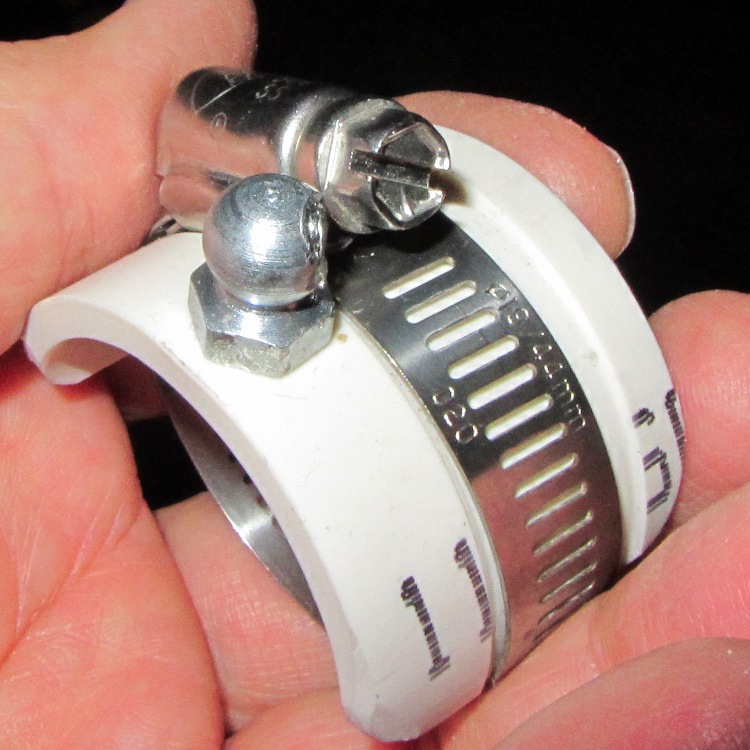
I applied a Dremel slitting wheel to a pair of Zerk grease fittings, sliced off the inlet valve, extracted the valve spring, and cleaned up the residue to leave a somewhat misshapen 9.3 mm (really a scant 3/8 inch) ball-like end. A bit of lathe work converted a chunk of PVC pipe into a sleeve grooved for a metal hose clamp. I drilled two #3 holes, tapped them 1/4-28 (which, believe it or not, is the correct thread for a Zerk), bandsawed the pipe in half, introduced the pieces to Mr Belt Sander to round the edges, screwed Zerks into holes, and wound up with a pair of these:
Handlebar Mirror Mount – detail
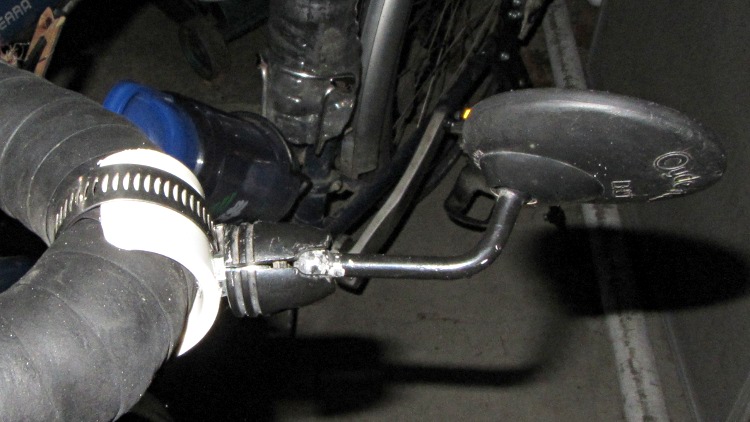
Which looks awful on the handlebars, but we’re pretty sure it won’t break and he has a spare if the mirror on Marie’s bike snaps off:
Handlebar Mirror Mount – fixed
The Zerk fitting could unscrew, but the threads aren’t exactly in pristine condition after all that fussing and seem to be jammed firmly in place. If we had more time, I’d have heated the PVC and molded it around the handlebars, but we decided that wasn’t really necessary.
They rode off into the distance this morning… may you have smooth roads and a tailwind, JeanMarc and Marie!
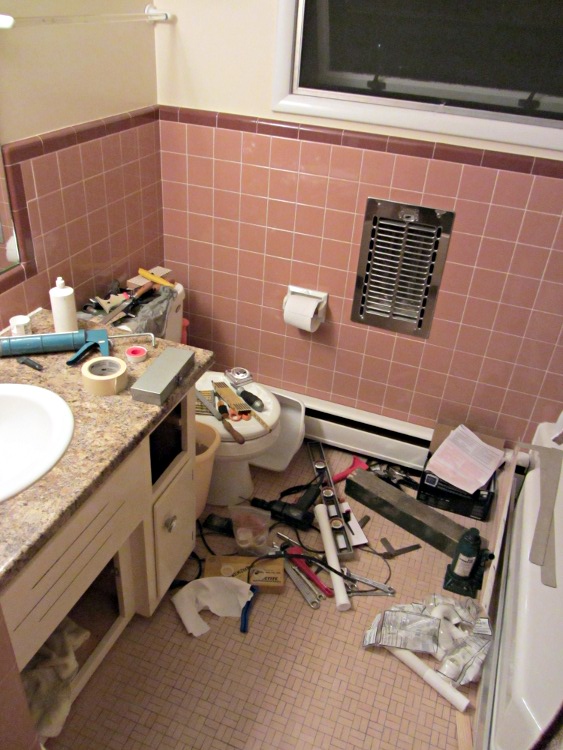
I finally got around to replacing the sink in the front bathroom, which required a surprising number of tools:
Bathroom tool midden heap
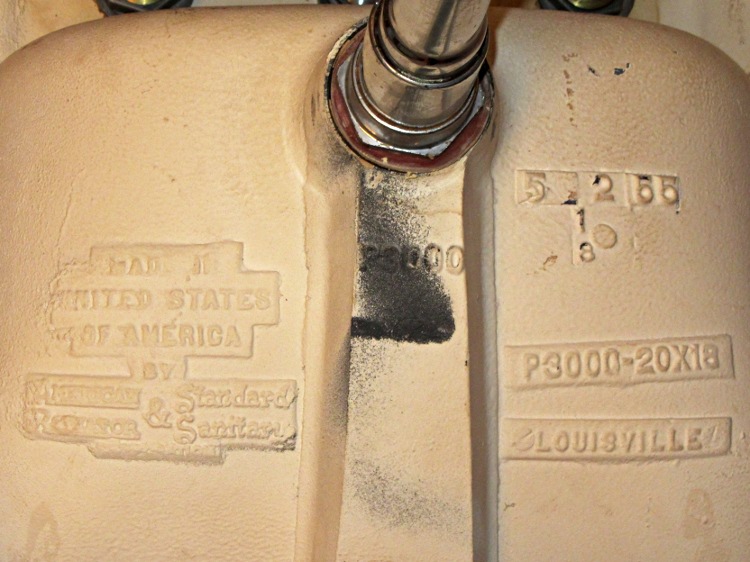
As with the three other sinks I’ve replaced over the years, this one was a beautiful cast-iron monster made by the American Regulator & Standard Sanitary company, back before the name mushed into American Standard. This casting shows the original typography:
Bathroom sink by American Regulator and Standard Sanitary
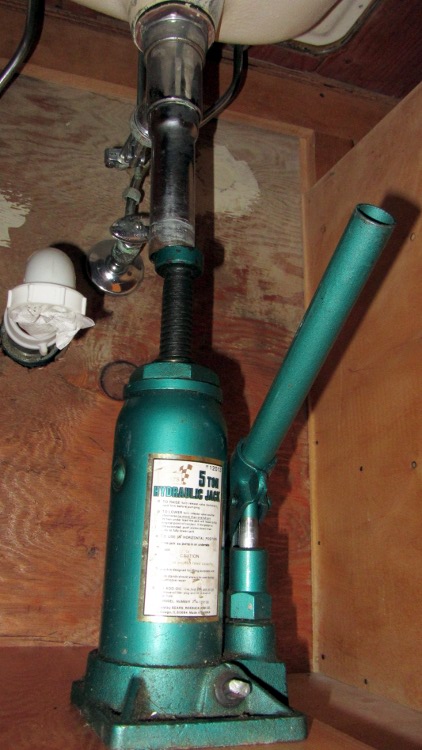
A thin stainless steel trim ring and 16 (!) clamps held the sink in place on the countertop. Harsh experience taught me to support the sink while removing the clamps, because without the clamps there is nothing holding the sink up and I no longer enjoy stopping the tailpiece of a cast-iron sink with my chest…
Supporting the old sink
As it turned out, the sink required two pumps on the jack to break it free from the gunk gluing it in place; I was pleased to be wrong. I toted it to the end of the driveway, put a FREE sign on it, wherefrom it vanished within two hours. We’ll never know if it became someone’s precious antique or just a source of heavy brass fittings at the scrap metal recycler.
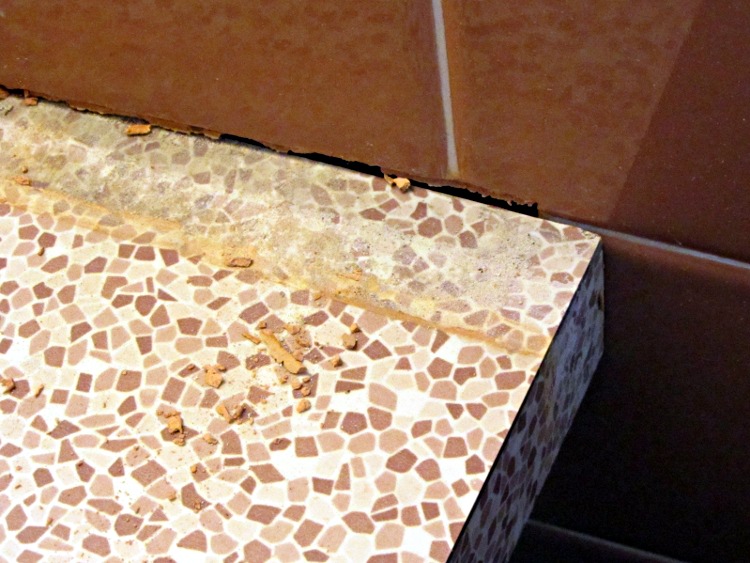
The original vanitory countertop had been recessed into the corner walls before the tiles went up, so I sawed out a chunk of the front edge and bent the plywood enough to tap it out without destroying anything. The countertop rotated around the left-front corner and the right-rear corner looked like this when the dust settled:
Extracted vanitory countertop
Half a century ago, the tile installers did a lovely mud job; the tiles adjoin and the grout is barely 1/16 inch wide. The vanitory case top was dead level, but the tiles weren’t quite aligned and my carefully applied and very neat 5 mm stripe of new caulk looks downright amateurish.
For what it’s worth, the new countertop started life as a stock kitchen countertop. I sawed off the backsplash, trimmed the length, cut a pair of notches to match the recesses, sawed a hole for the sink, rotated it into place, and screwed it down. You can go the custom-top route, but given that you only see about two square feet when you’re done, dropping $400 for 6 ft2 of fancy material with a gaping sink hole or over a kilobuck for a countertop with built-in recessed sink didn’t make enough sense to us.
And, no, vanitory is not a misspelling; I learned a new word during this project:
Vanitory job label
After we sell the house, the new owners will rip all this out without a second thought. After all, Dusky Rose went out of style a long time ago, a perfect hand-set array of 3/4 x 1-5/8 inch floor tiles isn’t attractive, and nobody cares about mud jobs. We’d rather keep that nice work around (even if we’re willing to put up with a simple countertop), but that’s just us; we’re the type of people who think keeping the original spring-loaded turned-wood dowel in the toilet paper holder is charming.
They’ll junk that space heater recessed into the wall, too: it has a long coily 120 V heating element strung inside, easily within the reach of questing little fingers. I added a GFI to that circuit, but I can’t imagine anybody else tolerating it. Times change.








 The Smell of Molten Projects in the Morning