The Smell of Molten Projects in the Morning

Ed Nisley's Blog: Shop notes, electronics, firmware, machinery, 3D printing, laser cuttery, and curiosities. Contents: 100% human thinking, 0% AI slop.

Tag: Improvements

Making the world a better place, one piece at a time

  • Always Sign Your Work

    Quite some years ago, I added a wire shelf to the bottom of the “pantry” closet to hold odds-and-ends. The most recent deep-cleaning cycle required removing the shelf, which required removing the mounting brackets to get the fool thing out of the closet.

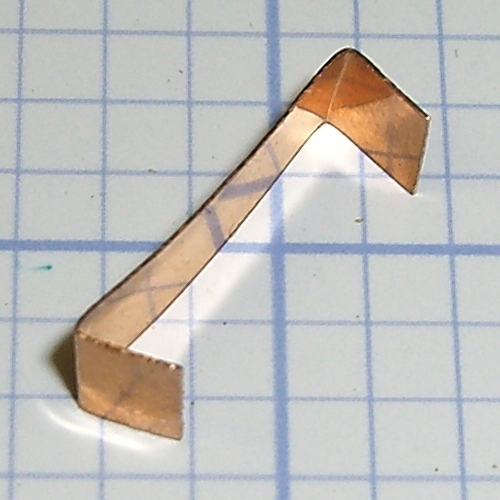
    The backside of one bracket shows I had a bit of trouble matching the mounting holes to the wall anchors:

    Pantry wire shelf brackets - overview
    Pantry wire shelf brackets – overview

    The lower bracket bears some advice from my Shop Assistant:

    Pantry wire shelf brackets - detail
    Pantry wire shelf brackets – detail

    Check thrice
    Measure twice
    Cut once

    From what little we hear these days, she’s learned the value of always checking her work…

    And she signs it, too.

  • HP 7475A Plotter: Hacking Chiplotle For Hardware Handshaking

    Chiplotle seems like a good way to drive the HP 7475A plotter, but some preliminary tinkering showed that the plotter pen paused quite regularly while drawing. The plotter wakes up with hardware handshaking enabled, Chiplotle has a config file that lets you specify hardware handshaking, the cable has all the right connections for hardware handshaking, but peering at Der Blinkenlights showed hardware handshaking never happened: the data didn’t overrun, the buffer never filled up, and DTR remained solidly on.

    Come to find out that Chiplotle sends data in half-buffer-size chunks (all code from baseplotter.py):

    class _BasePlotter(object):
       def __init__(self, serial_port):
          self.type = '_BasePlotter'
          self._logger = get_logger(self.__class__.__name__)
          self._serial_port = serial_port
          self._hpgl = commands
          self._margins = MarginsInterface(self)
          self.maximum_response_wait_time = get_config_value('maximum_response_wait_time')
    
          #this is so that we don't pause while preparing and sending
          #full buffers to the plotter. By sending 1/2 buffers we assure
          #that the plotter will still have some data to plot while
          #receiving the new data
          self.buffer_size = int(self._buffer_space / 2)
          self.initialize_plotter( )
    

    Every time something goes out to the plotter, this happens:

       def _write_string_to_port(self, data):
          ''' Write data to serial port. data is expected to be a string.'''
          #assert type(data) is str
          if not isinstance(data, basestring):
             raise TypeError('string expected.')
          data = self._filter_unrecognized_commands(data)
          data = self._slice_string_to_buffer_size(data)
          for chunk in data:
             self._sleep_while_buffer_full( )
             self._serial_port.write(chunk)
    

    In order to figure out whether the plotter has enough room, Chiplotle must ask it:

       def _sleep_while_buffer_full(self):
          '''
             sleeps until the buffer has some room in it.
          '''
          if self._buffer_space < self.buffer_size:
             while self._buffer_space < self.buffer_size:
                time.sleep(0.01)
    

    The self._buffer_space method contains the complete handshake:

       def _buffer_space(self):
          self._serial_port.flushInput()
          self._serial_port.write(self._hpgl.B().format)
          bs = self._read_port()
          return int(bs)
    

    Assuming that Python can actually meter out a 0.01 second sleep, that’s a mere 10 ms; call it 10 character times at 9600 b/s. By and large, Chiplotle hammers away at the poor plotter while the buffer drains.

    Now, that would be just ducky, except that the HP 7475A plotter dates back to slightly after microcontrollers were invented. The MC6802 trundles along at 1 MHz from a 4 MHz crystal, because it needed a quadrature clock, and takes a while to get things done. Responding to the buffer space request (a three-character sequence: ␛.B) requires the plotter to:

    • Stop plotting 
    • Answer the phone
    • Figure out what to do
    • Compose a reply
    • Drop it in the serial buffer
    • Resume plotting

    Which take enough time to produce a distinct hitch in the gitalong. Some crude print debugging showed most of the delay happens between the write() and the read() tucked inside _buffer_space.

    Linux handles serial port hardware handshaking far below the Python level, so the simplest fix was to rip out the line that checks for enough buffer space:

       def _write_string_to_port(self, data):
          ''' Write data to serial port. data is expected to be a string.'''
          #assert type(data) is str
          if not isinstance(data, basestring):
             raise TypeError('string expected.')
          data = self._filter_unrecognized_commands(data)
          data = self._slice_string_to_buffer_size(data)
          for chunk in data:
    #         self._sleep_while_buffer_full( )
             self._serial_port.write(chunk)
    

    And then the plotter races along without pauses, drawing as fast as it possibly can, with the DTR output blinking like crazy as Chiplotle dumps the character stream into the output buffer and the serial port hardware (*) managing the data flow. Apparently, detecting a buffer-full situation and dropping the DTR output requires only a few 6802 CPU cycles, which is what makes hardware handshaking such a good idea.

    There’s a movie about that…

    Hooray for Der Blinkenlights!

    HP 7475A - serial port adapters - hardcore
    HP 7475A – serial port adapters – hardcore

    (*) Which is, of course, a USB-to-RS232 converter. I paid extra to get one that reports an FTDI chipset, which may mean the counterfeiters have upped their game since the Windows driver disaster. I actually tried it on the Token Windows box and it still works, so maybe it’s Genuine FTDI.

  • HP 7475A Plotter: Serial Cable for Hardware Handshaking

    The HP 7475A wakes up with hardware handshaking enabled: DTR starts high and goes low when the internal 1 KB buffer has less than 80 bytes remaining. The plotter also supports XON/XOFF handshaking, a sad software thing you’d use only if you had no other choice.

    The Chiplotle doc provides a wiring diagram for a suitable 9-to-25 pin cable, so I printed one and doodled on it while pondering the Great Cable Stash:

    HP7475A Plotter - Serial Cable
    HP7475A Plotter – Serial Cable

    The color codes over on the left of the top diagram match a prebuilt cable I hoped to repurpose, but it had only five conductors, none of which were DSR or CTS. Pfui!

    So I used a hank of gorgeous flexy 9-conductor cable (which came with premolded DE-9 ends of the wrong gender, now amputated into pigtails and back in the GCS), which supported the connections redrawn on the bottom in proper numeric order, used the obvious color sequence (Bn R O Y G Bl V W K), then soldered suitable connectors on each end:

    HP 7475A Plotter - serial cable
    HP 7475A Plotter – serial cable

    And it worked the first time…

  • Bird Box Cleanout

    The effort those little birds put into their nests never ceases to amaze me:

    Bird box cleanout - old nests
    Bird box cleanout – old nests

    Last year it was the same story. Of course, if we didn’t clean out the boxes, the birds would do it on their own, so perhaps we help them get started earlier.

  • HP 7475A Plotter: Roland Knife Stabilizer, Improved

    The objective being to wrap a nose around the cutter blade to allow some control over the cut depth, I lengthened the cylinder around the cutter body and modeled a discrete glue-on cap:

    Roland knife stabilizer and nose - show
    Roland knife stabilizer and nose – show

    Which, with an additional 80 g of ballast, worked fine in the double-thick vinyl:

    Roland knife stabilizer - nut weight
    Roland knife stabilizer – nut weight

    The pen-lift spring can just barely manage to heave that load off the vinyl, but it’s obviously running at the limit of its ability and this can’t possibly be a Good Thing for the mechanism in the long run.

    After a bit more fiddling around, I noticed that the stabilizer wasn’t sitting flat on the pen holder and that there really wasn’t any good reason to have a separate cap, so I did one more revision:

    Roland knife stabilizer with nose - side view
    Roland knife stabilizer with nose – side view

    The cutaway view shows the knife model now has tapered transition from the body to the grossly enlarged blade, so the model will build without supports inside the cylinder.

    A little cutout on one wall lets the plate sit flat on the pen holder and a barely visible recess in the cylinder gives the carousel pen-capping actuator a bit more clearance:

    Roland knife stabilizer with nose - Slic3r preview
    Roland knife stabilizer with nose – Slic3r preview

    It works about as well as the version shown above, minus the tedious gluing, so I’ll call it a success… even though it’s obviously not going to get much use. I don’t see any way to apply enough downforce to make the cutter work; the mechanical changes just aren’t worthwhile.

    The OpenSCAD source code, which includes some tweaks and outright kludges since the first version, builds adapters for Sakura pens (which work just fine) as well as this knife stabilizer:

    // HP 7475A plotter pen adapters
    // Ed Nisley KE4ZNU April 2015
    
    Layout = "BuildStabilizer";
    							// ShowBody BuildBody BodyPoly
    							// ShowPen ShowPenAdapter BuildPenAdapter Plug Pen PenPoly
    							// ShowKnife BuildKnife KnifeAdapter Knife
    							// ShowStabilizer Stabilizer BuildStabilizer
    
    //- Extrusion parameters must match reality!
    
    ThreadThick = 0.25;
    ThreadWidth = 0.40;
    
    HoleWindage = 0.2;
    
    Protrusion = 0.1;			// make holes end cleanly
    
    inch = 25.4;
    
    function IntegerMultiple(Size,Unit) = Unit * ceil(Size / Unit);
    
    //----------------------
    // Dimensions
    // Z=0 at pen tip!
    
    NumSides = 8*4;						// number of sides on each "cylinder"
    
    RADIUS = 0;							// subscript for radius values
    HEIGHT = 1;							//   ... height above Z=0
    
    //-- Original HP plotter pen, which now serves as a body for the actual pen
    
    BodyOutline = [						// X values = (measured diameter)/2, Y as distance from tip
    	[0.0,0.0],						//  0 fiber pen tip
    //	[2.0/2,1.4],					//  1 ... taper (not buildable)
    	[1.0/2,0.005],					//  1 ... faked point to remove taper
    	[2.0/2,0.0],[2.0/2,2.7],		//  2 ... cylinder
    	[3.7/2,2.7],[3.7/2,4.45],		//  4 tip surround
    	[4.8/2,5.2],					//  6 chamfer
    	[6.5/2,11.4],					//  7 rubber seal face
    	[8.9/2,11.4],					//  8 cap seat
    	[11.2/2,15.9],					//  9 taper to body
    	[11.5/2,28.0],					// 10 lower body
    	[13.2/2,28.0],[16.6/2,28.5],	// 11 lower flange = 0.5
    	[16.6/2,29.5],[13.2/2,30.0],	// 13 flange rim = 1.0
    	[11.5/2,30.0],					// 15 upper flange = 0.5
    	[11.5/2,43.25],					// 16 upper body
    	[0.0,43.25]						// 17 lid over reservoir
    	];
    
    TrimHeight = BodyOutline[9][HEIGHT];		// cut off at top of lower taper
    SplitHeight = (BodyOutline[11][HEIGHT] + BodyOutline[14][HEIGHT])/2;	// middle of flange
    
    FlangeOD = 2*BodyOutline[13][RADIUS];
    FlangeTop = BodyOutline[15][HEIGHT];
    
    BodyOD = 2*BodyOutline[16][RADIUS];
    BodyOAL = BodyOutline[17][HEIGHT];
    
    echo(str("Trim: ",TrimHeight));
    echo(str("Split: ",SplitHeight));
    
    BuildSpace = FlangeOD;
    
    //-- Sakura Micron fiber-point pen
    
    ExpRP = 0.15;						// expand critical sections (by radius)
    
    //-- pen locates in holder against end of outer body
    
    PenOutline = [
    	[0,0],							//  0 fiber pen tip
    	[0.6/2,0.0],[0.6/2,0.9],		//  1  ... cylinder
    	[1.5/2,0.9],[1.5/2,5.3],		//  3 tip surround
    	[4.7/2,5.8],					//  5 chamfer
    	[4.9/2,12.3],					//  6 nose
    //	[8.0/2,12.3],[8.0/2,13.1],		//  7 latch ring
    //	[8.05/2,13.1],[8.25/2,30.5],	//  9 actual inner body
    	[8.4/2 + ExpRP,12.3],[8.4/2 + ExpRP,30.5],	//  7 inner body - clear latch ring
    	[9.5/2 + ExpRP,30.5],			//  9 outer body - location surface!
    	[9.8/2 + ExpRP,50.0],			// 10 outer body - length > Body
    	[7.5/2,50.0],					// 11 arbitrary length
    	[7.5/2,49.0],					// 12 end of reservoir
    	[0,49.0]						// 13 fake reservoir
    	];
    
    PenNose = PenOutline[6];
    PenLatch = PenOutline[7];
    
    PenOAL = PenOutline[11][HEIGHT];
    
    //-- Plug for end of cut-off pen body
    //   you need two plugs...
    
    PlugOutline = [
    	[0,0],							// 0 center of lid
    	[9.5/2,0.0],[9.5/2,1.0],		// 1 lid rim <= body OD
    	[7.9/2,1.0],					// 3 against end of pen
    	[7.6/2,6.0],					// 4 taper inside pen body
    	[5.3/2,6.0],					// 5 against ink reservoir
    	[4.0/2,1.0],					// 6 taper to lid
    	[0.0,1.0]						// 7 flat end of taper
    	];
    
    PlugOAL = PlugOutline[5][HEIGHT];
    
    //   cap locates against end of inner body at latch ring
    //-- cap origin is below surface to let pen tip be at Z=0
    
    CapGap = 1.0;						// gap to adapter body when attached
    CapGripHeight = 2.0;				// thickness of cap grip flange
    CapTipClearance = 1.0;				// clearance under fiber tip
    
    CapOffset = -(CapGripHeight + CapTipClearance);	// align inside at pen tip Z=0
    
    CapOutline = [
    	[0,CapOffset],									// 0 base
    	[FlangeOD/2,CapOffset],							// 1 finger grip flange
    	[FlangeOD/2,CapOffset + CapGripHeight],			// 2  ... top
    	[BodyOD/2,CapOffset + CapGripHeight],			// 3 shaft
    	[BodyOD/2,TrimHeight - CapGap],					// 4  ... top with clearance
    	[PenLatch[RADIUS],TrimHeight - CapGap],			// 5 around pen latch ring
    	[PenLatch[RADIUS],PenNose[HEIGHT]],				// 6  ... location surface!
    	[PenNose[RADIUS] + ExpRP,PenNose[HEIGHT]],		// 7 snug around  nose
    	[PenNose[RADIUS] + ExpRP,-CapTipClearance],		// 8 clearance around tip
    	[0,-CapTipClearance],							// 9  ... bottom
    	];
    
    //-- Roland drag knife bearing assembly
    
    ExpRK = 0.30;						// expand critical sections (by radius)
    AdjLen = 2.0;						// allowance for adjustment travel
    
    //- Knife tweaked for pen adapter
    /*
    KnifeOutline = [
    	[0,0],							//  0 blade point (actually 0.25 mm offset)
    	[1.0/2,0.0],					//  1  ... blunt end
    	[1.0/2,4.0],					//  2  ... cylinder
    	[2.0/2,4.0],					//  3 blade shank
    	[2.0/2,5.9],					//  4  .. at bearing
    	[6.0/2,5.9],					//  5 holder - shell
    
    	[7.3/2 + ExpRK,8.3],			//  6 holder - taper to body
    	[7.3/2 + ExpRK,21.0 - AdjLen],	//  7 holder body
    
    	[8.8/2 + ExpRK,22.0 - AdjLen],	//  8 holder - threads bottom
    	[8.8/2 + ExpRK,25.0],[9.0/2 + ExpRK,26.0],		//  9 clear threads to reduce friction
    	[9.0/2 + ExpRK,32.0],[8.8/2 + ExpRK,33.0],		// 11  ... end clearance
    	[8.8/2 + ExpRK,42.5 - AdjLen],	// 13 holder - threads top = locknut bottom
    	[12.5/2,42.5 - AdjLen],			// 14 knurled locknut - adjustment travel
    	[12.5/2,45.8],					// 15 knurled locknut - top
    	[11.0/2,45.8],					// 16 holder - adjusting knurl
    	[11.0/2,52.0],					// 17 holder - top surface
    	[3.0/2,52.0],[3.0/2,57.2],		// 18 spring post
    	[0.0,57.2]						// 19 end of post
    	];
    */
    
    //- Knife tweaked for stabilizer
    
    KnifeOutline = [
    	[0,0],							//  0 blade point (actually 0.25 mm offset)
    	[3.0/2,0.0],					//  1  ... blunt end
    	[3.0/2,4.0],					//  2  ... cylinder
    	[3.0/2,4.0],					//  3 blade shank
    	[6.0/2,5.9],					//  4  .. at bearing (taper to support nose)
    	[6.0/2,5.9],					//  5 holder - shell
    
    	[7.3/2 + ExpRK,8.3],			//  6 holder - taper to clear threads
    	[7.3/2 + ExpRK,21.0 - AdjLen],	//  7  ..
    
    	[8.8/2 + ExpRK,22.0 - AdjLen],	//  8 holder - threads bottom
    	[8.8/2 + ExpRK,25.0],[9.0/2 + ExpRK,26.0],		//  9 clear threads to reduce friction
    	[9.0/2 + ExpRK,32.0],[8.8/2 + ExpRK,33.0],		// 11  ... end clearance
    
    	[8.8/2 + ExpRK,42.5 - AdjLen],	// 13 holder - threads top = locknut bottom
    	[12.5/2,42.5 - AdjLen],			// 14 knurled locknut - adjustment travel
    	[12.5/2,45.8],					// 15 knurled locknut - top
    	[11.0/2,45.8],					// 16 holder - adjusting knurl
    	[11.0/2,52.0],					// 17 holder - top surface
    	[3.0/2,52.0],[3.0/2,57.2],		// 18 spring post
    	[0.0,57.2]						// 19 end of post
    	];
    
    ThreadStart = KnifeOutline[8][HEIGHT];
    ThreadOD = 2*KnifeOutline[11][RADIUS];
    
    //-- Plotter pen holder stabilizer
    
    HolderPlateThick = 3.0;				// thickness of plate atop holder
    RimHeight = 5.0;					// rim around sides of holder
    RimThick = 2.0;						// wall thickness
    
    HolderOrigin = [17.0,12.2,0.0];		// center of pen tip relative to polygon coordinates
    
    HolderHeight = 30.0;				// top of holder to platen in pen-down position
    HolderTopThick = 1.7;				// top of holder to top of pen flange
    
    HolderNoseLength = 4.0;				// length of nose taper
    HolderKnifeOffset = -3.0;			// additional downward adjustment range
    
    LockScrewInset = 3.0;				// from right edge of holder plate
    LockScrewOD = 2.0;					// tap for 2.5 mm screw
    
    UncapperHeight = -17.0;				// uncapping actuator arm from top of pen holder
    UncapperOD = 11.0;					//  ... max OD that clears uncapper
    
    // Beware: update hardcoded subscripts in Stabilizer() when adding / deleting point entries 
    
    HolderPlate = [
    	[8.6,18.2],[8.6,23.9],			// 0 lower left corner of pen recess
    	[13.9,23.9],[13.9,30.0],		// 2
    //	[15.5,30.0],[15.5,25.0],		// 4 omit middle of support beam
    //	[20.4,25.0],[20.4,30.0],		// 6
    	[22.7,30.0],[22.7,27.5],		// 4
    	[35.8,27.5],[35.8,20.7],		// 6 spring box corner
    	[43.0,20.7],					// 8
    	[31.5,0.0],						// 9
    //	[24.5,0.0],[24.5,8.0],			// 10 omit pocket above pen clamp
    //	[22.5,10.0],[22.5,16.5],		// 12
    //	[20.5,18.2]						// 14
    	[13.6,0.0],						// 10
    	[8.6,5.0]						// 11
    	];
    
    BeamWidth = HolderPlate[4][0] - HolderPlate[2][0];		// rear support beam
    
    TabWidth = HolderPlate[1][1] - HolderPlate[0][1];		// tab extending left beyond pen recess
    TabClear = 3.0;											// maximum rim height over tab
    
    HolderCylinderOutline = [
    	[0,0],											//  0 center of nose
    	[6.0/2,0.0],									//  1 flat nose surface OD
    	[BodyOD/2,HolderNoseLength],			//  2 taper to cylinder OD
    	[BodyOD/2,HolderHeight],				//  3 cylinder to top of holder plate
    	[0,HolderHeight]								//  4 flat top
    	];
    
    //----------------------
    // Useful routines
    
    module PolyCyl(Dia,Height,ForceSides=0) {			// based on nophead's polyholes
    
      Sides = (ForceSides != 0) ? ForceSides : (ceil(Dia) + 2);
    
      FixDia = Dia / cos(180/Sides);
    
      cylinder(r=(FixDia + HoleWindage)/2,
               h=Height,
    	   $fn=Sides);
    }
    
    //- Locating pin hole with glue recess
    //  Default length is two pin diameters on each side of the split
    
    PinOD = 1.75;
    PinOC = BodyOD / 2;
    
    module LocatingPin(Dia=PinOD,Len=0.0) {
    
    	PinLen = (Len != 0.0) ? Len : (4*Dia);
    
    	translate([0,0,-ThreadThick])
    		PolyCyl((Dia + 2*ThreadWidth),2*ThreadThick,4);
    
    	translate([0,0,-2*ThreadThick])
    		PolyCyl((Dia + 1*ThreadWidth),4*ThreadThick,4);
    
    	translate([0,0,-(Len/2 + ThreadThick)])
    		PolyCyl(Dia,(Len + 2*ThreadThick),4);
    
    }
    
    module LocatingPins(Length) {
    	for (i=[-1,1])
    	translate([0,i*PinOC/2,0])
    		rotate(180/4)
    		LocatingPin(Len=Length);
    }
    
    //----------------------
    // Basic shapes
    
    //-- HP plotter pen body
    
    module ShowPolygon(pts) {
    	polygon(pts);
    }
    
    module Body() {
    	render(convexity=3)
    		rotate_extrude($fn=NumSides)
    			polygon(points=BodyOutline);
    }
    
    //-- Sakura drawing pen body
    
    module Pen() {
    	rotate_extrude($fn=NumSides)
    		polygon(points=PenOutline);
    }
    
    //-- Plug for top of Sakura pen
    
    module Plug() {
    	render(convexity = 2)
    		rotate_extrude($fn=NumSides)
    			polygon(points=PlugOutline);
    }
    
    //-- Cap for tip of Sakura pen
    
    module Cap() {
    	render(convexity = 2)
    		rotate_extrude($fn=NumSides)
    			polygon(points=CapOutline);
    }
    
    //-- Sakura pen adapter
    
    module PenAdapter() {
    
    	render(convexity=3)
    		difference() {
    			Body();
    			Pen();
    			translate([0,0,TrimHeight/2])
    				cube([2*FlangeOD,2*FlangeOD,TrimHeight],center=true);
    		}
    }
    
    //-- Roland knife body
    
    module Knife() {
    	render(convexity=3)
    		rotate_extrude($fn=NumSides)
    			polygon(points=KnifeOutline);
    }
    
    //-- Roland knife adapter
    
    module KnifeAdapter(TrimZ = false) {
    
    Trans = TrimZ ? - TrimHeight : 0;
    
    	render(convexity=5)
    		translate([0,0,Trans])
    			difference() {
    				Body();
    				Knife();
    				translate([0,0,TrimHeight/2])
    					cube([2*FlangeOD,2*FlangeOD,TrimHeight],center=true);
    			}
    }
    
    //-- nose cap for stabilizer cylinder
    
    module StabilizerNose() {
    	render(convexity = 2)
    		rotate_extrude($fn=NumSides)
    			polygon(points=StabilizerNoseOutline);
    }
    
    //-- Roland knife stabilizer atop pen holder
    //   the trim blocks have offsets with magic numbers from the HolderPlate outline &c
    
    module Stabilizer(SeeKnife = false) {
    
    Cutout = (Layout == "ShowStabilizer") ? 0 : 1;
    
    	difference() {
    		union() {
    			translate(-HolderOrigin)													// put center of pen at origin
    			translate([0,0,-RimHeight])													// put top of holder at Z=0
    				difference() {
    						render(convexity=4)
    						linear_extrude(height=(HolderPlateThick + RimHeight))			// overall flange around edges
    							offset(r=RimThick)
    									polygon(points=HolderPlate);
    
    						render(convexity=4)
    						translate([0,0,-Protrusion])									// recess for pen holder plate
    							linear_extrude(height=(RimHeight + Protrusion))
    								polygon(points=HolderPlate);
    
    						translate([HolderPlate[7][0] - Protrusion,HolderPlate[7][1] - Protrusion,-Protrusion])	// trim spring box from top plate
    							cube([30,20,(RimHeight + HolderPlateThick + 2*Protrusion)]);
    
    						translate([27.0,HolderPlate[6][1] - Protrusion,-Protrusion])	// trim pivot plate clearance
    							cube([30,20,(RimHeight + HolderPlateThick + 2*Protrusion)]);
    
    						translate([HolderPlate[2][0],20,-Protrusion])					// trim left support beam
    							cube([BeamWidth,20,(RimHeight + Protrusion)]);
    
    						translate([0,HolderPlate[0][1],-(TabClear + Protrusion)])		// trim tab behind pen recess
    							cube([(HolderPlate[0][0] + Protrusion),TabWidth,RimHeight + Protrusion]);
    
    						translate([HolderPlate[9][0] - LockScrewInset,RimThick,RimHeight - HolderTopThick - LockScrewOD/2])												// lock screw on front edge
    							rotate([90,0,0])
    								rotate(180/4)
    									PolyCyl(LockScrewOD,3*RimThick);					// punch out hold-down screw hole
    				}
    
    			difference() {
    				translate([0,0,-HolderHeight])											// cylinder and nose
    					rotate_extrude($fn=NumSides)
    						polygon(points=HolderCylinderOutline);
    				translate([-HolderOrigin[0],-(BodyOD + Cutout*UncapperOD/2),(UncapperHeight - HolderHeight)])	// uncapper clearance
    					cube([2*HolderOrigin[0],BodyOD,HolderHeight]);
    			}
    		}
    
    		translate([0,0,-HolderHeight + HolderKnifeOffset])
    			if (SeeKnife)
    #				Knife();
    			else
    				Knife();
    
    	}
    }
    
    //----------------------
    // Build it
    
    if (Layout == "Pen")
    	Pen();
    
    if (Layout == "Knife")
    	Knife();
    
    if (Layout == "Stabilizer")
    	Stabilizer();
    
    if (Layout == "ShowBody")
    	Body();
    
    if (Layout == "BodyPoly") {
    	ShowPolygon(BodyOutline);
    	Body();
    }
    
    if (Layout == "PenPoly") {
    	ShowPolygon(PenOutline);
    	Pen();
    }
    
    if (Layout == "BuildBody") {
    	Spacing = 0.75*BuildSpace;
    	difference() {
    		union() {
    			translate([Spacing,0,-SplitHeight])
    				Body();
    			rotate([180,0,0])
    				translate([-Spacing,0,-SplitHeight])
    					Body();
    		}
    		translate([0,0,-BodyOAL])
    			cube(2*BodyOAL,center=true);
    		for (i = [-1,1])
    			translate([i*Spacing,0,0])
    				LocatingPins(5.0);
    	}
    }
    
    if (Layout == "Plug")
    	Plug();
    
    if (Layout == "KnifeAdapter")
    	KnifeAdapter();
    
    if (Layout == "ShowPen") {
    	color("AntiqueWhite") {
    		Pen();
    		translate([-1.5*BodyOD,0,0])
    			Pen();
    	}
    	color("Magenta",0.35) {
    		translate([0,0,PlugOAL + PenOAL + 3.0])
    			rotate([180,0,0])
    				Plug();
    		PenAdapter();
    		Cap();
    	}
    	color("Magenta") {
    		translate([1.5*BodyOD,0,PlugOAL + PenOAL + 3.0])
    			rotate([180,0,0])
    				Plug();
    		translate([1.5*BodyOD,0,0]) {
    			PenAdapter();
    			Cap();
    		}
    	}
    }
    
    if (Layout == "ShowPenAdapter") {
    	color("AntiqueWhite") {
    		translate([0.00*BodyOD,0,0])
    			Pen();
    		translate([-2.75*BodyOD,0,0])
    			Pen();
    	}
    
    	translate([-1.50*BodyOD,0,0])
    		color("SandyBrown")
    			Body();
    
    	translate([0.00*BodyOD,0,0])
    		color("SandyBrown",0.35)
    			PenAdapter();
    
    	translate([3.00*BodyOD,0,0])
    		color("SandyBrown")
    			PenAdapter();
    
    	translate([1.50*BodyOD,0,0])
    		difference() {
    			color("SandyBrown")
    				PenAdapter();
    			translate([-BodyOD,-2*BodyOD,0])
    				cube([2*BodyOD,2*BodyOD,PenOAL]);
    		}
    
    }
    
    if (Layout == "ShowKnife") {
    
    	color("Goldenrod") {
    		Knife();
    		translate([-1.5*BodyOD,0,0])
    			Knife();
    	}
    	color("Magenta",0.35)
    		KnifeAdapter();
    	color("Magenta") {
    		translate([1.5*BodyOD,0,0])
    			KnifeAdapter();
    	}
    
    }
    
    if (Layout == "BuildPenAdapter") {
    
    	if (false) {
    		for (j = [-1,1])
    			translate([j*BuildSpace/2,-0.7*BuildSpace,0])
    			Plug();
    
    		translate([0,0,-CapOffset])
    			Cap();
    	}
    	else {
    		Plug();
    	}
    
    	difference() {
    		union() {
    			translate([1.20*BuildSpace,0,-SplitHeight])
    				PenAdapter();
    			rotate([180,0,0])
    				translate([-1.20*BuildSpace,0,-SplitHeight])
    					PenAdapter();
    		}
    		translate([0,0,-BodyOAL])
    			cube(2*BodyOAL,center=true);
    	}
    
    }
    
    if (Layout == "BuildKnife") {
    
    	difference() {
    		union() {
    			translate([0.7*BuildSpace,0,-SplitHeight])
    				KnifeAdapter(false);
    			rotate([180,0,0])
    				translate([-0.7*BuildSpace,0,-SplitHeight])
    					KnifeAdapter(false);
    		}
    		translate([0,0,-BodyOAL])
    			cube(2*BodyOAL,center=true);
    	}
    
    }
    
    if (Layout == "BuildStabilizer") {
    
    	translate([0,0,HolderPlateThick])
    		rotate([0,180,0])
    			Stabilizer(false);
    }
    
    if (Layout == "ShowStabilizer") {
    
    	translate([BuildSpace/2,0,HolderHeight])
    			Stabilizer(true);
    	translate([-BuildSpace/2,0,HolderKnifeOffset])
    		Knife();
    }
    
  • HP 7475A Plotter: Roland Knife Holder-Stabilizer

    Somewhat encouraged by the results of the height-map cap atop the plotter’s pen holder, I figured a unified knife adapter and stabilizer cap would work even better. That requires enough accuracy to build a real solid model, rather than just sketch a height map…

    Print out the the grid-overlaid image of the pen holder, then doodle coordinates & measurements all over the poor thing:

    HP 7475A Pen Holder - gridded doodle
    HP 7475A Pen Holder – gridded doodle

    Now I can toss that piece of paper…

    That, plus a bit of digital caliper work, produces a flurry of dimensions & an array of vertices:

    //-- Plotter pen holder stabilizer
    
    HolderPlateThick = 3.0;				// thickness of plate atop holder
    RimHeight = 5.0;					// rim around sides of holder
    RimThick = 2.0;
    
    HolderOrigin = [17.0,12.2,0.0];		// center of pen relative to polygon coordinates
    
    HolderZOffset = 30.0;				// top of holder in pen-down position
    HolderTopThick = 1.7;				// top of holder to top of pen flange
    HolderCylinderLength = 17.0;		// length of pen support structure
    
    HolderKnifeOffset = -2.0;			// additional downward adjustment range (not below top surface)
    
    LockScrewInset = 3.0;				// from right edge of holder plate
    LockScrewOD = 2.0;					// tap for 2.5 mm screw
    
    // Beware: update hardcoded subscripts in Stabilizer() when adding / deleting point entries 
    
    HolderPlate = [
    	[8.6,18.2],[8.6,23.9],			// 0 lower left corner of pen recess
    	[13.9,23.9],[13.9,30.0],		// 2
    //	[15.5,30.0],[15.5,25.0],		// 4 omit middle of support beam
    //	[20.4,25.0],[20.4,30.0],		// 6
    	[22.7,30.0],[22.7,27.5],		// 4
    	[35.8,27.5],[35.8,20.7],		// 6 spring box corner
    	[43.0,20.7],					// 8
    	[31.5,0.0],						// 9
    //	[24.5,0.0],[24.5,8.0],			// 10 omit pocket above pen clamp
    //	[22.5,10.0],[22.5,16.5],		// 12
    //	[20.5,18.2]						// 14
    	[13.6,0.0],						// 10
    	[8.6,5.0]						// 11
    	];
    
    BeamWidth = HolderPlate[4][0] - HolderPlate[2][0];
    

    The general idea is to extrude the overall shape of the stabilizer cap, carve out chunks to fit it onto the pen holder, then add a cylinder around the knife bearing:

    HP7475A - Roland knife stabilizer - bottom - thrown together view
    HP7475A – Roland knife stabilizer – bottom – thrown together view

    The OpenSCAD source code contains a bunch of magic numbers and indexes that pull values from the vertex array:

    module Stabilizer(SeeKnife = false) {
    
      difference() {
        union() {
          translate(-HolderOrigin)                                            // put center of pen at origin
            difference() {
                render(convexity=4)
                linear_extrude(height=(HolderPlateThick + RimHeight))         // overall flange around edges
                  offset(r=RimThick)
                      polygon(points=HolderPlate);
    
                render(convexity=4)
                translate([0,0,-Protrusion])                                  // recess for pen holder plate
                  linear_extrude(height=(RimHeight + Protrusion))
                    polygon(points=HolderPlate);
    
                translate([HolderPlate[7][0] - Protrusion,HolderPlate[7][1] - Protrusion,-Protrusion])  // trim spring box from top plate
                  cube([30,20,(RimHeight + HolderPlateThick + 2*Protrusion)]);
    
                translate([27.0,HolderPlate[6][1] - Protrusion,-Protrusion])  // trim pivot plate clearance
                  cube([30,20,(RimHeight + HolderPlateThick + 2*Protrusion)]);
    
                translate([HolderPlate[2][0],20,-Protrusion])                 // trim left support beam
                  cube([BeamWidth,20,(RimHeight + Protrusion)]);
    
                translate([HolderPlate[9][0] - LockScrewInset,RimThick,RimHeight - HolderTopThick - LockScrewOD/2])                        // lock screw on front edge
                  rotate([90,0,0])
                    rotate(180/4)
                      PolyCyl(LockScrewOD,3*RimThick);                        // hold-down screw hole
            }
    
          translate([0,0,(RimHeight - HolderCylinderLength + Protrusion)])
            cylinder(d=BodyOD,h=HolderCylinderLength + Protrusion,$fn=NumSides);  // surround knife threads
        }
    
        translate([0,0,-HolderZOffset + HolderKnifeOffset])
          if (SeeKnife)
    #        Knife();
          else
            Knife();
      }
    }
    

    A bottom view shows all the cutouts:

    HP7475A - Roland knife stabilizer - build layout
    HP7475A – Roland knife stabilizer – build layout

    The little hole in the front fits a screw that will pass under the top plate of the pen holder and prevent the cutting forces from pushing it off.

    As with the Sakura pen adapter, the knife point sits at (0,0,0) with the stabilizer cap positioned at the (estimated) top of the pen holder:

    Roland knife stabilizer - show layout
    Roland knife stabilizer – show layout

    After a few print-and-try iterations to align all the fiddly cutouts:

    HP 7475A - Roland knife stabilizer - installed
    HP 7475A – Roland knife stabilizer – installed

    The slope-topped block protruding toward you from the bottom right actuates the carousel’s pen capping mechanism; it doesn’t quite touch the side of an HP pen and is well clear of the knife holder.

    Because there’s still no depth control surrounding the knife blade, this won’t work well at all, but it should suffice for better measurements.

    The full source code is back at the beginning.

  • Kosher Coke Season

    Quite by accident, I spotted a considerable number of yellow-cap standard Coca-Cola bottles during a recent grocery ride:

    Yellow Cola Cola cap - Kosher for Passover
    Yellow Cola Cola cap – Kosher for Passover

    As before, the main ingredient after fizzy water is good old sucrose, which is why it merits a yellow cap:

    Yellow Coca Cola cap - Kosher ingredients
    Yellow Coca Cola cap – Kosher ingredients

    Four bottles spread out over the next few months will be about all I can stand…