The Smell of Molten Projects in the Morning

Ed Nisley's Blog: Shop notes, electronics, firmware, machinery, 3D printing, laser cuttery, and curiosities. Contents: 100% human thinking, 0% AI slop.

Tag: Improvements

Making the world a better place, one piece at a time

  • Under-cabinet Lamp Brackets: Angled Edition

    The LED strip lights have a reasonably diffuse pattern with an on-axis bright area that puts more light on the rear of the counter than seems strictly necessary. Revising the original brackets to tilt the strips moves the bright patch half a foot forward:

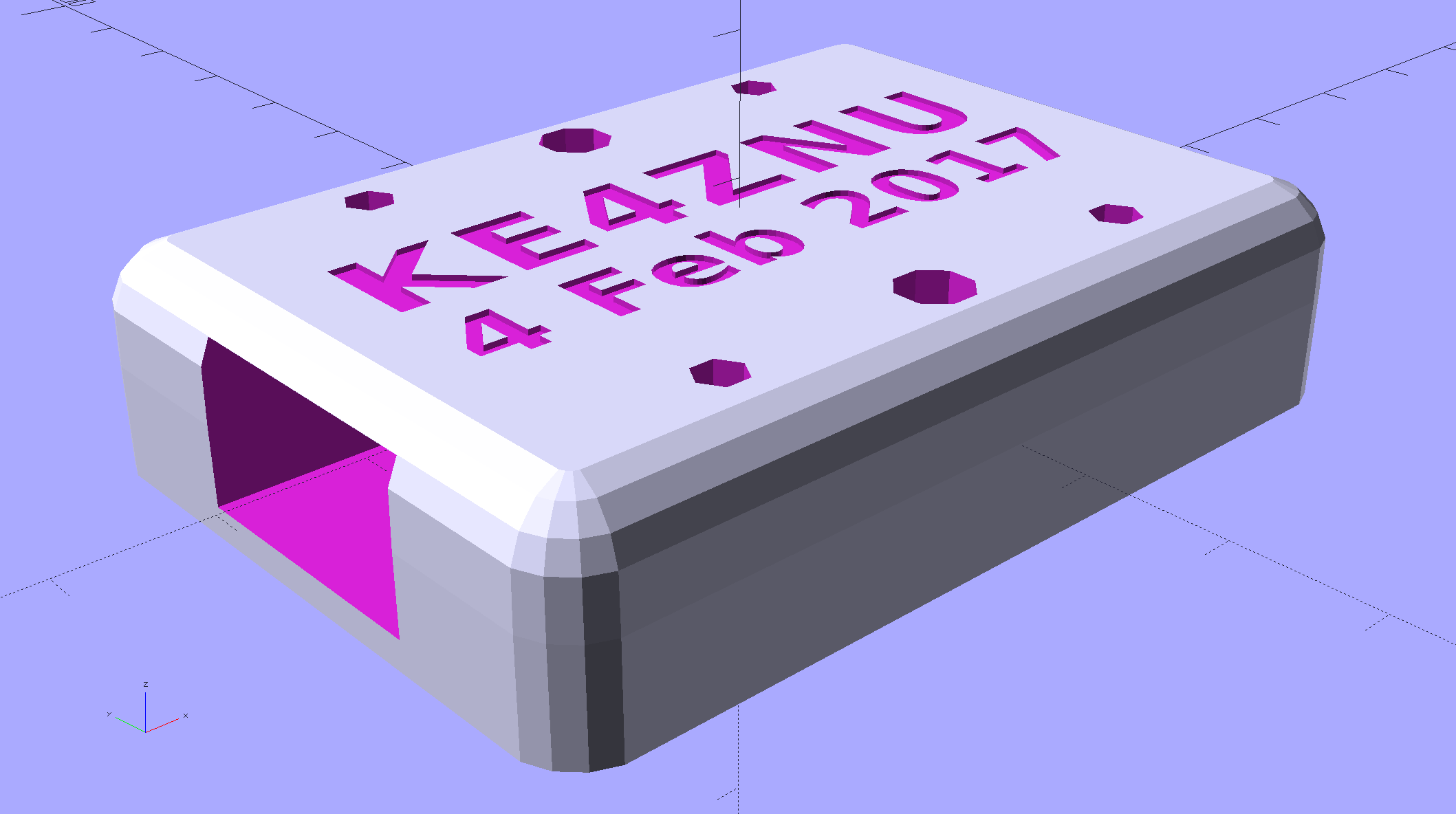
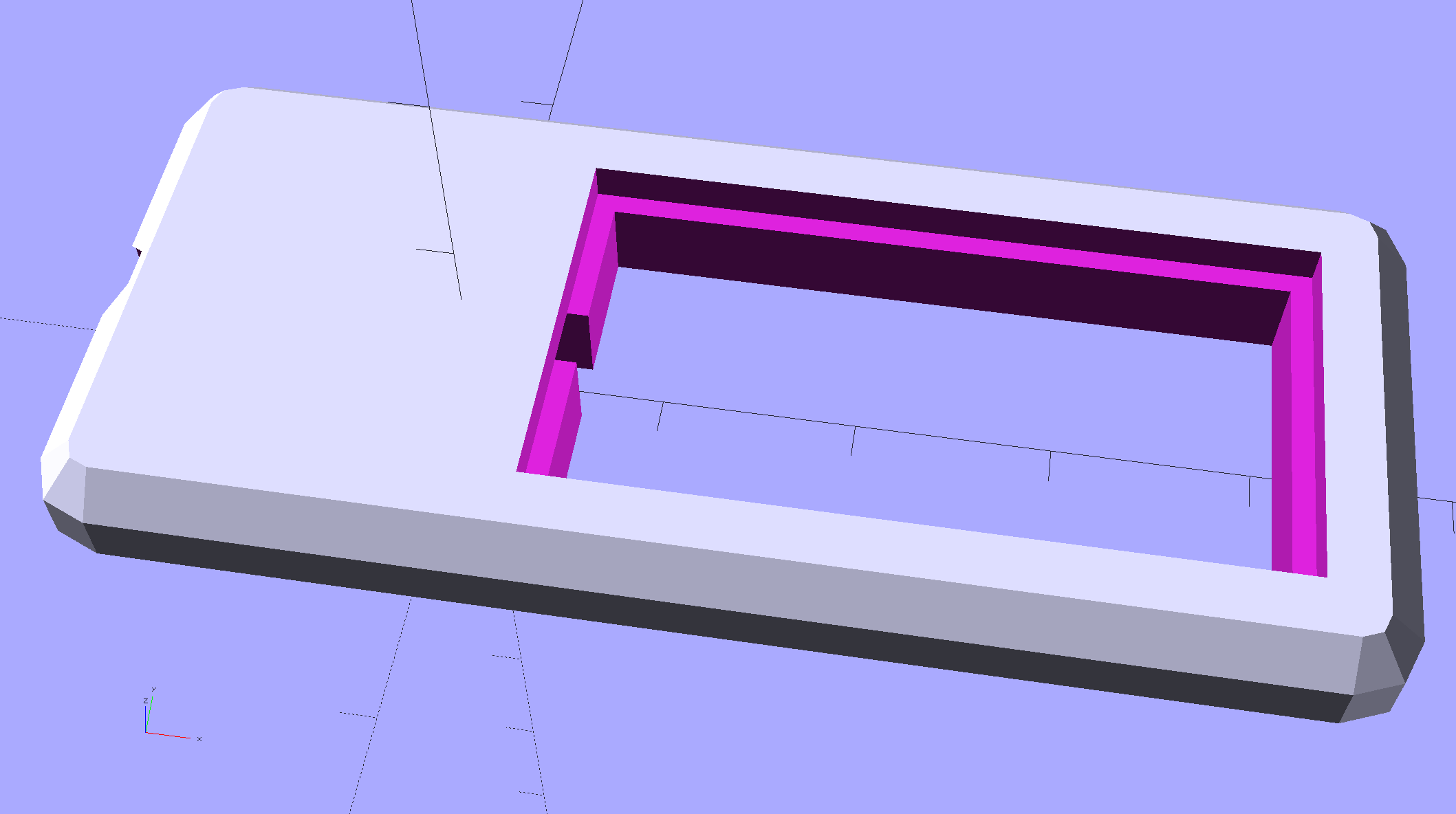
    Kitchen Light Bracket - angled - solid model
    Kitchen Light Bracket – angled – solid model

    For lack of anything smarter, the angle puts the diagonal of the LED strip on the level:

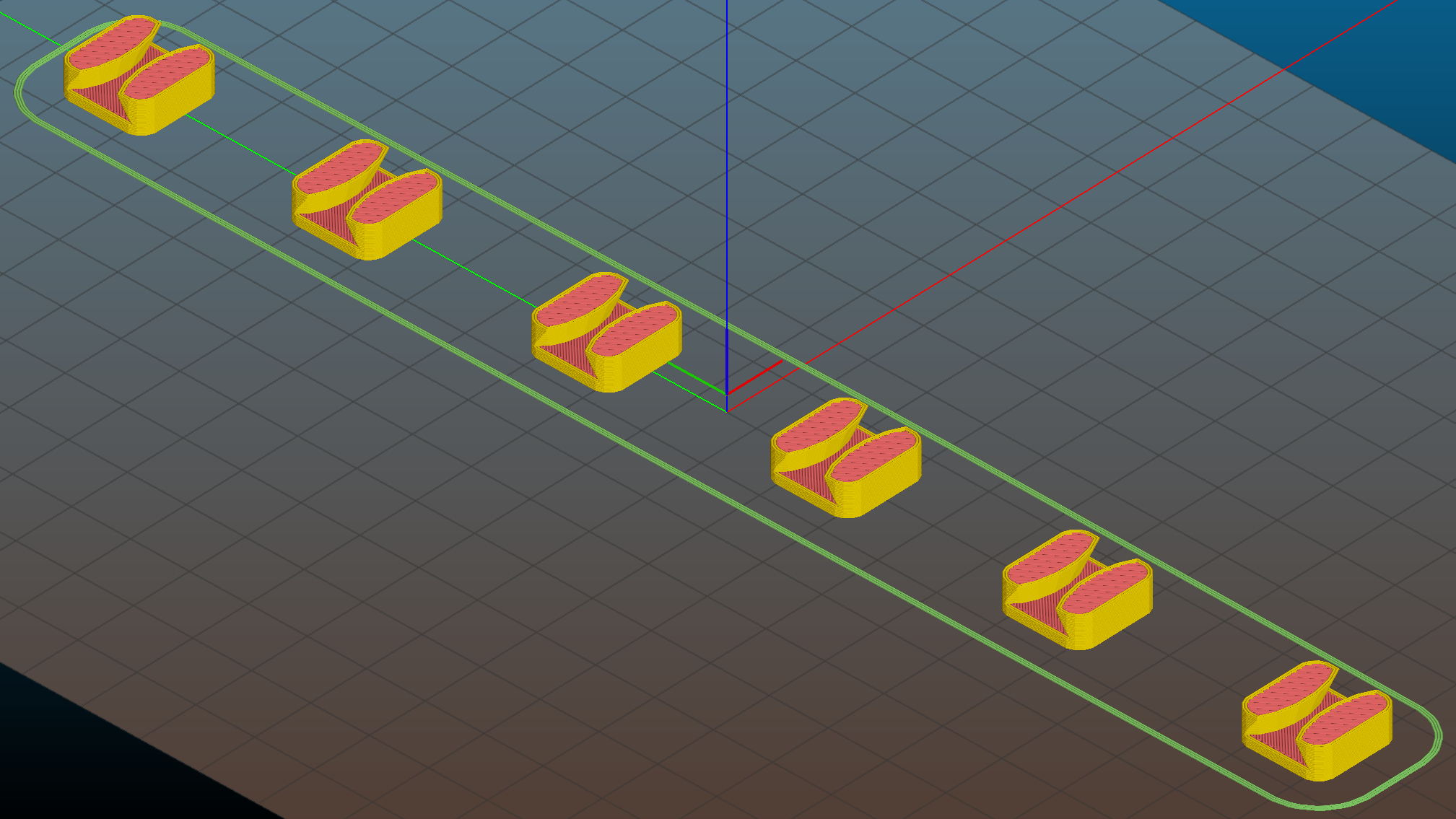
    Kitchen Light Bracket - angled - Slic3r preview
    Kitchen Light Bracket – angled – Slic3r preview

    The translucent block represents the strip (double-thick and double-wide), with a peg punching a hole for the threaded brass insert.

    Although the source code has an option to splice the middle blocks together, it can also build them separately:

    Kitchen Light Bracket - angled - LED block
    Kitchen Light Bracket – angled – LED block

    Turns out they’re easier to assemble that way; screw ’em to the strips, then screw the strips to the cabinet.

    I moved the deck screw holes to the other end of the block, thus putting the strips against the inside of the cabinet face. It turns out the IR sensor responds to the DC level of the reflected light, not short-term changes, which meant the reflection from the adjacent wood blinded it to anything waved below. Adding a strip of black electrical tape killed enough of the reflected light to solve that problem:


    Under-cabinet light - IR sensor shield
    Under-cabinet light – IR sensor shield

    The tape isn’t quite as far off-center as it looks, but I’m glad nobody will ever see it …

    The before-and-after light patterns, as viewed on B-size metric graph paper centered on the left-hand strip and aligned with the belly side of the countertop:

    Under-cabinet light - straight vs angled patterns
    Under-cabinet light – straight vs angled patterns

    Those look pretty much the same, don’t they? So much for photography as evidence for anything.

    The OpenSCAD source code as a GitHub Gist:


    // Mounting brackets for eShine under-counter LED lights
    // Ed Nisley KE4ZNU December 2016
    Layout = "Build";
    //- Extrusion parameters must match reality!
    ThreadThick = 0.25;
    ThreadWidth = 0.40;
    HoleWindage = 0.2;
    Protrusion = 0.1; // make holes end cleanly
    inch = 25.4;
    function IntegerMultiple(Size,Unit) = Unit * ceil(Size / Unit);
    //———-
    // Dimensions
    MountHeight = (1 + 0*3/16) * inch; // distance from cabinet bottom
    THREADOD = 0;
    HEADOD = 1;
    LENGTH = 2;
    WoodScrew = [4.0,8.3,41]; // 8×1-5/8 Deck screw
    WoodScrewRecess = 3.0;
    WoodScrewMargin = 1.5 * WoodScrew[HEADOD]; // head OD + flat ring
    Insert = [3.9,4.6,5.8 + 2.0]; // 4-40 knurled brass insert
    JoinerLength = 19.0; // joiner between strips
    LEDEndBlock = [11.0,28.8,9.5]; // LED plastic end block
    LEDScrewOffset = [1.0,8.2,0]; // hole offset from end block center point
    StripAngle = atan2(LEDEndBlock[2],LEDEndBlock[1]);
    echo(str("Strip angle: ",StripAngle));
    MountBlock = [WoodScrewMargin,(WoodScrewMargin + LEDEndBlock[1]*cos(StripAngle)),MountHeight];
    //———————-
    // Useful routines
    module PolyCyl(Dia,Height,ForceSides=0) { // based on nophead's polyholes
    Sides = (ForceSides != 0) ? ForceSides : (ceil(Dia) + 2);
    FixDia = Dia / cos(180/Sides);
    cylinder(d=(FixDia + HoleWindage),h=Height,$fn=Sides);
    }
    //—–
    // LED end block with positive insert for subtraction
    // returned with mounting hole end of strip along X axis
    // ready for positioning & subtraction
    module EndBlock(Side = "L") {
    LSO = [((Side == "L") ? 1 : -1)*LEDScrewOffset[0],LEDScrewOffset[1],LEDScrewOffset[2]];
    rotate([-StripAngle,0,0])
    translate([0,LEDEndBlock[1]/2,LEDEndBlock[2]])
    union() {
    cube(LEDEndBlock + [LEDEndBlock[0],0,LEDEndBlock[2]],center=true);
    translate(LSO + [0,0,-(LEDEndBlock[2] + Insert[2])])
    rotate(180/6)
    PolyCyl(Insert[1],2*Insert[2],6);
    }
    }
    //—–
    // End mounting block with proper hole offsets
    module EndMount(Side = "L") {
    translate([0,0,MountBlock[2]/2])
    difference() {
    translate([0,MountBlock[1]/2,0])
    cube(MountBlock,center=true);
    translate([0,WoodScrewMargin,MountBlock[2]/2])
    EndBlock(Side);
    translate([0,WoodScrewMargin/2,-MountBlock[2]])
    rotate(180/6)
    PolyCyl(WoodScrew[THREADOD],2*MountBlock[2],6);
    translate([0,WoodScrewMargin/2,(MountBlock[2]/2 – WoodScrewRecess)])
    rotate(180/6)
    PolyCyl(WoodScrew[HEADOD],WoodScrewRecess + Protrusion,6);
    translate([((Side == "L") ? 1 : -1)*MountBlock[0]/2,3*MountBlock[1]/4,-MountBlock[2]/4])
    rotate([90,0,((Side == "L") ? 1 : -1)*90])
    translate([0,0,-2*ThreadThick])
    linear_extrude(height=4*ThreadThick,convexity=3)
    text(Side,font=":style=bold",valign="center",halign="center");
    }
    }
    module MidMount() {
    XOffset = (JoinerLength + MountBlock[0])/2;
    BridgeThick = 5.0;
    union() {
    translate([XOffset,0,0])
    EndMount("L");
    translate([0,MountBlock[1]/2,BridgeThick/2])
    cube([JoinerLength,MountBlock[1],BridgeThick] + [2*Protrusion,0,0],center=true);
    translate([-XOffset,0,0])
    EndMount("R");
    }
    }
    //———-
    // Build them
    if (Layout == "EndBlock")
    EndBlock("L");
    if (Layout == "EndMount")
    EndMount("R");
    if (Layout == "MidMount")
    MidMount();
    if (Layout == "BuildJoined") {
    translate([-(JoinerLength + 2*MountBlock[0]),0,0])
    EndMount("L");
    MidMount();
    translate([(JoinerLength + 2*MountBlock[0]),0,0])
    EndMount("R");
    }
    if (Layout == "Build") {
    translate([-MountBlock[0],0,0])
    EndMount("L");
    translate([MountBlock[0],0,0])
    EndMount("R");
    }

  • Respooling Stainless Steel Thread

    For various reasons, I needed a smaller quantity of that stainless steel thread / yarn, so I mooched an empty spool from Mary, ran a bolt through it with washers + nut on the far end, chucked the bolt in the lathe, and ran the spindle backwards at the slowest speed:

    Stainless steel thread - smaller spool
    Stainless steel thread – smaller spool

    I started by letting the big spool unroll from the side, but that produced horrible twists in the slack thread. Remembering the lesson from our previous thread spool adventure, I put it on the floor and let the thread pull from the top:

    Stainless steel thread - unwinding spool
    Stainless steel thread – unwinding spool

    It still accumulated a huge twist between the two spools, even while guiding it hand-over-hand onto the rotating spool. Either the factory lays the thread on the large spool with a built-in twist or, more likely, a multi-strand steel thread behaves like a spring, no matter what anybody wants, and comes off the spool with a nasty case of inherent vice.

    Memo to Self: don’t let stainless steel thread slide through your hands under power, because some of the fuzz visible in the top picture will stay with you.

  • Under-cabinet Lamp Brackets

    These blocky brackets hold a pair of LED light strips in the recess under our 1955-era kitchen cabinets, to let the light cover the entire counter:

    Kitchen Light Bracket
    Kitchen Light Bracket

    The large holes are for drywall screws into the cabinet, the smaller ones for 2.5 mm SHCS holding the strips to the brackets. I drilled those little holes out and installed 4-40 brass inserts; this being a one-off installation, the source code doesn’t include that change.

    There’s not much to see after they’re installed:

    Under-cabinet light bracket - center joiner
    Under-cabinet light bracket – center joiner

    I’d hoped to swap the ends of the strip to power it from the right end, but the guts aren’t symmetric and you can’t just flip it end-for-end:

    eShine LED Under-cabinet light - disassembled
    eShine LED Under-cabinet light – disassembled

    That’s an add-on unit without the IR proximity sensor circuitry and power switch, but with the same overall layout. You take it apart by pressing the obvious latch on one of the endcaps, then gently prying the plastic away from the aluminum extrusion, taking care not to wreck the coaxial socket. Reassemble in reverse order.

    The OpenSCAD source code as a GitHub Gist:


    // Mounting brackets for eShine under-counter LED lights
    // Ed Nisley KE4ZNU December 2016
    //- Extrusion parameters must match reality!
    ThreadThick = 0.25;
    ThreadWidth = 0.40;
    HoleWindage = 0.2;
    Protrusion = 0.1; // make holes end cleanly
    inch = 25.4;
    function IntegerMultiple(Size,Unit) = Unit * ceil(Size / Unit);
    //———-
    // Dimensions
    MountHeight = (1 + 3/16) * inch – 5.0; // under-cab space – base thickness
    THREADOD = 0;
    HEADOD = 1;
    LENGTH = 2;
    WoodScrew = [4.0,8.3,41]; // 8×1-5/8 Deck screw
    WoodScrewRecess = 2.0;
    LEDScrew = [2.0,4.5,8.0]; // M2.5×10 SHCS
    LEDScrewOffset = [1.0,8.2,0]; // hole offset from center point
    JoinerLength = 18.1; // joiner between strips
    EndBlock = [11.0,28.5,MountHeight]; // mounting block size for ends
    //———————-
    // Useful routines
    module PolyCyl(Dia,Height,ForceSides=0) { // based on nophead's polyholes
    Sides = (ForceSides != 0) ? ForceSides : (ceil(Dia) + 2);
    FixDia = Dia / cos(180/Sides);
    cylinder(d=(FixDia + HoleWindage),h=Height,$fn=Sides);
    }
    // End mounting block with proper hole offsets
    module EndMount(Side = "L") {
    LSO = [((Side == "L") ? 1 : -1)*LEDScrewOffset[0],LEDScrewOffset[1],LEDScrewOffset[2]];
    difference() {
    union() {
    cube(EndBlock,center=true);
    translate([0,1.5*WoodScrew[1],0])
    cube(EndBlock,center=true);
    }
    translate(LSO + [0,0,-EndBlock[2]])
    rotate(180/4)
    PolyCyl(LEDScrew[THREADOD],2*EndBlock[2],4);
    translate([0,(EndBlock[1] + 1.5*WoodScrew[1])/2,-EndBlock[2]])
    rotate(180/6)
    PolyCyl(WoodScrew[THREADOD],2*EndBlock[2],6);
    translate([0,(EndBlock[1] + 1.5*WoodScrew[1])/2,(EndBlock[2]/2 – WoodScrewRecess)])
    rotate(180/6)
    PolyCyl(WoodScrew[HEADOD],WoodScrewRecess + Protrusion,6);
    translate([((Side == "L") ? 1 : -1)*EndBlock[0]/2,0,0])
    rotate([90,0,((Side == "L") ? 1 : -1)*90])
    translate([0,0,-2*ThreadThick])
    linear_extrude(height=4*ThreadThick,convexity=3)
    text(Side,font=":style=bold",valign="center",halign="center");
    }
    }
    module MidMount() {
    XOffset = (JoinerLength + EndBlock[0])/2;
    union() {
    translate([XOffset,0,0])
    EndMount("L");
    cube([JoinerLength,EndBlock[1],EndBlock[2]] + [2*Protrusion,0,0],center=true);
    translate([-XOffset,0,0])
    EndMount("R");
    }
    }
    //———-
    // Build them
    translate([0,0,EndBlock[2]/2]) {
    translate([-(JoinerLength + 2*EndBlock[0]),0,0])
    EndMount("L");
    MidMount();
    translate([(JoinerLength + 2*EndBlock[0]),0,0])
    EndMount("R");
    }

  • Satco PAR30 LED Floodlight vs. Halogen

    I replaced a dead 75 W halogen PAR30 bulb over the kitchen sink with a Satco S9415 LED bulb that was, at the time, advertised as “75 W equivalent”:

    Satco S9415 PAR30 LED Bulb - specs
    Satco S9415 PAR30 LED Bulb – specs

    It’s noticeably less bright than the surviving halogen bulb, which is what you’d expect when 950 lm goes head-to-head with 1100+ lm (based on casual searching), but with a similar color temperature and beam pattern, so it’s Good Enough. I should have bought two and converted the halogens into glass sculptures.

    The difference between the 22.8 year Life and the 3 Year Warranty always seems amusing. The warranty requires returning the bulb, so that’s about useless …

  • Kinesis Freestyle2 Keyboard vs. Linux

    My old Microsoft Comfort Curve keyboard having gotten on in years, I picked up a Kinesis Freestyle2 (KB800B for PC) split keyboard:

    Kinesis Freestyle2 - desk layout
    Kinesis Freestyle2 – desk layout

    The little hinged dingus (“Pivot Tether”) between the halves (“Keying Modules”) has two posts that pop into into sockets on the back of the halves and are retained by the two sliding latches. The cord connecting the halves allows 9 inches of separation; I don’t need that much, but more than zero seemed about right.

    Kinesis also sells various staggeringly expensive (IMO) doodads that attach to the back of the keyboard to “tent” the middle upward with varying degrees of refinement. None of the doodads offer to raise the back of the keyboard, which I vastly prefer to the current flat or reverse-tilted recommendations.

    The keyboard & trackballs rest on a homebrew shelf that slides out from where the desk used to have a center drawer, which puts the keyboard slightly above elbow height (heck, slightly above thigh height), whereupon tilting the keyboard puts the keys exactly where they should be. I bandsawed some wood into vaguely triangular sticks, topped them with foam sheets, and tinkered for best tilt. Works for me, anyhow.

    The Compatibility section of the Freestyle2 User Manual describes the “special driverless hot keys”: Most will also work with Linux. Four of them do not work, to the extent that they don’t even send key codes to exv. Some searching suggests this is an intractable problem, for reasons that make no sense to me. Their HID Usage Codes, whatever that might mean:

    Kinesis Freestyle2 - inert key codes
    Kinesis Freestyle2 – inert key codes

    That’s only a minor inconvenience; I prefer a physical calculator and don’t spend much of my life listening to anything through the headphones.

    For whatever it’s worth, the scroll ring on the most recent warranty replacement Kensington Expert “Mouse” (I think it’s the third) has worked flawlessly for years; they seem to have fixed the sudden death syndrome.

  • Sony HDR-AS30V vs. Lithium Ion 18650 Cells

    These items came near enough to produce an irresistible force:

    Sony HDR-AS30V vs 18650 cells - side view
    Sony HDR-AS30V vs 18650 cells – side view

    How can you look at that layout and not jump to the obvious conclusion?

    The front view suggests enough room for a stylin’ case:

    Sony HDR-AS30V vs 18650 cells - end view
    Sony HDR-AS30V vs 18650 cells – end view

    You’d need only one cell for the camera; I happened to have two in my hand when the attractive force hit.

    The camera is 24.5 ⌀ x 47 tall x 71.5 overall length (67.8 front-to-door-seating-plane).

    The ATK 18650 cells are 19 ⌀ x 69 long, with the overlong length due to the protection PCB stuck on the + end of the cylinder. You can get shorter unprotected cells for a bit less, which makes sense if you’re, say, Telsa Motors and building them into massive batteries; we mere mortals need all the help we can get to prevent what’s euphemistically called “venting with flame“.

    Although I like the idea of sliding the cell into a tubular housing with a removable end cap, it might make more sense to park the cell over the camera in a trough with leaf-spring contacts on each end and a lid that snaps over the top. That avoids threaded fittings, figuring out how to get an amp or so out of the removable end cap contact, and similar imponderables.

    think it’s possible to drill a hole through the bottom of the camera at the rear of the battery compartment to pass a cable from a fake internal cell to the external cell. Some delicate probing will be in order.

    In round numbers, those 18650 cells allegedly have three times the actual capacity of the camera’s flat battery and cost about as much as the not-so-cheap knockoff camera cells I’ve been using.

  • Kenmore Progressive Vacuum Tool Adapters: Second Failure

    Pretty much as expected, the dust brush nozzle failed again, adjacent to the epoxy repair:

    Dust brush adapter - second break
    Dust brush adapter – second break

    A bit of rummaging turned up some ¾ inch Schedule 40 PVC pipe which, despite the fact that no plumbing measurement corresponds to any physical attribute, had about the right OD to fit inside the adapter’s ID:

    Dust brush - PVC reinforcement
    Dust brush – PVC reinforcement

    The enlarged bore leaves just barely enough space for a few threads around the circumference. Fortunately, the pipe OD is a controlled dimension, because it must fit inside all the molded PVC elbows / tees / caps / whatever.

    The pipe ID isn’t a controlled dimension and, given that the walls seemed far too thick for this purpose, I deployed the boring bar:

    Dust brush adapter - reinforced tube - boring
    Dust brush adapter – reinforced tube – boring

    That’s probably too much sticking out of the chuck, but sissy cuts saved the day. The carriage stop keeps the boring bar 1 mm away from the whirling chuck.

    Bandsaw it to length and face the ends:

    Dust brush adapter - reinforcement
    Dust brush adapter – reinforcement

    The PVC tube extends from about halfway along the steep taper from the handle fitting out to the end, with the section closest to the handle making the most difference.

    Ram it flush with the end:

    Dust brush adapter - reinforced tube - detail
    Dust brush adapter – reinforced tube – detail

    I thought about gluing it in place, but it’s a sufficiently snug press fit that I’m sure it won’t go anywhere.

    Natural PETG probably isn’t the right color:

    Dust brush adapter - reinforced tube - installed
    Dust brush adapter – reinforced tube – installed

    Now, let’s see how long that repair lasts …

    The OpenSCAD source code as a GitHub Gist:

    //——————-
    // eBay horsehair dusting brush
    // Hacked for 3/4" Schedule 40 PVC stiffening tube
    module DustBrush() {
    union() {
    translate([0,0,40.0])
    rotate([180,0,0])
    difference() {
    union() {
    cylinder(d1=EndStop[OD1],d2=31.8,h=10.0);
    translate([0,0,10.0 – Protrusion])
    cylinder(d1=32.0,d2=30.0,h=30.0 + Protrusion);
    }
    translate([0,0,-Protrusion])
    cylinder(d1=26.0,d2=24.0,h=100);
    translate([0,0,-Protrusion]) // 3/4 inch Sch 40 PVC
    PolyCyl(27.0,100);
    }
    translate([0,0,40.0 – Protrusion])
    MaleFitting();
    }
    }