The Smell of Molten Projects in the Morning

Ed Nisley's Blog: Shop notes, electronics, firmware, machinery, 3D printing, laser cuttery, and curiosities. Contents: 100% human thinking, 0% AI slop.

Tag: Improvements

Making the world a better place, one piece at a time

  • QRPme Pocket Pal II: RF Waveforms and Meter Test

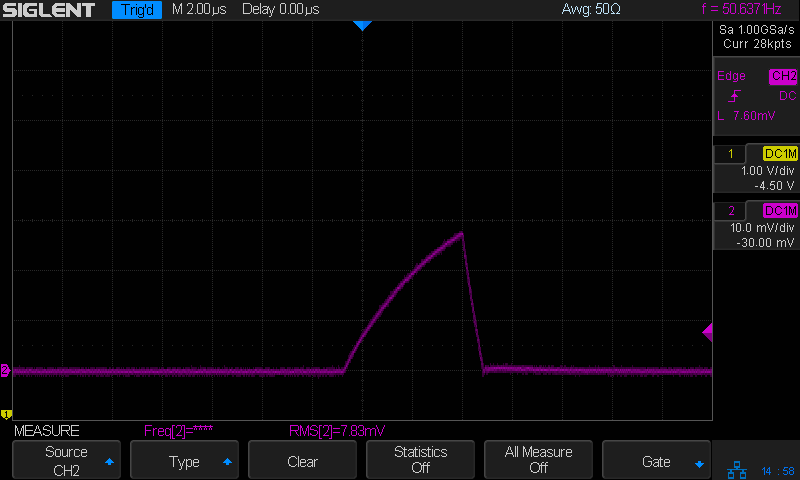
    The QRPme Pocket Pal II produces RF test signals in the 20 meter and 40 meter bands, both square-ish waves derived from its 14.31818 MHz oscillator-in-a-can:

    QRPme 20 meter - clip leads
    QRPme 20 meter – clip leads

    That’s the 20 meter signal, seen through the twisted pair test lead with alligator clips clamped on the scope probe, thusly:

    QRPme Pocket Pal II - clip leads to probe tip
    QRPme Pocket Pal II – clip leads to probe tip

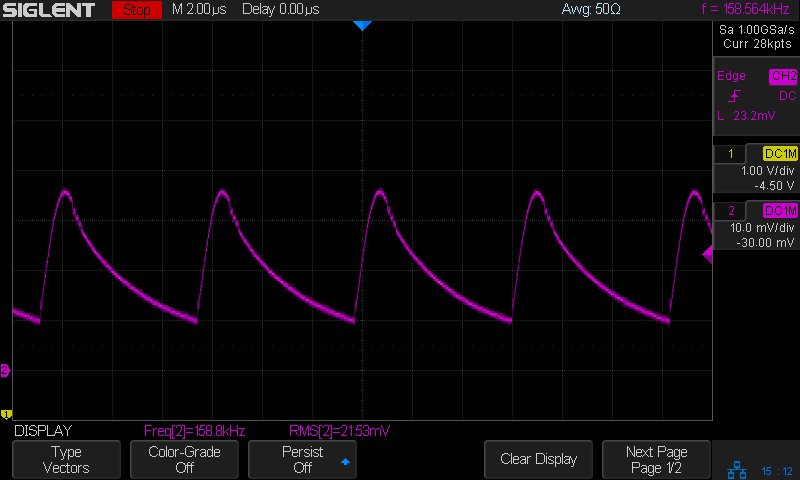
    When you’re working with RF signals, the “ground” part of the probe circuit matters:

    QRPme 20 meter - probe tip gnd
    QRPme 20 meter – probe tip gnd

    That’s with the probe and its short spring ground jammed directly into the header:

    QRPme Pocket Pal II - probe tip gnd
    QRPme Pocket Pal II – probe tip gnd

    Well, in this case, signal quality doesn’t matter very much, as you’re using the Pocket Pal II at a hamfest (or your bench) to determine if an HF radio is completely dead.

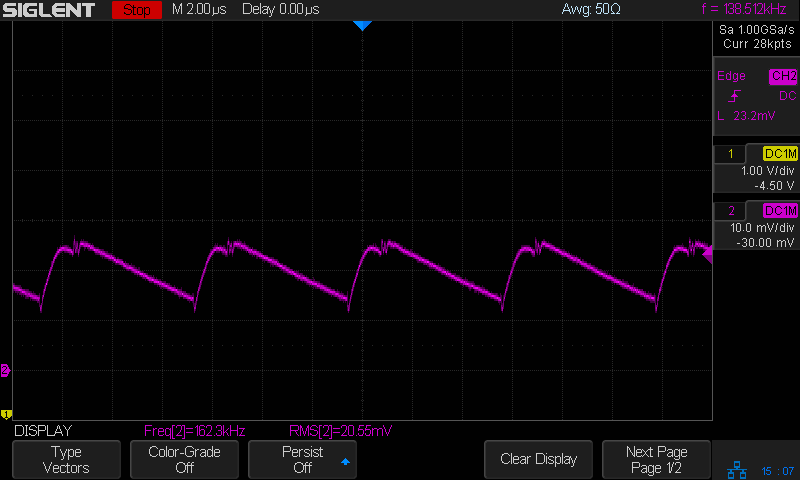
    Here’s the 40 meter output, with the J3 jumper in place and the probe jammed into the header:

    QRPme 40 meter - J3 on - probe tip gnd
    QRPme 40 meter – J3 on – probe tip gnd

    Pulling the J3 jumper off doubles the test signal amplitude:

    QRPme 40 meter - J3 off - probe tip gnd
    QRPme 40 meter – J3 off – probe tip gnd

    Nothing wrong with those signals! In a pinch, those edges probably produce harmonics up in the UHF bands.

    For completeness, here’s the 250 μA DC output driving a contestant chosen from the Box o’ Meters:

    QRPme Pocket Pal II - 250 uA meter test
    QRPme Pocket Pal II – 250 uA meter test

    Eyeballometrically, the meter wants to see 1 mA for full-scale deflection, which is the whole point of the tester.

    Recommended, with some early notes.

  • FM DDS: First Light Hardware

    Some Barely Viable Prototype hardware for a frequency modulated DDS to replace Channel Elements requiring now-unobtainable crystals:

    FM DDS - First Light layout
    FM DDS – First Light layout

    The heatsink (surely harvested from a PC, then salvaged from a box o’ goodies) runs about 25 °C above ambient while dropping a 12 V input to 5 V at 180 mA, so it’s good for maybe 2°C/W. It carries a KA278RA05C LDO regulator; you’d probably want something fancier in real life.

    The AD9851 DDS requires a 5 V supply to run at 180 MHz from the 30 MHz oscillator on its PCB, with the side effect of putting its minimum Logic 1 Voltage threshold at 3.5 V. Because the Teensy 3.6 runs at 3.3 V from its own on-board linear regulator, the DIP 74AHCT125 level shifter between the two boosts the Teensy’s LVCMOS SPI signals to good old TTL.

    The sticker on the CPU reminds me of the jumper cut between the USB +5 V line and the VIN pin, thus putting the Teensy on the better-regulated local supply for the benefit of its ADC reference:

    Teensy 3.6 Back - VIN to VUSB jumper
    Teensy 3.6 Back – VIN to VUSB jumper

    The picture comes from PJRC’s exceedingly helpful Teensy 3.6 reference cards.

    I ran header pins along both sides of the Teensy to simplify attaching scope probes and suchlike; the dangling gray wire brings the scope’s Arbitrary Function generator signal to the Teensy’s A9 input.

    The FMDDS Mock 3 firmware lit right up, albeit with the faceplant of sending the SPI bytes in the wrong order and the wrong bit direction, which was easily fixed after a bit of puzzling:

    FM DDS 10 MHz - SPI 16 MHz LSB
    FM DDS 10 MHz – SPI 16 MHz LSB

    Just a typo, could happen to anyone …

  • Tiny Turtle Teleportation: Rail Trail

    This little critter was chugging across the Dutchess Rail Trail near the ponds north of Page Industrial Park, so I stopped to lend a hand:

    Tiny Turtle Dorsal - Rail Trail - 2018-05-23
    Tiny Turtle Dorsal – Rail Trail – 2018-05-23

    The plastron looked like a brightly colored jewel:

    Tiny Turtle Ventral - Rail Trail - 2018-05-23
    Tiny Turtle Ventral – Rail Trail – 2018-05-23

    Perhaps plastrons start out with all the pigment they’ll ever have, then fade from bright orange to yellow-brown as they spread out.

    If you’re not paying attention, you’d think “pebble” or “dog turd”. Neither of which you should ride over, of course, but … teleporting a tiny turtle to the drainage ditch on the far side seemed to increase the world’s net happiness.

    The pix are tight crops from the AS30V’s 170° FOV images, which means they’re way grittier than you’d expect from a “full HD” image.

  • Monthly Science: Water Bottle Refill Stations

    The O’Neill Center at WCSU has two sets of drinking fountains:

    Water bottle refill stations
    Water bottle refill stations

    The bottle shape on the back of each fountain marks the sensor for its water bottle refill spout. The small rectangular block above and right of the sensor is a virtue signalling display giving the number of disposable bottles allegedly not consigned to a landfill.

    The left fountain:

    Water bottle refill station - left
    Water bottle refill station – left

    The center fountain:

    Water bottle refill station - center
    Water bottle refill station – center

    The right fountain:

    Water bottle refill station - right
    Water bottle refill station – right

    Which looked exactly like either a test pattern or a failed display, until I waved my hand over the senor and watched it increment to 00008889. Timing is everything!

    The other trio of fountains had the same progression, so it must be a chirality thing.

    I can’t say whether you should use the left fountain to avoid some germs or the right fountain for the freshest water. Not having to maneuver our bottle under the usual arch from a drinking nozzle was a big win, though, so mad props to ’em.

  • Siglent SDS2304X Screen Shot File

    Poking the Print button on the front of the Siglent SDS2304X scope saves the screen to a BMP file (in the /BMP directory) on a USB flash drive plugged into its front-panel port:

    Siglent SDS2304X Front Panel - Print Button - USB port
    Siglent SDS2304X Front Panel – Print Button – USB port

    Which produces files like these:

    ll --block-size=1 /path-to-USB-stick/BMP/
    total 2318336
    drwxr-xr-x 2 ed ed    4096 May 23 13:13 ./
    drwxr-xr-x 4 ed ed    4096 Dec 31  1969 ../
    -rw-r--r-- 1 ed ed 1152054 May 23 13:13 SDS00001.BMP
    -rw-r--r-- 1 ed ed 1152054 May 23 13:13 SDS00002.BMP
    

    The files are 1152054 bytes long, as specified by the BMP header inside the file:

    hexdump -C /path-to-USB-stick/BMP/SDS00001.BMP | head
    00000000  42 4d 36 94 11 00 00 00  00 00 36 00 00 00 28 00  |BM6.......6...(.|
    00000010  00 00 20 03 00 00 e0 01  00 00 01 00 18 00 00 00  |.. .............|
    00000020  00 00 00 94 11 00 00 00  00 00 00 00 00 00 00 00  |................|
    00000030  00 00 00 00 00 00 01 01  01 01 01 01 01 01 01 01  |................|
    00000040  01 01 01 01 01 01 01 01  01 01 01 01 01 01 01 01  |................|
    *
    00000880  01 01 01 01 01 01 01 01  01 01 01 01 01 01 1e 1e  |................|
    00000890  1e 1e 1e 1e 1e 1e 1e 1e  1e 1e 1e 1e 1e 1e 1e 1e  |................|
    *
    00000990  1e 1e 1e 1e 1e 1e 01 01  01 01 01 01 01 01 01 01  |................|
    

    The first 14 bytes contain the Bitmap file header, with the file size in Little-Endian order in the four bytes at offset +0x02: 0x00119436 = 1152054.

    The four bytes at offset +0x0A give the offset of the pixel data: +0x36. That’s the series of 0x01 bytes in the fourth row. Unlike most images, BMP pixel arrays start at the lower left corner of the image and proceed rightward / upward to the last pixel at the upper right corner.

    The data between the Bitmap file header and the start of the pixel data contains at least a Device Independent Bitmap header, identified by its length in the first four bytes at offset +0x0E. In this case, the length of 0x28 = 40 bytes makes it a Windows (no surprise) header.

    The two bytes at +1C give the bits-per-pixel value: 0x18 = 24 = 3 bytes/pixel, so parse the pixels in RGB order.

    The four bytes at +0x12 give the bitmap width in pixels: 0x320 = 800. Each pixel row must be a multiple of 4 bytes long, which works out fine at 2400 bytes.

    The tail end of the file shows one dark pixel at the upper right:

    hexdump -C /path-to-USB-stick/BMP/SDS00001.BMP | tail
    00118330  00 cc 00 00 cc 00 00 cc  00 00 cc 00 00 cc 00 00  |................|
    00118340  cc 00 00 cc 00 00 cc 00  00 cc 00 00 cc 00 00 cc  |................|
    00118350  00 00 cc 00 00 cc 00 00  cc 0f 0f 75 1e 1e 1e 1e  |...........u....|
    00118360  1e 1e 1e 1e 1e 1e 1e 1e  1e 1e 1e 1e 1e 1e 1e 1e  |................|
    *
    00118ad0  1e 1e 1e 01 01 01 1e 1e  1e 1e 1e 1e 1e 1e 1e 1e  |................|
    00118ae0  1e 1e 1e 1e 1e 1e 1e 1e  1e 1e 1e 1e 1e 1e 1e 1e  |................|
    *
    00119430  1e 1e 1e 01 01 01                                 |......|
    

    Which looks like this, expanded by a factor of eight (clicky for more dots to reveal the situation):

    Screenshot - upper right corner - 8x expansion
    Screenshot – upper right corner – 8x expansion

    The scope can also transfer a screenshot over the network:

    lxi screenshot -a 192.168.1.42 /tmp/lxi-shot.bmp 
    Loaded siglent-sds screenshot plugin
    Saved screenshot image to /tmp/lxi-shot.bmp
    

    Which has the same header:

    hexdump -C /tmp/lxi.bmp | head
    00000000  42 4d 36 94 11 00 00 00  00 00 36 00 00 00 28 00  |BM6.......6...(.|
    00000010  00 00 20 03 00 00 e0 01  00 00 01 00 18 00 00 00  |.. .............|
    00000020  00 00 00 94 11 00 00 00  00 00 00 00 00 00 00 00  |................|
    00000030  00 00 00 00 00 00 01 01  01 01 01 01 01 01 01 01  |................|
    00000040  01 01 01 01 01 01 01 01  01 01 01 01 01 01 01 01  |................|
    *
    00000880  01 01 01 01 01 01 01 01  01 01 01 01 01 01 1e 1e  |................|
    00000890  1e 1e 1e 1e 1e 1e 1e 1e  1e 1e 1e 1e 1e 1e 1e 1e  |................|
    *
    00000990  1e 1e 1e 1e 1e 1e 01 01  01 01 01 01 01 01 01 01  |................|
    

    But the resulting file is three bytes = one pixel (!) too large:

    ll --block-size=1 /tmp/lxi.bmp
    -rw-rw-r-- 1 ed ed 1152057 May 23 19:09 /tmp/lxi.bmp
    

    The tail end of the file:

    hexdump -C /tmp/lxi.bmp | tail
    00118330  00 cc 00 00 cc 00 00 cc  00 00 cc 00 00 cc 00 00  |................|
    00118340  cc 00 00 cc 00 00 cc 00  00 cc 00 00 cc 00 00 cc  |................|
    00118350  00 00 cc 00 00 cc 00 00  cc 0f 0f 75 1e 1e 1e 1e  |...........u....|
    00118360  1e 1e 1e 1e 1e 1e 1e 1e  1e 1e 1e 1e 1e 1e 1e 1e  |................|
    *
    00118ad0  1e 1e 1e 01 01 01 1e 1e  1e 1e 1e 1e 1e 1e 1e 1e  |................|
    00118ae0  1e 1e 1e 1e 1e 1e 1e 1e  1e 1e 1e 1e 1e 1e 1e 1e  |................|
    *
    00119430  1e 1e 1e 01 01 01 01 01  0a                       |.........|
    

    Because the file header doesn’t include those three bytes, they don’t go into the image and the resulting screenshot is visually the same.

    Which looks like a picket-fence error, doesn’t it? I’d lay long odds the erroneous loop runs from 0 to NUMPIXELS, rather than 0 to NUMPIXELS-1. Raise your hand if you’ve ever made that exact mistake.

    I have no practical way to determine whether the error is inside the scope or the LXI network code, but given Siglent’s overall attention to software fit-and-finish, I suspect the former.

    One can convert BMP files to the much more compact PNG format:

    convert /tmp/lxi.bmp /tmp/lxi.png
    convert: length and filesize do not match `/tmp/lxi.bmp' @ warning/bmp.c/ReadBMPImage/829.
    

    Yes. Yes, there is a mismatch.

    The space savings is impressive, particularly in light of PNG being a lossless format:

    ll /tmp/lxi.*
    -rw-rw-r-- 1 ed ed 1.1M May 23 19:09 /tmp/lxi.bmp
    -rw-rw-r-- 1 ed ed  14K May 23 19:17 /tmp/lxi.png
    

    You can eliminate the nag by truncating the file:

    truncate --size=1152054 /tmp/lxi.bmp
    

    One could wrap it all up in a script:

    #!/bin/bash
    lxi screenshot -a 192.168.1.42 /tmp/"$1".bmp
    truncate --size=1152054 /tmp/"$1".bmp
    convert /tmp/"$1".bmp "$1".png
    echo Screenshot: "$1".png

    And then It Just Works:

    getsds2304x.sh "Test Shot Starfish"
    Loaded siglent-sds screenshot plugin
    Saved screenshot image to /tmp/Test Shot Starfish.bmp
    Screenshot: Test Shot Starfish.png
    
    Test Shot Starfish
    Test Shot Starfish

    SpaceX uses Test Shot Starfish tracks for pre-launch background music; the actual test shot was spectacular.

  • LXI-Tools for Siglent SDS2304X Oscilloscope and SDM3045X Multimeter

    For whatever reason, my Siglent SDS2304X Oscilloscope and SDM3045X Multimeter partially implement their documented command sets through partial implementations of the VXI instrumentation driver network protocol. The Linux command-line side comes from lxi-tools, which one must fetch from its repository and compile from source(do liblxi first, then lxi-tools)  through the usual ./configure - make - sudo make install process, after tediously installing whatever dependencies might be revealed by incremental progress through the configuration(s) on your system(s).

    The alternative, of course, is Labview on Windows.

    The SDS2304X scope doesn’t respond to the LXI discover broadcast, so you must know and specify its IP address in the command. It’s easiest to configure the Siglent instruments at fixed IP addresses and be done with it:

    lxi scpi -a 192.168.1.41 "*idn?"
    Siglent Technologies,SDM3045X,SDM34whatever,5.01.01.03
    lxi scpi -a 192.168.1.42 "*idn?"
    *IDN SIGLENT,SDS2304X,SDS2Xwhatever,1.2.2.2 R10
    

    Although the LXI tools also come in a Snap package, installing them that way prevents storing files outside the user’s home directory; having evolved a fairly extensive NFS filesystem, Snaps seem basically useless for my purposes. I don’t see much more security exposure from downloading and running a Snap than from downloading, compiling, and running the source code, but they obviously know what’s best for me.

  • Turtle Teleportation: Vassar Road

    As always, we knew this wouldn’t end well for the small lump just in front of the car’s rear wheel (clicky for more, albeit fuzzy, dots):

    Turtle 0134 - Vassar Rd - 2018-05-20
    Turtle 0134 – Vassar Rd – 2018-05-20

    So I stopped to lend a hand:

    Turtle 1280 - Vassar Rd - 2018-05-20
    Turtle 1280 – Vassar Rd – 2018-05-20

    A fumbling hand, as it turned out, on the turtle’s slippery shell:

    Turtle 1364 - Vassar Rd - 2018-05-20
    Turtle 1364 – Vassar Rd – 2018-05-20

    A belly-up turtle in the middle of the road knows the solution to the Halting Problem.

    I hoped a secluded spot under a pine tree was closer to its destination:

    Turtle 1724 - Vassar Rd - 2018-05-20
    Turtle 1724 – Vassar Rd – 2018-05-20

    However, if the turtle is a female in search of an egg-laying site, then she and all her progeny must cross Vassar Road in the other direction to reach the Mighty Wappinger Creek.

    We’ll teleport them if we see them, too …