Ed Nisley's Blog: Shop notes, electronics, firmware, machinery, 3D printing, laser cuttery, and curiosities. Contents: 100% human thinking, 0% AI slop.
Wouldn’t it be great if you could export all that stuff to a text file in a readable format? The CSV files come close, but they’re not really meant for human consumption.
Subject to revision, your mileage may vary, past performance is no indication of future yield, perfectly safe when used exactly as directed, shake before using, don’t touch that dial!
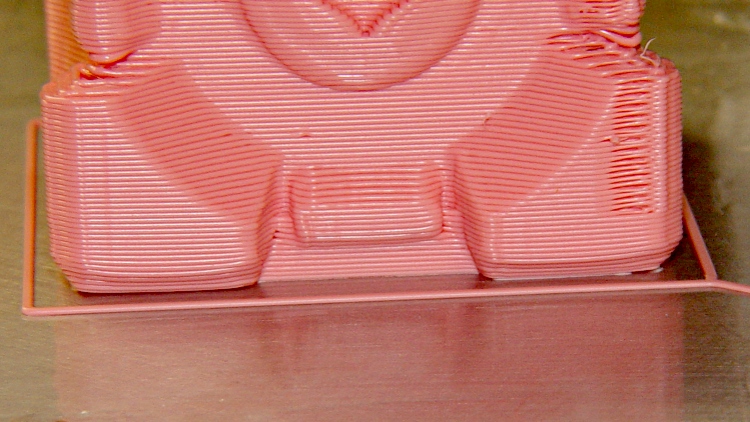
Companion cube, with a slightly warped right corner:
Companion Cube – build detail
Now, those objects may have other problems, but two things work really well:
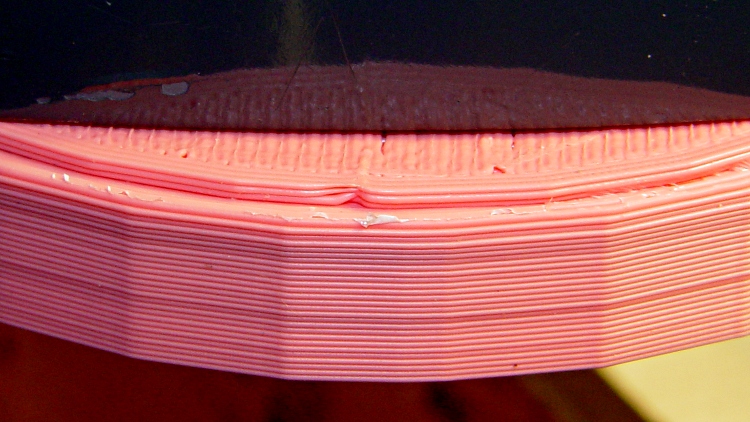
The first layer sticks like it was glued to the ABS film
The side walls build perfectly straight, without bulges or shrinkage
What’s important to me: this is dependable and repeatable.
It’s not yet a simple routine, because these objects were built while I was hacking away at the HBP + aluminum plate platform, some are on the old ABP + aluminum plate arrangement, and they’re not all first-attempt parts. However, given a proper setup, It. Just. Works.
Part of the process involves a very slow first-layer feed: about 10 mm/s. At that pace the molten ABS has enough time to bond with the layer on the plate, even around corners; much faster and it can pull free.
The Extruder runs at 210 °C, the HBP at 120 °C, feed is 40 mm/s, and traverse is around 50 mm/s.
It is yet to be seen if this lashup will remain stable, but the first indications seem pretty good.
The Skeinforge Outline plugin draws a rectangle around the first perimeter layer of an object. I use that single-width, single-layer extrusion to monitor the height of the nozzle above the build platform and the tilt of the plate. The Outline extrusion will either peel off separately or come off as the film peels away from the plate when I twist the object off.
These Outlines come from a variety of objects. The one in the lower left was a test case that I stopped after extruding only the Outline.
ABS coatings from aluminum build plates
I measure the Outline along each edge; larger objects provide three data points along each side of the build platform.
The good part of this is that it reports the build platform’s behavior during an actual extrusion, so you can keep an eye on whether it’s drifting out of alignment. The aluminum plates present a sufficiently flat surface that any variations will be due to a non-level HBP or an off-calibration Z-axis.
These numbers from around a large Outline told me that I should tweak the Z axis height down by 0.1 mm to increase the first layer thickness back to about 0.33 mm. The lower-right corner was slightly thicker because the wiper hit the Thermal Core insulation.
0.24
0.22
0.17
0.27
0.17
0.27
0.22
0.28
0.32
0.22
0.21
0.24
Given those values, I can tweak the leveling screws to adjust the platform tilt. What I don’t have at this point is any long-term record of how consistent my hacked HBP will be. But at least I’ve got numbers!
The first aluminum build plates had to fit around the gimcrackery atop my tweaked ABP: two solderless grounding lugs and a lump of Wire Glue. The new HBP setup put the grounding lug below the fixed plate and did away with the lump, so the removable plate could have five holes and a wiper cutout without any fancy trimming.
I’d squared up three plates and machined only two for the ABP, so I had one plate that just needed drilling. Rather than machining two new plates, I filled the cutouts on the old plates with JB Industro Weld epoxy, flycut the excess, and drilled new holes.
Flycut and drilled epoxy fill
This was straightforward manual CNC: get the plate square on the table, touch off the plate edges, and then drill the holes in two steps.
If those thin epoxy webs break off the outside of the holes, it’s not the end of the world: the plates won’t go anywhere because they’re indexed by the holes on the other side.
Memo to Self: Next time, make a fixture to hold the plates relative to a starting hole and eliminate all the tedious alignment steps.
A batch of LED ring lights arrived from halfway around the planet and I’d earmarked one for a microscope ring illuminator, despite the crappy color spectrum of white LEDs. It’s better than the fluorescent desk lamp I’d been using up to this point.
This shows the business end of the LED ring light, which would probably look better more professional without the full-frontal Barbie color scheme:
Microscope LED Ring light – snout view
It’s less overwhelming from the top:
Microscope with LED illuminator
The power cable came with the ring. I unsoldered it, fed the end through the shade, resoldered it, snipped off the automobile lamp adapter, wired it to a switch and a 12 V 200 mA wall wart, and hot-melt-glued the switch to the microscope. Yet another vampire load, alas.
The two parts must be printed separately to eliminate any problem with overhang, as the finished widget would have vertical walls on both sides. I thought about support material, realized that would be a lot like work, and split the thing into two parts.
LED ring light – mounting plate and shade
The walls on the shade ring show the same backlash problem that cropped up there; I built these before tweaking the belts.
The mounting plate screws into the microscope’s accessory thread:
Microscope LED Ring Light – Mount Plate
Admittedly, “screws into” may be an exaggeration: the mount is just a cylindrical feature slightly larger than the microscope’s minor thread diameter; it’s barely more than a snug friction fit. I clipped out four small sections to allow that ring to bend slightly as it engages the threads.
A shade contains the LED ring and keeps direct light off the objective lenses. There’s a tiny hole on one side to let the power wires out:
Microscope LED Ring Light – Shade
The two parts got glued together with the same ABS-in-MEK gunk that I apply to the aluminum build plate:
Clamping LED ring light parts
I applied three blobs of hot-melt glue inside the shade, lined up the LED ring’s power wire with the exit hole, and smooshed it into place. Pause for a breath and it’s done!
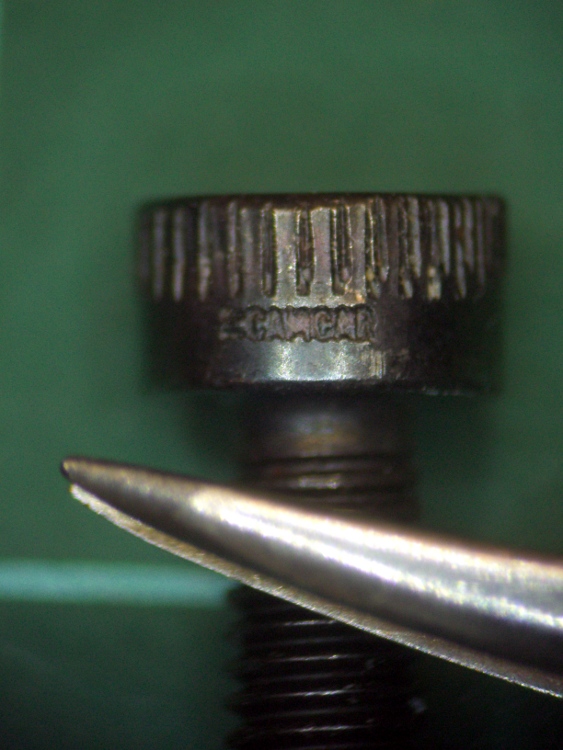
The result actually looks pretty good, despite the weird yellow-and-blue spectrum you get free with every “white” LED. I reset the camera’s color correction using a white sheet of paper. This is an ordinary M3 socket head cap screw, familiar to Thing-O-Matic owners everywhere, and a tweaked needle-point tweezer:
Sample image using LED ring light
The microscope camera mount works surprisingly well, particularly given how simple it was to build.
The OpenSCAD source makes the shade walls a bit taller than you see above. When I run out of pink filament, this one’s on the rebuild list!
// Microscope LED Ring Illuminator Mount
// Ed Nisley - KE4ZNU - Mar 2011

// Build with...
//	extrusion parameters matching the values below
//	2 extra shells
//	3 solid surfaces at top + bottom

Build = "Ring";					// Mount or Ring

// Extrusion parameters for successful building

ThreadZ = 0.33;						// should match extrusion thickness
WT = 1.75;							// width over thickness
ThreadWidth = ThreadZ * WT;			// should match extrusion width

HoleWindage = ThreadWidth;			// enlarge hole dia by extrusion width

// Screw mount dimensions

MountOD = 46.85 - ThreadWidth;		// Microscope thread diameter (thread minor)
MountDepth = 2.5;					// ... length
MountID = MountOD - 6*ThreadWidth;	// ID of mount body -- must clear lenses

echo(str("Mount ID: ",MountID));
echo(str("Mount OD: ",MountOD));

PlateThick = 3*ThreadZ;				// Thickness of mounting plate beyond rings

echo(str("Plate: ",PlateThick));

// LED Ring holder dimensions

RingID = 54.0;
RingOD = 71.0;
RingFit = 0.5;						// radial gap from ID and OD

InnerShade = 6.0;					// Shade walls around ring
OuterShade = 10.0;
ShadeWall = 4*ThreadWidth;			//  wall thickness

HolderID = RingID - 2*RingFit - 2*ShadeWall;
HolderOD = RingOD + 2*RingFit + 2*ShadeWall;

echo(str("Holder ID:",HolderID));
echo(str("Holder OD:",HolderOD));

LeadWidth = 4.0 + HoleWindage;		// LED power lead hole
LeadTall = 2.0 + HoleWindage;

Protrusion = 0.1;					// extend holes beyond surfaces for visibility

//---------------
// Create thread gripper and plate

module Mount() {

  difference() {
	union() {
	  translate([0,0,PlateThick])
		cylinder(r=(MountOD/2 + HoleWindage),h=MountDepth);
	  cylinder(r=HolderOD/2,h=PlateThick);
	}

	translate([0,0,-Protrusion])
	  cylinder(r=MountID/2,h=(PlateThick + MountDepth + 2*Protrusion));
  }

}

//----------------
// Create LED ring holder

module Ring() {

  difference() {
	union() {
	  cylinder(r=HolderOD/2,h=PlateThick);

	  translate([0,0,PlateThick]) {
		difference() {
		  cylinder(r=HolderOD/2,h=OuterShade);
		  cylinder(r=(HolderOD/2 - ShadeWall),h=(OuterShade + Protrusion));
		}

		cylinder(r=(HolderID/2 + ShadeWall),h=InnerShade);
	  }
	}

	translate([0,0,-Protrusion])
	  cylinder(r=HolderID/2,h=(InnerShade + PlateThick + 2*Protrusion));

	translate([(HolderOD/2 - ShadeWall/2),0,(PlateThick + ShadeWall/2 + LeadTall/2)]) {
	  scale([ShadeWall*2,LeadWidth,LeadTall])
		rotate(a=[0,90,0])
		  cylinder(r=0.5,h=1.0,center=true,$fn=12);
	}
  }

}

//---------------
// Build what's needed

if (Build == "Mount") {
  Mount();
}
else {
  Ring();
}
A bit of laparoscopic surgery on the front yard unearthed the drain line from the septic tank to the leach field. Drilling a 1-1/2 inch hole in the top of the pipe revealed that it’s 3/4 full of sludge, which is a Bad Thing: the leach field should get only liquid from the middle of the septic tank.
On the other paw, the house was built a bit over half a century ago and the records that came with it showed the tank was pumped two decades before we arrived. So it goes.
Rather than leave the hole in the pipe open until we get a new drain field, I built a plug that fit the 5 inch OD drain pipe and the 1-1/2 inch drilled hole.
Plug on aluminum plate
The aluminum build plate produces a smooth surface that’s entirely irrelevant on this part. The ABS film covers the blind hole in the middle that will serve as a drill guide in the unlikely event I must remove the plug.
Pipe plug – bottom view
I’ll admit it looks a bit out of place down there, though. I slobbered urethane adhesive around the central pillar and across the saddle, plugged it in, put a rock on top, and the adhesive foamed into a sludge-tight seal. At least I hope that’s how it worked out; I’m not going to pop it off just to find out.
Pipe plug in position
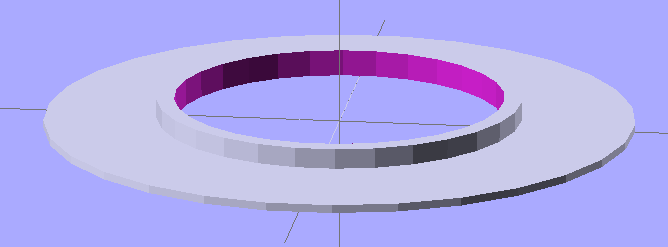
The solid model looks about like you’d expect:
Leach Pipe Plug Solid model
Never let it be said that a Thing-O-Matic lacks practical applications…
The OpenSCAD source:
// Plug for septic drain field pipe hole
// Ed Nisley - KE4ZNU - Mar 2011

include </home/ed/Thing-O-Matic/lib/MCAD/units.scad>

// Extrusion values

ThreadThickness = 0.33;
ThreadWT = 1.75;
ThreadWidth = ThreadThickness * ThreadWT;

HoleWindage = ThreadWidth;			// enlarge hole dia by extrusion width

// Pipe dimensions

PipeOD = 5 * inch;					// which is *4* inch cast iron pipe
PipeWall = (3/8) * inch;
PipeID = PipeOD - 2*PipeWall;

PipeLength = 2*PipeOD;				// for ease of viewing

HoleDia = (1 + 1/2) * inch;			// from a 1-1/2 inch hole saw

PatchOD = 2*HoleDia;
PatchThick = 10.0;					// a burly patch for a big old pipe

DrillDia = (1/4) * inch;			// pilot hole for removal, just in case

// Convenience settings

Protrusion = 0.1;					// extend holes beyond surfaces for visibility

// The central plug

module PlugBody() {
  difference() {
	cylinder(r=HoleDia/2,h=(PipeOD/2 + PatchThick));
	rotate([90,90,0])
	  cylinder(r=PipeID/2,h=PipeLength,center=true);
  }
}

// The shell on the pipe

module PlugShell() {
  difference() {
	cylinder(r=PatchOD/2,h=(PipeOD/2 + PatchThick));
	rotate([90,90,0])
	  cylinder(r=PipeOD/2,h=PipeLength,center=true);
  }
}

// Build it, with rotate/translate to put it flat on its back

rotate([0,180,0])
  translate([0,0,-(PipeOD/2 + PatchThick)])
	difference() {
	  union() {
		PlugBody();
		PlugShell();
	  }
	  translate([0,0,PipeOD/2])
		cylinder(r=DrillDia/2,h=(PatchThick + Protrusion));
	}
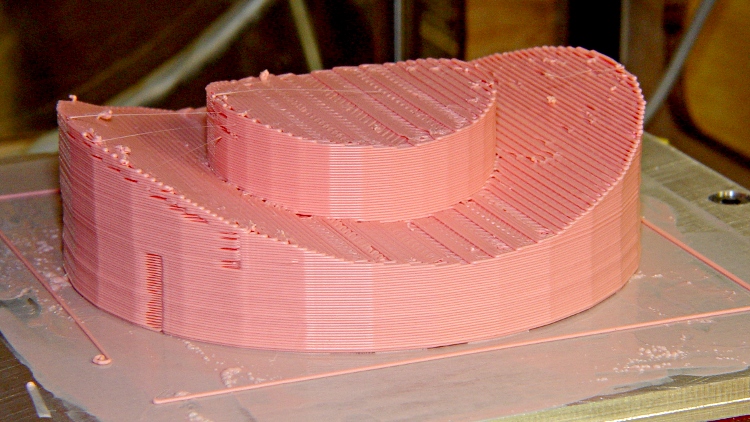
I tried using the Skeinforge Cool plugin in order to print the first layer at a higher temperature than the bulk of the object, with an eye toward improving the first layer’s adhesion to the build platform. Even with Reverse sucking back the filament before Cool begins, the nozzle dribbles little snots as it passes around the object’s perimeter:
Cool snots
The nozzle orbits at exactly the top of the just-extruded layer, so the least little bit of ooze from the nozzle sticks to the layer. The spacing between snots shows that the nozzle fills up on a regular basis, even with the Extruder motor turned off.
Running the extruder motor backwards for a bit would introduce an actual air bubble inside the nozzle, but then the plastic would ooze to the bottom, the air bubble would rise, and the nozzle would fart after starting the next layer. Not a desirable outcome.
These tweaks to the cool_start.gcode and cool_end.gcode routines lift the nozzle during the cooling orbit and lower it at the end:
Alas, Skeinforge inserts those files at every layer change, which means the nozzle jumps up-and-down at the same spot on every layer… and that introduces a major blemish at what used to be a minor seam.
Worse, if you’re building multiple copies of the same object, the G-Code file finishes a layer on the last object, does a little hop, returns to the first object, does a little hop, and then begins the cool-down orbit. Maybe that could be fixed by moving Cool after Multiply, but it’s starting to look like a hackfest instead of Just Working.









 The Smell of Molten Projects in the Morning