The Smell of Molten Projects in the Morning

Ed Nisley's Blog: Shop notes, electronics, firmware, machinery, 3D printing, laser cuttery, and curiosities. Contents: 100% human thinking, 0% AI slop.

Tag: CNC

Making parts with mathematics

  • Reversal Zits: Speed, Acceleration, and a Bestiary

    The Skeinforge Dimension plugin subsumes the obsolete Reversal plugin’s features. At the end of each thread, if the nozzle will move more than the Minimum Travel distance (1 mm by default, which is what I’m using) to the start of the next thread, the extruder yanks Retraction Distance of filament out of the hot end at the Retraction Speed.

    Some experimentation at 30 mm/s showed that 2 mm of filament would eliminate all drooling, 1.5 mm left thin threads, and 1.0 mm wasn’t nearly enough.

    Similar experimentation suggested 60 mm/s as the upper limit for Retraction Speed, with the SJFW acceleration limiting parameters set for 250 mm/s2. The usual extrusion speed isn’t much faster than a crawl, so the distance required to reach a backwards 60 mm/s is:

    dist = (60 mm/s)2 / (2 * 250 mm/s2) = 7.2 mm

    What that means, of course, is that the extruder doesn’t have enough torque to reach the programmed speed in the required distance. Assuming SJFW uses trapezoidal limiting, it will accelerate to some maximum speed at the halfway point and decelerate to a stop at the same rate. Pegging the midpoint at 1 mm, the extruder will reach a peak speed of:

    v = √(2 * 250 mm/s2 * 1 mm) = 22 mm/s

    In order to hit 60 mm/s in the middle of the retraction, the extruder must accelerate at:

    a = (60 mm/s)2 / (2 * 1 mm) = 1800 mm/s2

    Which requires way more torque than the piddly little motor I’m using can provide.

    While I could swap in that larger motor, crank the current up a bit, and goose the extruder acceleration, the current Reversal Zittage is small enough for my purposes. I’d rather expend that effort on doodling up a direct-drive extruder, but that’s on the back burner until something horrible happens to the current extruder.

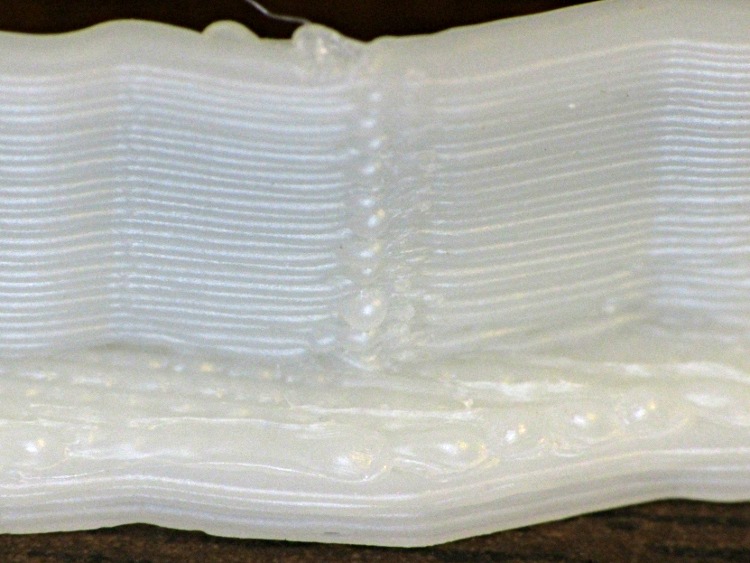
    One easy alternative: lower the perimeter speed sufficiently far as to reduce the pressure in the hot end enough that the current speeds can suppress the zits. Notice the difference in the pix below; what you can’t see is that the first layer has no zittage whatsoever. Of course, that means the perimeter must trundle along at maybe 10 mm/s…

    Herewith, a Reversal Zittage bestiary at various perimeter speeds, with Dimension set as described above and these extrusion settings:

    • 0.25 mm layer height
    • 0.50 mm thread width
    • 60 mm/s infill
    • 250 mm/s travel

    A Dishwasher Rack Protector vertical tube at 30 mm/s:
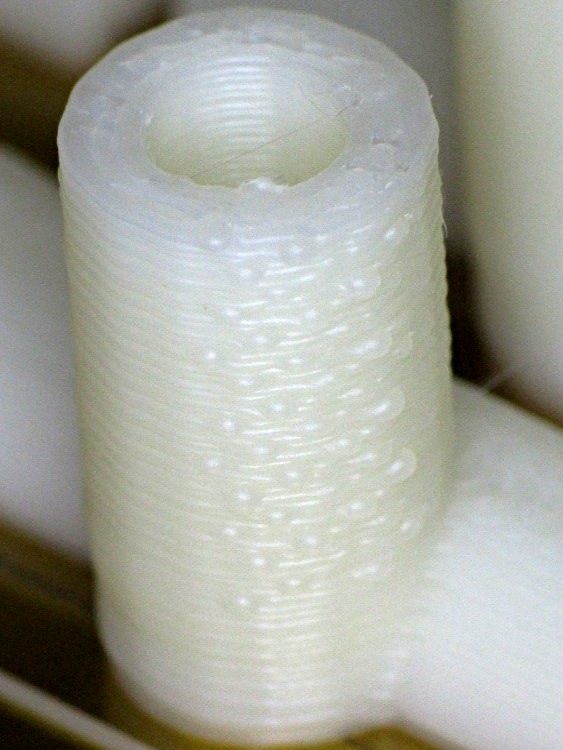
    Rack protector - Reversal zits
    Rack protector – Reversal zits

    The tube’s interior had equivalent zits that cleaned out easily with a twist drill.

    Some of the half-tube ends came out slightly angled with zits here & there, but remember that they’re 4.5 mm tall:
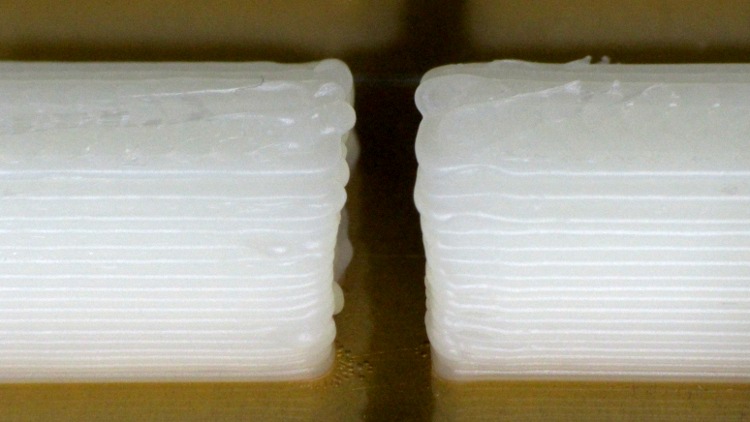
    Rack protector - Reversal zits

    The Zire 71 Protector had a lot more infill with very few perimeter joints. This corner shows a few zits at 30 mm/s:
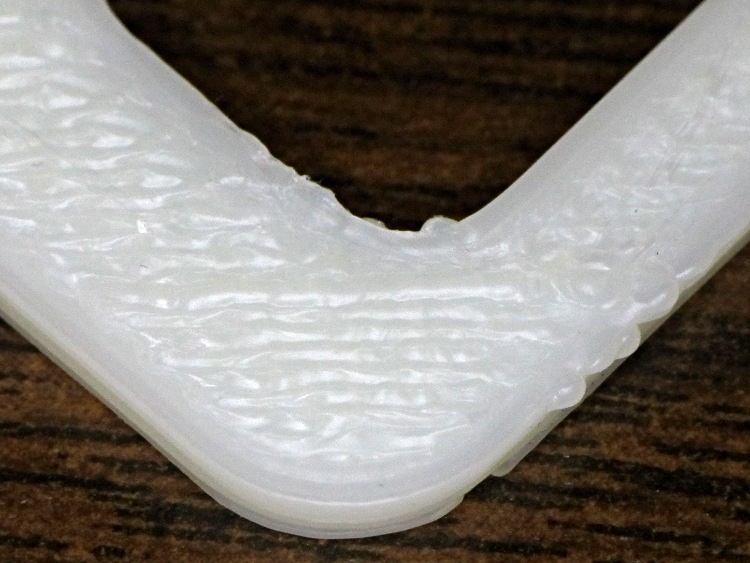
    Zire 71 protector - Reversal zits
    Zire 71 protector – Reversal zits

    One of the Dr. Who Cookie Cutters showed much more conspicuous zittage on the inside of a corner at 20 mm/s:
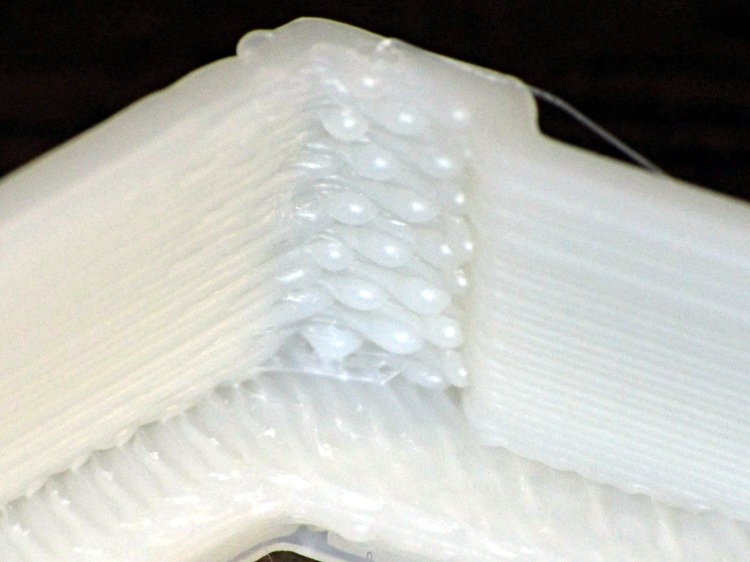
    Dr Who cutter - Reversal zit - interior corner
    Dr Who cutter – Reversal zit – interior corner

    Than on the outside of the same corner:
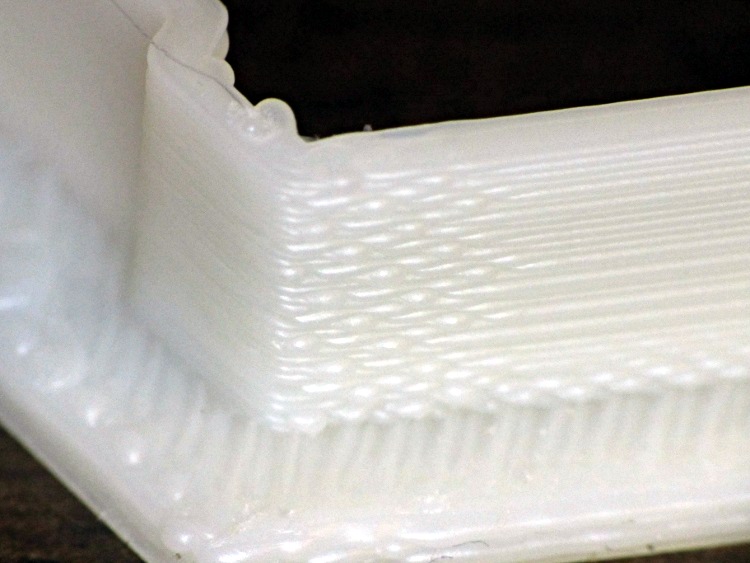
    Dr Who cutter - Reversal zit - Exterior corner
    Dr Who cutter – Reversal zit – Exterior corner

    The zits on the other cutter fell along one edge. The inside:

    Dr Who cutter - Reversal zits - interior side
    Dr Who cutter – Reversal zits – interior side

    And the outside:

    Dr Who cutter - Reversal zits - exterior side
    Dr Who cutter – Reversal zits – exterior side

    The Dr. Who set included flat cookie presses with patterns. Although these islands show some zittage, they’re about 1 mm tall and perhaps 5 mm long:
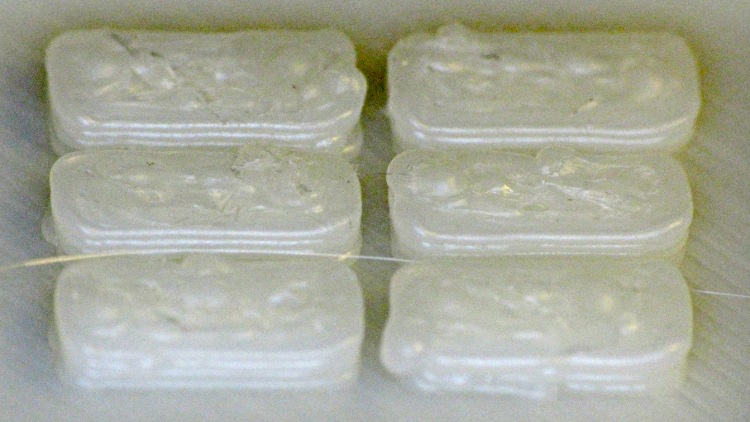
    Dr Who cutter - Reversal zits - islands
    Dr Who cutter – Reversal zits – islands

    The rest of the perimeter extrusions look essentially perfect, so these really are very minor imperfections.
  • Zire 71 Printed Button Shield

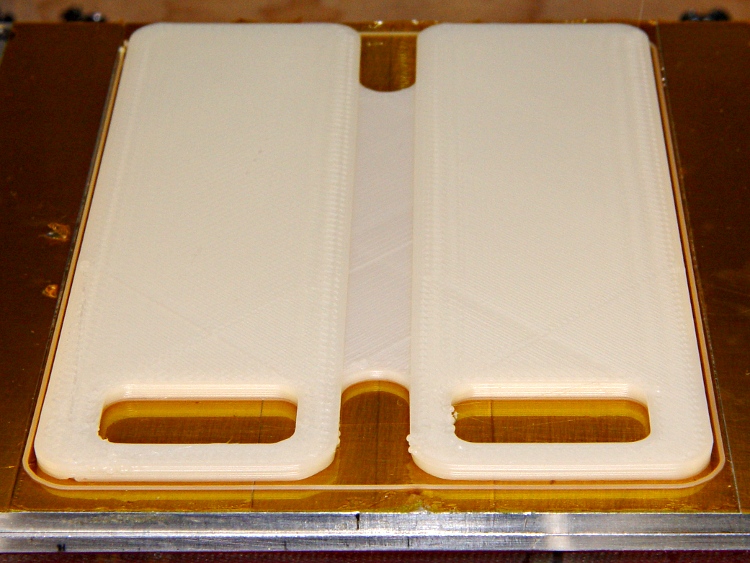
    After fixing that old plate, I just had to do this:

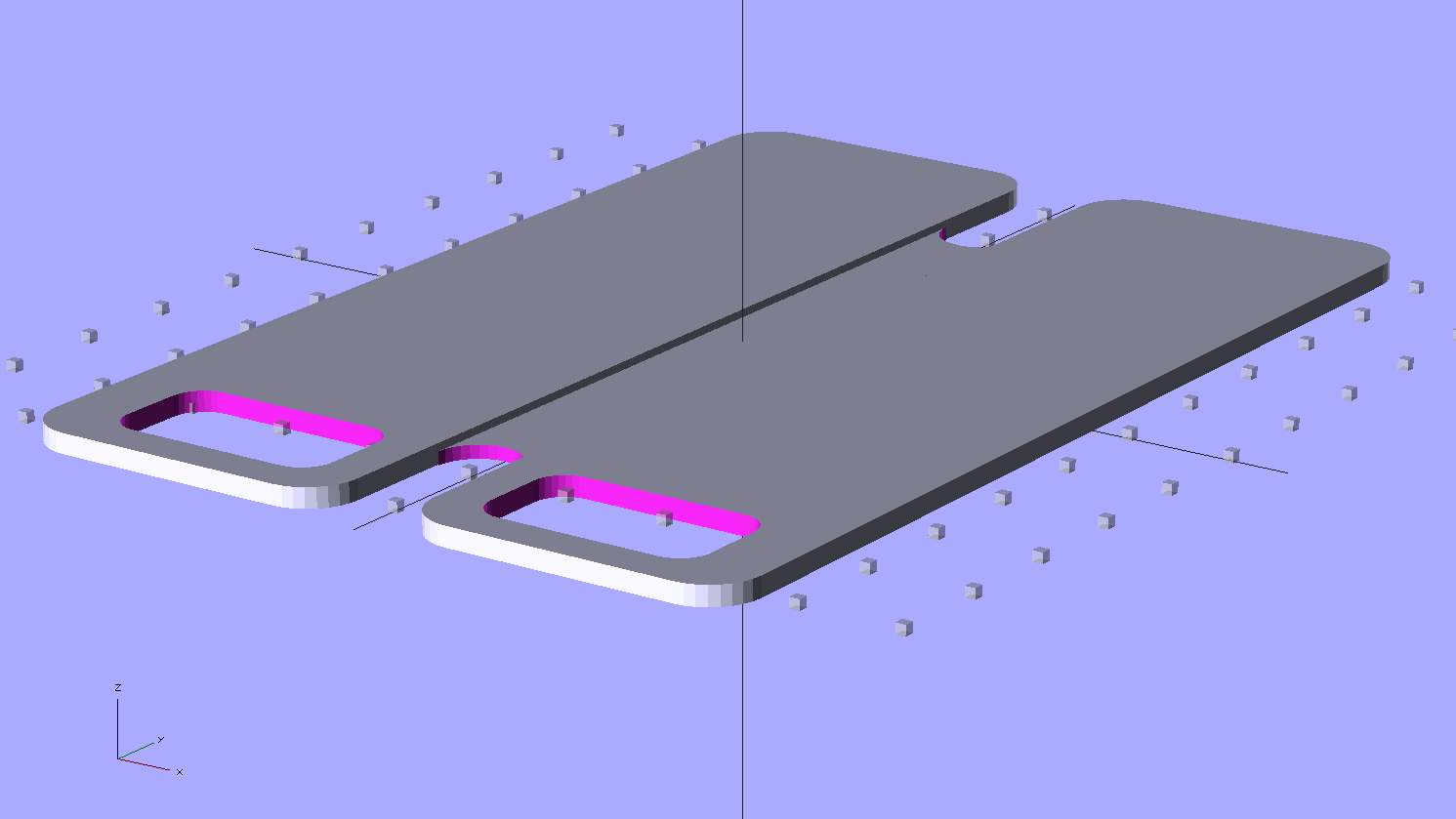
    Zire 71 protector - solid model
    Zire 71 protector – solid model

    Which pretty much fills up the build platform:

    Zire 71 protector - on build platform
    Zire 71 protector – on build platform

    And fits perfectly:

    Zire 71 protector in place
    Zire 71 protector in place

    It’s printed with 100% infill to produce a solid plastic plate.

    In retrospect, I think it’d work better if I put the notch on the bottom side with a bit of support, so that the glass-smooth surface faced the Zire. Maybe next time?

    The OpenSCAD source code:

    // Protector plate for Zire 71 PDA
    // Ed Nisley KE4ZNU - Jan 2012
    
    //-------
    //- Extrusion parameters must match reality!
    //  Print with +0 shells, 3 solid layers, 0.2 infill
    
    ThreadThick = 0.25;
    ThreadWidth = 2.0 * ThreadThick;
    
    Protrusion = 0.1;           // make holes end cleanly
    
    function IntegerMultiple(Size,Unit) = Unit * ceil(Size / Unit);
    function IntegerMultipleMin(Size,Unit) = Unit * floor(Size / Unit);
    
    //-------
    // Dimensions
    
    $fn=8*4;
    
    Length = 110;
    Width = 73;
    Thickness = IntegerMultiple(2.0,ThreadThick);
    CornerRadius = 5.0;
    
    NotchLength = 20;
    
    PocketWidth = 22;
    PocketLength = 12;
    PocketRadius = 3.0;
    PocketOffsetX = -1;
    PocketOffsetY = 10;
    
    SlotLength = 20;
    SlotWidth = IntegerMultiple(8.0,ThreadWidth);
    SlotDepth = IntegerMultiple(0.75,ThreadThick);
    
    //-------
    
    module ShowPegGrid(Space = 10.0,Size = 1.0) {
    
      Range = floor(50 / Space);
    
        for (x=[-Range:Range])
          for (y=[-Range:Range])
            translate([x*Space,y*Space,Size/2])
              %cube(Size,center=true);
    }
    
    //-------
    // Outer section of plate
    //  with nice rounded edges
    
    module PlateHalf() {
    
      translate([0,0,Thickness/2])
        difference() {
          minkowski(convexity=3) {
            cube([(Width - SlotWidth)/2 - 2*CornerRadius,(Length - 2*CornerRadius),(Thickness - 2*Protrusion)],center=true);
            cylinder(r=CornerRadius,h=Protrusion);
          }
          translate([PocketOffsetX,PocketOffsetY - Length/2,0])
            minkowski() {
              cube([PocketWidth - 2*PocketRadius,PocketLength - 2*PocketRadius,Thickness],center=true);
              cylinder(r=PocketRadius,h=Protrusion);
            }
        }
    }
    
    //-------
    
    ShowPegGrid();
    
    translate([(Width - SlotWidth)/4 + SlotWidth/2,0,0])
      PlateHalf();
    
    translate([-(Width - SlotWidth)/4 - SlotWidth/2,0,0])
      mirror([1,0,0])
        PlateHalf();
    
    difference() {
      translate([0,0,(Thickness - SlotDepth)/2])
        cube([SlotWidth + 2*Protrusion,Length - 2*SlotLength + SlotWidth,(Thickness - SlotDepth)],center=true);
      for (Index=[-1,1])
        translate([0,(Index*(Length/2 - SlotLength + SlotWidth/2)),-Protrusion])
          cylinder(r=SlotWidth/2,h=Thickness + 2*Protrusion);
    }
    
  • Extruder Speed Control Puzzle

    The Retraction speed in the Skeinforge Dimension plugin sets the E axis speed while it’s inhaling molten filament at the end of each thread and exhaling it at the start of the next thread. For a Retraction speed of 60 mm/s = 3600 mm/min and a Retraction Distance of 2 mm, the G-Code at the very start of the Skirt thread looks like this:

    G1 F3600.0
    G1 E2.0
    

    So far, so good; that, I can understand. The extruder spins at a pretty good clip, but only while moving 2 mm of filament.

    The Dimension plugin doc explains the settings for its parameters, but isn’t forthcoming on the subject of what to use for the Flow rate in the Speed plugin. The Speed plugin doc doesn’t help much; it seems the Flow rate uses either PWM or mm/s, depending on something imponderable. Per that discussion, you should apparently set both Feed and Flow to the same value (in mm/s), which I have done. Given that G-Code has only one speed setting for coordinated motion, that seems reasonable.

    For a Feed speed of 60 mm/s = 3600 mm/s (which may seem aggressive, but that’s what acceleration limiting enables), the G-Code at the start of the second layer looks like this:

    G1 X-3.5302 Y-26.3671 Z0.5 F3600.0 E141.3026
    G1 X2.7622 Y-22.7342 Z0.5 F3600.0 E141.4484
    G1 X9.0546 Y-26.3671 Z0.5 F3600.0 E141.5941
    

    However, that seems to mean the extruder rams filament into the hot end at 3600 mm/min = 60 mm/s, which simply isn’t what’s going on. The pinch wheel / gear / whatever turns at maybe 2 rev/min, which corresponds to about 60 mm/min: roughly 1/60 the speed indicated by the F3600.0 parameter.

    The SJFW M201 parameter was set to E60, which should set 60 mm/min as the minimum speed. But Skeinforge doesn’t know anything about the firmware’s internal minimum (or maximum!) speed limits.

    So I tried a few manual variations with the extruder heated up, feeding in commands like G1 E10 Fnn, with various nn values for the F speed, while measuring the elapsed time. If F sets the extruder speed in mm/min, then the time to extrude 10 mm of filament should vary inversely with the speed. Some results:

    • F240 → 10 s
    • F360 → 10 s
    • F400 → 11 s
    • F450 → 1 s
    • F480 → 1 s

    Huh. Now that, I do not understand.

    Setting M201 E120, which should double the minimum speed, produces these reasonable results:

    • F1 → 10 s
    • F2 → 7 s
    • F3 → 6 s
    • F4 → 3 s
    • F5 → stalls because the extruder can’t maintain that pace

    The first line seems to indicate that extruding 10 mm of filament at 1 mm/min requires 10 seconds, which is off by a neat factor of 1/60. The ratio of the lines is more-or-less right, as long as you allow more measurement windage than seems appropriate and ignore the gross overall speed mismatch. The difference between the two sequences is not the ratio of the two M201 settings, however.

    I have the extruder set to accelerate at 250 mm/s2, which implies it can reach 120 mm/min = 2 mm/s in 0.008 mm, which is basically instantly. Relevant equation: x = v2/2a.

    Given the incoming filament diameter and the outgoing extrusion thread dimensions, Skeinforge knows their cross-sectional areas.  Multiplying the extrusion thread’s cross-section area by the Pythagorean XY distance for a segment gives the extrusion volume, dividing that by the filament cross-section area gives the incoming filament length, and dividing that by the Filament Packing Density fudges the answer to come out right.

    From the coordinates in the first two lines of G-Code we have:

    • XY distance = 7.27 mm
    • extrusion distance = 0.15 mm

    Given the corresponding extrusion settings:

    • 0.25 mm layer height and 0.50 mm width = 0.125 mm2
    • 2.89 mm filament dia = 6.56 mm2
    • FPD=0.95

    The incoming distance works out to (0.125 * 7.27 / 6.56) / 0.95 = 0.15 mm, which is dead on the G-Code value. So I understand the volume part, at least.

    At the Feed rate of 60 mm/s, the extruder covers the XY distance in 7.27 / 60 = 0.12 s. The extruder must consume 0.15 mm of filament in that same time, which works out to 0.15 / 0.12 = 1.2 mm/s = 72 mm/min.

    Obviously, the extruder filament drive is not running at the F3600.0 value set by the G-Code, nor is it running at 1/60 that speed.

    I have not the foggiest idea what’s going on in there, but … it seems to work. Equally obviously, because Skeinforge doesn’t know which firmware I’m using, all the firmware usable with Dimension behaves the same way.

    One possibility: perhaps the E axis (definitely not XY and probably not Z) runs in something resembling EMC2’s inverse time mode, wherein the firmware adjusts the speed to complete the move in a fixed time. In this case, the firmware knows both the distance (given by Skeinforge in the E parameter) and the time for the XY move (found by dividing that XY Pythagorean distance by the F parameter), so it can compute the speed required to make the extruder poot out the right amount of plastic in that time, presumably while imposing (trapezoidal?) acceleration limiting along the way.

    That might also account for the weird behavior with M201 E60 shown above: perhaps the firmware uses a stale time left over from the most recent XY motion to compute the speed for a move involving only the E axis. I suppose I could puzzle through the source; it’s rather daunting.

    Anybody have any clues or pointers to the obvious doc I’ve overlooked?

  • Thing-O-Matic: Revised start.gcode and end.gcode

    SJFW supports the Dimension plugin with the E extruder axis and doesn’t implement the older M101/M103/M108/M113 direct extruder commands. So I rewrote start.gcode to take advantage of that, compensate for Z-axis backlash, and clean up a few other nits; an older version (for MBI firmware) is there. The new files are at the bottom of this post.

    The M351 disables dry-run mode, which I often engage while manually tweaking things: running the whole start.gcode file without heating helps get all the coordinates just right.

    Coarse homing sets the axis positions to zero, rather than their real values, to simplify the fine homing process. I could switch into G91 relative motion to back off the switches, but this is easier. The fine homing now runs dead slow through the 2 mm backoff distance and produces very consistent results.

    The first wipe gets rid of any residual snot before touching off on the Z-minimum platform switch, although I generally pick it off with a tweezer as the extruder heats.

    Unlike the MBI firmware, SJFW’s G92 can set each axis independently, which means the Z-min touchoff need not simultaneously reset the XY position. Note that the G92 distance gets smaller to raise the Z=0.0 position: a thinner switch means a smaller distance to the platform, so when you make the value smaller (for a constant switch height) the nozzle doesn’t travel as far downward to Z=0.0.

    I’d hoped to use SJFW’s M220/M221 commands to auto-set the home positions (including Z-min!), but they don’t quite work for this “in development” version. At least, feeding the appropriate commands directly through pronsole produces error messages indicating that the home positions aren’t set after a single-axis move, so I’ll continue using G92 for a while.

    I ram 10 mm of filament into the extruder with the nozzle positioned in front of the wiper blade, which generally does not poot out a giant tangle of thread because the previous print ended with a retraction that leaves the extruder depressurized. The point here is to squirt out at least some thread to get the extruder pressure close to normal, then do a retraction and wipe to prevent drooling on the way to the start of the Skirt outline.

    The Z axis has about 0.2 mm of backlash, which I compensate in two places. The mechanical Z=0.0 position works out to be 0.2 mm above the platform with the Z axis descending, so I made the G92 value slightly too small. The next two Z motions after the G92 descend to Z=0.0 in the left rear corner, then ascend to Z=0.2 to take up the mechanical backlash without causing any mechanical motion. After that, the nozzle is exactly (kinda-sorta) 0.2 mm above the platform and that matches the firmware’s notion of where it is. All successive Z motions (including to the first layer at Z=0.25) will be upward, so the backlash stays compensated and every layer comes out just about exactly correct.

    The last G92 presets the E axis position so that the first anti-reversal at the start of the Skirt thread doesn’t produce a giant blob. This is totally empirical; I think my manual reversal after priming doesn’t result in exactly the same extruder pressure as Skeinforge’s reversals.

    SJFW doesn’t implement the G0 rapid-motion command at all (which, for me, is better than implementing it wrong), so all the motion commands use G1 with an appropriate F feedrate parameter.

    However, extruder speed control using a G1 F before the G1 E doesn’t produce consistent results. I think the extruder normally runs in inverse-time mode, where the speed makes the E distance come out right for the prevailing XY speed. All I know for sure is that changing the F parameter doesn’t work the way it should: it does not set the subsequent filament speed in any predictable way.

    The new start.gcode file:

    ;---- start.gcode begins ----
    ; TOM 286 - Al plates + Geared extruder + Zmin platform sense
    ; Ed Nisley - KE4ZNU - Dec 2011
    ; SJFW 1.11 without G0 and G28/G16x homing
    ; Not yet -> Requires M220/M221 endstop positions
    ; See TOM286-sjfw.gcode for EEPROM setup
    ;
    ; Set initial conditions
    G21                 ; set units to mm
    G90                 ; set positioning to absolute
    ;----------
    ; Dry run?
    M351 P0             ; P0 = normal P1 = no heat
    ;----------
    ; Begin heating
    M104 S200           ; extruder head
    M140 S110           ; HBP
    ;----------
    ; Coarse home axes
    ; Set zero at limits for convenience
    G1 Z999 F1500       ; home Z to get nozzle out of danger zone
    G92 Z0
    G1 Y-999 F4000      ; retract Y to get X out of front opening
    G92 Y0
    G1 X-999 F4000      ; now safe to home X
    G92 X0
    ;----------
    ; Fine home axes
    ; Set actual offsets!
    G1 X2 Y2 Z-2 F5000  ; back off switches
    G1 Z999 F50
    G92 Z116.3
    G1 Y-999 F50
    G92 Y-58.5
    G1 X-999 F50
    G92 X-53.5
    ;----------
    ; Initial nozzle wipe to clear snot for Z touchoff
    G1 X0 Y0 Z3.0 F1500     ; pause at center to build confidence
    G4 P1000
    G1 Z10                  ; ensure clearance
    G1 X39 Y-58.0 F10000    ; move to front, avoid wiper blade
    G1 X55                  ; to wipe station
    G1 Z6.0                 ; to wipe level
    M116                    ; wait for temperature settling
    G1 Y-45 F500            ; slowly wipe nozzle
    ;-----------------------------------------------
    ; Z platform height touchoff
    ; Make sure the XY position is actually over the switch!
    ; Home Z downward to platform switch
    ; Compensate for 0.05 mm backlash in G92: make it 0.05 too low
    G1 X55.5 Y8.2 Z3.0 F6000     ; get over build platform switch
    G1 Z0 F50                    ; home downward very slowly
    G92 Z1.35                    ; set Z-min switch height
    G1 Z6.0 F1000                ; back off switch to wipe level
    ;-----------------------------------------------
    ; Prime extruder to stabilize initial pressure
    G1 X55 Y-45 F6000   ; set up for wipe from rear
    G1 Y-58.0 F500      ; wipe to front
    G91                 ; use incremental motion for extrusion
    G1 F4               ; set slow rate
    G1 E10              ; extrude enough to get good pressure
    G1 F4000            ; set for fast retract
    G1 E-2.0            ; retract
    G90                 ; back to absolute motion
    G1 Y-45 F1000       ; wipe nozzle to rear
    ;----------
    ; Set up for Skirt start in left rear corner
    ; Compensate for Z backlash: move upward from zero point
    G1 X-50 Y55 Z0.0 F10000     ; left rear corner -- kiss platform
    G1 Z0.2 F1500       ; take up Z backlash to less than thread height
    G92 E1.5            ; preset to avoid huge un-Reversal blob
    ;G1 X0 Y0
    ;---- start.gcode ends ----
    

    The matching end.gcode on the other end of the file simply retracts a bit more filament, then positions the stage front-and-center for easy build plate removal:

    ;---- end.gcode starts ----
    ; TOM 286 - Al plates + Geared extruder
    ; Ed Nisley - KE4ZNU - Dec 2011
    ; SJFW 1.11 without G0 and G28/G16x homing
    ; Not yet -> Requires M220/M221 endstop positions
    ; See TOM286-sjfw.gcode for EEPROM setup
    ;- inhale filament blob
    G91
    G1 E-5 F900
    G90
    ;- turn off heaters
    M104 S0         ; extruder head
    M140 S0         ; HBP
    ;- move to eject position
    G1 Z999 F1000   ; home Z to get nozzle away from object
    G92 Z117.2      ; reset Z
    G1 X0 F6000     ; center X axis
    G1 Y35          ; move Y stage forward
    ;---- end.gcode ends ----
    

    The replace.csv file that squashes commands that SJFW doesn’t implement:

    M101	;-- M101 no Extruder Forward
    M103	;-- M103 no All Extruders Off
    M108	;-- M108 no Extruder Speed
    M113	;-- M113 no Extruder PWM
    
  • SJFW: Initial EEPROM Configuration File

    Starting with acceleration and speed values based on those initial estimates, I hand-fed G-Code moves directly into the printer via pronsole while bouncing among these choices:

    • Increase acceleration until motor stalls
    • Decrease acceleration until motor starts
    • Increase velocity until motor stalls
    • Decrease velocity until motor runs

    The X axis runs fine at 333 mm/s = 20 m/min with 20 m/s2 acceleration; that little motor isn’t an impediment at all. As expected, the Y axis can’t accelerate that hard; it eventually started at 10 m/s2 to run at 250 mm/s = 15 m/min. I set X = 15 m/s2 and Y = 5 m/s2, with different maximum speeds.

    With those values in place, the printer can run the Smooth Axis Test at 250 mm/s, which is breathtaking and surprisingly noise-free: acceleration control eliminates the jarring start-stop motion. I modified Jackson’s G-Code to remove position testing, which uses codes that SJFW doesn’t implement.

    It’s worth mentioning I haven’t adjusted the motor currents at all.

    The Z axis can run at 2000 mm/min = 33 mm/s with acceleration around 1500 mm/s2. I backed that off to 1500 mm/min = 25 mm/s with 1000 mm/s2 acceleration. It’s noticeably faster than before, but that really doesn’t make much difference; there’s no point in replacing the stock MBI high-resistance / high-inductance motor.

    The E axis seems to require setting its speed with a separate G1 Exxx command (which is how Skeinforge does it) to get consistent results, although I confess to not taking good notes. I disconnected the filament drive to run the motor / gears without a load, got a workable speed & acceleration combination, reconnected the drive, fired up the hot end, and squirted filament all over the place to get actual numbers. It turns out that the little stepper on the extruder can actually ram a few millimeters of filament into the hot end at 4000 mm/min = 66 mm/s, but with acceleration down at 250 mm/s2. That’s dramatically peppier than the previous pace, which should reduce the Reversal Zittage problem.

    The resulting SJFW config file, with many unchanged default entries, will not work on a stock Thing-O-Matic:

    ; TOM286 with Z-min switch
    M402                            ; Write this config to EEPROM
    M309 P1 S0                      ; Endstops
    M300 X28 Y25 Z22 E15            ; STEP pins
    M301 X27 Y24 Z17 E14            ; DIR pins
    M302 X26 Y23 Z16 E3             ; ENABLE pins
    M304 X12 Y10 Z8                 ; MIN pins
    M305 Z7                         ; MAX pins
    M307 X1 Y1 Z0 E1                ; Axis Inversion
    M308 X0 Y0 Z0 E0                ; Disable After Move
    M200 X47.06985 Y47.06985 Z200  E48.30 ; Steps per MM
    M201 X1200     Y1200     Z1000 E60    ; Start Speed mm/min
    M202 X20000    Y15000    Z1500 E4000  ; Max speed mm/min
    M203 X1800     Y1800     Z1500 E90    ; Avg speed mm/min
    M206 X15000    Y5000     Z1000 E250   ; Acceleration mm/s^2
    ;M220 X-52.5    Y-58.5    Z1.50        ; Home - min
    ;M221                     Z117.2       ; Home - max
    ; LCD setup as per sjfw page on reprap wiki.
    M250 P47     ;set LCD RS pin
    M251 P43     ;set LCD RW pin
    M252 P41     ;set LCD E pin
    M253 S4 P39  ;set LCD Data 4 pin
    M253 S5 P37  ;set LCD Data 5 pin
    M253 S6 P35  ;set LCD Data 6 pin
    M253 S7 P33  ;set LCD Data 7 pin - always set last of all LCD pins OR ELSE!
    M255 S2 P48  ;set Keypad Col 3 pin
    M255 S1 P46  ;set Keypad Col 2 pin
    M254 S3 P42  ;set Keypad Row 4 pin
    M254 S2 P40  ;set Keypad Row 3 pin
    M254 S1 P38  ;set Keypad Row 2 pin
    M254 S0 P36  ;set Keypad Row 1 pin
    M255 S3 P34  ;set Keypad Col 4 pin
    M255 S0 P44  ;set Keypad Col 1 pin - always set last of all Keypad pins OR ELSE!
    M104 S0                          ; Turn off hotend heat (Important with EC!)
    M140 S0                          ; Turn off platform heat (Important with EC!)
    M350 P1                          ; Enable lookahead
    ;M211 P5000                       ; Report temperatures every 5 seconds
    M84                              ; Disable all Motors
    M400                             ; End EEPROM write
    

    I haven’t connected an LCD or keyboard to the thing; for me, printing is fire-and-forget.

  • Skeinforge: Simplified Plugin Selection Page

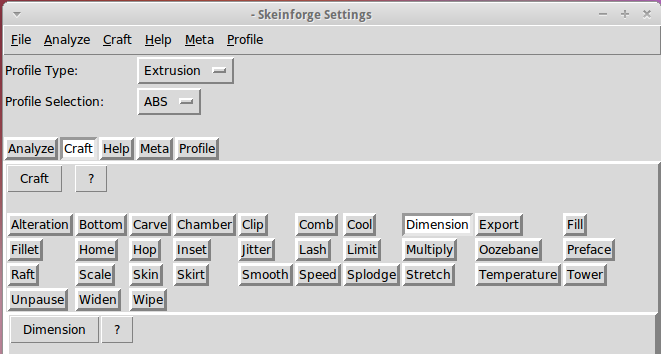
    The Skeinforge Craft window presents a formidable array of buttons, one for each possible plugin:

    Skeinforge standard
    Skeinforge standard

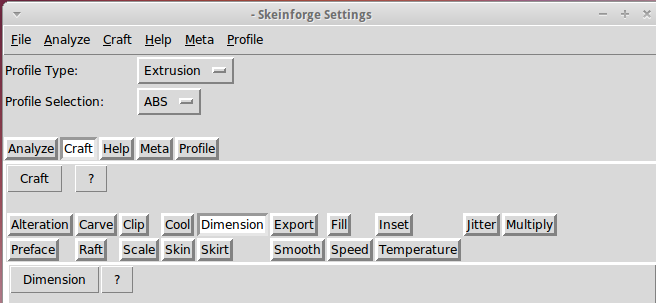
    I’ve disabled many of those plugins because, for example, limiting Z-axis speed isn’t relevant on my printer. If you’re sure you won’t use some of the plugins, remove them by editing /where-it's-installed/skeinforge_application/skeinforge_plugins/profile_plugins/extrusion.py thusly…

    In getCraftSequence(), located at about the midpoint of that file, duplicate the line that lists the plugins and add an octothorpe (OK, a hash) to make one line a Python comment, then remove the plugins you don’t care about from the other line:

    def getCraftSequence():
    	'Get the extrusion craft sequence.'
    #	return 'carve scale bottom preface widen inset fill multiply speed temperature raft skirt chamber tower jitter clip smooth stretch skin comb cool hop wipe oozebane splodge home lash fillet limit unpause dimension alteration export'.split()
    	return 'carve scale preface inset fill multiply speed temperature raft skirt jitter clip smooth skin cool dimension alteration export'.split()
    

    This being Python, do not change the indentation. If you get overenthusiastic and toss something useful overboard or just pine for the Good Old Days, swap the octothorpe to your modified line to restore the original plugin assortment.

    Save the result and you’ll see only the useful buttons:

    Skeinforge simplified
    Skeinforge simplified

    There, now, wasn’t that easy?

  • GPS+Voice Interface for Wouxun KG-UV3D: PCB in a Box!

    It always feels good when the parts fit together, even if they don’t actually do anything yet…

    Bare PCB in Wouxun HT battery case
    Bare PCB in Wouxun HT battery case

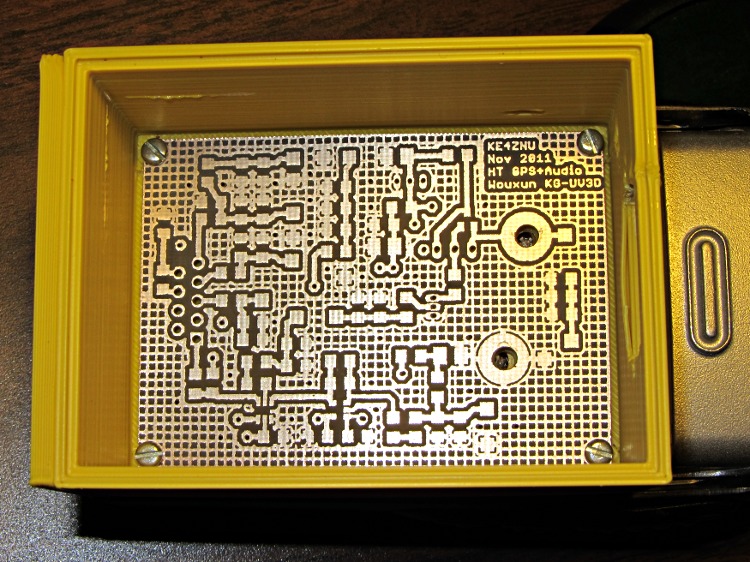
    That’s the bare PCB in the first-pass 3D-printed battery case adapter, both of which need quite a bit more work. In particular, the case desperately needs some sort of latch to hold the yet-to-be-built contacts against the HT’s battery terminals.

    Amazingly, all the holes lined up spot on, although I think the lower battery contact could move half a millimeter closer to the base of the radio. The battery case contacts are large enough to work as-is and, for what it’s worth, the Wouxun battery cases seem to differ slightly among themselves, too.

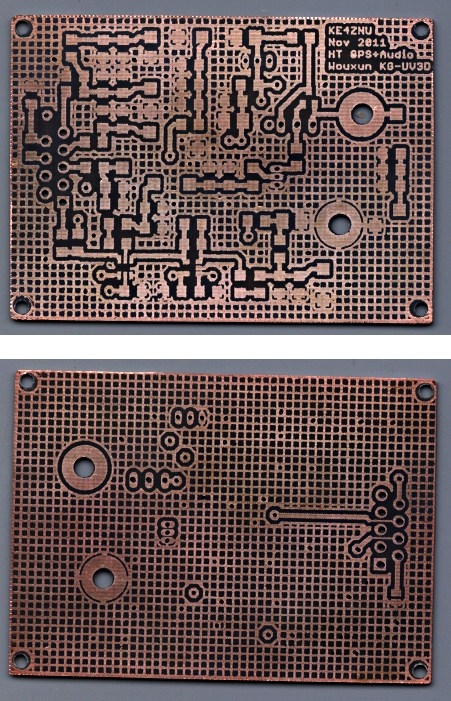
    The PCB itself came out about as well as any homebrew PCB I’ve ever made, after getting the Logitech Joggy Thing working again to line the Sherline up for hole drilling:

    Wouxun HT GPS-Audio PCB - copper
    Wouxun HT GPS-Audio PCB – copper

    The circuit has provision for pairs of SMD caps on all the inputs, with which I hope to squash RFI from both the VHF and UHF amateur bands by choosing their self-resonant frequencies appropriately.