The Smell of Molten Projects in the Morning

Ed Nisley's Blog: Shop notes, electronics, firmware, machinery, 3D printing, laser cuttery, and curiosities. Contents: 100% human thinking, 0% AI slop.

Tag: CNC

Making parts with mathematics

  • HAL Pin Names for an Arduino Leonardo Knockoff

    Going through the usual dance to reveal the HAL pin names for an Arduino Leonardo knockoff shows that it is, indeed, both a mouse and a keyboard.
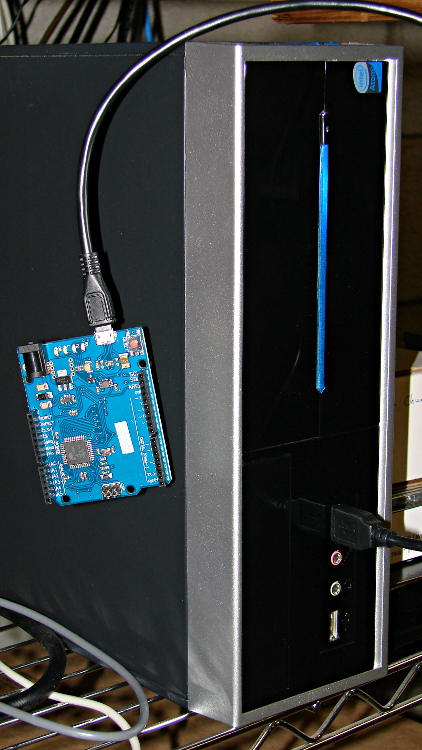
    Arduino Leonardo knockoff - LinuxCNC box
    Arduino Leonardo knockoff – LinuxCNC box

    Pawing through less /proc/bus/input/devices reveals:

    I: Bus=0003 Vendor=2341 Product=8036 Version=0101
    N: Name="Arduino LLC Arduino Leonardo"
    P: Phys=usb-0000:00:1d.0-1/input2
    S: Sysfs=/devices/pci0000:00/0000:00:1d.0/usb2/2-1/2-1:1.2/input/input3
    U: Uniq=
    H: Handlers=kbd mouse1 event3
    B: EV=100017
    B: KEY=70000 0 0 0 0 e080ffdf 1cfffff ffffffff fffffffe
    B: REL=103
    B: MSC=10
    

    Tweaking the permissions:

    sudo chgrp users /dev/input/event3
    sudo chgrp users /dev/input/mouse1
    sudo chmod g+w /dev/input/event3
    sudo chmod g+w /dev/input/mouse1
    

    The output of lsusb shows something interesting:

    Bus 005 Device 001: ID 1d6b:0001 Linux Foundation 1.1 root hub
    Bus 004 Device 006: ID 06f2:0011 Emine Technology Co. KVM Switch Keyboard
    Bus 004 Device 005: ID 046d:c401 Logitech, Inc. TrackMan Marble Wheel
    Bus 004 Device 004: ID 04d9:1203 Holtek Semiconductor, Inc. MC Industries Keyboard
    Bus 004 Device 003: ID 046d:c216 Logitech, Inc. Dual Action Gamepad
    Bus 004 Device 002: ID 0451:2046 Texas Instruments, Inc. TUSB2046 Hub
    Bus 004 Device 001: ID 1d6b:0001 Linux Foundation 1.1 root hub
    Bus 003 Device 001: ID 1d6b:0001 Linux Foundation 1.1 root hub
    Bus 002 Device 002: ID 2341:8036
    Bus 002 Device 001: ID 1d6b:0001 Linux Foundation 1.1 root hub
    Bus 001 Device 001: ID 1d6b:0002 Linux Foundation 2.0 root hub
    

    For whatever reason, this board doesn’t report a device name. It’s plugged into the same USB port as that mouse, so it gets the same Bus and Device numbers, which helps confirm that’s the board.

    Querying the attributes with udevadm produces the all-important product string:

    udevadm info --query=all --attribute-walk --name=/dev/bus/usb/002/002
    ... snippage ...
      looking at device '/devices/pci0000:00/0000:00:1d.0/usb2/2-1':
        KERNEL=="2-1"
        SUBSYSTEM=="usb"
        DRIVER=="usb"
        ATTR{configuration}==""
        ATTR{bNumInterfaces}==" 3"
        ATTR{bConfigurationValue}=="1"
        ATTR{bmAttributes}=="80"
        ATTR{bMaxPower}=="500mA"
        ATTR{urbnum}=="17"
        ATTR{idVendor}=="2341"
        ATTR{idProduct}=="8036"
        ATTR{bcdDevice}=="0100"
        ATTR{bDeviceClass}=="02"
        ATTR{bDeviceSubClass}=="00"
        ATTR{bDeviceProtocol}=="00"
        ATTR{bNumConfigurations}=="1"
        ATTR{bMaxPacketSize0}=="64"
        ATTR{speed}=="12"
        ATTR{busnum}=="2"
        ATTR{devnum}=="2"
        ATTR{version}==" 2.00"
        ATTR{maxchild}=="0"
        ATTR{quirks}=="0x0"
        ATTR{authorized}=="1"
        ATTR{manufacturer}=="Arduino LLC"
        ATTR{product}=="Arduino Leonardo"
    

    Then we know enough to discover what it can do:

    halrun
    halcmd: loadusr -W hal_input -KRAL Leo
    halcmd: show all
    Loaded HAL Components:
    ID      Type  Name                                      PID   State
         5  User  hal_input                                 11265 ready
         3  User  halcmd11264                               11264 ready
    
    Component Pins:
    Owner   Type  Dir         Value  Name
         5  bit   OUT         FALSE  input.0.btn-middle
         5  bit   OUT          TRUE  input.0.btn-middle-not
         5  bit   OUT         FALSE  input.0.btn-mouse
         5  bit   OUT          TRUE  input.0.btn-mouse-not
         5  bit   OUT         FALSE  input.0.btn-right
         5  bit   OUT          TRUE  input.0.btn-right-not
         5  bit   OUT         FALSE  input.0.key-0
         5  bit   OUT          TRUE  input.0.key-0-not
         5  bit   OUT         FALSE  input.0.key-1
         5  bit   OUT          TRUE  input.0.key-1-not
         5  bit   OUT         FALSE  input.0.key-102nd
         5  bit   OUT          TRUE  input.0.key-102nd-not
         5  bit   OUT         FALSE  input.0.key-2
         5  bit   OUT          TRUE  input.0.key-2-not
         5  bit   OUT         FALSE  input.0.key-3
         5  bit   OUT          TRUE  input.0.key-3-not
         5  bit   OUT         FALSE  input.0.key-4
         5  bit   OUT          TRUE  input.0.key-4-not
         5  bit   OUT         FALSE  input.0.key-5
         5  bit   OUT          TRUE  input.0.key-5-not
         5  bit   OUT         FALSE  input.0.key-6
         5  bit   OUT          TRUE  input.0.key-6-not
         5  bit   OUT         FALSE  input.0.key-7
         5  bit   OUT          TRUE  input.0.key-7-not
         5  bit   OUT         FALSE  input.0.key-8
         5  bit   OUT          TRUE  input.0.key-8-not
         5  bit   OUT         FALSE  input.0.key-9
         5  bit   OUT          TRUE  input.0.key-9-not
         5  bit   OUT         FALSE  input.0.key-a
         5  bit   OUT          TRUE  input.0.key-a-not
         5  bit   OUT         FALSE  input.0.key-apostrophe
         5  bit   OUT          TRUE  input.0.key-apostrophe-not
         5  bit   OUT         FALSE  input.0.key-b
         5  bit   OUT          TRUE  input.0.key-b-not
         5  bit   OUT         FALSE  input.0.key-backslash
         5  bit   OUT          TRUE  input.0.key-backslash-not
         5  bit   OUT         FALSE  input.0.key-backspace
         5  bit   OUT          TRUE  input.0.key-backspace-not
         5  bit   OUT         FALSE  input.0.key-c
         5  bit   OUT          TRUE  input.0.key-c-not
         5  bit   OUT         FALSE  input.0.key-capslock
         5  bit   OUT          TRUE  input.0.key-capslock-not
         5  bit   OUT         FALSE  input.0.key-comma
         5  bit   OUT          TRUE  input.0.key-comma-not
         5  bit   OUT         FALSE  input.0.key-compose
         5  bit   OUT          TRUE  input.0.key-compose-not
         5  bit   OUT         FALSE  input.0.key-d
         5  bit   OUT          TRUE  input.0.key-d-not
         5  bit   OUT         FALSE  input.0.key-delete
         5  bit   OUT          TRUE  input.0.key-delete-not
         5  bit   OUT         FALSE  input.0.key-dot
         5  bit   OUT          TRUE  input.0.key-dot-not
         5  bit   OUT         FALSE  input.0.key-down
         5  bit   OUT          TRUE  input.0.key-down-not
         5  bit   OUT         FALSE  input.0.key-e
         5  bit   OUT          TRUE  input.0.key-e-not
         5  bit   OUT         FALSE  input.0.key-end
         5  bit   OUT          TRUE  input.0.key-end-not
         5  bit   OUT         FALSE  input.0.key-enter
         5  bit   OUT          TRUE  input.0.key-enter-not
         5  bit   OUT         FALSE  input.0.key-equal
         5  bit   OUT          TRUE  input.0.key-equal-not
         5  bit   OUT         FALSE  input.0.key-esc
         5  bit   OUT          TRUE  input.0.key-esc-not
         5  bit   OUT         FALSE  input.0.key-f
         5  bit   OUT          TRUE  input.0.key-f-not
         5  bit   OUT         FALSE  input.0.key-f1
         5  bit   OUT          TRUE  input.0.key-f1-not
         5  bit   OUT         FALSE  input.0.key-f10
         5  bit   OUT          TRUE  input.0.key-f10-not
         5  bit   OUT         FALSE  input.0.key-f11
         5  bit   OUT          TRUE  input.0.key-f11-not
         5  bit   OUT         FALSE  input.0.key-f12
         5  bit   OUT          TRUE  input.0.key-f12-not
         5  bit   OUT         FALSE  input.0.key-f2
         5  bit   OUT          TRUE  input.0.key-f2-not
         5  bit   OUT         FALSE  input.0.key-f3
         5  bit   OUT          TRUE  input.0.key-f3-not
         5  bit   OUT         FALSE  input.0.key-f4
         5  bit   OUT          TRUE  input.0.key-f4-not
         5  bit   OUT         FALSE  input.0.key-f5
         5  bit   OUT          TRUE  input.0.key-f5-not
         5  bit   OUT         FALSE  input.0.key-f6
         5  bit   OUT          TRUE  input.0.key-f6-not
         5  bit   OUT         FALSE  input.0.key-f7
         5  bit   OUT          TRUE  input.0.key-f7-not
         5  bit   OUT         FALSE  input.0.key-f8
         5  bit   OUT          TRUE  input.0.key-f8-not
         5  bit   OUT         FALSE  input.0.key-f9
         5  bit   OUT          TRUE  input.0.key-f9-not
         5  bit   OUT         FALSE  input.0.key-g
         5  bit   OUT          TRUE  input.0.key-g-not
         5  bit   OUT         FALSE  input.0.key-grave
         5  bit   OUT          TRUE  input.0.key-grave-not
         5  bit   OUT         FALSE  input.0.key-h
         5  bit   OUT          TRUE  input.0.key-h-not
         5  bit   OUT         FALSE  input.0.key-home
         5  bit   OUT          TRUE  input.0.key-home-not
         5  bit   OUT         FALSE  input.0.key-i
         5  bit   OUT          TRUE  input.0.key-i-not
         5  bit   OUT         FALSE  input.0.key-insert
         5  bit   OUT          TRUE  input.0.key-insert-not
         5  bit   OUT         FALSE  input.0.key-j
         5  bit   OUT          TRUE  input.0.key-j-not
         5  bit   OUT         FALSE  input.0.key-k
         5  bit   OUT          TRUE  input.0.key-k-not
         5  bit   OUT         FALSE  input.0.key-kp0
         5  bit   OUT          TRUE  input.0.key-kp0-not
         5  bit   OUT         FALSE  input.0.key-kp1
         5  bit   OUT          TRUE  input.0.key-kp1-not
         5  bit   OUT         FALSE  input.0.key-kp2
         5  bit   OUT          TRUE  input.0.key-kp2-not
         5  bit   OUT         FALSE  input.0.key-kp3
         5  bit   OUT          TRUE  input.0.key-kp3-not
         5  bit   OUT         FALSE  input.0.key-kp4
         5  bit   OUT          TRUE  input.0.key-kp4-not
         5  bit   OUT         FALSE  input.0.key-kp5
         5  bit   OUT          TRUE  input.0.key-kp5-not
         5  bit   OUT         FALSE  input.0.key-kp6
         5  bit   OUT          TRUE  input.0.key-kp6-not
         5  bit   OUT         FALSE  input.0.key-kp7
         5  bit   OUT          TRUE  input.0.key-kp7-not
         5  bit   OUT         FALSE  input.0.key-kp8
         5  bit   OUT          TRUE  input.0.key-kp8-not
         5  bit   OUT         FALSE  input.0.key-kp9
         5  bit   OUT          TRUE  input.0.key-kp9-not
         5  bit   OUT         FALSE  input.0.key-kpasterisk
         5  bit   OUT          TRUE  input.0.key-kpasterisk-not
         5  bit   OUT         FALSE  input.0.key-kpdot
         5  bit   OUT          TRUE  input.0.key-kpdot-not
         5  bit   OUT         FALSE  input.0.key-kpenter
         5  bit   OUT          TRUE  input.0.key-kpenter-not
         5  bit   OUT         FALSE  input.0.key-kpminus
         5  bit   OUT          TRUE  input.0.key-kpminus-not
         5  bit   OUT         FALSE  input.0.key-kpplus
         5  bit   OUT          TRUE  input.0.key-kpplus-not
         5  bit   OUT         FALSE  input.0.key-kpslash
         5  bit   OUT          TRUE  input.0.key-kpslash-not
         5  bit   OUT         FALSE  input.0.key-l
         5  bit   OUT          TRUE  input.0.key-l-not
         5  bit   OUT         FALSE  input.0.key-left
         5  bit   OUT          TRUE  input.0.key-left-not
         5  bit   OUT         FALSE  input.0.key-leftalt
         5  bit   OUT          TRUE  input.0.key-leftalt-not
         5  bit   OUT         FALSE  input.0.key-leftbrace
         5  bit   OUT          TRUE  input.0.key-leftbrace-not
         5  bit   OUT         FALSE  input.0.key-leftctrl
         5  bit   OUT          TRUE  input.0.key-leftctrl-not
         5  bit   OUT         FALSE  input.0.key-leftmeta
         5  bit   OUT          TRUE  input.0.key-leftmeta-not
         5  bit   OUT         FALSE  input.0.key-leftshift
         5  bit   OUT          TRUE  input.0.key-leftshift-not
         5  bit   OUT         FALSE  input.0.key-m
         5  bit   OUT          TRUE  input.0.key-m-not
         5  bit   OUT         FALSE  input.0.key-minus
         5  bit   OUT          TRUE  input.0.key-minus-not
         5  bit   OUT         FALSE  input.0.key-n
         5  bit   OUT          TRUE  input.0.key-n-not
         5  bit   OUT         FALSE  input.0.key-numlock
         5  bit   OUT          TRUE  input.0.key-numlock-not
         5  bit   OUT         FALSE  input.0.key-o
         5  bit   OUT          TRUE  input.0.key-o-not
         5  bit   OUT         FALSE  input.0.key-p
         5  bit   OUT          TRUE  input.0.key-p-not
         5  bit   OUT         FALSE  input.0.key-pagedown
         5  bit   OUT          TRUE  input.0.key-pagedown-not
         5  bit   OUT         FALSE  input.0.key-pageup
         5  bit   OUT          TRUE  input.0.key-pageup-not
         5  bit   OUT         FALSE  input.0.key-pause
         5  bit   OUT          TRUE  input.0.key-pause-not
         5  bit   OUT         FALSE  input.0.key-q
         5  bit   OUT          TRUE  input.0.key-q-not
         5  bit   OUT         FALSE  input.0.key-r
         5  bit   OUT          TRUE  input.0.key-r-not
         5  bit   OUT         FALSE  input.0.key-right
         5  bit   OUT          TRUE  input.0.key-right-not
         5  bit   OUT         FALSE  input.0.key-rightalt
         5  bit   OUT          TRUE  input.0.key-rightalt-not
         5  bit   OUT         FALSE  input.0.key-rightbrace
         5  bit   OUT          TRUE  input.0.key-rightbrace-not
         5  bit   OUT         FALSE  input.0.key-rightctrl
         5  bit   OUT          TRUE  input.0.key-rightctrl-not
         5  bit   OUT         FALSE  input.0.key-rightmeta
         5  bit   OUT          TRUE  input.0.key-rightmeta-not
         5  bit   OUT         FALSE  input.0.key-rightshift
         5  bit   OUT          TRUE  input.0.key-rightshift-not
         5  bit   OUT         FALSE  input.0.key-s
         5  bit   OUT          TRUE  input.0.key-s-not
         5  bit   OUT         FALSE  input.0.key-scrolllock
         5  bit   OUT          TRUE  input.0.key-scrolllock-not
         5  bit   OUT         FALSE  input.0.key-semicolon
         5  bit   OUT          TRUE  input.0.key-semicolon-not
         5  bit   OUT         FALSE  input.0.key-slash
         5  bit   OUT          TRUE  input.0.key-slash-not
         5  bit   OUT         FALSE  input.0.key-space
         5  bit   OUT          TRUE  input.0.key-space-not
         5  bit   OUT         FALSE  input.0.key-sysrq
         5  bit   OUT          TRUE  input.0.key-sysrq-not
         5  bit   OUT         FALSE  input.0.key-t
         5  bit   OUT          TRUE  input.0.key-t-not
         5  bit   OUT         FALSE  input.0.key-tab
         5  bit   OUT          TRUE  input.0.key-tab-not
         5  bit   OUT         FALSE  input.0.key-u
         5  bit   OUT          TRUE  input.0.key-u-not
         5  bit   OUT         FALSE  input.0.key-up
         5  bit   OUT          TRUE  input.0.key-up-not
         5  bit   OUT         FALSE  input.0.key-v
         5  bit   OUT          TRUE  input.0.key-v-not
         5  bit   OUT         FALSE  input.0.key-w
         5  bit   OUT          TRUE  input.0.key-w-not
         5  bit   OUT         FALSE  input.0.key-x
         5  bit   OUT          TRUE  input.0.key-x-not
         5  bit   OUT         FALSE  input.0.key-y
         5  bit   OUT          TRUE  input.0.key-y-not
         5  bit   OUT         FALSE  input.0.key-z
         5  bit   OUT          TRUE  input.0.key-z-not
         5  s32   OUT             0  input.0.rel-wheel-counts
         5  float OUT             0  input.0.rel-wheel-position
         5  bit   IN          FALSE  input.0.rel-wheel-reset
         5  float IN              1  input.0.rel-wheel-scale
         5  s32   OUT             0  input.0.rel-x-counts
         5  float OUT             0  input.0.rel-x-position
         5  bit   IN          FALSE  input.0.rel-x-reset
         5  float IN              1  input.0.rel-x-scale
         5  s32   OUT             0  input.0.rel-y-counts
         5  float OUT             0  input.0.rel-y-position
         5  bit   IN          FALSE  input.0.rel-y-reset
         5  float IN              1  input.0.rel-y-scale
    

    That’s a pretty decent assortment of directly usable names and features, even without keyboard LEDs. The mouse pins could be repurposed for general sensor values:

    • counts = integer = accumulated encoder wheel ticks
    • position = float = count / scale (why divided? I don’t know)
    • scale = float = turns counts into position
    • reset = bit = resets position or maybe count (not sure)

    I think you could use count to transfer a bare ADC reading from the Leonardo, then use scale to get the actual voltage in “position”. In that situation, reset wouldn’t be at all useful.

    The keyboard pins could transfer Boolean sensors.

    You’d want to give HAL exclusive control of the Leonardo-is-not-a-mouse, because the incoming data would make hash of the, ah, LinuxCNC UI experience in short order. I’m not sure how to control that; the Leonardo advice boils down to “be careful” and “use a physical switch”.

    I have *no* idea where the names come from, but apparently the OS / kernel / something has a HID layer that translates bare USB capability bits into strings. How that relates to a particular device, what the choices might be, how one could add / replace the names for a given device, and all that, I don’t know yet.
  • Stepper Motor Thermal Coefficient vs. Thermal Compound and Forced Air

    Prompted by that comment, a bit more data emerges.

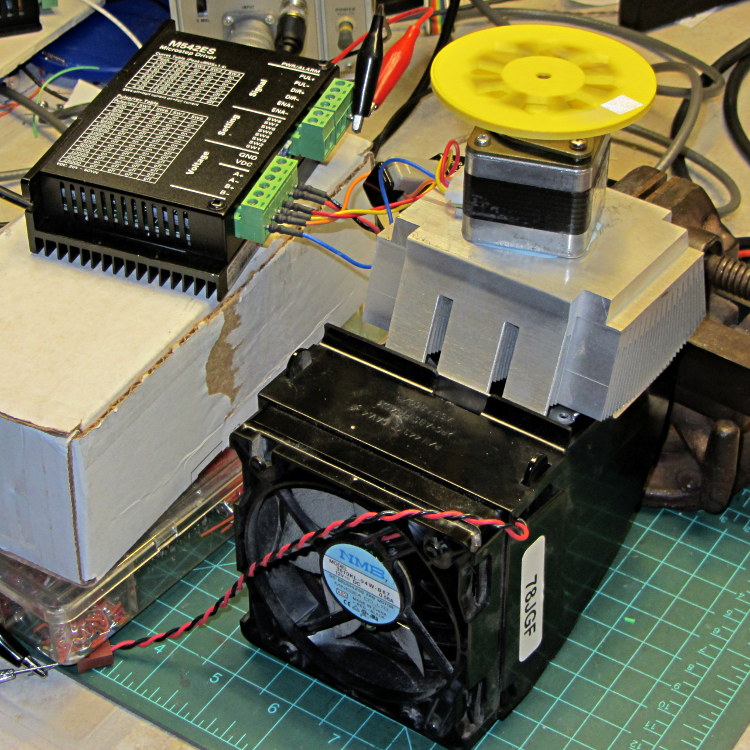
    This unsteady ziggurat barely supports the aluminum CPU heatsink atop a PC CPU exhaust duct; the two came from different PCs and have no relation to each other.  The vise in the background keeps the whole affair from falling over. The fan sucks air through the heatsink and exhausts it out the front.

    NEMA 17 Stepper - Heatsink with Fan
    NEMA 17 Stepper – Heatsink with Fan

    Throughout all this, the stepper driver runs at a bit over 10 k step/sec, tuned to avoid the howling mechanical resonances in that stack. At 1/8 microstepping, that’s 6.25 rev/s = 375 RPM, which would drive the Thing-O-Matic at 210 mm/s and the M2 at 225 mm/s. Your speed will vary, of course, depending on the pulley diameter / number of teeth / belt pitch, etc.

    Under the same conditions as before (i.e., no thermal compound, fan off), the stepper stabilized at 143 °F = 62 °C in the 57 °F = 14 °C Basement Laboratory ambient, with 1.91 A peak current (I don’t believe that second decimal place, either) and a 6.6 °C/W case-to-ambient coefficient. That’s close enough to the 63 °C and 6.7 °C/W coefficient from the earlier test, so the conditions seem roughly the same.

    Smoothing a thin layer of heatsink compound on the butt of the motor, then squishing it firmly atop the heatsink, cut the temperature to 130 °F = 53 °C without the fan. That suggests the case-to-ambient coefficient is now 5.3 °C/W: the thermal compound helps by 1.3 °C/W.

    Turning on the fan drops the case temperature to 84 °F = 29 °C, which works out to a coefficient of 2.1 °C/W. Obviously, moving air over that heatsink helps the cooling a lot: the heatsink felt cold to the touch and the motor case was barely warm.

    Increasing the current to 2.37 A dissipates 11.2 W, which would be scary without the heatsink and air flow. The temperature stabilized at 91 °F = 33 °C, for a coefficient of 1.7 °C/W.

    At 2.83 A = 16 W, the temperature rises to 100 °F = 38 °C, with a coefficient of 1.5 °C/W. While it’s not unstoppable with that much current, the motor has plenty of torque! The motor becomes pleasantly warm, the heatsink stays just above cool, and all seems right with the world. I suspect the windings get a bit toasty in there, but they can’t possibly be worse off than inside a case at boiling-water temperatures.

    Using the original insulated-motor coefficient of 19 °C/W, 16 W would cook the motor at 320 °C. Perhaps the case would make a nice extruder heater after it stopped being a motor?

    [Update: See the comments for the results of just blowing air over the motor case.]

  • Stepper Motor Thermal Coefficient

    You’ve probably seen this exchange on whatever DIY 3D printing forum you monitor:

    1. My stepper motors get scorching hot, what should I do?
    2. Turn down the current!
    3. That worked great, but …
    4. … now all my objects have a shift in the middle.
    5. Your motor is losing steps: turn up the current!
    6. Uh, right.
    NEMA 17 Stepper on cloth
    NEMA 17 Stepper on cloth

    So, with that setup on the bench, I ran a simple experiment with current, temperature, and heat transfer. Most DIY 3D printers have stepper motors attached to a plywood chassis or plastic holder, so the first data point comes from a motor with no mechanical thermal path to the outside world (which is the Basement Laboratory at 14 °C ambient).

    Running at about 1200 step/s with a winding current of 1 A peak from a 24 A supply, the motor stabilized at 52 °C = 125 °F after half an hour.

    Both windings have a 2 Ω resistance and carry 1 A peak = 0.7 A rms, so the total power dissipation is:

    2 × [(1 A / √2)2 × 2 Ω] = 2 W

    That’s the same power produced with the motor stopped at a full step position, where the peak current flows in a single winding and the other winding carries zero current:

    (1 A)2 × 2 Ω = 2 W

    The temperature rise suggests a thermal coefficient of about 19 °C/W = (52 °C – 14 °C) / 2 W.

    The next current setting on the driver is 1.46 A, which doubles the power dissipation to 4.3 W. Assuming a large number of linearities, that would cook the motor at 82 °C = 180 °F above ambient. Even though the motor could probably withstand that temperature, for what should be obvious reasons I didn’t go there.

    Instead, I parked the motor atop a big CPU heatsink harvested from an obsolete PC, sans thermal compound, mechanical fitting, and anything more secure than gravity holding it in place:

    NEMA 17 Stepper on Heatsink
    NEMA 17 Stepper on Heatsink

    The results:

    Ambient 14 °C
    Winding 2 ohm
    A pk A rms Power W Case °C °C/W amb °C/W incr
    1.00 0.71 2.0 28 7.0 7.0
    1.46 1.03 4.3 42 6.6 6.2
    1.91 1.35 7.3 63 6.7 6.9

    The thermal coefficients represent the combination of all interfaces from motor case to ambient, but the case and heatsink stabilized to about the same temperature, so the main limit (as always) will be heat transfer to ambient air. Obviously, the heatsink sits in the wrong orientation with little-to-no air flow, not to mention that the butt end of a stepper motor isn’t precisely machined and has plenty of air between the two surfaces. Improving all that would be in the nature of fine tuning and should substantially lower the coefficient.

    What’s of interest: just perching the motor on a big chunk of aluminum dropped the case temperature 24 °C without no further effort.

    Blowing air over the case (probably) won’t be nearly as effective. Epoxy-ing a liquid-cooled cold plate to the end cap would improve the situation beyond all reasonable bounds, plus confer extreme geek cred.

    Hmmm, the Warehouse Wing does have some copper tubing…

  • Stepper Driver Waveforms: Current Control

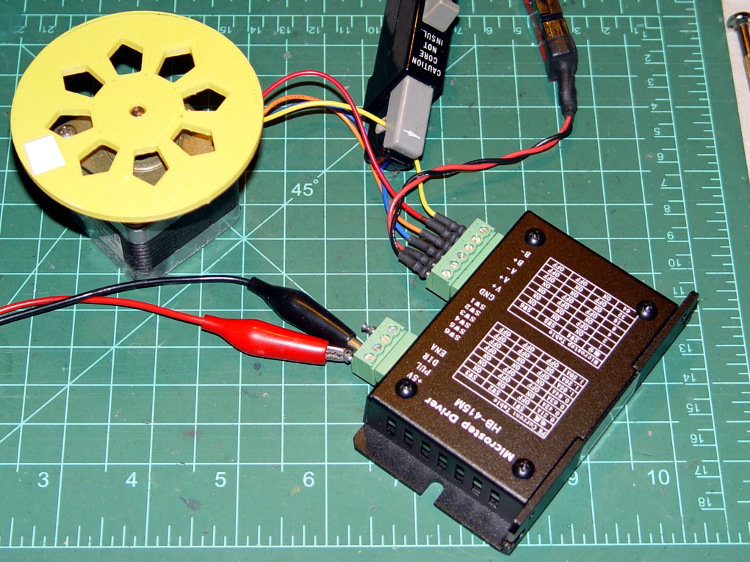
    A bit more data from this setup:

    HB-415M Driver - test setup
    HB-415M Driver – test setup

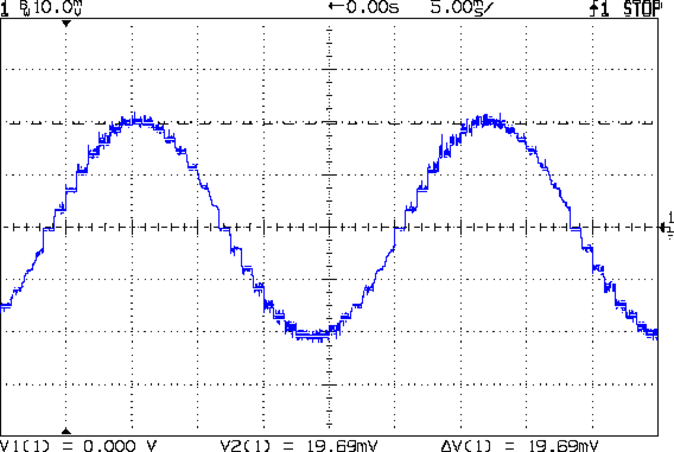
    As you saw earlier the low-speed waveform looked reasonably good, although the HB-415M driver produces only 71% of its rated current (so it’s actually 1 A peak, not the 1.5 A in the caption):

    HB-415M 8-step 1.5A 20V
    HB-415M 8-step 1.5A 20V

    The driver runs in 1/8 microstep mode, which means 1 revolution = 8 × 200 step = 1600 steps. Each cycle of that stepped sine wave has 32 microsteps  = 4 full steps/cycle × 8 microsteps. One cycle is about 27 ms, so 1 step = 840 µs → 1200 step/s → 0.74 rev/s → 44 rpm. The Thing-O-Matic runs at 47 step/mm → 34 mm/rev, so this speed corresponds to travel at 25 mm/s, roughly the usual printing pace.

    Admittedly, that hairball on the bench isn’t a realistic arrangement, because the motor runs with no load. On the other paw, assuming you’ve done a good job eliminating mechanical binding, then it’s probably pretty close to what you’d see during constant-speed travel.

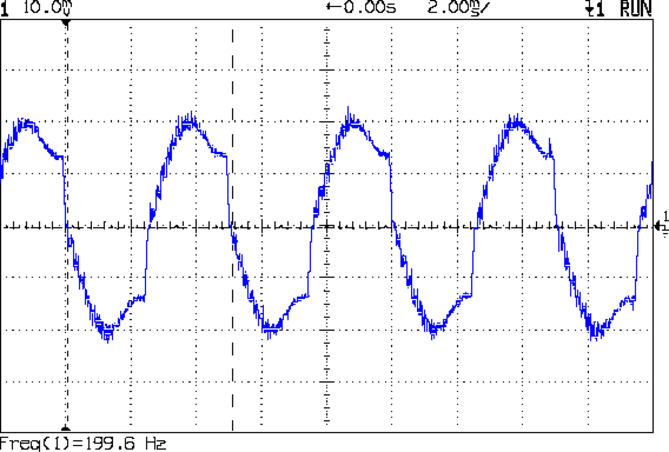
    Cranking the pulse generator to 6400 step/s = 133 mm/s produces this waveform:

    HB-415M 1A 8step 24V
    HB-415M 1A 8step 24V

    The power supply was 24 V, but there was no visible difference at 20 V. The driver evidently can’t control the winding current on the downward side of the waveform. Adding some frictional torque by grabbing the yellow interrupter wheel improved the situation, but not by much.

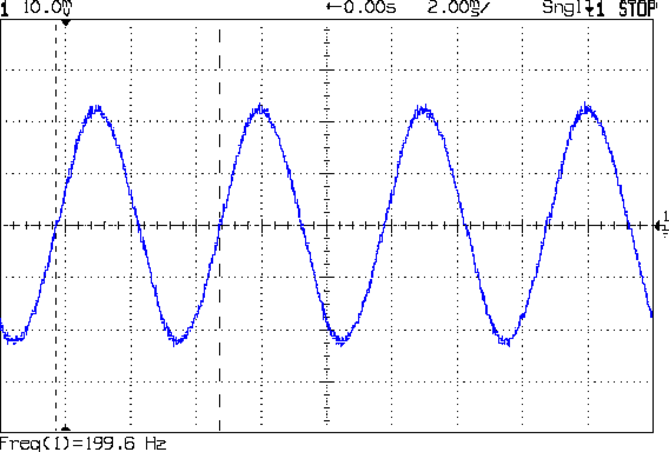
    A box of 2M542 drivers just arrived from a nominally reputable supplier, although they were actually labeled M542ES. Under the same conditions, they produce this waveform:

    M542ES 1A 8step 24V
    M542ES 1A 8step 24V

    So there’s something to be said for larger drivers; the HB-415M drivers were operating at their upper limit and the M542ES at their lower limit, both producing close to 1 A peak.

  • HAL Pin Names for a Bone-Stock USB Mouse

    I’ve always wondered what the LinuxCNC HAL pin names would be for an ordinary mouse, particularly nowadays when an Arduino Leonardo can become a USB HID gadget without much effort at all. If one had a Leonardo and l337 programming skillz, one might receive far more interesting data than just fast-twitch muscle movement…

    Logitech Optical Mouse - LinuxCNC box
    Logitech Optical Mouse – LinuxCNC box

    So. We begin…

    From less /proc/bus/input/devices:

    ... snippage ...
    I: Bus=0003 Vendor=046d Product=c077 Version=0111
    N: Name="Logitech USB Optical Mouse"
    P: Phys=usb-0000:00:1d.0-1/input0
    S: Sysfs=/devices/pci0000:00/0000:00:1d.0/usb2/2-1/2-1:1.0/input/input10
    U: Uniq=
    H: Handlers=mouse3 event10
    B: EV=17
    B: KEY=ff0000 0 0 0 0 0 0 0 0
    B: REL=143
    B: MSC=10
    

    From ll /dev/input:

    ... snippage ...
    crw-r-----   1 root root 13, 74 2013-02-23 07:46 event10
    ... snippage ...
    crw-r-----   1 root root 13, 35 2013-02-23 07:46 mouse3
    

    Manually beat the permissions into shape, because this is a one-off affair:

    sudo chgrp users /dev/input/event10
    sudo chgrp users /dev/input/mouse3
    sudo chmod g+w /dev/input/event10
    sudo chmod g+w /dev/input/mouse3
    

    Find the USB address from lsusb:

    Bus 005 Device 001: ID 1d6b:0001 Linux Foundation 1.1 root hub
    Bus 004 Device 006: ID 06f2:0011 Emine Technology Co. KVM Switch Keyboard
    Bus 004 Device 005: ID 046d:c401 Logitech, Inc. TrackMan Marble Wheel
    Bus 004 Device 004: ID 04d9:1203 Holtek Semiconductor, Inc. MC Industries Keyboard
    Bus 004 Device 003: ID 046d:c216 Logitech, Inc. Dual Action Gamepad
    Bus 004 Device 002: ID 0451:2046 Texas Instruments, Inc. TUSB2046 Hub
    Bus 004 Device 001: ID 1d6b:0001 Linux Foundation 1.1 root hub
    Bus 003 Device 001: ID 1d6b:0001 Linux Foundation 1.1 root hub
    Bus 002 Device 002: ID 046d:c077 Logitech, Inc.
    Bus 002 Device 001: ID 1d6b:0001 Linux Foundation 1.1 root hub
    Bus 001 Device 001: ID 1d6b:0002 Linux Foundation 2.0 root hub
    

    Query the attributes with udevadm:

    udevadm info --query=all --attribute-walk --name=/dev/bus/usb/002/002
    ... snippage ...
      looking at device '/devices/pci0000:00/0000:00:1d.0/usb2/2-1':
        KERNEL=="2-1"
        SUBSYSTEM=="usb"
        DRIVER=="usb"
        ATTR{configuration}==""
        ATTR{bNumInterfaces}==" 1"
        ATTR{bConfigurationValue}=="1"
        ATTR{bmAttributes}=="a0"
        ATTR{bMaxPower}==" 98mA"
        ATTR{urbnum}=="13"
        ATTR{idVendor}=="046d"
        ATTR{idProduct}=="c077"
        ATTR{bcdDevice}=="6700"
        ATTR{bDeviceClass}=="00"
        ATTR{bDeviceSubClass}=="00"
        ATTR{bDeviceProtocol}=="00"
        ATTR{bNumConfigurations}=="1"
        ATTR{bMaxPacketSize0}=="8"
        ATTR{speed}=="1.5"
        ATTR{busnum}=="2"
        ATTR{devnum}=="2"
        ATTR{version}==" 2.00"
        ATTR{maxchild}=="0"
        ATTR{quirks}=="0x0"
        ATTR{authorized}=="1"
        ATTR{manufacturer}=="Logitech"
        ATTR{product}=="USB Optical Mouse"
    

    Fire up halrun, load hal_input, and dump the pins:

    halrun
    halcmd: loadusr -W hal_input -KRAL Optical
    halcmd: show all
    Loaded HAL Components:
    ID      Type  Name                                      PID   State
         5  User  hal_input                                  1693 ready
         3  User  halcmd1692                                 1692 ready
    
    Component Pins:
    Owner   Type  Dir         Value  Name
         5  bit   OUT         FALSE  input.0.btn-back
         5  bit   OUT          TRUE  input.0.btn-back-not
         5  bit   OUT         FALSE  input.0.btn-extra
         5  bit   OUT          TRUE  input.0.btn-extra-not
         5  bit   OUT         FALSE  input.0.btn-forward
         5  bit   OUT          TRUE  input.0.btn-forward-not
         5  bit   OUT         FALSE  input.0.btn-middle
         5  bit   OUT          TRUE  input.0.btn-middle-not
         5  bit   OUT         FALSE  input.0.btn-mouse
         5  bit   OUT          TRUE  input.0.btn-mouse-not
         5  bit   OUT         FALSE  input.0.btn-right
         5  bit   OUT          TRUE  input.0.btn-right-not
         5  bit   OUT         FALSE  input.0.btn-side
         5  bit   OUT          TRUE  input.0.btn-side-not
         5  bit   OUT         FALSE  input.0.btn-task
         5  bit   OUT          TRUE  input.0.btn-task-not
         5  s32   OUT             0  input.0.rel-hwheel-counts
         5  float OUT             0  input.0.rel-hwheel-position
         5  bit   IN          FALSE  input.0.rel-hwheel-reset
         5  float IN              1  input.0.rel-hwheel-scale
         5  s32   OUT             0  input.0.rel-wheel-counts
         5  float OUT             0  input.0.rel-wheel-position
         5  bit   IN          FALSE  input.0.rel-wheel-reset
         5  float IN              1  input.0.rel-wheel-scale
         5  s32   OUT             0  input.0.rel-x-counts
         5  float OUT             0  input.0.rel-x-position
         5  bit   IN          FALSE  input.0.rel-x-reset
         5  float IN              1  input.0.rel-x-scale
         5  s32   OUT             0  input.0.rel-y-counts
         5  float OUT             0  input.0.rel-y-position
         5  bit   IN          FALSE  input.0.rel-y-reset
         5  float IN              1  input.0.rel-y-scale
    ... snippage ...
    

    Hmmm, that was interesting…

  • Eagle HAL Configuration: Sherline HAL File

    More hal-config.lbr tweakage produced enough HAL blocks to completely define the Sherline CNC mill’s HAL connections, all wired up in a multi-page schematic (Eagle-LinuxCNC-Sherline.zip.odt) that completely replaces all the disparate *.hal files I’d been using, plus a new iteration of the hal-write-2.5.ulp Eagle-to-HAL conversion script.

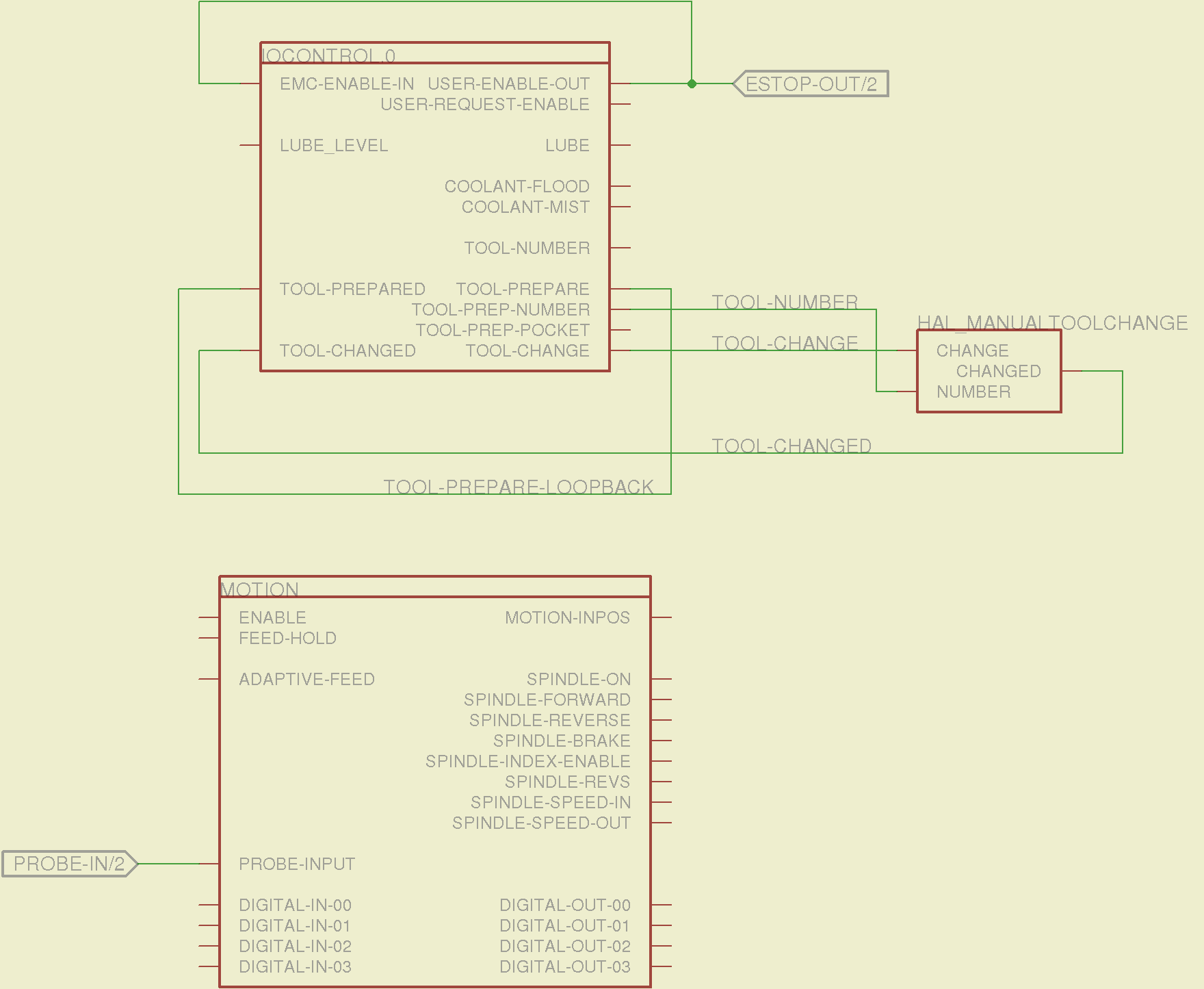
    The first sheet (clicky for more dots) defines the manually configured userspace and realtime modules:

    Sherline Schematic - 1
    Sherline Schematic – 1

    That sheet has three types of Eagle devices:

    • Generalized LoadRT – devices like trivkins that require only a loadrt line
    • Dedicated LoadRT – devices like motion that require functions connected to a realtime thread
    • Generalized LoadUsr – devices like hal_input with a HAL device, but no function pins

    The device’s NAME field contains either the module name (for the specialized devices with functions) or a generic MODULE for everything else, preceded by an optional index that imposes an ordering on the output lines. The device’s VALUE field contains the text that will become the loadrt or loadusr line in the HAL file. Trailing underscores act as separators, but are discarded by the conversion script.

    The immensely long line is the VALUE field that plugs a bunch of variables from the Sherline.ini file into the motion controller.

    The conversion script doesn’t do anything special for those devices, other than transfer the VALUE field to the HAL file. Ordinary HAL devices, the ones with functions that don’t require any special setup, must appear in the conversion script’s list of device names, so that it can recognize them and deal with their connections.

    That sheet produces this part of the HAL file:

    ####################################################
    # Load realtime and userspace modules
    loadrt trivkins
    loadrt [EMCMOT]EMCMOT key=[EMCMOT]SHMEM_KEY num_joints=[TRAJ]AXES base_period_nsec=[EMCMOT]BASE_PERIOD servo_period_nsec=[EMCMOT]SERVO_PERIOD traj_period_nsec=[EMCMOT]SERVO_PERIOD
    loadrt probe_parport
    loadrt hal_parport cfg="[PARPORT]ADDRESS out"
    loadrt stepgen step_type=0,0,0,0
    loadrt pwmgen output_type=0
    loadusr -W hal_manualtoolchange
    loadusr -W hal_input -KA Dual
    loadrt logic count=1 personality=0x104
    

    The conversion script counts the other schematic devices and automagically produces these lines to load their corresponding modules:

    loadrt constant		count=13
    loadrt and2		count=17
    loadrt conv_float_s32		count=1
    loadrt flipflop		count=4
    loadrt mux2		count=5
    loadrt mux4		count=1
    loadrt not		count=8
    loadrt or2		count=14
    loadrt scale		count=7
    loadrt timedelay		count=1
    loadrt toggle		count=1
    

    Next, the parallel port configuration, which uses the D525’s system board hardware:

    Sherline Schematic - 2
    Sherline Schematic – 2

    The stepconf configuration utility buries the parallel port configuration values in the default HAL file as magic numbers. I moved them to a new stanza in the INI file, although the syntax may not be robust enough to support multiple cards, ports, and configurations. This, however, works for now:

    [PARPORT]
    ADDRESS = 0x378
    RESET_TIME = 10000
    STEPLEN = 25000
    STEPSPACE = 25000
    DIRSETUP = 50000
    DIRHOLD = 50000
    

    That LOGIC block is new and serves as an AND gate that produces a combined enable signal for the parallel port. The stepconf utility uses the X axis enable signal, but, seeing as how the Sherline controller doesn’t use the result, none of that matters on my system.

    The tool height probe and manual tool change wiring:

    Sherline Schematic - 3
    Sherline Schematic – 3

    I’m not convinced the Emergency Stop polarity is correct, but it matches what was in the original HAL file. As before, the Sherline driver box ignores that output, so none of that matters right now.

    Four very similar pages define the XYZA step-and-direction generators. This is the X axis driver:

    Sherline Schematic - 4
    Sherline Schematic – 4

    You can imagine what the next three pages for the YZA logic look like, right? There are also a few blank pages in the schematic, so the numbers jump abruptly.

    The magic part of this is having Eagle manage all the tedious renumbering and counting. If you remember to adjust the name of the first module from, say, AXIS.1 to AXIS.0, then the rest get the proper numbers as you go along.

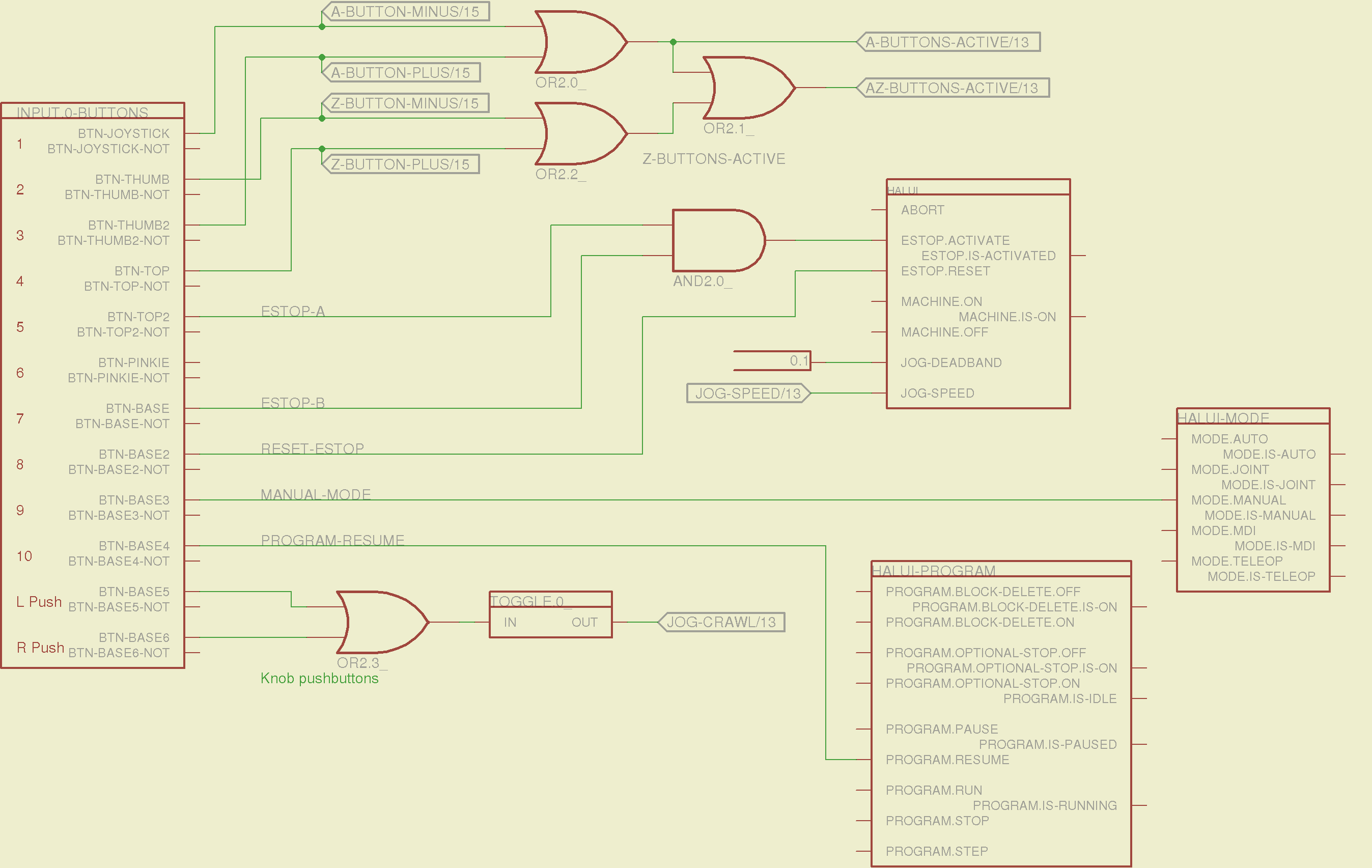
    The remainder of the schematic implements the Joggy Thing’s logic, much as described there. I discovered, quite the hard way, that copy-and-pasting an entire schematic from elsewhere does horrible things to the device numbering, but I’m not sure how to combine two schematics to limit the damage. In any event, manually adjusting a few pages wasn’t the worst thing I’ve ever had to do; starting with a unified schematic should eliminate that task in the future.

    The miscellaneous buttons:

    Sherline Schematic - 11
    Sherline Schematic – 11

    The joystick and hat values:

    Sherline Schematic - 12
    Sherline Schematic – 12

    The joystick deadband logic now uses the (new with HAL 2.5, I think) input.n.abs-x-flat pins, which eliminated a tangle of window comparator logic.

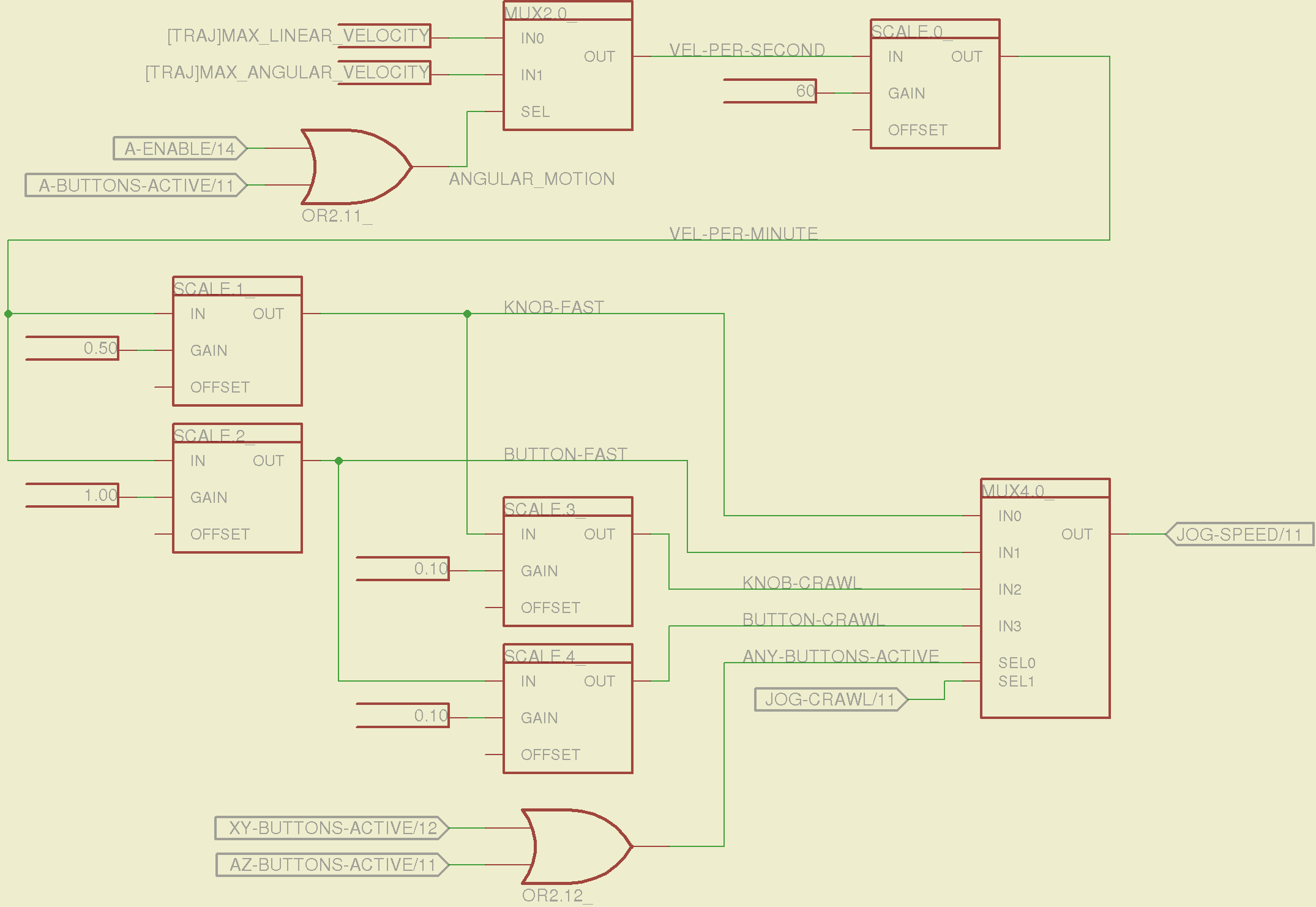
    The jog speed adjustment logic that sets the fast and crawl speeds:

    Sherline Schematic - 13
    Sherline Schematic – 13

    I should probably put the speed ratios in the INI file, but that’s in the nature of fine tuning.

    The lockout logic that remembers which axis started moving first on a given joystick and locks out the other axis, which greatly simplifies jogging up to an edge without bashing into something else:

    Sherline Schematic - 14
    Sherline Schematic – 14

    Combine all those signals into values that actually tell HAL to jog the axes:

    Sherline Schematic - 15
    Sherline Schematic – 15

    The last page connects all the realtime function pins to the appropriate threads:

    Sherline Schematic - 16
    Sherline Schematic – 16

    The LinuxCNC documentation diverges slightly from the implementation, but a few iterations resolved all the conflicts and had the additional benefit that I had to carefully think through what was actually going on.

    A deep and sincere tip o’ the cycling helmet to the folks making LinuxCNC happen!

    Although the Sherline mill doesn’t have more than a few minutes of power-on time with the new HAL file, the Joggy Thing behaves as it used to and the axes move correctly, so I think the schematic came out pretty close to the original HAL file.

    The next step: draw a new schematic to bring up and exercise a different set of steppers…

  • Eagle HAL Configuration: Nostromo N52 Controller

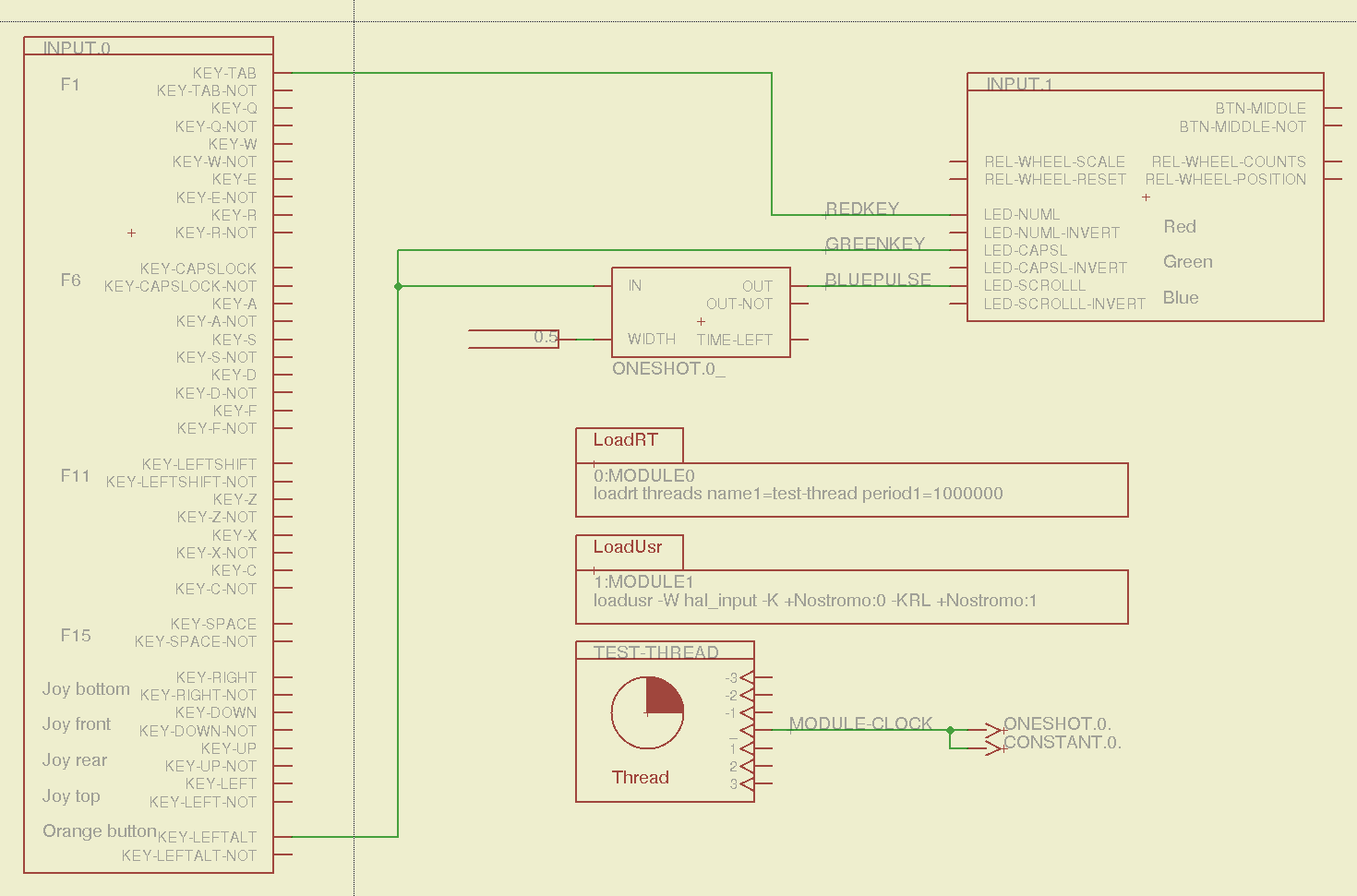
    Combining some of the pin names generated by hal_input with the recipe for creating HAL devices, here’s a test configuration that hitches an old Nostromo N52 controller to a LinuxCNC system (clicky for more dots):

    Nostromo N52 Controller - HAL config
    Nostromo N52 Controller – HAL config

    The F01 key lights the red LED, the Orange Button lights the green LED, and a oneshot timer pulses the blue LED for half a second after the Button closes. The Thread block defines the connections from the functions to the main timing routine, and the loadrt block defines the thread timing. The hal_input module takes care of its own input sampling in userspace.

    Now, for the classic embedded system “Hello, world!” test:

    Nostromo N52 Controller - F01 test
    Nostromo N52 Controller – F01 test

    It’s amazing how good an LED can make you feel…

    A halscope shot shows the timing relation between the Orange Button (confusingly hitched to the greenkey signal) and the oneshot pulse:

    HalScope - oneshot triggering
    HalScope – oneshot triggering

    That schematic produces this HAL configuration file:

    # HAL config file automatically generated by Eagle-CAD ULP:
    # [/mnt/bulkdata/Project Files/eagle/ulp/hal-write-2.5.ulp]
    # (C) Martin Schoeneck.de 2008
    # Charalampos Alexopoulos 2011
    # Mods Ed Nisley KE4ZNU 2010 2013
    # Path        [/mnt/bulkdata/Project Files/eagle/projects/LinuxCNC HAL Configuration/]
    # ProjectName [Nostromo]
    # File name   [/mnt/bulkdata/Project Files/eagle/projects/LinuxCNC HAL Configuration/Nostromo.hal]
    # Created     [12:28:04 14-Feb-2013]
    
    ####################################################
    # Load realtime and userspace modules
    loadrt threads name1=test-thread period1=1000000
    loadusr -W hal_input -K +Nostromo:0 -KRL +Nostromo:1
    loadrt constant		count=1
    loadrt oneshot		count=1
    
    ####################################################
    # Hook functions into threads
    addf oneshot.0		test-thread
    addf constant.0		test-thread
    
    ####################################################
    # Set parameters
    
    ####################################################
    # Set constants
    setp constant.0.value	0.5
    
    ####################################################
    # Connect Modules with nets
    net bluepulse input.1.led-scrolll oneshot.0.out
    net duration constant.0.out oneshot.0.width
    net greenkey input.0.key-leftalt oneshot.0.in input.1.led-capsl
    net redkey input.0.key-tab input.1.led-numl
    

    A snapshot of the Nostromo.sch, Nostromo.hal, hal_config.lbr, and hal-write-2.5.ulp files is in Nostromo-N52.zip.odt. Rename it to get rid of the ODT suffix, unzip it, and there you go.