The Smell of Molten Projects in the Morning

Ed Nisley's Blog: Shop notes, electronics, firmware, machinery, 3D printing, laser cuttery, and curiosities. Contents: 100% human thinking, 0% AI slop.

Tag: CNC

Making parts with mathematics

  • GCMC Platter Engraving

    Engraving Spirograph / Guilloché patterns on scrap CDs and hard drive platters now works better than ever:
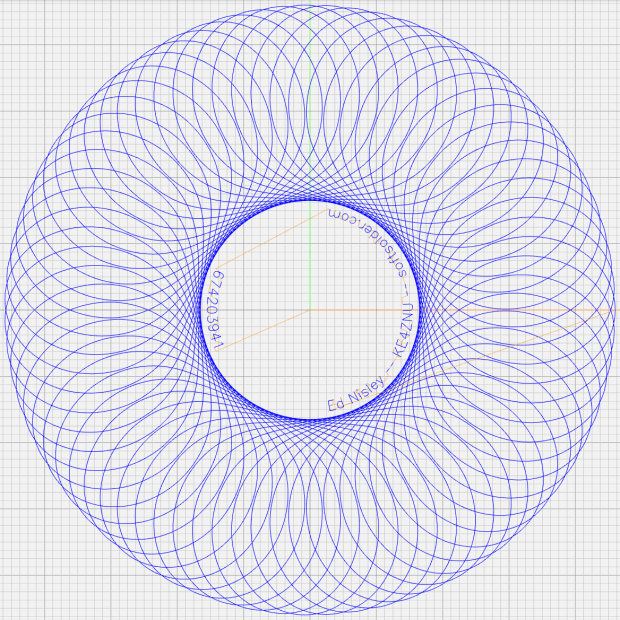
    Spirograph - 674203941 - preview
    Spirograph – 674203941 – preview

    After, that is, I realized:

    • Any Rotor will work, as long as it’s smaller than the Stator
    • You must pick pen offset L so the pattern never crosses the stator center point
    • L ≥ 1 is perfectly fine
    • You must scale the resulting pattern to fit the actual space on the disk

    One of my final doodles showing how the variables relate to each other, although the Wikipedia article may be useful for the underlying math and other posts have more pix on various machines:
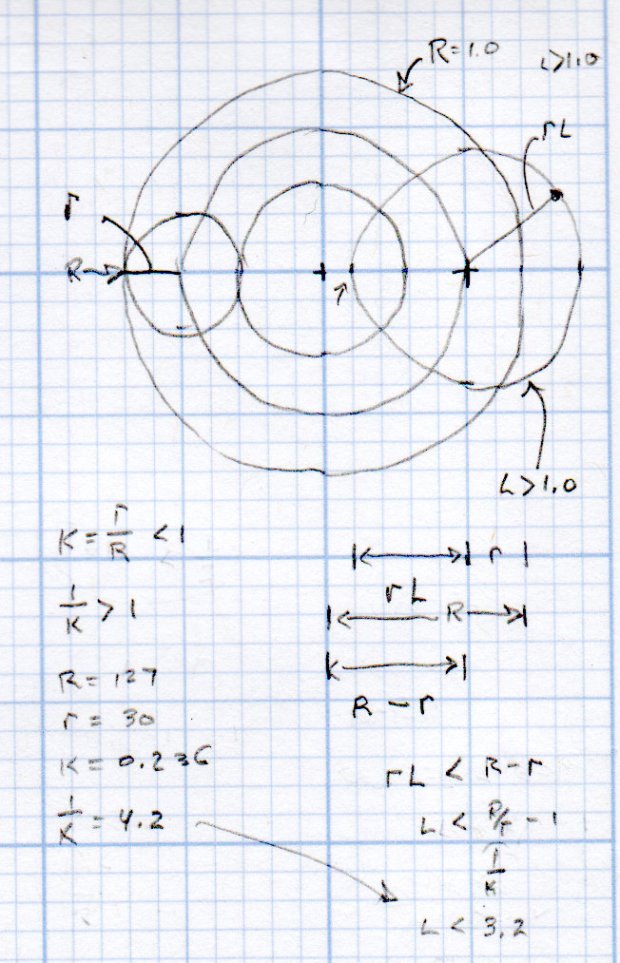
    Spirograph Scaling doodles
    Spirograph Scaling doodles

    Cheat sheet:

    • Stator has tooth count (∝ radius) R
    • Rotor has tooth count (∝ radius) r
    • K = r/R, so if you normalize R=1, K=r
    • Pen offset L puts it at radius rL in the rotor

    Picking a suitable rotor requires iterating with random choices until one fits:

      RotorTeeth = Stators[-1];
      n = 0;
      while (RotorTeeth >= floor(0.95 * StatorTeeth) || RotorTeeth < 5) {
        RotorTeeth = (XORshift() & 0x007f);       // this is why Stator can't have more than 127 teeth
        n++;
      }
      comment("Rotor: ",RotorTeeth," in ",n," iterations");

    The 5% buffer on the high end ensures there will be an L keeping a hole in the middle of the pattern. Requiring at least five teeth on the low end just seems like a Good Idea.

    Given the stator & rotor tooth counts, iterate on random L values until one works:

      n = 0;
      do {
        L = (to_float((XORshift() & 0x1f) + 1) / 32.0) * (1.0/K - 1.0);   // allow L > 1.0
        n++;
      } while (L >= (1.0/K - 1.0) || L < 0.01);
    }
    comment("Offset L: ", L," in ",n," iterations");

    With L chosen to leave a hole in the middle of the pattern, then the pattern traced by the pen in the rotor is centered at 1.0 – K (the normalized Stator radius minus the normalized Rotor radius) and varies by ±LK (the offset times the normalized Rotor radius) on either side:

    RotorMin = 1.0 - 2*K;
    comment("Rotor Min: ",RotorMin);
    
    BandCtr = 1.0 - K;                      // band center radius
    BandMin = BandCtr - L*K;                //  ... min radius
    BandMax = BandCtr + L*K;                //  ... max radius
    
    BandAmpl = BandMax - BandCtr;
    
    comment("Band Min: ",BandMin," Ctr: ",BandCtr," Max: ",BandMax);

    Knowing that, rescaling the pattern to fit the disk limits goes like this:

    FillPath = {};
    
    foreach (Path; pt) {
    
      a = atan_xy(pt);                      // recover angle to point
      r = length(pt);                       //  ... radius to point
    
      br = (r - BandCtr) / BandAmpl;        // remove center bias, rescale to 1.0 amplitude
      dr = br * (OuterRad - MidRad);        // rescale to fill disk
      pr = dr + MidRad;                     // set at disk centerline
    
      x = pr * cos(a);                      // find new XY coords
      y = pr * sin(a);
    
      FillPath += {[x,y]};
    }
    
    comment("Path has ",count(FillPath)," points");

    The final step prunes coordinates so close together as to produce no useful motion, which I define to be 0.2 mm:

    PointList = {FillPath[0]};                // must include first point
    
    lp = FillPath[0];
    n = 0;
    
    foreach (FillPath; pt) {
      if (length(pt - lp) <= Snuggly) {       // discard too-snuggly point
        n++;
      }
      else {
        PointList += {pt};                    // otherwise, add it to output
        lp = pt;
      }
    }
    
    PointList += {FillPath[-1]};                // ensure closure at last point
    
    comment("Pruned ",n," points, ",count(PointList)," remaining");

    The top of the resulting G-Code file contains all the various settings for debugging:

    (Disk type: CD)
    (Outer Diameter: 117.000mm)
    (        Radius: 58.500mm)
    (Inner Diameter: 38.000mm)
    (        Radius: 19.000mm)
    (Mid Diameter: 77.500mm)
    (      Radius: 38.750mm)
    (Legend Diameter: 30.000mm)
    (         Radius: 15.000mm)
    (PRNG seed: 674203941)
    (Stator 8: 71)
    (Rotor: 12 in 1 iterations)
    (Dia ratio K: 0.169 1/K: 5.917)
    (GCD: 1)
    (Lobes: 71)
    (Turns: 12)
    (Offset L: 3.227 in 1 iterations)
    (Rotor Min: 0.662)
    (Band Min: 0.286 Ctr: 0.831 Max: 1.376)
    (Path has 43201 points)
    (Pruned 14235 points, 28968 remaining)

    The GCMC source code as a GitHub Gist:

    // Spirograph simulator for MPCNC used as plotter
    // Ed Nisley KE4ZNU – 2017-12-23
    // Adapted for Guillioche plots with ball point pens – 2018-09-25
    // 2019-06 Text on circular arcs
    // 2019-08 Coordinate pruning
    // 2019-09 Allow L > 1.0, proper scale to fit disk
    // Spirograph equations:
    // https://en.wikipedia.org/wiki/Spirograph
    // Loosely based on GCMC cycloids.gcmc demo:
    // https://gitlab.com/gcmc/gcmc/tree/master/example/cycloids.gcmc
    //—–
    // Library routines
    include("tracepath.inc.gcmc");
    include("engrave.inc.gcmc");
    //—–
    // Define useful constants
    SafeZ = 10.00mm;
    TravelZ = 1.00mm;
    AngleStep = 0.1deg;
    Snuggly = 0.2mm; // prune coordinates when closer
    TextFont = FONT_HSANS_1_RS;
    TextSize = [1.5mm,1.5mm];
    //—–
    // Command line parameters
    // -D DiskType="string"
    if (!isdefined("DiskType")) {
    DiskType = "CD";
    }
    if (DiskType != "CD" && // list all possible types
    DiskType != "3.5" &&
    DiskType != "TrimCD"
    ) {
    error("Unknown disk type: ",DiskType);
    }
    comment("Disk type: ",DiskType); // default is "CD"
    Margin = 1.5mm; // clamping margin around disk OD
    DiskDia = (DiskType == "3.5") ? 95.0mm :
    (DiskType == "TrimCD") ? 95.0mm :
    120.0mm;
    OuterDia = DiskDia – 2*Margin;
    OuterRad = OuterDia / 2;
    comment("Outer Diameter: ",OuterDia);
    comment(" Radius: ",OuterRad);
    InnerDia = (DiskType == "3.5") ? 33.0mm :
    (DiskType == "TrimCD") ? 38.0mm :
    38.0mm;
    InnerDia = InnerDia;
    InnerRad = InnerDia / 2;
    comment("Inner Diameter: ",InnerDia);
    comment(" Radius: ",InnerRad);
    MidDia = (InnerDia + OuterDia) / 2;
    MidRad = MidDia / 2;
    comment("Mid Diameter: ",MidDia);
    comment(" Radius: ",MidRad);
    LegendDia = (DiskType == "3.5") ? 31.0mm :
    (DiskType == "TrimCD") ? 31.0mm :
    30.0mm;
    LegendDia = LegendDia;
    LegenRad = LegendDia / 2;
    comment("Legend Diameter: ",LegendDia);
    comment(" Radius: ",LegenRad);
    // -D PRNG_Seed=integer non-zero random number seed
    if (isdefined("PRNG_Seed")) { // did we get a seed?
    if (!PRNG_Seed) { // .. it must not be zero
    PRNG_Seed = 347221084;
    }
    }
    else { // no incoming seed, so use a constant
    PRNG_Seed = 674203941;
    }
    comment("PRNG seed: ",PRNG_Seed);
    PRNG_State = PRNG_Seed; // set initial state
    // -D various other useful tidbits
    // add unit to speeds and depths: 2000mm / -3.00mm / etc
    if (!isdefined("PlotSpeed")) {
    PlotSpeed = 2400mm;
    }
    if (!isdefined("TextSpeed")) {
    TextSpeed = 2000mm;
    }
    // Force is proportional to depth, but you must know the coefficent!
    if (!isdefined("PlotZ")) {
    PlotZ = (DiskType == "3.5") ? -3.00 : -0.25mm;
    }
    if (!isdefined("Legend")) {
    Legend = "Ed Nisley – KE4ZNU – softsolder.com";
    }
    //—–
    // Spirograph tooth counts mooched from:
    // http://nathanfriend.io/inspirograph/
    // Stators includes both inside and outside counts, because we're not fussy
    // Stator with prime tooth count will always produce that number of lobes
    // Prime numbers:
    // https://en.wikipedia.org/wiki/Prime_number
    // Table of primes:
    // https://www.factmonster.com/math/numbers/prime-numbers-facts-examples-table-all-1000
    // Must be sorted and should not exceed 127 teeth, which will make plenty of lobes
    Stators = [37,41,43,47,53,59,61,67,71,73,79,83,89,97,101,103,107,109,113,127];
    // Rotor tooth count chosen randomly, these are for the old method
    Rotors = [24, 30, 32, 36, 40, 45, 48, 50, 52, 56, 60, 63, 64, 72, 75, 80, 84];
    //Rotors = [5,7,11,13,17,19,23,31,37,41,47];
    //—–
    // Greatest Common Divisor
    // https://en.wikipedia.org/wiki/Greatest_common_divisor#Using_Euclid's_algorithm
    // Inputs = integers without units
    // This is unused with prime rotor tooth counts left here for completeness
    function gcd(a,b) {
    if (!isnone(a) || isfloat(a) || !isnone(b) || isfloat(b)) {
    error("GCD params must be dimensionless integers. a: ",a," b: ",b);
    }
    local d = 0; // power-of-two counter
    while (!((a | b) & 1)) { // remove and tally common factors of two
    a >>= 1;
    b >>= 1;
    d++;
    }
    while (a != b) {
    if (!(a & 1)) {a >>= 1;} // discard non-common factor of 2
    elif (!(b & 1)) {b >>= 1;} // … likewise
    elif (a > b) {a = (a – b) >> 1;} // gcd(a,b) also divides a-b
    else {b = (b – a) >> 1;} // … likewise
    }
    local GCD = a*(1 << d); // form gcd
    // message("GCD: ",GCD);
    return GCD;
    }
    //—–
    // Max and min functions
    function max(x,y) {
    return (x > y) ? x : y;
    }
    function min(x,y) {
    return (x < y) ? x : y;
    }
    //—–
    // Pseudo-random number generator
    // Based on xorshift:
    // https://en.wikipedia.org/wiki/Xorshift
    // http://www.jstatsoft.org/v08/i14/paper
    // Requires initial state from calling script
    // -D "PRNG_Seed=whatever"
    // Bash (et. al.) supplies nine reasonably random digits from $(date +%N)
    function XORshift() {
    local x = PRNG_State; // fetch current state
    x ^= x << 13;
    x ^= x >> 17;
    x ^= x << 5;
    PRNG_State = x; // save state for next invocation
    return x;
    }
    //—–
    // Bend text around an arc
    function ArcText(TextPath,Center,Radius,BaseAngle,Align) {
    PathLength = TextPath[-1].x;
    Circumf = 2*pi()*Radius;
    TextAngle = to_deg(360 * PathLength / Circumf);
    AlignAngle = BaseAngle + (Align == "Left" ? 0 :
    Align == "Center" ? -TextAngle / 2 :
    Align == "Right" ? -TextAngle :
    0);
    ArcPath = {};
    foreach(TextPath; pt) {
    if (!isundef(pt.x) && !isundef(pt.y) && isundef(pt.z)) { // XY motion, no Z
    r = Radius – pt.y;
    a = 360deg * (pt.x / Circumf) + AlignAngle;
    ArcPath += {[r*cos(a) + Center.x, r*sin(a) + Center.y,-]};
    }
    elif (isundef(pt.x) && isundef(pt.y) && !isundef(pt.z)) { // no XY, Z up/down
    ArcPath += {pt};
    }
    else {
    error("Point is not pure XY or pure Z: " + to_string(pt));
    }
    }
    return ArcPath;
    }
    //—–
    // Set up gearing
    s = (XORshift() & 0xffff) % count(Stators);
    StatorTeeth = Stators[s];
    comment("Stator ",s,": ",StatorTeeth);
    // When Stator has prime teeth, any Rotor will have GCD = 1
    if (1) {
    RotorTeeth = Stators[-1];
    n = 0;
    while (RotorTeeth >= floor(0.95 * StatorTeeth) || RotorTeeth < 5) {
    RotorTeeth = (XORshift() & 0x007f); // this is why Stator can't have more than 127 teeth
    n++;
    }
    comment("Rotor: ",RotorTeeth," in ",n," iterations");
    }
    else {
    r = (XORshift() & 0xffff) % count(Rotors);
    RotorTeeth = Rotors[r];
    comment("Rotor ",r,": ",RotorTeeth);
    }
    K = to_float(RotorTeeth) / to_float(StatorTeeth); // find normalized rotor dia
    comment("Dia ratio K: ",K," 1/K: ",1.0/K);
    GCD = gcd(StatorTeeth,RotorTeeth); // reduce teeth to ratio of least integers
    comment("GCD: ",GCD);
    Lobes = StatorTeeth / GCD; // compute useful values
    comment("Lobes: ", Lobes);
    Turns = RotorTeeth / GCD;
    comment("Turns: ", Turns);
    // Find normalized pen offset to never cross Stator center
    if (1) {
    n = 0;
    do {
    L = (to_float((XORshift() & 0x1f) + 1) / 32.0) * (1.0/K – 1.0); // allow L > 1.0
    // comment(" test L: ",L);
    n++;
    } while (L >= (1.0/K – 1.0) || L < 0.01);
    }
    else {
    n = 0;
    do {
    L = to_float((XORshift() & 0x1f) + 1) / 32.0; // force L < 1.0
    n++;
    } while (L >= (1.0/K – 1.0) || L < 0.01);
    }
    comment("Offset L: ", L," in ",n," iterations");
    //—–
    // Crank out a list of points in normalized coordinates
    Path = {};
    for (a = 0.0deg ; a <= Turns*360deg ; a += AngleStep) {
    x = (1 – K)*cos(a) + L*K*cos(a*(1 – K)/K);
    y = (1 – K)*sin(a) – L*K*sin(a*(1 – K)/K);
    Path += {[x,y]};
    }
    //—–
    // Calculate normalized limits for band traced by pen in rotor at offset L
    // L was chosen to produce a band around the rotor center point
    RotorMin = 1.0 – 2*K;
    comment("Rotor Min: ",RotorMin);
    BandCtr = 1.0 – K; // band center radius
    BandMin = BandCtr – L*K; // … min radius
    BandMax = BandCtr + L*K; // … max radius
    BandAmpl = BandMax – BandCtr;
    comment("Band Min: ",BandMin," Ctr: ",BandCtr," Max: ",BandMax);
    //—–
    // Scale normalized band to fill physical limits centered at mid-disk radius
    FillPath = {};
    foreach (Path; pt) {
    a = atan_xy(pt); // recover angle to point
    r = length(pt); // … radius to point
    br = (r – BandCtr) / BandAmpl; // remove center bias, rescale to 1.0 amplitude
    dr = br * (OuterRad – MidRad); // rescale to fill disk
    pr = dr + MidRad; // set at disk centerline
    x = pr * cos(a); // find new XY coords
    y = pr * sin(a);
    FillPath += {[x,y]};
    }
    comment("Path has ",count(FillPath)," points");
    //—–
    // Prune too-snuggly physical coordinates
    PointList = {FillPath[0]}; // must include first point
    lp = FillPath[0];
    n = 0;
    foreach (FillPath; pt) {
    if (length(pt – lp) <= Snuggly) { // discard too-snuggly point
    n++;
    }
    else {
    PointList += {pt}; // otherwise, add it to output
    lp = pt;
    }
    }
    PointList += {FillPath[-1]}; // ensure closure at last point
    comment("Pruned ",n," points, ",count(PointList)," remaining");
    //—–
    // Convert coordinate list to G-Code
    comment("Pattern begins");
    feedrate(PlotSpeed);
    goto([-,-,SafeZ]);
    goto([0,0,-]);
    goto([-,-,TravelZ]);
    tracepath(PointList, PlotZ);
    //—–
    // Draw the legend
    comment("Legend begins");
    if (Legend) {
    tp = scale(typeset(Legend,TextFont),TextSize);
    tpa = ArcText(tp,[0mm,0mm],LegenRad,0deg,"Center");
    feedrate(TextSpeed);
    engrave(tpa,TravelZ,PlotZ);
    }
    tp = scale(typeset(to_string(PRNG_Seed),TextFont),TextSize);
    tpa = ArcText(tp,[0mm,0mm],LegenRad,180deg,"Center");
    feedrate(TextSpeed);
    engrave(tpa,TravelZ,PlotZ);
    goto([-,-,SafeZ]); // done, so get out of the way
    goto([0,0,-]);
    comment("Disk ends");
    #!/bin/bash
    # Guilloche and Legend Generator
    # Ed Nisley KE4ZNU – 2019-06
    Disk='DiskType="CD"'
    PlotZ='PlotZ=-3.00mm'
    Legend='Legend="Ed Nisley — KE4ZNU — softsolder.com"'
    Flags='-P 3 –pedantic'
    # Set these to match your file layout
    LibPath='/opt/gcmc/library'
    Prolog='/mnt/bulkdata/Project Files/CNC 3018-Pro Router/Patterns/gcmc/prolog.gcmc'
    Epilog='/mnt/bulkdata/Project Files/CNC 3018-Pro Router/Patterns/gcmc/epilog.gcmc'
    Script='/mnt/bulkdata/Project Files/CNC 3018-Pro Router/Patterns/Platter Engraving.gcmc'
    ts=$(date +%Y%m%d-%H%M%S)
    if [ -n "$1" ] # if random seed parameter exists
    then
    rnd=$1 # .. use it
    else
    rnd=$(date +%N) # .. otherwise use nanoseconds
    fi
    fn="Disk_${ts}_${rnd}.ngc"
    echo Output: $fn
    Seed="PRNG_Seed=$rnd"
    rm -f $fn
    echo "(File: "$fn")" > $fn
    gcmc -D "$Disk" -D "$Seed" -D "$Legend" -D "$PlotZ" $Flags \
    –include "$LibPath" –prologue "$Prolog" –epilogue "$Epilog" \
    "$Script" >> "$fn"
  • CNC 3018-Pro: Hard Drive Platter Fixture

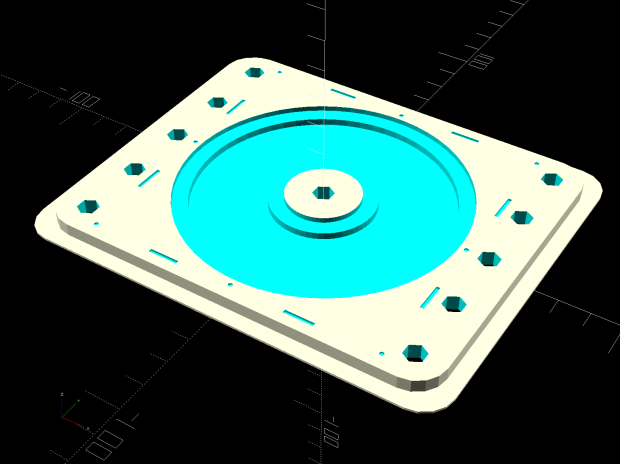
    A variation on the CD fixture produces a 3.5 inch hard drive platter fixture:

    Platter Fixtures - Hard Drive on 3018
    Platter Fixtures – Hard Drive on 3018

    Which needed just a touch of milling for a snug fit around the platter:

    CNC 3018-Pro - HD platter fixture - test fit
    CNC 3018-Pro – HD platter fixture – test fit

    Tape it down on the 3018’s platform, set XY=0 at the center, and It Just Works™:

    CNC 3018-Pro - HD platter fixture - 70 g
    CNC 3018-Pro – HD platter fixture – 70 g

    The rather faint line shows engraving at -1.0 mm = 70 g downforce isn’t quite enough. Another test with the same pattern at -3.0 mm = 140 g came out better:

    CNC 3018-Pro - HD platter fixture - 140 g
    CNC 3018-Pro – HD platter fixture – 140 g

    It’s in the same OpenSCAD file as the CD fixture, in the unlikely event you need one.

  • MPCNC: Z-Axis Height Probe

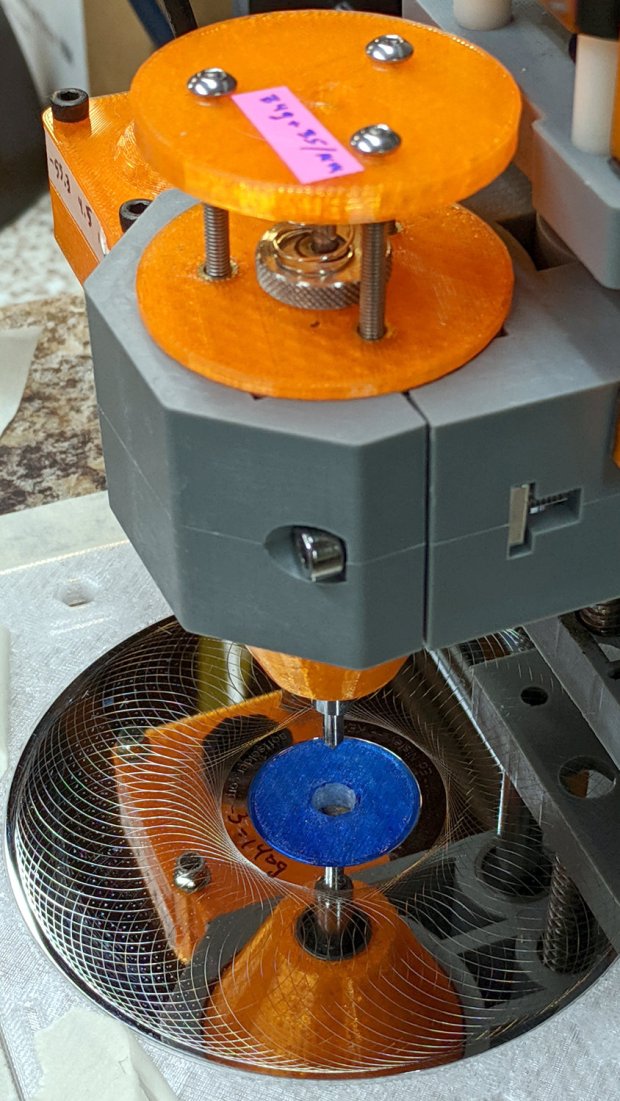
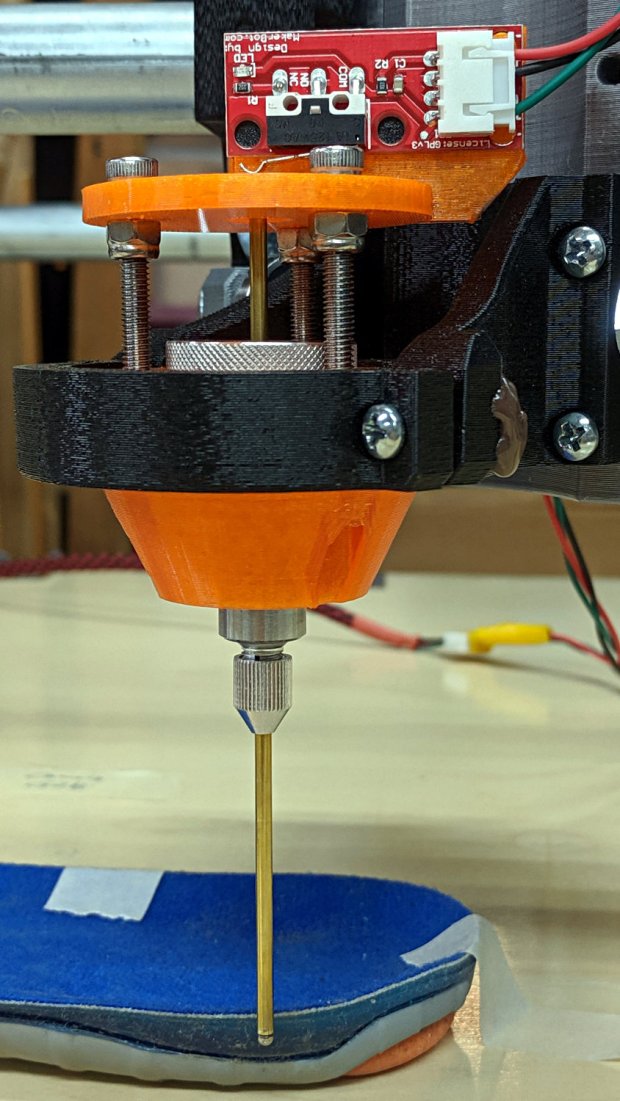
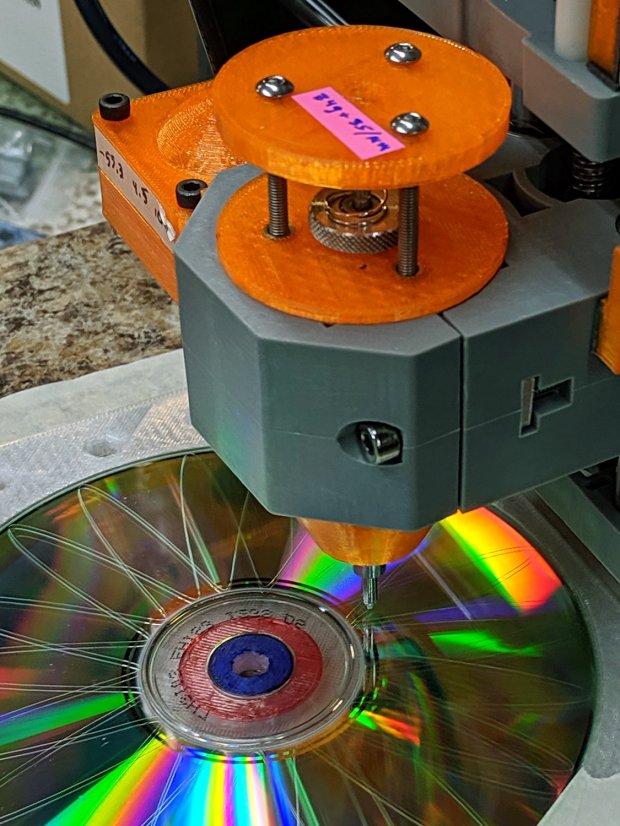
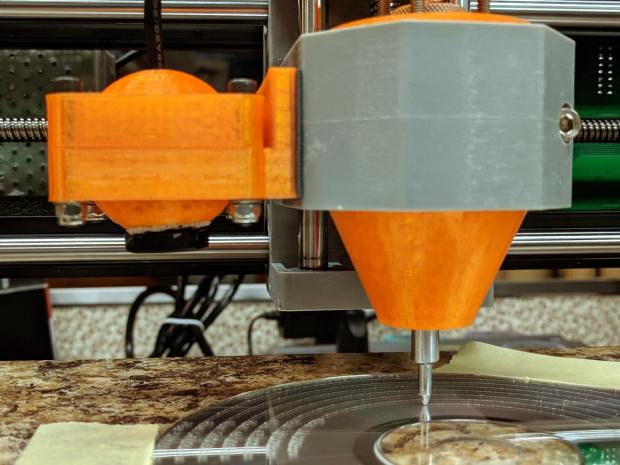
    A slight modification to the MPCNC LM12UU collet pen holder turns it into a long-reach Z-Axis Height Probe:

    CNC 3018-Pro - Z-Axis height probe - overview
    CNC 3018-Pro – Z-Axis height probe – overview

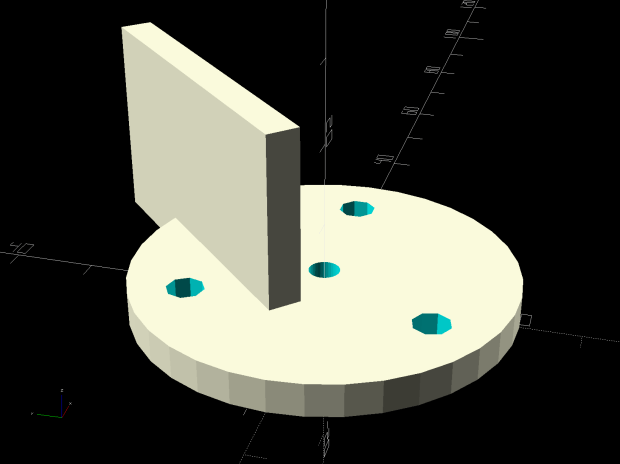
    A flange on the top plate holds a Makerbot-style endstop switch:

    Collet Holder - LM12UU - switch plate - solid model
    Collet Holder – LM12UU – switch plate – solid model

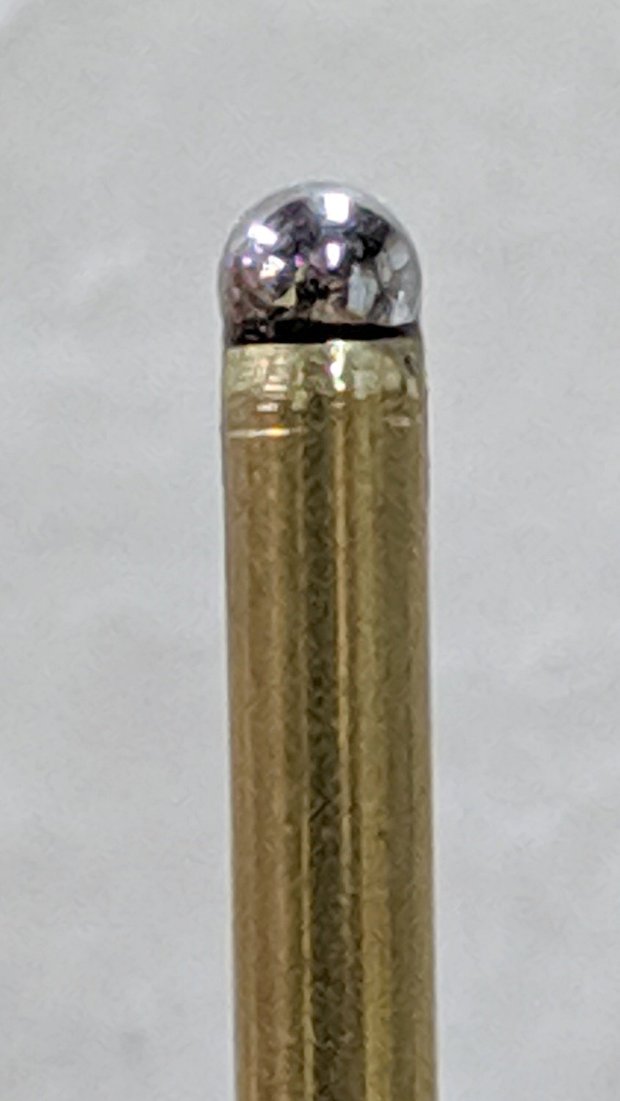
    The brass probe rod sports a 3/32 inch ball epoxied on its tip, although for my simple needs I could probably use the bare rod:

    CNC 3018-Pro - Z-Axis height probe - ball tip detail
    CNC 3018-Pro – Z-Axis height probe – ball tip detail

    I clamped the rod to extend a bit beyond the plate, where it can soak up most of the switch release travel, leaving just enough to reset the clickiness after each probe:

    CNC 3018-Pro - Z-Axis height probe - detail
    CNC 3018-Pro – Z-Axis height probe – detail

    The probe responds only to Z motion, not tip deflection in XY, so it’s not particularly good for soft objects with sloped sides, like the insole shown above. It works fine for rigid objects and should suffice to figure the modeling workflow.

    The bCNC Auto-Level probe routine scans a grid over a rectangular region:

    Insole - bCNC AutoLevel Probe Map - detail
    Insole – bCNC AutoLevel Probe Map – detail

    Which Meshlab turns into a solid model:

    Insole - Meshlab triangulation
    Insole – Meshlab triangulation

    That’s the bottom of the insole probed on a 5 mm grid, which takes something over an hour to accomplish.

    The OpenSCAD code as a GitHub Gist:

    // Collet pen cartridge holder using LM12UU linear bearing
    // Ed Nisley KE4ZNU – 2019-04-26
    // 2019-06 Adapted from LM12UU drag knife holder
    // 2019-09 Probe switch mount plate
    Layout = "Build"; // [Build, Show, Puck, Mount, Plate, SwitchPlate]
    /* [Hidden] */
    // Extrusion parameters
    ThreadThick = 0.25; // [0.20, 0.25]
    ThreadWidth = 0.40; // [0.40]
    // Constants
    Protrusion = 0.1; // [0.01, 0.1]
    HoleWindage = 0.2;
    inch = 25.4;
    function IntegerMultiple(Size,Unit) = Unit * ceil(Size / Unit);
    ID = 0;
    OD = 1;
    LENGTH = 2;
    //- Adjust hole diameter to make the size come out right
    module PolyCyl(Dia,Height,ForceSides=0) { // based on nophead's polyholes
    Sides = (ForceSides != 0) ? ForceSides : (ceil(Dia) + 2);
    FixDia = Dia / cos(180/Sides);
    cylinder(r=(FixDia + HoleWindage)/2,h=Height,$fn=Sides);
    }
    //- Dimensions
    // Basic shape of DW660 snout fitting into the holder
    // Lip goes upward to lock into MPCNC mount
    Snout = [44.6,50.0,9.6]; // LENGTH = ID height
    Lip = 4.0; // height of lip at end of snout
    // Holder & suchlike
    PenShaft = 3.5; // hole to pass pen cartridge
    WallThick = 4.0; // minimum thickness / width
    Screw = [4.0,8.5,25.0]; // thread ID, washer OD, length
    Insert = [4.0,6.0,10.0]; // brass insert
    Bearing = [12.0,21.0,30.0]; // linear bearing body
    Plate = [PenShaft,Snout[OD] – WallThick,WallThick]; // spring reaction plate
    echo(str("Plate: ",Plate));
    SpringSeat = [0.56,7.5,2*ThreadThick]; // wire = ID, coil = OD, seat depth = length
    PuckOAL = max(Bearing[LENGTH],(Snout[LENGTH] + Lip)); // total height of DW660 fitting
    echo(str("PuckOAL: ",PuckOAL));
    Key = [Snout[ID],25.7,(Snout[LENGTH] + Lip)]; // rectangular key
    NumScrews = 3;
    //ScrewBCD = 2.0*(Bearing[OD]/2 + Insert[OD]/2 + WallThick);
    ScrewBCD = (Snout[ID] + Bearing[OD])/2;
    echo(str("Screw BCD: ",ScrewBCD));
    NumSides = 9*4; // cylinder facets (multiple of 3 for lathe trimming)
    // MBI Endstop switch PCB
    PCB = [40.0,1.6,16.5]; // endstop PCB, switch downward, facing parts
    Touchpoint = [-4.8,4.8,4.5]; // contact point from PCB edges, solder side
    TapeThick = 1.0; // foam mounting tape
    SwitchMount = [PCB.x,WallThick,PCB.z + Touchpoint.z + Plate.z];
    module DW660Puck() {
    translate([0,0,PuckOAL])
    rotate([180,0,0]) {
    cylinder(d=Snout[OD],h=Lip/2,$fn=NumSides);
    translate([0,0,Lip/2])
    cylinder(d1=Snout[OD],d2=Snout[ID],h=Lip/2,$fn=NumSides);
    cylinder(d=Snout[ID],h=(Snout[LENGTH] + Lip),$fn=NumSides);
    translate([0,0,(Snout[LENGTH] + Lip) – Protrusion])
    cylinder(d1=Snout[ID],d2=2*WallThick + Bearing[OD],h=PuckOAL – (Snout[LENGTH] + Lip),$fn=NumSides);
    intersection() {
    translate([0,0,0*Lip + Key.z/2])
    cube(Key,center=true);
    cylinder(d=Snout[OD],h=Lip + Key.z,$fn=NumSides);
    }
    }
    }
    module MountBase() {
    difference() {
    DW660Puck();
    translate([0,0,-Protrusion]) // bearing
    PolyCyl(Bearing[OD],2*PuckOAL,NumSides);
    for (i=[0:NumScrews – 1]) // clamp screws
    rotate(i*360/NumScrews)
    translate([ScrewBCD/2,0,-Protrusion])
    rotate(180/8)
    PolyCyl(Insert[OD],2*PuckOAL,8);
    }
    }
    module SpringPlate() {
    difference() {
    cylinder(d=Plate[OD],h=Plate[LENGTH],$fn=NumSides);
    translate([0,0,-Protrusion]) // pen cartridge hole
    PolyCyl(PenShaft,2*Plate[LENGTH],NumSides);
    translate([0,0,Plate.z – SpringSeat[LENGTH]]) // spring retaining recess
    PolyCyl(SpringSeat[OD],SpringSeat[LENGTH] + Protrusion,NumSides);
    for (i=[0:NumScrews – 1]) // clamp screws
    rotate(i*360/NumScrews)
    translate([ScrewBCD/2,0,-Protrusion])
    rotate(180/8)
    PolyCyl(Screw[ID],2*PuckOAL,8);
    }
    }
    module SwitchPlate() {
    translate([0,0,Plate.z])
    rotate([180,0,0])
    SpringPlate();
    rotate(45)
    translate([Touchpoint.x,Touchpoint.y + TapeThick,0])
    cube(SwitchMount,center=false);
    }
    //—–
    // Build it
    if (Layout == "Puck")
    DW660Puck();
    if (Layout == "Plate")
    SpringPlate();
    if (Layout == "SwitchPlate")
    SwitchPlate();
    if (Layout == "Mount")
    MountBase();
    if (Layout == "Show") {
    MountBase();
    translate([0,0,1.6*PuckOAL])
    rotate([180,0,0])
    SpringPlate();
    }
    if (Layout == "Build") {
    translate([0,Snout[OD]/2,PuckOAL])
    rotate([180,0,0])
    MountBase();
    translate([0,-Snout[OD]/2,0])
    SpringPlate();
    }
  • CNC 3018-Pro: CD Fixture Probe Camera Target

    Taping the CD fixture to the CNC 3018-Pro’s raised platform solves the repeatability problem by putting the CD at a fixed location relative to the machine’s Home coordinates. The next step puts the XY=0 coordinate origin at the exact center of the platter, so the pattern comes out exactly centered on the disc:

    CNC 3018-Pro - CD fixture
    CNC 3018-Pro – CD fixture

    The fixture has a central boss:

    Platter Fixtures - CD on 3018 - tape flange
    Platter Fixtures – CD on 3018 – tape flange

    The blue boss centers the CD’s hub hole, the red plateau supports the disc, and the white background lies 5 mm below the CD’s upper surface:

    CNC 3018-Pro - CD holder target
    CNC 3018-Pro – CD holder target

    Yup, red and blue Sharpies FTW.

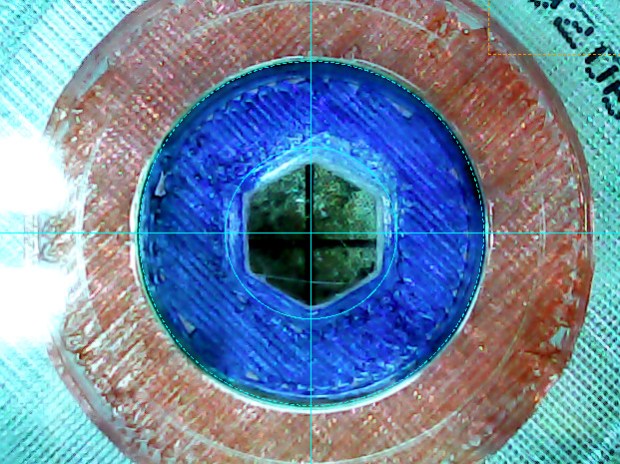
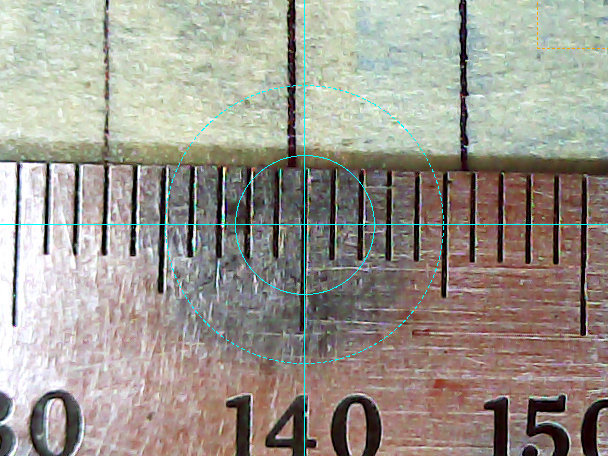
    The bCNC probe camera image includes two faint cyan rings centered on the crosshair:

    CNC 3018-Pro - bCNC probe camera - red-blue CD target
    CNC 3018-Pro – bCNC probe camera – red-blue CD target

    Set the diameter to 15 mm (or a bit less), center the outer ring on the hub hole = the border between blue & red, set XY=0, and it’s within maybe ±0.1 mm of the true center.

    Done!

  • bCNC Probe Camera Calibration

    I’m sure I’ll do this again some time …

    Focus the camera at whatever distance needed to clear the longest tooling you’ll use or, at least, some convenient distance from the platform. You must touch off Z=0 at the surface before using bCNC’s probe camera alignment, because it will move the camera to the preset focus distance.

    Align the camera’s optical axis perpendicular to the table by making it stare into a mirror flat on the platform, then tweaking the camera angles until the crosshair centers on the reflected lens image. This isn’t dead centered, but it’s pretty close:

    CNC 3018-Pro - bCNC Probe Camera - collimation - detail
    CNC 3018-Pro – bCNC Probe Camera – collimation – detail

    The camera will be focused on the mirror, not the reflection, as you can tell by the in-focus crud on the mirror. Whenever you focus the lens, you’ll probably move the optical axis, so do the best you can with the fuzzy image.

    You can adjust small misalignments with the Haircross (seems backwards to me) Offset values.

    A cheap camera’s lens barrel may not be aligned with its optical axis, giving the lens a jaunty tilt when it’s correctly set up:

    CNC 3018-Pro - Engraving - taped
    CNC 3018-Pro – Engraving – taped

    With the camera focus set correctly, calibrate the camera Offset from the tool (a.k.a. Spindle) axis:

    • Put a pointy tool at XY=0
    • Touch off Z=0 on a stack of masking tape
    • Put a dent in the tape with the bit
    • Move to the camera’s focused Z level
    • Make the dent more conspicuous with a Sharpie, as needed
    • Register the spindle location
    • Jog to center the crosshair on the dent
    • Register the camera location

    Calibrate the Crosshair ring diameter thusly:

    • Put an object with a known size on the platform
    • Touch off Z=0 at its surface
    • Move to the camera’s focused Z level
    • Set the Crosshair diameter equal to the known object size
    • Adjust the Scale value to make the Crosshair overlay reality

    For example, calibrating the diameter to 10 mm against a shop scale:

    CNC 3018-Pro Probe Camera - scale factor - detail
    CNC 3018-Pro Probe Camera – scale factor – detail

    At 10 mm above the CD, setting the camera’s resolution to 11.5 pixel/mm:

    CNC 3018-Pro - bCNC probe camera - settings
    CNC 3018-Pro – bCNC probe camera – settings

    Makes the outer circle exactly 15.0 mm in diameter to match the CD hub ring ID:

    CNC 3018-Pro - bCNC probe camera - red-blue CD target
    CNC 3018-Pro – bCNC probe camera – red-blue CD target

    I doubt anybody can find the pixel/mm value from first principles, so you must work backwards from an object’s actual size.

  • CNC 3018-Pro: Diamond Drag Engraving Test Disk

    The smaller and more rigid CNC 3018-Pro should be able to engrave text faster than the larger and rather springy MPCNC, which could engrave text at about 50 mm/min. This test pattern pushes both cutting depth and engraving speed to absurd values:

    Engraving Test Pattern - 2019-09-18
    Engraving Test Pattern – 2019-09-18

    Compile the GCMC source to generate G-Code, lash a CD / DVD to the platform (masking tape works fine), touch off the XY coordinates in the center, touch off Z=0 on the surface, then see what happens:

    CNC 3018-Pro - Engraving test pattern - curved text
    CNC 3018-Pro – Engraving test pattern – curved text

    The “engraving depth” translates directly into the force applied to the diamond point, because the spring converts displacement into force. Knowing the Z depth, you can calculate or guesstimate the force.

    Early results from the 3018 suggest it can engrave good-looking text about 20 times faster than the MPCNC:

    CNC 3018-Pro - Engraving - speeds
    CNC 3018-Pro – Engraving – speeds

    You must trade off speed with accuracy on your very own machine, as your mileage will certainly differ!

    The GCMC source code as a GitHub Gist:

    // Engraving test piece
    // Ed Nisley KE4ZNU – 2019-09
    //—–
    // Command line parameters
    // -D OuterDia=number
    if (!isdefined("OuterDia")) {
    OuterDia = 120mm – 2mm; // CD = 120, 3.5 inch drive = 95
    }
    OuterRad = OuterDia / 2.0;
    comment("Outer Diameter: ",OuterDia);
    comment(" Radius: ",OuterRad);
    //—–
    // Library routines
    include("tracepath.inc.gcmc");
    include("engrave.inc.gcmc");
    //—–
    // Bend text around an arc
    function ArcText(TextPath,Center,Radius,BaseAngle,Align) {
    PathLength = TextPath[-1].x;
    Circumf = 2*pi()*Radius;
    TextAngle = to_deg(360 * PathLength / Circumf);
    AlignAngle = BaseAngle + (Align == "Left" ? 0 :
    Align == "Center" ? -TextAngle / 2 :
    Align == "Right" ? -TextAngle :
    0);
    ArcPath = {};
    foreach(TextPath; pt) {
    if (!isundef(pt.x) && !isundef(pt.y) && isundef(pt.z)) { // XY motion, no Z
    r = Radius – pt.y;
    a = 360deg * (pt.x / Circumf) + AlignAngle;
    ArcPath += {[r*cos(a) + Center.x, r*sin(a) + Center.y,-]};
    }
    elif (isundef(pt.x) && isundef(pt.y) && !isundef(pt.z)) { // no XY, Z up/down
    ArcPath += {pt};
    }
    else {
    error("Point is not pure XY or pure Z: " + to_string(pt));
    }
    }
    return ArcPath;
    }
    //—–
    // Set up for drawing
    SafeZ = 10.0mm; // above clamps and screws
    TravelZ = 1.0mm; // above workpiece
    PlotZ = -0.5mm; // tune for best results
    TextSpeed = 1000mm; // intricate detail
    DrawSpeed = 2000mm; // smooth curves
    TextFont = FONT_HSANS_1_RS;
    TextSize = [2.0mm,2.0mm];
    TextLeading = 2*TextSize.y; // line spacing
    DiskCenter = [0mm,0mm]; // middle of the platter
    InnerDia = 40mm;
    InnerRad = InnerDia / 2.0;
    comment("Inner Diameter: ",InnerDia);
    comment(" Radius: ",InnerRad);
    NumRings = ceil((OuterRad – (InnerRad + TextLeading))/TextLeading); // number of rings to draw
    comment("Numer of rings: ",NumRings);
    if (1) {
    comment("Text Size begins");
    feedrate(TextSpeed);
    ts = "Text size: " + to_string(TextSize);
    tp = scale(typeset(ts,TextFont),TextSize);
    tpa = ArcText(tp,DiskCenter,OuterRad,90deg,"Left");
    engrave(tpa,TravelZ,PlotZ);
    }
    if (1) {
    comment("Depth variations begin");
    TextRadius = OuterRad;
    pz = 0.0mm;
    repeat(NumRings ; i) {
    comment(" depth: " + to_string(pz));
    feedrate(TextSpeed);
    ts = "Depth: " + to_string(pz) + " at " + to_string(TextSpeed) + "/min";
    tp = scale(typeset(ts,TextFont),TextSize);
    tpa = ArcText(tp,DiskCenter,TextRadius,-5deg,"Right");
    engrave(tpa,TravelZ,pz);
    feedrate(DrawSpeed);
    goto([0,-TextRadius,-]);
    move([-,-,pz]);
    arc_ccw([-TextRadius,0,-],-TextRadius);
    goto([-,-,TravelZ]);
    feedrate(TextSpeed);
    tp = scale(typeset("Rad: " + to_string(TextRadius),TextFont),TextSize);
    tpa = ArcText(tp,DiskCenter,TextRadius,180deg,"Right");
    engrave(tpa,TravelZ,PlotZ);
    TextRadius -= TextLeading;
    pz -= 0.10mm;
    }
    }
    if (1) {
    comment("Feedrate variations begin");
    TextRadius = OuterRad;
    ps = 250mm;
    repeat(NumRings ; i) {
    comment(" speed: " + to_string(ps) + "/min");
    feedrate(ps);
    ts = "Speed: " + to_string(ps) + "/min at " + to_string(PlotZ);
    tp = scale(typeset(ts,TextFont),TextSize);
    tpa = ArcText(tp,DiskCenter,TextRadius,5deg,"Left");
    engrave(tpa,TravelZ,PlotZ);
    TextRadius -= TextLeading;
    ps += 250mm;
    }
    }
    if (1) {
    comment("Off-center text arcs begin");
    feedrate(TextSpeed);
    tc = [-40mm/sqrt(2),-40mm/sqrt(2)]; // center point
    r = 3mm;
    s = [0.5mm,0.5mm];
    ts = "Radius: " + to_string(r) + " Size: " + to_string(s);
    tp = scale(typeset(ts,TextFont),s);
    tpa = ArcText(tp,tc,r,0deg,"Center");
    engrave(tpa,TravelZ,PlotZ);
    r = 5mm;
    s = [1.0mm,1.0mm];
    ts = "Radius: " + to_string(r) + " Size: " + to_string(s);
    tp = scale(typeset(ts,TextFont),s);
    tpa = ArcText(tp,tc,r,0deg,"Center");
    engrave(tpa,TravelZ,PlotZ);
    r = 8mm;
    s = [1.5mm,1.5mm];
    ts = "Radius: " + to_string(r) + " Size: " + to_string(s);
    tp = scale(typeset(ts,TextFont),s);
    tpa = ArcText(tp,tc,r,0deg,"Center");
    engrave(tpa,TravelZ,PlotZ);
    r = 15mm;
    s = [3.0mm,3.0mm];
    ts = "Radius: " + to_string(r) + " Size: " + to_string(s);
    tp = scale(typeset(ts,FONT_HSCRIPT_2),s);
    tpa = ArcText(tp,tc,r,0deg,"Center");
    engrave(tpa,TravelZ,PlotZ);
    }
    if (1) {
    comment("Attribution begins");
    feedrate(TextSpeed);
    tp = scale(typeset("Ed Nisley – KE4ZNU – softsolder.com",TextFont),TextSize);
    tpa = ArcText(tp,DiskCenter,15mm,0deg,"Center");
    engrave(tpa,TravelZ,PlotZ);
    tp = scale(typeset("Engraving Test Disc",TextFont),TextSize);
    tpa = ArcText(tp,DiskCenter,15mm,180deg,"Center");
    engrave(tpa,TravelZ,PlotZ);
    }
    goto([-,-,SafeZ]);
    goto([0mm,0mm,-]);
    comment("Done!");
    #!/bin/bash
    # Engraving test pattern generator
    # Ed Nisley KE4ZNU – 2019-08
    Diameter='OuterDia=116mm'
    Flags='-P 3 –pedantic'
    # Set these to match your file layout
    LibPath='/opt/gcmc/library'
    Prolog='/mnt/bulkdata/Project Files/CNC 3018-Pro Router/Patterns/gcmc/prolog.gcmc'
    Epilog='/mnt/bulkdata/Project Files/CNC 3018-Pro Router/Patterns/gcmc/epilog.gcmc'
    Script='/mnt/bulkdata/Project Files/CNC 3018-Pro Router/Patterns/Engraving Test.gcmc'
    ts=$(date +%Y%m%d-%H%M%S)
    fn='TestPattern_'${ts}'.ngc'
    echo Output: $fn
    rm -f $fn
    echo "(File: "$fn")" > $fn
    /opt/gcmc/src/gcmc -D $Diameter $Flags \
    –include "$LibPath" –prologue "$Prolog" –epilogue "$Epilog" \
    "$Script" >> $fn
  • CNC 3018-Pro: DRV8825 Drivers at the Edge of Madness

    Having previously concluded running the CNC 3018-Pro steppers from 12 V would let the DRV8825 chips provide better current control in Fast Decay mode at reasonable speeds, I wondered what effect a 24 V supply would have at absurdly high speeds with the driver in 1:8 microstep mode to reduce the IRQ rate.

    So, in what follows, the DRV8825 chip runs in 1:8 microstep mode with Fast Decay current control. You must apply some hardware hackage to the CAMTool V 3.3 board on the CNC 3018-Pro to use those modes.

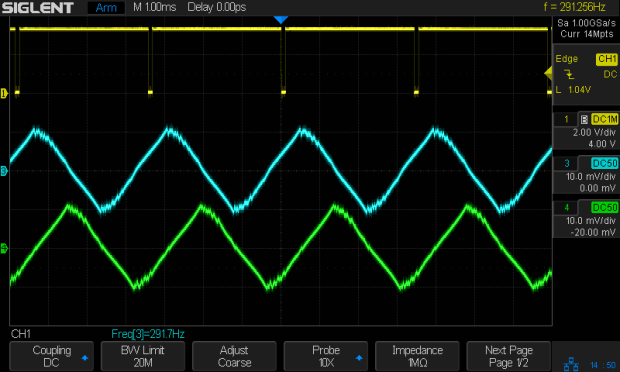
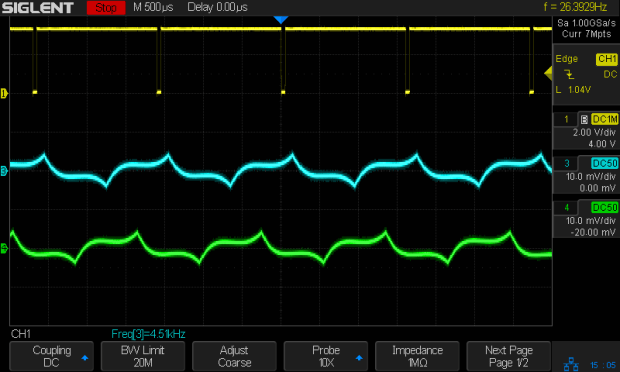
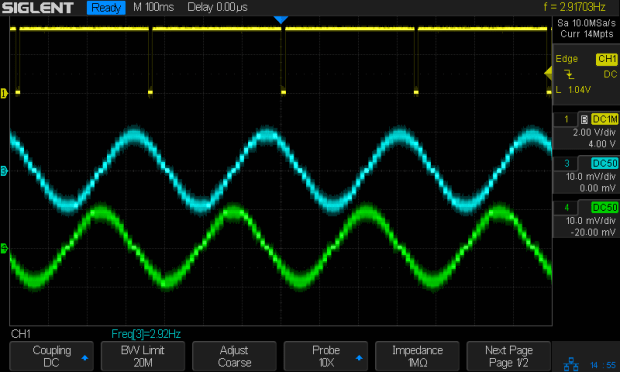
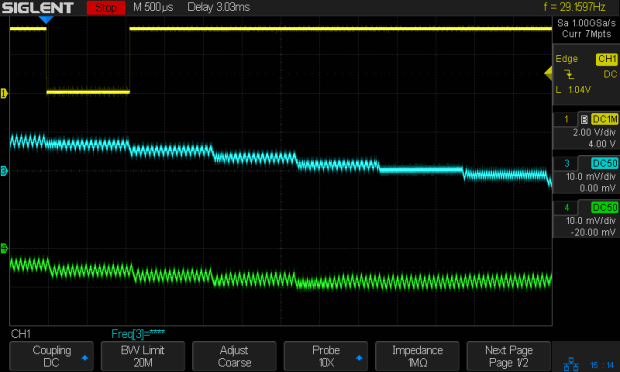
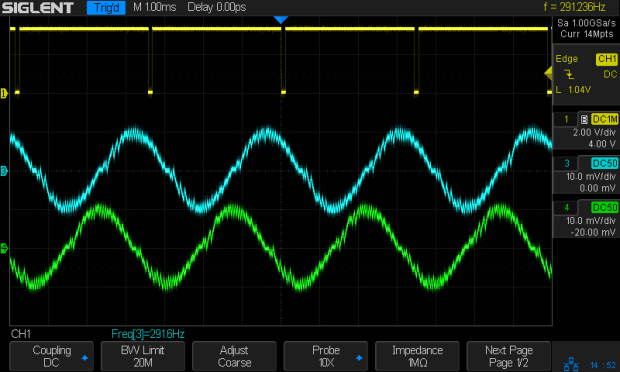
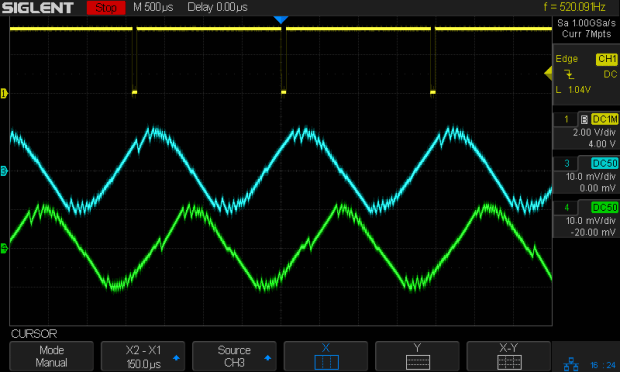
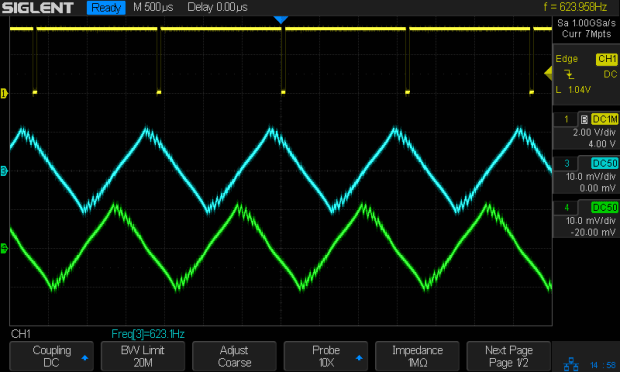
    In all the scope pix, horizontal sync comes from the DRV8825 Home pulse in the top trace, with the current in the two windings of the X axis motor in the lower traces at 1 A/div. Because only the X axis is moving, the actual axis speed matches the programmed feed rate.

    Homework: figure out the equivalent two-axis-moving speed.

    The 12 V motor supply works well at 140 mm/min, with Fast Decay mode producing clean microstep current levels and transitions:

    3018 X - Fast - 12V - 140mm-min 1A-div
    3018 X – Fast – 12V – 140mm-min 1A-div

    The sine waves deteriorate into triangles around 1400 mm/min, suggesting this is about as fast as you’d want to go with a 12 V supply:

    3018 X - Fast - 12V - 1400mm-min 1A-div
    3018 X – Fast – 12V – 1400mm-min 1A-div

    Although the axis can reach 3000 mm/min, it’s obviously running well beyond its limits:

    3018 X - Fast - 12V - 3000mm-min 1A-div
    3018 X – Fast – 12V – 3000mm-min 1A-div

    The back EMF fights the 12 V supply to a standstill during most of the waveform, leaving only brief 500 mA peaks, so there’s no torque worth mentioning and terrible position control.

    Increasing the supply to 24 V, still with 1:8 microstepping and Fast Decay …

    At a nose-pickin’ slow 14 mm/min, Fast Decay mode looks rough, albeit with no missteps:

    3018 X - Fast - 24V - 14mm-min 1A-div
    3018 X – Fast – 24V – 14mm-min 1A-div

    At 140 mm/min, things look about the same:

    3018 X - Fast - 24V - 140mm-min 1A-div
    3018 X – Fast – 24V – 140mm-min 1A-div

    For completeness, a detailed look at the PWM current control waveforms at 140 mm/min:

    3018 X - Fast detail - 24V - 140mm-min 1A-div
    3018 X – Fast detail – 24V – 140mm-min 1A-div

    The dead-flat microstep in the middle trace happens when the current should be zero, which is comforting.

    At 1400 mm/min, where the 12 V waveforms look triangular, the 24 V supply has enough mojo to control the current, with increasing roughness and slight undershoots after the zero crossings:

    3018 X - Fast - 24V - 1400mm-min 1A-div
    3018 X – Fast – 24V – 1400mm-min 1A-div

    At 2000 mm/min, the DRV8825 is obviously starting to have trouble regulating the current against the increasing back EMF:

    3018 X - Fast - 24V - 2000mm-min 1A-div
    3018 X – Fast – 24V – 2000mm-min 1A-div

    At 2500 mm/min, the back EMF is taking control away from the DRV8825:

    3018 X - Fast - 24V - 2500mm-min 1A-div
    3018 X – Fast – 24V – 2500mm-min 1A-div

    The waveforms take on a distinct triangularity at 2700 mm/min:

    3018 X - Fast - 24V - 2700mm-min 1A-div
    3018 X – Fast – 24V – 2700mm-min 1A-div

    They’re fully triangular at 3000 mm/min:

    3018 X - Fast - 24V - 3000mm-min 1A-div
    3018 X – Fast – 24V – 3000mm-min 1A-div

    In round numbers, you’d expect twice the voltage to give you twice the speed for a given amount of triangularity, because the current rate-of-change varies directly with the net voltage. I love it when stuff works out!

    At that pace, the X axis carrier traverses the 300 mm gantry in 6 s, which is downright peppy compared to the default settings.

    Bottom lines: the CNC 3018-Pro arrives with a 24 V supply that’s too high for the DRV8825 drivers in Mixed Decay mode and the CAMTool V3.3 board’s hardwired 1:32 microstep mode limits the maximum axis speed. Correcting those gives you 3000 mm/min rapids with good-looking current waveforms.

    I’m reasonably sure engraving plastic and metal disks at 3000 mm/min is a Bad Idea™, but having some headroom seems desirable.