The Smell of Molten Projects in the Morning

Ed Nisley's Blog: Shop notes, electronics, firmware, machinery, 3D printing, laser cuttery, and curiosities. Contents: 100% human thinking, 0% AI slop.

Category: Software

General-purpose computers doing something specific

  • GRBL Error 33: G-Code Arc Tolerances

    GRBL Error 33: G-Code Arc Tolerances

    After figuring out how two-place decimal fractions caused this blooper, I had to poke into the debris field surrounding the crash:

    Tek CC - top deck - failed arcs
    Tek CC – top deck – failed arcs

    The bCNC Terminal trace stops at the first failure, so I set GCMC to produce two-place fractions (“Number of decimals less than 3 severely limits accuracy”), then rammed the NGC file’s G-Code into a spreadsheet:

    Spreadsheet - GCMC 2 digit - full path
    Spreadsheet – GCMC 2 digit – full path

    The last two columns (perhaps you must open the image in a new tab to see the whole thing) compute the GRBL error values: the absolute difference between the two radii and that difference as a fraction of the radius. The R Error header under Start should be X, of course; I’ll regenerate the images for the DM column.

    The reduced accuracy of the two-digit fractions triggers the error marked by the red cells, where the radii differ by 0.0082 mm (>0.005) and the relative error is 0.17% (>0.1%).

    Suppressing the first failed arc by passing the same starting point to the next arc simulates the second failure:

    Spreadsheet - GCMC 2 digit - suppress first failed arc
    Spreadsheet – GCMC 2 digit – suppress first failed arc

    Similarly, the third arc from the same point fails:

    Spreadsheet - GCMC 2 digit - suppress second failed arc
    Spreadsheet – GCMC 2 digit – suppress second failed arc

    The fourth arc becomes a full circle and produces the circular gash across the deck:

    Spreadsheet - GCMC 2 digit - suppress third failed arc
    Spreadsheet – GCMC 2 digit – suppress third failed arc

    Two digits definitely aren’t enough!

  • bCNC Rounding vs. G-Code Arcs: GRBL Error 33

    bCNC Rounding vs. G-Code Arcs: GRBL Error 33

    While cutting the top deck of the Pickett-flavored Tek Circuit Computer on the MPCNC, this happened:

    Tek CC - top deck - failed arcs
    Tek CC – top deck – failed arcs

    I traced the off-center circle with a marker to make it more visible, as it’s the drag knife cut that should have been the exit move after completing the window.

    Huh. It never did that before …

    The bCNC plot looked fine, but the Terminal log showed three Error 33 reports:

    Failed arc command - bCNC screen - terminal and plot
    Failed arc command – bCNC screen – terminal and plot

    The GRBL doc has this to say about Error 33:

    The motion command has an invalid target. G2, G3, and G38.2 generates this error, if the arc is impossible to generate or if the probe target is the current position.

    The error messages don’t occur immediately after the failing G2/G3 command, because bCNC sends enough commands to keep the GRBL serial input buffer topped off. After GRBL sends the error message, it continues chewing its way through the buffer and, when bCNC notices the first error, it stops sending more G-Code commands and shudders to a stop.

    The great thing about Free Software is that when it breaks, you have all the pieces. Looking into the GRBL source code provides a definition of Error 33:

    // [G2/3 Offset-Mode Errors]: No axis words and/or offsets in selected plane. The radius to the current
    //   point and the radius to the target point differs more than 0.002mm (EMC def. 0.5mm OR 0.005mm and 0.1% radius).

    Which doesn’t quite match the code, but it’s close enough:

    // Compute difference between current location and target radii for final error-checks.
                float delta_r = fabs(target_r-gc_block.values.r);
                if (delta_r > 0.005) {
                  if (delta_r > 0.5) { FAIL(STATUS_GCODE_INVALID_TARGET); } // [Arc definition error] > 0.5mm
                  if (delta_r > (0.001*gc_block.values.r)) { FAIL(STATUS_GCODE_INVALID_TARGET); } // [Arc definition error] > 0.005mm AND 0.1% radius
                }

    I’ve drag-knifed maybe a dozen top decks with no problem, so figuring out what broke took a while.

    The key turned out to be in the Terminal log, where all coordinates in the G-Code commands had, at most, two decimal places. The GCMC program producing the G-Code emits three decimal places, so bCNC rounded off a digit before squirting commands to GRBL.

    After more searching, it seems I’d told bCNC to do exactly that:

    bCNC Config - Round 2 digits - highlighted
    bCNC Config – Round 2 digits – highlighted

    Perhaps I’d mistakenly set “Decimal digits” instead of “DRO Zero padding” when I reduced the DRO resolution from three decimals to two? It’s set to “2” in the CNC 3018XL configuration, so this seems like a typical one-off brain fade.

    GRBL doesn’t execute invalid commands, so the tool position remains at the end of the window’s outer perimeter while the next two arc commands fail, because their center offsets produced completely invalid radii.

    The three failed arc commands should have cut the right end of the window, the inner side, and the left end, but left the tool position unchanged. The final arc command should have withdrawn the blade along the outer side of the window, but became a complete circle, with the commanded end point equal to the leftover starting point at the same radius from the deck center.

    The same G-Code file fails consistently with Decimal digits = 2 and runs perfectly with Decimal digits = 3, so at least I know a good fix.

    Protip: Keep your hands away from moving machinery, because you never know what might happen!

    This seems sufficiently obscure to merit becoming a Digital Machinist column. More analysis is in order …

  • Natural Enemies

    Natural Enemies

    I couldn’t resist setting this up for my next Digital Machinist column on logarithmic scales:

    Homage Tektronix Circuit Computer with HP 50g calculator
    Homage Tektronix Circuit Computer with HP 50g calculator

    The caption will read “Photo 1: A replica Tektronix Circuit Computer shown with its natural enemy, an HP 50g Graphing Calculator.”

    It’s my desk calculator. In the Basement Laboratory, I use the HP 48 calculator app, with a couple of $10 Sharp calculators in harm’s way.

  • HON Lateral File: Shelf Rebuild

    HON Lateral File: Shelf Rebuild

    After sliding the HON Lateral File Cabinet shelf into place and installing the bumpers, it seemed rather loose and floppy. Comparing the situation with the other file cabinet showed it had a missing glide button in the rear and two missing slides at the front.

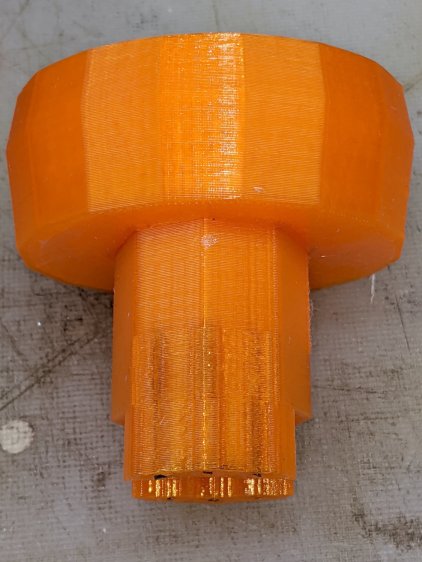
    A replacement button emerged from the end of a Delrin rod:

    HON Lateral File - shelf button - parting off
    HON Lateral File – shelf button – parting off

    The original buttons had an expanding stem, which is easy to do with an injection-molded part. I opted for simple adhesive, with enough of a blob underneath the shelf to (presumably) lock it in place forevermore:

    HON Lateral File - shelf button - installed
    HON Lateral File – shelf button – installed

    The slides required an iterative design technique (pronounced “fumbling around”), because nothing on either side remained square / plumb / true / unbent. I hacked the first version from scrap acrylic, broke off anything that didn’t fit, and got better measurements from what remained:

    HON Lateral File - shelf front guide - size test
    HON Lateral File – shelf front guide – size test

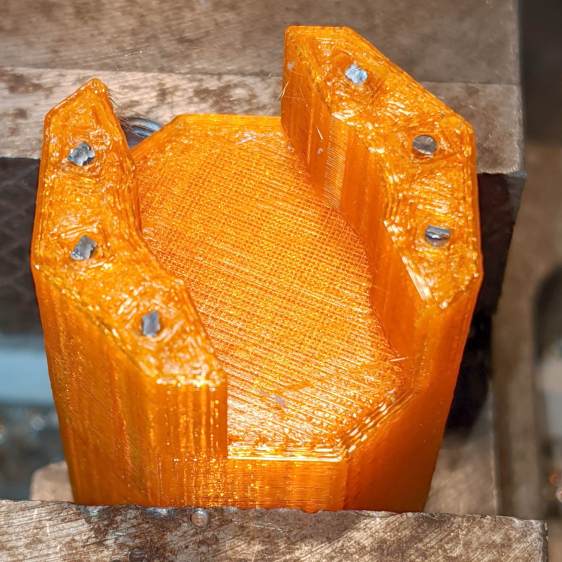
    With those measurements in hand, the second version used a pair of weird flat-head shoulder screws (probably from a hard drive) to anchor 3D printed angle brackets into the frame:

    HON Lateral File - shelf slides - version 2
    HON Lateral File – shelf slides – version 2

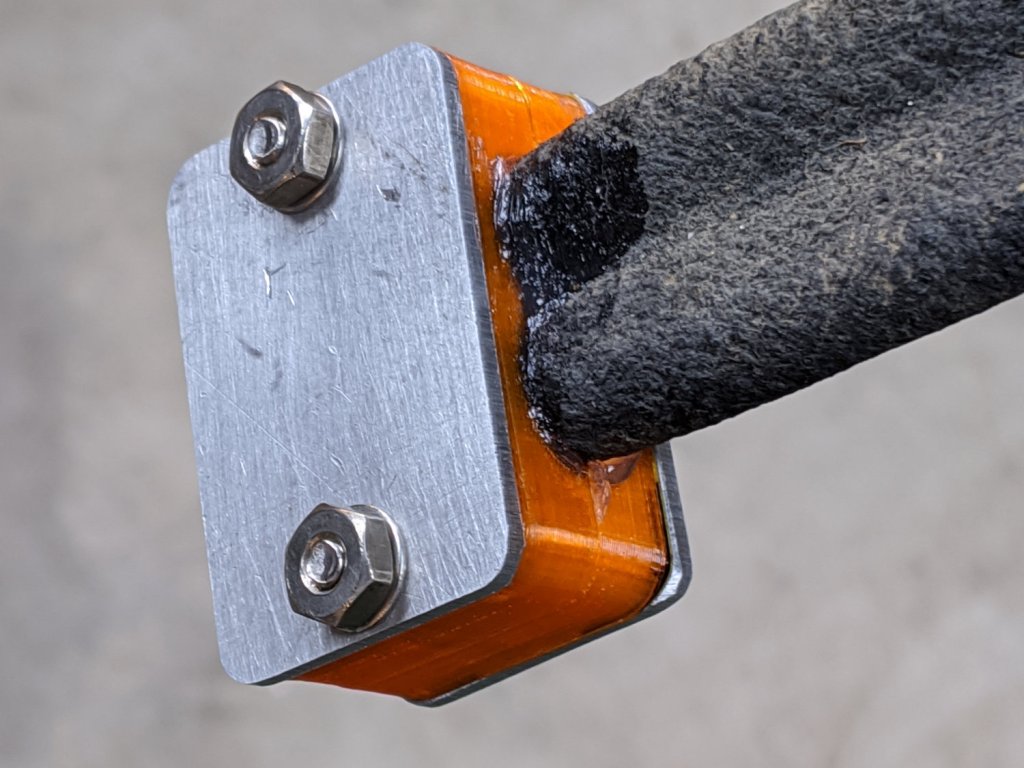
    Those worked reasonably well, but PETG doesn’t produce a nice sliding surface, so the final version has flat-head Delrin studs in slightly tweaked brackets:

    HON Lateral File - shelf slides - version 3
    HON Lateral File – shelf slides – version 3

    As with the buttons in the back, the original slides had expanding studs holding them in place, but glue works fine here, too:

    HON Lateral File - shelf slides - version 3 - installed
    HON Lateral File – shelf slides – version 3 – installed

    The button isn’t quite square to the surface and the slide isn’t quite flush with the bent metal in the frame, but it’s Good Enough™ for a shelf that won’t get lots of mileage.

    For reference, the brackets should print vertically to wrap the plastic threads around the upright for better strength:

    HON Lateral File Shelf Slide - Slic3r
    HON Lateral File Shelf Slide – Slic3r

    If you did it the obvious way, the upright side would break right off at the first insult from the hulking shelf, although they’re basically a solid chip of plastic, with a little infill inside the bottom slab.

    While I was at it, I pulled the springs to make them a bit longer, so they touch the back of the frame when the shelf is half an inch behind the front face of the drawers. A firm push and those Delrin contact points let the shelf pop out an inch or so, with plenty of room for fingers underneath the front edge.

    Some drawer slide stops near the back needed attention, too:

    HON Lateral File - slide stop bumper - bent
    HON Lateral File – slide stop bumper – bent

    I cannot imagine how hard somebody slammed the drawers, because bending the stops back to a right angle required a Vise-Grip and some muttering:

    HON Lateral File - slide stop bumper
    HON Lateral File – slide stop bumper

    Oddly, the cushiony hollow side faces away from the drawer, toward the back of the frame, because putting it forward holds the drawer front proud of the front frame face. Maybe HON cost-reduced the steel slides by making them just slightly shorter and using the same bumpers?

    The drawers have begun filling up from boxes scattered around the house:

    HON Lateral File - fabric stash
    HON Lateral File – fabric stash

    That’s the “orange” part of Mary’s collection, now with plenty of room to grow!

    The OpenSCAD source code as a GitHub Gist:

    // HON Lateral File Cabinet
    // Shelf slides
    // Ed Nisley KE4ZNU 2020-02-25
    //- Extrusion parameters must match reality!
    // Print with 3 shells and 3 solid layers
    ThreadThick = 0.25;
    ThreadWidth = 0.40;
    HoleWindage = 0.2;
    function IntegerMultiple(Size,Unit) = Unit * ceil(Size / Unit);
    Protrusion = 0.1; // make holes end cleanly
    inch = 25.4;
    ID = 0;
    OD = 1;
    LENGTH = 2;
    module PolyCyl(Dia,Height,ForceSides=0) { // based on nophead's polyholes
    Sides = (ForceSides != 0) ? ForceSides : (ceil(Dia) + 2);
    FixDia = Dia / cos(180/Sides);
    cylinder(r=(FixDia + HoleWindage)/2,h=Height,$fn=Sides);
    }
    //———————-
    // Dimensions
    SlideBlock = [18.0,25.0,12.0]; // across, along, height of left shelf bracket
    SlideWalls = [1.0,-SlideBlock.y/2,2.0]; // wall thicknesses, dummy Y
    HoleOffset = [8.4,7.0,0]; // hole center from left, front, dummy Z
    HoleOD = 4.0;
    Screw = [4.0,10,0.8]; // weird flat-head shoulder screw
    ScrewRecess = Screw.z + 2*ThreadThick; // depth to keep head below slide surface
    echo(str("Head base: ",SlideWalls.z – ScrewRecess));
    $fn = 12*4;
    //——————-
    // Single slide
    module Slide() {
    difference() {
    cube(SlideBlock,center=false);
    translate(SlideWalls)
    cube(SlideBlock * 2,center=false);
    translate(HoleOffset – [0,0,SlideBlock.z/2])
    rotate(180/8)
    PolyCyl(HoleOD,2*SlideBlock.z,8);
    translate(HoleOffset + [0,0,SlideWalls.z] – [0,0,ScrewRecess])
    rotate(180/12)
    PolyCyl(Screw[OD],3*Screw[LENGTH],12);
    }
    }
    //——————-
    // Build them
    Gap = 5.0/2;
    translate([0,-Gap,0])
    rotate([90,0,0])
    Slide();
    translate([0,Gap,0])
    rotate([-90,0,0])
    mirror([0,1,0])
    Slide();

  • Homage Tek CC: Subscripts & Superscripts

    The GCMC typeset() function converts UTF-8 text into a vector list, with Hershey vector fonts sufficing for most CNC projects. The fonts date back to the late 1960s and lack niceties such as superscripts, so the Homage Tektronix Circuit Computer scale legends have a simpler powers-of-ten notation:

    Tek CC - Pilot V5 - plain paper - red blue
    Tek CC – Pilot V5 – plain paper – red blue

    Techies understand upward-pointing carets, but … ick.

    After thinking it over, poking around in the GCMC source code, and sketching alternatives, I ruled out:

    • Adding superscript glyphs to the font tables
    • Writing a text parser with various formatting commands
    • Doing anything smart

    Because I don’t need very many superscripts, a trivial approach seemed feasible. Start by defining the size & position of the superscript characters:

    SuperScale = 0.75;                                       // superscript text size ratio
    SuperOffset = [0mm,0.75 * LegendTextSize.y];            //  ... baseline offset
    

    Half-size characters came out barely readable with 0.5 mm Pilot pens:

    Tek CC - Superscript test - 0.5x
    Tek CC – Superscript test – 0.5x

    They’re legible and might be OK with a diamond drag point.

    They work better at 3/4 scale:

    Tek CC - Superscript test - 0.75x
    Tek CC – Superscript test – 0.75x

    Because superscripts only occur at the end of the scale legends, a truly nasty hack suffices:

    function ArcLegendSuper(Text,Super,Radius,Angle,Orient) {
    
      local tp = scale(typeset(Text,TextFont),LegendTextSize);
    
      tp += scale(typeset(Super,TextFont),LegendTextSize * SuperScale) + SuperOffset + [tp[-1].x,0mm];
    
      local tpa = ArcText(tp,[0mm,0mm],Radius,Angle,TEXT_CENTERED,Orient);
    
      feedrate(TextSpeed);
      engrave(tpa,TravelZ,EngraveZ);
    }
    

    The SuperScale constant shrinks the superscript vectorlist, SuperOffset shifts it upward, and adding [tp[-1].x,0mm] glues it to the end of the normal-size vectorlist.

    Yup, that nasty.

    Creating the legends goes about like you’d expect:

      ArcLegendSuper("pF - picofarad  x10","-12",r,a,INWARD);
    

    Presenting “numeric” superscripts as text keeps the option open for putting non-numeric stuff up there, which seemed easier than guaranteeing YAGNI.

    A similar hack works for subscripts:

    Tek CC - Subscript test - 0.75x
    Tek CC – Subscript test – 0.75x

    With even more brutal code:

      Sub_C = scale(typeset("C",TextFont),LegendTextSize * SubScale) + SubOffset;
    
    <<< snippage >>>
    
        tp = scale(typeset("←----- τ",TextFont),LegendTextSize);
        tp += Sub_C + [tp[-1].x,0mm];
        tp += scale(typeset(" Scale -----→",TextFont),LegendTextSize) + [tp[-1].x,0mm];
    

    The hackage satisfied the Pareto Principle, so I’ll declare victory and move on.

  • SK6812 RGBW Test Fixture: Row-by-Row Color Mods

    The vacuum tube LED firmware subtracts the minimum value from the RGB channels of the SK6812 RGBW LEDs and displays it in the white channel, thereby reducing the PWM value of the RGB LEDs by their common “white” component. The main benefit is reducing the overall power by about two LEDs. More or less, kinda sorta.

    I tweaked the SK6812 test fixture firmware to show how several variations of the basic RGB colors appear:

          for (int col=0; col < NUMCOLS ; col++) {              // for each column
            byte Value[PIXELSIZE];                              // figure first row colors
            for (byte p=0; p < PIXELSIZE; p++) {                //  ... for each color in pixel
              Value[p] = StepColor(p,-col*Pixels[p].TubePhase);
            }
            // just RGB
            int row = 0;
            uint32_t UniColor = strip.Color(Value[RED],Value[GREEN],Value[BLUE],0);
            strip.setPixelColor(col + NUMCOLS*row++,UniColor);
    
            byte MinWhite = min(min(Value[RED],Value[GREEN]),Value[BLUE]);
    
            // only common white
            UniColor = strip.Color(0,0,0,MinWhite);
            strip.setPixelColor(col + NUMCOLS*row++,UniColor);
    
            // RGB minus common white + white
            UniColor = strip.Color(Value[RED]-MinWhite,Value[GREEN]-MinWhite,Value[BLUE]-MinWhite,MinWhite);
            strip.setPixelColor(col + NUMCOLS*row++,UniColor);
    
             // RGB minus common white
            UniColor = strip.Color(Value[RED]-MinWhite,Value[GREEN]-MinWhite,Value[BLUE]-MinWhite,0);
            strip.setPixelColor(col + NUMCOLS*row++,UniColor);
    
            // inverse RGB
            UniColor = strip.Color(255 - Value[RED],255 - Value[GREEN],255 - Value[BLUE],0);
            strip.setPixelColor(col + NUMCOLS*row++,UniColor);

    Which looks like this:

    SK6812 Test Fixture - RGBW color variations - diffuser
    SK6812 Test Fixture – RGBW color variations – diffuser

    The pure RGB colors appear along the bottom row, with the variations proceeding upward to the inverse RGB in the top row. The dust specks show it’s actually in focus.

    The color variations seem easier to see without the diffuser:

    SK6812 Test Fixture - RGBW color variations - bare LEDs
    SK6812 Test Fixture – RGBW color variations – bare LEDs

    The white LEDs are obviously “warm white”, which seems not to make much difference.

    Putting a jumper from D2 to the adjacent (on an Nano, anyway) ground pin selects the original pattern, removing the jumper displays the modified pattern:

    SK6812 test fixture - pattern jumper
    SK6812 test fixture – pattern jumper

    For whatever it’s worth, those LEDs have been running at full throttle for two years with zero failures!

    The Arduino source code as a GitHub Gist:

    // SK6812 RGBW LED array exerciser
    // Ed Nisley – KE4ANU – February 2017
    // 2020-01-25 add row-by-row color modifications
    #include <Adafruit_NeoPixel.h>
    //———-
    // Pin assignments
    const byte PIN_NEO = A3; // DO – data out to first Neopixel
    const byte PIN_HEARTBEAT = 13; // DO – Arduino LED
    const byte PIN_SELECT = 2; // DI – pattern select input
    //———-
    // Constants
    #define UPDATEINTERVAL 20ul
    const unsigned long UpdateMS = UPDATEINTERVAL – 1ul; // update LEDs only this many ms apart minus loop() overhead
    // number of steps per cycle, before applying prime factors
    #define RESOLUTION 100
    // phase difference between LEDs for slowest color
    #define BASEPHASE (PI/16.0)
    // LEDs in each row
    #define NUMCOLS 5
    // number of rows
    #define NUMROWS 5
    #define NUMPIXELS (NUMCOLS * NUMROWS)
    #define PINDEX(row,col) (row*NUMCOLS + col)
    //———-
    // Globals
    // instantiate the Neopixel buffer array
    Adafruit_NeoPixel strip = Adafruit_NeoPixel(NUMPIXELS, PIN_NEO, NEO_GRBW + NEO_KHZ800);
    uint32_t FullWhite = strip.Color(255,255,255,255);
    uint32_t FullOff = strip.Color(0,0,0,0);
    struct pixcolor_t {
    byte Prime;
    unsigned int NumSteps;
    unsigned int Step;
    float StepSize;
    float TubePhase;
    byte MaxPWM;
    };
    // colors in each LED
    enum pixcolors {RED, GREEN, BLUE, WHITE, PIXELSIZE};
    struct pixcolor_t Pixels[PIXELSIZE]; // all the data for each pixel color intensity
    unsigned long MillisNow;
    unsigned long MillisThen;
    //– Figure PWM based on current state
    byte StepColor(byte Color, float Phi) {
    byte Value;
    Value = (Pixels[Color].MaxPWM / 2.0) * (1.0 + sin(Pixels[Color].Step * Pixels[Color].StepSize + Phi));
    // Value = (Value) ? Value : Pixels[Color].MaxPWM; // flash at dimmest points
    // printf("C: %d Phi: %d Value: %d\r\n",Color,(int)(Phi*180.0/PI),Value);
    return Value;
    }
    //– Helper routine for printf()
    int s_putc(char c, FILE *t) {
    Serial.write(c);
    }
    //——————
    // Set the mood
    void setup() {
    pinMode(PIN_HEARTBEAT,OUTPUT);
    digitalWrite(PIN_HEARTBEAT,LOW); // show we arrived
    pinMode(PIN_SELECT,INPUT_PULLUP);
    Serial.begin(57600);
    fdevopen(&s_putc,0); // set up serial output for printf()
    printf("WS2812 / SK6812 array exerciser\r\nEd Nisley – KE4ZNU – February 2017\r\n");
    /// set up Neopixels
    strip.begin();
    strip.show();
    // lamp test: run a brilliant white dot along the length of the strip
    printf("Lamp test: walking white\r\n");
    strip.setPixelColor(0,FullWhite);
    strip.show();
    delay(250);
    for (int i=1; i<NUMPIXELS; i++) {
    digitalWrite(PIN_HEARTBEAT,HIGH);
    strip.setPixelColor(i-1,FullOff);
    strip.setPixelColor(i,FullWhite);
    strip.show();
    digitalWrite(PIN_HEARTBEAT,LOW);
    delay(250);
    }
    strip.setPixelColor(NUMPIXELS – 1,FullOff);
    strip.show();
    delay(250);
    // fill the array, row by row
    printf(" … fill\r\n");
    for (int i=NUMROWS-1; i>=0; i–) { // for each row
    digitalWrite(PIN_HEARTBEAT,HIGH);
    for (int j=NUMCOLS-1; j>=0 ; j–) {
    strip.setPixelColor(PINDEX(i,j),FullWhite);
    strip.show();
    delay(100);
    }
    digitalWrite(PIN_HEARTBEAT,LOW);
    }
    // clear to black, column by column
    printf(" … clear\r\n");
    for (int j=NUMCOLS-1; j>=0; j–) { // for each column
    digitalWrite(PIN_HEARTBEAT,HIGH);
    for (int i=NUMROWS-1; i>=0; i–) {
    strip.setPixelColor(PINDEX(i,j),FullOff);
    strip.show();
    delay(100);
    }
    digitalWrite(PIN_HEARTBEAT,LOW);
    }
    delay(1000);
    // set up the color generators
    MillisNow = MillisThen = millis();
    printf("First random number: %ld\r\n",random(10));
    Pixels[RED].Prime = 3;
    Pixels[GREEN].Prime = 5;
    Pixels[BLUE].Prime = 7;
    Pixels[WHITE].Prime = 11;
    printf("Primes: (%d,%d,%d,%d)\r\n",
    Pixels[RED].Prime,Pixels[GREEN].Prime,Pixels[BLUE].Prime,Pixels[WHITE].Prime);
    unsigned int PixelSteps = (unsigned int) ((BASEPHASE / TWO_PI) *
    RESOLUTION * (unsigned int) max(max(max(Pixels[RED].Prime,Pixels[GREEN].Prime),Pixels[BLUE].Prime),Pixels[WHITE].Prime));
    printf("Pixel phase offset: %d deg = %d steps\r\n",(int)(BASEPHASE*(360.0/TWO_PI)),PixelSteps);
    Pixels[RED].MaxPWM = 255;
    Pixels[GREEN].MaxPWM = 255;
    Pixels[BLUE].MaxPWM = 255;
    Pixels[WHITE].MaxPWM = 32;
    for (byte c=0; c < PIXELSIZE; c++) {
    Pixels[c].NumSteps = RESOLUTION * (unsigned int) Pixels[c].Prime;
    Pixels[c].Step = (3*Pixels[c].NumSteps)/4;
    Pixels[c].StepSize = TWO_PI / Pixels[c].NumSteps; // in radians per step
    Pixels[c].TubePhase = PixelSteps * Pixels[c].StepSize; // radians per tube
    printf("c: %d Steps: %5d Init: %5d",c,Pixels[c].NumSteps,Pixels[c].Step);
    printf(" PWM: %3d Phi %3d deg\r\n",Pixels[c].MaxPWM,(int)(Pixels[c].TubePhase*(360.0/TWO_PI)));
    }
    }
    //——————
    // Run the mood
    void loop() {
    MillisNow = millis();
    if ((MillisNow – MillisThen) > UpdateMS) {
    digitalWrite(PIN_HEARTBEAT,HIGH);
    unsigned int AllSteps = 0;
    for (byte c=0; c < PIXELSIZE; c++) { // step to next increment in each color
    if (++Pixels[c].Step >= Pixels[c].NumSteps) {
    Pixels[c].Step = 0;
    printf("Color %d steps %5d at %8ld delta %ld ms\r\n",c,Pixels[c].NumSteps,MillisNow,(MillisNow – MillisThen));
    }
    AllSteps += Pixels[c].Step; // will be zero only when all wrap at once
    }
    if (0 == AllSteps) {
    printf("Grand cycle at: %ld\r\n",MillisNow);
    }
    if (digitalRead(PIN_SELECT)) {
    for (int col=0; col < NUMCOLS ; col++) { // for each column
    byte Value[PIXELSIZE]; // figure first row colors
    for (byte p=0; p < PIXELSIZE; p++) { // … for each color in pixel
    Value[p] = StepColor(p,-col*Pixels[p].TubePhase);
    }
    // just RGB
    int row = 0;
    uint32_t UniColor = strip.Color(Value[RED],Value[GREEN],Value[BLUE],0);
    strip.setPixelColor(col + NUMCOLS*row++,UniColor);
    byte MinWhite = min(min(Value[RED],Value[GREEN]),Value[BLUE]);
    // only common white
    UniColor = strip.Color(0,0,0,MinWhite);
    strip.setPixelColor(col + NUMCOLS*row++,UniColor);
    // RGB minus common white + white
    UniColor = strip.Color(Value[RED]-MinWhite,Value[GREEN]-MinWhite,Value[BLUE]-MinWhite,MinWhite);
    strip.setPixelColor(col + NUMCOLS*row++,UniColor);
    // RGB minus common white
    UniColor = strip.Color(Value[RED]-MinWhite,Value[GREEN]-MinWhite,Value[BLUE]-MinWhite,0);
    strip.setPixelColor(col + NUMCOLS*row++,UniColor);
    // inverse RGB
    UniColor = strip.Color(255 – Value[RED],255 – Value[GREEN],255 – Value[BLUE],0);
    strip.setPixelColor(col + NUMCOLS*row++,UniColor);
    }
    }
    else {
    for (int k=0; k < NUMPIXELS; k++) { // for each pixel
    byte Value[PIXELSIZE];
    for (byte c=0; c < PIXELSIZE; c++) { // … for each color
    Value[c] = StepColor(c,-k*Pixels[c].TubePhase); // figure new PWM value
    // Value[c] = (c == RED && Value[c] == 0) ? Pixels[c].MaxPWM : Value[c]; // flash highlight for tracking
    }
    uint32_t UniColor = strip.Color(Value[RED],Value[GREEN],Value[BLUE],Value[WHITE]);
    strip.setPixelColor(k,UniColor);
    }
    }
    strip.show();
    MillisThen = MillisNow;
    digitalWrite(PIN_HEARTBEAT,LOW);
    }
    }

  • LibreOffice Impress vs. NFS Network Shares vs. Caching

    Whenever I put together a presentation, LibreOffice Impress gradually grinds to a halt with images in the slide thumbnails repeatedly updating and never stabilizing; eventually, LO crashes and sends a crash report to whoever’s watching. This may be due to my enthusiastic use of images to get my point(s) across, although I’m just not gonna back down from that position:

    LibreOffice Impress - Thumbnail thrashing
    LibreOffice Impress – Thumbnail thrashing

    That’s a screenshot of a small thumbnail, enlarged for visibility, so it doesn’t look that crappy in real life.

    Perhaps the problem arises because I insert the images as links, rather than embedding them to create a monolithic presentation file roughly the size of all outdoors?

    Searching with the obvious keywords produces tantalizing hints concerning LO’s file locks clashing with NFS network share locking, which seems appropriate for my situation with all the files living on the grandiosely named file server (a headless Optiplex) in the basement.

    The suggestions include making sure the NFS locking daemon is active, but I have NFC about how that might work in practice. The lockd daemon is running, for whatever that’s worth.

    Seeing as how I’m the only one editing my LO presentations, disabling LO’s locks has little downside and requires tweaking one character in one line inside /usr/bin/libreoffice:

    # file locking now enabled by default
    SAL_ENABLE_FILE_LOCKING=0
    export SAL_ENABLE_FILE_LOCKING
    <<< blank line to show off underscores above >>>

    After a brief bout of good behavior, Impress resumed thrashing and stalling.

    Copying the entire presentation + images to the SSD inside my desktop PC didn’t improve the situation.

    More searches on less obvious keywords suggested disabling the Impress “background cache”, whatever that might be:

    Tools → Options → Impress → General → Settings

    Then un-check the ☐ Use background cache item, which may be the last vestige of the now-vanished memory usage and graphics cache size settings from previous versions.

    In any event, disabling the cache had no effect, so it’s likely a problem deep inside LibreOffice where I cannot venture.

    It autosaves every ten minutes and I must restart it maybe once an hour: survivable, but suboptimal.

    There seems to be an improvement from Version 6.0.7 (Ubuntu 18.04 LTS) to Version 6.2.8 (Manjaro rolling release), although it’s too soon to tell whether it’s a fix or just different symptoms.