Ed Nisley's Blog: Shop notes, electronics, firmware, machinery, 3D printing, laser cuttery, and curiosities. Contents: 100% human thinking, 0% AI slop.
Category: Science
If you measure something often enough, it becomes science
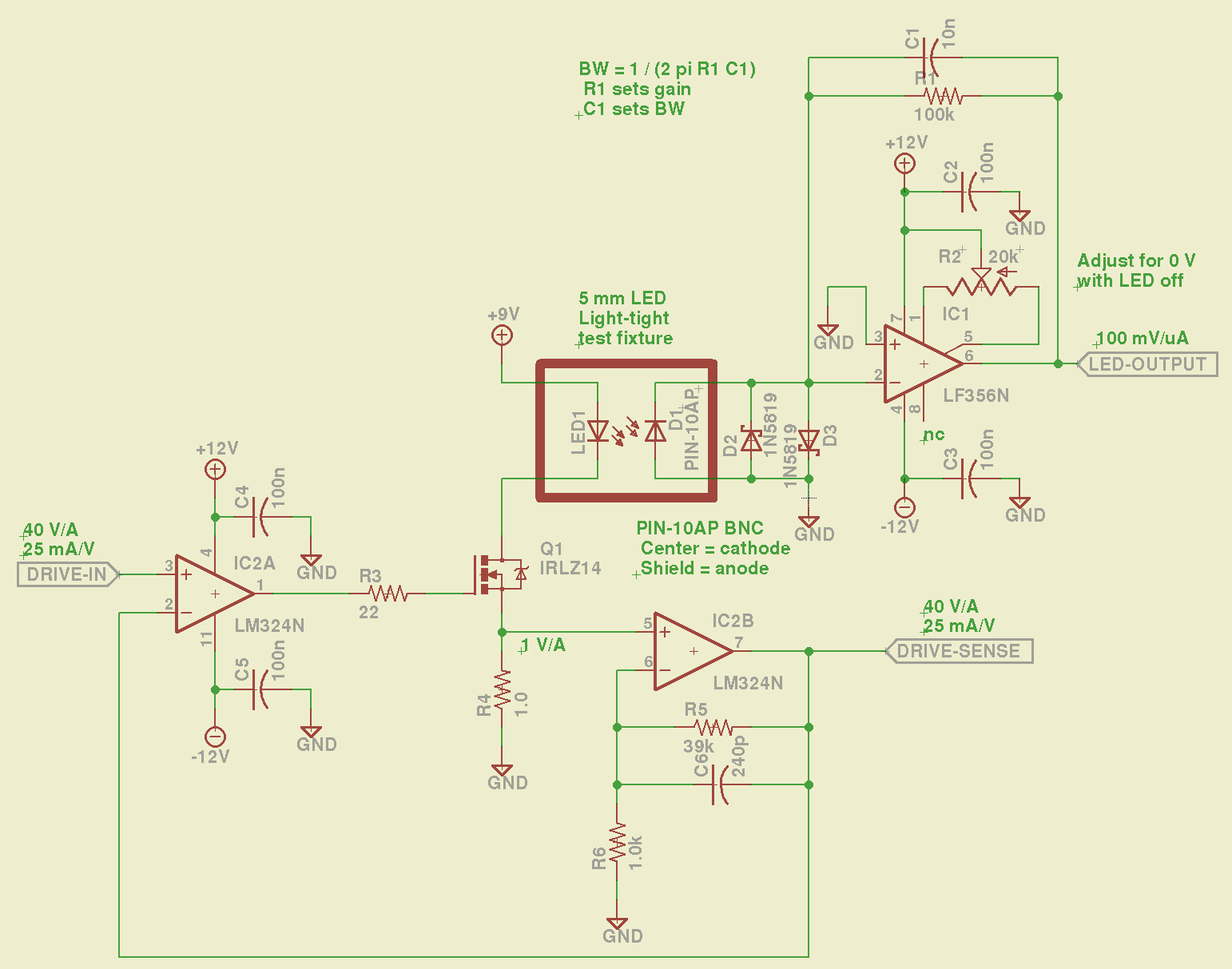
The LM324 converts the input voltage to an LED drive current, scaled by the sense resistor and the gain of IC2B to 25 mA/V. The feedback loop closes through the MOSFET and C6 rolls off the response, so there’s a nasty overshoot on the leading edge of input pulses where the current increases faster than the op amp can tamp it down:
Red LED – 25 mA 14 uA
The LM356 acts as a transimpedance amplifer to convert the photodiode current to voltage. The PIN-10AP specs say it should operate in photovoltaic mode with zero bias and that more than -3V of bias will kill the photodiode; the LM356 should hold its inverting input at virtual ground, but the two 1N5819 Schottky diodes enforce that limit. There being zero volts across the diodes, they don’t leak in either direction, so it’s all good.
The circuit is an embarrassing hairball on solderless breadboard, so use your imagination…
You could mash this together with the LED Curve Tracer, although you’d want better low-current resolution from the Arduino output.
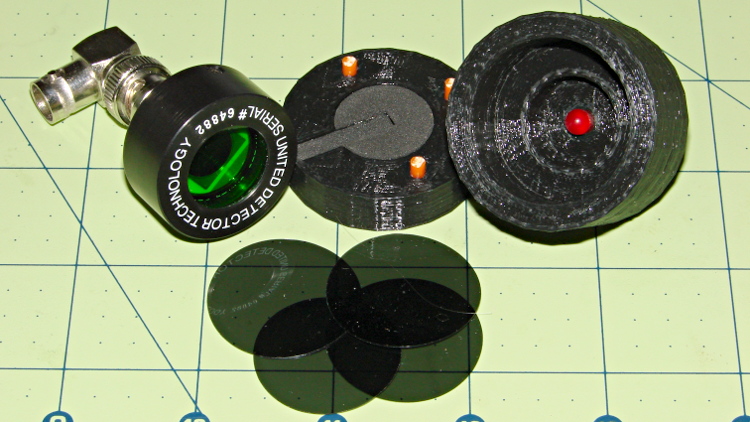
Given that test fixture, the obvious question is whether the PIN-10AP photodiode’s output current varies linearly with light intensity, just like the specs would lead you to believe. I excavated the sheet of 2-stop neutral density filter gel from the Parts Warehouse Wing and cut some 30 mm disks:
LED Photodiode test fixture – ND filter disks
A single filter layer should reduce the light intensity by 2 f/stops = a factor of 4. Each successive layer reduces the intensity by another factor of 4. They’re all at least reasonably clean and free of defects, but they’re definitely not optical lens quality.
Running the LED with a 100 mA pulse at 20% duty cycle and stacking the disks in the fixture, one by one, between the LED and photodiode, produces this data:
Layers
Attenuation
Scale
V
I – uA
Ratio
0
1
1.0000
8.7
87
1
4
0.2500
1.9
19
4.58
2
16
0.0625
0.43
4.3
4.42
3
64
0.0156
0.097
0.97
4.43
4
256
0.0039
0.022
0.22
4.41
The Ratio column divides successive pairs of current values. The first step, from “no filter” to “one filter”, came out a bit larger than the rest, probably because the gel sheet isn’t anti-reflective and some light bounces off the top.
After that, though, it looks just like I’m cheating, doesn’t it?
The ratios should be 4.0, but the actual 4.4 means it’s a 2.1 stop filter. Close enough, methinks.
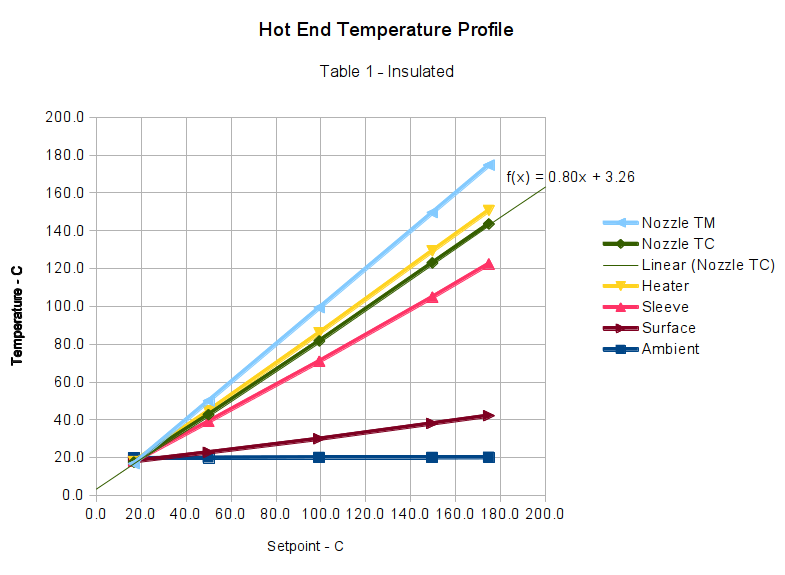
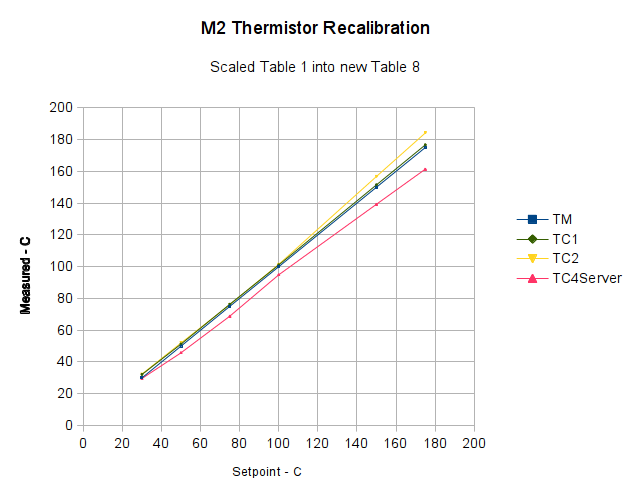
Those measurements suggested that my initial correction to the Table 1 values weren’t quite correct, but a similar correction might work as long as I didn’t change the insulating wrap. This graph includes a linear fit to the Nozzle TC data, based on the original M2 firmware’s Table 1 thermistor data and cotton insulation:
M2 Extruder Thermistor Recal – Table 1 Insulated – Nozzle TC linear fit
Applying that equation to Table 1 produces this thermistor lookup table:
I extrapolated the last entry from the previous two, because if the table doesn’t include an entry for 0 °C, then when you turn the heater off, the setpoint winds up being the lowest temperature greater than zero. Doesn’t make any difference, I think, but looks odd.
Load that table, run the temperature up, record more data:
M2 Extruder Thermistor Recal – slope-offset fit from Table 1
The error isn’t particularly pretty, being off by +4 °C at the high end. You could hand-tweak the linear fit equation to push the error down at normal operating temperatures, but it’s close enough for my purposes.
Although I don’t have any numbers, one benefit of tighter thermal coupling to the extruder nozzle is greatly reduced overshoot during heating.
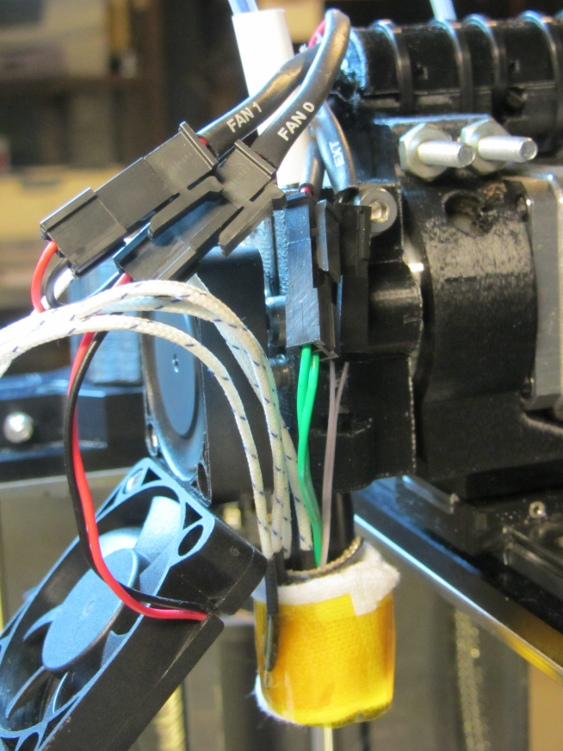
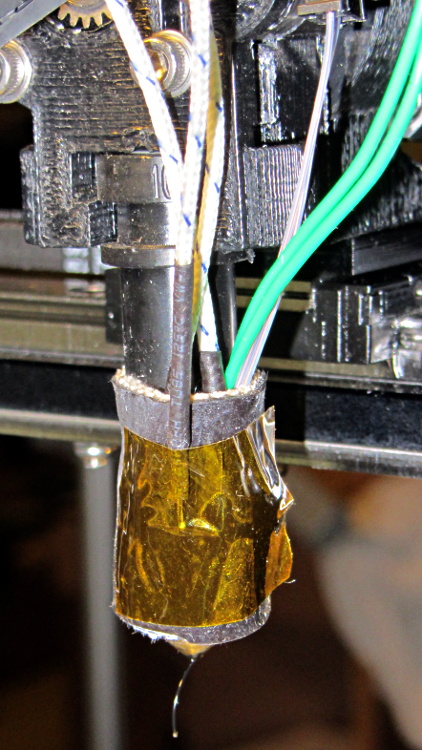
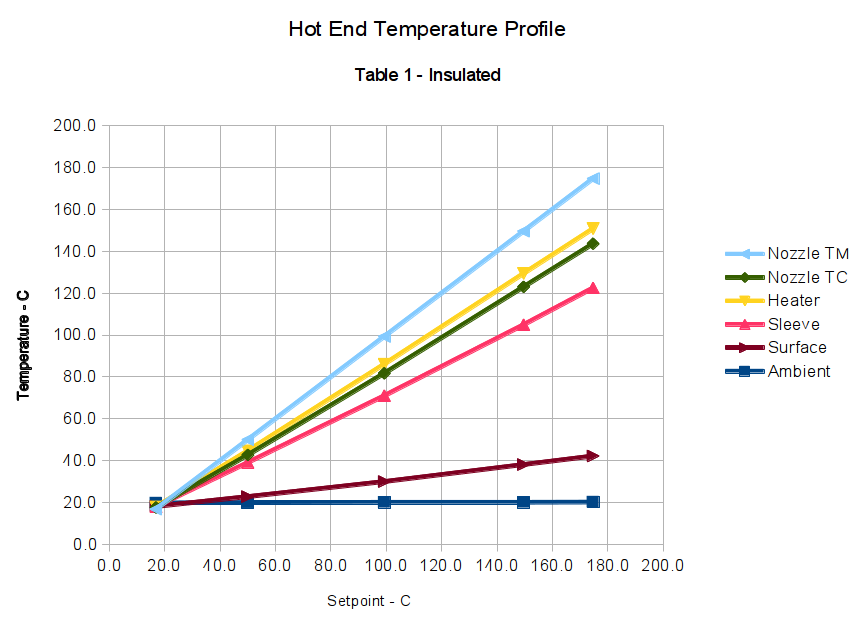
Knowing that all the thermocouples and amps and meters report more-or-less the same values, I tucked several of them around the hot end:
M2 Hot End Temperature Profile – Insulated
Their IDs and placement:
Nozzle TM – Makergear thermistor epoxied to nozzle
Nozzle TC – thermocouple epoxied to nozzle
Heater – thermocouple at heater, under insulating sleeve
Sleeve – thermocouple at heater, outside insulating sleeve
Surface – thermocouple taped to outside of cotton insulation
Although I intended to put the Heater thermocouple bead on the ceramic heater itself, I have no way of knowing exactly where it was, nor whether it actually made good contact with the heater body, because it’s tucked inside the fiberglass + silicone insulating sleeve. That sleeve will, perforce, be somewhat cooler than the heater, and that will certainly affect the results.
The sensors are stacked more-or-less radially outward from the center, which may or may not make any difference.
The upper fan (which runs constantly) does not blow directly on the leads, but air flow over the leads does change the reported temperatures: I haven’t taken that into account, even though it’s certainly significant, but the leads and fan remain in (approximately) the same position for the tests.
In the stock M2, the lower fan blows directly on the uninsulated hot end, the thermistor, and the nozzle; the G-Code controls when it’s turned on, so whatever effects it has are not constant. It was always off for these tests, but that’s certainly not the case while printing an object.
The cotton insulation wrap isn’t the same as I used earlier; it was easier to use a new length of cloth than to remove the Kapton tape from the old insulation. The new insulation was slightly thicker, as well, and did a better job of reducing heat loss. I took the Insulated measurements first, then removed the cloth for the Bare measurements. Although I tried to keep the thermocouples in the same positions, I certainly nudged the wires while peeling off the cloth:
M2 Hot End Temperature Profile – Bare
The Marlin firmware in the M2 normally uses thermistor Table 1. I adjusted those values to create Table 8, which exactly corrected the mismatch, at least with the earlier, thinner insulation.
After each temperature step, I waited until the temperature plot in the Pronterface graph had settled to a single pixel line for one minute. That didn’t mean the temperature was exactly at the setpoint, but it wasn’t changing very much at all, which is all I needed for this dataset.
Keeping all that in mind…
Graph 1 — Thermistor Table 1, bare (the as-shipped M2 configuration):
Hot End Temperature Profile Graph – Table 1 – Bare
Graph 2 — Thermistor Table 1, with insulation:
Hot End Temperature Profile Graph – Table 1 – Insulated
Graph 3 — Thermistor Table 8, bare:
Hot End Temperature Profile Graph – Table 8 – Bare
Graph 4 — Thermistor Table 8, with insulation:
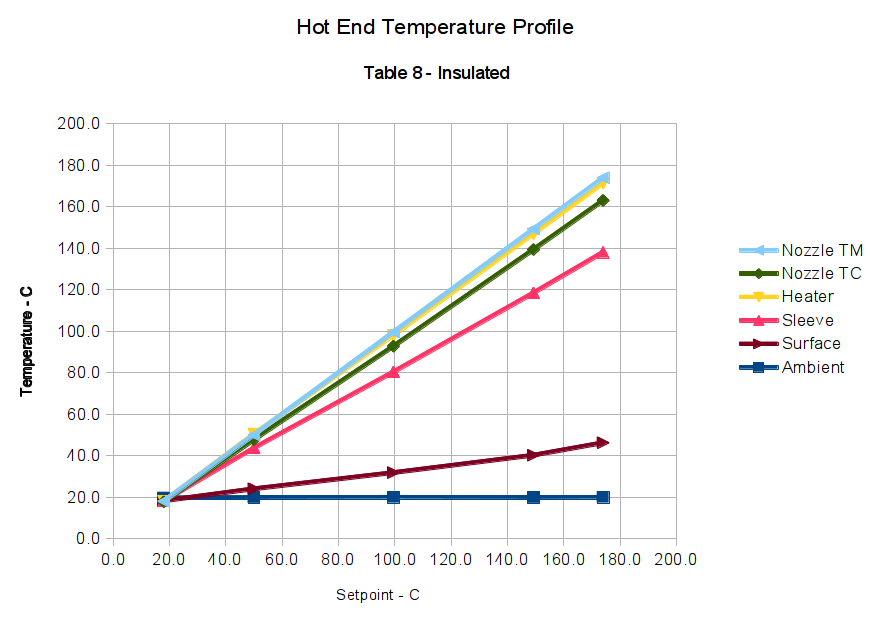
Hot End Temperature Profile Graph – Table 8 – Insulated
The data in Graph 4 clearly show that the correction factor I used to create Table 8 doesn’t apply with a different insulation wrap around the hot end. Although the Nozzle TM and Nozzle TC lines are quite close, they aren’t the exact match I saw before.
When you compare Graph 1 with Graph 3, then Graph 2 with Graph 4, you’ll see that the thermocouple data remains consistent: the temperature differences at a specific temperature are the same, regardless of what the Nozzle TM indicates. For example, at the upper-right corner of Graph 1, when the Nozzle TM reports 175 °C, Nozzle TC is at 145 °C and the Heater is at 124 °C (use the Y axis values): Nozzle TC is 21 °C higher than the Heater. Looking in Graph 3 to the point where the Heater is 124 °C, the Heater is once again 21 °C hotter (again, using the Y axis values).
Although it seems odd, having the thermocouple on the bare Heater run cooler than the Nozzle TC is entirely possible, because the Heater thermocouple is in contact with the relatively thin sleeve, which is cooling the outside of the heater core. The Nozzle TC has a direct metallic + epoxy connection to the inside of the heater core, which will be hotter than its exterior surface.
Conversely, Graph 2 shows the insulated Heater running hotter than the Nozzle TM. That also makes sense: with less heat loss through the Sleeve, the exterior of the heater gets hotter than the threaded brass cylinder in the middle, which is losing heat at both ends.
Those correlations suggest the various thermocouples do indicate the actual temperatures and the nozzle thermistor doesn’t.
I believe bonding the thermistor to the nozzle with epoxy doesn’t affect that conclusion. It does make the results less subject to random changes due to the thermistor bead’s exact position and contact with the nozzle, though, and certainly makes the temperatures I record quite different from those found in other M2 hot ends. The fundamental rule here is that when you want to measure the temperature of something, the probe must make solid contact with the something, not dangle in mid-air somewhere nearby.
Based on some earlier (and rather crude) measurements, I proposed that the thermistor was gaining heat through its leads, because they pass over the heater core. That’s definitely not true, as the Nozzle TM and Nozzle TC have the same temperature difference between the bare and insulated cases: compare Graph 1 with Graph 2, then Graph 3 with Graph 4. If the thermistor gained heat, it would be relatively hotter than the thermocouple in the case with additional insulation, because the Heater would then run hotter and pipe more heat into the thermistor leads.
That’s why you make measurements…
Along those lines, I’ve asked several people I trust to measure their M2 hot ends [You know who you are. Thanks!] and the results are unequivocal: nobody sees any significant variation between the thermistor and a thermocouple tucked beside it. The only difference in the setups seems to be the solid connection between my sensors and the nozzle. I can’t explain it, either, and I’ve shot down several of my own proposals.
Although I don’t have a good way to put thermocouples in a known temperature environment (ie, yes, I can freeze and boil water, but I doubt the trustworthiness of any measurements made therein), I can compare the results from several different thermocouples held at the same (unknown) temperature: if they all agree to within a reasonable tolerance, I assume that they’re all reporting the correct temperature. Even better, if some of the temperatures come from different thermocouple amplifiers, then the electronics cross-check each other.
With that in mind, I attached a 4 Ω 25 W aluminum-body power resistor to the back of the same isothermal block I built for the Thing-O-Matic extruder tests, atop a dab of heatsink compound for good measure:
Isothermal block with 25 W power resistor
Then I tucked four sensors into the drilled holes:
Sensors in heated aluminum block
Clockwise from the front left corner:
T1: Fluke meter, eBay TC (black sheath)
T2: Fluke meter, Fluke TC (brown sheath)
TM5: TC4+Arduino, eBay 100 kΩ thermistor (invisibly fine bare wire leads)
TC1: TC4+Arduino, eBay TC (black sheath)
The TC4 Shield handles both thermocouple and thermistor sensors, so I added a thermistor from my collection just to see how it worked. The datasheet gives these parameters:
100 kΩ resistance at 25 °C
beta = 3950 (from 25 °C to 50 °C)
beta = 3990 (from 25 °C to 85 °C)
Unfortunately, there’s no way to include the eBay thermocouple epoxied to the nozzle in this test, but it’s from the same lot as the two in this test, so I assume it’ll produce the same results. The consistency in earlier tests suggests they’re all really Type K thermocouples and produce the same results as the Fluke thermocouple and meter that I assume produces accurate readings.
The closed-cell foam insulating the block from the vice jaws seemed like a good idea at the time.
I connected the resistor to the bench power supply, channeled the true spirit of DIY 3D printing (ie, ignored the power derating curves), and fired it up:
Multiple Sensor Calibration – vs time
The successive steps correspond to power levels of 0 W (the ambient temperature), 1 W, 2 W, 3W, 4W, and 6 W. The last point established that the foam melts at slightly over 100 °C, whereupon the test terminated. Eyeballometrically, the time constant of the resistor + block is on the order of 20 minutes, so these few points represent a rather tedious Basement Laboratory session.
Plotting the temperatures against the reading for T2, the Fluke thermocouple connected to the Fluke meter, and thinning the lines makes the results a bit more obvious:
Multiple Sensor Calibration – vs T2
The three thermocouples and Fluke meter / TC4 Shield pretty much overlay each other, with the thermistor reporting a somewhat higher temperature. Given that TM5 is an eBay thermistor, I’ll let you judge whether the beta value I got from its listing matches the beta of the actual thermistor.
In any event, I’d say the thermocouples report a temperature within at most a degree or two of the actual temperature. Plus, I didn’t get a steam burn in the process…
The Marlin firmware used by the M2 has these thermistor selections in Configuration.h:
//// Temperature sensor settings:
// -2 is thermocouple with MAX6675 (only for sensor 0)
// -1 is thermocouple with AD595
// 0 is not used
// 1 is 100k thermistor
// 2 is 200k thermistor
// 3 is mendel-parts thermistor
// 4 is 10k thermistor !! do not use it for a hotend. It gives bad resolution at high temp. !!
// 5 is ParCan supplied 104GT-2 100K
// 6 is EPCOS 100k
// 7 is 100k Honeywell thermistor 135-104LAG-J01

#define TEMP_SENSOR_0 1
#define TEMP_SENSOR_1 1
#define TEMP_SENSOR_2 0
#define TEMP_SENSOR_BED 1
The first table in thermistortables.h looks like this:
The OVERSAMPLENR constant determines the number of successive ADC samples added together into a single value, which is then used to search the table for the corresponding entry. The table entries are pairs of: {nominal ADC value * number of samples, temperature in C}
which means that if we know the temperature, we can work backwards to find the ADC value and then compute the actual thermistor resistance.
However, before doing that, I created a modified version of the thermistor table that simply scales the temperatures down by 0.878:
I inserted that table, changed the thermistor selection, reloaded the firmware, and ran the same test as before, which produced this result:
Rescaled extruder thermocouple
The stock thermistor and the thermocouple now report essentially the same values, which is entirely due to the new table. The two additional lines come from two more thermocouples taped to the nozzle and dangling downward toward the platform:
M2 – Hot end with additional thermocouples
Given that I simply taped those thermistors in place, they don’t contact the nozzle nearly as well as the epoxied sensors. The fact that one reads a bit higher and the other much lower could be explained by handwaving, but one possibility is that the various thermocouples don’t quite agree with each other.







 The Smell of Molten Projects in the Morning