The Smell of Molten Projects in the Morning

Ed Nisley's Blog: Shop notes, electronics, firmware, machinery, 3D printing, laser cuttery, and curiosities. Contents: 100% human thinking, 0% AI slop.

Category: Recumbent Bicycling

Cruisin’ the streets

  • HT GPS + Audio: Schematic

    This board drives the helmet mic & earbud, combines the TinyTrak3+ AFSK audio with the mic audio, and interfaces with the radio’s mic & speaker jacks.
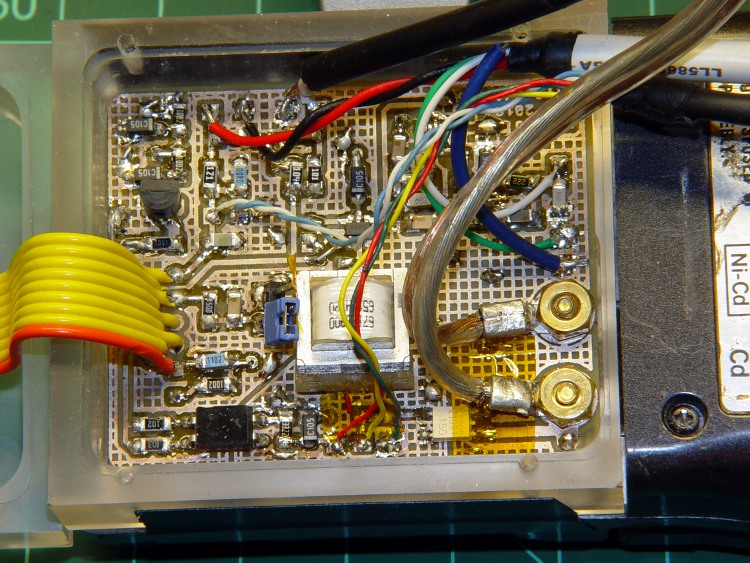
    GPS + Audio circuit board
    GPS + Audio circuit board

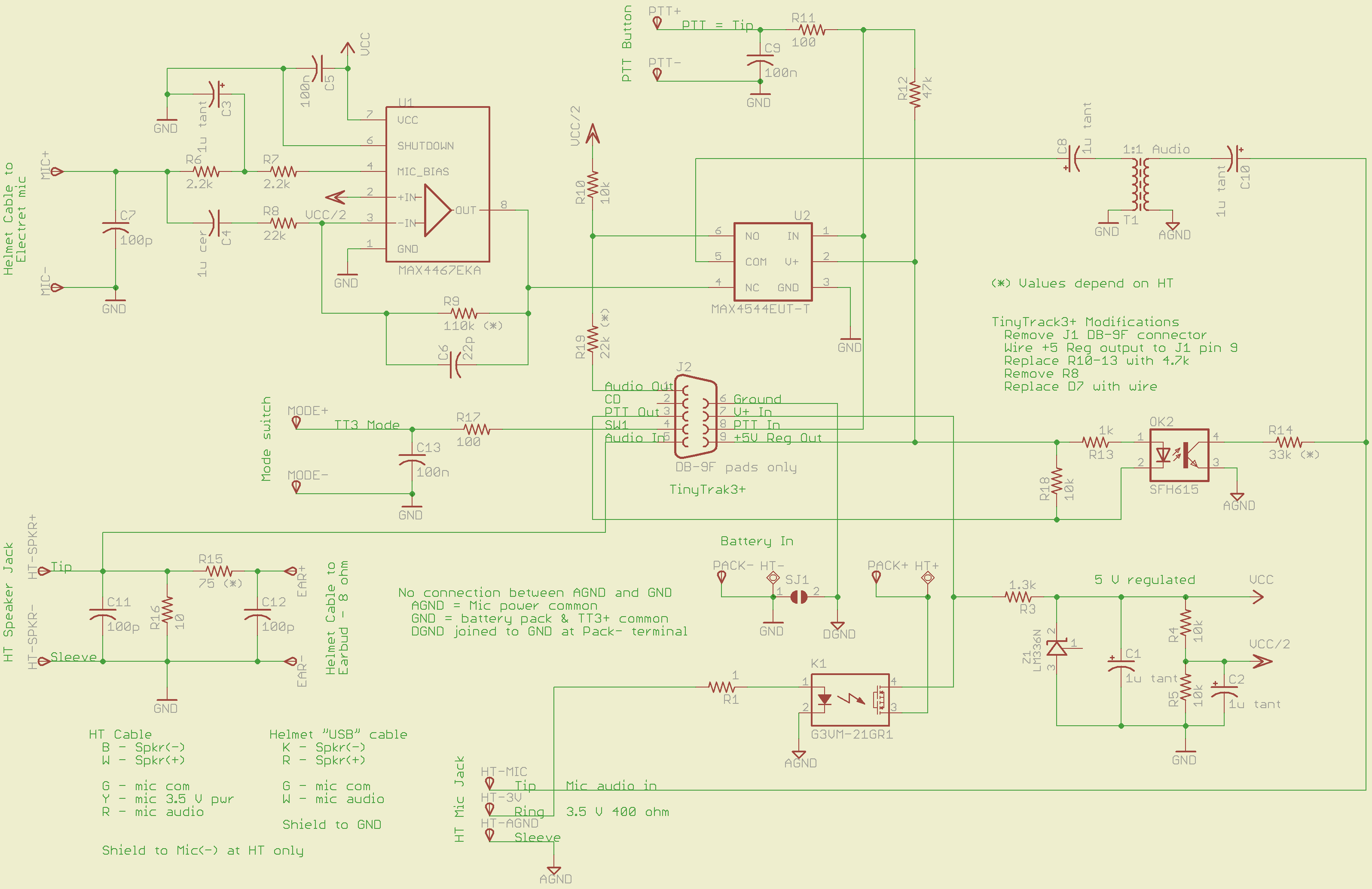
    The schematic (click for more dots):

    GPS + Voice HT Interface schematic
    GPS + Voice HT Interface schematic

    The ICOM IC-Z1A provides a 3.5 V power supply (on the ring terminal of the mic jack) that normally drives an electret mic. I use it to turn on a MOSFET relay that powers all the circuitry directly from the external battery pack. The relay has about 1 Ω of resistance, so there’s not much voltage drop. Note that the radio’s power does not go through the relay: it connects directly to the external battery.

    An earlier version used an optocoupler to drive a 2N2907 PNP transistor for power switching. That worked fine and might actually be better; I think the MOSFET relay needs slightly more drive current than the HT’s 3.5 V supply can provide. More on that later if the problems continue.

    The TinyTrak3 includes a 5 V regulator that I wired through the normally unused pin 9 of the DB-9 connector (no connector, just a ribbon cable). It powers the  PTT button, analog switch, and the PTT optocoupler.

    The MAX4467 handles the electret mic, with power from a separate 5 V shunt regulator built around an LM336. That keeps much of the TT3’s digital noise out of the audio. You can use a MAX4468 if the voltage gain required for your electret mic capsule is greater than Av=5; the ’67 is unity-gain stable.

    A MAX4544 analog switch (basically, a low-power MOSFET relay) selects either voice or AFSK data. I originally tried adding the two with an op-amp, but there’s just too much noise from the TT3. The external PTT selects audio data; the rest of the time the radio gets the TT3.

    The HT’s mic input is galvanically isolated from the rest of the circuit board. That eliminates ground loops, circulating RF, and all manner of hassle. Bulky, awkward, expensive, and highly worthwhile.

    An optocoupler isolates the TT3 PTT-out signal from the HT’s audio input, while switching the 33 kΩ resistor that activates the HT PTT. R18 bypasses any leakage current from the TT3’s driver transistor around the coupler’s LED; the PTT current to the HT is so small that the leakage on a hot day can tease it.

    A small 1:1 audio transformer couples the voice + data into the HT’s mic input jack. The 1 μF caps are certainly overkill, but they’re small and work well.

    The HT’s external speaker goes into a simple L attenuator that reduces the volume. The HT expects an 8 Ω speaker, but most of the earbuds these days are 30 Ω and way loud; the volume control doesn’t have much resolution when there’s only two or three clicks between inaudible and ouch.

    All the external inputs have a 100 pF bypass cap and a 100 Ω series resistor to cut down on RF and tamp down static discharges. Might be overkill, but the previous units withstood years of abuse with that sort of circuitry and I’ll stand by it.

    Required tweakage for your HT’s preferences:

    • R9: MAX4467 gain gets the electret capsule output up to whatever your HT expects.
    • R15/R16: Earbud attenuator cuts the HT’s speaker output down to something reasonable for your ear
    • R14: PTT resistor must suit your radio
    • R19: TT3 output may be too hot for your HT audio, even with R6 on the TT3 turned way down.

    All the wires go to top-layer solder pads, rather than physical connectors. I didn’t have any “front panel” space for connectors, anyway, so that’s as good as it gets.

    I’ll eventually gather all the files into one lump and put ’em up here.
  • HT GPS + Audio: Hardware Overview

    The project has two circuit boards:

    • a modified TinyTrak3 kit for GPS-to-AFSK
    • a custom PCB for everything else

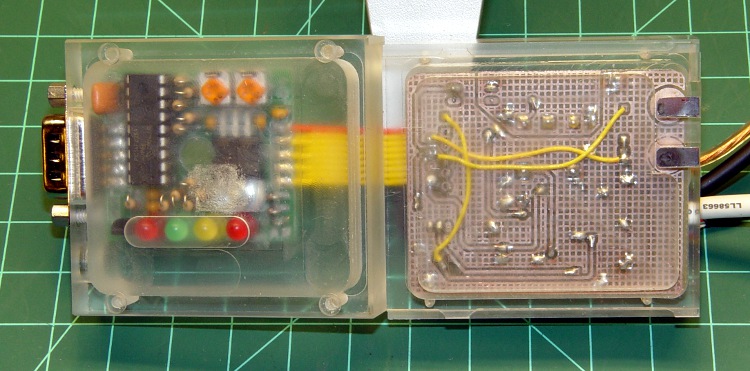
    The boards fit in the two halves of the enclosure, which is held together by four 7/8-inch 2-56 machine screws. The blind holes in the lower (right) half are tapped for the screws. The clearance holes in the upper (left) half are a bit too close to the interior; if the setup isn’t perfect, they break through.

    The right half slides into the HT’s battery pack grooves. The two tin plates match up with the HT’s power input contact springs.

    Interface - top and bottom surfaces
    Interface – top and bottom surfaces

    The oval mark around the four LEDs is actually a 1 mm deep recess in the cover; the LEDs are the tallest things on the board and I sort of ran out of room. The GPS connector is essentially flush against the back of the HT, so the board can’t get any lower. Even though the case halves are milled from a hulking 3/4-inch plastic plate, the top surface is only 1 mm thick above the LEDs, so the board can’t get any higher.

    The interior view:

    Interface box - interior
    Interface box – interior

    The DB-9 serial connector mounting screws hold the TinyTrak3 board in place. The GPS receiver and PC serial port (used for configuration) plug into that connector.

    The four external cables connected to the circuit board:

    • power from external battery pack
    • helmet mic + earbud
    • PTT switch
    • HT speaker + mic + mic power

    A closeup of the audio PCB in its natural habitat:

    GPS + Audio circuit board
    GPS + Audio circuit board

    The two nuts on the right fit on 4-40 brass screws that I converted into studs under those tin battery pack strips, about which more later. The nuts hold the circuit board in place atop a shoulder around the interior of the compartment.

    The OEM battery packs have nice tabs that engage the HT’s clever pushbutton latching mechanism. I spent a lot of time staring at them: they’re easy to do in an injection mold and impossible to machine at my skill level. So I punted: two strips of tape hold the enclosure in place on the HT. Works fine.

  • GPS + Audio Interface for ICOM Z-1A HT

    You’ve seen bits & pieces of this in the previous weeks and months: now it’s up and running!

    Admittedly, this is brassboard hardware; I must now build three final versions for our bikes incorporating all the tweaks & adjustments. But it’s time to write this stuff down so I can find it again … and perhaps you can use some chunks, too.

    ICOM IC-Z1A with GPS+Audio Interface
    ICOM IC-Z1A with GPS+Audio Interface

    What it does:

    Why we need it:

    • voice intercom for our family rides: we talk without shouting at each other
    • safety communication for public service events supported by the local amateur radio club
    • GPS-based APRS position reporting for those events
    • trip monitoring on our long solo rides
    • it’s a neat tech hack with lots of Quality Shop Time

    Major sub-projects (some already partially written up):

    I don’t have an instruction manual to go along with this, nor is there a parts kit available. You’ll certainly want to modify everything for your own purposes; the circuit board and case certainly won’t fit whatever HT you’re using!

    Over the next several days, I’ll be describing & documenting the tricky parts… in no particular order, because I’m not going to sort my notes & photos ahead of time.

  • Another Circumferential Seat-Frame Clamp

    This is another step along the way to getting our daughter’s radio firmly mounted to her Tour Easy, not tucked into one of the panniers. The general idea is to use a water bottle holder for the radio, with a seat wedge pack from an upright bike cushioning the radio. The secret ingredient is a circumferential clamp that mounts the holder to the lower rail of the bike’s seat frame.

    This clamp is basically the same as the ones on our bikes, but I doodled up a sketch with some illegible dimensions that almost matches the actual clamp; we may both find it useful the next time.

    Clamp layout sketch
    Clamp layout sketch

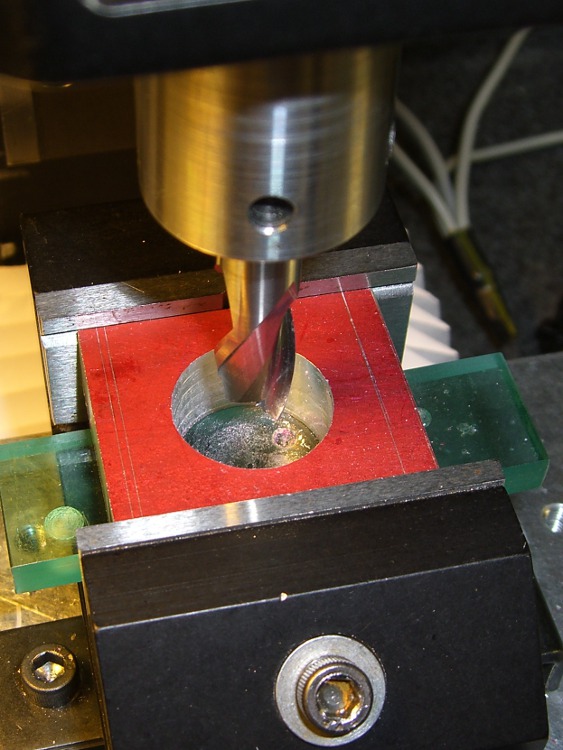
    Machining the clamp is straightforward: bandsaw a block of about the right size, square it up in the mill, helix-mill the clamp hole …

    Helix-milling the clamp hole
    Helix-milling the clamp hole

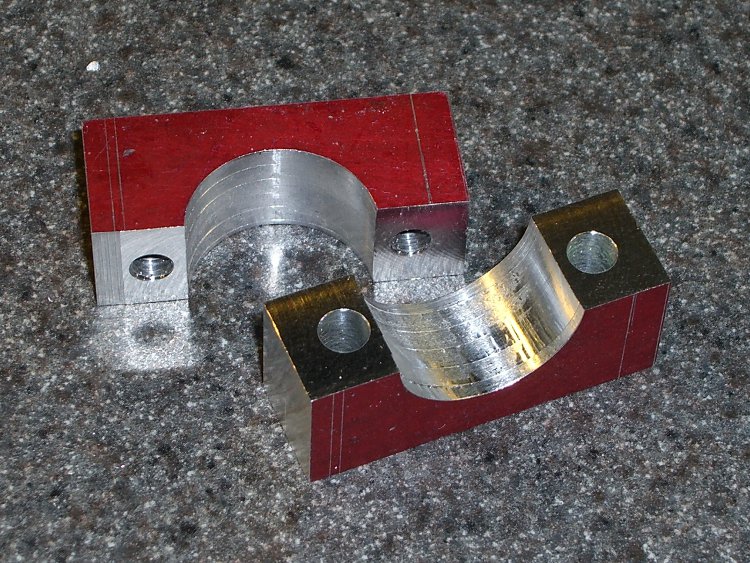
    Drill the clearance and tapping holes for the screw, bandsaw it in half, clean up the cut edges …

    Finished clamp parts
    Finished clamp parts

    Obviously, I didn’t put those nice bevels on the front side.

    Both previous water bottle holders required a spreader plate between the clamp screws and the holder’s screws, but this time the holder had a nice aluminum plate all by itself. It just fit on the Sherline and a bit of manual CNC center-drilled the curved plate and poked a jobber-length drill through the holes …

    Drilling holder for clamp screws
    Drilling holder for clamp screws

    And then it fit perfectly on the bike …

    Mounted holder
    Mounted holder

    A side view …

    Mounted holder - side view
    Mounted holder – side view

    Now, to find a wedge pack big enough for the HT and small enough to fit in the holder!

  • Adapting an Earbud for Bicycle Use

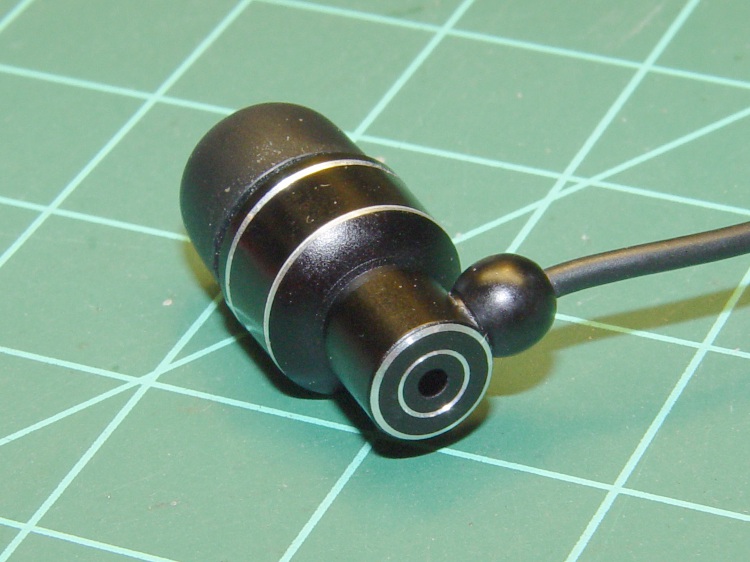
    I favor a small cylindrical earbud with a good seal inside my ear for use with the amateur radio on my bike. These things come with back vents that allegedly improve their bass response; that’s not a concern for communications-grade audio and, worse, the vent produces a tremendous amount of wind noise.

    Earbud with back vent
    Earbud with back vent

    The solution is straightforward: put some tape over the vent!

    Kapton tape over vent
    Kapton tape over vent

    I used Kapton tape, because I have it, but in point of fact the snippet of duct tape I applied on the first ride (having forgotten to do it on the bench) worked just fine. A drop of epoxy would be fine, too, if you were a bit careful about not letting it ooze down inside the case while it cured.

    Despite the fancy appearance, this is a random pick from the assortment of earbuds I’ve bought at $10 or less over the last few years. According to my golden-eared assistant, the audio quality varies dramatically among the assortment, but they all work reasonably well between 300-3000 Hz. I suspect the insanely cheap ones on eBay are essentially the same things, although IMO they’re intended to collect large quantities of high positive ratings: caveat emptor.

    Speaking of caveats, insert the usual safety caveats here.

    Note that we’re using one earbud for tactical comm, not boppin’ to the music, and the audio level is low enough we (well, I) can’t hear diddly at speeds over 15 mph. Your jurisdiction may prohibit “headphones” or “earphones” or some such, so behave accordingly.

    All the officers I’ve met think the radios are a great idea, if that means anything.

  • Bell Bicycle Helmet Teardown

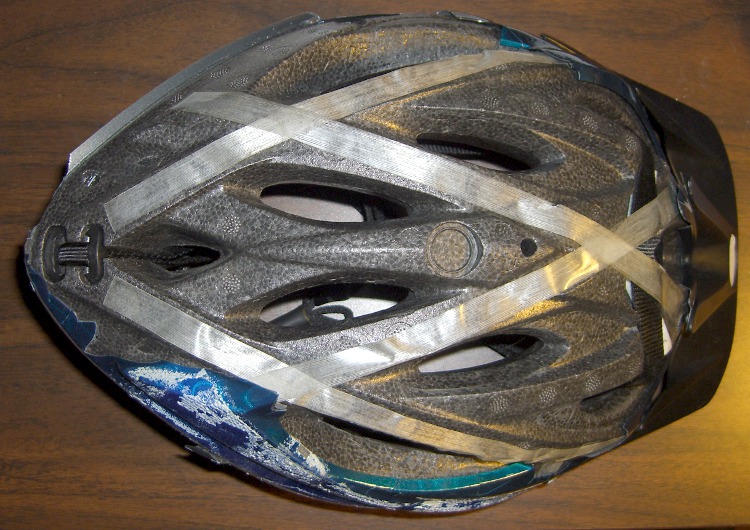
    Having gotten our new helmets up & running, I decided to tear down my old helmet to see what’s inside. The thin plastic shell was already cracked (and probably brittle from years of sun), so it tore off very easily. The foam structure was in good shape, but I was surprised to see that everything’s held in place by glass filament tape!

    Peeled bike helmet
    Peeled bike helmet

    The straps pass through an H-shaped locking clip tucked into a recess in the rear apex (to the left in the picture). The front strap simply loops over the foam shell (to the right of the tape crossing on the right), where it’s held in place on double-sided adhesive foam tape by the glass filament tape.

    All in all, a low-cost, low-weight design that works just fine.

  • Visor-mounting a Third Eye Hardshell Mirror

    Tweaked Third Eye Mirror
    Tweaked Third Eye Mirror

    The Third Eye Hardshell Mirror was designed back in the day when Bell Helmets had actual hard plastic shells over a foam core, with a lip around the shell’s edge. These days, helmets consist of an elaborate foam structure with a paper-thin plastic covering. Mary’s helmet is like that, but it has a visor and I figured the mounting clamp might grab onto that.

    It almost worked, but the edge of the clamp tapered the wrong way: tightening the screw tipped the clamp away from the visor lip.

    Solution: chop off the offending part of the clamp, file off the sharp edges, and screw it in place. Works like a champ.

    I’m not convinced this mount will survive the test of time, though. We already know that the clever ball joint will eventually lose its griptivity, but that’s fixable.