The Smell of Molten Projects in the Morning

Ed Nisley's Blog: Shop notes, electronics, firmware, machinery, 3D printing, laser cuttery, and curiosities. Contents: 100% human thinking, 0% AI slop.

Category: PC Tweakage

Remembering which tweaks worked

  • Windows-free BIOS Update

    A new-to-me Dell Optiplex 9020 needed a BIOS update, which, as always, arrives in a Windows / DOS EXE file. Because I’d already swapped in an SSD and installed Manjaro, I had to (re-)discover how to put the EXE file on a bootable DOS USB stick.

    The least horrible way seemed to be perverting a known-good FreeDOS installation image:

    sha256sum FD12FULL.zip 
    fd353f20f509722e8b73686918995db2cd03637fa68c32e30caaca70ff94c6d2  FD12FULL.zip

    Unzip it to get the USB image file, then find the partition offset:

    fdisk -l FD12FULL.img
    Disk FD12FULL.img: 512 MiB, 536870912 bytes, 1048576 sectors
    Units: sectors of 1 * 512 = 512 bytes
    Sector size (logical/physical): 512 bytes / 512 bytes
    I/O size (minimum/optimal): 512 bytes / 512 bytes
    Disklabel type: dos
    Disk identifier: 0x00000000
    
    Device        Boot Start     End Sectors   Size Id Type
    FD12FULL.img1 *       63 1048319 1048257 511.9M  6 FAT16

    Mount the partition as a loop device:

    sudo mount -o loop,offset=$((63*512)),uid=ed FD12FULL.img /mnt/loop

    See how much space is left:

    df -h /mnt/loop
    Filesystem      Size  Used Avail Use% Mounted on
    /dev/loop0      512M  425M   87M  84% /mnt/loop

    The image file is 512 MB and has 87 MB available. The BIOS file is 9.5 MB, so copy the file to the “drive”:

    cp O9020A25.exe /mnt/loop

    Which knocks the available space down by about what you’d expect:

    df -h /mnt/loop
    Filesystem      Size  Used Avail Use% Mounted on
    /dev/loop0      512M  435M   78M  85% /mnt/loop

    Unmount the image “drive”:

    sudo umount /mnt/loop

    Copy the image file to a USB stick:

    sudo dcfldd status=progress bs=1M if=FD12FULL.img of=/dev/sdg
    512 blocks (512Mb) written.
    512+0 records in
    512+0 records out

    Pop the USB stick in the Optiplex, set the BIOS to boot from “Legacy” ROMs, whack F12 during the reboot, pick the USB stick from the list, and It Just Works™:

    BIOS Update screen
    BIOS Update screen

    We have a couple of other 9020s around that need the same treatment, so the effort won’t go to waste.

  • Manjaro Linux VNC Setup

    I installed the XFCE flavor of Manjaro Linux (beside Win 8.1 Pro) on a new-to-me Dell Latitude 7250 serving as our new Token Windows box and carry-along-able Linux laptop.

    Manjaro being an offshoot of Arch, they have plenty of guides and references, with How to Set up X11VNC Server being most useful at the moment. This box needs only a VNC server and apparently works with ‑xdamage for faster updates.

    With the laptop plugged into an external display and Manjaro set up to use both displays, the X11VNC server feeds both to the client with the proper positioning, producing a truly panoramic, albeit scaled, view:

    WinFlip - X11VNC dual screen
    WinFlip – X11VNC dual screen

    TightVNC on Windows does much the same thing, although (AFAICT) Windows doesn’t allow different background pictures on the two screens; that’s irrelevant to my mmmm use case.

  • Heatsink Fuzz

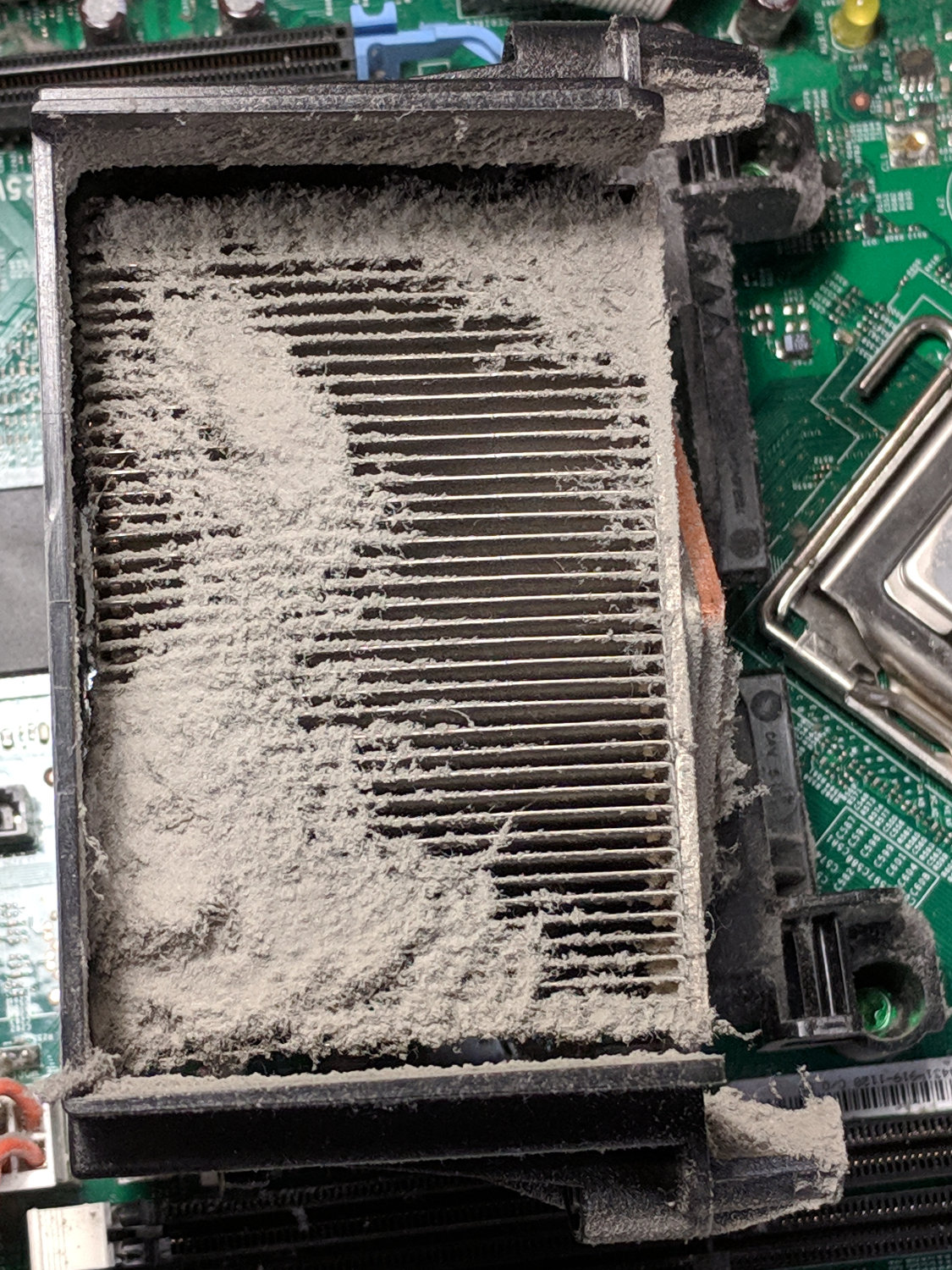
    This appeared while harvesting heatsinks and suchlike from a defunct Dell Optiplex:

    Clogged CPU heatsink
    Clogged CPU heatsink

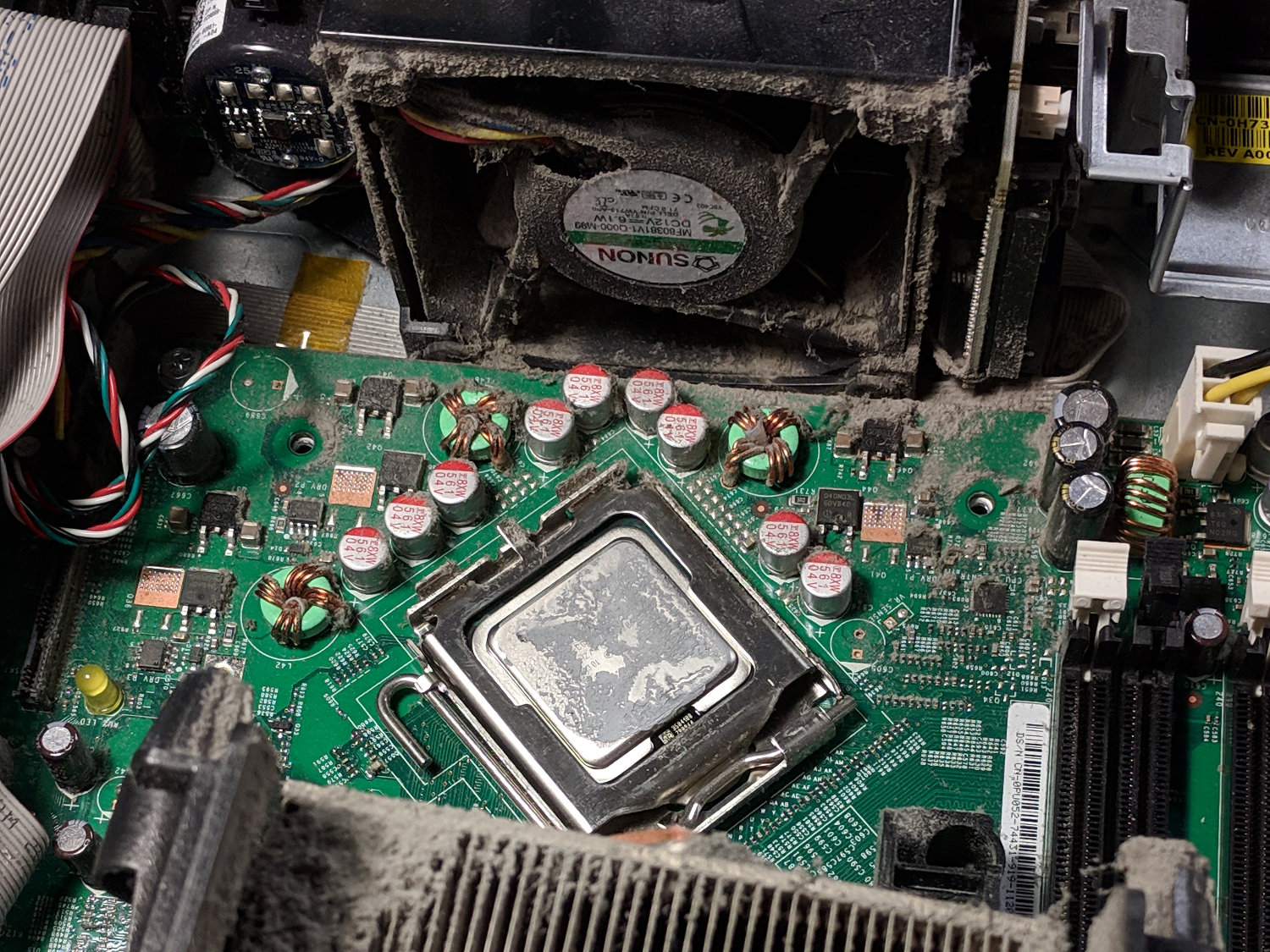
    The only way to get access to that end of the heatsink is to break the heatsink’s thermal bond to the CPU, which seems like a Bad Idea if you intend to continue using the thing:

    Clogged CPU heatsink - fan
    Clogged CPU heatsink – fan

    I buy off-lease Optiplexes from Dell Financial Services (a.k.a. Dell Refurbished) and, although their interiors always look well-cleaned, Dell (or, nowadays, FedEx Reverse Logistics) may have decided against breaking the CPU’s thermal bond and just sent me an office’s dust collection.

    Doesn’t look like my dust. That’s my story and I’m sticking with it.

  • Home Key Tactile Bumps

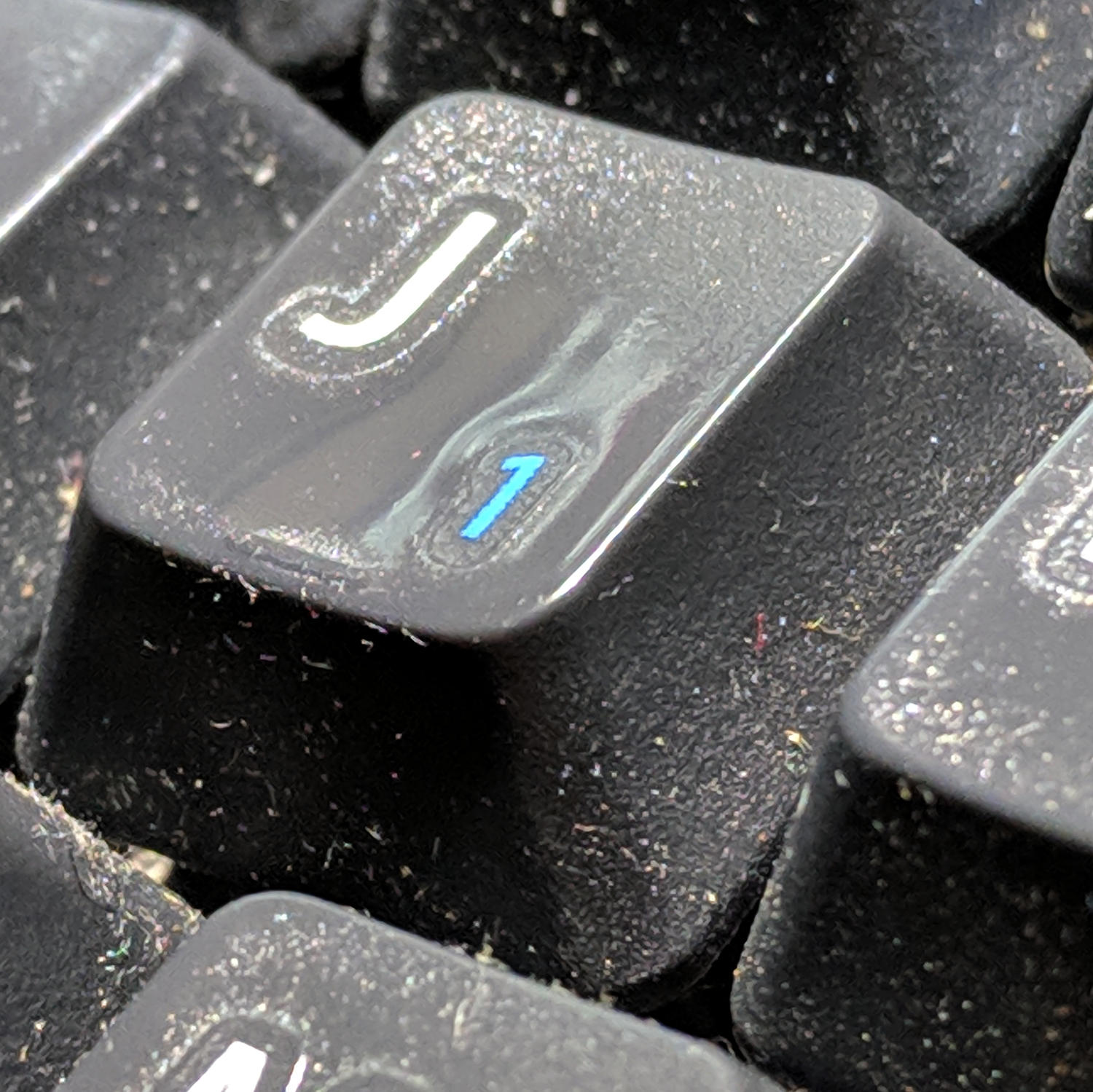
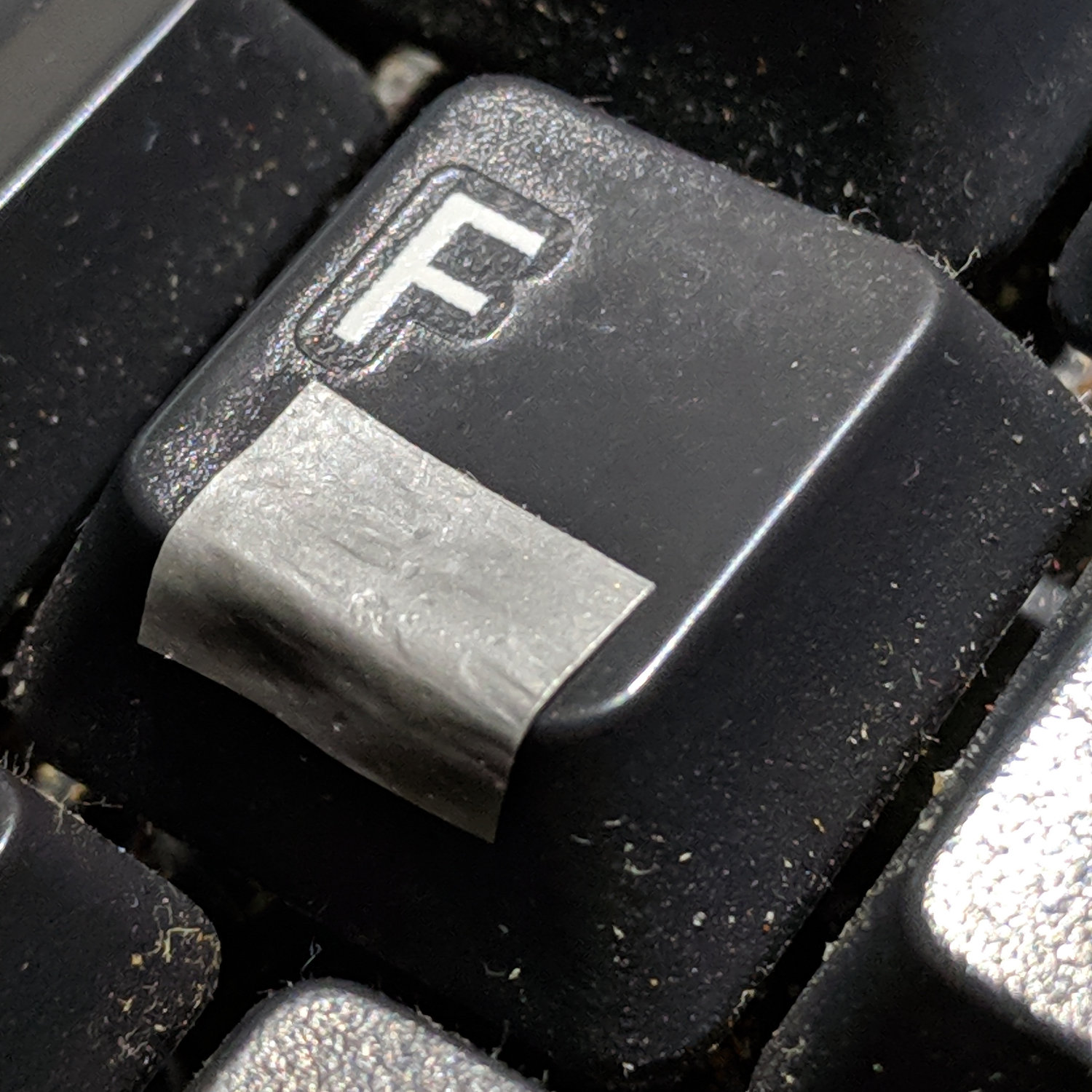
    It seems I do more typing than the good folks at Kinesis expected:

    Kinesis keyboard - worn tactile bump
    Kinesis keyboard – worn tactile bump

    In round numbers, the keyboard is all of two years old and that little ridge is pretty much history.

    The ultimate fix will likely involve a dab of epoxy, but a duct tape snippet should show me how much of a bump my fingers need to find the home keys without conscious thought:

    Kinesis keyboard - tape bump
    Kinesis keyboard – tape bump

    Early returns suggest one layer isn’t quite prominent enough; some iteration will be in order.

    And, yeah, I should yank the keycaps for some deep cleaning.

  • Firefox + uBlock Origin vs. CNN Autoplay Videos

    Set up these filters in uBlock Origin, per some hints:

    ||registry.api.cnn.io/assets/fave/theoplayer$domain=cnn.com
    cnn.com###large-media

    All those annoying CNN auto-play videos will vanish, along with any videos you might have wanted. For me, it’s a reasonable tradeoff, as most (useful) videos will be available on Youtube or elsewhere.

    The built-in browser controls you might think of activating, as I have, don’t work on CNN videos, because CNN uses theoplayer, a “universal” Javascript-based player. It’s not Flash, it’s not HTML5, it’s not a specific video thing, it’s a way to work around all those blocking mechanisms.

    Mostly, I don’t get news from CNN, but occasionally a link will lead there, a video appears, and instantly gets muted.

    Burn them. Burn them all.

    Update: Some sites run auto-play videos through JW Player, which you kill thusly:

    ||jwcdn.com
    ||content.jwplatform.com

    That blocks the source of the player, which seems to not depend on the site using it. So far, so good.

  • Imagemagick 6 vs. PDF

    Come to find out Xubuntu 18.04 ratcheted the ImageMagick security settings up to a dangerous chattering whine:

    convert p???.jpg "Machining D-bit Drills.pdf"
    convert-im6.q16: not authorized `Machining D-bit Drills.pdf' @ error/constitute.c/WriteImage/1037.
    

    Fortunately, someone who understands this stuff encountered the problem before I did and posted a great description of the solution.

    To forestall link rot, the process looks like:

    cd /etc/ImageMagick-6/
    sudo cp policy.xml policy.xml.base
    sudo nano policy.xml
    … change one line …
     policy domain="coder" rights="read|write" pattern="PDF"
    

    It is completely unclear to me whether ImageMagick (as of ImageMagick 6.9.7-4 Q16 x86_64 20170114 ) requires or merely tolerates the vertical bar in place of commas, nor whether it’s in my best interest to replace "coder" with "*".

    In any event, I can once again stuff bitmap images into PDF files.

  • LinuxCNC 2.7 vs. Logitech Joggy Thing

    The old Atom running LinuxCNC for the Sherline finally stopped booting, so I popped the Optiplex 760 off the stack and did a live-USB trial run. The latency / jitter worked out around 25 µs, slightly worse than before, but still Good Enough, and the StepConf utility coerced the motors into working OK.

    What didn’t work was the old Eagle-to-HAL code defining the Logitch Gamepad as a Joggy Thing to allow smooth joystick jog control. Well, stuff changes over the course of eight years, but, in this case, the fix turned out to be a one-liner: the probe_parport module isn’t needed nowadays.

    With that out of the way, it runs fine:

    LinuxCNC - Sherline Mill - Logitech Gamepad
    LinuxCNC – Sherline Mill – Logitech Gamepad

    The INI and HAL files defining the Sherline configuration as a GitHub Gist:

    # HAL config file automatically generated by Eagle-CAD ULP:
    # [/mnt/bulkdata/Project Files/eagle/ulp/hal-write-2.5.ulp]
    # (C) Martin Schoeneck.de 2008
    # Charalampos Alexopoulos 2011
    # Mods Ed Nisley KE4ZNU 2010 2013
    # Path [/mnt/bulkdata/Project Files/eagle/projects/LinuxCNC for M2/]
    # ProjectName [LinuxCNC Sherline Configuration]
    # File name [/mnt/bulkdata/Project Files/eagle/projects/LinuxCNC for M2/LinuxCNC Sherline Configuration.hal]
    # Created [11:17:21 17-Feb-2013]
    ####################################################
    # Load realtime and userspace modules
    loadrt trivkins
    loadrt [EMCMOT]EMCMOT key=[EMCMOT]SHMEM_KEY num_joints=[TRAJ]AXES base_period_nsec=[EMCMOT]BASE_PERIOD servo_period_nsec=[EMCMOT]SERVO_PERIOD traj_period_nsec=[EMCMOT]SERVO_PERIOD
    # not needed in 2.7
    # loadrt probe_parport
    loadrt hal_parport cfg="[PARPORT]ADDRESS out"
    loadrt stepgen step_type=0,0,0,0
    loadrt pwmgen output_type=0
    loadusr -W hal_manualtoolchange
    loadusr -W hal_input -KA Dual
    loadrt logic count=1 personality=0x104
    loadrt constant count=13
    loadrt and2 count=17
    loadrt conv_float_s32 count=1
    loadrt flipflop count=4
    loadrt mux2 count=5
    loadrt mux4 count=1
    loadrt not count=8
    loadrt or2 count=14
    loadrt scale count=7
    loadrt timedelay count=1
    loadrt toggle count=1
    ####################################################
    # Hook functions into threads
    addf stepgen.make-pulses base-thread
    addf pwmgen.make-pulses base-thread
    addf parport.0.read base-thread
    addf parport.0.write base-thread
    addf parport.0.reset base-thread
    addf logic.0 base-thread
    addf motion-command-handler servo-thread
    addf motion-controller servo-thread
    addf stepgen.update-freq servo-thread
    addf stepgen.capture-position servo-thread
    addf pwmgen.update servo-thread
    addf constant.0 servo-thread
    addf constant.1 servo-thread
    addf constant.2 servo-thread
    addf constant.3 servo-thread
    addf constant.4 servo-thread
    addf constant.5 servo-thread
    addf constant.6 servo-thread
    addf constant.7 servo-thread
    addf constant.8 servo-thread
    addf constant.9 servo-thread
    addf constant.10 servo-thread
    addf constant.11 servo-thread
    addf constant.12 servo-thread
    addf and2.0 servo-thread
    addf and2.1 servo-thread
    addf and2.2 servo-thread
    addf and2.3 servo-thread
    addf and2.4 servo-thread
    addf and2.5 servo-thread
    addf and2.6 servo-thread
    addf and2.7 servo-thread
    addf and2.8 servo-thread
    addf and2.9 servo-thread
    addf and2.10 servo-thread
    addf and2.11 servo-thread
    addf and2.12 servo-thread
    addf and2.13 servo-thread
    addf and2.14 servo-thread
    addf and2.15 servo-thread
    addf and2.16 servo-thread
    addf conv-float-s32.0 servo-thread
    addf toggle.0 servo-thread
    addf flipflop.0 servo-thread
    addf flipflop.1 servo-thread
    addf flipflop.2 servo-thread
    addf flipflop.3 servo-thread
    addf timedelay.0 servo-thread
    addf or2.0 servo-thread
    addf or2.1 servo-thread
    addf or2.2 servo-thread
    addf or2.3 servo-thread
    addf or2.4 servo-thread
    addf or2.5 servo-thread
    addf or2.6 servo-thread
    addf or2.7 servo-thread
    addf or2.8 servo-thread
    addf or2.9 servo-thread
    addf or2.10 servo-thread
    addf or2.11 servo-thread
    addf or2.12 servo-thread
    addf or2.13 servo-thread
    addf not.0 servo-thread
    addf not.1 servo-thread
    addf not.2 servo-thread
    addf not.3 servo-thread
    addf not.4 servo-thread
    addf not.5 servo-thread
    addf not.6 servo-thread
    addf not.7 servo-thread
    addf scale.0 servo-thread
    addf scale.1 servo-thread
    addf scale.2 servo-thread
    addf scale.3 servo-thread
    addf scale.4 servo-thread
    addf scale.5 servo-thread
    addf scale.6 servo-thread
    addf mux2.0 servo-thread
    addf mux4.0 servo-thread
    addf mux2.1 servo-thread
    addf mux2.2 servo-thread
    addf mux2.3 servo-thread
    addf mux2.4 servo-thread
    ####################################################
    # Set parameters
    setp parport.0.reset-time [PARPORT]RESET_TIME
    setp stepgen.0.maxaccel [AXIS_0]STEPGEN_MAXACCEL
    setp stepgen.0.maxvel [AXIS_0]MAX_VELOCITY
    setp stepgen.0.dirhold [PARPORT]DIRHOLD
    setp stepgen.0.dirsetup [PARPORT]DIRSETUP
    setp stepgen.0.steplen [PARPORT]STEPLEN
    setp stepgen.0.stepspace [PARPORT]STEPSPACE
    setp stepgen.0.position-scale [AXIS_0]SCALE
    setp parport.0.pin-03-out-reset FALSE
    setp parport.0.pin-05-out-reset FALSE
    setp parport.0.pin-07-out-reset FALSE
    setp parport.0.pin-09-out-reset FALSE
    setp parport.0.pin-17-out-reset FALSE
    setp stepgen.1.maxaccel [AXIS_1]STEPGEN_MAXACCEL
    setp stepgen.1.maxvel [AXIS_1]MAX_VELOCITY
    setp stepgen.1.dirhold [PARPORT]DIRHOLD
    setp stepgen.1.dirsetup [PARPORT]DIRSETUP
    setp stepgen.1.steplen [PARPORT]STEPLEN
    setp stepgen.1.stepspace [PARPORT]STEPSPACE
    setp stepgen.1.position-scale [AXIS_1]SCALE
    setp stepgen.2.maxaccel [AXIS_2]STEPGEN_MAXACCEL
    setp stepgen.2.maxvel [AXIS_2]MAX_VELOCITY
    setp stepgen.2.dirhold [PARPORT]DIRHOLD
    setp stepgen.2.dirsetup [PARPORT]DIRSETUP
    setp stepgen.2.steplen [PARPORT]STEPLEN
    setp stepgen.2.stepspace [PARPORT]STEPSPACE
    setp stepgen.2.position-scale [AXIS_2]SCALE
    setp stepgen.3.maxaccel [AXIS_3]STEPGEN_MAXACCEL
    setp stepgen.3.maxvel [AXIS_3]MAX_VELOCITY
    setp stepgen.3.dirhold [PARPORT]DIRHOLD
    setp stepgen.3.dirsetup [PARPORT]DIRSETUP
    setp stepgen.3.steplen [PARPORT]STEPLEN
    setp stepgen.3.stepspace [PARPORT]STEPSPACE
    setp stepgen.3.position-scale [AXIS_3]SCALE
    setp parport.0.pin-04-out-invert TRUE
    setp parport.0.pin-06-out-invert TRUE
    ####################################################
    # Set constants
    setp constant.0.value 0.1
    setp constant.1.value 20
    setp constant.2.value [TRAJ]MAX_LINEAR_VELOCITY
    setp constant.3.value [TRAJ]MAX_ANGULAR_VELOCITY
    setp constant.4.value 60
    setp constant.5.value 0.50
    setp constant.6.value 1.00
    setp constant.7.value 0.10
    setp constant.8.value 0.10
    setp constant.9.value 0.0
    setp constant.10.value -1.0
    setp constant.11.value 0.020
    setp constant.12.value 0.000
    ####################################################
    # Connect Modules with nets
    net a-amp-enable logic.0.in-03 axis.3.amp-enable-out stepgen.3.enable
    net a-analog halui.jog.3.analog mux2.4.out
    net a-button-minus or2.0.in0 input.0.btn-joystick and2.7.in0
    net a-button-plus or2.0.in1 input.0.btn-thumb2 and2.8.in0
    net a-buttons-active or2.0.out or2.1.in0 or2.11.in1
    net a-direction parport.0.pin-08-out stepgen.3.dir
    net a-disable not.7.out and2.13.in1
    net a-enable or2.11.in0 flipflop.3.out not.7.in mux2.4.sel
    net a-jog input.0.abs-z-position mux2.4.in1
    net a-knob-active or2.9.out not.2.in and2.15.in1
    net a-knob-inactive not.2.out and2.14.in1
    net a-select and2.16.in0 and2.15.out
    net a-set flipflop.3.set and2.16.out
    net a-step parport.0.pin-09-out stepgen.3.step
    net all-amps-enabled logic.0.and parport.0.pin-17-out
    net angular_motion or2.11.out mux2.0.sel
    net any-buttons-active mux4.0.sel0 or2.12.out
    net axis-disabled-value constant.9.out mux2.1.in0 mux2.2.in0 mux2.3.in0 mux2.4.in0
    net az-buttons-active or2.1.out or2.12.in1 or2.13.in0
    net az-reset flipflop.2.reset and2.14.out flipflop.3.reset
    net button-crawl scale.4.out mux4.0.in3
    net button-fast scale.2.out mux4.0.in1 scale.4.in
    net estop-a and2.0.in0 input.0.btn-top2
    net estop-b and2.0.in1 input.0.btn-base
    net estop-out parport.0.pin-01-out iocontrol.0.emc-enable-in iocontrol.0.user-enable-out
    net homeswitches parport.0.pin-10-in-not axis.0.home-sw-in axis.1.home-sw-in axis.2.home-sw-in axis.3.home-sw-in
    net jog-crawl toggle.0.out mux4.0.sel1
    net jog-speed halui.jog-speed mux4.0.out
    net knob-crawl mux4.0.in2 scale.3.out
    net knob-fast mux4.0.in0 scale.1.out scale.3.in
    net manual-mode halui.mode.manual input.0.btn-base3
    net n_9 axis.0.motor-pos-cmd stepgen.0.position-cmd
    net n_11 axis.0.motor-pos-fb stepgen.0.position-fb
    net n_13 and2.0.out halui.estop.activate
    net n_14 or2.3.in0 input.0.btn-base5
    net n_15 or2.3.in1 input.0.btn-base6
    net n_16 toggle.0.in or2.3.out
    net n_17 conv-float-s32.0.out input.0.abs-x-flat input.0.abs-y-flat input.0.abs-z-flat input.0.abs-rz-flat
    net n_18 constant.1.out conv-float-s32.0.in
    net n_19 constant.4.out scale.0.gain
    net n_20 constant.5.out scale.1.gain
    net n_21 constant.6.out scale.2.gain
    net n_22 constant.7.out scale.3.gain
    net n_23 scale.4.gain constant.8.out
    net n_24 constant.0.out halui.jog-deadband
    net n_25 constant.2.out mux2.0.in0
    net n_26 mux2.0.in1 constant.3.out
    net n_34 axis.1.motor-pos-cmd stepgen.1.position-cmd
    net n_36 axis.1.motor-pos-fb stepgen.1.position-fb
    net n_42 or2.7.in0 input.0.abs-x-is-pos
    net n_43 or2.7.in1 input.0.abs-x-is-neg
    net n_44 or2.8.in0 input.0.abs-y-is-pos
    net n_45 or2.8.in1 input.0.abs-y-is-neg
    net n_46 or2.9.in0 input.0.abs-z-is-pos
    net n_47 or2.9.in1 input.0.abs-z-is-neg
    net n_48 or2.10.in0 input.0.abs-rz-is-pos
    net n_49 or2.10.in1 input.0.abs-rz-is-neg
    net n_51 constant.10.out scale.5.gain scale.6.gain
    net n_54 constant.11.out timedelay.0.on-delay
    net n_55 constant.12.out timedelay.0.off-delay
    net n_56 timedelay.0.out and2.1.in1 and2.2.in1 and2.4.in1 and2.3.in1 and2.5.in1 and2.6.in1 and2.8.in1 and2.7.in1
    net n_57 and2.1.out halui.jog.0.minus
    net n_58 and2.2.out halui.jog.0.plus
    net n_59 and2.3.out halui.jog.1.minus
    net n_60 halui.jog.1.plus and2.4.out
    net n_61 and2.5.out halui.jog.2.minus
    net n_62 and2.6.out halui.jog.2.plus
    net n_63 and2.7.out halui.jog.3.minus
    net n_64 and2.8.out halui.jog.3.plus
    net n_67 axis.2.motor-pos-cmd stepgen.2.position-cmd
    net n_69 axis.2.motor-pos-fb stepgen.2.position-fb
    net n_77 axis.3.motor-pos-cmd stepgen.3.position-cmd
    net n_79 axis.3.motor-pos-fb stepgen.3.position-fb
    net probe-in parport.0.pin-15-in-not motion.probe-input
    net program-resume halui.program.resume input.0.btn-base4
    net reset-estop input.0.btn-base2 halui.estop.reset
    net tool-change iocontrol.0.tool-change hal_manualtoolchange.change
    net tool-changed hal_manualtoolchange.changed iocontrol.0.tool-changed
    net tool-number iocontrol.0.tool-prep-number hal_manualtoolchange.number
    net tool-prepare-loopback iocontrol.0.tool-prepare iocontrol.0.tool-prepared
    net vel-per-minute scale.0.out scale.1.in scale.2.in
    net vel-per-second mux2.0.out scale.0.in
    net x-amp-enable logic.0.in-00 axis.0.amp-enable-out stepgen.0.enable
    net x-analog mux2.1.out halui.jog.0.analog
    net x-buttons-active or2.5.in0 or2.4.out
    net x-direction parport.0.pin-02-out stepgen.0.dir
    net x-disable not.4.out and2.12.in1
    net x-enable not.4.in flipflop.0.out mux2.1.sel
    net x-hat-minus or2.4.in1 input.0.abs-hat0x-is-neg and2.1.in0
    net x-hat-plus or2.4.in0 input.0.abs-hat0x-is-pos and2.2.in0
    net x-jog input.0.abs-x-position mux2.1.in1
    net x-knob-active or2.7.out not.0.in and2.9.in0
    net x-knob-inactive not.0.out and2.10.in0 and2.11.in0
    net x-set and2.9.out flipflop.0.set
    net x-step parport.0.pin-03-out stepgen.0.step
    net xy-buttons-active or2.5.out or2.12.in0 or2.13.in1
    net xy-reset flipflop.0.reset and2.10.out flipflop.1.reset
    net xyza-buttons-active or2.13.out timedelay.0.in
    net y-amp-enable logic.0.in-01 axis.1.amp-enable-out stepgen.1.enable
    net y-analog halui.jog.1.analog mux2.2.out
    net y-buttons-active or2.6.out or2.5.in1
    net y-direction parport.0.pin-04-out stepgen.1.dir
    net y-disable not.5.out and2.9.in1
    net y-enable flipflop.1.out not.5.in mux2.2.sel
    net y-hat-minus or2.6.in1 input.0.abs-hat0y-is-neg and2.4.in0
    net y-hat-plus or2.6.in0 input.0.abs-hat0y-is-pos and2.3.in0
    net y-jog input.0.abs-y-position scale.5.in
    net y-jog-reversed mux2.2.in1 scale.5.out
    net y-knob-active not.1.in or2.8.out and2.11.in1
    net y-knob-inactive not.1.out and2.10.in1
    net y-select and2.12.in0 and2.11.out
    net y-set flipflop.1.set and2.12.out
    net y-step parport.0.pin-05-out stepgen.1.step
    net z-amp-enable logic.0.in-02 axis.2.amp-enable-out stepgen.2.enable
    net z-analog mux2.3.out halui.jog.2.analog
    net z-button-minus or2.2.in0 input.0.btn-thumb and2.5.in0
    net z-button-plus or2.2.in1 input.0.btn-top and2.6.in0
    net z-buttons-active or2.2.out or2.1.in1
    net z-direction parport.0.pin-06-out stepgen.2.dir
    net z-disable not.6.out and2.16.in1
    net z-enable not.6.in flipflop.2.out mux2.3.sel
    net z-jog input.0.abs-rz-position scale.6.in
    net z-jog-reversed scale.6.out mux2.3.in1
    net z-knob-active not.3.in or2.10.out and2.13.in0
    net z-knob-inactive not.3.out and2.15.in0 and2.14.in0
    net z-set and2.13.out flipflop.2.set
    net z-step parport.0.pin-07-out stepgen.2.step
    view raw Sherline.hal hosted with ❤ by GitHub
    # Ed Nisley – KE4ZNU
    # Just do not run stepconf ever again…
    [EMC]
    MACHINE = Sherline-XYZA
    DEBUG = 0
    RS274NGC_STARTUP_CODE = G21 G40 G49 G54 G80 G90 G92.1 G94 G97 G98
    [DISPLAY]
    DISPLAY = axis
    EDITOR = gedit
    GEOMETRY = AXYZ
    POSITION_OFFSET = RELATIVE
    POSITION_FEEDBACK = ACTUAL
    MAX_FEED_OVERRIDE = 3.0
    INTRO_GRAPHIC = /home/ed/linuxcnc/configs/Sherline-XYZA/Sherline.gif
    INTRO_TIME = 3
    PROGRAM_PREFIX = /mnt/bulkdata/
    #PROGRAM_PREFIX = /home/ed/linuxcnc/nc_files/
    #INCREMENTS = .1in .05in .01in .005in .001in .0005in .0001in
    INCREMENTS = 10 mm, 1 mm, 0.1 mm, 90 deg, 45 deg, 10 deg
    [FILTER]
    PROGRAM_EXTENSION = .py Python Script
    py = python
    [TASK]
    TASK = milltask
    CYCLE_TIME = 0.010
    [RS274NGC]
    PARAMETER_FILE = emc.var
    [EMCMOT]
    EMCMOT = motmod
    SHMEM_KEY = 111
    COMM_TIMEOUT = 1.0
    COMM_WAIT = 0.010
    BASE_PERIOD = 50000
    SERVO_PERIOD = 1000000
    [PARPORT]
    ADDRESS = 0x378
    RESET_TIME = 10000
    STEPLEN = 25000
    STEPSPACE = 25000
    DIRSETUP = 50000
    DIRHOLD = 50000
    [HAL]
    HALUI = halui
    HALFILE = Sherline.hal
    HALFILE = custom.hal
    POSTGUI_HALFILE = custom_postgui.hal
    [TRAJ]
    AXES = 4
    COORDINATES = X Y Z A
    MAX_ANGULAR_VELOCITY = 45.00
    DEFAULT_ANGULAR_VELOCITY = 36.0
    LINEAR_UNITS = inch
    ANGULAR_UNITS = degree
    CYCLE_TIME = 0.010
    DEFAULT_VELOCITY = 0.400
    MAX_LINEAR_VELOCITY = 0.400
    POSITION_FILE = lastposition.txt
    NO_FORCE_HOMING = 1
    [EMCIO]
    EMCIO = io
    CYCLE_TIME = 0.100
    TOOL_TABLE = Sherline.tbl
    TOOL_CHANGE_AT_G30 = 1
    [AXIS_0]
    TYPE = LINEAR
    MAX_VELOCITY = 0.400
    MAX_ACCELERATION = 5.0
    STEPGEN_MAXACCEL = 10.0
    SCALE = 16000.0
    FERROR = 0.05
    MIN_FERROR = 0.01
    MIN_LIMIT = -1.0
    MAX_LIMIT = 9.5
    BACKLASH = 0.003
    HOME_IS_SHARED = 1
    HOME_SEQUENCE = 1
    HOME_SEARCH_VEL = 0.3
    HOME_LATCH_VEL = 0.03
    HOME_FINAL_VEL = 0.4
    HOME_OFFSET = 9.1
    HOME = 5.25
    [AXIS_1]
    TYPE = LINEAR
    MAX_VELOCITY = 0.400
    MAX_ACCELERATION = 5.0
    STEPGEN_MAXACCEL = 10.0
    SCALE = 16000.0
    FERROR = 0.05
    MIN_FERROR = 0.01
    MIN_LIMIT = 0.00
    MAX_LIMIT = 5.10
    BACKLASH = 0.003
    HOME_IS_SHARED = 1
    HOME_SEQUENCE = 2
    HOME_SEARCH_VEL = 0.3
    HOME_LATCH_VEL = 0.03
    HOME_FINAL_VEL = 0.4
    HOME_OFFSET = 5.1
    HOME = 4.5
    [AXIS_2]
    TYPE = LINEAR
    MAX_VELOCITY = 0.333
    MAX_ACCELERATION = 3.0
    STEPGEN_MAXACCEL = 6.0
    SCALE = 16000.0
    FERROR = 0.05
    MIN_FERROR = 0.01
    MIN_LIMIT = 0.0
    MAX_LIMIT = 6.680
    BACKLASH = 0.005
    HOME_IS_SHARED = 1
    HOME_SEQUENCE = 0
    HOME_SEARCH_VEL = 0.150
    HOME_LATCH_VEL = 0.015
    HOME_FINAL_VEL = 0.33
    HOME_OFFSET = 6.680
    HOME = 6.500
    [AXIS_3]
    TYPE = ANGULAR
    ###WRAPPED_ROTARY = 1
    MAX_VELOCITY = 40.0
    MAX_ACCELERATION = 250.0
    STEPGEN_MAXACCEL = 275.0
    SCALE = 160.0
    FERROR = 1
    MIN_FERROR = .25
    MIN_LIMIT = -999999999.9
    MAX_LIMIT = 999999999.9
    HOME_SEARCH_VEL = 0
    HOME_LATCH_VEL = 0
    HOME = 0.0
    view raw Sherline.ini hosted with ❤ by GitHub