Ed Nisley's Blog: Shop notes, electronics, firmware, machinery, 3D printing, laser cuttery, and curiosities. Contents: 100% human thinking, 0% AI slop.
This is not made obvious at the outset, but a video card with a DMS-59 connector that can drive a pair of Single Link DVI monitors cannot drive a single Dual Link DVI monitor: the DMS-59 connector doesn’t have the required signals.
The fact that each of the Single Link DVI connectors on the end of the DMS-59 Y-splitter cable have enough pins (well, holes) to mate with a Dual Link DVI cable doesn’t clarify the situation.
Of course, you can’t combine two separate Single Link outputs into a Dual Link input.
An HDMI 1.4 cable can support a single 2560×1440 monitor, but not from this resolutely low-res video card.
Bus 005 Device 001: ID 1d6b:0001 Linux Foundation 1.1 root hub
Bus 004 Device 006: ID 06f2:0011 Emine Technology Co. KVM Switch Keyboard
Bus 004 Device 005: ID 046d:c401 Logitech, Inc. TrackMan Marble Wheel
Bus 004 Device 004: ID 04d9:1203 Holtek Semiconductor, Inc. MC Industries Keyboard
Bus 004 Device 003: ID 046d:c216 Logitech, Inc. Dual Action Gamepad
Bus 004 Device 002: ID 0451:2046 Texas Instruments, Inc. TUSB2046 Hub
Bus 004 Device 001: ID 1d6b:0001 Linux Foundation 1.1 root hub
Bus 003 Device 001: ID 1d6b:0001 Linux Foundation 1.1 root hub
Bus 002 Device 002: ID 2341:8036
Bus 002 Device 001: ID 1d6b:0001 Linux Foundation 1.1 root hub
Bus 001 Device 001: ID 1d6b:0002 Linux Foundation 2.0 root hub
For whatever reason, this board doesn’t report a device name. It’s plugged into the same USB port as that mouse, so it gets the same Bus and Device numbers, which helps confirm that’s the board.
Querying the attributes with udevadm produces the all-important product string:
halrun
halcmd: loadusr -W hal_input -KRAL Leo
halcmd: show all
Loaded HAL Components:
ID      Type  Name                                      PID   State
     5  User  hal_input                                 11265 ready
     3  User  halcmd11264                               11264 ready

Component Pins:
Owner   Type  Dir         Value  Name
     5  bit   OUT         FALSE  input.0.btn-middle
     5  bit   OUT          TRUE  input.0.btn-middle-not
     5  bit   OUT         FALSE  input.0.btn-mouse
     5  bit   OUT          TRUE  input.0.btn-mouse-not
     5  bit   OUT         FALSE  input.0.btn-right
     5  bit   OUT          TRUE  input.0.btn-right-not
     5  bit   OUT         FALSE  input.0.key-0
     5  bit   OUT          TRUE  input.0.key-0-not
     5  bit   OUT         FALSE  input.0.key-1
     5  bit   OUT          TRUE  input.0.key-1-not
     5  bit   OUT         FALSE  input.0.key-102nd
     5  bit   OUT          TRUE  input.0.key-102nd-not
     5  bit   OUT         FALSE  input.0.key-2
     5  bit   OUT          TRUE  input.0.key-2-not
     5  bit   OUT         FALSE  input.0.key-3
     5  bit   OUT          TRUE  input.0.key-3-not
     5  bit   OUT         FALSE  input.0.key-4
     5  bit   OUT          TRUE  input.0.key-4-not
     5  bit   OUT         FALSE  input.0.key-5
     5  bit   OUT          TRUE  input.0.key-5-not
     5  bit   OUT         FALSE  input.0.key-6
     5  bit   OUT          TRUE  input.0.key-6-not
     5  bit   OUT         FALSE  input.0.key-7
     5  bit   OUT          TRUE  input.0.key-7-not
     5  bit   OUT         FALSE  input.0.key-8
     5  bit   OUT          TRUE  input.0.key-8-not
     5  bit   OUT         FALSE  input.0.key-9
     5  bit   OUT          TRUE  input.0.key-9-not
     5  bit   OUT         FALSE  input.0.key-a
     5  bit   OUT          TRUE  input.0.key-a-not
     5  bit   OUT         FALSE  input.0.key-apostrophe
     5  bit   OUT          TRUE  input.0.key-apostrophe-not
     5  bit   OUT         FALSE  input.0.key-b
     5  bit   OUT          TRUE  input.0.key-b-not
     5  bit   OUT         FALSE  input.0.key-backslash
     5  bit   OUT          TRUE  input.0.key-backslash-not
     5  bit   OUT         FALSE  input.0.key-backspace
     5  bit   OUT          TRUE  input.0.key-backspace-not
     5  bit   OUT         FALSE  input.0.key-c
     5  bit   OUT          TRUE  input.0.key-c-not
     5  bit   OUT         FALSE  input.0.key-capslock
     5  bit   OUT          TRUE  input.0.key-capslock-not
     5  bit   OUT         FALSE  input.0.key-comma
     5  bit   OUT          TRUE  input.0.key-comma-not
     5  bit   OUT         FALSE  input.0.key-compose
     5  bit   OUT          TRUE  input.0.key-compose-not
     5  bit   OUT         FALSE  input.0.key-d
     5  bit   OUT          TRUE  input.0.key-d-not
     5  bit   OUT         FALSE  input.0.key-delete
     5  bit   OUT          TRUE  input.0.key-delete-not
     5  bit   OUT         FALSE  input.0.key-dot
     5  bit   OUT          TRUE  input.0.key-dot-not
     5  bit   OUT         FALSE  input.0.key-down
     5  bit   OUT          TRUE  input.0.key-down-not
     5  bit   OUT         FALSE  input.0.key-e
     5  bit   OUT          TRUE  input.0.key-e-not
     5  bit   OUT         FALSE  input.0.key-end
     5  bit   OUT          TRUE  input.0.key-end-not
     5  bit   OUT         FALSE  input.0.key-enter
     5  bit   OUT          TRUE  input.0.key-enter-not
     5  bit   OUT         FALSE  input.0.key-equal
     5  bit   OUT          TRUE  input.0.key-equal-not
     5  bit   OUT         FALSE  input.0.key-esc
     5  bit   OUT          TRUE  input.0.key-esc-not
     5  bit   OUT         FALSE  input.0.key-f
     5  bit   OUT          TRUE  input.0.key-f-not
     5  bit   OUT         FALSE  input.0.key-f1
     5  bit   OUT          TRUE  input.0.key-f1-not
     5  bit   OUT         FALSE  input.0.key-f10
     5  bit   OUT          TRUE  input.0.key-f10-not
     5  bit   OUT         FALSE  input.0.key-f11
     5  bit   OUT          TRUE  input.0.key-f11-not
     5  bit   OUT         FALSE  input.0.key-f12
     5  bit   OUT          TRUE  input.0.key-f12-not
     5  bit   OUT         FALSE  input.0.key-f2
     5  bit   OUT          TRUE  input.0.key-f2-not
     5  bit   OUT         FALSE  input.0.key-f3
     5  bit   OUT          TRUE  input.0.key-f3-not
     5  bit   OUT         FALSE  input.0.key-f4
     5  bit   OUT          TRUE  input.0.key-f4-not
     5  bit   OUT         FALSE  input.0.key-f5
     5  bit   OUT          TRUE  input.0.key-f5-not
     5  bit   OUT         FALSE  input.0.key-f6
     5  bit   OUT          TRUE  input.0.key-f6-not
     5  bit   OUT         FALSE  input.0.key-f7
     5  bit   OUT          TRUE  input.0.key-f7-not
     5  bit   OUT         FALSE  input.0.key-f8
     5  bit   OUT          TRUE  input.0.key-f8-not
     5  bit   OUT         FALSE  input.0.key-f9
     5  bit   OUT          TRUE  input.0.key-f9-not
     5  bit   OUT         FALSE  input.0.key-g
     5  bit   OUT          TRUE  input.0.key-g-not
     5  bit   OUT         FALSE  input.0.key-grave
     5  bit   OUT          TRUE  input.0.key-grave-not
     5  bit   OUT         FALSE  input.0.key-h
     5  bit   OUT          TRUE  input.0.key-h-not
     5  bit   OUT         FALSE  input.0.key-home
     5  bit   OUT          TRUE  input.0.key-home-not
     5  bit   OUT         FALSE  input.0.key-i
     5  bit   OUT          TRUE  input.0.key-i-not
     5  bit   OUT         FALSE  input.0.key-insert
     5  bit   OUT          TRUE  input.0.key-insert-not
     5  bit   OUT         FALSE  input.0.key-j
     5  bit   OUT          TRUE  input.0.key-j-not
     5  bit   OUT         FALSE  input.0.key-k
     5  bit   OUT          TRUE  input.0.key-k-not
     5  bit   OUT         FALSE  input.0.key-kp0
     5  bit   OUT          TRUE  input.0.key-kp0-not
     5  bit   OUT         FALSE  input.0.key-kp1
     5  bit   OUT          TRUE  input.0.key-kp1-not
     5  bit   OUT         FALSE  input.0.key-kp2
     5  bit   OUT          TRUE  input.0.key-kp2-not
     5  bit   OUT         FALSE  input.0.key-kp3
     5  bit   OUT          TRUE  input.0.key-kp3-not
     5  bit   OUT         FALSE  input.0.key-kp4
     5  bit   OUT          TRUE  input.0.key-kp4-not
     5  bit   OUT         FALSE  input.0.key-kp5
     5  bit   OUT          TRUE  input.0.key-kp5-not
     5  bit   OUT         FALSE  input.0.key-kp6
     5  bit   OUT          TRUE  input.0.key-kp6-not
     5  bit   OUT         FALSE  input.0.key-kp7
     5  bit   OUT          TRUE  input.0.key-kp7-not
     5  bit   OUT         FALSE  input.0.key-kp8
     5  bit   OUT          TRUE  input.0.key-kp8-not
     5  bit   OUT         FALSE  input.0.key-kp9
     5  bit   OUT          TRUE  input.0.key-kp9-not
     5  bit   OUT         FALSE  input.0.key-kpasterisk
     5  bit   OUT          TRUE  input.0.key-kpasterisk-not
     5  bit   OUT         FALSE  input.0.key-kpdot
     5  bit   OUT          TRUE  input.0.key-kpdot-not
     5  bit   OUT         FALSE  input.0.key-kpenter
     5  bit   OUT          TRUE  input.0.key-kpenter-not
     5  bit   OUT         FALSE  input.0.key-kpminus
     5  bit   OUT          TRUE  input.0.key-kpminus-not
     5  bit   OUT         FALSE  input.0.key-kpplus
     5  bit   OUT          TRUE  input.0.key-kpplus-not
     5  bit   OUT         FALSE  input.0.key-kpslash
     5  bit   OUT          TRUE  input.0.key-kpslash-not
     5  bit   OUT         FALSE  input.0.key-l
     5  bit   OUT          TRUE  input.0.key-l-not
     5  bit   OUT         FALSE  input.0.key-left
     5  bit   OUT          TRUE  input.0.key-left-not
     5  bit   OUT         FALSE  input.0.key-leftalt
     5  bit   OUT          TRUE  input.0.key-leftalt-not
     5  bit   OUT         FALSE  input.0.key-leftbrace
     5  bit   OUT          TRUE  input.0.key-leftbrace-not
     5  bit   OUT         FALSE  input.0.key-leftctrl
     5  bit   OUT          TRUE  input.0.key-leftctrl-not
     5  bit   OUT         FALSE  input.0.key-leftmeta
     5  bit   OUT          TRUE  input.0.key-leftmeta-not
     5  bit   OUT         FALSE  input.0.key-leftshift
     5  bit   OUT          TRUE  input.0.key-leftshift-not
     5  bit   OUT         FALSE  input.0.key-m
     5  bit   OUT          TRUE  input.0.key-m-not
     5  bit   OUT         FALSE  input.0.key-minus
     5  bit   OUT          TRUE  input.0.key-minus-not
     5  bit   OUT         FALSE  input.0.key-n
     5  bit   OUT          TRUE  input.0.key-n-not
     5  bit   OUT         FALSE  input.0.key-numlock
     5  bit   OUT          TRUE  input.0.key-numlock-not
     5  bit   OUT         FALSE  input.0.key-o
     5  bit   OUT          TRUE  input.0.key-o-not
     5  bit   OUT         FALSE  input.0.key-p
     5  bit   OUT          TRUE  input.0.key-p-not
     5  bit   OUT         FALSE  input.0.key-pagedown
     5  bit   OUT          TRUE  input.0.key-pagedown-not
     5  bit   OUT         FALSE  input.0.key-pageup
     5  bit   OUT          TRUE  input.0.key-pageup-not
     5  bit   OUT         FALSE  input.0.key-pause
     5  bit   OUT          TRUE  input.0.key-pause-not
     5  bit   OUT         FALSE  input.0.key-q
     5  bit   OUT          TRUE  input.0.key-q-not
     5  bit   OUT         FALSE  input.0.key-r
     5  bit   OUT          TRUE  input.0.key-r-not
     5  bit   OUT         FALSE  input.0.key-right
     5  bit   OUT          TRUE  input.0.key-right-not
     5  bit   OUT         FALSE  input.0.key-rightalt
     5  bit   OUT          TRUE  input.0.key-rightalt-not
     5  bit   OUT         FALSE  input.0.key-rightbrace
     5  bit   OUT          TRUE  input.0.key-rightbrace-not
     5  bit   OUT         FALSE  input.0.key-rightctrl
     5  bit   OUT          TRUE  input.0.key-rightctrl-not
     5  bit   OUT         FALSE  input.0.key-rightmeta
     5  bit   OUT          TRUE  input.0.key-rightmeta-not
     5  bit   OUT         FALSE  input.0.key-rightshift
     5  bit   OUT          TRUE  input.0.key-rightshift-not
     5  bit   OUT         FALSE  input.0.key-s
     5  bit   OUT          TRUE  input.0.key-s-not
     5  bit   OUT         FALSE  input.0.key-scrolllock
     5  bit   OUT          TRUE  input.0.key-scrolllock-not
     5  bit   OUT         FALSE  input.0.key-semicolon
     5  bit   OUT          TRUE  input.0.key-semicolon-not
     5  bit   OUT         FALSE  input.0.key-slash
     5  bit   OUT          TRUE  input.0.key-slash-not
     5  bit   OUT         FALSE  input.0.key-space
     5  bit   OUT          TRUE  input.0.key-space-not
     5  bit   OUT         FALSE  input.0.key-sysrq
     5  bit   OUT          TRUE  input.0.key-sysrq-not
     5  bit   OUT         FALSE  input.0.key-t
     5  bit   OUT          TRUE  input.0.key-t-not
     5  bit   OUT         FALSE  input.0.key-tab
     5  bit   OUT          TRUE  input.0.key-tab-not
     5  bit   OUT         FALSE  input.0.key-u
     5  bit   OUT          TRUE  input.0.key-u-not
     5  bit   OUT         FALSE  input.0.key-up
     5  bit   OUT          TRUE  input.0.key-up-not
     5  bit   OUT         FALSE  input.0.key-v
     5  bit   OUT          TRUE  input.0.key-v-not
     5  bit   OUT         FALSE  input.0.key-w
     5  bit   OUT          TRUE  input.0.key-w-not
     5  bit   OUT         FALSE  input.0.key-x
     5  bit   OUT          TRUE  input.0.key-x-not
     5  bit   OUT         FALSE  input.0.key-y
     5  bit   OUT          TRUE  input.0.key-y-not
     5  bit   OUT         FALSE  input.0.key-z
     5  bit   OUT          TRUE  input.0.key-z-not
     5  s32   OUT             0  input.0.rel-wheel-counts
     5  float OUT             0  input.0.rel-wheel-position
     5  bit   IN          FALSE  input.0.rel-wheel-reset
     5  float IN              1  input.0.rel-wheel-scale
     5  s32   OUT             0  input.0.rel-x-counts
     5  float OUT             0  input.0.rel-x-position
     5  bit   IN          FALSE  input.0.rel-x-reset
     5  float IN              1  input.0.rel-x-scale
     5  s32   OUT             0  input.0.rel-y-counts
     5  float OUT             0  input.0.rel-y-position
     5  bit   IN          FALSE  input.0.rel-y-reset
     5  float IN              1  input.0.rel-y-scale
That’s a pretty decent assortment of directly usable names and features, even without keyboard LEDs. The mouse pins could be repurposed for general sensor values:
position = float = count / scale (why divided? I don’t know)
scale = float = turns counts into position
reset = bit = resets position or maybe count (not sure)
I think you could use count to transfer a bare ADC reading from the Leonardo, then use scale to get the actual voltage in “position”. In that situation, reset wouldn’t be at all useful.
The keyboard pins could transfer Boolean sensors.
You’d want to give HAL exclusive control of the Leonardo-is-not-a-mouse, because the incoming data would make hash of the, ah, LinuxCNC UI experience in short order. I’m not sure how to control that; the Leonardo advice boils down to “be careful” and “use a physical switch”.
I have *no* idea where the names come from, but apparently the OS / kernel / something has a HID layer that translates bare USB capability bits into strings. How that relates to a particular device, what the choices might be, how one could add / replace the names for a given device, and all that, I don’t know yet.
The hack I added to the lightdm startup script occasionally causes it to hang, which suggests a timing problem. The result leaves the default text-mode login screen active on VT1, after which I can log in and issue sudo lightdm start to produce the usual GUI screen. Using startx doesn’t (seem to) start the display manager, resulting in all manner of weird behavior.
start on ((filesystem
           and runlevel [!06]
           and started dbus
           and (drm-device-added card0 PRIMARY_DEVICE_FOR_DISPLAY=1
                or stopped udev-fallback-graphics)
           and mounted MOUNTPOINT=/mnt/bulkdata)
          or runlevel PREVLEVEL=S)
According to the timing diagram in section 10.1.8, the filesystem event should happen after all the remote filesystems have been mounted, which seems like that stanza might produce a race condition. So just waiting for the filesystem event should suffice, but it doesn’t; that’s why I had to add the mounted event.
According to the example in section 11.14, that stanza should probably look like:
start on ((filesystem
           and (runlevel [!06]
           and (started dbus
           and (drm-device-added card0 PRIMARY_DEVICE_FOR_DISPLAY=1
                or stopped udev-fallback-graphics))))
          or runlevel PREVLEVEL=S)
The additional parentheses around successive conditions seem to serialize them, so that they need not all occur at the same time.
At least I think that’s how it should work…
Unfortunately, it doesn’t. The good news is that it’s converted the intermittent failure into a hard fault, which is generally a step in the right direction.
Changing the stanza to:
#start on ((filesystem
start on ((mounted MOUNTPOINT=/mnt/bulkdata
           and runlevel [!06]
           and started dbus
           and (drm-device-added card0 PRIMARY_DEVICE_FOR_DISPLAY=1
                or stopped udev-fallback-graphics))
#           and mounted MOUNTPOINT=/mnt/bulkdata))
          or runlevel PREVLEVEL=S)
… also fails hard.
At this point, I have no idea what to do, so I’ve restored the original stanza.
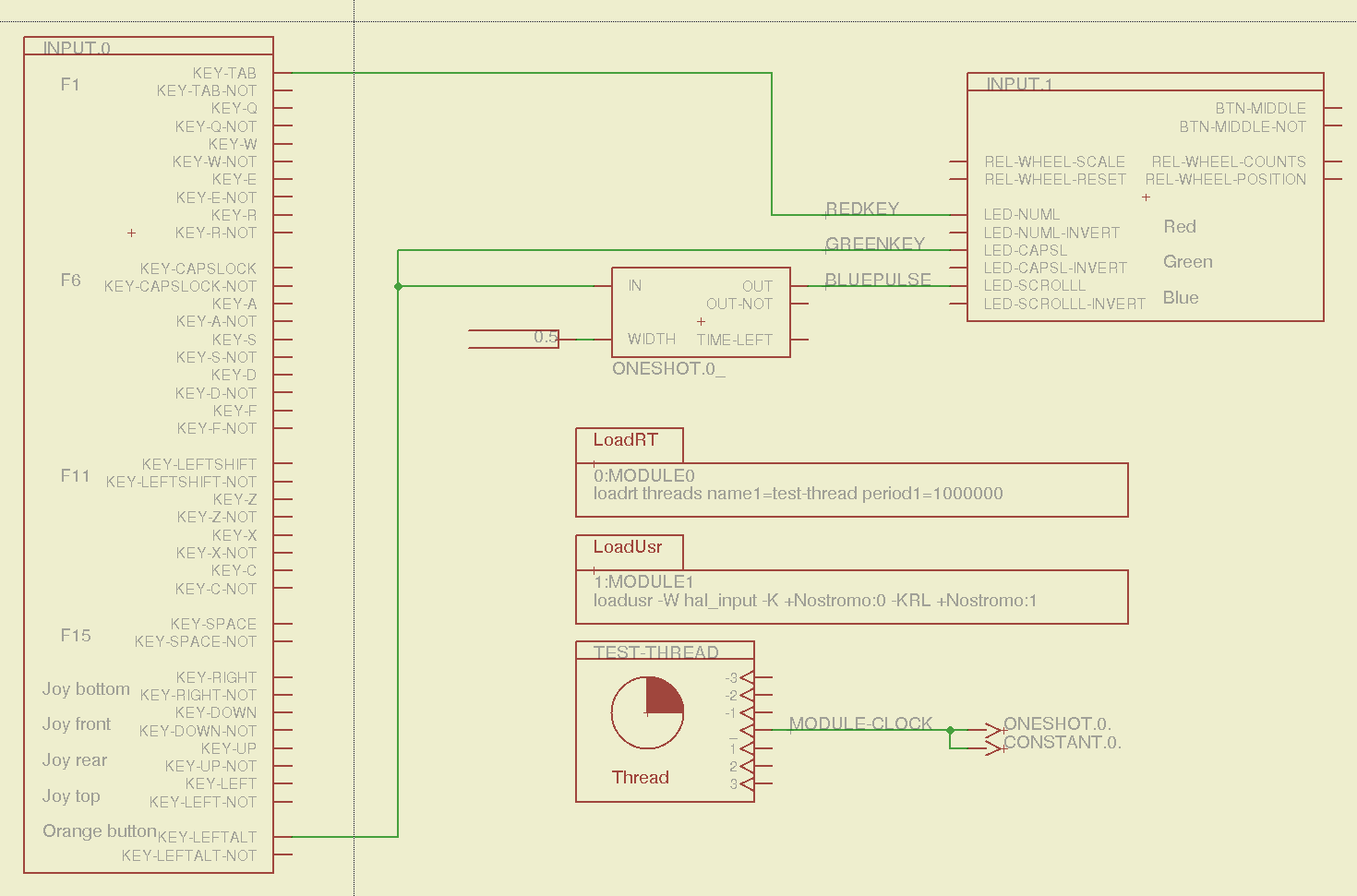
Combining some of the pin names generated by hal_input with the recipe for creating HAL devices, here’s a test configuration that hitches an old Nostromo N52 controller to a LinuxCNC system (clicky for more dots):
Nostromo N52 Controller – HAL config
The F01 key lights the red LED, the Orange Button lights the green LED, and a oneshot timer pulses the blue LED for half a second after the Button closes. The Thread block defines the connections from the functions to the main timing routine, and the loadrt block defines the thread timing. The hal_input module takes care of its own input sampling in userspace.
Now, for the classic embedded system “Hello, world!” test:
Nostromo N52 Controller – F01 test
It’s amazing how good an LED can make you feel…
A halscope shot shows the timing relation between the Orange Button (confusingly hitched to the greenkey signal) and the oneshot pulse:
HalScope – oneshot triggering
That schematic produces this HAL configuration file:
# HAL config file automatically generated by Eagle-CAD ULP:
# [/mnt/bulkdata/Project Files/eagle/ulp/hal-write-2.5.ulp]
# (C) Martin Schoeneck.de 2008
# Charalampos Alexopoulos 2011
# Mods Ed Nisley KE4ZNU 2010 2013
# Path        [/mnt/bulkdata/Project Files/eagle/projects/LinuxCNC HAL Configuration/]
# ProjectName [Nostromo]
# File name   [/mnt/bulkdata/Project Files/eagle/projects/LinuxCNC HAL Configuration/Nostromo.hal]
# Created     [12:28:04 14-Feb-2013]

####################################################
# Load realtime and userspace modules
loadrt threads name1=test-thread period1=1000000
loadusr -W hal_input -K +Nostromo:0 -KRL +Nostromo:1
loadrt constant		count=1
loadrt oneshot		count=1

####################################################
# Hook functions into threads
addf oneshot.0		test-thread
addf constant.0		test-thread

####################################################
# Set parameters

####################################################
# Set constants
setp constant.0.value	0.5

####################################################
# Connect Modules with nets
net bluepulse input.1.led-scrolll oneshot.0.out
net duration constant.0.out oneshot.0.width
net greenkey input.0.key-leftalt oneshot.0.in input.1.led-capsl
net redkey input.0.key-tab input.1.led-numl
A snapshot of the Nostromo.sch, Nostromo.hal, hal_config.lbr, and hal-write-2.5.ulp files is in Nostromo-N52.zip.odt. Rename it to get rid of the ODT suffix, unzip it, and there you go.
While pondering whether I should use the carcass of an old Dell PC to house the stepper drivers and control logic for the LinuxCNC M2 project, I bandsawed a scrap of aluminum sheet to about the right size. It had some truly nasty gouges and bonded-on crud, so I chucked up a wire brush cup in the drill press and had at it:
Machine jeweled baseplate
It’s obvious I haven’t done jeweling in a long time, isn’t it? Even a crude engine jeweling job spiffs things right up, though, even if a cough showcase job like this deserves straighter lines and more precise spacing. The aluminum sheet is far too large for the Sherline, which put CNC right out of consideration, and I’m not up for sufficient crank spinning on the big manual mill.
I match-marked mounting holes directly from the harvested motherboard and drilled them, whereupon I discovered that the aluminum is a dead-soft gummy alloy that doesn’t machine cleanly: it won’t become the final baseplate.
Memo to Self: Use the shop vacuum with the nozzle spinward of the brush, fool.
A (formerly Belkin, now Razer, which is evidently unrelated to Mazer Rackham) Nostromo N52 SpeedPad might not be a perfect CNC pendant, but it does have plenty of buttons and an (oddly oriented) XY joypad that might be useful for, say, a 3D printer controller running LinuxCNC.
Belkin Nostromo N52 SpeedPad
Following the same path as with the Logitech Dual Action Gamepad that became the Joggy Thing, we find that the N52 reports itself as a keyboard and a mouse:
udevadm info --query=all --attribute-walk --name=/dev/bus/usb/002/004

Udevadm info starts with the device specified by the devpath and then
walks up the chain of parent devices. It prints for every device
found, all possible attributes in the udev rules key format.
A rule to match, can be composed by the attributes of the device
and the attributes from one single parent device.

  looking at device '/devices/pci0000:00/0000:00:02.0/usb2/2-10':
    KERNEL=="2-10"
    SUBSYSTEM=="usb"
    DRIVER=="usb"
    ATTR{configuration}==""
    ATTR{bNumInterfaces}==" 2"
    ATTR{bConfigurationValue}=="1"
    ATTR{bmAttributes}=="80"
    ATTR{bMaxPower}==" 90mA"
    ATTR{urbnum}=="1354"
    ATTR{idVendor}=="050d"
    ATTR{idProduct}=="0815"
    ATTR{bcdDevice}=="0210"
    ATTR{bDeviceClass}=="00"
    ATTR{bDeviceSubClass}=="00"
    ATTR{bDeviceProtocol}=="00"
    ATTR{bNumConfigurations}=="1"
    ATTR{bMaxPacketSize0}=="8"
    ATTR{speed}=="1.5"
    ATTR{busnum}=="2"
    ATTR{devnum}=="4"
    ATTR{version}==" 1.10"
    ATTR{maxchild}=="0"
    ATTR{quirks}=="0x0"
    ATTR{authorized}=="1"
    ATTR{manufacturer}=="Honey Bee "
    ATTR{product}=="Nostromo SpeedPad2 "

... snippage ...
Note the trailing blank in the manufacturer and product values.
Create a new rules file /etc/udev/rule/90-Nostromo.rules to change the group and permissions:
# Belkin Nostromo N52 SpeedPad controller for LinuxCNC
# Ed Nisley - KE4ZNU - February 2013

ATTRS{product}=="Nostromo SpeedPad2",GROUP="plugdev",MODE="0660"
Note that the file name must start with a number around 90- to avoid being clobbered by a rule in /lib/udev/rules.d/50-udev-default.rules that (re)sets the permissions to 0640; the doc suggests that rules without numbers happen after all the number rules, so perhaps you could just use meaningful names. That took an embarrassingly long time to figure out…
There’s no need for the trailing blank in that rule, as the match proceeds left-to-right and stops at the end of the test string.
You must, perforce, be in the plugdev group. If not, add yourself.
You need not unplug the N52 to test the rule. Just use:
The + prefix tells HAL to capture the named device and prevent its events from reaching X. The KRL codes suggest which functions you’re interested in for that particular device. The suffix digit selects successive devices for multiple gadgets matching the same name string.
Apparently, the N52 reports it can produce all the usual keyboard and mouse values & buttons, even if they’re not connected to physical hardware. I suspect it has generic keyboard / mouse controllers inside, with just a few of the usual matrix crosspoints connected to switches.
The basic key mapping, sorted by the Nostromo functions:
Type
Dir
Name
Nostromo key
bit
OUT
input.0.key-tab
F1
bit
OUT
input.0.key-q
F2
bit
OUT
input.0.key-w
F3
bit
OUT
input.0.key-e
F4
bit
OUT
input.0.key-r
F5
bit
OUT
input.0.key-capslock
F6
bit
OUT
input.0.key-a
F7
bit
OUT
input.0.key-s
F8
bit
OUT
input.0.key-d
F9
bit
OUT
input.0.key-f
F10
bit
OUT
input.0.key-leftshift
F11
bit
OUT
input.0.key-z
F12
bit
OUT
input.0.key-x
F13
bit
OUT
input.0.key-c
F14
bit
OUT
input.0.key-space
F15
bit
OUT
input.0.key-leftalt
Orange button
bit
OUT
input.0.key-right
Pad bottom
bit
OUT
input.0.key-down
Pad front
bit
OUT
input.0.key-up
Pad rear
bit
OUT
input.0.key-left
Pad top
bit
OUT
input.1.btn-middle
Wheel press
s32
OUT
input.1.rel-wheel-counts
Scroll wheel
bit
IN
input.1.led-numl
Red LED
bit
IN
input.1.led-capsl
Green LED
bit
IN
input.1.led-scrolll
Blue LED
The bit pins also have inverted values available on the corresponding -not pins. The LEDs have an -invert that flips the sense of the input pin. The rel-wheel pin has other useful tidbits as suffixes; the count changes by ±1 for each wheel detent.
The Tab key and all the letters auto-repeat, the various Shift and Alt keys do not. That seems to make no difference to the bit values reported by HAL.
That doesn’t verify that you can successfully create a bazillion little files, but it’s a good rough-and-ready check that you haven’t gotten, say, a 2 GB drive mis-labeled as 4 GB. It could happen…
Assuming you’ve deleted any shovelware (these were clean) and that the drives are now empty (as these were), find out how big they claim to be:
df /media/ed/CENTON\ USB/
Filesystem     1K-blocks  Used Available Use% Mounted on
/dev/sdb1        4107284     4   4107280   1% /media/ed/CENTON USB
Pour /dev/urandom into a file that will fill the available space (not the total space), which will take several minutes:
time dd bs=1K count=4107280 if=/dev/urandom of=/tmp/test.dat
4107280+0 records in
4107280+0 records out
4205854720 bytes (4.2 GB) copied, 450.883 s, 9.3 MB/s

real	7m31.162s
user	0m0.712s
sys	6m54.166s
Copy it to the drive, using rsync with a progress indicator:
time rsync --progress /tmp/test.dat /media/ed/CENTON\ USB/
test.dat
  4205854720 100%    8.45MB/s    0:07:54 (xfer#1, to-check=0/1)

sent 4206368202 bytes  received 31 bytes  8772405.07 bytes/sec
total size is 4205854720  speedup is 1.00

real	7m59.035s
user	0m24.490s
sys	0m17.433s
Verify that the two files match:
time diff /tmp/test.dat /media/ed/CENTON\ USB
real	3m32.576s
user	0m0.588s
sys	0m6.268s
And, yes, one of them is noticeably darker; four of the others seem lighter and five darker gray. Most likely, the cases came from three different anodizing batches and, I suppose, if I were to pry them apart, the innards could be radically different. Ya never know!