The Smell of Molten Projects in the Morning

Ed Nisley's Blog: Shop notes, electronics, firmware, machinery, 3D printing, laser cuttery, and curiosities. Contents: 100% human thinking, 0% AI slop.

Category: Machine Shop

Mechanical widgetry

  • Laser Cutter vs. Mirrorshades: Front

    Laser Cutter vs. Mirrorshades: Front

    Well, a shattered lens found beside the road on a walk:

    Laser vs sunglasses - focused overview
    Laser vs sunglasses – focused overview

    The battered frame has enough information to suggest they were once rather fancy. At this point, all that matters is they have two glass layers separated by a dark plastic polarizing film, with a gold-ish metallized front glass surface.

    I fired the two pulses (on the left side of the obvious crack) at the front of the lens, both at 100 ms / 70% power:

    Laser vs sunglasses - overview
    Laser vs sunglasses – overview

    Neither pulse penetrated the lens.

    The smaller zit was fired in the position shown in the first picture, with the focal point more-or-less at the top surface of the lens. As seen from the front:

    Laser vs sunglasses - focused front
    Laser vs sunglasses – focused front

    The outer part of the damaged area is about 0.5 mm in diameter. The heat around the damage seems to have cleared away all the schmutz on the lens; those things that look like scratches are oily smears and road dirt.

    Seen from the rear:

    Laser vs sunglasses - focused rear
    Laser vs sunglasses – focused rear

    The rear surface is blistered, but doesn’t have a hole, so I think the beam melted the glass and inflated a cavity along its path.

    I then perched the lens in the unfocused beam path, with paper taped over the laser head opening to keep any fragments off the mirror and focus lens:

    Laser vs sunglasses - beam front overview
    Laser vs sunglasses – beam front overview

    The beam produced the larger scar and also blasted off a ring of crud around the wound, as seen from the front surface:

    Laser vs sunglasses - beam front
    Laser vs sunglasses – beam front

    The beam seems to have shattered a thin layer under the metallization, but didn’t do any deeper damage. The rear surface is undamaged and the paper didn’t have a scorch mark.

    They’re not laser safety glasses, but at least they didn’t disintegrate.

    Protip: do not lie on the laser platform and stare upward into the laser head, even while wearing fancy polarized mirrorshades.

  • Bed Frame Feet

    Bed Frame Feet

    Quite some time ago I slipped felt pads under the feet holding the bed frame off the wood floor and recently noticed two of them perpetrating an escape. My first thought was a variation of the 3D printed Fuzzy Felt Feet holders under our power chairs, but the bed frame feet are much larger.

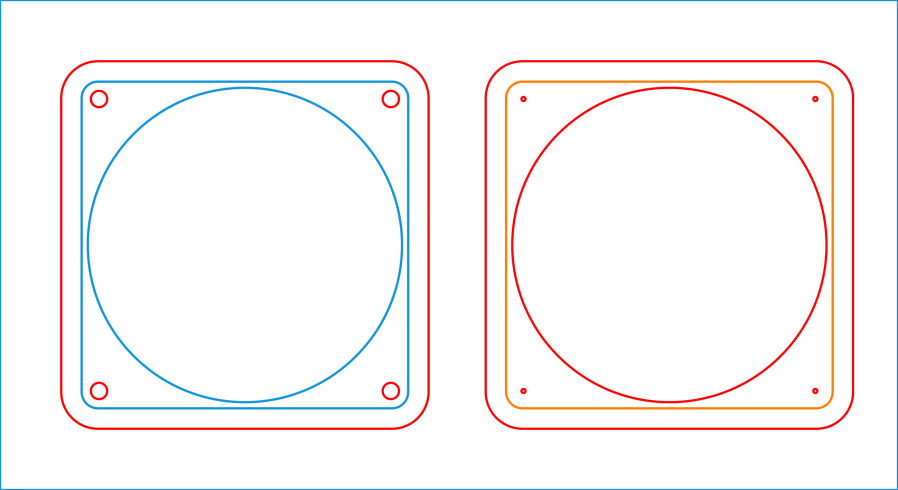
    The holders are basically rings surrounding the feet and felt, which LightBurn makes easy enough:

    Bed Frame Feet - LB layout
    Bed Frame Feet – LB layout

    The Foot Retainer is 6 mm plywood, the Plate and Felt Retainer are 3 mm.

    I fired a ranging shot to verify the sizes:

    Bed Feet - clamping
    Bed Feet – clamping

    Then do three more, apply wood glue, and deploy Too Many Clamps.

    The fuzzy felt feet are about 5 mm thick, so the 3 mm plywood shouldn’t quite touch the floor. Alas, the fuzz squishes more than I expected, so I added the chipboard Felt Spacers for a millimeter more clearance:

    Bed Feet - chipboard spacer
    Bed Feet – chipboard spacer

    They’re glued to the Plate with the felt adhesive side stuck to them:

    Bed Feet - fuzzy felt foot
    Bed Feet – fuzzy felt foot

    The felt and chipboard compress under load so now it behaves as it should:

    Bed Feet - installed
    Bed Feet – installed

    Gotta get better at gluing plywood together, though.

  • Laser Cutter: Fire Extinguisher Brackets

    Laser Cutter: Fire Extinguisher Brackets

    A Genuine Kidde Fyre Freez CO₂ extinguisher that Came With The House™ finally found its ideal location:

    Fyre Freez extinguisher - mounted
    Fyre Freez extinguisher – mounted

    It was last refilled 65 years ago:

    Fire Extinguisher Recharge Tag - 1957
    Fire Extinguisher Recharge Tag – 1957

    I know it’s still good, because the label has its 4 lb 7 oz refilled gross weight stamped into it, which is exactly what it weighs today.

    Walter Smith Welding Supplies may still be in business, perhaps in Poughkeepsie, but their former 18 Downs St location in Kingston has become Noble Gas Solutions:

    Noble Gas Solutions - 18 Downs St Kingston - 2019
    Noble Gas Solutions – 18 Downs St Kingston – 2019

    Back then, you could call Smith Welding at a four digit phone number in Kingston: 5061. Nowadays, you must call Noble Gas with three more digits: 338-5061. As Charles Stross observed, something like 70% of the future is already in place, because infrastructure is so tenacious.

    Heck, just look at that Quonset hut!

    Keep calm and extinguish on:

    Fyre Freez extinguisher - step 4
    Fyre Freez extinguisher – step 4

    Two thoughts spring to mind:

    • Most kitchen fires start waist-high (it’s the late 1950s: where else would she be?)
    • She’s gonna lose skin on that metal tank

    Seems to me a Fyre Freez will get cold enough to freeze skin while discharging, but I admit to not having actually tried it.

    Anyhow, given the overall basement decor, the brackets have the right general style:

    Fyre Freez extinguisher - bracket detail
    Fyre Freez extinguisher – bracket detail

    Here’s hoping its future will be as dull as its past …

  • Sears / Kenmore Progressive Vacuum Cleaner: Motor FAIL

    Sears / Kenmore Progressive Vacuum Cleaner: Motor FAIL

    After seven years, our Sears / Kenmore Progressive vacuum cleaner gave off a horrible screech and an intense smell of electrical death, prompting me to tear it apart.

    It’s easy to find the two front screws holding the top in place, although you’ll need either a bendy or offset screwdriver to remove them:

    Sears Progressive Vacuum - front case screws
    Sears Progressive Vacuum – front case screws

    Pull up hard on the cord retraction plunger to remove it, revealing the two rear screws:

    Sears Progressive Vacuum - rear case screws
    Sears Progressive Vacuum – rear case screws

    Extract the wires and motor control PCB from their niches:

    Sears Progressive Vacuum - motor assembly overview
    Sears Progressive Vacuum – motor assembly overview

    Prying the latch in the middle of the rear panel (over on the right) releases the motor assembly, which you can then wiggle-n-jiggle upward and out:

    Sears Progressive Vacuum - extracting motor assembly
    Sears Progressive Vacuum – extracting motor assembly

    Disconnect the wires, peel off various foam bits, and extract the motor from its carapace. Measure the blower diameter and cut a suitable plywood clamp for the bench vise:

    Sears Progressive Vacuum - custom motor clamp
    Sears Progressive Vacuum – custom motor clamp

    I loves me some good laser cutter action, even when the plywood crate the laser came in doesn’t have much to recommend it:

    Sears Progressive Vacuum - failed plywood clamp
    Sears Progressive Vacuum – failed plywood clamp

    I vaguely recall reading the purple tinge comes from the bromine vapor used to dis-insect the wood during manufacturing, before shipping it halfway around the planet.

    One area of the commutator looks like it’s in bad shape:

    Sears Progressive Vacuum - as-found commutator
    Sears Progressive Vacuum – as-found commutator

    Clean the commutator bars in the desperate hope it’s just random crud, even though that seems unlikely, then connect a widowmaker cord to the motor terminals:

    Sears Progressive Vacuum - widowmaker line cord
    Sears Progressive Vacuum – widowmaker line cord

    Use a Variac to spin the motor at a (relatively) low speed while watching the brushes and commutator:

    Sears Progressive Vacuum - commutator sparking
    Sears Progressive Vacuum – commutator sparking

    Now, that is not a nominal outcome.

    The cleaned commutator again shows signs of distress:

    Sears Progressive Vacuum - scarred commutator
    Sears Progressive Vacuum – scarred commutator

    Indeed, measuring the resistance across the line cord terminals shows a shorted winding: 0.0 Ω with the brushes aligned on the bars just antispinward of the scars.

    So the motor is definitely, irretrievably dead.

    Extracting the brushes shows the arcs have eroded their spinward edges:

    Sears Progressive Vacuum - eroded motor brushes
    Sears Progressive Vacuum – eroded motor brushes

    The dark smudge on the windings seems due to internal problems, rather than just the arcs, because the wiring crossing between the commutator and the smudge remains clean:

    Sears Progressive Vacuum - charred motor windings
    Sears Progressive Vacuum – charred motor windings

    One can buy a used motor assembly on eBay for about $40, with no assurance it doesn’t also have a shorted winding.

    Dang, now I gotta make more adapters for whatever vacuum comes next …

  • Laser Cutter: LightBurn Camera Accuracy

    Laser Cutter: LightBurn Camera Accuracy

    After going through the LightBurn camera alignment / calibration process, I thought it would be interesting to see how well the corrected image matches the design grid.

    Burn some holes and draw lines 10 mm in from the physical corners, like this:

    LB Camera Cal - corner target
    LB Camera Cal – corner target

    Burn holes and lay in a 10 mm grid at the center point:

    LB Camera Cal - center grid
    LB Camera Cal – center grid

    The center grid as seen through the camera:

    LB Camera Cal - center grid overlay
    LB Camera Cal – center grid overlay

    That’s after adjusting the X and Y offset to align the center of the imaged grid with the center of the design grid. That’s using the non-faded image to make the target lines more visible.

    The corner markers don’t quite line up with the grid, but they’re not off by much (using the faded image to make the grid more visible):

    • LB platform overlay - adj - rear left
    • LB platform overlay - adj - rear right
    • LB platform overlay - adj - front left
    • LB platform overlay - adj - front right

    You could, of course, split the difference among all five sites, but I think having the middle of the platform be more accurate than the far corners makes more sense.

    In any event, a few millimeters works for most purposes, even if you’d want to verify the alignment for critical operations before firing the laser in earnest.

  • Laser Cutter: LightBurn Camera Calibration

    Laser Cutter: LightBurn Camera Calibration

    Going through the LightBurn lens calibration and camera alignment routine produces an orthographic view of the laser platform from a camera with an ordinary lens perched somewhere above it.

    Early on, I stuck a camera to the lid of my OMTech 60 W laser:

    OMTech Laser - camera mount
    OMTech Laser – camera mount

    The uncorrected view from the camera (through VLC):

    LB Uncorrected Camera View
    LB Uncorrected Camera View

    After calibration and alignment, LightBurn underlays this view of the platform behind the workspace:

    LB Corrected Camera View
    LB Corrected Camera View

    The correction depends critically on the camera maintaining its position / orientation / focus, which turns out to be a bad assumption for the camera I’ve been using, because the (metal) focus locking screw binds directly on the (metal) lens threads. This works, until vibrations slightly loosen the screw and the lens shifts ever so slightly.

    After noticing the focus had shifted again, I tucked a snippet of silicone insulation from some 30 AWG hookup wire into the screw hole to compress against the lens thread, then re-did the entire sequence with some attention to detail.

    Pulsing the laser in each corner produced pinholes exactly 700×500 mm apart. One diagonal is 859.0 mm and the other is 861.5 mm, pretty close to the ideal 860.2 mm.

    Next, to measure the offsets from some known positions …

  • Onion Maggot Flies vs. Sticky Traps: Season Finale

    Onion Maggot Flies vs. Sticky Traps: Season Finale

    Mary left the sticky card traps in the onion patch until the last onions came out, clustered them around the leeks, and collected them long after the season was over.

    I count maybe twenty flies that might be onion maggot flies or cabbage maggot flies.

    The cards protected the onion crop, failed miserably for the leeks, and did nothing for the nearby cabbages. Deploying the cards while planting worked very well, refreshing them after a month continued the protection, but the main fly season seems to end shortly thereafter.

    All the sticky cards as a slideshow, starting with the three along the border fence:

    • VCCG Onion Card - fence A - 2022-11
    • VCCG Onion Card - fence B - 2022-11
    • VCCG Onion Card - fence C - 2022-11
    • VCCG Onion Card - plot A - 2022-11
    • VCCG Onion Card - plot B - 2022-11
    • VCCG Onion Card - plot C - 2022-11
    • VCCG Onion Card - plot D - 2022-11

    The cards remain sticky to my fingers, but an adroit fly could skate over the debris field and emerge unscathed.