The Smell of Molten Projects in the Morning

Ed Nisley's Blog: Shop notes, electronics, firmware, machinery, 3D printing, laser cuttery, and curiosities. Contents: 100% human thinking, 0% AI slop.

Category: Machine Shop

Mechanical widgetry

  • Model M Keyboard Surprise

    A friend gave me a New Old Stock IBM Model M keyboard, built by Lexmark on 1/30/96. Although I intended to try it out, I first showed it to Mary and it immediately ended up at her desk:

    IBM Model M 1996 - media keys
    IBM Model M 1996 – media keys

    I favor off-lease Dell boxes intended for office use, so the PS/2 plug on the end of the (permanently attached) cable slid right into the PS/2 jack on the back panel. Gotta love it.

    She’d been hammering out testcases and doc on Model M keyboards basically forever, so her fingers snapped into position and the room sounds like her old IBM office.

    The “101 key” layout predates frippery along the lines of multimedia keys, so I gimmicked the top row of the numeric pad to control the mixer volume and muting toggle:

    • /amixer sset 'Master' 10%-
    • *amixer sset 'Master' 10%+
    • amixer sset 'Master' toggle

    While doing that, I found the semicolon key fired at the slightest touch, so I popped the keycap to see if I could frighten it into compliance:

    IBM Model M 1996 - dome switch
    IBM Model M 1996 – dome switch

    Huh.

    It seems Lexmark replaced the classic buckling spring mechanism with less clicky rubber dome switches, even back in 1996, perhaps for use in libraries & suchlike. Come to think of it, this place is more like a library than an office, so muted clickiness seems appropriate.

    For completeness:

    IBM Model M 1996 - label
    IBM Model M 1996 – label
  • Two-Wheel Plotter

    While contemplating all the hocus-pocus and precision alignment involved in the DIY plotter project, it occurred to me you could conjure a plotter from a pair of steppers, two disks, a lifting mechanism, and not much else. The general idea resembles an Rθ plotter, with the paper glued to a turntable for the “theta” motion, but with the “radius” motion produced by pen(s) on another turntable:

    Rotary Plotter - geometry 4
    Rotary Plotter – geometry 4

    The big circle is the turntable with radius R1, which might be a touch over 4.5 inches to fit an 8.5 inch octagon cut from ordinary Letter paper. The arc with radius R2 over on the right shows the pen path from the turntable’s center to its perimeter, centered at (R1/2,-R1) for convenience.

    The grid paper represents the overall Cartesian grid containing the XY points you’d like to plot, like, for example, point Pxy in the upper right corner. The object of the game is to figure out how to rotate the turntable and pen holder to put Pxy directly under the pen at Ixy over near the right side, after which one might make a dot by lowering the pen. Drawing a continuous figure requires making very small motions between closely spaced points, using something like Bresenham’s line algorithm to generate the incremental coordinates or, for parametric curves like the SuperFormula, choosing a small parameter step size.

    After flailing around for a while, I realized this requires finding the intersections of two circles after some coordinate transformations.

    The offset between the two centers is (ΔX,ΔY) and the distance is R2 = sqrt(ΔX² + ΔY²).  The angle between the +X axis and the pen wheel is α = atan2(ΔY,ΔX), which will be negative for this layout.

    Start by transforming Pxy to polar coordinates PRθ, which produces the circle containing both Pxy and Ixy. A pen positioned at radius R from the center of the turntable will trace that circle and Ixy sits at the intersection of that circle with the pen rotating around its wheel.

    The small rectangle with sides a and b has R as its diagonal, which means a² + b² = R² and the pointy angle γ = atan a/b.

    The large triangle below that has base (R2 – a), height b, and hypotenuse R2, so (R2 – a)² + b² = R2².

    Some plug-and-chug action produces a quadratic equation that you can solve for a as shown, solve for b using the first equation, find γ from atan a/b, then subtract γ from θ to get β, the angle spearing point Ixy. You can convert Rβ back to the original grid coordinates with the usual x = R cos β and y = R sin β.

    Rotate the turntable by (θ – β) to put Pxy on the arc of the pen at Ixy.

    The angle δ lies between the center-to-center line and Ixy. Knowing all the sides of that triangle, find δ = arccos (R2 – a) / R2 and turn the pen wheel by δ to put the pen at Ixy.

    Lower the pen to make a dot.

    Done!

    Some marginal thinking …

    I’m sure there’s a fancy way to do this with, surely, matrices or quaternions, but I can handle trig.

    You could drive the steppers with a Marlin / RAMPS controller mapping between angles and linear G-Code coordinates, perhaps by choosing suitable steps-per-unit values to make the degrees (or some convenient decimal multiple / fraction thereof) correspond directly to linear distances.

    You could generate points from an equation in, say, Python on a Raspberry Pi, apply all the transformations, convert the angles to G-Code, and fire them at a Marlin controller over USB.

    Applying 16:1 microstepping to a stock 200 step/rev motor gives 0.113°/step, so at a 5 inch radius each step covers 0.01 inch. However, not all microsteps are moved equally and I expect the absolute per-step accuracy would be somewhere between OK and marginal. Most likely, given the application, even marginal accuracy wouldn’t matter in the least.

    The pen wheel uses only 60-ish degrees of the motor’s rotation, but you could mount four-ish pens around a complete wheel, apply suitable pen lift-and-lower action and get multicolor plots.

    You could gear down the steppers to get more steps per turntable revolution and way more steps per pen arc, perhaps using cheap & readily available RepRap printer GT2 pulleys / belts / shafts / bearings from the usual eBay sellers. A 16 tooth motor pulley driving a 60 tooth turntable pulley would improve the resolution by a factor of 3.75: more microsteps per commanded motion should make the actual motion come out better.

    Tucking the paper atop the turntable and under the pen wheel could be a challenge. Perhaps mounting the whole pen assembly on a tilting plate would help?

    Make all the workings visible FTW!

    Some doodles leading up to the top diagram, complete with Bad Ideas and goofs …

    Centering the pen wheel at a corner makes R2 = R1 * sqrt(2), which seems attractive, but seems overly large in retrospect:

    Rotary Plotter - geometry 1
    Rotary Plotter – geometry 1

    Centering the pen wheel at (-R1,R1/2) with a radius of R1 obviously doesn’t work out, because the arc doesn’t reach the turntable pivot, so you can’t draw anything close to the center. At least I got to work out some step sizes.

    A first attempt at coordinate transformation went nowhere:

    Rotary Plotter - geometry 2
    Rotary Plotter – geometry 2

    After perusing the geometric / triangle solution, this came closer:

    Rotary Plotter - geometry 3
    Rotary Plotter – geometry 3
  • Hickory Shells for Bacon Smoking

    Hickory trees run on a triennial cycle and 2017 produced a huge crop of nuts. My trusty Vise-Grip makes short work of the otherwise impenetrable shells:

    Hickory Nuts - cracking in Vise-Grip
    Hickory Nuts – cracking in Vise-Grip

    A nut pick extracts the good stuff:

    Hickory Nuts - cracked
    Hickory Nuts – cracked

    In round numbers, you get twice as much shell as you do nut meat, so there’s plenty of shells left over.

    I wrapped 10 ounces of shells in a double layer of aluminum foil, poked two rows of air holes along the package, dropped it holes-up atop the “flavorizer” bars in the propane barbie, and smoked 5 pounds of cured pork belly into some of the finest bacon we’ve ever eaten.

    Heated and starved for air inside the aluminum wrapper, the shells became charcoal:

    Carbonized hickory shells
    Carbonized hickory shells

    Yum!

  • T-shirt Shop Rags

    Small wipes made from worn-out cotton t-shirts absorb most shop liquids, don’t overstay their welcome after short projects, and prevent the deep emotional attachment leaving swarf in the clothes washer. Scissors cutting gets tedious, so mooch a rotary cutter and slash away:

    T-shirt shop rags
    T-shirt shop rags

    Synthetic fabrics don’t work nearly as well as cotton, so pay attention to the labels.


  • Vacuum Tube LEDs: PAR30 Halogen Spotlight

    Breaking the fake heatsink off the big floodlight, drilling out the guts, and rebuilding it with a WS2812 RGBW LED left the PET braid too short for a nice curve from socket to bulb, so I swapped in a smaller and equally defunct PAR30 halogen spotlight:

    PAR30 Halogen - red phase
    PAR30 Halogen – red phase

    And in green:

    PAR30 Halogen - green phase
    PAR30 Halogen – green phase

    The white glass frit ring around the perimeter lights up nicely in the dark.

    The knockoff Arduino Nano now runs the RGBW program, with Morse transmissions disabled and the white LED dialed back to MaxPWM = 32.

  • RAMPS 1.4: Configuration for Generic Motor Control

    Configuring the knockoff RAMPS 1.4 board went reasonably smoothly:

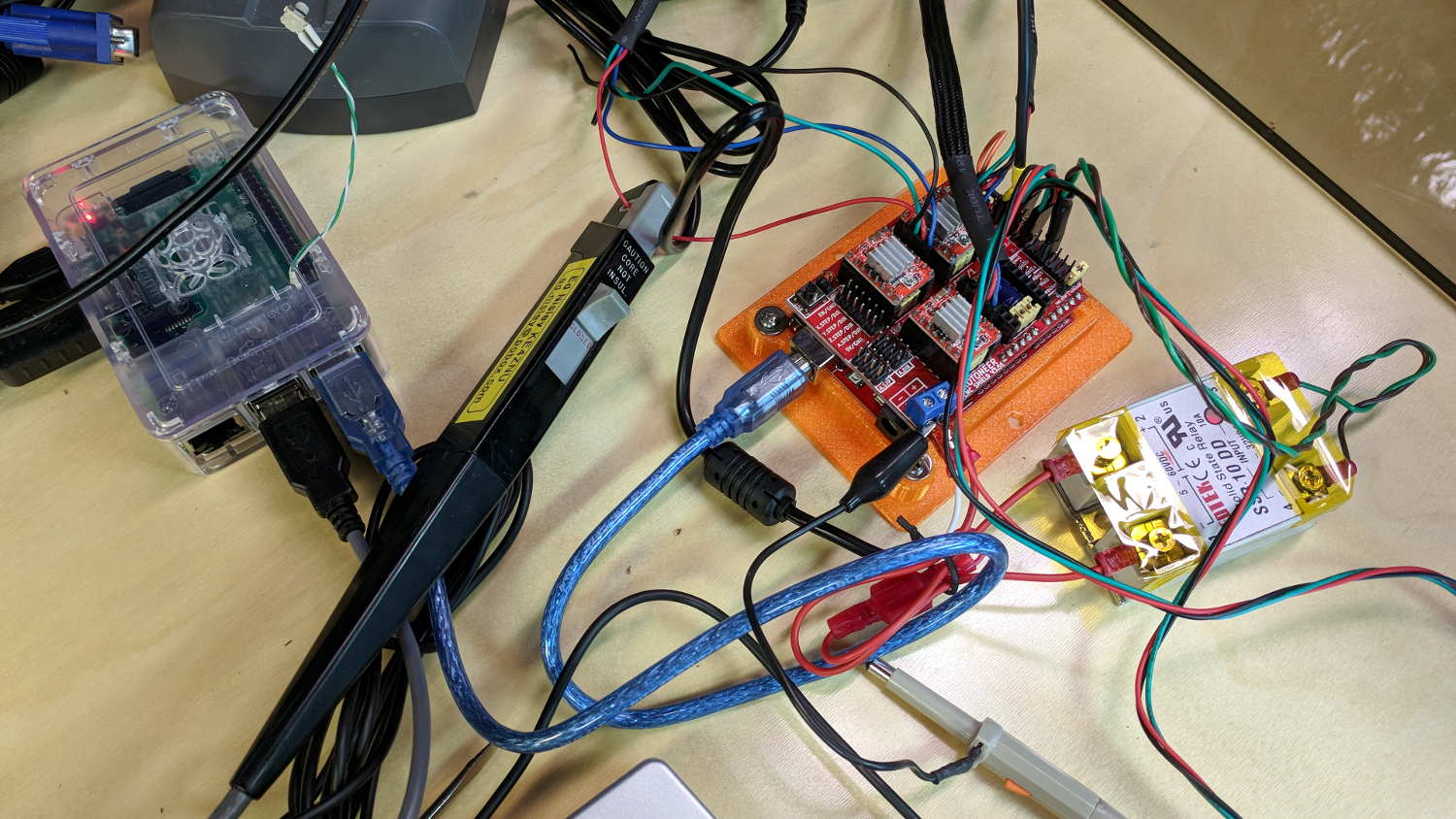
    RAMPS 1.4 - First Light
    RAMPS 1.4 – First Light

    The DC (n.b., not an AC) solid state relay in the foreground switches the 20 V laptop supply brick to the RAMPS shield atop the knockoff Arduino Mega 2560, controlled by the PS_ON pin (black wire), with +5 V from a pin in the AUX header (yellow wire). The SSR includes a ballast resistor limiting the current to 12 mA, with an inconspicuous red LED behind the black dot showing when the output is turned on.

    Because it’s a DC SSR, polarity matters: the supply goes to the + terminal, the RAMPS power inputs to the – terminal.

    I haven’t applied much of a load to to the SSR, but it works as expected. Define POWER_SUPPLY 1 and PS_DEFAULT_OFF so the boards starts up with the SSR turned off, then use M80 / M81 to turn it on / off as needed.

    Remove D1 on the RAMPS board to isolate the Mega power from the +20 V supply. Stuffed as shown, the Mega draws 70 mA from the USB port, although an external 8 V (-ish) supply is always a good idea.

    The stepper is a random NEMA 17 from the heap in a mount intended for a DIY plotter. I adjusted the tiny trimpots on all the boards for 400 mA peak = 250 mA RMS into the windings, after finding 250 mApk didn’t produce nearly enough mojo, even for a demonstration:

    X Axis Stepper Drive
    X Axis Stepper Drive

    Just to get it running, I used DEFAULT_AXIS_STEPS_PER_UNIT = 100 step/mm, MAX_FEEDRATE 100 mm/s, and (for lack of anything better)
    DEFAULT_*_ACCELERATION 1000. Those all depend the torque produced by the motor current, which is still way too low.

    The endstops require X_???_ENDSTOP_INVERTING true.

    I set the ?_BED_SIZE parameters to a generous 2000, with ?_MIN_POS equal to -SIZE/2 to put the origin in the middle where I prefer it, with a similar setting for the Z axis. Obviously, those numbers don’t correspond to any physical reality.

    Three little 100 kΩ thermistors sprout from their header and produce reasonable temperatures, although (being cheap eBay parts) they may not match the Type 4 curve. I don’t have any heaters connected. All the over / under temperature lockouts are disabled, because I don’t care right now.

    The G-Code parser wants uppercase command letters, which means I get to press the Caps Lock key for the first time in nearly forever!

    The header along the right edge of the board connects to the LCD control board, which is another story.

    The diffs for the Configuration.h and Configuration_adv.h files as a GitHub Gist:

    77c77
    < #define STRING_CONFIG_H_AUTHOR "(none, default config)" // Who made the changes.
    > #define STRING_CONFIG_H_AUTHOR "(Ed Nisley – KE4ZNU)" // Who made the changes.
    113c113
    < #define BAUDRATE 250000
    > #define BAUDRATE 115200
    126c126
    < //#define CUSTOM_MACHINE_NAME "3D Printer"
    > #define CUSTOM_MACHINE_NAME "Not a 3D Printer"
    130c130
    < //#define MACHINE_UUID "00000000-0000-0000-0000-000000000000"
    > #define MACHINE_UUID "89647f7b-2575-4809-bc90-5396f4376e02"
    225c225
    < #define POWER_SUPPLY 0
    > #define POWER_SUPPLY 1
    230c230
    < //#define PS_DEFAULT_OFF
    > #define PS_DEFAULT_OFF
    285c285
    < #define TEMP_SENSOR_0 1
    > #define TEMP_SENSOR_0 4
    290c290
    < #define TEMP_SENSOR_BED 0
    > #define TEMP_SENSOR_BED 4
    304c304
    < #define TEMP_WINDOW 1 // (degC) Window around target to start the residency timer x degC early.
    > #define TEMP_WINDOW 2 // (degC) Window around target to start the residency timer x degC early.
    309c309
    < #define TEMP_BED_WINDOW 1 // (degC) Window around target to start the residency timer x degC early.
    > #define TEMP_BED_WINDOW 2 // (degC) Window around target to start the residency timer x degC early.
    324,325c324,325
    < #define HEATER_0_MAXTEMP 275
    < #define HEATER_1_MAXTEMP 275
    > #define HEATER_0_MAXTEMP 75
    > #define HEATER_1_MAXTEMP 75
    329c329
    < #define BED_MAXTEMP 150
    > #define BED_MAXTEMP 75
    417,418c417,418
    < #define PREVENT_COLD_EXTRUSION
    < #define EXTRUDE_MINTEMP 170
    > //#define PREVENT_COLD_EXTRUSION
    > #define EXTRUDE_MINTEMP 50
    422c422
    < #define PREVENT_LENGTHY_EXTRUDE
    > //#define PREVENT_LENGTHY_EXTRUDE
    441,442c441,442
    < #define THERMAL_PROTECTION_HOTENDS // Enable thermal protection for all extruders
    < #define THERMAL_PROTECTION_BED // Enable thermal protection for the heated bed
    > //#define THERMAL_PROTECTION_HOTENDS // Enable thermal protection for all extruders
    > //#define THERMAL_PROTECTION_BED // Enable thermal protection for the heated bed
    476c476
    < #define ENDSTOPPULLUPS // Comment this out (using // at the start of the line) to disable the endstop pullup resistors
    > //#define ENDSTOPPULLUPS // Comment this out (using // at the start of the line) to disable the endstop pullup resistors
    490,495c490,495
    < #define X_MIN_ENDSTOP_INVERTING false // set to true to invert the logic of the endstop.
    < #define Y_MIN_ENDSTOP_INVERTING false // set to true to invert the logic of the endstop.
    < #define Z_MIN_ENDSTOP_INVERTING false // set to true to invert the logic of the endstop.
    < #define X_MAX_ENDSTOP_INVERTING false // set to true to invert the logic of the endstop.
    < #define Y_MAX_ENDSTOP_INVERTING false // set to true to invert the logic of the endstop.
    < #define Z_MAX_ENDSTOP_INVERTING false // set to true to invert the logic of the endstop.
    > #define X_MIN_ENDSTOP_INVERTING true // set to true to invert the logic of the endstop.
    > #define Y_MIN_ENDSTOP_INVERTING true // set to true to invert the logic of the endstop.
    > #define Z_MIN_ENDSTOP_INVERTING true // set to true to invert the logic of the endstop.
    > #define X_MAX_ENDSTOP_INVERTING true // set to true to invert the logic of the endstop.
    > #define Y_MAX_ENDSTOP_INVERTING true // set to true to invert the logic of the endstop.
    > #define Z_MAX_ENDSTOP_INVERTING true // set to true to invert the logic of the endstop.
    527c527
    < #define DEFAULT_AXIS_STEPS_PER_UNIT { 80, 80, 4000, 500 }
    > #define DEFAULT_AXIS_STEPS_PER_UNIT { 100, 100, 100, 100 }
    534c534
    < #define DEFAULT_MAX_FEEDRATE { 300, 300, 5, 25 }
    > #define DEFAULT_MAX_FEEDRATE { 100, 100, 100, 100 }
    542c542
    < #define DEFAULT_MAX_ACCELERATION { 3000, 3000, 100, 10000 }
    > #define DEFAULT_MAX_ACCELERATION { 1000, 1000, 1000, 1000 }
    552,554c552,554
    < #define DEFAULT_ACCELERATION 3000 // X, Y, Z and E acceleration for printing moves
    < #define DEFAULT_RETRACT_ACCELERATION 3000 // E acceleration for retracts
    < #define DEFAULT_TRAVEL_ACCELERATION 3000 // X, Y, Z acceleration for travel (non printing) moves
    > #define DEFAULT_ACCELERATION 1000 // X, Y, Z and E acceleration for printing moves
    > #define DEFAULT_RETRACT_ACCELERATION 1000 // E acceleration for retracts
    > #define DEFAULT_TRAVEL_ACCELERATION 1000 // X, Y, Z acceleration for travel (non printing) moves
    566,567c566,567
    < #define DEFAULT_ZJERK 0.4
    < #define DEFAULT_EJERK 5.0
    > #define DEFAULT_ZJERK 20.0
    > #define DEFAULT_EJERK 20.0
    744c744
    < #define INVERT_X_DIR false
    > #define INVERT_X_DIR true
    746c746
    < #define INVERT_Z_DIR false
    > #define INVERT_Z_DIR true
    774,775c774,775
    < #define X_BED_SIZE 200
    < #define Y_BED_SIZE 200
    > #define X_BED_SIZE 2000
    > #define Y_BED_SIZE 2000
    778,783c778,783
    < #define X_MIN_POS 0
    < #define Y_MIN_POS 0
    < #define Z_MIN_POS 0
    < #define X_MAX_POS X_BED_SIZE
    < #define Y_MAX_POS Y_BED_SIZE
    < #define Z_MAX_POS 200
    > #define X_MIN_POS -X_BED_SIZE/2
    > #define Y_MIN_POS -Y_BED_SIZE/2
    > #define Z_MIN_POS -1000
    > #define X_MAX_POS X_BED_SIZE/2
    > #define Y_MAX_POS Y_BED_SIZE/2
    > #define Z_MAX_POS 1000
    1013c1013
    < //#define EEPROM_SETTINGS // Enable for M500 and M501 commands
    > #define EEPROM_SETTINGS // Enable for M500 and M501 commands
    1023c1023
    < #define HOST_KEEPALIVE_FEATURE // Disable this if your host doesn't like keepalive messages
    > //#define HOST_KEEPALIVE_FEATURE // Disable this if your host doesn't like keepalive messages
    1046,1047c1046,1047
    < #define PREHEAT_1_TEMP_BED 70
    < #define PREHEAT_1_FAN_SPEED 0 // Value from 0 to 255
    > #define PREHEAT_1_TEMP_BED 60
    > #define PREHEAT_1_FAN_SPEED 255 // Value from 0 to 255
    1050,1051c1050,1051
    < #define PREHEAT_2_TEMP_BED 110
    < #define PREHEAT_2_FAN_SPEED 0 // Value from 0 to 255
    > #define PREHEAT_2_TEMP_BED 90
    > #define PREHEAT_2_FAN_SPEED 255 // Value from 0 to 255
    1275c1275
    < //#define REVERSE_ENCODER_DIRECTION
    > #define REVERSE_ENCODER_DIRECTION
    1290c1290
    < //#define INDIVIDUAL_AXIS_HOMING_MENU
    > #define INDIVIDUAL_AXIS_HOMING_MENU
    1307,1308c1307,1308
    < //#define LCD_FEEDBACK_FREQUENCY_DURATION_MS 100
    < //#define LCD_FEEDBACK_FREQUENCY_HZ 1000
    > #define LCD_FEEDBACK_FREQUENCY_DURATION_MS 50
    > #define LCD_FEEDBACK_FREQUENCY_HZ 700
    1379c1379
    < //#define REPRAP_DISCOUNT_FULL_GRAPHIC_SMART_CONTROLLER
    > #define REPRAP_DISCOUNT_FULL_GRAPHIC_SMART_CONTROLLER
    65,66c65,66
    < #define THERMAL_PROTECTION_PERIOD 40 // Seconds
    < #define THERMAL_PROTECTION_HYSTERESIS 4 // Degrees Celsius
    > #define THERMAL_PROTECTION_PERIOD 100 // Seconds
    > #define THERMAL_PROTECTION_HYSTERESIS 5 // Degrees Celsius
    77c77
    < #define WATCH_TEMP_PERIOD 20 // Seconds
    > #define WATCH_TEMP_PERIOD 60 // Seconds
    85c85
    < #define THERMAL_PROTECTION_BED_PERIOD 20 // Seconds
    > #define THERMAL_PROTECTION_BED_PERIOD 120 // Seconds
    97c97
    < #define WATCH_BED_TEMP_PERIOD 60 // Seconds
    > #define WATCH_BED_TEMP_PERIOD 120 // Seconds
    225c225
    < *
    > *
    352c352
    < #define HOMING_BUMP_DIVISOR {2, 2, 4} // Re-Bump Speed Divisor (Divides the Homing Feedrate)
    > #define HOMING_BUMP_DIVISOR {4, 4, 4} // Re-Bump Speed Divisor (Divides the Homing Feedrate)
    374c374
    < #define DEFAULT_STEPPER_DEACTIVE_TIME 120
    > #define DEFAULT_STEPPER_DEACTIVE_TIME 0
    458c458
    < //#define LCD_INFO_MENU
    > #define LCD_INFO_MENU
    461c461
    < //#define STATUS_MESSAGE_SCROLLING
    > #define STATUS_MESSAGE_SCROLLING
    464c464
    < //#define LCD_DECIMAL_SMALL_XY
    > #define LCD_DECIMAL_SMALL_XY
    467c467
    < //#define LCD_TIMEOUT_TO_STATUS 15000
    > #define LCD_TIMEOUT_TO_STATUS 10000
    562c562
    < #define XYZ_HOLLOW_FRAME
    > //#define XYZ_HOLLOW_FRAME
    565c565
    < #define MENU_HOLLOW_FRAME
    > //#define MENU_HOLLOW_FRAME
    573c573
    < //#define USE_SMALL_INFOFONT
    > #define USE_SMALL_INFOFONT
    752c752
    < #define TX_BUFFER_SIZE 0
    > #define TX_BUFFER_SIZE 128
  • Shortening a 2MT-to-1MT Morse Taper Sleeve

    The hulking 1/2 inch Jacobs chuck is grossly oversized for most of the holes I poke in things spinning in the lathe. I already have several smaller Jacobs chucks for the Sherline’s 1 MT spindle, so I got some Morse Taper Sleeve Adapters for the mini-lathe’s 2MT tailstock. They’re longer than the “short” 2MT dead center:

    1MT to 2MT adapter - vs 2MT dead center
    1MT to 2MT adapter – vs 2MT dead center

    Because they’re longer, the tailstock ram loses nearly an inch of travel it can’t afford.

    So I hacksawed the taper just beyond the opening at the tang and faced off the ragged end:

    1MT to 2MT adapter - facing
    1MT to 2MT adapter – facing

    The steady rest jaws don’t match the Morse taper angle, but they’re way better than assuming the nose of the Jacob chuck can hold such an ungainly affair.

    The short 1MT taper on the drill chuck doesn’t extend to the opening: when it’s firmly pushed into the socket, there’s no simple way to eject it. So, drill a small hole for a pin punch to pop it out:

    1MT to 2MT adapter - center drilling
    1MT to 2MT adapter – center drilling

    I hate hammering on tooling, which means I must eventually enlarge the hole to clear a 5 mm bolt, make a square-ish nut to fit inside the slot, and gimmick up a plug for the 1/4-20 socket in the 1MT taper (used by the Sherline mill drawbar). More work than I want to take on right now, but it’ll provide some Quality Shop Time.

    If the truth be known, I also got a 3/8-16 thread to 2MT adapter for the mid-size Jacobs chuck seen in the pictures, thus eliminating the thread-to-1MT adapter and plugging the chuck directly into the tailstock. The 1MT adapter will come in handy for the least Jacobs chuck; although LMS has a 0JT-to-2MT adapter, the less I monkey with that tiny taper, the better off we’ll both be.