The Smell of Molten Projects in the Morning

Ed Nisley's Blog: Shop notes, electronics, firmware, machinery, 3D printing, laser cuttery, and curiosities. Contents: 100% human thinking, 0% AI slop.

Category: Home Ec

Things around the home & hearth

  • HOKA Shoe: FAIL

    HOKA Shoe: FAIL

    Mary got a pair of HOKA shoes in the spring and, after a few months of what we consider light usage, had the upper detach from the sole:

    HOKA shoe - failed joint
    HOKA shoe – failed joint

    The oddly shaped holes in the rubberized area are a stylin’ thing, not defects.

    The wet-looking stuff is E6000+ adhesive, which then got clamped overnight:

    HOKA shoe - clamping
    HOKA shoe – clamping

    It cured and seems to be holding the pieces together:

    HOKA shoe - glued
    HOKA shoe – glued

    HOKA shoes came highly recommended by a friend and carry a corresponding price tag. Mary felt expensive shoes should hold together better than that, so (before I undertook the repair) she returned them under warranty. Some weeks later, the shoes reappeared with a note describing the failure as “normal wear and tear” which is not covered by the warranty.

    Whereupon I was given permission to have my way with them.

    For whatever it’s worth, this also happened:

    HOKA site blocking
    HOKA site blocking

    Mary’s conclusion was they’re nice shoes and fit well, but they’re definitely not worth three times the price of the shoes she’d been wearing.

  • USB Charger: Safety FAIL

    USB Charger: Safety FAIL

    Mary reported a problem unplugging the USB charger powering the light pad (the successor to the pad I repaired) she uses for quilting layouts:

    USB Charger - as found
    USB Charger – as found

    Yes, that blade is sticking out of the hot (“Line”) side of the outlet.

    The only way into the charger was through its other end:

    USB charger - interior top
    USB charger – interior top

    Because I had no intention of returning it to service, I tried pushing the errant blade back in place, only to have it overshoot the mark and bulldoze various parts aside:

    USB charger - PCB blade contacts
    USB charger – PCB blade contacts

    The two upright shapes contact the blades, but do not lock them in place. The PCB pulled easily out of the case, with no objection from the remaining (“Neutral”) blade.

    The blades are simple steel bars press-fit into the plastic case, without holes / dimples / notches to lock them into the plastic. As far as I could tell, they were not molded in place.

    I tossed the corpse into the e-waste box, extracted another USB charger from the Box o’ USB Chargers and returned the light pad to service.

    I do have a few Genuine UL Listed USB chargers, but these are not among them.

  • Dances With Disease

    Dances With Disease

    So then this happened:

    Positive COVID test
    Positive COVID test

    This being my first round in this particular rodeo, I’m unlikely to be doing anything useful for a week or two.

    Paxlovid incoming …

    Protip: Wear your mask, no matter how much trouble other folks have understanding your accent.

  • Wasp Blower: Carnage

    Wasp Blower: Carnage

    The day after I set up the Wasp Blower, the carnage was terrible to behold:

    Wasp Blower - carnage
    Wasp Blower – carnage

    Two weeks later, the blower is chopping up two or three wasps each day.

    As far as I can tell, the blower killed essentially every wasp leaving the nest and most of the returning foragers:

    Wasp Blower - shattered wasps
    Wasp Blower – shattered wasps

    After two weeks, (nearly?) all of the eggs remaining in the nest have hatched, the larvae / pupae have starved for lack of incoming food, and I’ve put out ant bait traps to discourage scavengers.

    The plan is to keep running the blower until a week goes by without any kills, then seal the crack under the door sill.

    I have no idea how the queens (Yellowjacket wasp nests have multiple queens!) are doing in there, but they must be getting pretty hungry and, we hope, will not survive the winter.

    This makes me feel awful, but not nearly bad enough to regret dealing with the critters.

  • Taylor Rain Gauge Holder Spike

    Taylor Rain Gauge Holder Spike

    One of Mary’s gardening buddies gave her a Taylor rain gauge he picked up at a closeout sale, but the exceedingly thin aluminum holder obviously wasn’t up to the task:

    Taylor Rain Gauge - OEM metal stake
    Taylor Rain Gauge – OEM metal stake

    I briefly considered 3D printing a better bracket, but came to my senses:

    Taylor Rain Gauge holder - front
    Taylor Rain Gauge holder – front

    A generous fillet of tan JB PlasticBonder holds the thin aluminum clamp ring to the top of the dagger spike:

    Taylor Rain Gauge holder - rear
    Taylor Rain Gauge holder – rear

    The spike is 6.3 mm acrylic and should survive for a while despite the stress-raiser corners. The next iteration will have radiused corners and could last longer:

    Taylor Rain Gauge Holder - LightBurn layout
    Taylor Rain Gauge Holder – LightBurn layout

    The holes will fit 4 mm screws, although the OEM holder isn’t good for more than 3 mm.

    The LightBurn SVG layout as a GitHub Gist:

    Loading
    Sorry, something went wrong. Reload?
    Sorry, we cannot display this file.
    Sorry, this file is invalid so it cannot be displayed.

    Took longer to write it up than to do it, even counting mixing the adhesive.

  • Wasp Blower

    Wasp Blower

    A colony of Yellowjacket wasps moved into a gap somewhere inside our front door, which we noticed only after they set up a heavy traffic pattern over the front step. The nest is far enough up inside the door frame (or, shudder, the wall) to be immune to rattlecan insecticide spray and the wasps simply tiptoe across sticky-trap sheets laid on their entrance paths.

    Taking a hint from the comments to our long-ago fruit fly adventure, I conjured a Wasp Blower from available materials:

    Wasp Blower - installed
    Wasp Blower – installed

    That’s a hulking 12 V electronics case fan mounted on a cardboard bulkhead inside what’s basically a tunnel, with its power supply plugged into a widowmaker extension cord screwed into the light fixture next to the door.

    The fan blows away from the door, with the general idea of killing wasps leaving the nest. Arriving wasps can walk home around the box, but departing wasps always take flight from the small crack under the door sill, whereupon they’re sucked into the fan, shattered by the blades, and blown out onto the step.

    A Yellowjacket can make headway into a 1 m/s wind, but not for very long, which explains why most of them prefer walking home.

    The carnage looks awful, so it seems to be working …

  • Delta Model 1400 Shower Faucet Knob Insert

    Delta Model 1400 Shower Faucet Knob Insert

    Having just replaced the shower faucet cartridge, the knob insert (probably from 1998, according to a label on the shower stall) could also use some improvement:

    Delta 1400 Shower Faucet knob insert - front
    Delta 1400 Shower Faucet knob insert – front

    That oblong blue tint is water. The shattered sections formerly had small fingers holding the insert into the knob:

    Delta 1400 Shower Faucet knob insert - rear
    Delta 1400 Shower Faucet knob insert – rear

    Pry the aluminum disk out of the insert and scan it:

    Delta Shower Faucet - label scan
    Delta Shower Faucet – label scan

    There is no feature in the knob to capture the semicircular notch at the arrow tip, so the disk can rotate as it pleases. I think the arrow should point to the OFF label on the bezel when the water is turned off, but who knows?

    Import it into Inkscape, whereupon it becomes obvious the printed legend is not centered on the disk, lay suitable construction lines & circles, then draw similar shapes:

    Delta Shower Faucet - Inkscape layout
    Delta Shower Faucet – Inkscape layout

    I located the circles at the Inkscape page corner to put their center at the (0,0) origin with the arrow pointed along the X axis to simplify importing it into OpenSCAD.

    The three useful graphic features go on separate layers so OpenSCAD can treat them as separate objects:

    Delta Shower Faucet - Inkscape layers
    Delta Shower Faucet – Inkscape layers

    Build the overall insert shape in OpenSCAD:

    difference() {
      union() {
        tube(Insert[LENGTH],id=Insert[ID],od=Insert[OD],anchor=BOTTOM) position(TOP)
          cyl(FaceThick,d=Insert[OD],anchor=TOP);
      }
      zrot(KnobAngle)
        down(Protrusion)
          cube([2*Insert[OD],IndexWidth,Insert[LENGTH] - FaceThick + Protrusion],anchor=BOTTOM);
    }
    

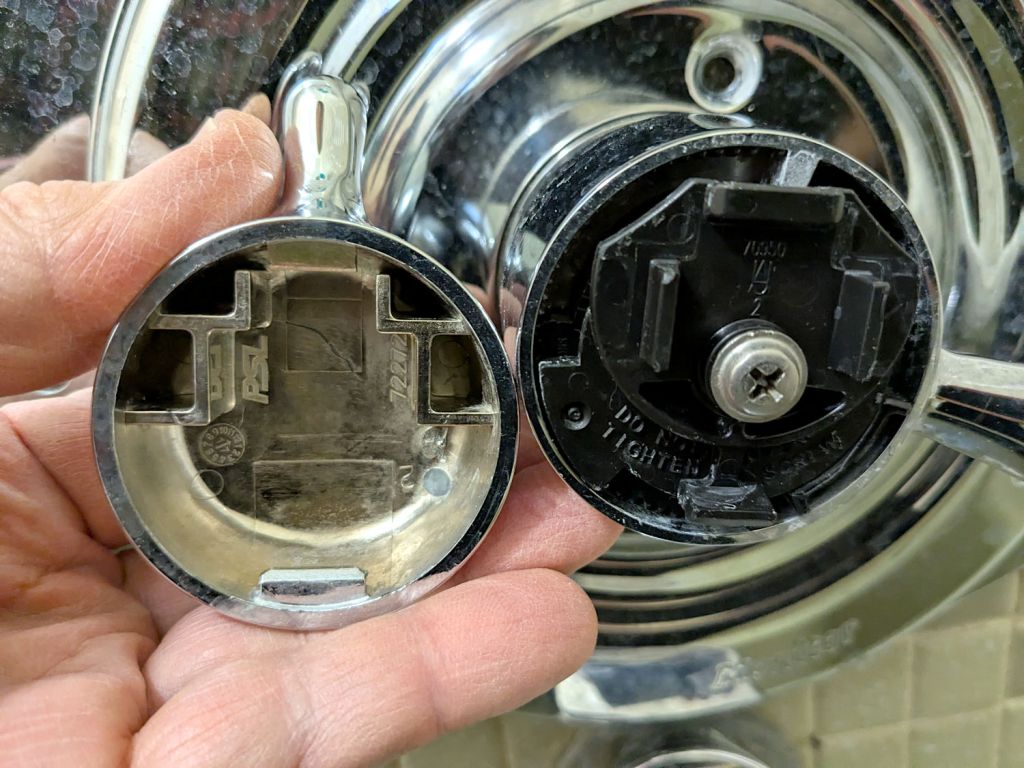
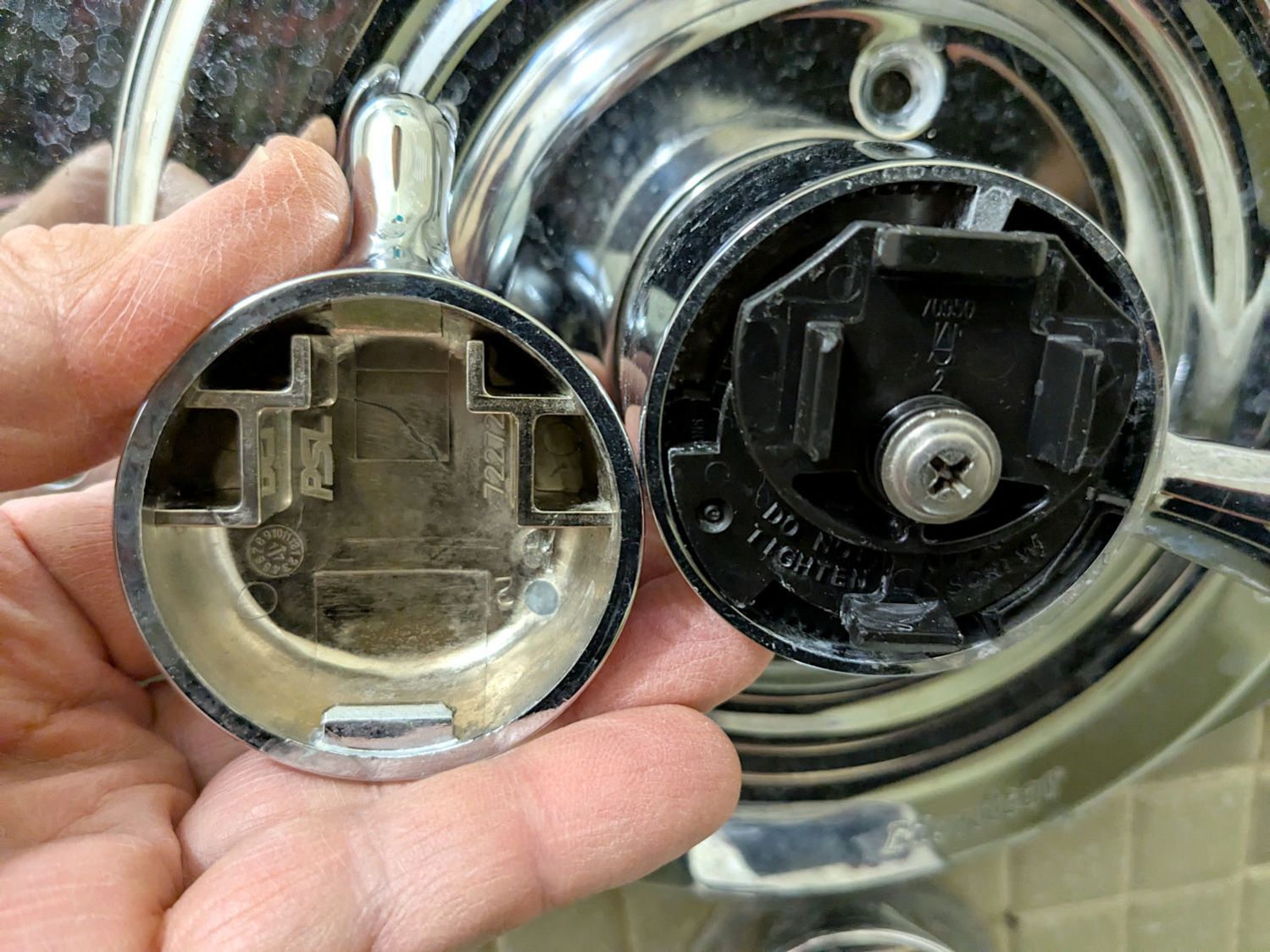
    The KnobAngle rotation comes from the angle of the features inside the knob that locate the insert, which are aligned horizontally here, but at about 30° when the knob is installed on the faucet :

    Delta 1400 Shower Faucet knob - insert recess features
    Delta 1400 Shower Faucet knob – insert recess features

    The knob shined up surprisingly well for being three decades old; that photo is as-found.

    Import the Inkscape graphics into OpenSCAD and align them an itsy above the top of the insert structure to prevent Z fighting without triggering the slicer into adding another layer:

    up(Insert[LENGTH] - LabelThick + 0.01)
      color("DarkSlateGray")
        linear_extrude(LabelThick)
          import(LabelFN,center=false,layer="Angle Indicator");
    up(Insert[LENGTH] - LabelThick + 0.01)
      color("Red")
        linear_extrude(LabelThick)
          import(LabelFN,center=false,layer="Hot Arc");
    up(Insert[LENGTH] - LabelThick + 0.01)
      color("Blue")
        linear_extrude(LabelThick)
          import(LabelFN,center=false,layer="Cold Arc");


    Those three shapes must be handled separately, lest OpenSCAD combine them into one thing that PrusaSlicer won’t recognize as distinct shapes. There’s no need to subtract them from the main insert shape, but getting separate colors to come out right is definitely not straightforward.

    Which looks like this, with cheerful colors that need not correspond to the printer filaments:

    Delta Shower Faucet Insert - solid model
    Delta Shower Faucet Insert – solid model

    Normally I have a set of Build transformations to orient the thing for printing, but doing a simple rotation to put the top down on the platform also blows away the separate nature of the graphics.

    I use the EIA color code sequence in PrusaSlicer so I can identify the filament number by eye:

    Shower Fauce Knob Insert - PrusaSlicer preview
    Shower Fauce Knob Insert – PrusaSlicer preview

    A little while later:

    Delta 1400 Shower Faucet knob insert - installed
    Delta 1400 Shower Faucet knob insert – installed

    The insert is a loose fit in the knob, held in place by good double-sided foam tape to the screw securing the knob. I decided to not bother with little fingers, because I loves me some simple removable adhesive action.

    Yeah, you can buy an entire replacement knob for ten bucks, but where’s the fun in that?

    The OpenSCAD source code as a GitHub Gist:

    // Delta shower faucet knob insert
    // Ed Nisley – KE4ZNU
    // 2025-08-09
    include <BOSL2/std.scad>
    /* [Hidden] */
    HoleWindage = 0.2;
    Protrusion = 0.01;
    NumSides = 4*3*4;
    $fn=NumSides;
    ID = 0;
    OD = 1;
    LENGTH = 2;
    LabelFN = "Shower Fauce Knob Insert.svg";
    LabelThick = 0.8;
    KnobAngle = 30; // horizontal to index features
    IndexWidth = 2.5; // slot to fit knob locating features
    Insert = [33.5,37.7,7.0]; // slides into knob
    FaceThick = 1.6;
    //———-
    // Construct it in the obvious orientation
    // Flip it in the slicer to preserve the artwork for separate filaments!
    difference() {
    union() {
    tube(Insert[LENGTH],id=Insert[ID],od=Insert[OD],anchor=BOTTOM) position(TOP)
    cyl(FaceThick,d=Insert[OD],anchor=TOP);
    }
    zrot(KnobAngle)
    down(Protrusion)
    cube([2*Insert[OD],IndexWidth,Insert[LENGTH] – FaceThick + Protrusion],anchor=BOTTOM);
    }
    // Must be handled separately to produce separate objects for different filaments
    up(Insert[LENGTH] – LabelThick + 0.01)
    color("DarkSlateGray")
    linear_extrude(LabelThick)
    import(LabelFN,center=false,layer="Angle Indicator");
    up(Insert[LENGTH] – LabelThick + 0.01)
    color("Red")
    linear_extrude(LabelThick)
    import(LabelFN,center=false,layer="Hot Arc");
    up(Insert[LENGTH] – LabelThick + 0.01)
    color("Blue")
    linear_extrude(LabelThick)
    import(LabelFN,center=false,layer="Cold Arc");