The Smell of Molten Projects in the Morning

Ed Nisley's Blog: Shop notes, electronics, firmware, machinery, 3D printing, laser cuttery, and curiosities. Contents: 100% human thinking, 0% AI slop.

Category: Home Ec

Things around the home & hearth

  • GripStic Shortening

    GripStic Shortening

    We’ve been using GripStic Bag Sealers on bags around the kitchen with good results, but the “XLarge” pink sticks far exceed the largest bags we have. While not the worst problem I’ve encountered in the last year, I can fix that:

    Gripstic - shortened assortment
    Gripstic – shortened assortment

    An elaborate latch aligns the yellow rod along the axis of the outer shell:

    Gripstic - rod end feature
    Gripstic – rod end feature

    I shortened the stick with Tiny Bandsaw™, cleaned up the ends, squirted hot melt glue into the shell, set it on a bench block, rammed the yellow rod into the glue, and paused for contemplation:

    Gripstic - shortened glue
    Gripstic – shortened glue

    Trim off the blob and it’s all good.

    The WordPress AI suggests “Additionally, including tips for handling the Tiny Bandsaw™ and hot melt glue would be beneficial.” So, as always, use your tools carefully, OK?

    Adding the preceding paragraph changed the AI suggestion to “To further improve the content, consider adding tips for handling the Tiny Bandsaw™ and hot melt glue for the readers’ benefit. Always prioritize safety when using tools.” I recommend not juggling Tiny Bandsaw™ and a hot melt glue gun, particularly went they’re running.

  • Home Depot Glacier Bay Kitchen Faucet: Round 2

    Home Depot Glacier Bay Kitchen Faucet: Round 2

    The kitchen faucet worked its way loose again. Attempting to shut off the water revealed a pair of leaky valves under the sink, so I shut off the house water in the basement, cut the valve pipes below the solder drips, and installed a pair of push-connect shutoffs:

    Kitchen faucet shutoff valve - push connection
    Kitchen faucet shutoff valve – push connection

    I loves me some good push-connect fitting action, which is new news to me. Back in the Bad Old Days™, I’d be under the sink with a propane torch, trying to solder a pair of wet pipes and failing miserably.

    With that out of the way and the faucet dismantled for the first time (by my hands, anyway), the threads holding the base to the spout column may have been damaged during factory assembly:

    HD Glacier Bay kitchen faucet - damaged threads
    HD Glacier Bay kitchen faucet – damaged threads

    I thought the gunk was thread lock compound, but it’s shredded plastic from the base fitting threads. The corresponding female threads inside the spout column are undamaged, so I think somebody tried screwing it together with the threads misaligned, backed off, then muscled it together.

    It’s worth noting there are no keys or stops fixing the correct orientation of any of these parts. In particular, the trim ring bearing the small Front label (facing you in the picture) has no fixed orientation: whoever assembles the faucet in the factory must position it correctly on the fly as the base screws into the column and jams tight.

    So I cleaned up the damaged threads as best I could, flipped the threaded brass tube end-for-end to put the cleanest part into the base, and reassembled everything with careful attention to starting the threads correctly:

    HD Glacier Bay kitchen faucet - flipped brass tube
    HD Glacier Bay kitchen faucet – flipped brass tube

    Tightening the base fitting into the column is much easier with everything on the kitchen counter, although centering the label on the molded opening required several tries.

    Protip: a pair of grippy gloves and rubber sheets help a lot.

    I want to find out how secure the original design, properly tightened and aligned, will be, so I did not apply any threadlocker.

  • Subaru Forester Taillight Bulbs

    Subaru Forester Taillight Bulbs

    I finally got around to replacing the Forester’s taillight bulbs:

    Subaru Forester taillight bulbs
    Subaru Forester taillight bulbs

    The clear bulbs don’t have the same thermal damage as the headlights I replaced a year ago, but the new bulbs should be much brighter.

    Subaru calls them W21/5W and WY21W, respectively, but the rest of the world says 7443 and 7440NA (or 7440A).

    For the record, the taillight assembly comes off (after removing the obvious pair of screws not shown here) by pulling straight back with grippy gloves:

    Subaru Forester taillight mount
    Subaru Forester taillight mount

    Aligning the locating pins with those two latching sockets (why is one green?) requires a flashlight and a bit of dexterity, but easing the slot over the white post first helps a lot. Practice makes perfect: it’s easier on the other side of the car.

  • Glass-top Patio Table Leg Brackets: Hardfought

    Glass-top Patio Table Leg Brackets: Hardfought

    A glass-top patio table came with our house and, similar to one of the patio chairs, required some repair. The arched steel legs fit into plastic brackets / sockets around the steel table rim under the glass top:

    Glass patio table - new brackets installed
    Glass patio table – new brackets installed

    The four glaringly obvious white blocks are the new brackets.

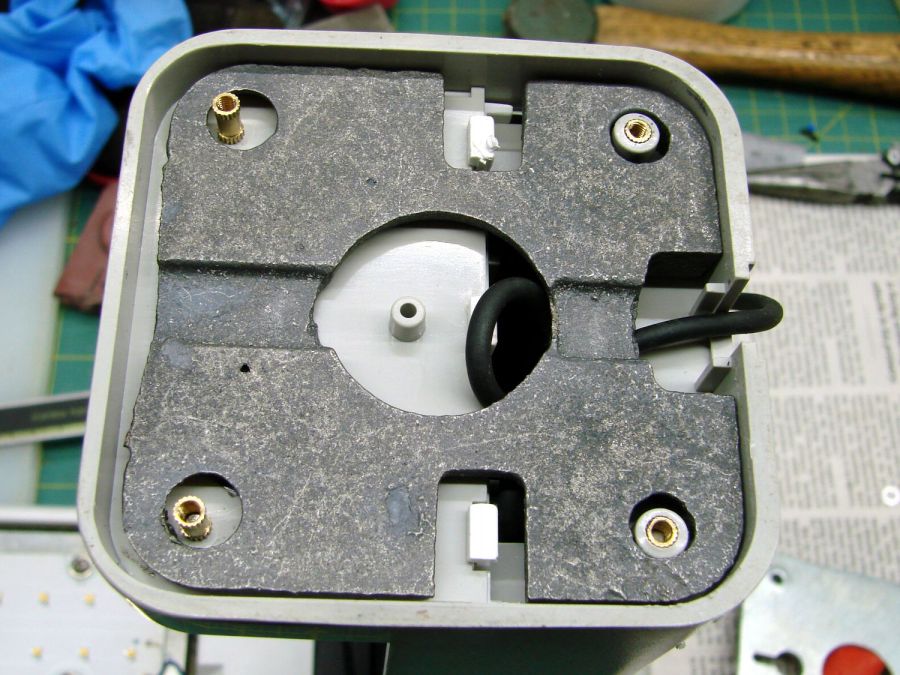
    The original brackets had, over uncounted years, deteriorated:

    Glass patio table - failed OEM bracket
    Glass patio table – failed OEM bracket

    Perhaps disintegrated would be a better description:

    Glass patio table - crumbled OEM bracket
    Glass patio table – crumbled OEM bracket

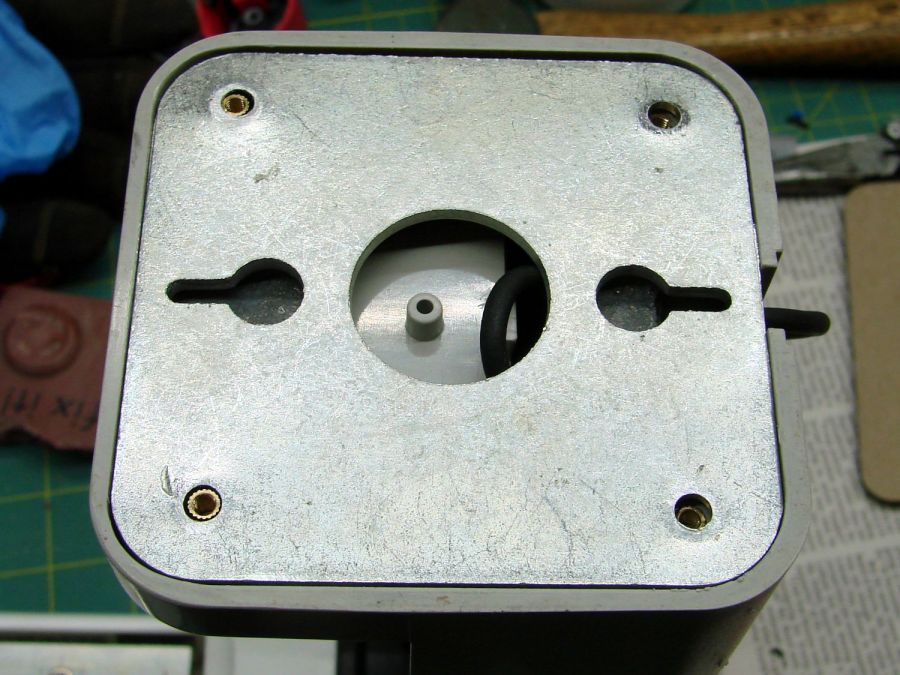
    Each leg has a pair of rusted 1-½ inch ¼-20 screws holding it to the central ring. As expected, seven of the eight screws came out easily enough, with the last one requiring an overnight soak in Kroil penetrating oil plus percussive persuasion:

    Glass patio table - jammed screw
    Glass patio table – jammed screw

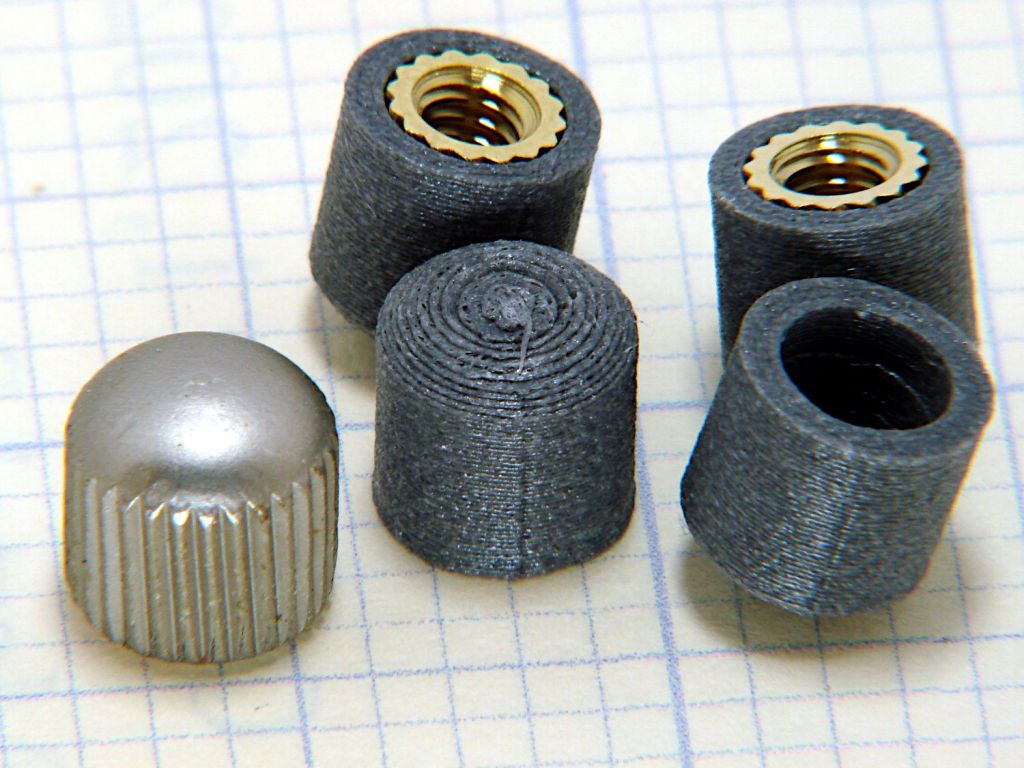
    The four legs had three different screws holding them to the brackets, so I drilled out the holes and squished M5 rivnuts in place:

    Glass patio table - M5 rivnut installed
    Glass patio table – M5 rivnut installed

    Although it’s not obvious, the end of that tube is beveled with respect to the centerline to put both the top and bottom edges on the table rim inside the bracket. In addition, the tube angles about 10° downward from horizontal, which I did not realize amid the wrecked fittings, so the first bracket model failed instantly as I inserted the leg:

    Glass patio table - first bracket test
    Glass patio table – first bracket test

    The top & bottom walls of that poor thing were breathtakingly thin (to match the original bracket) and cracked when confronted with the angled tube. I could not measure all the sizes & angles without assembling the table on trial brackets, so getting it right required considerable rapid prototyping:

    Glass patio table - failed brackets
    Glass patio table – failed brackets

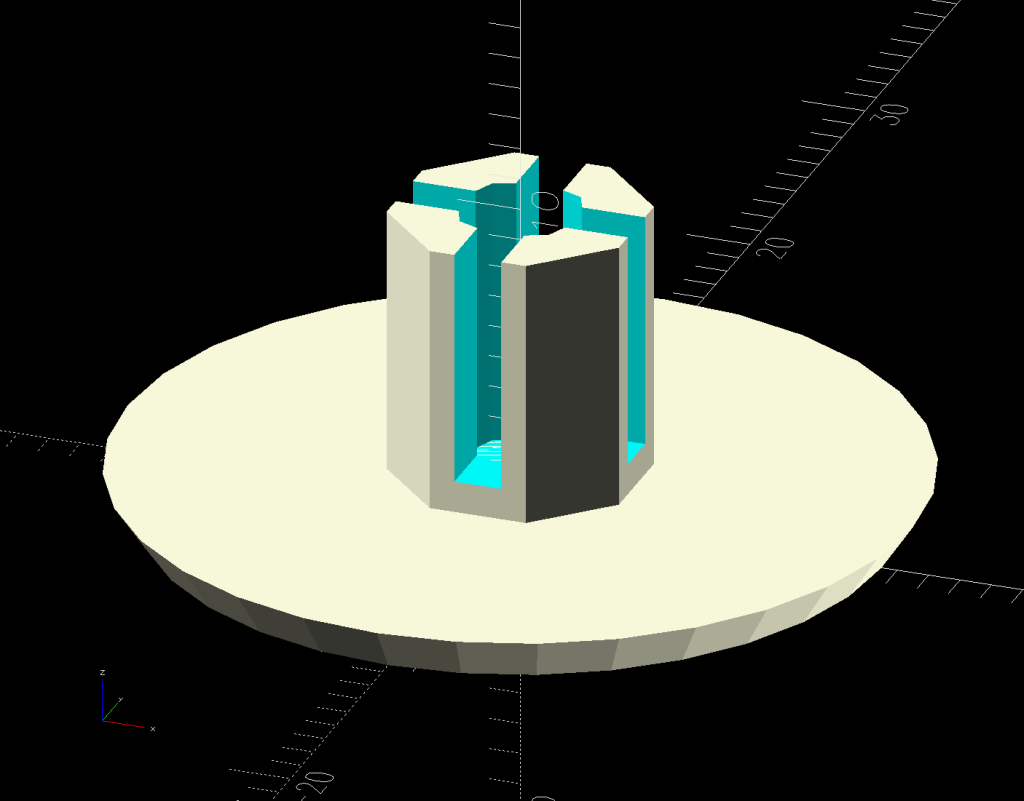
    Some trigonometry produced a solid model with features rebuilding themselves around the various sizes / angles / offsets:

    Glass Top Table - leg bracket - solid model
    Glass Top Table – leg bracket – solid model

    A sectioned view shows the angled tube position and end chamfer:

    Glass Top Table - leg bracket - section view
    Glass Top Table – leg bracket – section view

    The OpenSCAD code can produce a sectioned midline slice useful for laser-cut MDF pieces to check the angle:

    Glass patio table - chunky bracket installed - bottom
    Glass patio table – chunky bracket installed – bottom

    That eliminated several bad ideas & misconceptions, although trying to balance the leg on a 3 mm MDF snippet was trickier than I expected. In retrospect, gluing a few snippets together would be easier and still faster than trying to print a similar section from the model.

    The slightly elongated slot for the M5 screw shows that the original screw holes were not precisely placed or that the tubes were not precisely cut, neither of which come as a surprise. I finally built some slop into the design to eliminate the need for four different blocks keyed to four different legs.

    The outer rim, the notch on the bottom, and the tab on the top curve to match the four foot OD glass tabletop, with the inward side & ends remaining flat:

    Glass patio table - chunky bracket installed - top
    Glass patio table – chunky bracket installed – top

    The sector’s difference from a straight line amounts to half a millimeter and improved the fit enough to justify the geometric exercise. The bracket snaps into position with the notch over the table rim and the tab locked in the gap between the glass disk & the rim, although I suspect the weight of the tabletop would keep everything aligned anyway.

    The walls are now at least 4 mm thick and, printed in PETG, came out strong enough to survive assembly and some gentle testing. They’re arranged to print on their side to eliminate support under those slight curves and to align the layers for best strength vertically in the finished bracket:

    Glass Top Table - leg bracket - slicer preview
    Glass Top Table – leg bracket – slicer preview

    The leg cavity and screw hole built well enough without internal support.

    They’re relentlessly rectangular and I’m not going to apologize one little bit.

    Now to see how they survive out there on the screened porch.

    The OpenSCAD source code as a GitHub Gist:

    // Glass patio table leg brackets
    // Ed Nisley – KE4ZNU
    // 2024-08
    /* [Layout] */
    Layout = "Show"; // [Section,Projection,Show,Build]
    Part = "Leg"; // [Leg, RimPlate, Block, Bracket]
    /* [Hidden] */
    ThreadWidth = 0.40;
    ThreadThick = 0.25;
    HoleWindage = 0.2;
    Protrusion = 0.1;
    //—–
    // Dimensions
    /* [Hidden] */
    GlassOD = 1230.0; // inner edge of upper tab
    GlassThick = 5.0;
    WallThick = 4.0;
    TOP = 0;
    BOT = 1;
    TabWidth = [3.0,3.0]; // locking tabs, top & bottom
    TabHeight = [0.5,3.0]; // … height
    LegOA = [16.0,36.5,23.0]; // X insertion, Y around glass, Z upward
    LegAngle = 10;
    ScrewOffset = [8.0,10.0]; // from socket bottom
    ScrewOD = 6.0; // clearance hole
    Plate = [1.0 + 2*max(TabWidth[TOP],TabWidth[BOT]),
    LegOA.y + 2*WallThick,
    25.5
    ];
    echo(Plate=Plate);
    BlockOA = [LegOA.x*cos(LegAngle) + (LegOA.z/2)*sin(LegAngle) + WallThick,
    Plate.y,
    LegOA.z/cos(LegAngle) + 2*LegOA.x*sin(LegAngle) + 2*WallThick
    ];
    echo(BlockOA=BlockOA);
    //—–
    // Useful routines
    function IntegerMultiple(Size,Unit) = Unit * ceil(Size / Unit);
    module PolyCyl(Dia,Height,ForceSides=0) { // based on nophead's polyholes
    Sides = (ForceSides != 0) ? ForceSides : (ceil(Dia) + 2);
    FixDia = Dia / cos(180/Sides);
    cylinder(r=(FixDia + HoleWindage)/2,
    h=Height,
    $fn=Sides);
    }
    //—–
    // Table Leg
    // Including screw slot
    // Additional length to allow use as difference
    module Leg() {
    union() {
    difference() {
    rotate([0,90,0])
    translate([0,0,-LegOA.x])
    linear_extrude(height=4*LegOA.x,convexity=5)
    hull()
    for (j=[-1,1])
    translate([0,j*(LegOA.y – LegOA.z)/2])
    circle(d=LegOA.z);
    rotate([0,-LegAngle,0])
    translate([-2*LegOA.x,0,0])
    cube(4*LegOA,center=true);
    }
    hull()
    for (c = ScrewOffset)
    translate([each c + (LegOA.z/2)*sin(LegAngle),0,-LegOA.z])
    //rotate(180/6)
    PolyCyl(ScrewOD,LegOA.z,6);
    }
    }
    // Rim Plate
    module RimPlate() {
    n = 16*4*3;
    render(convexity=5)
    translate([-Plate.x,0,0])
    difference() {
    intersection() { // shape outer side to match table rim curve
    translate([0,-Plate.y/2,0])
    cube(Plate,center=false);
    translate([GlassOD/2 + TabWidth[TOP],0,0])
    cylinder(d=GlassOD + 2*TabWidth[TOP],h=Plate.z,center=false,$fn=n);
    }
    translate([GlassOD/2 + TabWidth[TOP],0,Plate.z – TabHeight[TOP]])
    cylinder(d=GlassOD,h=Plate.z,center=false,$fn=n);
    translate([GlassOD/2 + TabWidth[BOT],0,-(Plate.z – TabHeight[BOT])])
    difference() {
    cylinder(d=GlassOD,h=Plate.z,center=false,$fn=n);
    cylinder(d=GlassOD – 2*TabWidth[BOT],h=Plate.z,center=false,$fn=n);
    }
    }
    }
    // Block surrounding leg
    module Block() {
    intersection() {
    translate([BlockOA.x/2,0,0])
    cube(BlockOA,center=true);
    translate([0,0,BlockOA.x*sin(LegAngle) – BlockOA.z/2])
    rotate([0,LegAngle,0])
    translate([-2*BlockOA.x,-2*BlockOA.y,0])
    cube(4*BlockOA,center=false);
    }
    }
    // Complete bracket
    module Bracket() {
    difference() {
    union() {
    RimPlate();
    translate([0,0,Plate.z – BlockOA.z/2 – TabHeight[TOP] – 0*WallThick])
    Block();
    }
    translate([0,0,1*Plate.z/2 – 1*WallThick])
    rotate([0,LegAngle,0])
    translate([WallThick,0,0])
    Leg();
    }
    }
    //—–
    // Build things
    // Layouts for design & tweaking
    if (Layout == "Section")
    intersection() {
    Bracket();
    translate([0,BlockOA.y/2,0])
    cube([4*BlockOA.x,BlockOA.y,3*BlockOA.z],center=true);
    }
    if (Layout == "Projection")
    for (j = [1])
    translate([0,j*2*BlockOA.z])
    projection(cut=true)
    translate([0,0,j*5.0])
    rotate([90,0,0])
    Bracket();
    if (Layout == "Show")
    if (Part == "Leg")
    Leg();
    else if (Part == "RimPlate")
    RimPlate();
    else if (Part == "Bracket")
    Bracket();
    else if (Part == "Block")
    Block();
    // Build layouts for top-level parts
    if (Layout == "Build") {
    translate([0,0,Plate.y/2])
    rotate([90,0,0])
    Bracket();
    }

    Some dimension doodles, not all of which correspond to reality:

    Glass patio table - dimension doodle A
    Glass patio table – dimension doodle A
    Glass patio table - dimension doodle B
    Glass patio table – dimension doodle B

    See? It’s not all slotted animals all the time around here …

  • Wheelbarrow Drain Holes

    Wheelbarrow Drain Holes

    Attacking a plastic wheelbarrow with a ¾ inch hole saw prevents it from becoming a mosquito breeding station:

    Wheelbarrow drain holes
    Wheelbarrow drain holes

    We had been storing it tipped to one side, resulting in the wheel filling up with water, which can’t be a Good Thing.

    If it must carry a load of sand, I’ll just duct-tape the holes.

    One of Mary’s friend looked at, but did not order, this wheelbarrow on Amazon. Shortly thereafter, she received a wheelbarrow in two packages: the handles and a box with everything else strapped into the barrow. After a discussion with Amazon’s support / help staff, she was told to just keep it at no charge.

    Over the next few weeks, she received five more wheelbarrows, each prompting a discussion and keeping them at no charge. Eventually, somebody figured out how to stop the stream.

    So half a dozen gardeners now have free wheelbarrows, courtesy of a glitch in The Machine.

    Makes you wonder, doesn’t it?

  • Laser Test Paper: Plant Label Testing

    Laser Test Paper: Plant Label Testing

    After a month outdoors, the (failed) flexible strip labels show signs of wear:

    Laser test paper - 1 month weathering
    Laser test paper – 1 month weathering

    The upper one has a coating of clear rattlecan paint and looks much the better for it. The lower one is bare, but also suffered greatly from being folded and tucked through itself, so it started in worse condition.

    Perhaps the paper will work better when stuck to metal plant label stakes, although I suspect the adhesive sheet will fail first:

    Laser test paper - small plant labels
    Laser test paper – small plant labels

    Those are random names; Mary tells me the proper label format has the Latin nomenclature on the first line.

    They’re now out on the patio for observation.

    For whatever it’s worth, my fascination with this paper boils down to “it’s cheaper than Trolase” for applications not requiring archival quality and duration. If it lasts Long Enough, that’ll be Good Enough.

  • Speaker Re-Foaming

    Speaker Re-Foaming

    Having recently promoted a pair of Radford Tri-Star 90 speakers to the Sewing Room, it was time to make them presentable:

    Radford Tri-Star 90 speakers - taped grill
    Radford Tri-Star 90 speakers – taped grill

    The original foam grill covering had disintegrated and left fossilized adhesive over the metal gridwork. Being not much for historic accuracy, I used double-sided duct tape (the blue barrier film peels off) and stuck some allegedly acoustic foam in place:

    Radford Tri-Star 90 speakers - re-covered
    Radford Tri-Star 90 speakers – re-covered

    The foam is a single sheet wrapped around three sides and, after some whittling, measured 19.5 inches tall and 19.25 inches wide. The width surely depends on how snugly it’s stretched, so allow a bit more and trim to fit.

    Duct tape probably isn’t the right adhesive for the job, but we’ll see how long it lasts. I really did not want to use spray glue and doubted my ability to slobber liquid stickum without oopsing the cones.

    The speakers sounded great back in the day and they definitely sound much better than my deflicted ears can hear now. Mary thinks they’re OK and that’s all that matters.

    Patrick, wherever you are: thanks!