The Smell of Molten Projects in the Morning

Ed Nisley's Blog: Shop notes, electronics, firmware, machinery, 3D printing, laser cuttery, and curiosities. Contents: 100% human thinking, 0% AI slop.

Category: Electronics Workbench

Electrical & Electronic gadgets

  • M2 Thermistor Rebuild

    The MAXTEMP error killing the M2 while printing the bar clamp mounts (probably) came from a short in the thermistor pellet that lowered the thermistor resistance and raised the calculated temperature. I manually heated the extruder and, although the temperature stabilized at 250 °C, the history plot showed irregular downward jogs from increasing resistance. Whenever this constellation of symptoms appears on the M2 forums, I always recommend ordering another thermistor or two, so …

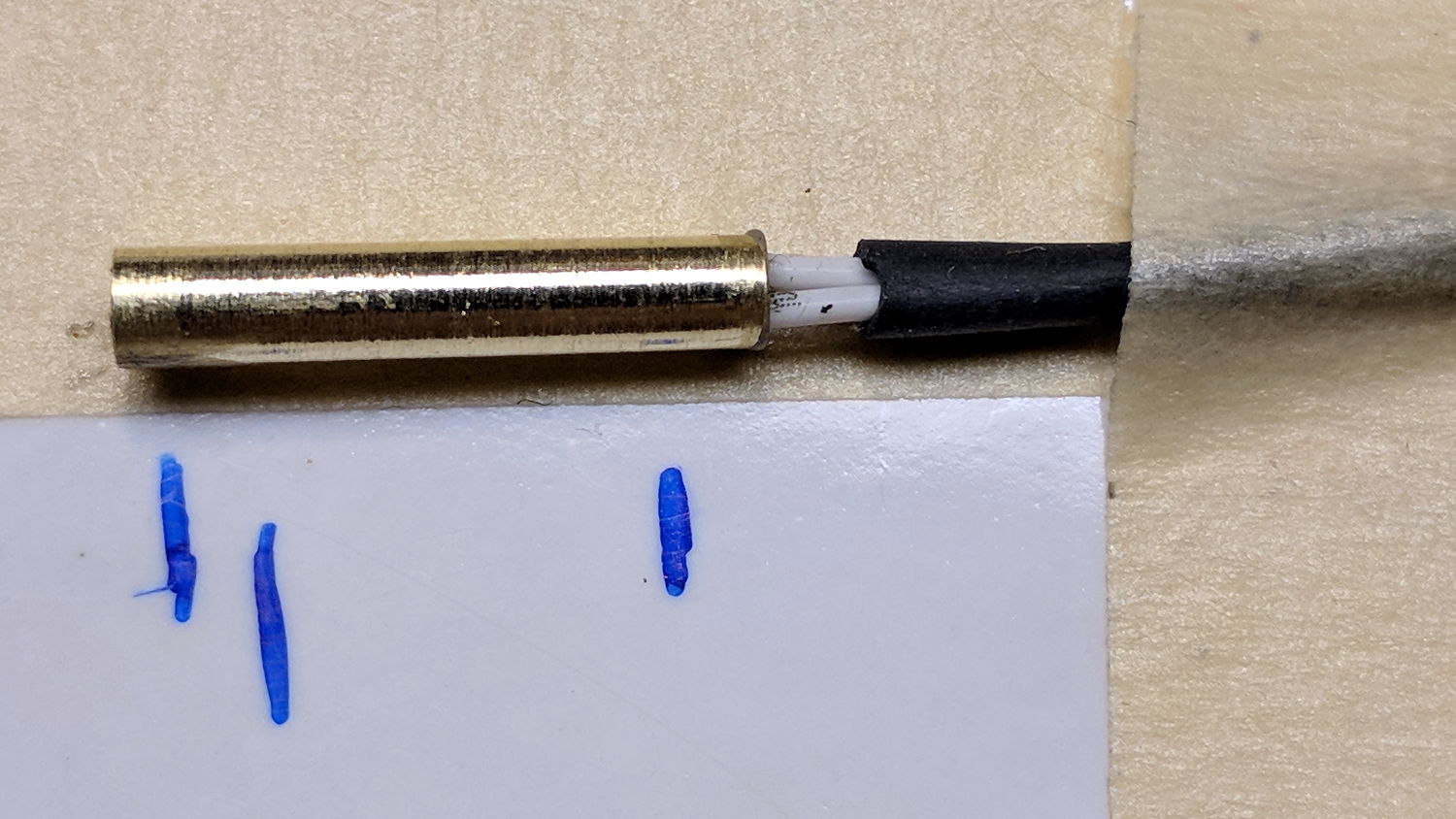
    Start by turning a 1/8 inch OD brass tube down to 3.00 mm, parting off a suitable length, facing the ends:

    M2 - thermistor brass tube turning
    M2 – thermistor brass tube turning

    Countersink the ends just for pretty.

    The tube should be a slip fit in the hot end:

    M2 - hot end thermistor - turned brass tube
    M2 – hot end thermistor – turned brass tube

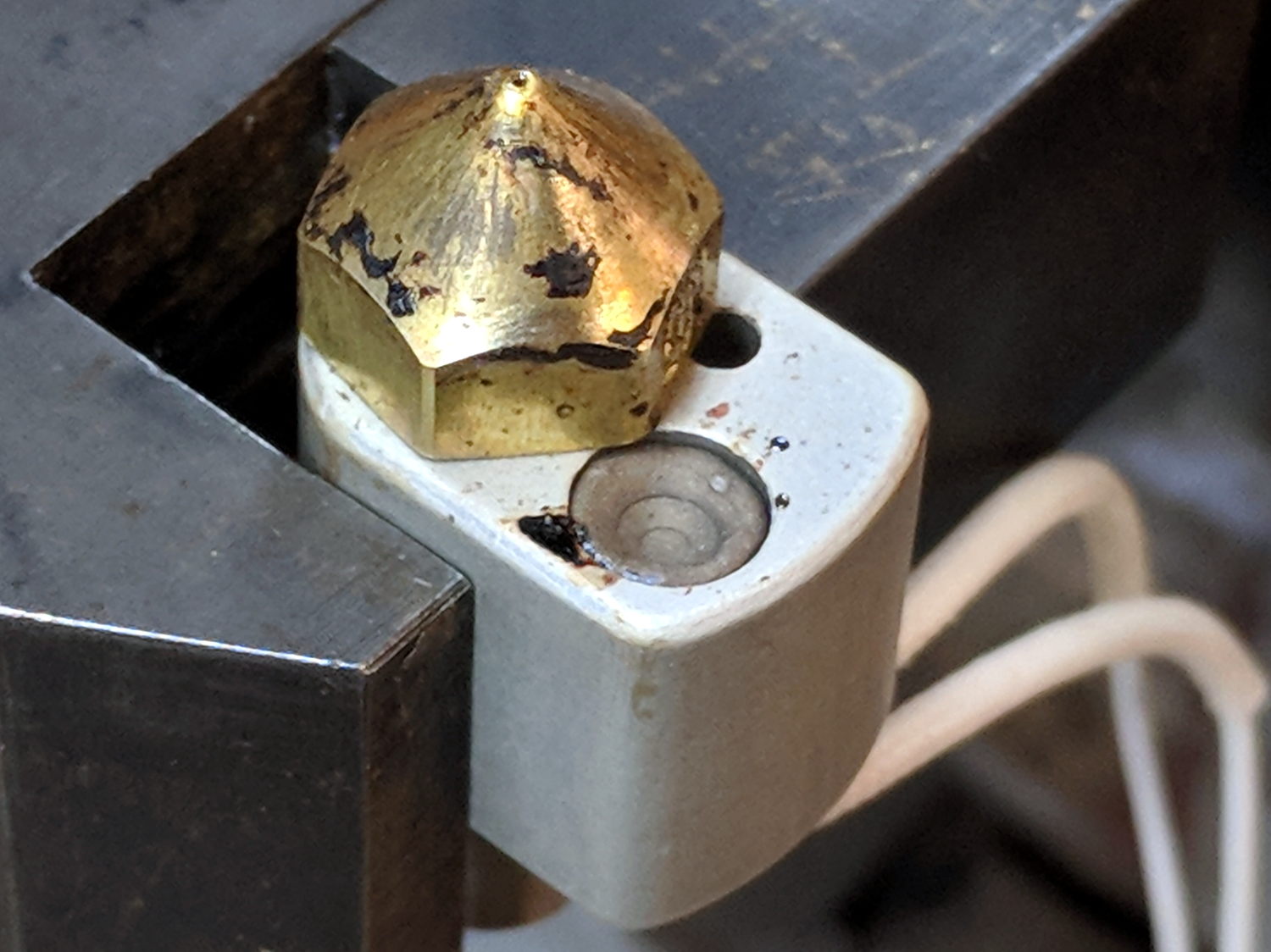
    While I had the hot end on the bench, I scuffed the nozzle to remove (most of) the baked-on crud:

    M2 - nozzle silicone - cleaned nozzle
    M2 – nozzle silicone – cleaned nozzle

    The plan is to seal the thermistor bead inside the tube with JB Weld epoxy, which I’ve verified (!) to work at extrusion temperatures, depending on the epoxy to insulate the wiring and immobilize all the pieces.

    Harvest the original wire harness from the defunct thermistor, solder to the bead, lay out guide lines:

    M2 - thermistor - assembly 1 layout
    M2 – thermistor – assembly 1 layout

    Slobber epoxy over everytyhing, fill the tube, insert bead into tube, stabilize with tape:

    M2 - thermistor - assembly 1 curing
    M2 – thermistor – assembly 1 curing

    Verify connectivity through the thermistor and isolation from the brass tube, then return upstairs to warm up thaw out while the epoxy cures.

    At this point, the observant reader should be thinking “Uh, Ed, that bead looked a tad large. Are you absolutely sure  … ?”

    Halfway up the basement stairs I realized I’d meticulously entombed a 10 kΩ thermistor, not the 100 kΩ thermistor used in the M2’s hot end. You can easily verify the resistance, as I did, with a quick web search; I have hella-good SEO for some specific topics.

    Back to the lab …

    Fortunately, JB Weld has a pot life over an hour, so extract the wrong bead, unsolder, install the right thermistor using snippets of insulation harvested from the original wiring, realign components:

    M2 - thermistor - assembly 2 layout
    M2 – thermistor – assembly 2 layout

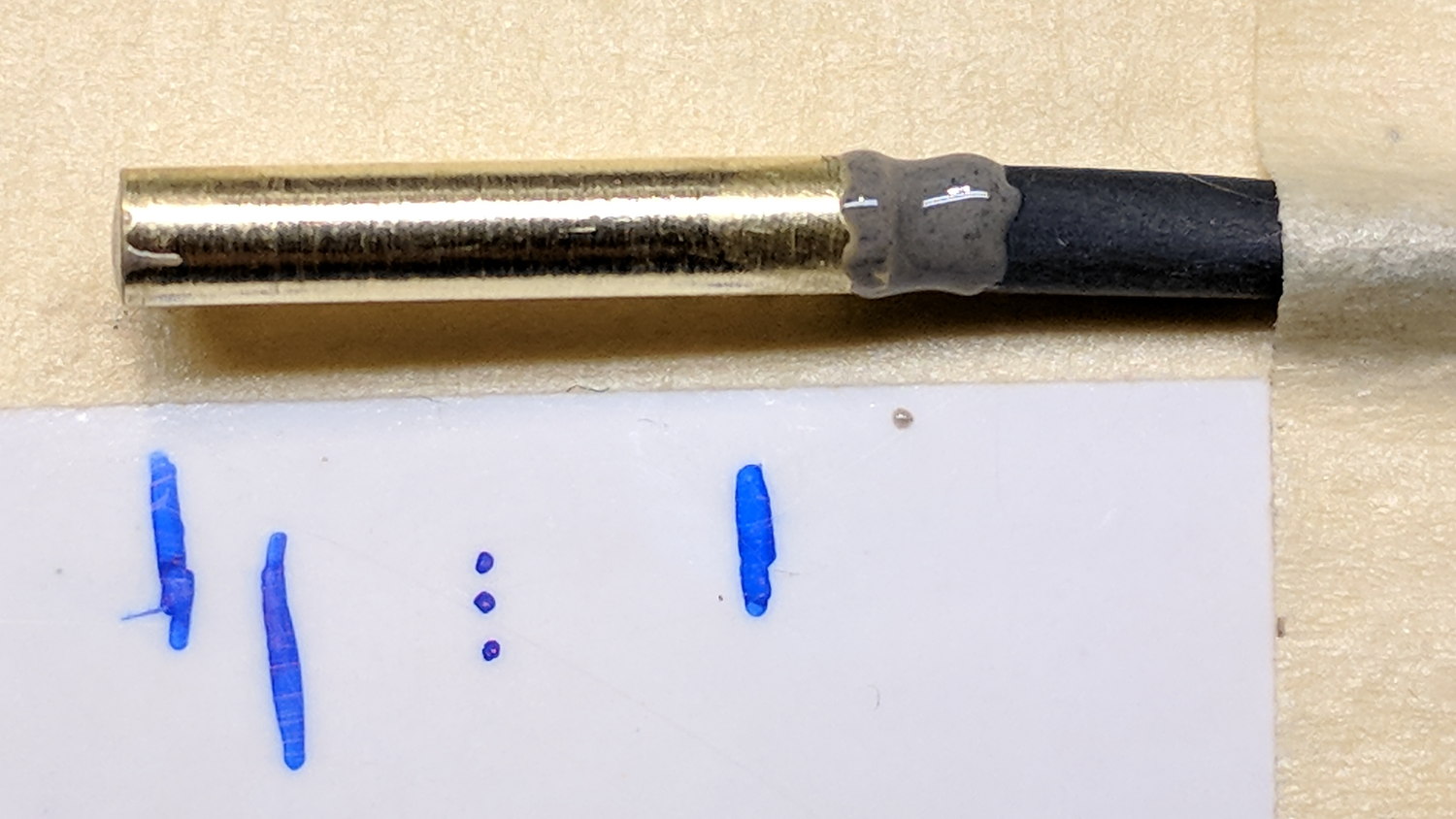
    Reapply epoxy:

    M2 - thermistor - assembly 2
    M2 – thermistor – assembly 2

    Re-verify resistances, return upstairs, fast-forward through the night, have another good idea …

  • MPCNC: Bar Clamp Mounts

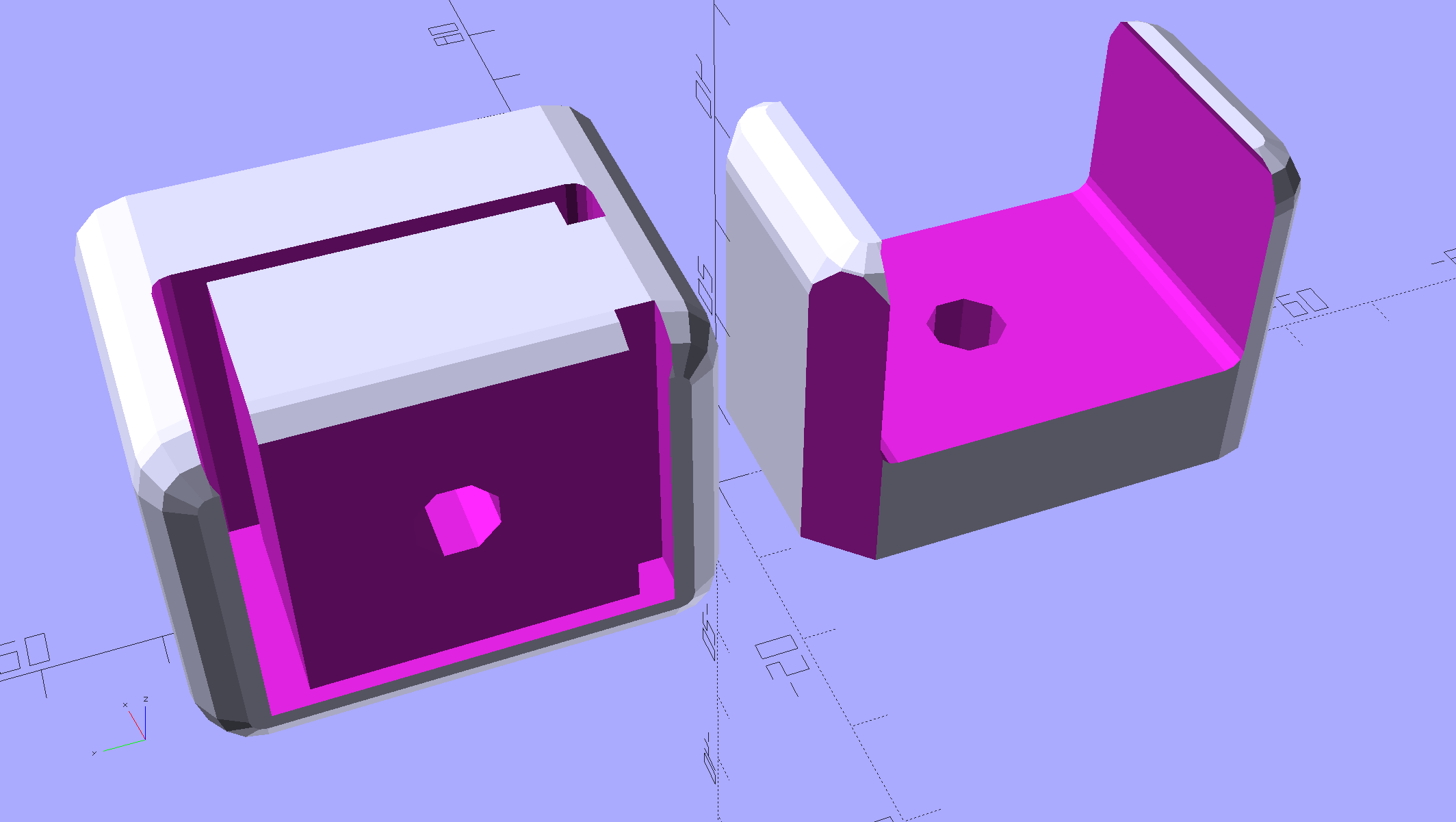
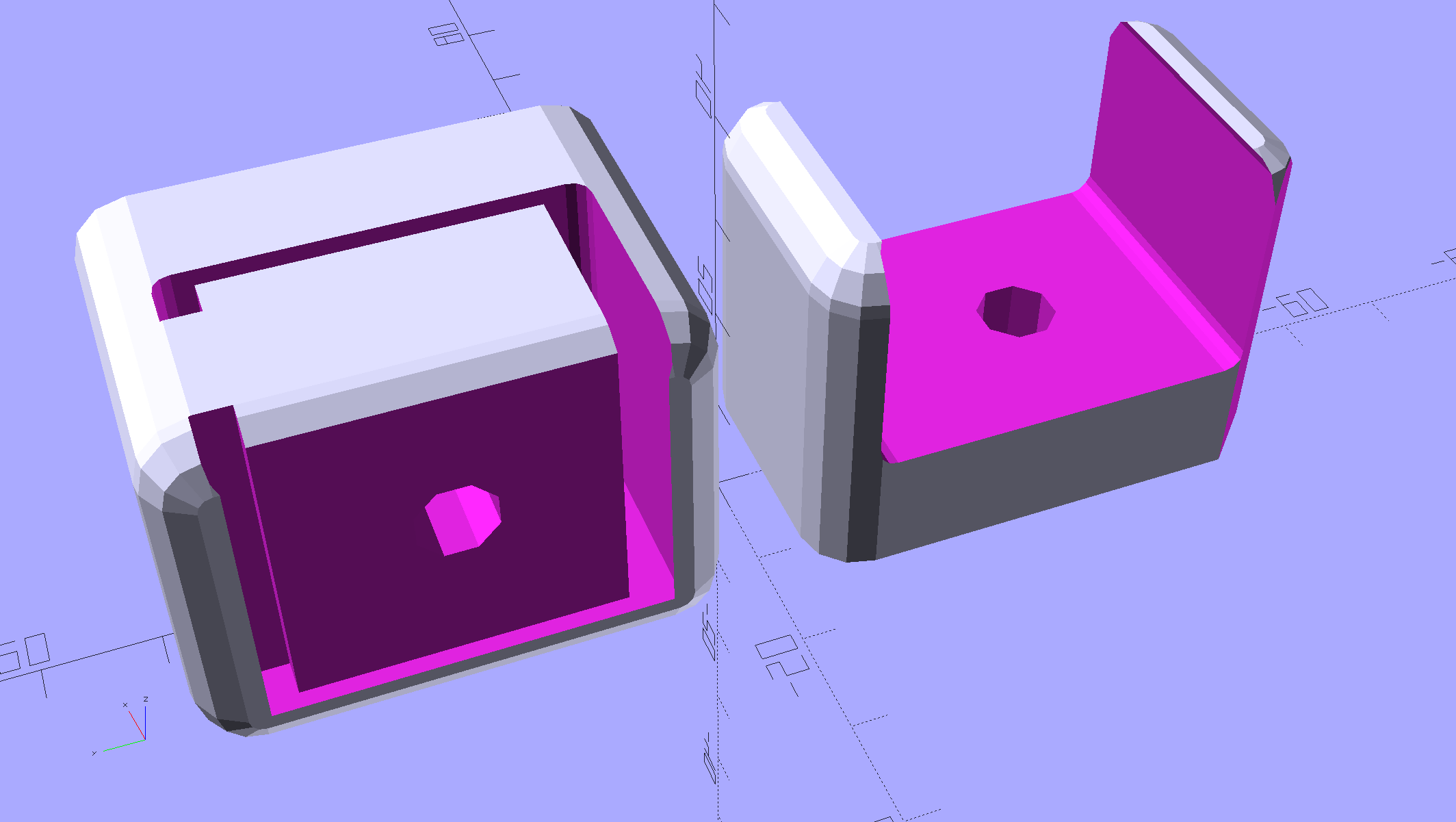
    Rather than attach a spoil board directly to the bench top under the MPCNC, one can grab it in bar clamps anchored to the bench, which requires suitable mounts. Because bar clamps are all the same, one must be flipped over to point the other way, soooo the mounts come in mirror-image sets.

    Holding the clamp on the left side of the table:

    Bar Clamp Mounts - Left - solid model
    Bar Clamp Mounts – Left – solid model

    For the right-side clamp:

    Bar Clamp Mounts - Right - solid model
    Bar Clamp Mounts – Right – solid model

    The chunky clamp prints on its end, with its bottom surface facing away from you, to let the block in the middle print without support. In that orientation, the bar slides in from the top.

    The fancy rounded corners happened while I iterated on getting the dimensions right.

    Actually printing and installing the things turned out to be separate challenges.

    The OpenSCAD source code as a GitHub Gist:

    // MPCNC Bar Clamp Mounts
    // Ed Nisley KE4ZNU – 2018-02-03
    Layout = "Build"; // BarEnd EndBlock ScrewBlock Build
    Chirality = "Right"; // bar handedness = side with opening
    /* [Extrusion] */
    ThreadThick = 0.25; // [0.20, 0.25]
    ThreadWidth = 0.40; // [0.40]
    /* [Hidden] */
    Protrusion = 0.1; // [0.01, 0.1]
    HoleWindage = 0.2;
    function IntegerMultiple(Size,Unit) = Unit * ceil(Size / Unit);
    ID = 0;
    OD = 1;
    LENGTH = 2;
    //– Adjust hole diameter to make the size come out right
    module PolyCyl(Dia,Height,ForceSides=0) { // based on nophead's polyholes
    Sides = (ForceSides != 0) ? ForceSides : (ceil(Dia) + 2);
    FixDia = Dia / cos(180/Sides);
    cylinder(r=(FixDia + HoleWindage)/2,h=Height,$fn=Sides);
    }
    /* [Clamp] */
    BarEndOut = [34.5,21.0]; // outside dimensions
    BarEndIn = [28.0,18.0]; // … inside
    BarEndSlot = [2.8,11.5]; // slot on open side
    BarEndRadius = 1.5; // corner rounding
    NumSides = 3*4; // … and sides
    BarHeightOC = 22.0; // min height above bench
    Clearance = 0.2; // overall bar clearance
    PinOffset = [14.0,2.5]; // clamp hardware pin location
    PinOD = 6.5; // … pin OD
    WallThick = 5.0; // basic wall & floor thickness
    EndBlockSize = [2*PinOffset.x + WallThick,BarEndOut.x + 2*WallThick,BarHeightOC + BarEndOut.y/2];
    ScrewBlockSize = [2*PinOffset.x,BarEndOut.x + 2*WallThick,BarHeightOC + BarEndOut.y/2];
    //—–
    // Define shapes
    // Aluminum bar extrusion
    module BarEnd(Length = 2.0,Hollow=true) {
    linear_extrude(height=Length,convexity=3)
    offset(delta=Clearance)
    difference() {
    hull()
    for (i=[1,1], j=[1,1])
    translate([i*(BarEndOut.x/2 BarEndRadius),j*(BarEndOut.y/2 BarEndRadius)])
    circle(r=BarEndRadius,$fn=3*4); // not related to block corner rounding
    if (Hollow) {
    translate([BarEndOut.x/2 BarEndIn.x/2 BarEndSlot.x,0])
    square(BarEndIn,center=true);
    translate([BarEndOut.x/2,0])
    square([BarEndOut.x,BarEndSlot.y],center=true);
    }
    }
    }
    // Block supporting open end of Bar
    module EndBlock() {
    Normal = (Chirality == "Left") ? [0,0,0] : [0,1,0];
    Radius = WallThick;
    mirror(Normal)
    difference() {
    if (true)
    hull() {
    dx = EndBlockSize.x/2 Radius;
    dy = EndBlockSize.y/2 Radius;
    for (i=[1,1],j=[1,1])
    translate([i*dx,j*dy,EndBlockSize.z Radius]) {
    sphere(r=Radius,$fn=NumSides);
    cylinder(r=Radius,h=Protrusion,$fn=NumSides);
    }
    for (i=[1,1],j=[1,1])
    translate([i*dx,j*dy,0])
    cylinder(r=Radius,h=Protrusion,$fn=NumSides);
    }
    else
    translate([EndBlockSize.x/2,EndBlockSize.y/2,0])
    cube(EndBlockSize,center=false);
    translate([EndBlockSize.x/2 PinOffset.x,0*PinOffset.y,Protrusion])
    rotate(180/8)
    PolyCyl(PinOD,2*EndBlockSize.z,8);
    translate([EndBlockSize.x/2 2*PinOffset.x,0,BarHeightOC])
    rotate([0,90,0]) rotate(90)
    BarEnd(Length=EndBlockSize.x);
    }
    }
    // Block supporting screw end of Bar
    // Ad-hoc chamfers to clear screw mount castings
    module ScrewBlock() {
    Normal = (Chirality == "Left") ? [0,0,0] : [0,1,0];
    Radius = WallThick;
    mirror(Normal)
    difference() {
    if (true)
    hull() {
    dx = ScrewBlockSize.x/2 Radius;
    dy = ScrewBlockSize.y/2 Radius;
    for (i=[1,1],j=[1,1])
    translate([i*dx,j*dy,ScrewBlockSize.z Radius]) {
    sphere(r=Radius,$fn=NumSides);
    cylinder(r=Radius,h=Protrusion,$fn=NumSides);
    }
    for (i=[1,1],j=[1,1])
    translate([i*dx,j*dy,0])
    cylinder(r=Radius,h=Protrusion,$fn=NumSides);
    }
    else
    translate([0,0,ScrewBlockSize.z/2])
    cube(ScrewBlockSize,center=true);
    translate([0,PinOffset.y,Protrusion])
    rotate(180/8)
    PolyCyl(PinOD,2*ScrewBlockSize.z,8);
    translate([ScrewBlockSize.x/2 Protrusion,0,BarHeightOC])
    rotate([0,90,0]) rotate(90)
    BarEnd(Length=ScrewBlockSize.x + 2*Protrusion,Hollow=false);
    for (i=[1,1])
    translate([i*ScrewBlockSize.x/2,ScrewBlockSize.y/2,ScrewBlockSize.z Protrusion])
    rotate(45)
    cube([sqrt(2)*WallThick,sqrt(2)*WallThick,2*ScrewBlockSize.z],center=true);
    }
    }
    //—–
    // Build things
    if (Layout == "BarEnd")
    BarEnd();
    if (Layout == "EndBlock")
    EndBlock();
    if (Layout == "ScrewBlock")
    ScrewBlock();
    if (Layout == "Build") {
    translate([EndBlockSize.z/2,0.6*EndBlockSize.y,EndBlockSize.x/2])
    rotate([0,90,0])
    EndBlock();
    translate([0,0.6*ScrewBlockSize.y,0])
    ScrewBlock();
    }

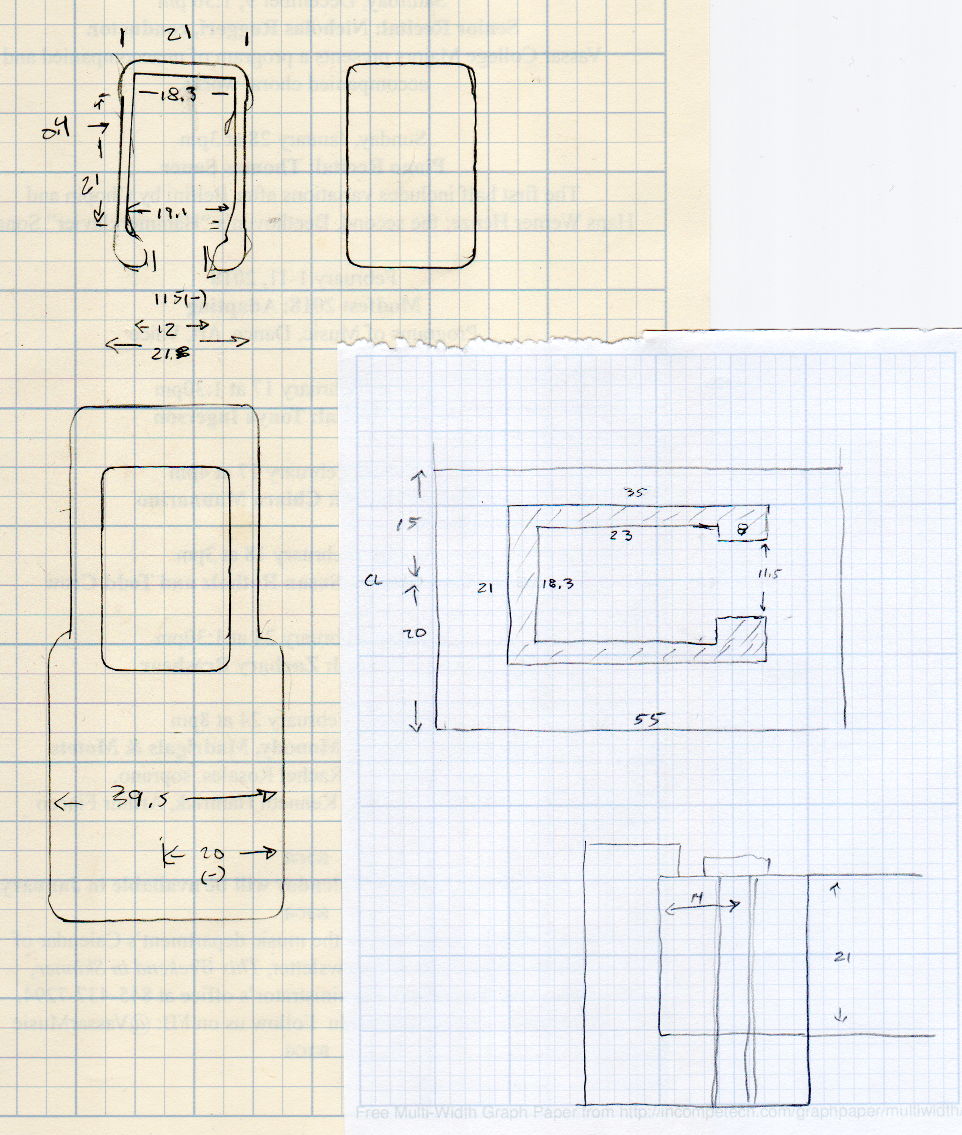
    The original doodles, with initial dimensions & some bad ideas:

    Bar Clamp Mount - Dimension Doodles
    Bar Clamp Mount – Dimension Doodles


  • MPCNC: Stepper Drive vs. Back EMF at the Edge of Madness

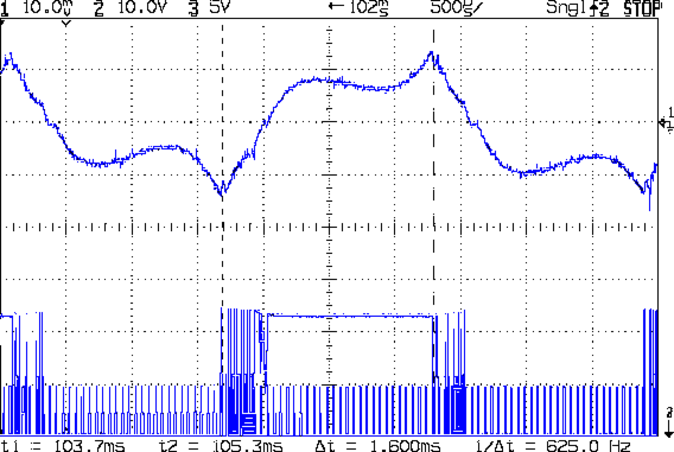
    This is what the stepper current looks like when you run an MPCNC at 12000 mm/min = 200 mm/s from a 24 V supply:

    G0 X 25.6 - A drive - 200 mm-s - low I - 24V 200mA-div
    G0 X 25.6 – A drive – 200 mm-s – low I – 24V 200mA-div

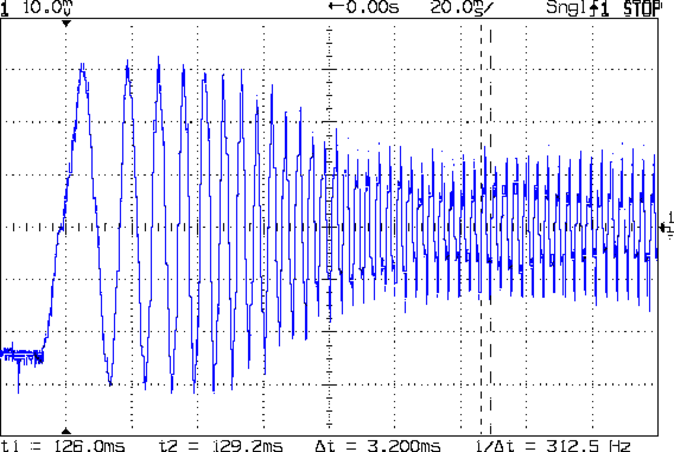
    The vertical scale for the winding current in the top trace is 200 mA/div, so those flat sections run about 150 mA, well under the 600 mA peak found at lower speeds. This G0 move ramps up to 12000 mm/min and shows the current falling off and the sine wave deteriorating:

    G0 X 200 mm-s - 24V 200mA-div
    G0 X 200 mm-s – 24V 200mA-div

    The motor turns at 375 RPM, which means each stepper generates 12 Vpk back EMF, so the A4988 driver has absolutely no control authority near what should be the zero crossings of the current waveform.

    The taller waveform along the bottom of the first scope shot comes from the H bridge output tending to increase the current waveform, so it’s applying a solid +24  during the flat top section and not only gets no traction, but actually loses ground just after the middle of the screen. Eventually the back EMF drops and the current begins increasing, but long after what should be the 600 mA peak current where the driver flips the H bridge and begins trying to decrease the current.

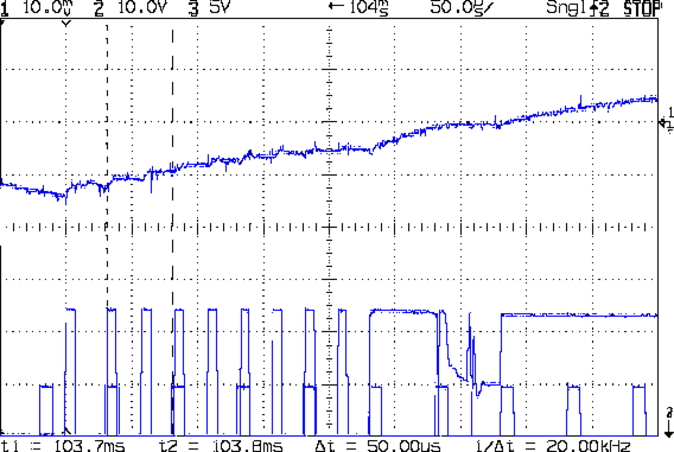
    Here’s a detailed view of the section just after the left cursor:

    G0 X 25.6 - A drive - low I - detail - 24V 200mA-div
    G0 X 25.6 – A drive – low I – detail – 24V 200mA-div

    The step pulses tick along at 50 μs intervals, with only two driver PWM pulses for each one.

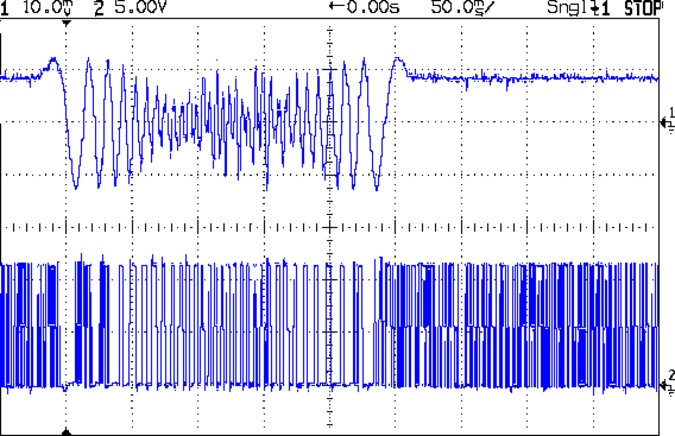
    A 2-flute carbide cutter spinning at 20000 RPM with a 0.25 mm chip load calls for a speed of 10000 mm/min. Alas, the stock 12 V supply stalls at 8000 mm/min:

    MPCNC G1X20F8000 - 500 mA-div 50 ms-div
    MPCNC G1X20F8000 – 500 mA-div 50 ms-div

    It’s facing something over 9 V of back EMF from the motors at that speed. The chaotic spikes near the middle of the current waveform show where the rotor dropped out of lock with the driver and begins shoving the current around.

    So that’s why you really can’t use a 12 V power supply with series stepper motors, at least if you want to run ’em at more than moderate speeds. It’s not at all clear the 24 V supply will provide enough motor torque to run at 10 k mm/min, so I gotta wrap an enclosure around the electronics and start making some chips to see how it behaves …

  • Monthly Science: Wearable LED vs. Dead CR2032 Lithium Cell

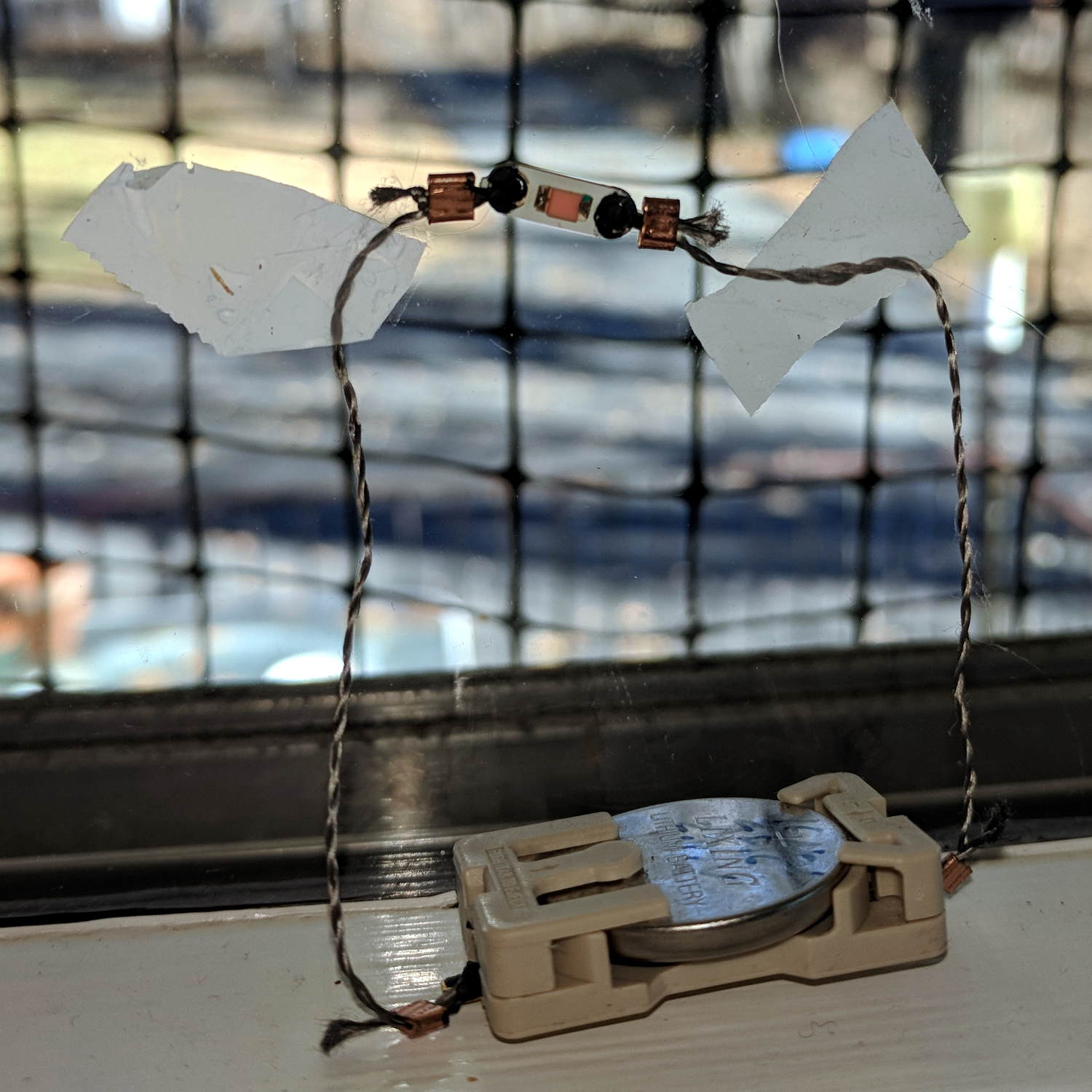
    Eight months later, the dead CR2032 cell driving the “ruby” wearable LED has dropped to 2.15 V:

    Wearable LED - on window
    Wearable LED – on window

    It’s not a true red LED with a 1.5-ish V forward drop, but a white / blue LED with red phosphor or a red filter, with a forward drop well over 3 V.

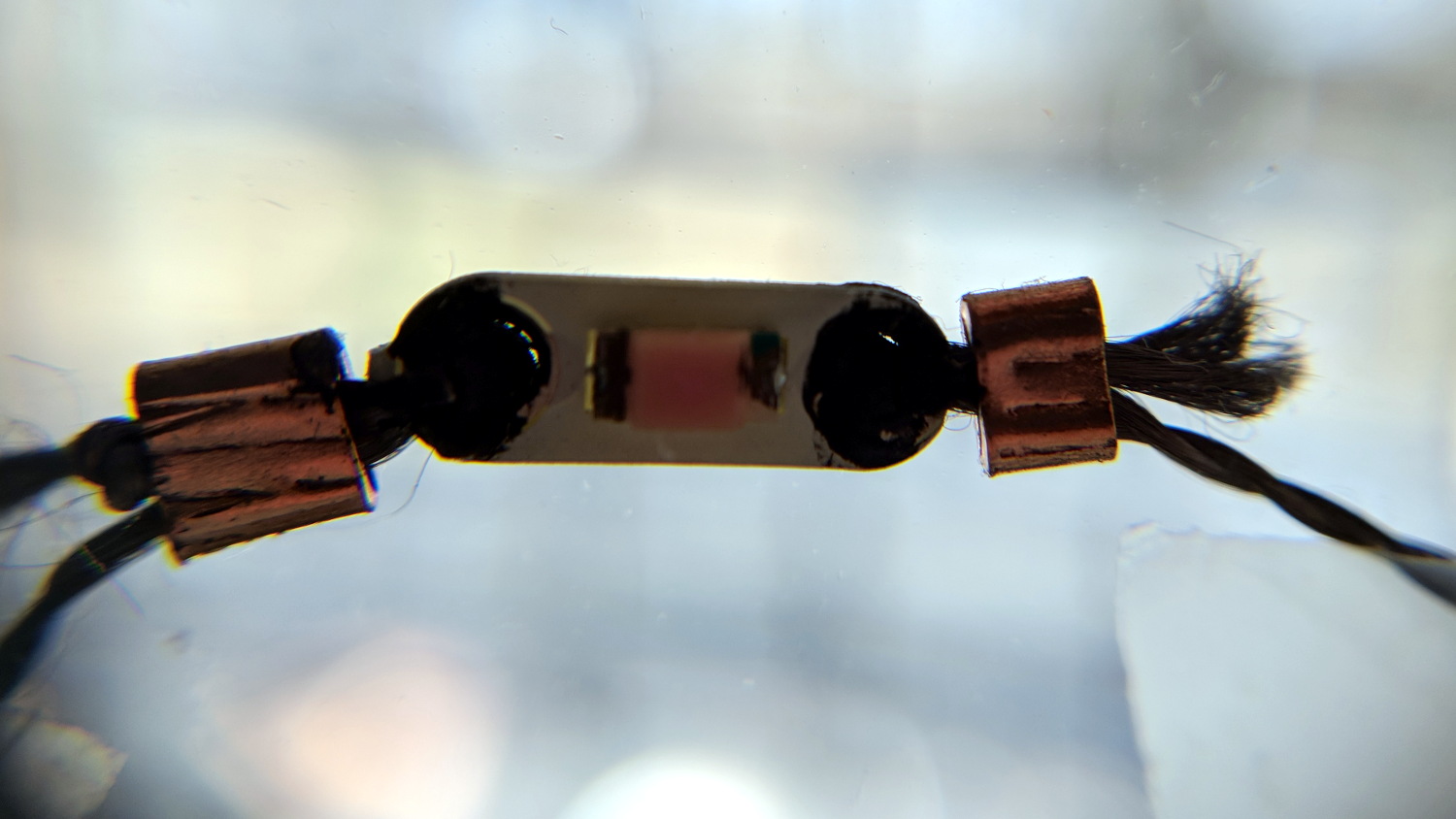
    Against the sunlit backdrop from our kitchen window, the LED looks dark:

    Wearable LED - daylight
    Wearable LED – daylight

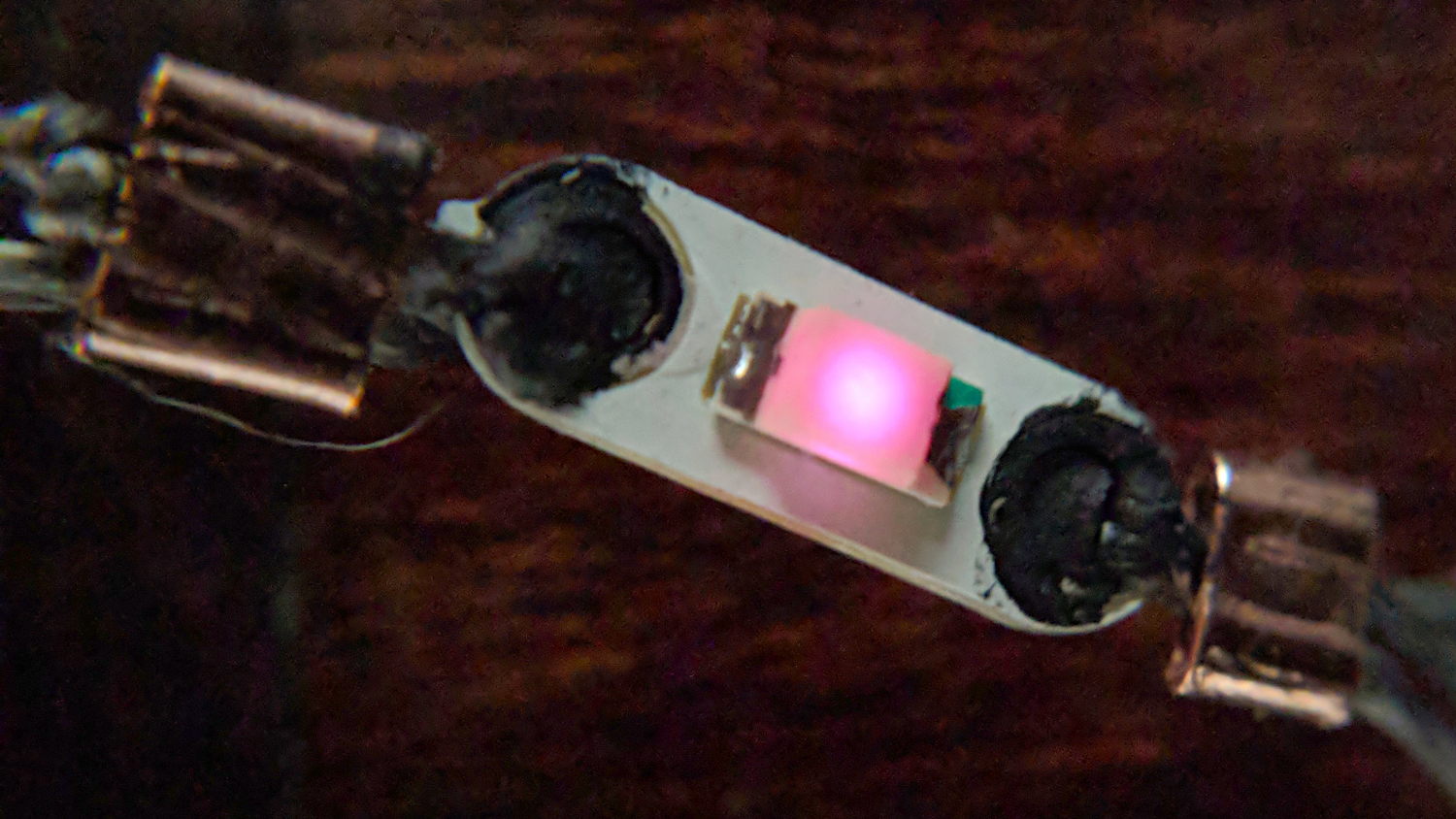
    Seen in a dim room, it’s still glowing:

    Wearable LED - dim light
    Wearable LED – dim light

    The current is now far below the 1 mA/div of my Tek A6302 Hall effect probe, so I have no way to measure the few microamps lighting the junction.

    The coarse grid outside the window is a swatch of deer netting we put up during feeder season to keep the birds from killing themselves on the glass.

  • Astable Multivibrator LED

    Having run out of dead CR123A lithium cells, I soldered up another holder to work through a handful of dead AA alkalines:

    Astable Multivibrator LED Blinky - AA Alkaline mod
    Astable Multivibrator LED Blinky – AA Alkaline mod

    It’s amazing how much light comes from a single wearable LED powered by a dead battery in a dark room!

    Stipulated: I should have 3D printed a CR123A cell adapter. Maybe next time …

  • MPCNC: Stepper Motor Back EMF

    A plot of the back EMF for an  Automation Technology KL17H248-15-4A stepper motor looks like I’m making stuff up again:

    KL17H248-15-4A stepper motor - Back EMF vs RPM - data
    KL17H248-15-4A stepper motor – Back EMF vs RPM – data

    Maybe the only questions I ask are ones with linear solutions?

    Anyhow, the data comes from the Z-axis motor in the lathe:

    Stepper back EMF test setup
    Stepper back EMF test setup

    Scary-looking, but reasonably safe. The chuck holds the motor shaft so it’s not going anywhere, the boring bar prevents any rotation, and the motor bearings do exactly what they’re supposed to. Shorting the motor leads would definitely put a hurt on the PLA frame, so I didn’t do that.

    The scope sat on the floor beside the lathe, capturing waveforms and doing calculations:

    Motor Back EMF - 500 RPM
    Motor Back EMF – 500 RPM

    Some waveforms look bent:

    Motor Back EMF - 300 RPM
    Motor Back EMF – 300 RPM

    I asked the scope to measure the RMS voltage, rather than the peak, because it’s less sensitive to distortions.

    Each winding produces one electrical cycle across four mechanical full steps, with the windings in quadrature. One shaft revolution thus produces 200 / 4 = 50 electrical cycles, so converting from shaft RPM into electrical cycles/s goes a little something like this:

    Electrical cycles/s = (shaft rev/min) * (50 cycles/rev) / 60 (s/min)

    Which works out to a tidy 0.833 Hz/RPM, basically spot on the last data point’s 839 Hz at 1000 RPM.

    The motivation for this comes from the third column in the scribbles: back EMF = 22.7 mVrms/RPM = 32 mVpk/RPM.

    A rapid move at 12 k mm/min = 200 mm/s shows the motor current collapsing to the ragged edge of not working:

    G0 X 200 mm-s - 24V 200mA-div
    G0 X 200 mm-s – 24V 200mA-div

    Converting motor speed to shaft RPM:

    RPM = (axis mm/s) / (32 mm/rev) * (60 s/min)
    RPM = (axis mm/min) / (32 mm/rev)

    So the shaft turns at 375 RPM when the X axis moves at 12 k mm/min, with each motor generating 8.5 Vrms = 12 Vpk of back EMF.

    The MPCNC wires the two motors on each axis in series, so the 24 V power supply faces 24 V of back EMF (!) from both motors, leaving exactly nothing to push the winding current around. Because the highest EMF occurs at the zero crossing points of the (normal) winding current, I think the current peaks now occur there, with the driver completely unable to properly shape the current waveform.

    What you see in the scope shot is what actually happens: the current stabilizes at a ragged square-ish wave at maybe 300 mA (plus those nasty spikes). More study is needed.

  • Kenmore Electric Dryer: Power Resistor Replacement

    Our long-suffering and much-repaired Kenmore clothes dryer didn’t shut off, with the heat on and the timer failing to advance from whatever position we set it to; the clothes were plenty dry and scorching hot. I tried “timed air dry” to eliminate the heater from the problem and found the timer still didn’t advance.

    Referring to the wiring diagram may be of some help:

    Kenmore clothes dryer 110.96282100 - wiring diagram
    Kenmore clothes dryer 110.96282100 – wiring diagram

    The timer motor is in the next-to-bottom ladder rung. Its BK terminal on the left connects to one side of the 240 VAC supply and the switch just to its right connects terminal TM to either the neutral AC line (thus unbalancing the 240 VAC line by a smidge) or to through a 4-ish kΩ resistor and the heater element (essentially zero, on this scale) to the other hot line; the resistor thus dropping 120-ish VAC.

    The various switches around the timer collect nearly all the wiring in the dryer:

    Kenmore dryer - timer wiring
    Kenmore dryer – timer wiring

    A closer look at the back, minus all the wiring:

    Kenmore dryer - timer backplate
    Kenmore dryer – timer backplate

    The motor comes off easily enough, revealing the fact that it’s not just an ordinary (i.e., cheap & readily available) timer motor:

    Kenmore dryer - timer motor pinions
    Kenmore dryer – timer motor pinions

    Hotwiring the motor through a widowmaker zip cord showed it worked just fine. For reference, the upper pinion rotates at about 45 sec/rev, the lower pinion takes maybe 1 hr/rev, both counterclockwise.

    Reassembling and hotwiring the complete timer showed it worked just fine, too.

    Poring over the wiring diagram suggested the power resistor might be open and, indeed, it was:

    Kenmore dryer - power resistor failure
    Kenmore dryer – power resistor failure

    The raised zit near the front shouldn’t be there:

    Kenmore dryer - power resistor failure - detail
    Kenmore dryer – power resistor failure – detail

    Apparently, the resistive element broke at that spot, burned through the thermoset plastic case, and failed safe.

    Introducing it to Mr Disk Sander revealed a cavity below the zit, surrounded by the remains of the resistive element:

    Kenmore dryer - power resistor - cut open
    Kenmore dryer – power resistor – cut open

    You can get a replacement resistor from the usual suspects for prices between $20 and $40, plus or minus shipping, but their pictures look a lot like an ordinary power resistor inside a length of heatshrink tubing, rather than the molded OEM part. I don’t put much stock in reviews & comments, although they seemed to suggest you get, indeed, an ordinary power resistor.

    I didn’t have a 4.7 kΩ power resistor in my (diminished) collection, so I soldered a giant 1.5 kΩ cylindrical resistor in series with a small 3.5 kΩ sandbox, wrapped them up, and tucked them under the front panel’s ground wire:

    Kenmore dryer - expedient power resistor
    Kenmore dryer – expedient power resistor

    A small box of resistors should arrive in the next month and I’ll re-do the repair with a bit more attention to permanency.