Ed Nisley's Blog: Shop notes, electronics, firmware, machinery, 3D printing, laser cuttery, and curiosities. Contents: 100% human thinking, 0% AI slop.
Various numbers that I’ve either measured or collected, scraped into one untidy heap, with the intent of figuring out the stepper motor torques. One significant figure will be entirely enough for what we’re doing; kg & g are really kg-force and g-force; you know what I mean.
Weights
X stage wood structure = 120 g
Aluminum build plate = 100 g
XY stage with plates & c =1.1 kg
Forces
Guide rod in two bushings = nil
X stage with four bushings = 0.8 lb = 0.4 kg
X stage with X rod follower = nil
X stage with X follower and motor = 1 lb = 0.5 kg
Y stage = 2 ounces = nil
Y stage with motor = 1.5 kg static, 1 kg moving
Distances
The ReplicatorG/machines/thingomatic.xml file lists the X and Y pulleys as 10.82 mm diameter. I measure 12.5 mm over the belt and the belt is 0.78 mm thick, sooo that makes it 10.9 at the pulley surface (which I can’t get to without taking everything apart again). Let’s call them 11 mm.
X and Y = 47.069852 step/mm. Let’s call that 47 step/mm → 0.021 mm/step
Z = 200 step/mm → 0.005 mm/step
[Update: see nophead’s comment for the right way to compute the X & Y distances. The answer is 47.0588 step/mm = 0.02125 mm/step, which is 0.1% off what I’d been using.]
The XML file lists the MK6 extruder at 50.235478806907409 step/mm. Measuring the results on my geared extruder, using the same filament drive doodad as they do, works out to 48.2 step/mm and 1456 step/rev.
The A3977 uses a pair of current-sense resistors (RS) to control the winding current. The REF trimpot sets a voltage level that the A3977 compares with the voltage (VREF) on the sense resistor, so the maximum current is directly proportional to the REF setting:
Max current = VREF / (8 * RS)
The MBI boards use 0.25 Ω resistors, so the equation reduces to
Max current = VREF / 2
So you can determine the maximum winding current by simply dividing the REF voltage in half.
However, keep in mind that the supply voltage and motor winding resistance also limit the current; additional voltage drops in the drivers and resistance in the wiring count against the maximum. The REF trimpot has no magic ability to force more current into the motor than Ohm’s Law will permit.
Having improved my Thing-O-Matic mechanics about as much as can be cough reasonably expected, the stepper motors driving the X and Y axes still seem to be running at about the limit of their ability. It’s time for some doodling on that subject; let’s start by collecting all the data in one spot.
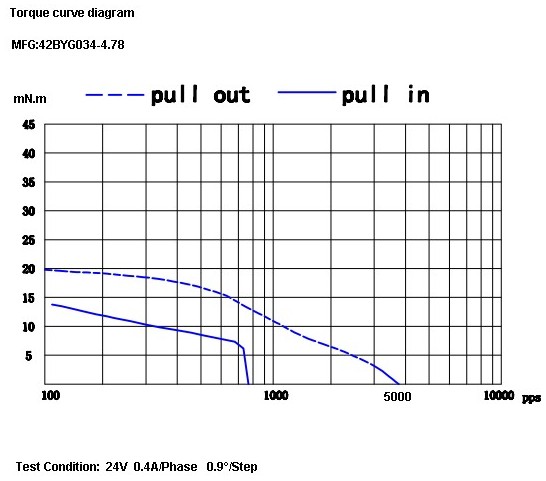
The X and Y motors are, as far as I can tell, inherited directly from the MBI Cupcake CNC. They seem to be Kysan 42BYG034-4.78 (aka SKU 1123029) described on that Kysan store product page as:
Note that, unlike most NEMA 17 steppers, this puppy does not have a 5 mm shaft (unlike the electrically identical Kysan 42BYG034, which does). A 5 mm pulley is a poor fit on a 4.78 mm shaft and, conversely, you must drill / bore MBI pulleys to fit other steppers.
If one was to buy a replacement pulley with a 5 mm bore, the A 6D51M018DF0605 from SDP might do the trick. Or you could apply a 0.199 inch (#8) drill to the bore and save twenty bucks.
The Z stepper has an integrated 4-start leadscrew, so it’s not suitable for a drop-in replacement without some Quality Shop Time. That comment leads to that Kysan store product page for Kysan 17HD011-200N (aka SKU 1040104), with this data:
12V
0.4A
200MM LEAD SCREW
1.8 DEGREE
30 OHM
37MH
260mN.m HOLDING TORQUE
The Kysan Electronics product page has more data (although the proffered PDF datasheet is empty), including a low-res torque curve:
Thing-O-Matic Z Axis torque curve
The Z axis motor on my TOM is labeled “PN 1040103”, which leads to that Kysan Electronics product page for 17HD-8X150MM0.4A, with just a mechanical drawing. The electrical properties seem identical.
The MK6 Extruder (MBI assembly and setup doc there) stepper motor evidently arrives without ID, but that comment suggests it’s an Anaheim Automation 17Y402S-LW4-01 or something similar. That discussion indicates the motor has a 5 mm shaft, not the 6 mm that would match the standard MK5/MK6 filament drive gear, and that MBI did another custom order.
Following various links leads us to the data table there, wherein we find:
Coil resistance = 12 Ω
Coil inductance = 29 mH
Rated current = 850 mA
Rated voltage = 10.2 V
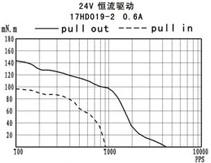
The torque curve:
Anaheim 17Y402S Torque Curve
One observation: these motors have extremely high winding resistance. That makes them suitable for low-speed H-bridge drivers without current control, not contemporary stepper drivers with chopper current control.
A batch of LED ring lights arrived from halfway around the planet and I’d earmarked one for a microscope ring illuminator, despite the crappy color spectrum of white LEDs. It’s better than the fluorescent desk lamp I’d been using up to this point.
This shows the business end of the LED ring light, which would probably look better more professional without the full-frontal Barbie color scheme:
Microscope LED Ring light – snout view
It’s less overwhelming from the top:
Microscope with LED illuminator
The power cable came with the ring. I unsoldered it, fed the end through the shade, resoldered it, snipped off the automobile lamp adapter, wired it to a switch and a 12 V 200 mA wall wart, and hot-melt-glued the switch to the microscope. Yet another vampire load, alas.
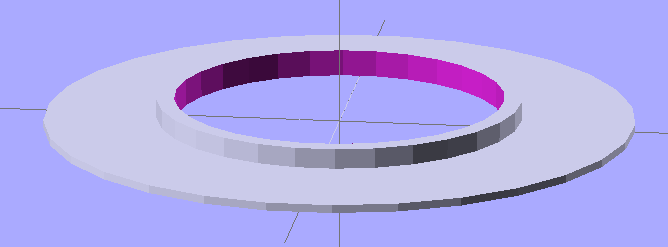
The two parts must be printed separately to eliminate any problem with overhang, as the finished widget would have vertical walls on both sides. I thought about support material, realized that would be a lot like work, and split the thing into two parts.
LED ring light – mounting plate and shade
The walls on the shade ring show the same backlash problem that cropped up there; I built these before tweaking the belts.
The mounting plate screws into the microscope’s accessory thread:
Microscope LED Ring Light – Mount Plate
Admittedly, “screws into” may be an exaggeration: the mount is just a cylindrical feature slightly larger than the microscope’s minor thread diameter; it’s barely more than a snug friction fit. I clipped out four small sections to allow that ring to bend slightly as it engages the threads.
A shade contains the LED ring and keeps direct light off the objective lenses. There’s a tiny hole on one side to let the power wires out:
Microscope LED Ring Light – Shade
The two parts got glued together with the same ABS-in-MEK gunk that I apply to the aluminum build plate:
Clamping LED ring light parts
I applied three blobs of hot-melt glue inside the shade, lined up the LED ring’s power wire with the exit hole, and smooshed it into place. Pause for a breath and it’s done!
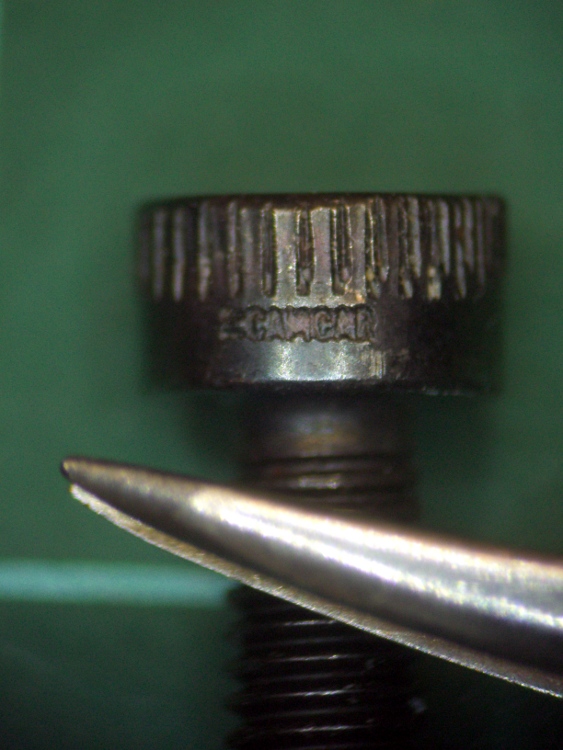
The result actually looks pretty good, despite the weird yellow-and-blue spectrum you get free with every “white” LED. I reset the camera’s color correction using a white sheet of paper. This is an ordinary M3 socket head cap screw, familiar to Thing-O-Matic owners everywhere, and a tweaked needle-point tweezer:
Sample image using LED ring light
The microscope camera mount works surprisingly well, particularly given how simple it was to build.
The OpenSCAD source makes the shade walls a bit taller than you see above. When I run out of pink filament, this one’s on the rebuild list!
// Microscope LED Ring Illuminator Mount
// Ed Nisley - KE4ZNU - Mar 2011

// Build with...
//	extrusion parameters matching the values below
//	2 extra shells
//	3 solid surfaces at top + bottom

Build = "Ring";					// Mount or Ring

// Extrusion parameters for successful building

ThreadZ = 0.33;						// should match extrusion thickness
WT = 1.75;							// width over thickness
ThreadWidth = ThreadZ * WT;			// should match extrusion width

HoleWindage = ThreadWidth;			// enlarge hole dia by extrusion width

// Screw mount dimensions

MountOD = 46.85 - ThreadWidth;		// Microscope thread diameter (thread minor)
MountDepth = 2.5;					// ... length
MountID = MountOD - 6*ThreadWidth;	// ID of mount body -- must clear lenses

echo(str("Mount ID: ",MountID));
echo(str("Mount OD: ",MountOD));

PlateThick = 3*ThreadZ;				// Thickness of mounting plate beyond rings

echo(str("Plate: ",PlateThick));

// LED Ring holder dimensions

RingID = 54.0;
RingOD = 71.0;
RingFit = 0.5;						// radial gap from ID and OD

InnerShade = 6.0;					// Shade walls around ring
OuterShade = 10.0;
ShadeWall = 4*ThreadWidth;			//  wall thickness

HolderID = RingID - 2*RingFit - 2*ShadeWall;
HolderOD = RingOD + 2*RingFit + 2*ShadeWall;

echo(str("Holder ID:",HolderID));
echo(str("Holder OD:",HolderOD));

LeadWidth = 4.0 + HoleWindage;		// LED power lead hole
LeadTall = 2.0 + HoleWindage;

Protrusion = 0.1;					// extend holes beyond surfaces for visibility

//---------------
// Create thread gripper and plate

module Mount() {

  difference() {
	union() {
	  translate([0,0,PlateThick])
		cylinder(r=(MountOD/2 + HoleWindage),h=MountDepth);
	  cylinder(r=HolderOD/2,h=PlateThick);
	}

	translate([0,0,-Protrusion])
	  cylinder(r=MountID/2,h=(PlateThick + MountDepth + 2*Protrusion));
  }

}

//----------------
// Create LED ring holder

module Ring() {

  difference() {
	union() {
	  cylinder(r=HolderOD/2,h=PlateThick);

	  translate([0,0,PlateThick]) {
		difference() {
		  cylinder(r=HolderOD/2,h=OuterShade);
		  cylinder(r=(HolderOD/2 - ShadeWall),h=(OuterShade + Protrusion));
		}

		cylinder(r=(HolderID/2 + ShadeWall),h=InnerShade);
	  }
	}

	translate([0,0,-Protrusion])
	  cylinder(r=HolderID/2,h=(InnerShade + PlateThick + 2*Protrusion));

	translate([(HolderOD/2 - ShadeWall/2),0,(PlateThick + ShadeWall/2 + LeadTall/2)]) {
	  scale([ShadeWall*2,LeadWidth,LeadTall])
		rotate(a=[0,90,0])
		  cylinder(r=0.5,h=1.0,center=true,$fn=12);
	}
  }

}

//---------------
// Build what's needed

if (Build == "Mount") {
  Mount();
}
else {
  Ring();
}
At one point along the way, the Control Panel reported the ABP temperature as 1024 °C, which seemed excessive. A bit of poking around revealed this situation on the ABP connector:
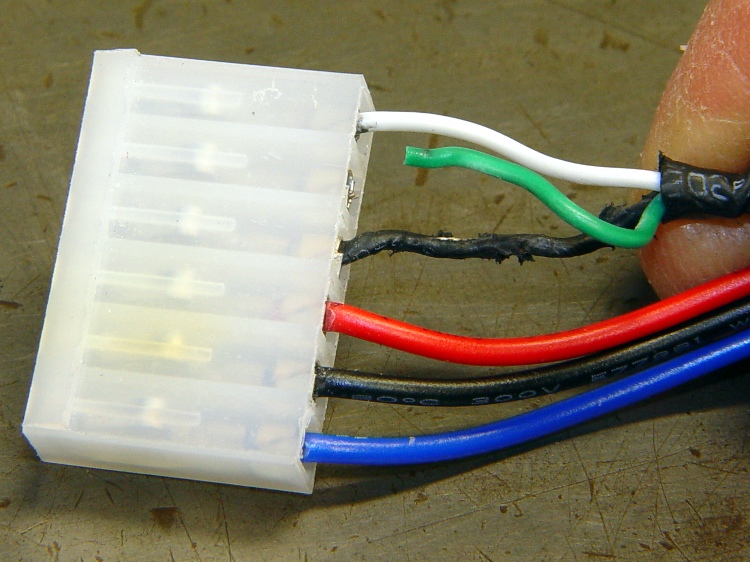
Overheated and chafed ABP connector
The connector just barely clears the top of the X axis homing switch board and the loose wires tended to rub on the top of the cable connector. I’d been meaning to fix that for a while, but now I had a real reason.
A bit of soldering and some self-vulcanizing tape later:
Strain relief on ABP connector
Also: notice the discoloration on the connector shell surrounding the Black wire? That’s the contact leading back to the MOSFET from the platform heater: a single pin carrying far more than its rated current. The shell around the contact on the Red wire (which carries the same current) isn’t discolored, which suggests the Black connector is a bit loose / poorly crimped / whatever. It looked OK to me, so I left it alone.
While I had the cable on the bench, I added a set of those right-angle pins to eliminate the risk of loose wire ends getting into the wrong places.
You can rub and you can rub, but you can’t shine shit.
Eks tells me that was one of his grandmother’s favorite sayings.
He introduced me to the concept of a “used-car polish”: high shine over deep scratches. Sometimes, that’s exactly what the job requires.
There’s also the notion of making a silk purse from a sow’s ear (attributed variously to Jonathan Swift and Anon), which someone actually did: render the ear down to a gel, extrude thread, loom cloth, and sew up a purse. Yes, it can be done, but there’s a practical limit in there somewhere.
Contrary to what you might think, this has nothing to do with a certain Thing-O-Matic. A bit of laparoscopic surgery on our front yard just revealed that our septic leach field has filled with gunk; it’s 56 years old and hadn’t been pumped for two decades before we bought the place. The next week or two should be interesting: I can do the diagnosis, but I can’t handle this repair.
The X10 RF Remote Control in the kitchen stopped working, which could mean only one thing: a set of dead AAA cells.
A negative terminal in the battery compartment showed the expected corrosion:
X10 Remote battery terminals
The corrosion evidently pushed the cell away from the terminal just enough to starve the remote.
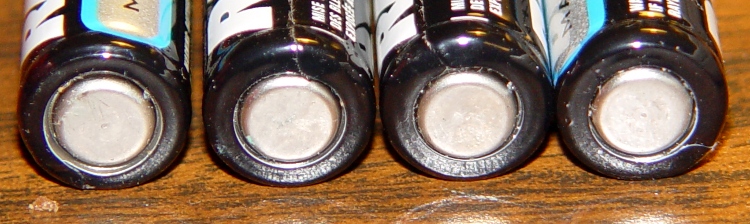
The cells, on the other paw, looked just fine:
Battery negative terminals
They’d been in there a year, sported a date code that’s still a few years in the future, and had a 1.3 V loaded output. Looks like that little bit of corrosion gave me enough of a heads-up to get the cells out before they rotted.






 The Smell of Molten Projects in the Morning