The Smell of Molten Projects in the Morning

Ed Nisley's Blog: Shop notes, electronics, firmware, machinery, 3D printing, laser cuttery, and curiosities. Contents: 100% human thinking, 0% AI slop.

Category: Electronics Workbench

Electrical & Electronic gadgets

  • Stepper Motor Thermal Coefficient

    You’ve probably seen this exchange on whatever DIY 3D printing forum you monitor:

    1. My stepper motors get scorching hot, what should I do?
    2. Turn down the current!
    3. That worked great, but …
    4. … now all my objects have a shift in the middle.
    5. Your motor is losing steps: turn up the current!
    6. Uh, right.
    NEMA 17 Stepper on cloth
    NEMA 17 Stepper on cloth

    So, with that setup on the bench, I ran a simple experiment with current, temperature, and heat transfer. Most DIY 3D printers have stepper motors attached to a plywood chassis or plastic holder, so the first data point comes from a motor with no mechanical thermal path to the outside world (which is the Basement Laboratory at 14 °C ambient).

    Running at about 1200 step/s with a winding current of 1 A peak from a 24 A supply, the motor stabilized at 52 °C = 125 °F after half an hour.

    Both windings have a 2 Ω resistance and carry 1 A peak = 0.7 A rms, so the total power dissipation is:

    2 × [(1 A / √2)2 × 2 Ω] = 2 W

    That’s the same power produced with the motor stopped at a full step position, where the peak current flows in a single winding and the other winding carries zero current:

    (1 A)2 × 2 Ω = 2 W

    The temperature rise suggests a thermal coefficient of about 19 °C/W = (52 °C – 14 °C) / 2 W.

    The next current setting on the driver is 1.46 A, which doubles the power dissipation to 4.3 W. Assuming a large number of linearities, that would cook the motor at 82 °C = 180 °F above ambient. Even though the motor could probably withstand that temperature, for what should be obvious reasons I didn’t go there.

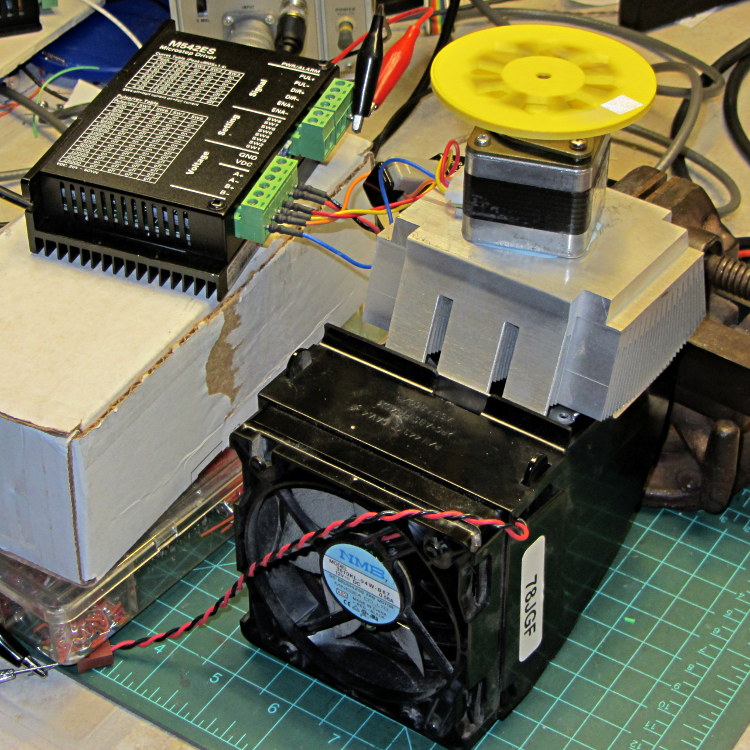
    Instead, I parked the motor atop a big CPU heatsink harvested from an obsolete PC, sans thermal compound, mechanical fitting, and anything more secure than gravity holding it in place:

    NEMA 17 Stepper on Heatsink
    NEMA 17 Stepper on Heatsink

    The results:

    Ambient 14 °C
    Winding 2 ohm
    A pk A rms Power W Case °C °C/W amb °C/W incr
    1.00 0.71 2.0 28 7.0 7.0
    1.46 1.03 4.3 42 6.6 6.2
    1.91 1.35 7.3 63 6.7 6.9

    The thermal coefficients represent the combination of all interfaces from motor case to ambient, but the case and heatsink stabilized to about the same temperature, so the main limit (as always) will be heat transfer to ambient air. Obviously, the heatsink sits in the wrong orientation with little-to-no air flow, not to mention that the butt end of a stepper motor isn’t precisely machined and has plenty of air between the two surfaces. Improving all that would be in the nature of fine tuning and should substantially lower the coefficient.

    What’s of interest: just perching the motor on a big chunk of aluminum dropped the case temperature 24 °C without no further effort.

    Blowing air over the case (probably) won’t be nearly as effective. Epoxy-ing a liquid-cooled cold plate to the end cap would improve the situation beyond all reasonable bounds, plus confer extreme geek cred.

    Hmmm, the Warehouse Wing does have some copper tubing…

  • Stepper Driver Waveforms: Current Control

    A bit more data from this setup:

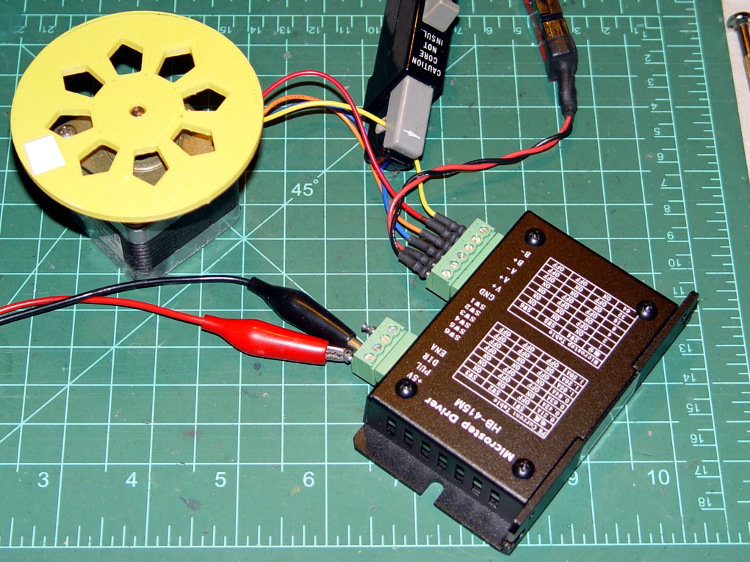
    HB-415M Driver - test setup
    HB-415M Driver – test setup

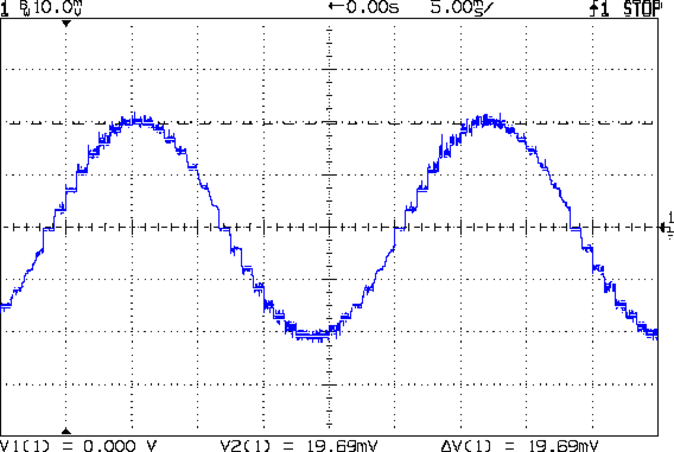
    As you saw earlier the low-speed waveform looked reasonably good, although the HB-415M driver produces only 71% of its rated current (so it’s actually 1 A peak, not the 1.5 A in the caption):

    HB-415M 8-step 1.5A 20V
    HB-415M 8-step 1.5A 20V

    The driver runs in 1/8 microstep mode, which means 1 revolution = 8 × 200 step = 1600 steps. Each cycle of that stepped sine wave has 32 microsteps  = 4 full steps/cycle × 8 microsteps. One cycle is about 27 ms, so 1 step = 840 µs → 1200 step/s → 0.74 rev/s → 44 rpm. The Thing-O-Matic runs at 47 step/mm → 34 mm/rev, so this speed corresponds to travel at 25 mm/s, roughly the usual printing pace.

    Admittedly, that hairball on the bench isn’t a realistic arrangement, because the motor runs with no load. On the other paw, assuming you’ve done a good job eliminating mechanical binding, then it’s probably pretty close to what you’d see during constant-speed travel.

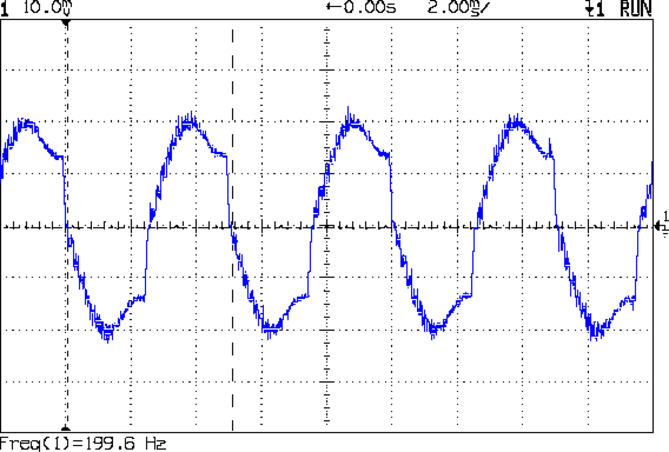
    Cranking the pulse generator to 6400 step/s = 133 mm/s produces this waveform:

    HB-415M 1A 8step 24V
    HB-415M 1A 8step 24V

    The power supply was 24 V, but there was no visible difference at 20 V. The driver evidently can’t control the winding current on the downward side of the waveform. Adding some frictional torque by grabbing the yellow interrupter wheel improved the situation, but not by much.

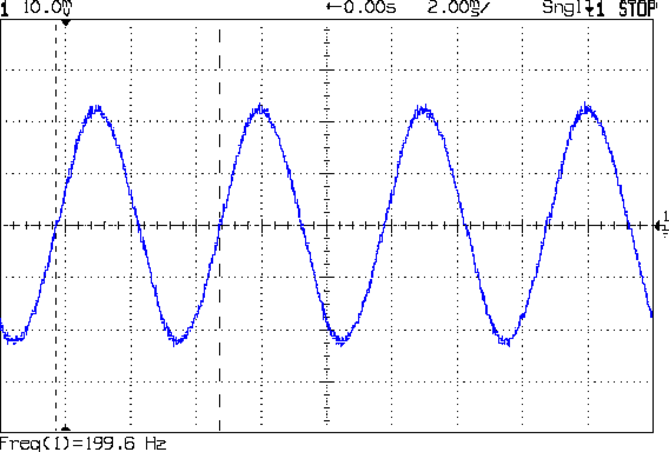
    A box of 2M542 drivers just arrived from a nominally reputable supplier, although they were actually labeled M542ES. Under the same conditions, they produce this waveform:

    M542ES 1A 8step 24V
    M542ES 1A 8step 24V

    So there’s something to be said for larger drivers; the HB-415M drivers were operating at their upper limit and the M542ES at their lower limit, both producing close to 1 A peak.

  • Gratuitous Engine Jeweling

    While pondering whether I should use the carcass of an old Dell PC to house the stepper drivers and control logic for the LinuxCNC M2 project, I bandsawed a scrap of aluminum sheet to about the right size. It had some truly nasty gouges and bonded-on crud, so I chucked up a wire brush cup in the drill press and had at it:

    Machine jeweled baseplate
    Machine jeweled baseplate

    It’s obvious I haven’t done jeweling in a long time, isn’t it? Even a crude engine jeweling job spiffs things right up, though, even if a cough showcase job like this deserves straighter lines and more precise spacing. The aluminum sheet is far too large for the Sherline, which put CNC right out of consideration, and I’m not up for sufficient crank spinning on the big manual mill.

    I match-marked mounting holes directly from the harvested motherboard and drilled them, whereupon I discovered that the aluminum is a dead-soft gummy alloy that doesn’t machine cleanly: it won’t become the final baseplate.

    Memo to Self: Use the shop vacuum with the nozzle spinward of the brush, fool.

  • HB-415M Stepper Driver Heatsinking: Lack Thereof

    Just to see what’s inside, I took those HB-415M drivers apart. They’re not all identical inside:

    HB-415M Driver - interior top
    HB-415M Driver – interior top

    The other side shouldn’t come as much of a surprise:

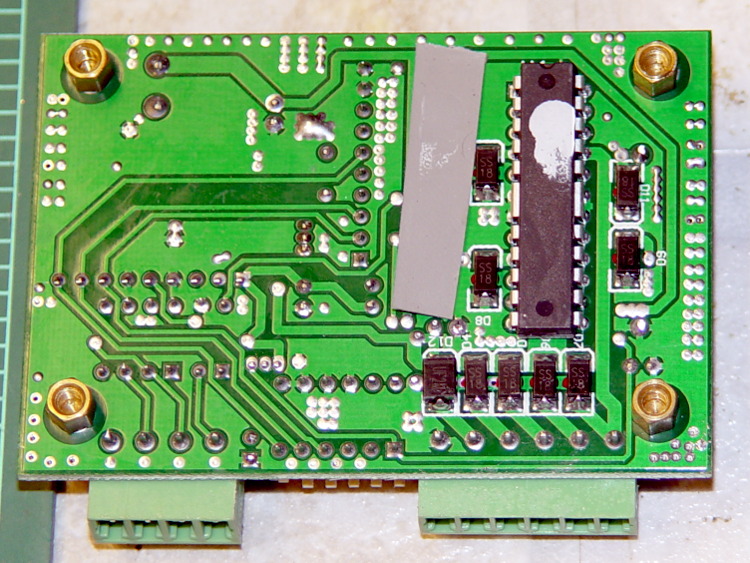
    HB-415M Driver heatsinking
    HB-415M Driver heatsinking

    Now, admittedly, I’ve applied a heatsink to the top of an epoxy package, but that DIP package has thermal tabs that should connect to the heatsink through a low-thermal-resistance path. A dab (!) of heatsink grease and what might be a thermally conductive plastic sheet atop the package seem, well, insufficient.

    The driver chip sports an Allegro A3992 marking that might be genuine. The datasheet goes into some detail as to how you should lay out the PCB; none of its recommendations made it into the finished product. In particular, the hulking current sense resistors surely have more inductance than you’d like.

    The resistor color code seems odd: black red red silver brown.

    HB-415M current sense resisors
    HB-415M current sense resisors

    Using black as the first band is unexpected, but it’s probably the only way to indicate a low-value resistance without printing the numbers: 0.22 Ω ±1%.

    Ah, well, the peak current isn’t as high as they claim, so it all probably works out in the end.

  • HB-415M Stepper Driver Measurements

    As mentioned there, the usual eBay vendor shipped HB-415M drivers instead of the advertised 2M415 drivers. Based on the Chinese datasheet and some poking around, I got a test setup working with a bench supply, a signal generator, and a NEMA 17 stepper motor with 2 Ω windings.

    HB-415M Driver - test setup
    HB-415M Driver – test setup

    Yes, it’s that stepper motor and interrupter wheel.

    First observation: the ENA input is active high. Pulling it low to turn on the optocoupler disables the drive output, which is exactly the opposite of what’s shown in the datasheet, which means that the driver will run quite happily with nothing connected to the ENA pin. The optoisolator current runs about 11 mA from a 5 V supply, close enough to the 10 mA typical spec, but the signal generator thinks it’s providing a TTL pulse output.

    Second observation: the driver’s actual winding current doesn’t match the DIP switch setting.

    Here’s the 1/8 microstep winding current for the 1.50 A peak setting, with a 0.5 A/div vertical calibration:

    HB-415M 8-step 1.5A 20V
    HB-415M 8-step 1.5A 20V

    Sure looks like 1 A peak, doesn’t it?

    The ratio seems close to 0.707 and remains consistent across all current settings, so I’d lay long money that the designer confused “peak” and “RMS” values, then figured the current sense resistor or chose the internal coefficients to produce the corresponding RMS current for the peak value.

    The reduced current produces not very much torque at all; negotiations are in progress for a partial refund based on eBay’s “item not as described” process…

  • Capacity Test For New UPS Batteries

    Just got a quartet of 12 V 7 A·h lead batteries, prompted by a big Belkin UPS that instantly shut down during a power blink. It needs only two batteries, but the shipping was the same for two or four and I’m sure the spares will come in handy.

    A stiff 2 A discharge test shows that SLA batteries really don’t like high currents, which is exactly what they must provide in a UPS:

    Rhino SLA - 2013-01
    Rhino SLA – 2013-01

    The capacity is barely 4 A·h at 2 A, not to mention that I’m using a conservative 11.4 V cutoff.

    The two batteries with the highest capacity also were the closest matches, so they’re now in the UPS.

  • Anonymous Breakout With HB-415 Stepper Driver: Mismatch

    Turns out that the anonymous parallel port breakout board isn’t compatible with an optoisolated stepper driver: each output has a 1 kΩ series resistor that limits the current well below the driver optocoupler’s expectations. The driver has an internal 300 Ω resistor on each input, too, which doesn’t help in this situation.

    A detailed look at the resistors lined up in front of the connectors:

    Anonymous parallel breakout board - series resistors
    Anonymous parallel breakout board – series resistors

    The breakout board would work fine with non-isolated drivers, like the Pololu breakout boards, so it’s not really at fault. The fact that there’s no doc anywhere to be found means you (well, I) couldn’t discover this without buying it first, but … I suppose it’ll come in handy for something.

    One could short across the resistors, but I intended to use this board for the initial bringup and all that soldering defeats the purpose.