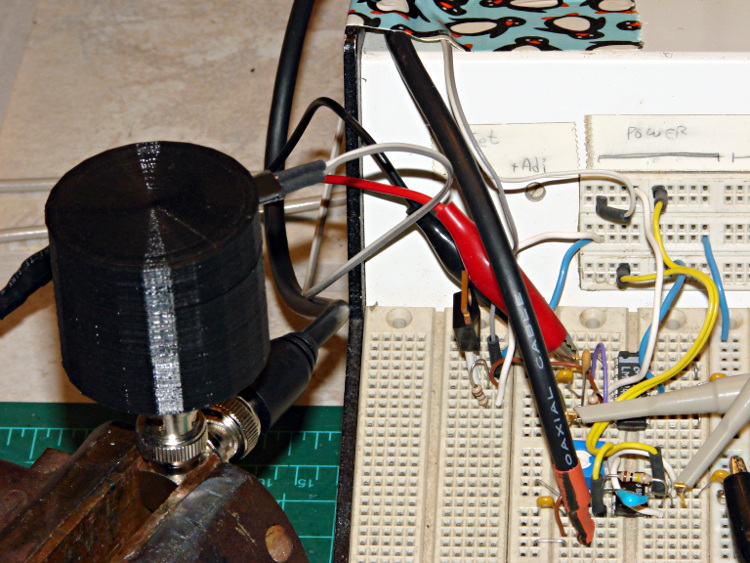
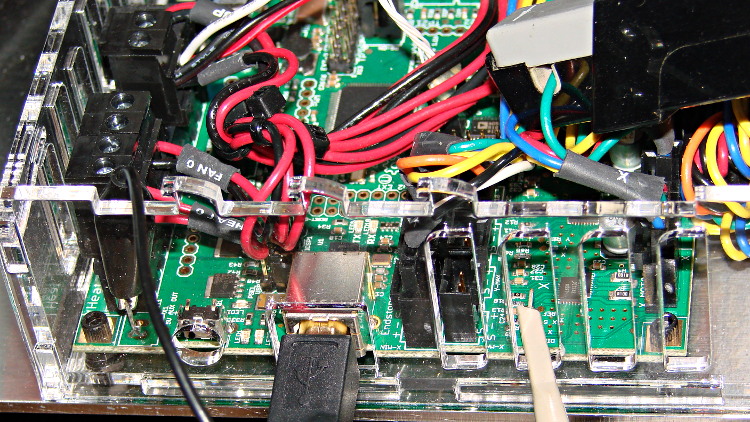
Based on the discussion attached to the post on Z axis numbers, I wanted to take a look at the points where Marlin switches from one step per interrupt to two, then to four, just to see what the timing looks like. The RAMBo board has neatly labeled test points, to which I tack-soldered a pin for the scope probe poked through one of the ventilation slots, and an unused power connector on the left edge of the PCB that provided a ground point (admittedly, much too far away for good RF grounding, but it suffices for CMOS logic signals). The Tek Hall-effect current probe leaning in from the top right captures the current in one of the X axis windings:
I’ve reset the Marlin constants based on first principles, per the notes on distance, speed, and acceleration, so they’re not representative of the as-shipped M2 firmware. Recapping the XY settings:
- Distance: 88.89 step/mm
- Speed: 450 mm/s = 27000 mm/min
- Acceleration: 5000 mm/s2, with the overall limit at 10 m/s2
The maximum interrupt frequency is about 10 kHz and the handler can issue zero, one, two, or four steps per axis per interrupt as required by the speed along each axis, up to a maximum of step rate of 40 kHz. There are complexities involved which I do not profess to understand.
The maximum 10 kHz step rate for one-step-per-interrupt motion corresponds to a speed of:
112.5 mm/s = (10000 step/s) / (88.89 step/mm)
The maximum 40 kHz step rate produces, naturally enough, four times that speed:
450 mm/s = (40000 step/s) / (88.89 step/mm)
Assuming constant acceleration, the distance required to reach a given speed from a standing start or to decelerate from that speed to a complete stop is:
x = v2 / (2 * a)
The time required to reach that speed is:
t = v/a
Accelerating at 5000 mm/s2:
- 112.5 mm/s = 6700 mm/min → 1.27 mm, 22.5 ms
- 150 mm/s = 9000 mm/min → 2.25 mm, 30 ms
- 450 mm/s = 27000 mm/min → 20.3 mm and 90 ms
An overview of a complete 6 mm move at 150 mm/s shows the acceleration and deceleration at each end, with a constant-speed section in the middle:
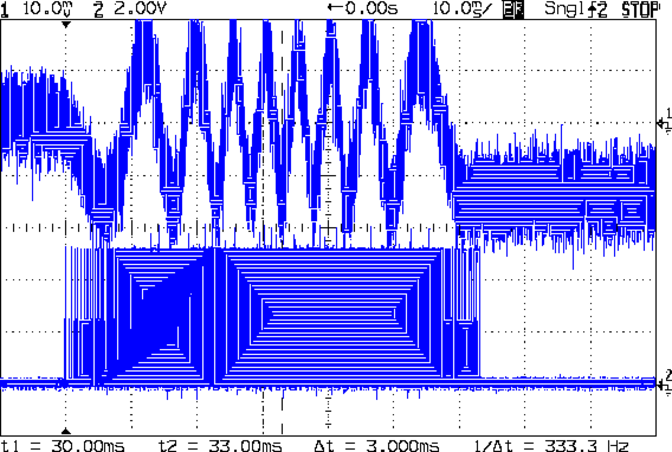
The bizarre patterns in the traces come from hp2xx‘s desperate attempts to discern the meaning of the scope’s HPGL graphic data where the trace forms a solid block of color; take it as given that there’s no information in the pattern. I described the trace conversion process there.
The upper trace shows the X axis motor winding current at a scale of 500 mA/div, with far more hash than one would expect. The RAMBo drivers evidently produce much more current noise than the brick drivers I intend to use.
The lower trace is the X axis step signal produced by the Arduino microcontroller. You can barely make out the individual step signals at each end, but there’s not enough horizontal resolution to show them when the motor moves at a reasonable pace.
In round numbers, the acceleration and deceleration should require about 30 ms each. The overall move takes 63 ms, so the constant-speed section in the middle must be about 3 ms long. That’s probably not right…
Here’s a closer look at the step pulses as the motion starts from zero on the way to 150 mm/s:
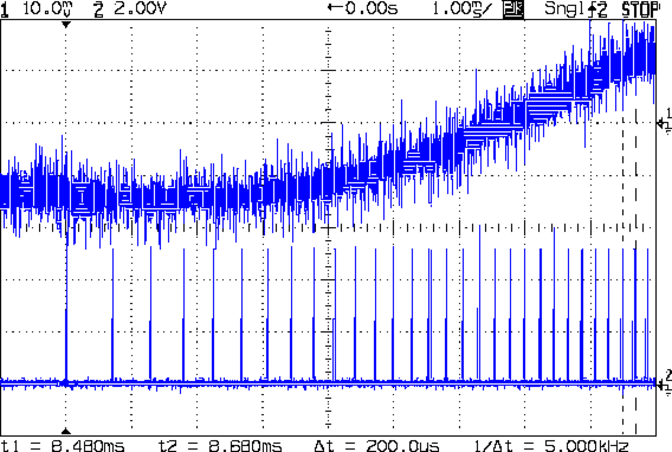
Over on the right, the 5 kHz step rate after 8.5 ms suggests a speed of 56 mm/s and counting 28 pulses says it moved 0.32 mm. Plugging those numbers into the equations:
- a = v/t = 6600 mm/s2
- a = (2 * x)/t2 = 8900 mm/s2
It’s not clear (to me, anyway) whether:
- The firmware accelerates faster than the alleged 5000 mm/s2 limit
- It’s accelerating near the overall limit of 10000 mm/s2
- The acceleration isn’t constant: starts high, then declines
- The measurement accuracy doesn’t support any conclusions
- I understand what’s happening
In order to see the double- and quad-step outputs, here’s a 50 mm move at 450 mm/s, with a 19 ms delay to the point where the interrupt handler transitions from single-step to double-step output:
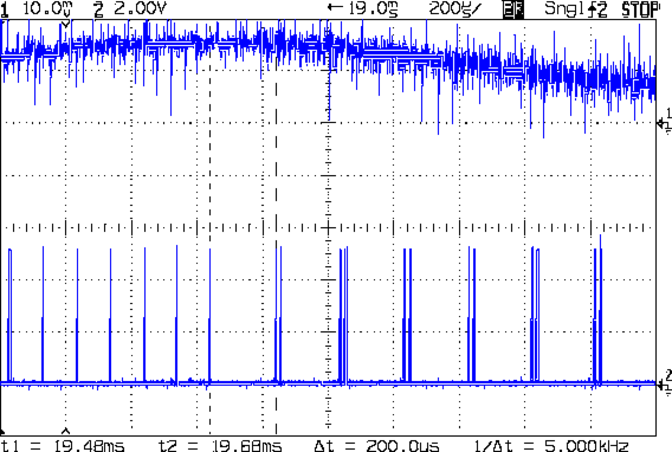
The interrupt frequency drops from just under 10 kHz to a bit under 5 kHz, with the doubled pulses about 16 μs apart. At the transition, the axis speed is 112.5 mm/s, pretty much as predicted.
If that’s the case, the overall acceleration to the transition works out to:
5800 mm/s2 = (113 mm/s) / (19.5 ms)
Delaying the traces to 41.9 ms after the motion starts shows the double-to-quad step transition:
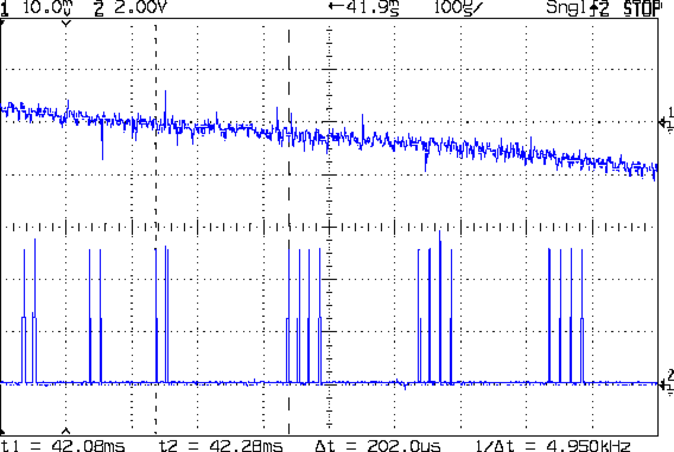
Once again, the pulse frequency drops from 10 kHz down to 5 kHz. The speed is now 225 mm/s, half the maximum possible speed, which also makes sense: at top speed, the pulses will be essentially continuous at 40 kHz.
The average acceleration from the start of the motion:
5300 mm/s2 = (225 mm/s) / (42.1 ms)
That implies the initial acceleration starts higher than the limit, but it evens out on the way to the commanded speed.
Those scope shots come from moving only the X axis. Moving both the X and Y axes, with Trace 1 now showing the Y axis output, for 50 mm at 450 mm/s, produces similar results; the Y axis output lags the X axis by a few microseconds:
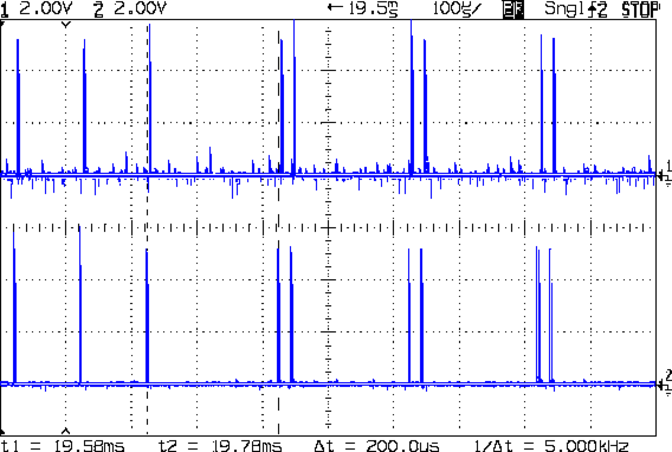
Once again, that’s at the single- to double-step transition at 19+ ms. The overall timing doesn’t depend on how many axes are moving, as long as they can accelerate at the same pace; otherwise, the firmware must adjust the accelerations to make both axes track the intended path.
None of this is too surprising.
For a motor running at a constant speed just beyond the single-to-double step transition at 112.5 mm/s or the double-to-quad transition at 225 mm/s, the rotor motion should have a 5 kHz perturbation around its nominal position: it coasts for nearly the entire period, then a pair of steps kicks it toward the proper position. At those transitions, the rotor turns at:
3.2 rev/s = (10000 step/s) / (3200 step/rev)

6.4 rev/s = (20000 step/s) / (3200 step/rev)
The perturbation should look like a 5 kHz oscillation (not exactly sinusoidal, maybe triangular?) superimposed on the nominal position, which is changing more-or-less parabolically as a function of time. I expect that the overall inertia damps it out pretty well, but I’d like to attach a rotary encoder to the motor shaft (or a linear encoder to the axis) to show the actual outcome, but I don’t have the machinery for that.
In any event, LinuxCNC’s step outputs should behave better, which is why I’m doing this whole thing in the first place…