Ed Nisley's Blog: Shop notes, electronics, firmware, machinery, 3D printing, laser cuttery, and curiosities. Contents: 100% human thinking, 0% AI slop.
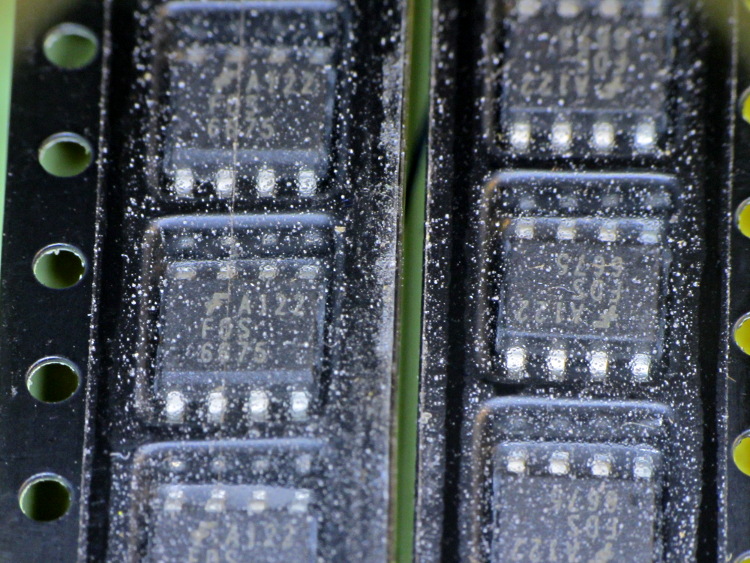
So I picked up a lot of 20 p-channel MOSFETs from the usual eBay supplier in China, which arrived in good order. As is often the case, the SOIC chips are in snippets of tape-and-reel carrier, but this tape looked decidedly odd:
eBay FDS6675 Tape Cover Contamination
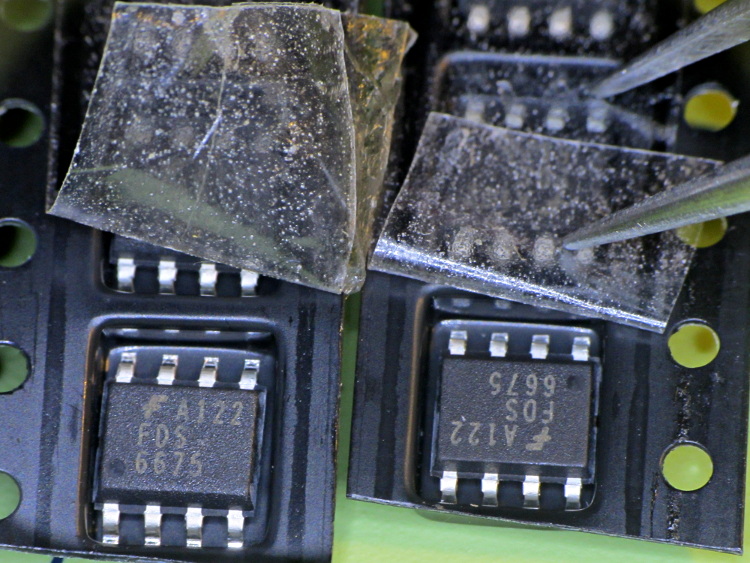
Peeling back the tape shows that the crud is just on (or perhaps inside) the tape, not on the ICs or inside the carrier pockets:
Some of those specks are dirt, some seem to be bubbles, other are just, well, I don’t know what they might be. Maybe they were having a bad day in the tape factory?
One might reasonably conclude the chips aren’t in their original carrier…
I must gimmick up a quick test to verify that the chips behave like p-channel MOSFETs, instead of, oh, solid plastic; that Fairchild logo looks a bit grotty, doesn’t it?
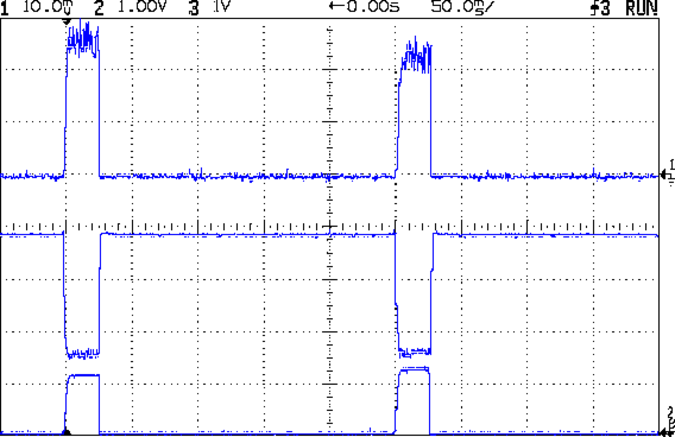
With that hardware in hand, a dab of firmware produces this result:
Hall Current Sense – 120 mA 25 ms 250 ms
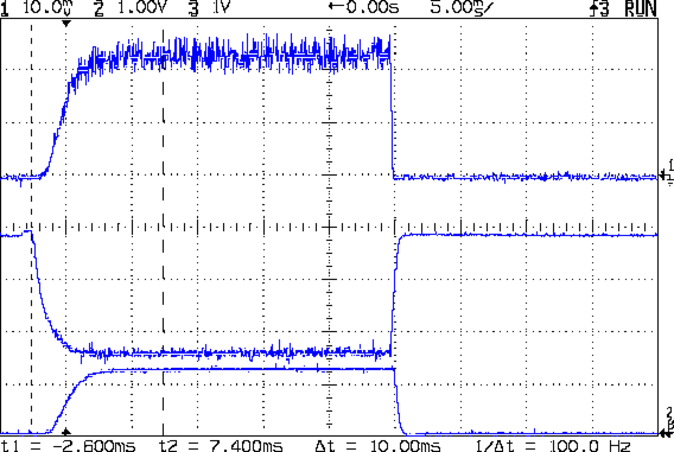
A detailed look at one pulse:
Hall Current Sense – 120 mA 25 ms 250 ms – detail
The top trace is the total LED current, nominally 120 mA, at 50 mA/div. The ripple (which is a nice triangle waveform at a faster sweep) comes from the 32 kHz PWM pulse train, despite passing through a 1 ms RC filter; the MOSFET runs in the linear region and makes a great amplifier.
The middle trace is the MOSFET drain voltage at 1 V/div. The on-state voltage runs around 1.6 V, so the LEDs see about 5.9 V at 120 mA, about what you’d expect, with the little bit of PWM ripple accounting for the current sawtooth in the top trace. The off-state voltage is only 3.8 V, because the LEDs soak up the rest; it’s about 1.2 V per LED.
The bottom trace is the current-sense amp output. The 1 nF cap in the op amp feedback loop rolls it off at 600 Hz, so there’s not much ripple at all in there. That goes directly to the Arduino’s ADC, where it’s further averaged over 10 samples.The LEDs take a couple of milliseconds to get up to full intensity, but it’s much faster than an incandescent filament: this thing blinks rather than flashes.
The current in each LED string runs from about 15 mA to 25 mA, with all the “old” LEDs at the low end and the “new” LED strings at the high end. Using unsorted LEDs from the same batch will probably be OK, although I’ll measure them just to see what they’re like.
The LEDs dissipate 700 mW and the MOSFET wastes 192 mW, so the efficiency is around 79%. Not too shabby for a linear regulator and it only gets better as the battery discharges. The toroid winding burns maybe 300 μW, so it’s not in the running; to be fair, a 1 Ω sense resistor would account for only 14 mW, but it would drop 120 mV instead of 3 mV, which is what matters more when the battery voltage drops.
That’s during the pulse, which should have a duty cycle under 25% or so, which means 175 mW and 48 mW on the average. Obviously, no heatsinks needed: each LED runs at 7 mW average under those conditions.
The firmware steps the gate voltage by the smallest possible increment, about 20 mV = 5 V / 256. The feedback loop adjusts the gate voltage in single steps to avoid goosing the LEDs with too much current; a binary search wouldn’t work very well at all. I think it’d be a good idea to build a table of transconductance (gate voltage to LED current) by ramping the gate voltage during startup, then fine-tune the coefficients during each pulse.
The console log tells the tale:
Hall effect Current Regulator
Ed Nisley - KE4ZNU - August 2013
Given Vcc: 5010 mV
Given VBatt divider ratio: 0.500
Bandgap reference voltage: 1105 mV
Battery voltage: 7551 mV
Nulling Hall sensor offset: 0 PWM
Final Hall sensor offset: 209 PWM
Gate voltage: 1947 mV  LED Current: 5 mA
Gate voltage: 1966 mV  LED Current: 6 mA
Gate voltage: 1986 mV  LED Current: 6 mA
Gate voltage: 2005 mV  LED Current: 7 mA
Gate voltage: 2025 mV  LED Current: 8 mA
Gate voltage: 2040 mV  LED Current: 8 mA
Gate voltage: 2064 mV  LED Current: 10 mA
Gate voltage: 2084 mV  LED Current: 11 mA
Gate voltage: 2103 mV  LED Current: 13 mA
Gate voltage: 2123 mV  LED Current: 14 mA
Gate voltage: 2142 mV  LED Current: 17 mA
Gate voltage: 2162 mV  LED Current: 19 mA
Gate voltage: 2177 mV  LED Current: 22 mA
Gate voltage: 2201 mV  LED Current: 25 mA
Gate voltage: 2221 mV  LED Current: 29 mA
Gate voltage: 2240 mV  LED Current: 33 mA
Gate voltage: 2255 mV  LED Current: 38 mA
Gate voltage: 2275 mV  LED Current: 44 mA
Gate voltage: 2294 mV  LED Current: 49 mA
Gate voltage: 2314 mV  LED Current: 56 mA
Gate voltage: 2333 mV  LED Current: 63 mA
Gate voltage: 2353 mV  LED Current: 70 mA
Gate voltage: 2372 mV  LED Current: 79 mA
Gate voltage: 2392 mV  LED Current: 89 mA
Gate voltage: 2412 mV  LED Current: 99 mA
Gate voltage: 2431 mV  LED Current: 110 mA
Gate voltage: 2451 mV  LED Current: 122 mA
Gate voltage: 2431 mV  LED Current: 110 mA
Gate voltage: 2451 mV  LED Current: 121 mA
Gate voltage: 2431 mV  LED Current: 110 mA
Gate voltage: 2451 mV  LED Current: 122 mA
Gate voltage: 2431 mV  LED Current: 110 mA
Gate voltage: 2451 mV  LED Current: 121 mA
The current feedback tweaks the gate voltage by one PWM increment on each loop, so the LED current pulses alternate between 110 and 122 mA when the loop finally reaches the setpoint. This doesn’t make any practical difference, as each LED string’s current varies by a few mA, at most, but maybe there should be a deadband of a bit more than ±1/2 PWM increment around the actual current.
The Arduino source code:
// LED Curve Tracer
// Ed Nisley - KE4ANU - August 2013

#include <stdio.h>

//----------
// Pin assignments

const byte PIN_READ_VBATT = 0;		// AI - battery voltage from divider
const byte PIN_READ_CURRENT = 1;	// AI - current sense amp
const byte PIN_READ_VGATE = 2;		// AI - actual gate voltage
const byte PIN_READ_HALL = 3;		// AI - raw Hall sensor voltage

const byte PIN_SET_BIAS = 11;		// PWM - VCC/2 bias voltage
const byte PIN_SET_VGATE = 3;		// PWM - MOSFET gate voltage

const byte PIN_HEARTBEAT = 13;		// DO - Arduino LED
const byte PIN_SYNC = 2;			// DO - scope sync output

//----------
// Constants

const float MaxLEDCurrent = 0.120;		// maximum LED current

const float Vcc = 5.01; 				// Arduino supply -- must be measured!

const float VBattRatio = 3.03/6.05;		// measured division ratio for battery divider

const float VStep = Vcc/256;			// minimum PWM voltage increment = 5 V / 256

const float IGain = 0.100;				// Hall sense voltage to LED current

const byte PWM_Settle = 10;				// PWM settling time ms

// Timer prescaler = 1:1 for 32 kHz PWM
#define TCCRxB 0x01

#define MK_UL(fl,sc) ((unsigned long)((fl)*(sc)))
#define MK_U(fl,sc) ((unsigned int)((fl)*(sc)))
#define MK_I(fl,sc) ((int)((fl)*(sc)))

//----------
// Globals

float AVRef1V1;					// 1.1 V bandgap reference - calculated from Vcc

float VBatt;					// battery voltage - calculated from divider
float VGateSense;				// actual gate voltage - measured after PWM filter
float ILEDSense;				// LED current from Hall effect sensor

float VGateDrive;				// gate drive voltage

byte PWMHallOffset;				// zero-field Hall effect sensor bias

long unsigned long MillisNow, MillisThen;	// sampled millis() value

//-- Read AI channel
//      averages several readings to improve noise performance
//		returns value in volts assuming known VCC ref voltage

#define NUM_T_SAMPLES    10

float ReadAI(byte PinNum) {

  word RawAverage;

  digitalWrite(PIN_SYNC,HIGH);					// scope sync

  RawAverage = (word)analogRead(PinNum);		// prime the averaging pump

  for (int i=2; i <= NUM_T_SAMPLES; i++) {
    RawAverage += (word)analogRead(PinNum);
  }

  digitalWrite(PIN_SYNC,LOW);

  RawAverage /= NUM_T_SAMPLES;

  return Vcc * (float)RawAverage / 1024.0;

}

//-- Set PWM output

void SetPWMVoltage(byte PinNum,float PWMVolt) {

byte PWM;

  PWM = constrain((byte)(255.0 * PWMVolt / Vcc),0,255);

  analogWrite(PinNum,PWM);
  delay(PWM_Settle);

}

//-- compute actual 1.1 V bandgap reference based on known VCC = AVcc (more or less)
//		adapted from http://code.google.com/p/tinkerit/wiki/SecretVoltmeter

float ReadBandGap(void) {

  word ADCBits;
  float VBandGap;

  ADMUX = _BV(REFS0) | _BV(MUX3) | _BV(MUX2) | _BV(MUX1);	// select 1.1 V input
  delay(2); // Wait for Vref to settle

  ADCSRA |= _BV(ADSC);										// Convert
  while (bit_is_set(ADCSRA,ADSC));

  ADCBits = ADCL;
  ADCBits |= ADCH<<8;

  VBandGap = Vcc * (float)ADCBits / 1024.0;
  return VBandGap;
}

//-- Helper routine for printf()

int s_putc(char c, FILE *t) {
  Serial.write(c);
}

//------------------
// Set things up

void setup() {

float AVRef1V1;

  pinMode(PIN_HEARTBEAT,OUTPUT);
  digitalWrite(PIN_HEARTBEAT,LOW);	// show we arrived

  pinMode(PIN_SYNC,OUTPUT);
  digitalWrite(PIN_SYNC,LOW);		// show we arrived

  TCCR1B = TCCRxB;					// set frequency for PWM 9 & 10
  TCCR2B = TCCRxB;					// set frequency for PWM 3 & 11

  analogWrite(PIN_SET_VGATE,0);		// force gate voltage = 0

  Serial.begin(57600);
  fdevopen(&s_putc,0);				// set up serial output for printf()

  printf("Hall effect Current Regulator\r\nEd Nisley - KE4ZNU - August 2013\r\n");

  printf("Given Vcc: %d mV\r\n",MK_I(Vcc,1000.0));
  printf("Given VBatt divider ratio: 0.%d\r\n",MK_I(VBattRatio,1000.0));

  AVRef1V1 = ReadBandGap();			// compute actual bandgap reference voltage
  printf("Bandgap reference voltage: %d mV\r\n",MK_I(AVRef1V1,1000.0));

  VBatt = ReadAI(PIN_READ_VBATT) / VBattRatio;
  printf("Battery voltage: %d mV\r\n",MK_I(VBatt,1000.0));

  SetPWMVoltage(PIN_SET_VGATE,0.0);		// zero LED current
  PWMHallOffset = 0;
  analogWrite(PIN_SET_BIAS,PWMHallOffset);
  printf("Nulling Hall sensor offset: %d PWM\r\n",PWMHallOffset);

  do {
	ILEDSense = IGain * ReadAI(PIN_READ_CURRENT);
//	printf("Current Sense: %d mA - ",MK_I(ILEDSense,1000.0));
	if (ILEDSense > 0.005) {
		PWMHallOffset += 1;
		analogWrite(PIN_SET_BIAS,PWMHallOffset);
        delay(PWM_Settle);
//		printf("Step offset: %d PWM\r\n",PWMHallOffset);
	}
  } while (ILEDSense > 0.005);
  printf("Final Hall sensor offset: %d PWM\r\n",PWMHallOffset);

  VGateDrive = 2.0;					// reasonable starting point

  MillisThen = millis();
}

//------------------
// Run the test loop

void loop() {

	if ((millis() - MillisThen) > 250) {
		MillisThen = millis();

		if (ILEDSense < MaxLEDCurrent) {
			VGateDrive += VStep;
		}
		else if (ILEDSense > MaxLEDCurrent) {
			VGateDrive -= VStep;
		}

		SetPWMVoltage(PIN_SET_VGATE,VGateDrive);

		VGateSense = ReadAI(PIN_READ_VGATE);
		printf("Gate voltage: %d mV  ",MK_I(VGateSense,1000.0));

		ILEDSense = IGain * ReadAI(PIN_READ_CURRENT);
		printf("LED Current: %d mA\r\n",MK_I(ILEDSense,1000.0));

		delay(50 - PWM_Settle - 3);
		SetPWMVoltage(PIN_SET_VGATE,0.0);

		digitalWrite(PIN_HEARTBEAT,!digitalRead(PIN_HEARTBEAT));
		digitalWrite(PIN_HEARTBEAT,!digitalRead(PIN_HEARTBEAT));
	}
}
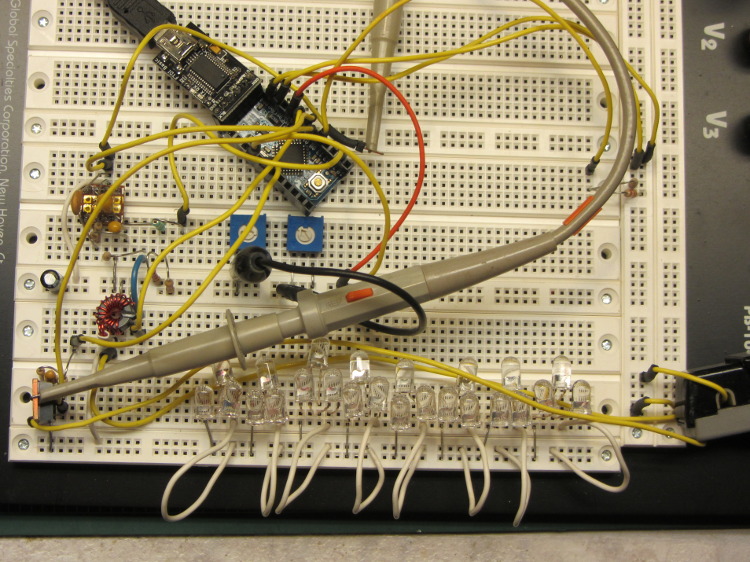
This hideous proof-of-concept lashup gathers a bunch of stuff I’ve been investigating into what’s definitely in the running for the most over-the-top LED blinky light ever:
Hall Effect LED Current Control – breadboard overview
The general idea:
A large-area bike taillight (tiny, narrow-beam, intense LEDs aren’t visible at a distance or off-axis)
Arduino Love closing the feedback loop (for programmatic blinkiness)
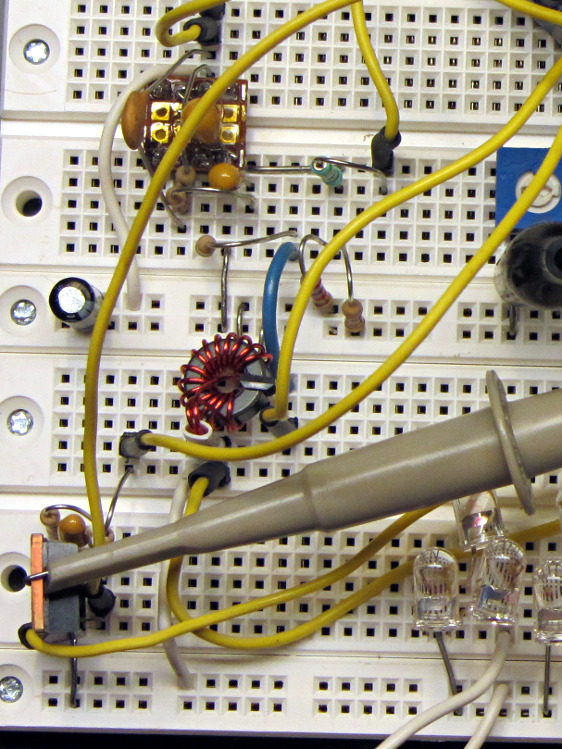
A closer look at the key analog parts:
Hall Effect LED Current Control – breadboard detail
The ferrite toroid near the middle surrounds that same “49E” Hall effect sensor. The ZVNL14 logic-level MOSFET in the lower right runs with about 2.4 V on the gate to put 120 mA through the LEDs. The cluster of parts just above it are the RC low-pass PWM filter, with the PWM running at 32 kHz. The snippet of perfboard near the top adapts a MAX4330 op amp to DIP pins. I used the twiddlepots to bring up the op amp and MOSFET circuitry by force-feeding bias and gate voltages.
The Arduino Pro Mini closes the feedback loop from current sensor to MOSFET gate. A knockoff Arduino Pro Mini is a $5 component, in onesies, delivered halfway around the planet. For low-volume stuff like this, you just build it right in and move on; there’s no reason to lay out a PCB with an ATmega328 chip and a handful of other parts. Unless you’re worried about power consumptions, as described below.
The schematic:
Hall Effect Current Feedback LED Driver – prototype schematic
The MAX4330 removes the Hall effect sensor’s VCC/2 bias, but it turns out the offset varies by enough from part to part and over temperature that a single twiddlepot setting won’t suffice. The RC filter near the middle of the schematic converts an Arduino PWM output into a voltage between 2.0 and 3.0 V, which puts more PWM resolution where it matters; the default 0.4% PWM steps are just too coarse. I think 16 bit PWM resolution would be A Very Good Thing here.
The first-pass program nulls the offset once, during the startup routine, but nulling whenever the LEDs turn off would be a Good Idea. The offset steps are 8 mV, about what you’d expect from 2/5 of the nominal 20 mV PWM increments. It ramps the offset up from zero, but you’d probably want to use a binary search.
The op amp has a voltage gain of about 28 that scales the toroid-plus-Hall-sensor output so that 500 mA in the winding produces 5 V. That gain isn’t quite high enough for the 120 mA I’m using for this collection of LEDs , but it makes the coefficient a nice round 0.10. It’d be good to have a calibrated current load, something around 100 mA, that would allow auto-calibration.
A 50% voltage divider lets the Arduino measure the nominal 7.4 V battery voltage and decide when to lower the current or change the blink pattern or kvetch about imminent blackout or something. Knowing both the battery voltage and the resistance of the current calibration load would let the program calculate the actual current for calibration. Given two calibration loads, then you could derive both the gain and the remaining offset; that’s likely too much trouble.
The Pro Mini board has a voltage regulator that provides +5 V for everything else in the circuit, which means putting the microcontroller into sleep mode won’t save any battery power. I think a p-channel MOSFET switch and a suicide output from the Arduino will be in order. A vibration sensor would give you auto power on and off, which would be a nice touch; MEMS sensors seem to want 3.3-ish V for supply and logic.
The entire lashup runs at about 60 mA with the LEDs turned off, which is way too high and may include some breadboard screwups; considerable reduction will be in order before this circuit makes any sense. The Hall effect sensor costs about 4 mA all by itself, plus another milliamp in the load resistor. The microcontroller should be around 10 – 20 mA, but the datasheet makes some assumptions that aren’t true for the Arduino runtime.
The program brute-forces the pulse timing, just to get this thing working. The main loop stalls while the LEDs are on, which is obviously a Bad Thing. The ADC conversions do some averaging, but I’m not confident it works well enough. The PWM output routine includes an entirely empirical delay to cover the filter time constants.
The blink pattern should be in a table. Given linear current control, you can have variable brightness; a “night taillight” mode that isn’t so shatteringly bright would be a Good Idea. The table might contain gate voltages for each current level, updated during the last pulse, so that the output would be Pretty Close at the beginning; you’d measure those values during startup.
A button or two for mode selection might be in order. Sealing buttons is always a problem, but this thing might not be totally waterproof anyway.
A bag of 50 cheap Hall effect sensors arrived from the usual eBay vendor, who was different from all previous eBay vendors (if in name only). Passing 124 mA through the armored FT50 toroid with 25 turns of 26 AWG wire, we find this distribution of bias points, measured as the offset from the actual VCC/2:
eBay 49E Hall Effect Sensor Bias Histogram
The bias point is actually referenced to the negative terminal (usually ground) with a ±0.25 V variation around the nominal. SS49 sensors run about 0.5 V below VCC/2 (2.25 V with a 5 V supply), SS49E sensors at 2.5 V with a tighter VCC limit that suggests you better stay pretty close to 5.0 V.
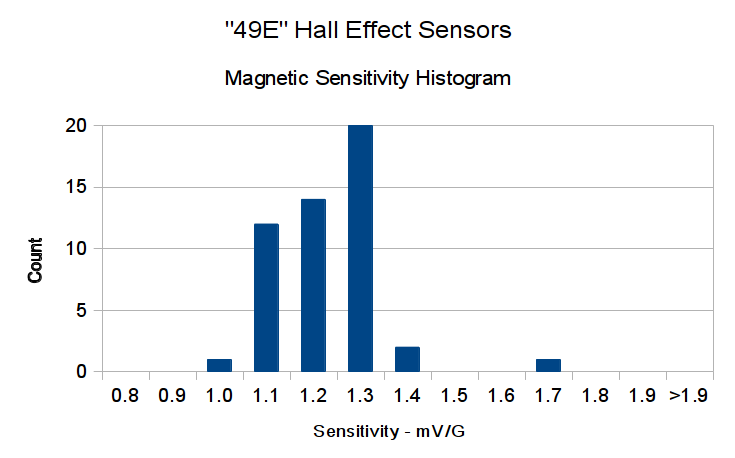
Allowing for the fact that I really don’t have good control over the actual magnetic field, the gain distribution seems tight:
eBay 49E Hall Effect Sensor Sensitivity Histogram
You’ll recall the Genuine Honeywell sensor specs:
SS49 – nominal 0.9 mV/G, limits 0.6 to 1.25 mV/G
SS49E – nominal 1.4 mV/G, limits 1.0 to 1.75 mV/G
The gain is roughly half that of the previous “49E” sensors, confirmed by sticking one of them this field. I don’t know which is more accurate, but these have a much prettier distribution.
So this lot resembles 49E sensors in both bias and gain.
Given the bias variation, though, it’s obvious that a DC application must measure the zero-field output and apply an analog offset to the amplifier, because a twiddlepot setting won’t suffice. Most likely, you’d want to update the offset every now and again to compensate for temperature variation, too.
Tossing the outliers gives an average gain of 1.17, which would give results within 10% over the lot. Given that you don’t care about the actual magnetic field, you could calibrate the output voltage for a known input current and get really nice results.
If you were doing position sensing from a known magnet, you’d want better control of the magnetic field gradient.
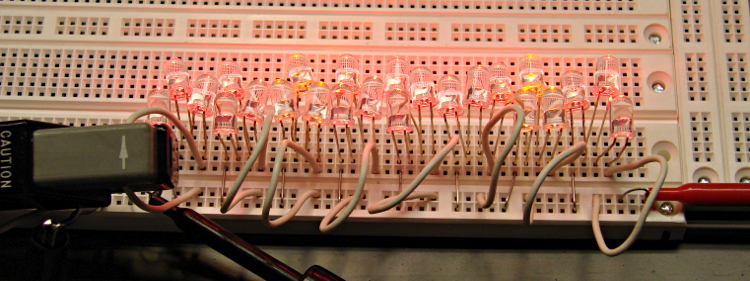
The collection of LEDs that I’ve been abusing with 100 mA pulses at 20% duty cycle got lined up in parallel, with three LEDs in series, driven from a bench power supply set to limit the current to about 180 mA:
Series-parallel LED test fixture
I sweetened the mix by adding a few other LEDs that had served their time in hell, then took some data by clipping the Tek Hall effect current probe around each of the white wires in turn:
Color
LED1
LED2
LED3
Divisions
Current – mA
Total voltage
Red
1.98
1.98
1.94
4.7
23.5
5.90
Red
1.95
1.95
2.00
3.4
17.0
5.90
Red
1.97
1.97
1.97
5.1
25.5
5.91
Yellow
1.97
1.97
1.96
4.5
22.5
5.90
Yellow
1.97
1.96
1.97
4.6
23.0
5.90
Red
1.98
1.98
1.94
4.6
23.0
5.90
Red
1.95
1.95
2.00
3.3
16.5
5.90
Red (new!)
1.99
1.96
1.94
6.4
32.0
5.89
Despite the decimals, don’t trust anything beyond the first two digits.
The LEDs started out with 6.03 V across them at that current, then settled down to 5.92 V after a few minutes of warming up.
The “new” Red string replaces a trio of old LEDs incinerated by a DVM probe fumble. They have a much higher current at the same voltage; the older LEDs have been abused enough to pass a lower current.
As an experiment, I swapped the LED with the 2.00 V drop in the string with the lowest current (line 7) and the LED with the 1.94 V drop in a string with higher current (line 6), only to find that the current followed the LEDs. Evidently, those LEDs were the limiting factor, even though their forward drops weren’t the same in their new strings.
So it seems binning based on forward drop doesn’t help much. Perhaps just line up a bunch of three-LED strings (forcing all of them to see the same forward drop), measure their current, and reject the highest and lowest strings to get a decent match among the remainder?
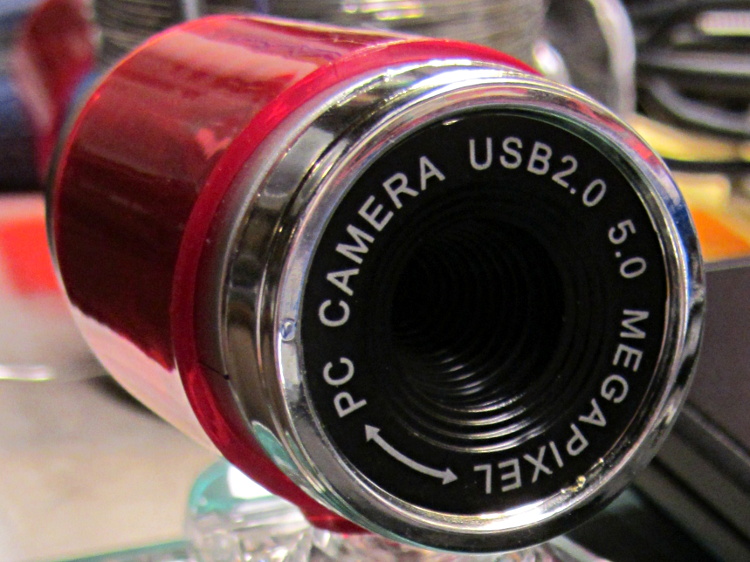
A brace of “Fashion” USB video cameras arrived from halfway around the planet. According to the eBay description and the legend around the lens, they’re “5.0 Megapixel”:
Fashion USB camera – case front
The reality, of course, is that for five bucks delivered you get 640×480 VGA resolution at the hardware level and their Windows driver interpolates the other 4.7 megapixels. VGA resolution will be good enough for my simple needs, particularly because the lens has a mechanical focus adjustment; the double-headed arrow symbolizes the focus action.
But the case seemed entirely too bulky and awkward. A few minutes with a #0 Philips screwdriver extracted the actual camera hardware, which turns out to be a double-sided PCB with a lens assembly on the front:
Fashion USB video – case vs camera
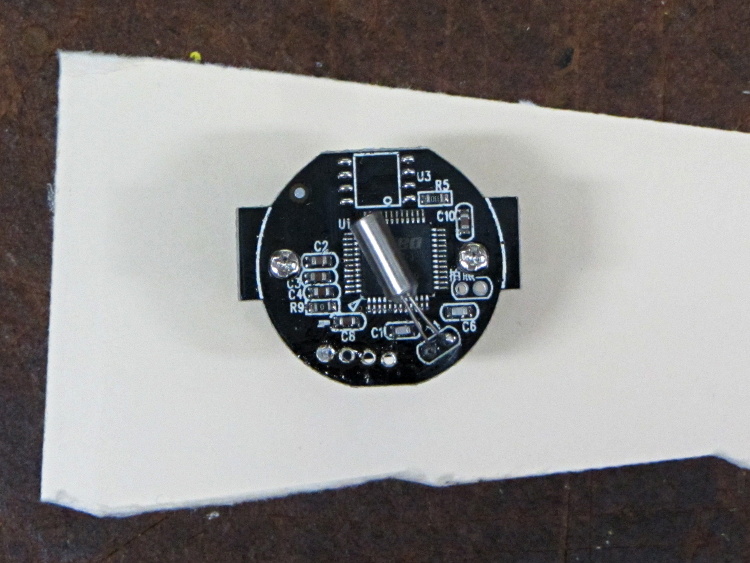
The PCB has asymmetric tabs that ensure correct orientation in the case:
Fashion USB camera – wired PCB rear
In order to build an OpenSCAD model for a more compact case, we need the dimensions of that PCB and those tabs…
Start with a picture of the back of the PCB against white paper, taken from a few feet to flatten the perspective:
img_3300 – Camera PCB on white paper
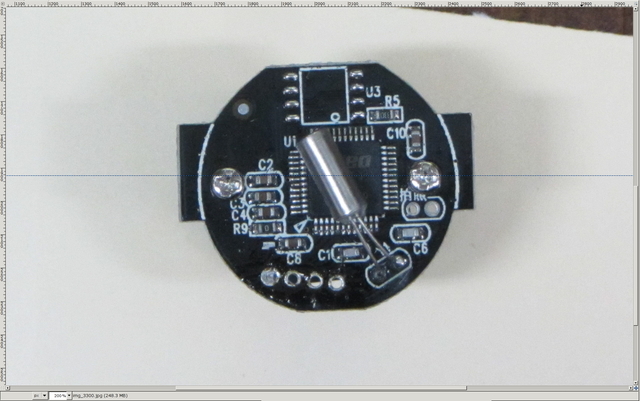
Load it into The GIMP, zoom in, and pull a horizontal guide line down to about the middle of the image:
Camera PCB – horizontal guide – scaled
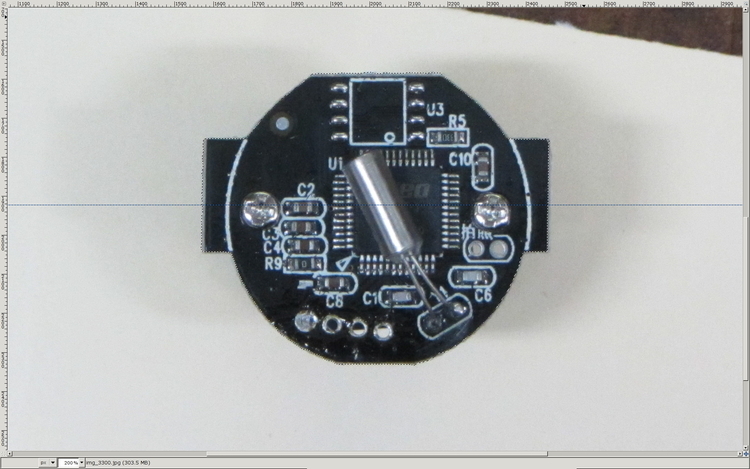
Rotate to align the two screws horizontally (they need not be centered on the guide, just lined up horizontally):
Camera PCB – rotated to match horizontal guide – scaled
Use the Magic Scissors to select the PCB border (it’s the nearly invisible ragged dotted outline):
Camera PCB – scissors selection – scaled
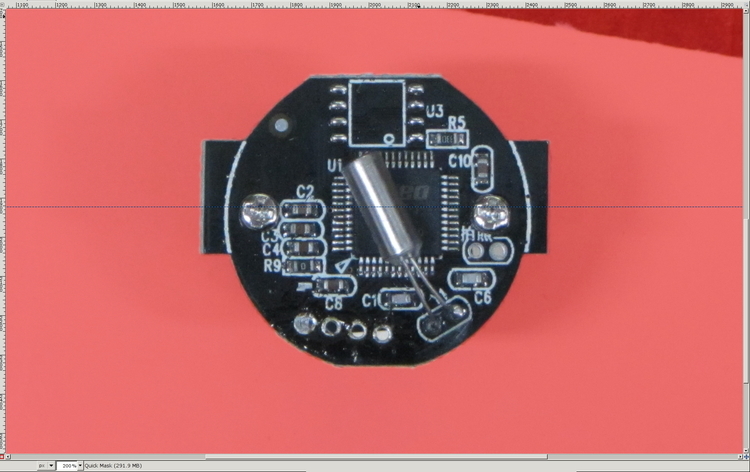
Flip to Quick Mask mode and clean up the selection as needed:
Camera PCB – quick mask cleanup – scaled
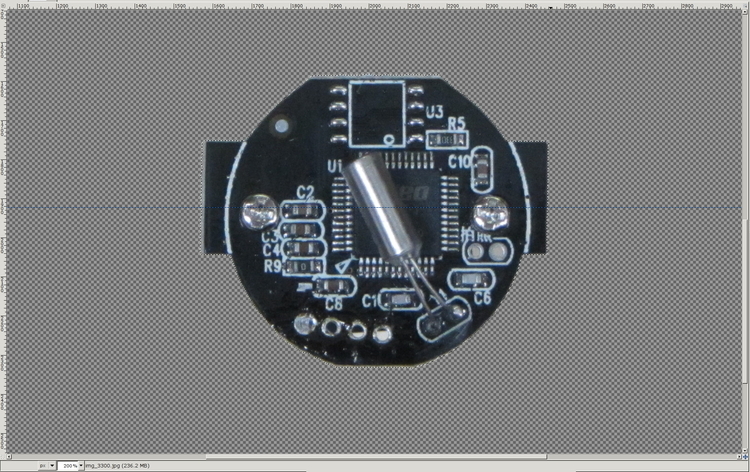
Flip back to normal view, invert the selection (to select the background, not the PCB), and delete the background to isolate the PCB:
Camera PCB – isolated – scaled
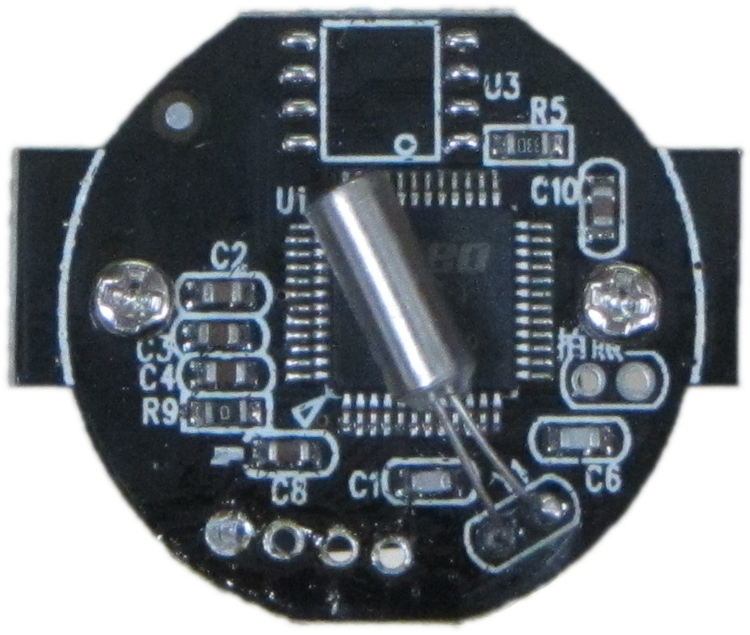
Tight-crop the PCB and flatten the image to get a white background:
Camera PCB – isolated – scaled
Fetch some digital graph paper from your favorite online source. The Multi-color (Light Blue / Light Blue / Light Grey) Multi-weight (1.0×0.6×0.3 pt) grid (1 / 2 / 10) works best for me, but do what you like. Get a full Letter / A4 size sheet, because it’ll come in handy for other projects.
Open it up (converting at 300 dpi), turn it into a layer atop the PCB image, use the color-select tool to select the white background between the grid lines, then delete the selection to leave just the grid with transparency:
Camera PCB with grid overlay – unscaled
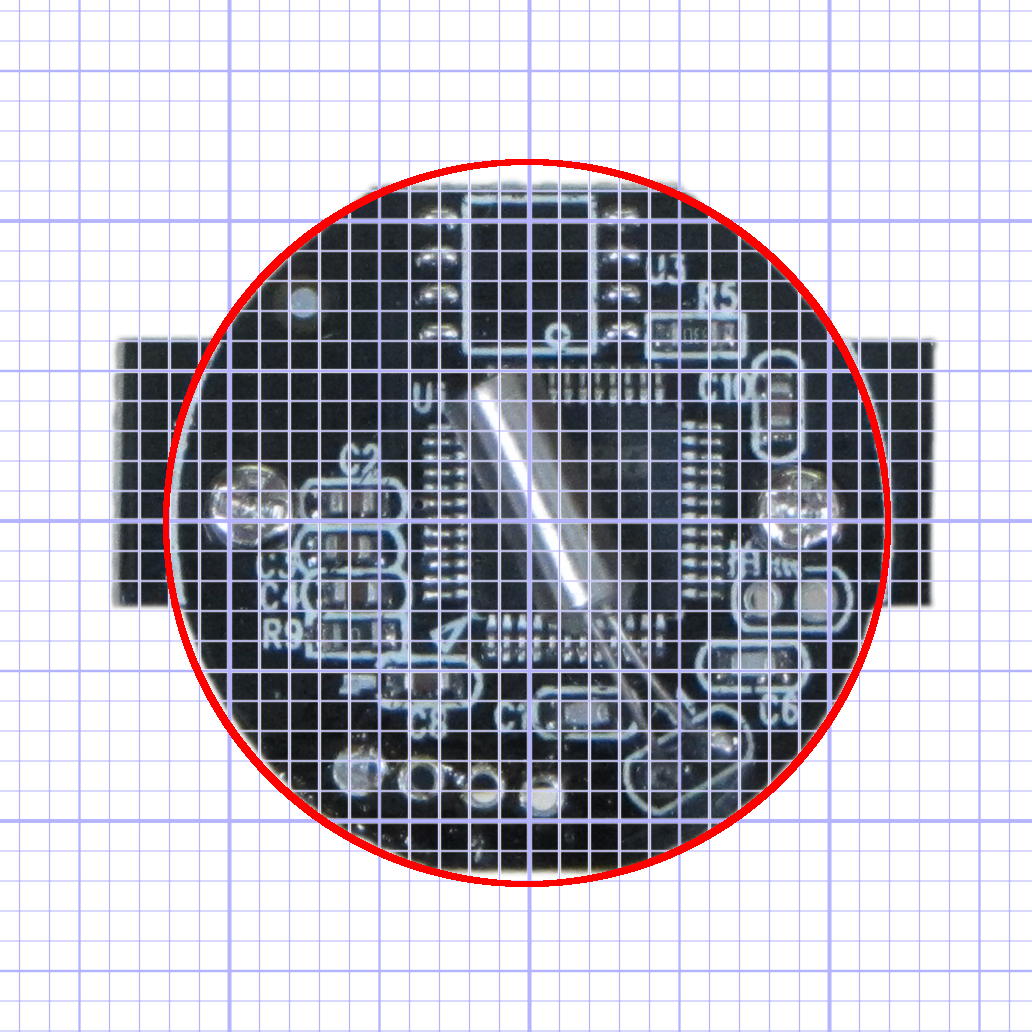
We want one minor grid square to be 1×1 mm on the PCB image, sooo…
Accurately measure a large feature on the real physical object: 27.2 mm across the tabs
Drag the grid to align a major line with one edge of the PCB
Count the number of minor square across to the other side of the image: 29.5
Scale the grid overlay layer by image/physical size: 1.085 = 29.5/27.2
Drag the grid so it’s neatly centered on the object (or has a major grid intersection somewhere useful)
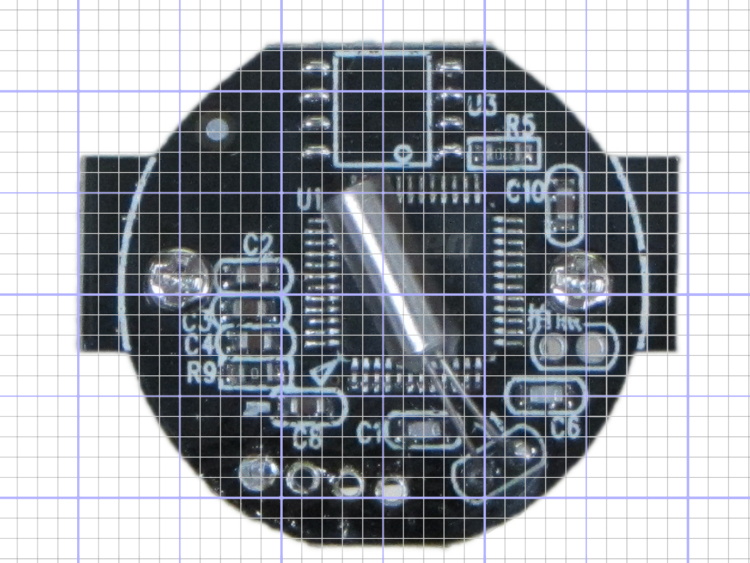
That produces a calibrated overlay:
Camera PCB with grid overlay
Then it’s just a matter of reading off the coordinates, with each minor grid square representing 1.0 mm in the real world, and writing some OpenSCAD code…
I needed a rail-to-rail op amp in a DIP package to breadboard the amplifier for those toroids and came up dry, so I sawed out a protoboard square, glued a MAX4330 in SOT23-5 atop it in classic dead-bug style, rearranged the leads into the standard DIP pinout, and moved on:
MAX4330 dead-bug style on DIP adapter
The trick to getting the header pins aligned is to stick ’em in a pile of perfboards, which instantly makes them stand up straight and parallel: