The Smell of Molten Projects in the Morning

Ed Nisley's Blog: Shop notes, electronics, firmware, machinery, 3D printing, laser cuttery, and curiosities. Contents: 100% human thinking, 0% AI slop.

Category: Electronics Workbench

Electrical & Electronic gadgets

  • Panel-mount Fuseholder Holder

    Under ordinary circumstances, a fuseholder mounts in a square-ish panel cutout, but there’s no convenient panel to be found in the repurposed GX270 case. So now there’s a holder for the fuseholder stuck to the side of the power supply inside the case:

    Fuseholder - installed
    Fuseholder – installed

    The square tube covers the entire fuseholder, with the quick-connect tabs protruding from the back, to provide enough surface area for the double-stick foam tape.

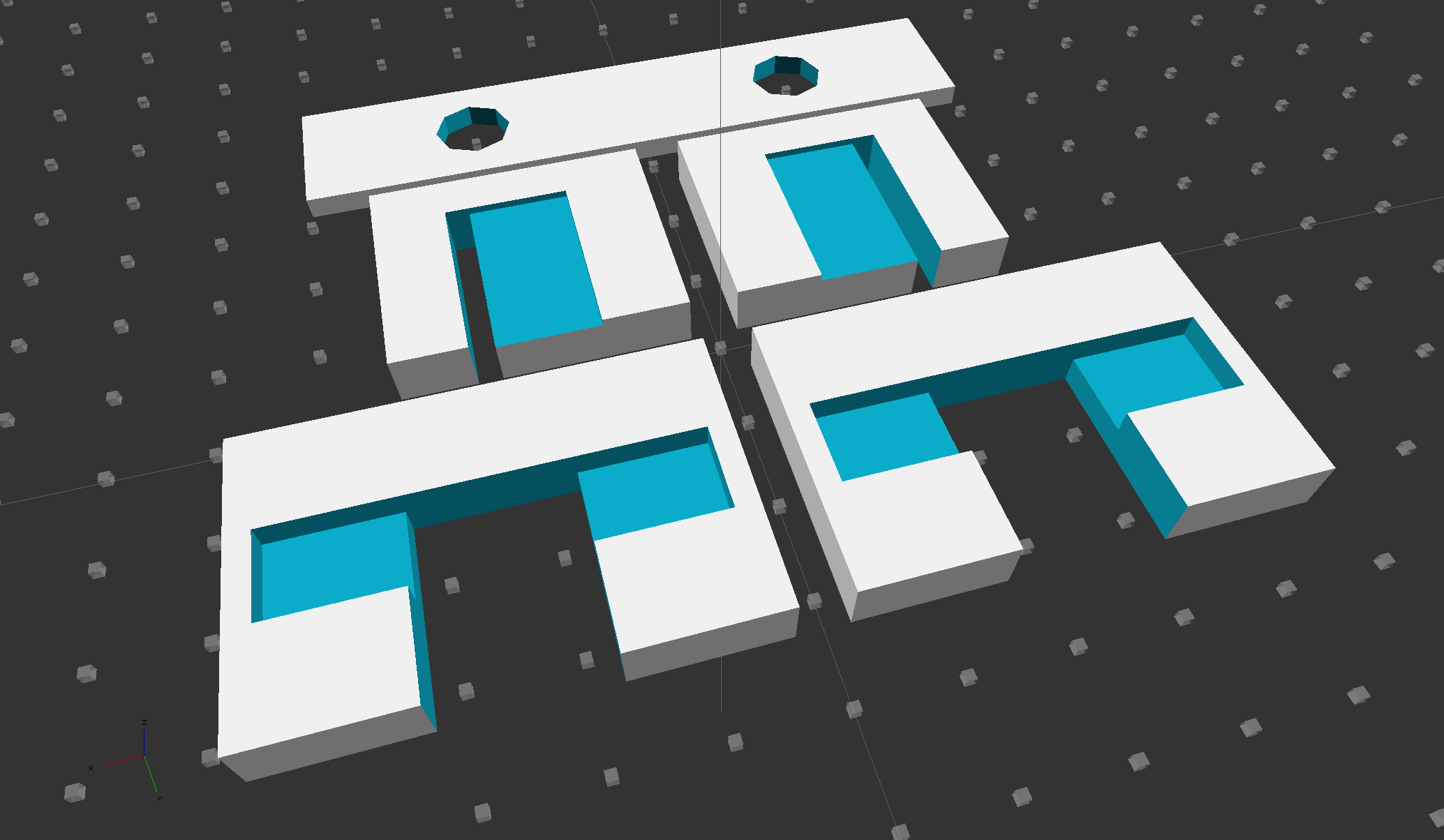
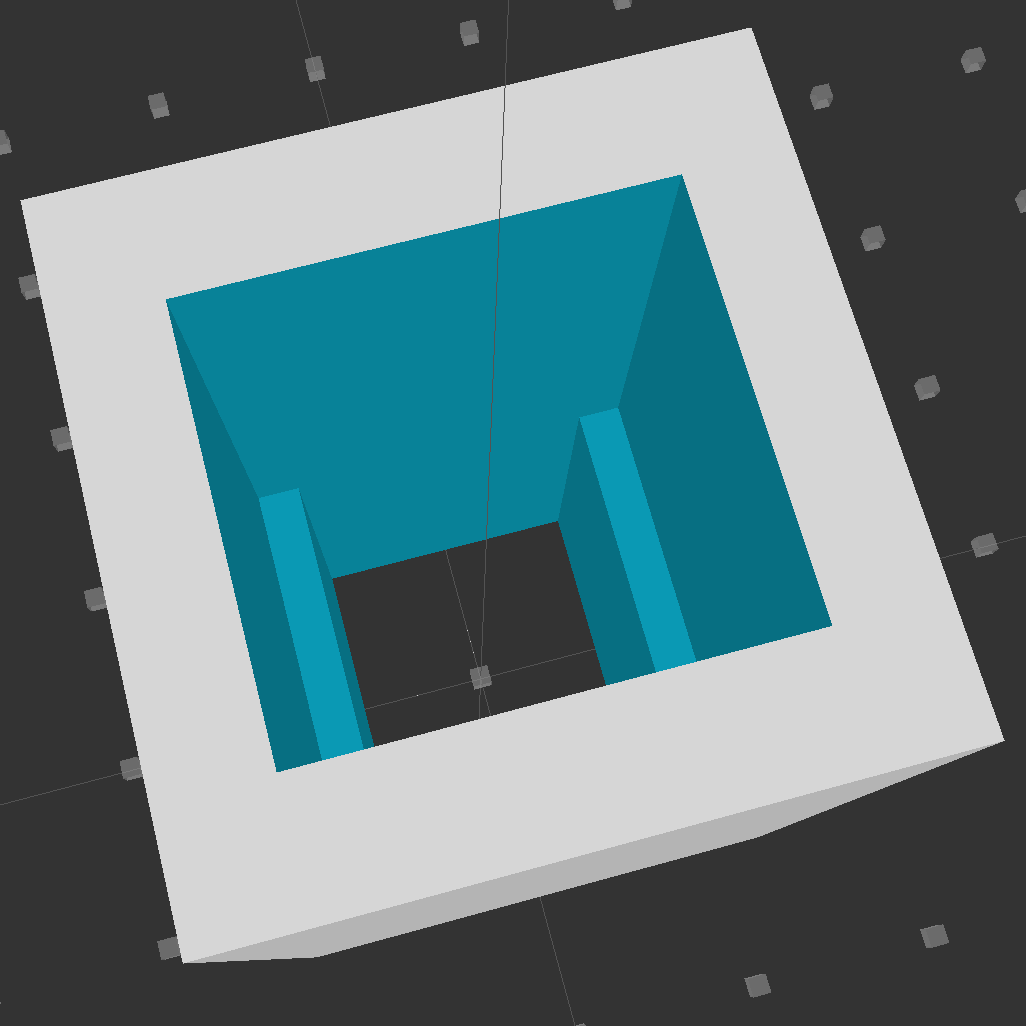
    Looking down into the solid model, you can see the reduced width near the back end:

    Fuseholder Holder
    Fuseholder Holder

    The black fuseholder contains a 5 A fast blow fuse, which should be entirely adequate for normal operation. In the event that a wire breaks loose and contacts the metal shell surrounding the whole chassis, it will pop instantly. That won’t disable the power supply, but it will remove line voltage from the entire motor controller chassis.

    Remember that the source power line goes to the center QC tab, thus burying the always-hot contact deep in the fuseholder.

    The OpenSCAD source code:

    // Fuseholder mount
    // Ed Nisley - KE4ZNU - August 2014
    
    //- Extrusion parameters must match reality!
    
    ThreadThick = 0.20;
    ThreadWidth = 0.40;
    
    HoleWindage = 0.2;			// extra clearance
    
    Protrusion = 0.1;			// make holes end cleanly
    
    AlignPinOD = 1.70;			// assembly alignment pins: filament dia
    
    function IntegerMultiple(Size,Unit) = Unit * ceil(Size / Unit);
    
    //----------------------
    // Dimensions
    
    Shell = [25.0,25];						// outside = bezel size + some stiffening
    
    Mount = [17.3,15.7,21.0];					// mount section = slight compression in X
    Base = [13.5,15.7,17.0];					// clearance over crimped contact
    
    OAL = Mount[2] + Base[2];
    
    //----------------------
    // Useful routines
    
    module PolyCyl(Dia,Height,ForceSides=0) {			// based on nophead's polyholes
    
      Sides = (ForceSides != 0) ? ForceSides : (ceil(Dia) + 2);
    
      FixDia = Dia / cos(180/Sides);
    
      cylinder(r=(FixDia + HoleWindage)/2,
               h=Height,
               $fn=Sides);
    }
    
    module ShowPegGrid(Space = 10.0,Size = 1.0) {
    
      RangeX = floor(100 / Space);
      RangeY = floor(125 / Space);
    
    	for (x=[-RangeX:RangeX])
    	  for (y=[-RangeY:RangeY])
    		translate([x*Space,y*Space,Size/2])
    		  %cube(Size,center=true);
    
    }
    
    //----------------------
    // Build it
    
    ShowPegGrid();
    
    difference() {
    	translate([0,0,OAL/2])
    		cube([Shell[0],Shell[1],OAL],center=true);
    	translate([0,0,Base[2] + Mount[2]/2])
    		cube(Mount + [0,0,2*Protrusion],center=true);
    	translate([0,0,Base[2]/2])
    		cube(Base + [0,0,2*Protrusion],center=true);
    }
    
  • Current Sensing: Powered Iron Toroid

    Dell built the GX270 I’m repurposing back in 2004, early on in the capacitor plague years, but only one of the system board caps showed signs of leakage:

    Capacitor plague - 2004 Dell Edition
    Capacitor plague – 2004 Dell Edition

    While I was harvesting some of the connectors, it occurred to me that those powdered iron inductors might make good current sensors, as they’re already wound with heavy gauge copper wires.

    I picked an inductor with enough turns and, although slitting didn’t pose much of a problem, the saw did make a mess of the turns adjacent to the cut:

    Powdered iron toroid - slitting
    Powdered iron toroid – slitting

    Iron powder has more magnetic remnance than ferrite, to the extent that iron swarf clogged the gap. After the first pass, I ran the slit toroid through the degausser to shake it clean and see what damage had been done. It looked OK, so I realigned it on the saw blade and continued the mission, with all the dust vanishing into the vacuum cleaner’s snout.

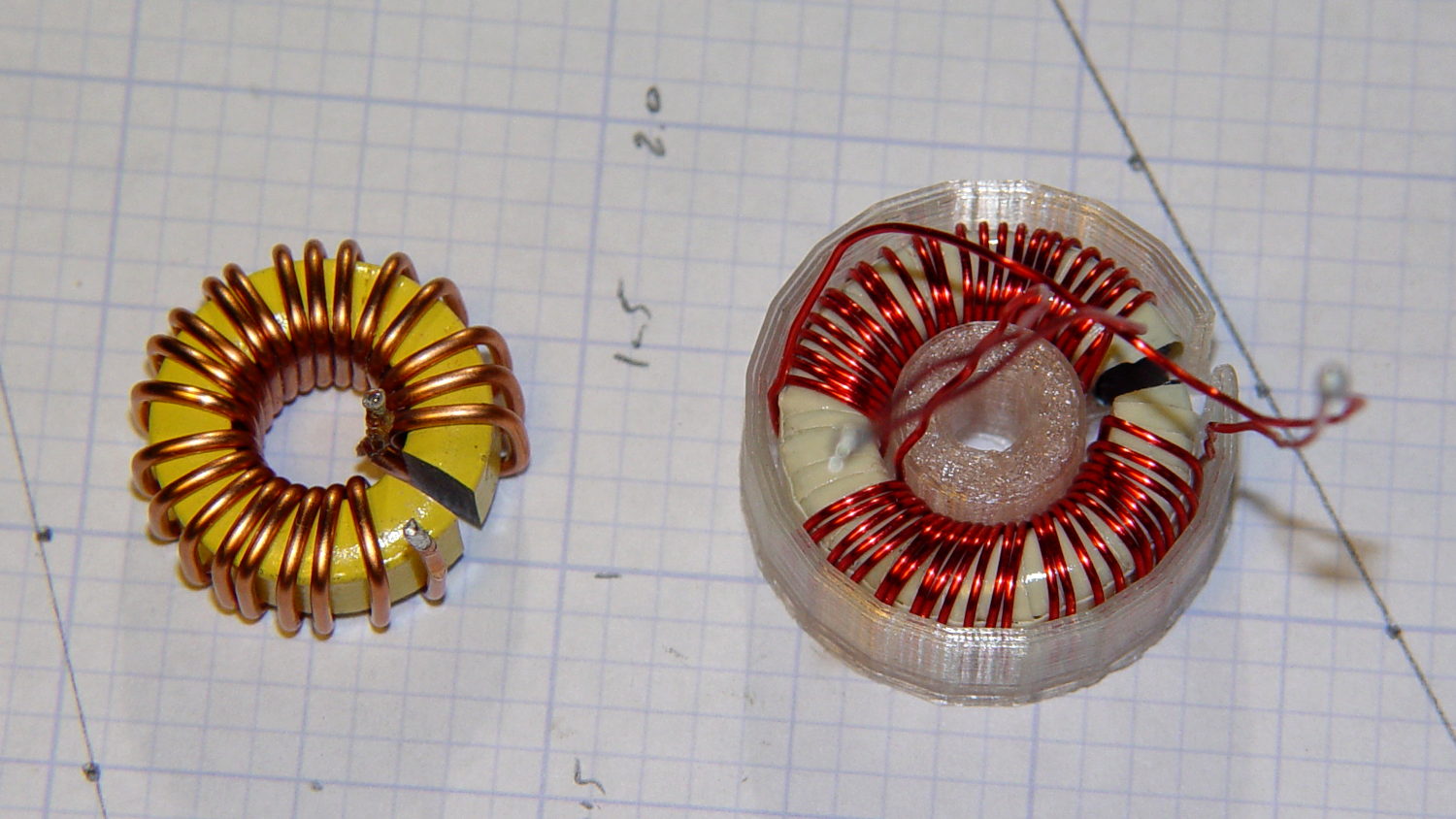
    Removing the damaged sections left 22 turns. For comparison, I converted the 56 turn ferrite toroid into a 25 turn model by paralleling two 25 turn sections:

    Slit toroids - iron - ferrite
    Slit toroids – iron – ferrite

    The enamel wire on the iron toroid measures 40 mil diameter, close enough to 18 AWG.

    Paralleling two 24 AWG windings on the ferrite toroid produces twice the copper area of a single winding, so the resistance is the same as a single 21 AWG winding (3 AWG steps = factor of two area change). That’s three steps smaller than the 18 AWG on the iron toroid, so the resistance is a factor of two larger than the heavier wire.

    The paralleled winding has the advantage of reducing the power dissipation required to produce the same magnetic flux density, without the difficulty of winding heavier wire. That may not actually matter, given the relatively low currents required by the motor in normal operation.

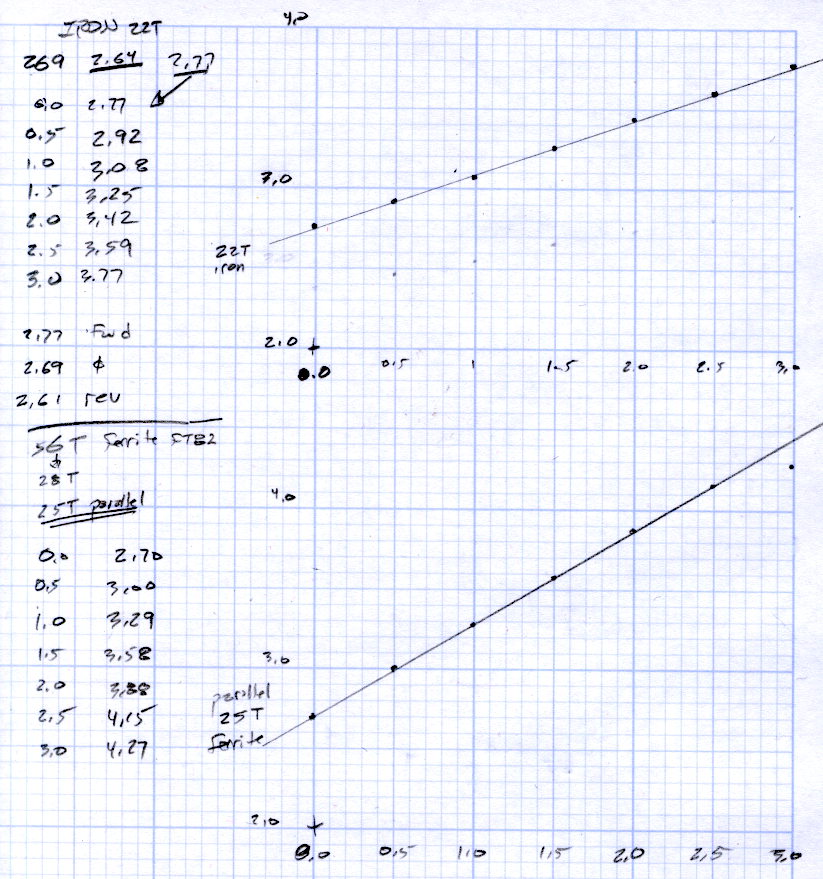
    Wedging a Hall sensor into the gaps and stepping the current produced two useful graphs:

    Iron and ferrite toroids - Hall sensor output
    Iron and ferrite toroids – Hall sensor output

    The iron toroid has lower permittivity (less flux density for a given magnetizing force), which means the full-scale range exceeds 3 A and the useful range up to 1 A covers only 300 mV.

    The last point on the ferrite curve shows the Hall sensor output saturating just over 4 V, with 1.5 V of range.

    The slope, in mV/A

    • Powdered iron: 340
    • Ferrite: 540

    Boosting the slope of the powdered iron by 25/22 gives 386 mV/A, so the iron permeability really is 70% of the ferrite. That’s modulo the gap size, of course, which surely differs by enough to throw out all the significant digits.

    Obviously, an op amp circuit to remove the offset and rescale the output to 0-5 V will be in order.

    The previous graph for the ferrite toroid with the complete 56 turn winding shows, as expected, about twice the output of this 25 turn version:

    FT82-43 - 56 turns - 24 AWG
    FT82-43 – 56 turns – 24 AWG

    The linear part of that line is 1375 mV/A, although I can’t vouch that the data came from the same Hall effect sensor. Scaling it by 25/56 gives 613 mV/A, suggesting it’s not the same sensor.

    Having developed an emotional attachment to the ferrite toroid, I’ll use it in the first pass of the current feedback circuit. If the motor need a bit less sensitivity or lower resistance, the powdered iron toroid looks like a winner.

    Memo to self: Always degauss iron toroids before slitting!

  • FC1002 Frequency Counter Faceplate: BLAM!

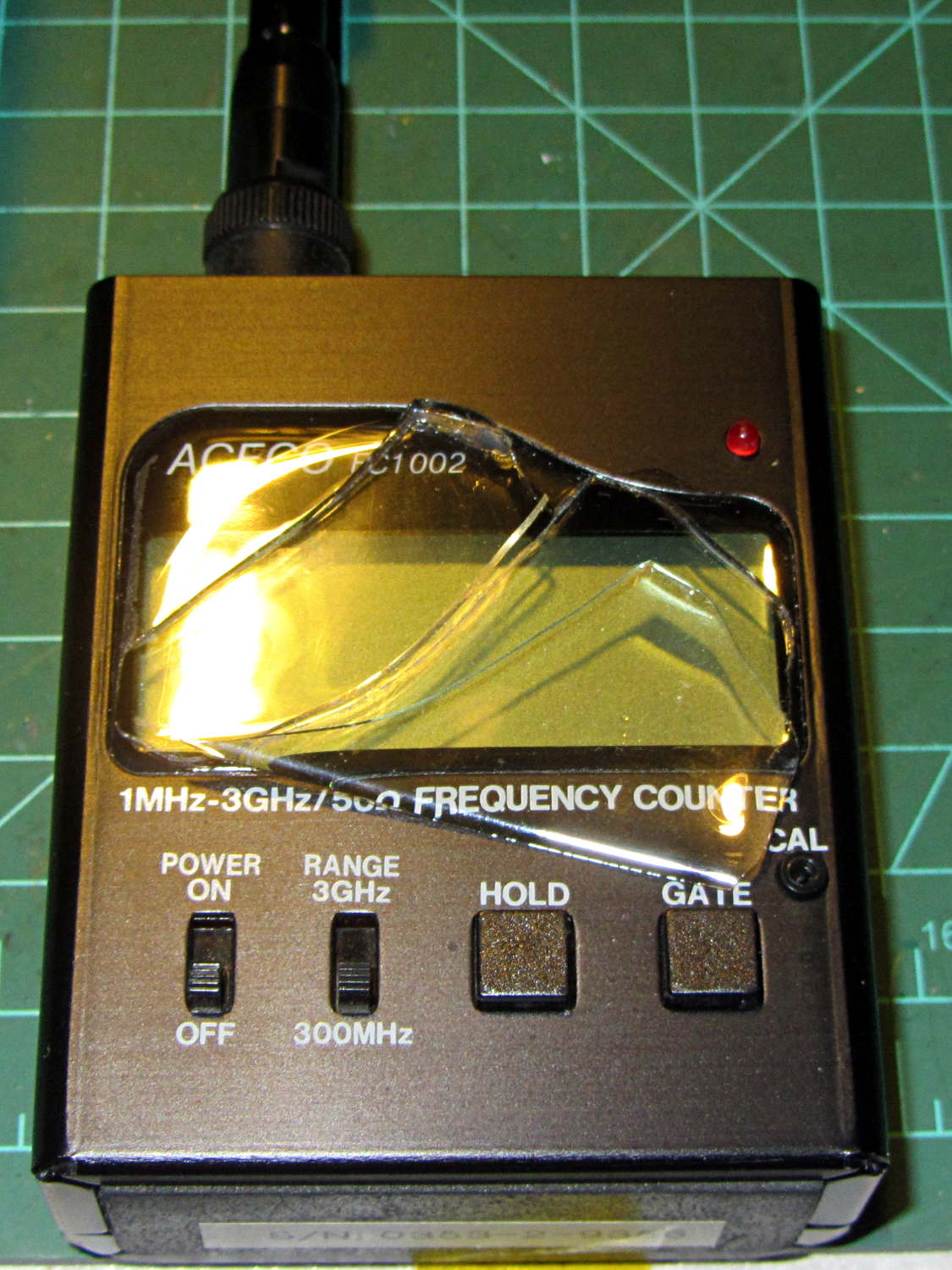
    So I picked up the frequency counter and found this:

    FC1002 Frequency Counter - split shattered faceplate
    FC1002 Frequency Counter – split shattered faceplate

    The outer, previously cracked pieces of the faceplate split parallel to the front panel, separating into two layers, and popped free of their mount. The layer closest to the panel remains intact.

    The fragments were flexible and the bottom layer was rigid, suggesting the faceplate consisted of two parts, perhaps an acrylic (?) base with a soft silicone (?) poured atop it for armor and scratch protection.

    It still works fine and the acrylic (?) layer will suffice for my simple needs, despite being slightly marred by the cyanoacrylate glue I slobbered into the cracks.

    I definitely didn’t see that coming…

  • Dell Optiplex GX270 Power Control PCB Connections

    The general idea is to gut an old Dell Optiplex GX270 and stuff the high-voltage parts of the sewing machine controller inside a well constructed and solidly grounded metal shield inside a not-too-ugly plastic box. It’d be nice to reuse the power control button and status LEDs on the front panel…

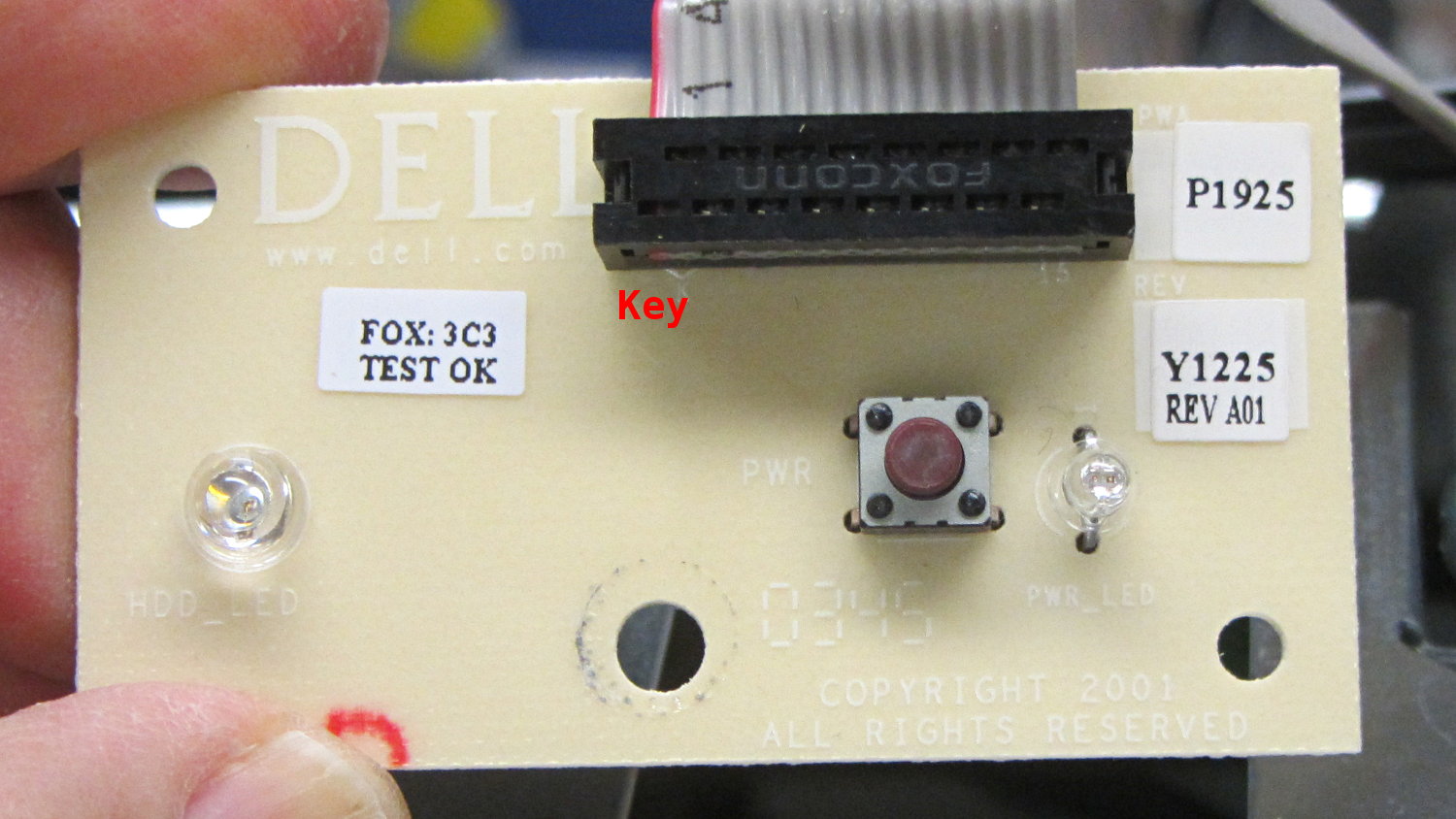
    The few parts on the front of the through-hole board:

    Dell Power Button PCB - component
    Dell Power Button PCB – component

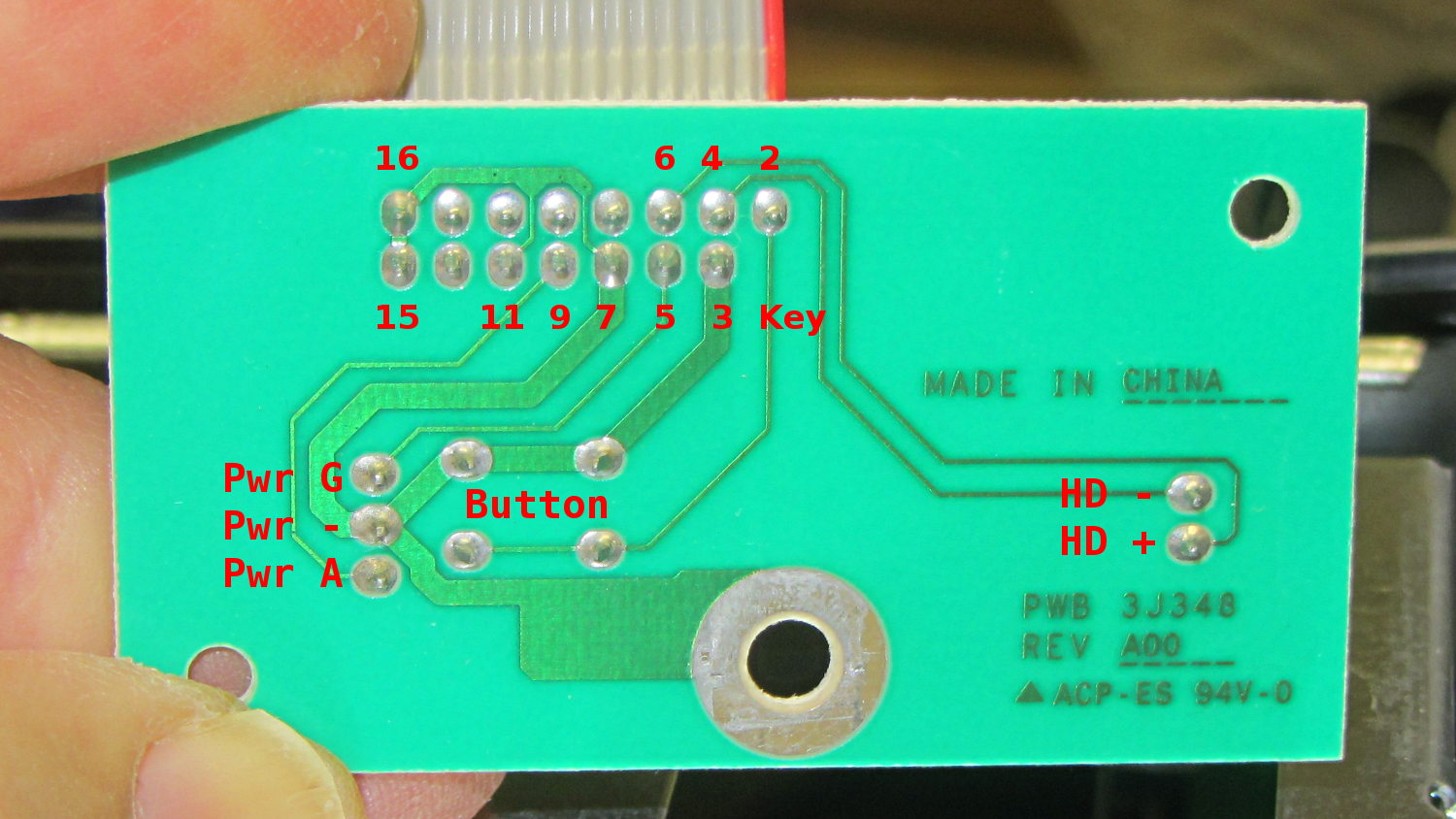
    The copper side, with annotations:

    Dell Power Button PCB - copper
    Dell Power Button PCB – copper

    The red tracer on the ribbon cable goes to Pin 1, which is a blind key on the PCB.

    The LEDs do not have ballast resistors, so those must go on a circuit board somewhere else.

    The connections:

    16 14 12 10 8 6 4 2
    Gnd nc nc nc nc HD+ HD- Button+
    Gnd nc Gnd Pwr Y+ Gnd Pwr G+ Gnd Key
    15 13 11 9 7 5 3 1


  • Eroded PTT Cable

    While installing new underseat packs (about which, more later) on my Tour Easy, I discovered a bight of PTT cable had been touching the top of the chain:

    Eroded PTT cable - Tour Easy
    Eroded PTT cable – Tour Easy

    The gentle ripples to the right of the worn-through section seem particularly nice; you couldn’t do that deliberately if you had to.

    This section of cable should have been taped to the upper frame bars. It’s hidden under the seat, just in front of the rear fender, and between the under-seat packs, so it’s basically invisible from any angle.

    Soooo, that probably explains a bit of the intermittent trouble I’d been having with the PTT switch, although most of it came from the corroded switch contacts.

    Rather than replace the whole cable, I cut out the eroded section, spliced the conductors, and taped it firmly back on the tubes.

  • Dell Power Supply: Extracting Some AC

    The case from a Dell Optiplex GX270 will hold the Kenmore 158 sewing machine’s motor control electronics, because it has a well-grounded metal box inside the plastic shell that will protect fragile humans from line voltages. The GX270 power supply will suffice for the usual stuff, but the bridge rectifier, power transistor, and suchlike require a direct connection to the AC line.

    Rather than add another plug, I soldered a nice two-wire line cord to the IEC socket terminals inside the GX270’s power supply:

    Modified Dell power supply - interior
    Modified Dell power supply – interior

    The cord follows the IEC/EU standard color code:

    • Blue – neutral
    • Brown – hot

    The power supply follows the US standard color code:

    • White – neutral
    • Black – hot

    The nice thing about standard color codes: everybody can have one!

    The yellow cable tie anchors the cord to a metal tab that, when bent at right angles, provides a convenient exit from the power supply at exactly the right location:

    Modified Dell power supply - AC cord exit
    Modified Dell power supply – AC cord exit

    The power supply mounts with the label facing inward, directly adjacent to the PCI slot covers. The new cord emerges near the bottom, inside the recess that formerly accommodated the board.

    Definitely not UL approved, but we’re well beyond that stage anyway…

  • Tour Easy: Push-to-Talk Switch Rework

    The handlebar-mounted PTT button for the amateur radio on my bike once again went toes-up, most like due to the accumlation of road dust and rainwater over the years. Rather than replace the switch, which would require peeling off a massive glob of hot melt glue and resoldering the wires, I just carved the tops off the rivets holding the cover in place, pried off the cover, and removed the button to reveal the top of the switch dome:

    Handlebar PTT switch - corroded dome
    Handlebar PTT switch – corroded dome

    Blech!

    The dome flexes outward to contact the (rather crusty) terminals on either side, so all the action happens under the dome.

    A lineup of the plastic button, the inverted dome, and the cover plate:

    Handlebar PTT switch - components
    Handlebar PTT switch – components

    The top and bottom of the dome show some grit: that’s where it contacted the switch terminals.

    Wiping the crud out of the switch body, scrubulating everything with contact cleaner, and putting it all back together restored the switch to working order. There’s (once again) a snippet of Kapton tape over the cover holding it in place, but I don’t expect this to last very long:

    Handlebar PTT switch - kapton cover
    Handlebar PTT switch – kapton cover

    But it works well enough for now …