Ed Nisley's Blog: Shop notes, electronics, firmware, machinery, 3D printing, laser cuttery, and curiosities. Contents: 100% human thinking, 0% AI slop.
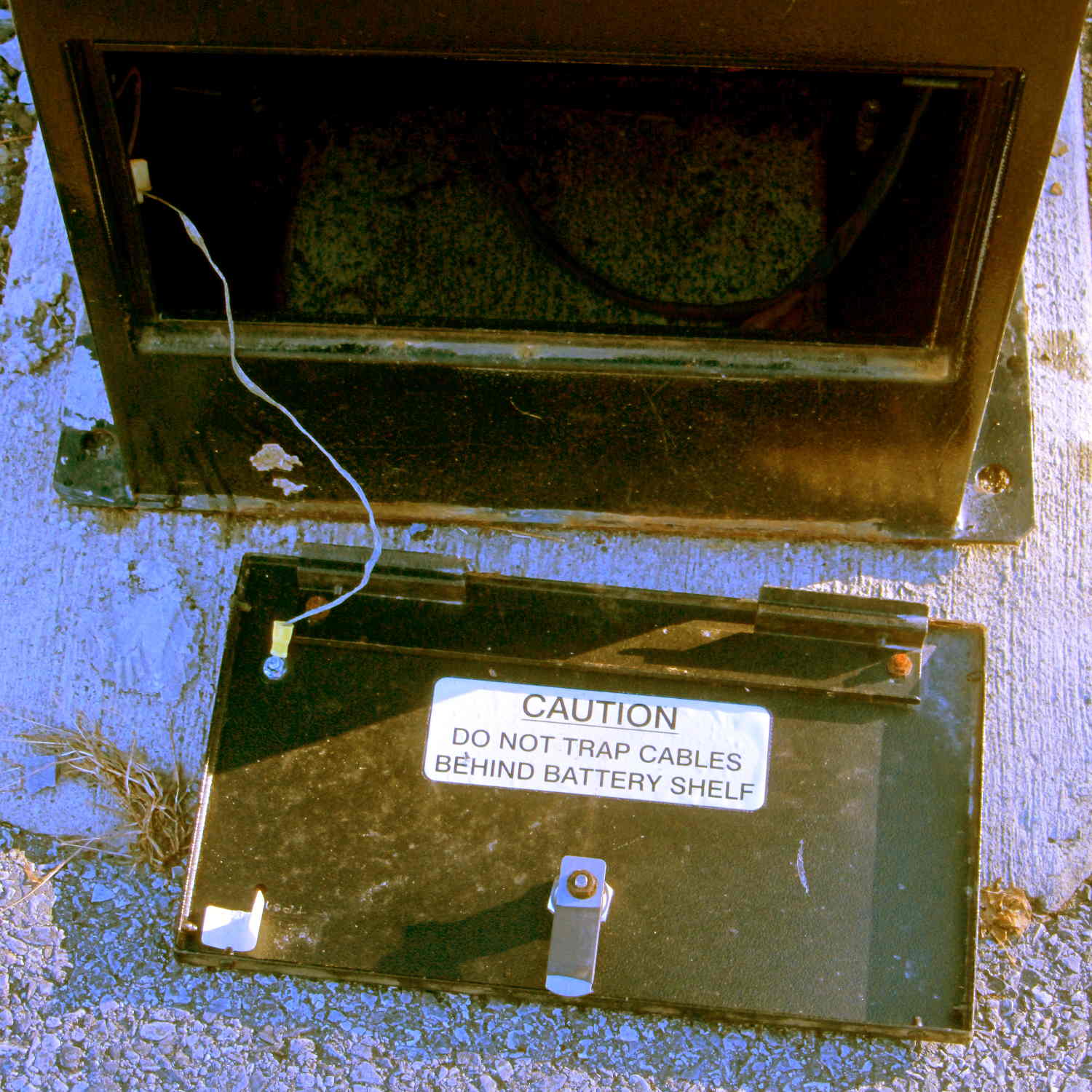
So we took an out-and-back walk across the Walkway Over the Hudson, after which I spotted this amusing sight:
Parking Meter – empty battery box
The horrible color balance comes from using a preset tuned for the M2’s new LED lights, rather than letting the camera figure things out on its own, then fighting it down after cropping.
Anyhow, we did a bit over two miles of walking with outdoor temperature just over freezing. The camera lives in the left cargo pocket of my pants and the spare NB-5L battery in the camera case faces outward. Neither battery would power the camera at ambient temperature; evidently, being that cold reduced their output voltage below the level that the camera would accept.
With a cold battery, the camera grunted, displayed a message about replacing the battery, and promptly shut itself off. Warming one of the batteries boosted its terminal voltage enough to take the picture, which accounts for not getting the proper color balance: I was fully occupied just getting the camera working.
Back home and warmed up, the camera said both batteries were fully charged. They came from the BNF27 lot that produced low terminal voltages, so I’ll reserve them for warmer weather and use the BNI13 lot during the next few months.
The cardboard package liner claims the lithium-ion battery inside our Larval Engineer’s shiny new InstaBoost jump starter is good for 10.8 A·h and and the minuscule inscription on the case truncates it to 10 A·h. Given what I’ve seen for other batteries, either value would be true when measured under the most favorable conditions, but these curves still came as a bit of a surprise (clicky for more dots):
Pilot Instaboost
The three short, abruptly dropping curves come from the main terminals, with the battery clamps attached to similar clamps (with a glitch when they shifted position) plugged into my CBA II/IV battery tester, showing that the InstaBoost shuts off after a few minutes, regardless of load. That makes good sense: don’t connect a lithium battery to a lead-acid battery for more than a few minutes!
The two longer curves come from the 12 V jack on the side and show that it will run until the battery goes flat. Evidently, the internal battery protection circuit cuts out at less than the 10 V minimum I used for these tests.
I didn’t bother testing the USB charging outlet, as I assume it would produce 5 V at 1 A for slightly less than twice as long.
Under the most favorable conditions I could come up with, the actual battery capacity of 3.5 A·h is a third of what it should be. I’d expect that from the usual eBay supplier, not Lowe’s.
Given the cheapnified clamps, perhaps Pilot deliberately gutted the battery capacity to save a few bucks. After all, the customers will never notice. Will they?
Except…
Another customer took his apart and found three 3.6 A·h “high output” (whatever that means) lithium cells in series. In that configuration, the individual cell capacity does not add and the pack should produce about 3.6 A·h. Those curves show it produces slightly less than that when discharged to 10 V, which means the thing works exactly like you’d expect. Indeed, it’s better than a typical second-tier product and much better than typical eBay crap.
The most charitable explanation would be that somebody screwed up, multiplied the number of cells by their individual capacity, put that number in the specs, and everyone downstream ran with it. If the cells were in parallel, then the total capacity in ampere·hours would equal the sum of the cell capacity.
If you change the specs to match the as-built hardware, then, apart from those cheapnified clamps, it’s working just fine…
Even though the current has the usual exponential relationship to the terminal voltage, the slope at 200 mA (100 mA each, assuming they share & share alike) remains low enough that I (think I) can get away with just dialing in a voltage and leaving it at that; changes due to small temperature variations won’t cause meaningful differences in the current.
That’s easier than building an adjustable current regulator, anyway.
The heap disgorged two cheap DC-to-DC boost converters from halfway around the planet, with about the right specs:
So I wired one up to the bench supply, set it for 12 V, turned it on, and wham it maxed out the supply at 3 A with no load on the converter’s output.
Huh.
Adding a suitable load resistor brought the input current down, but the voltage adjustment trimpot didn’t have much effect and the bench supply would still wham hit 3 A with no provocation, so the load resistor didn’t actually make any difference. Eventually, I figured out that simply pressing my finger on the trimpot caused the output to vary wildly.
Given that fairly broad hint, this became obvious:
Boost Converter – trimpot pins
Evidently, I had used the other converter for the previous tests. Huh.
With that trimpot pin soldered in place, the converter worked fine. Eyeballometrically speaking, the LEDs seem bright enough at 100 mA total (50 mA each) for my purposes, which happens at 18-ish V. Dissipating only 2 W won’t require nearly as much heatsink as they’re presently mounted on, although I should wait for warmer weather before concluding that they’re doing OK while crammed inside the end cap.
Before declaring victory, I took a closer look at the board and found this mmm oversight:
Boost Converter – masked 78L09 tab
Notice the big pad under the 78L09 regulator, with six thermal vias to an expansive copper pour on the other side of the board, completely covered with red solder mask.
Removing the regulator show the regulator’s footprint didn’t include the tab:
Boost Converter – 78L09 footprint
Maybe they decided, after a careful analysis, that the regulator couldn’t possibly dissipate enough power to warrant the additional solder required for the entire thermal pad. Heck, pocket a fraction of a yuan on ten million boards and you’re livin’ large.
Scraping the mask off, fluxing everything in sight, and soldering the regulator down probably won’t make any difference:
Boost Converter – scraped and soldered
Yes, The Bigger The Blob, The Better The Job strikes again. It does make me feel better and that’s all that counts.
The LED mounting plate inside the sewing machine’s end cap sits 30° from the vertical axis of the needle. Even though the surface-mount LED emitters have a broad pattern, it seemed reasonable to aim them toward the needle to put the brightest spot where it’s needed.
The LEDs must have enough heatsinking to pull 2+ W out of the solder pads, so I figured I’d just epoxy them firmly to the mounting plate, rather than try to gimmick up a circuit board that would interpose a fiberglass slab in the thermal path.
Combine those two requirements and you (well, I) get a wire fixture that provides both power and alignment:
LED mount – wire fixture
The LED body is 5 mm square, sin(30°) = 0.5, and the rear wire raises contact end by 2.5 mm. This still isn’t an exact science; if the center of the beam lands in the right time zone, that’s close enough.
Testing the LED assembly at low current before entombing it shows the emitters have six chips in series (clicky for more dots):
LED mount – lighting test
The grotendous solder job follows my “The Bigger the Blob, the Better the Job” principle, modulated by the difficulty of getting a smooth finish on bare wires. Indeed, the first wires I painstakingly bent, set up, and soldered turned out to have an un-solderable surface, much like the header pins from a while ago. That hank of wire now resides in the copper cable recycling bucket; you’re looking at Version 1.1.
Two strips of Kapton tape under the ends of the wires hold them off the (scoured and wiped clean!) aluminum plate, with more tape forming a dam around the nearest edges:
LED mount – epoxy pour
Despite being steel-filled, JB Weld remains nonconductive, the epoxy-filled gap under the wires insulates them from the plate, the wires aren’t shorted together, and there’s a great thermal bond to the heatsink. Good stuff, that JB Weld!
A view from the back side shows the epoxy sagging over the wires before I added another blob:
LED mount – epoxy pour – rear
The LED assembly just sits there, without being anchored, until the epoxy cures. The epoxy remains thick enough (in the rather chilly Basement Laboratory) so that it doesn’t exactly pour, can be eased into place without too much muss & fuss, and stays pretty much where it’s put.
After the epoxy stiffened a bit, I gingerly positioned stranded wires not-quite-touching the LED wires and applied a dot of solder to each. Powering the LEDs from a bench supply at 500 mW each took the chill off the heatsink and encouraged proper curing:
LED mount – heated epoxy cure
Fast forward to the next day, return the heatsink to the Sherline, and drill a hole for the power cable. It’s centered between the wires in Y and between the fins in X, which is why I couldn’t drill before mounting the LEDs:
LED mount – drilling cable hole
It’s not like I’m building this from any specs…
Trim the wires, solder the cable in place, cover the wire ends & joints with JB KwikWeld epoxy, and it’s done:
LED mount – final epoxy
With the LEDs running their 230 mA rated current, the entire heatsink gets pleasantly warm and the mounting plate isn’t much warmer than that. I loves me a good JB Weld job…
However, I suspect they’ll shine too brightly at full throttle, which means an adjustable power supply looms on the horizon…
So one of my Genuine Sony 64 GB MicroSDXC cards stopped working in my Genuine Sony HDR-AS30V action camera, failing to record video after starting normally.
For example:
The RCVER status display doesn’t appear anywhere in the manual, but also occurs when the camera must rebuild its metadata indexes. Or something like that. Anyhow, it’s obviously unhappy about what just happened in the course of recording.
After several weeks of having Sony ignore my emailed requests (no “email agent” never contacted me after the initial “we’re on it” autoreplies) and after several days of being blown off by their phone menu (800-222-7669 and 800-282-2848 lead to the same tree, after which 5 – 1 – 6 disconnects after one ringy dingy), I got another number by picking a reasonable (to me) option and bulldozing the pleasant voice off-script: 877-440-3453. It turns out that if you’re at the Digital Camera node in the Sony tech support tree, the helpful agent cannot find the model number of the SR-64UY MicroSDXC card in their database, even though I’m looking at the Sony Support web page describing it.
Anyhow, 877-440-3453 (or the “direct” 956-795-4660) produces a pleasant voice that directs me to their Media Services center in Texas and, after clicking on the Ordering Information menu item (isn’t that obvious?), produces a PDF that one fills in and sends with the failed media for their perusal.
Being that type of guy, I sent in a somewhat more extensive description than would fit in the tiny space on the form:
The problem with this SR-64UY MicroSDXC card (serial N73WAXOP) is that it cannot record video at the highest resolution produced by my SONY HDR-AS30V action camera: 1920x1080p @ 60 fps.
The formatted data capacity seems unchanged at 59 GB, so the problem is not a loss of capacity.
The camera starts recording and will continue for a few seconds or a few minutes, at which point it stops recording, flashes WAIT, then RCVER (“recover”), then returns to its idle mode. The recorded video is correct up to the failure.
I have reformatted the card in the camera, which does not correct the problem.
An identical SR-64UY MicroSDXC card (serial N73WA9JM), bought shortly afterward and not used, continues to operate correctly, so the problem isn’t the fault of the camera.
The failing card (XOP) has recorded less than 100 sessions since August, while the working card (9JM) has been sitting, unused, on my desk. Recording sessions generally run 45 to 90 minutes and the AS30V produces a 4 GB every 22 minutes, so each session involves 2 to 6 large video files, plus the same number of thumbnails. I transfer the files to a PC and delete them from the card after each session. The card has therefore recorded only 1000 GB of video before failing.
The XOP card can record video at 1920×1080 @ 30 fps and all lower resolutions. The camera requires a Class 4 speed, which means that the SR-64UY card no longer meets its Class 10 / U 1 speed rating.
Please replace this card with one that meets its speed rating.
Thank you…
The replacement card just arrived, so a speed reduction is a warranty failure.
I’ll test this one by plugging it into the high-amperage Micro-USB charger for the Kindle, aiming it at a clock, and letting it run until it’s either filled the card with excruciatingly boring high-data-rate video or crashed & burned in the attempt.