The Smell of Molten Projects in the Morning

Ed Nisley's Blog: Shop notes, electronics, firmware, machinery, 3D printing, laser cuttery, and curiosities. Contents: 100% human thinking, 0% AI slop.

Category: Electronics Workbench

Electrical & Electronic gadgets

  • Cheap WS2812 LEDs: Test Fixture Current

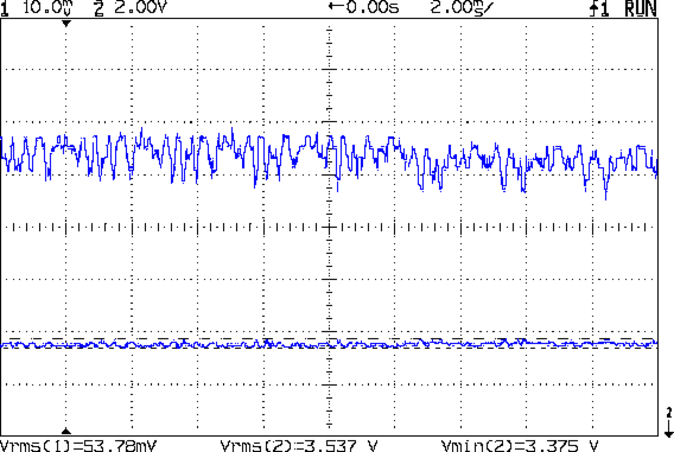
    With the WS2812 test fixture neatly mounted, I plugged it into a six-port USB charger allegedly capable of supplying 2.4 A per port and captured a trace with nearly all 28 LEDs displaying full white:

    WS2812 4x7 array - 200 mA VCC - all on
    WS2812 4×7 array – 200 mA VCC – all on

    At 200 mA/div, the top trace shows a bit under 1.2 A, a bit under the 1.68 A = 28 × 60 mA you’d expect; in round numbers, each RGB pixel draws 43 mA. Actually, the WS2812 specs don’t specify the maximum / typical LED current and, on belief and evidence, I doubt these units meet any particular specs you’d care to cite.

    Also, the supply voltage (measured across the LED array “bus bar” wires) hits 3.37 V, well under the 5 V you’d expect from a USB charger and less than the 3.5 V called for by the WS2812 specs. Although the WS2812 nominally limits the LED current, there’s no telling how it varies with supply voltage.

    A cheap USB 1 A wall-wart charger produced far more hash:

    WS2812 4x7 array - 200 mA VCC - all on - cheap 1A wart - 20 uF
    WS2812 4×7 array – 200 mA VCC – all on – cheap 1A wart – 20 uF

    That’s with an additional 20 µF of tantalum capacitance across the power bus bars. The peak current looks like 1.4 A, with marginally more supply voltage at 3.56 V.

    Bumping the trace speed shows the wall wart produces nasty current spikes, at what must be the poor thing’s switching speed, as it desperately tries to produce enough juice for the LEDs:

    WS2812 4x7 array - 200 mA VCC 50 us - all on - cheap 1A wart - 20 uF
    WS2812 4×7 array – 200 mA VCC 50 us – all on – cheap 1A wart – 20 uF

    The step over on the right looks like a single RGB LED going dark, as it’s about 50 mA tall.

    The output voltage doesn’t show the same spikes, so the LED array acts like a constant-voltage load. Given that the WS2812 probably connects all the LEDs pretty much straight across the supply, that’s not far from the truth: we’re looking at the forward drop of those blue LEDs.

    Now, to let it cook away in the cool and the dark of the Basement Laboratory…

  • Cheap WS2812 LEDs: Test Fixture Mount

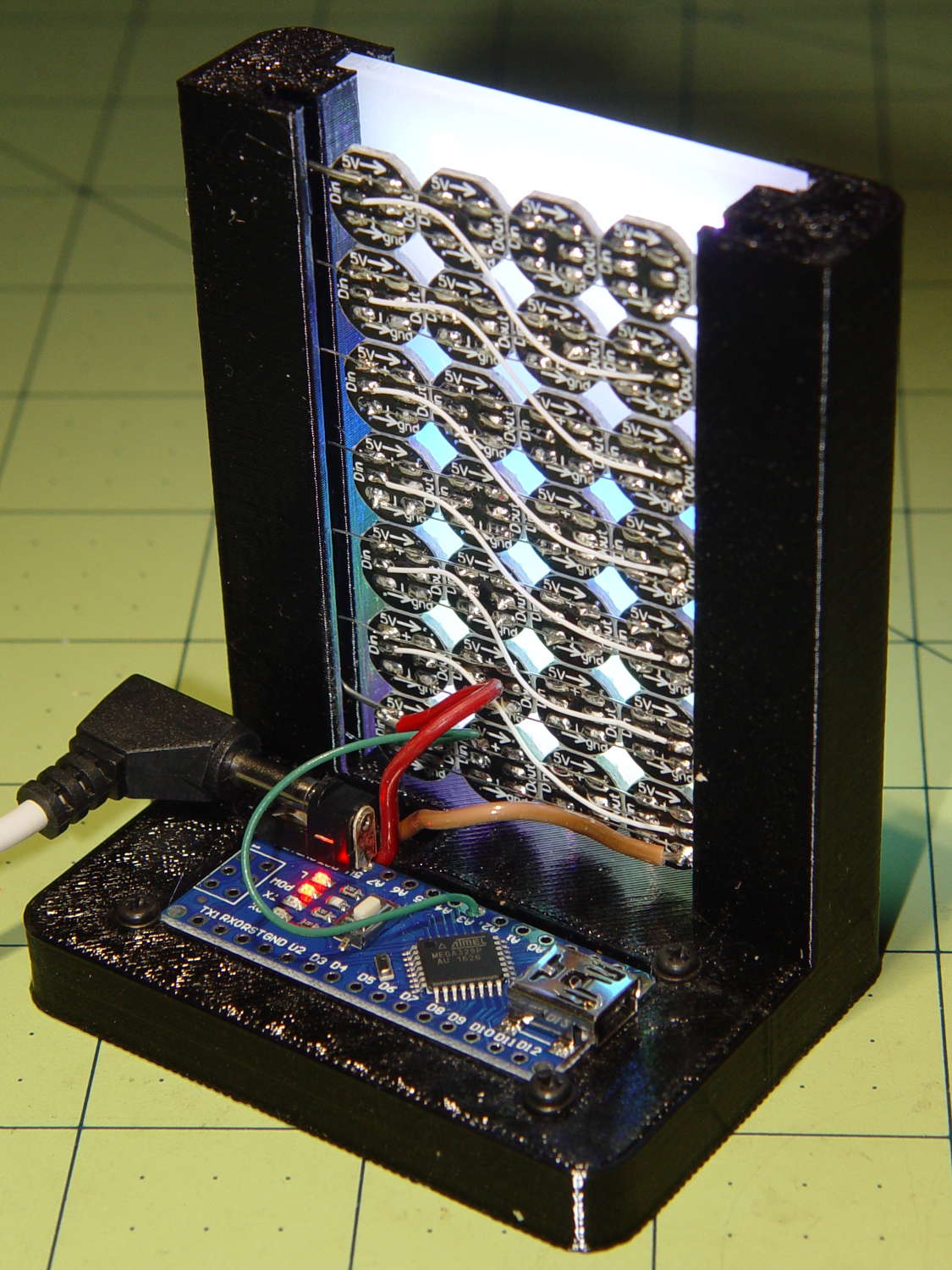
    Mounting the ungainly WS2812 LED test fixture seemed like a Good Idea to keep the electricity out of the usual conductive litter:

    WS2812 array test fixture - rear
    WS2812 array test fixture – rear

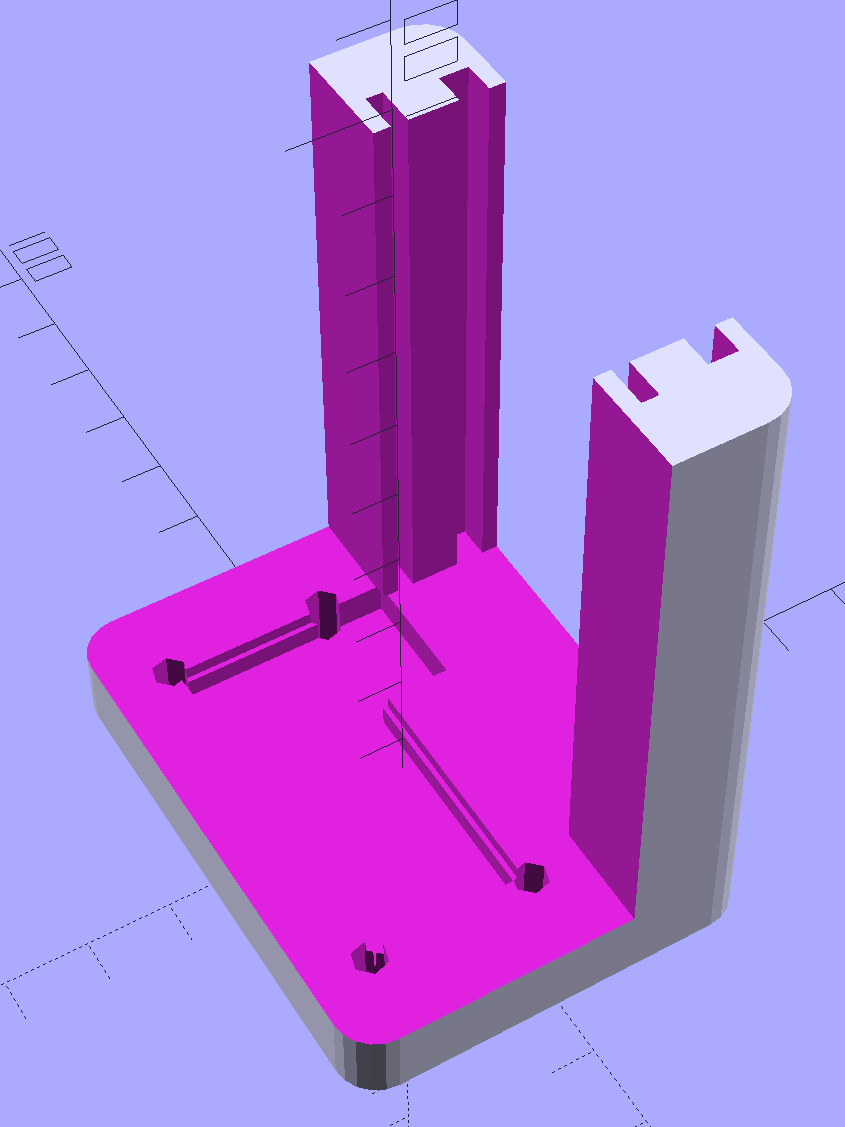
    The solid model shows more details:

    LED Test Fixture - solid model
    LED Test Fixture – solid model

    The power wires along the array edges slide into the rear (thinner) slot, with enough friction from a few gentle bends to hold the whole mess in place.

    The knockoff Arduino Nano rests on the recessed ledge in the pit, with M2 screws and washers at the corners holding it down (the PCB’s built-in holes might work with 1 mm or 0-90 screws, but that’s just crazy talk). I soldered the power wires directly to the coaxial jack pins under the PCB; they snake out to the LEDs through the little trench. There should be another cutout around the USB connector for in-situ programming, although the existing code works fine.

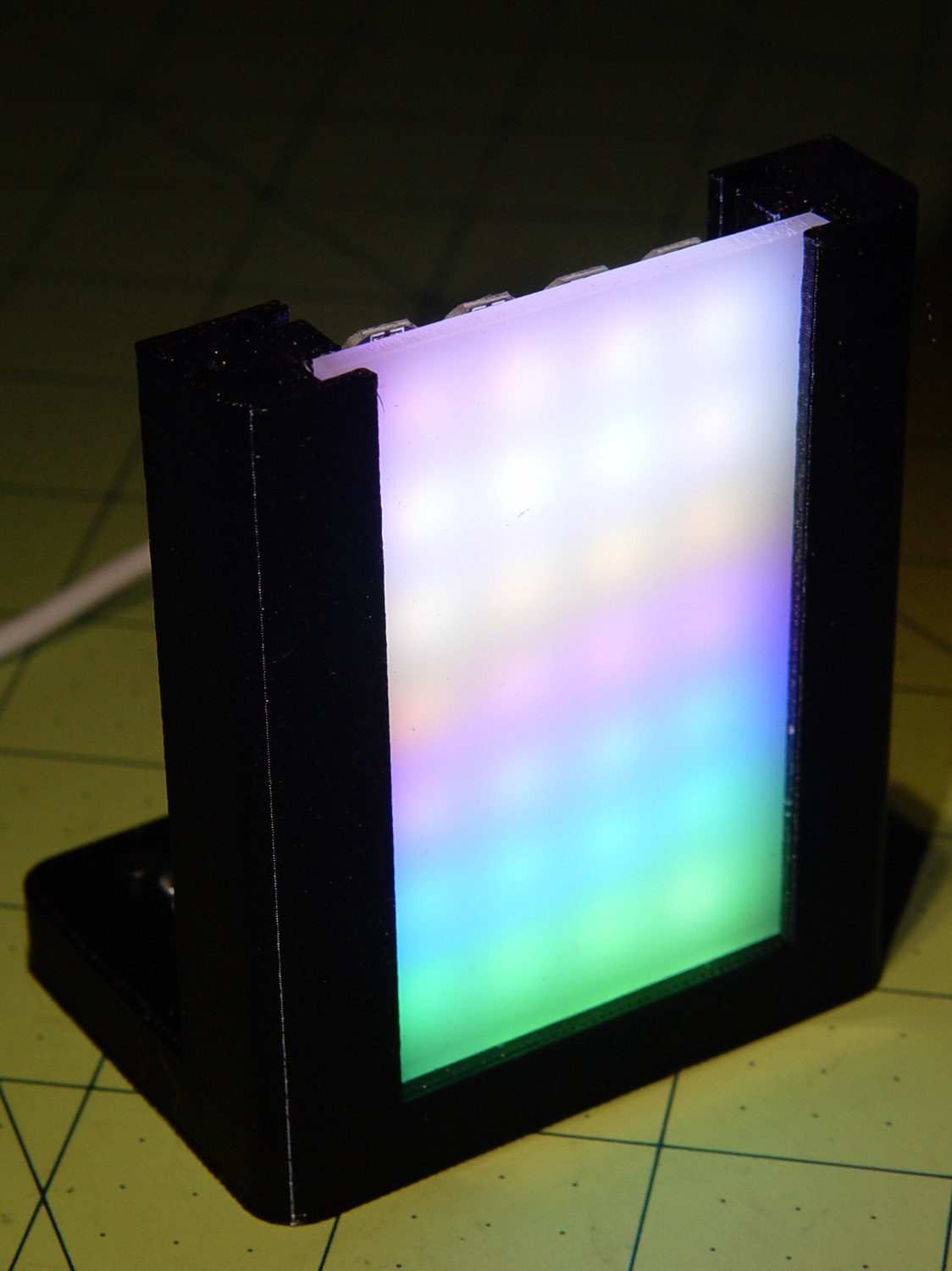
    The front (wider) slot holds a piece of translucent white acrylic to diffuse the light:

    WS2812 array test fixture - front flash
    WS2812 array test fixture – front flash

    It’s painfully bright: a few layers of neutral density filter would be appropriate for a desk toy.

    The array runs hot enough at MaxPWM = 255 to produce a gentle upward breeze.

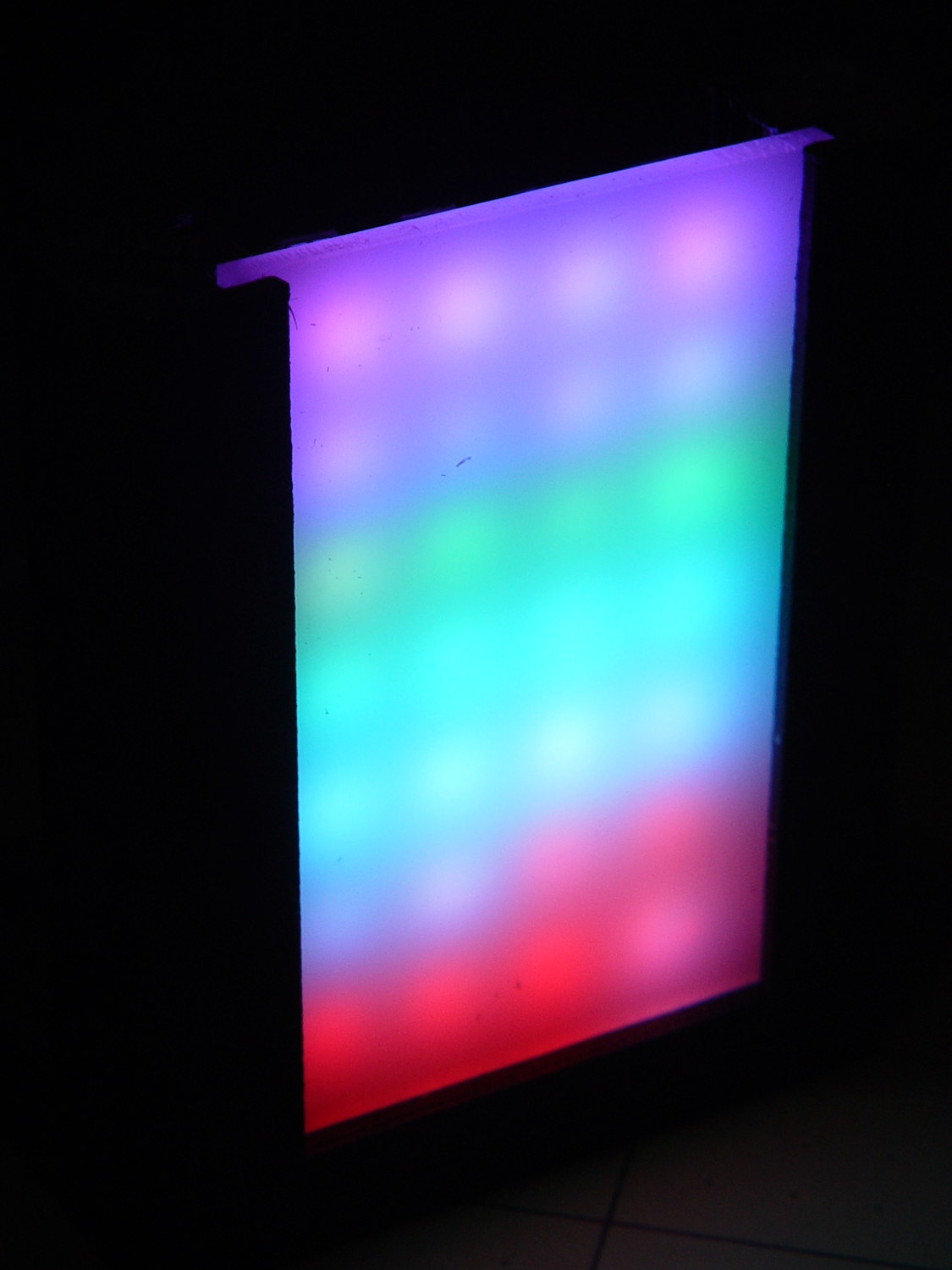
    It looks even better without the flash:

    WS2812 array test fixture - front dark
    WS2812 array test fixture – front dark

    You’ll find many easier ways to get RGB LED panels, but that’s not the point here; I’m waiting for these things to die an unnatural death.

    The OpenSCAD source code as a GitHub Gist:

    // LED Test Fixture
    // Ed Nisley KE4ZNU – February 2017
    ClampFlange = true;
    Channel = false;
    //- Extrusion parameters – must match reality!
    ThreadThick = 0.25;
    ThreadWidth = 0.40;
    function IntegerMultiple(Size,Unit) = Unit * ceil(Size / Unit);
    Protrusion = 0.1;
    HoleWindage = 0.2;
    //- Screw sizes
    ID = 0;
    OD = 1;
    LENGTH = 2;
    Insert = [2.8,3.5,4.0]; // M2 threaded insert
    ScrewOD = 2.0;
    WasherOD = 5.0;
    //- Component sizes
    PCBSize = [18.0,43.5,1.6]; // microcontroller PCB
    PCBClear = 2*[ThreadWidth,ThreadWidth,0]; // clearance around board
    PCBShelf = [ThreadWidth,ThreadWidth,0]; // shelf under perimeter
    PCBCavity = PCBSize – PCBShelf + [0,0,2.5]; // support shelf around bottom parts
    LEDPanel = [70,40,4.0]; // lying flat, LEDs upward
    LEDWire = [LEDPanel[0],LEDPanel[1] + 2*5.0,2.0]; // power wires along sides
    Diffuser = [LEDPanel[0],LEDPanel[1] + 2*4.0,3.5];
    echo(str("Diffuser panel: ",Diffuser));
    WallThick = 8.0;
    BaseThick = 3*ThreadThick + Insert[LENGTH] + PCBCavity[2];
    Block = [3*WallThick + PCBSize[0] + LEDPanel[2] + Diffuser[2],
    2*WallThick + IntegerMultiple(max(PCBSize[1],LEDWire[1]),5),
    BaseThick + LEDPanel[0]];
    echo(str("Block: ",Block));
    CornerRadius = 5.0;
    NumSides = 4*5;
    //- Adjust hole diameter to make the size come out right
    module PolyCyl(Dia,Height,ForceSides=0) { // based on nophead's polyholes
    Sides = (ForceSides != 0) ? ForceSides : (ceil(Dia) + 2);
    FixDia = Dia / cos(180/Sides);
    cylinder(r=(FixDia + HoleWindage)/2,h=Height,$fn=Sides);
    }
    //- Build it
    difference() {
    hull() // main block with rounded corners
    for (i=[-1,1], j=[-1,1])
    translate([i*(Block[0]/2 – CornerRadius),j*(Block[1]/2 – CornerRadius),,0])
    cylinder(r=CornerRadius,h=Block[2],$fn=NumSides);
    translate([2*WallThick + PCBSize[0] – Block[0],
    0,
    (Block[2]/2 + BaseThick)])
    cube(Block + [0,2*Protrusion,0],center=true); // cut out over PCB
    translate([WallThick + (PCBSize + PCBClear)[0]/2 – Block[0]/2,
    0,
    0]) {
    translate([0,0,(BaseThick + (Protrusion – PCBSize[2])/2)])
    cube(PCBSize + PCBClear + [0,0,Protrusion],center=true); // PCB recess
    translate([0,0,(BaseThick + (Protrusion – PCBCavity[2])/2)])
    cube(PCBCavity + [0,0,Protrusion],center=true); // cavity under PCB
    translate([PCBSize[0]/2 + WallThick/2 – Protrusion/2,PCBSize[1]/2 – 15/2,BaseThick – PCBCavity[2]/2 + Protrusion/2])
    cube([WallThick + PCBShelf[0] + Protrusion,
    15,PCBCavity[2] + Protrusion],center=true); // wiring cutout
    for (i=[-1,1], j=[-1,1]) // screw inserts
    translate([i*(PCBSize[0] + ScrewOD)/2,j*(PCBSize[1] + ScrewOD)/2,-Protrusion])
    rotate(180/(2*6))
    PolyCyl(Insert[OD],BaseThick + 2*Protrusion,6);
    }
    resize([2*Block[0],0,LEDPanel[0] + Protrusion]) // LED panel outline
    translate([0,0,BaseThick])
    rotate([0,-90,0])
    translate([(LEDPanel[0] + Protrusion)/2,0,0])
    cube(LEDPanel + [Protrusion,0,0],center=true);
    translate([-Block[0]/2 + 2*WallThick + PCBSize[0] + LEDWire[2]/2 + 5*ThreadWidth,
    0,BaseThick]) // LED wiring recess
    rotate([0,-90,0])
    translate([(LEDWire[0] + Protrusion)/2,0,0])
    cube(LEDWire + [Protrusion,0,0],center=true);
    translate([Block[0]/2 – Diffuser[2]/2 – 5*ThreadWidth,0,BaseThick]) // diffuser
    rotate([0,-90,0])
    translate([(Diffuser[0] + Protrusion)/2,0,0])
    cube(Diffuser + [Protrusion,0,0],center=true);
    }
  • Cheap WS2812 LEDs: Test Fixture

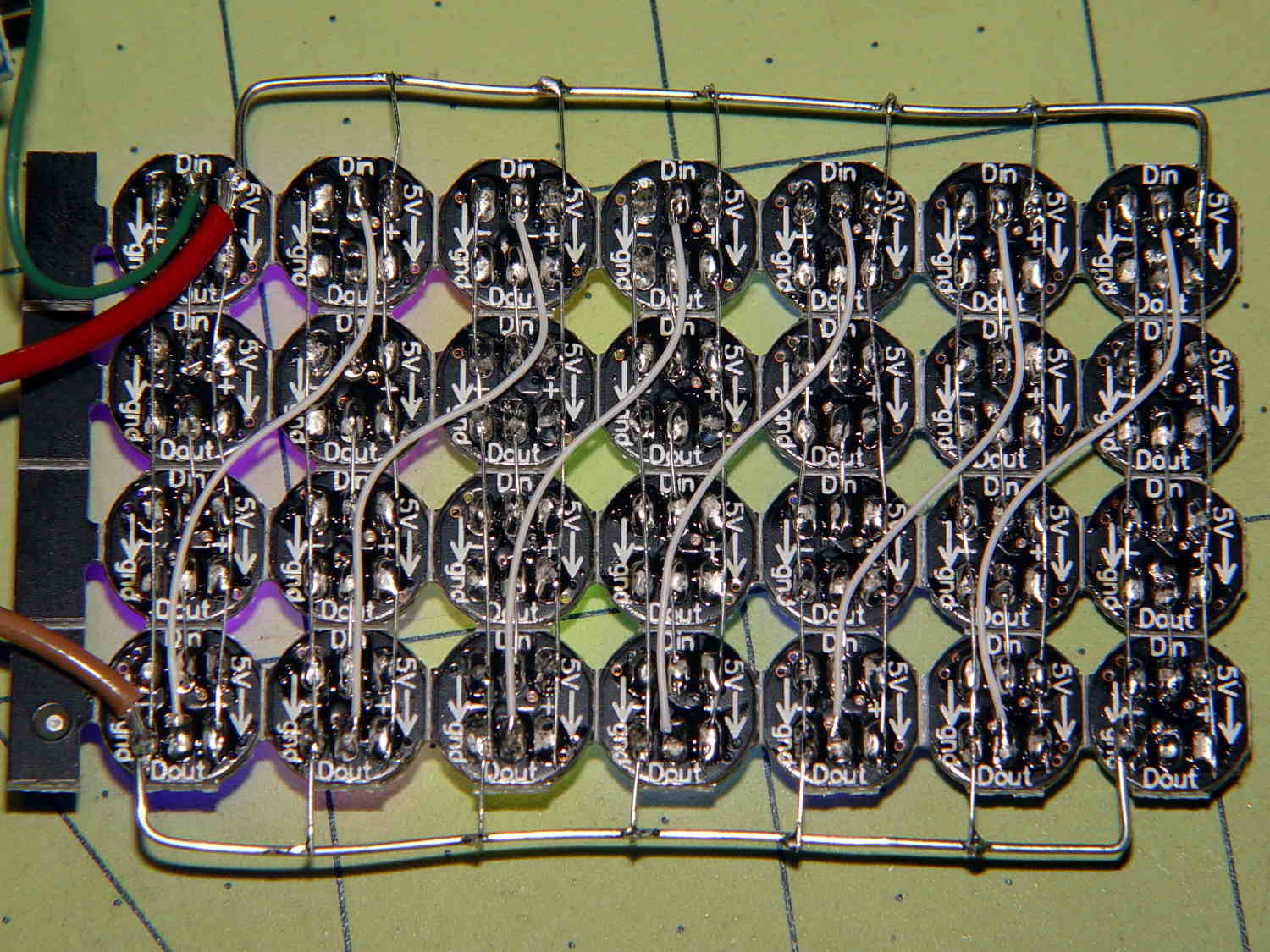
    Given that I no longer trust any of the knockoff Neopixels, I wired the remaining PCB panel into a single hellish test fixture:

    WS2812 4x7 LED test fixture - wiring
    WS2812 4×7 LED test fixture – wiring

    The 22 AWG wires deliver +5 V and Common, with good old-school Wire-Wrap wire passing to the four LEDs betweem them. The data daisy chain snakes through the entire array.

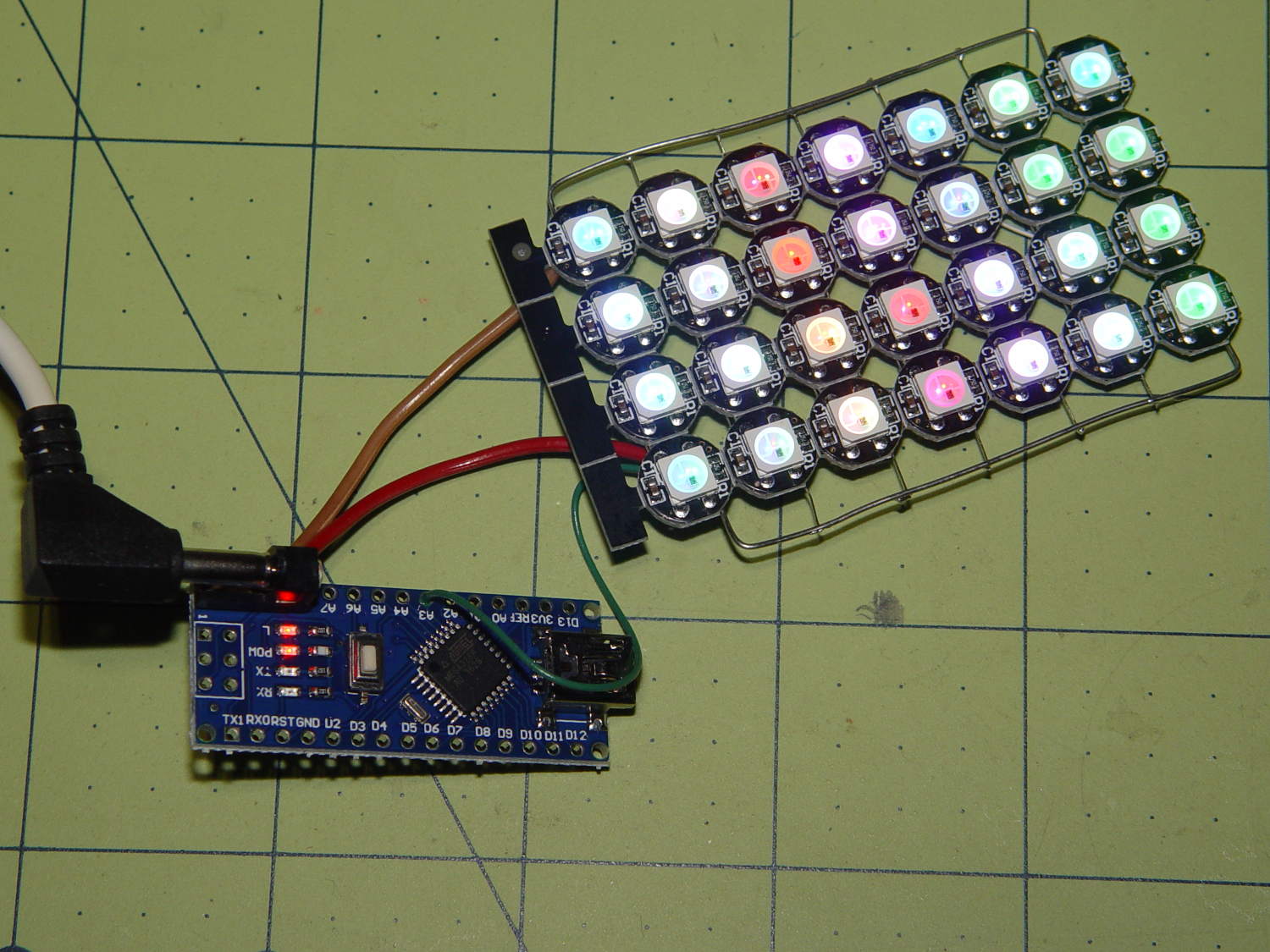
    It seems only fitting to use a knockoff Arduino Nano as the controller:

    WS2812 4x7 LED test fixture - front
    WS2812 4×7 LED test fixture – front

    The code descends from an early version of the vacuum tube lights, gutted of all the randomizing and fancy features. It updates the LEDs every 20 ms and, with only 100 points per cycle, the colors tick along fast enough reassure you (well, me) that the thing is doing something: the pattern takes about 20 seconds from one end of the string to the other.

    At full throttle the whole array draws 1.68 A = 60 mA × 28 with all LEDs at full white, which happens only during the initial lamp test and browns out the supply (literally: the blue LEDs fade out first and produce an amber glow). The cheap 5 V 500 mA power supply definitely can’t power the entire array at full brightness.

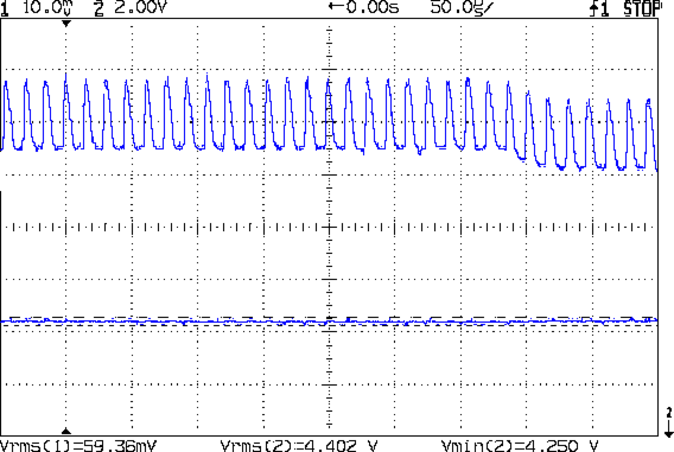
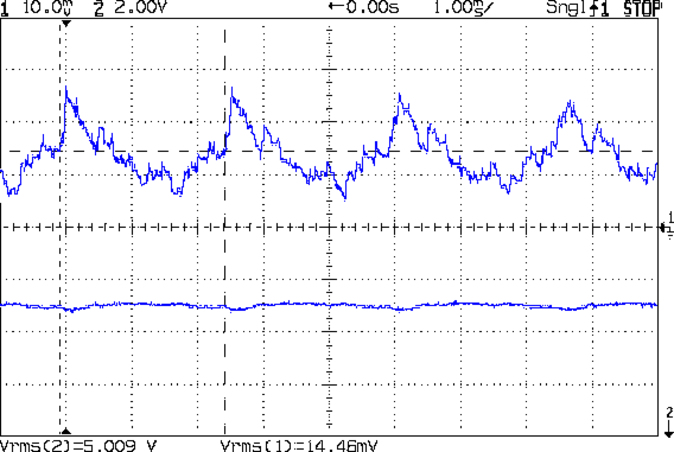
    The power supply current waveform looks fairly choppy, with peaks at the 400 Hz PWM frequency:

    WS2812 4x7 array - 200 mA VCC
    WS2812 4×7 array – 200 mA VCC

    With the Tek current probe set at 200 mA/div, the upper trace shows 290 mA RMS. That’s at MaxPWM = 127, which reduces the average current but doesn’t affect the peaks. At full brightness the average current should be around 600 mA, a tad more than the supply can provide, but maybe it’ll survive; the bottom trace shows a nice average, but the minimum hits 4.6 V during peak current.

    Assuming that perversity will be conserved as usual, none of the LEDs will fail for as long as I’m willing to let them cook.

    The Arduino source code as a GitHub Gist:

    // WS2812 LED array exerciser
    // Ed Nisley – KE4ANU – February 2017
    #include <Adafruit_NeoPixel.h>
    //———-
    // Pin assignments
    const byte PIN_NEO = A3; // DO – data out to first Neopixel
    const byte PIN_HEARTBEAT = 13; // DO – Arduino LED
    //———-
    // Constants
    #define UPDATEINTERVAL 20ul
    const unsigned long UpdateMS = UPDATEINTERVAL – 1ul; // update LEDs only this many ms apart minus loop() overhead
    // number of steps per cycle, before applying prime factors
    #define RESOLUTION 100
    // phase difference between LEDs for slowest color
    #define BASEPHASE (PI/16.0)
    // LEDs in each row
    #define NUMCOLS 4
    // number of rows
    #define NUMROWS 7
    #define NUMPIXELS (NUMCOLS * NUMROWS)
    #define PINDEX(row,col) (row*NUMCOLS + col)
    //———-
    // Globals
    // instantiate the Neopixel buffer array
    Adafruit_NeoPixel strip = Adafruit_NeoPixel(NUMPIXELS, PIN_NEO, NEO_GRB + NEO_KHZ800);
    uint32_t FullWhite = strip.Color(255,255,255);
    uint32_t FullOff = strip.Color(0,0,0);
    struct pixcolor_t {
    byte Prime;
    unsigned int NumSteps;
    unsigned int Step;
    float StepSize;
    float TubePhase;
    byte MaxPWM;
    };
    // colors in each LED
    enum pixcolors {RED, GREEN, BLUE, PIXELSIZE};
    struct pixcolor_t Pixels[PIXELSIZE]; // all the data for each pixel color intensity
    unsigned long MillisNow;
    unsigned long MillisThen;
    //– Figure PWM based on current state
    byte StepColor(byte Color, float Phi) {
    byte Value;
    Value = (Pixels[Color].MaxPWM / 2.0) * (1.0 + sin(Pixels[Color].Step * Pixels[Color].StepSize + Phi));
    // Value = (Value) ? Value : Pixels[Color].MaxPWM; // flash at dimmest points
    // printf("C: %d Phi: %d Value: %d\r\n",Color,(int)(Phi*180.0/PI),Value);
    return Value;
    }
    //– Helper routine for printf()
    int s_putc(char c, FILE *t) {
    Serial.write(c);
    }
    //——————
    // Set the mood
    void setup() {
    pinMode(PIN_HEARTBEAT,OUTPUT);
    digitalWrite(PIN_HEARTBEAT,LOW); // show we arrived
    Serial.begin(57600);
    fdevopen(&s_putc,0); // set up serial output for printf()
    printf("WS2812 array exerciser\r\nEd Nisley – KE4ZNU – February 2017\r\n");
    /// set up Neopixels
    strip.begin();
    strip.show();
    // lamp test: run a brilliant white dot along the length of the strip
    printf("Lamp test: walking white\r\n");
    strip.setPixelColor(0,FullWhite);
    strip.show();
    delay(250);
    for (int i=1; i<NUMPIXELS; i++) {
    digitalWrite(PIN_HEARTBEAT,HIGH);
    strip.setPixelColor(i-1,FullOff);
    strip.setPixelColor(i,FullWhite);
    strip.show();
    digitalWrite(PIN_HEARTBEAT,LOW);
    delay(250);
    }
    strip.setPixelColor(NUMPIXELS – 1,FullOff);
    strip.show();
    delay(250);
    // fill the array, row by row
    printf(" … fill\r\n");
    for (int i=0; i < NUMROWS; i++) { // for each row
    digitalWrite(PIN_HEARTBEAT,HIGH);
    for (int j=0; j < NUMCOLS; j++) {
    strip.setPixelColor(PINDEX(i,j),FullWhite);
    strip.show();
    delay(100);
    }
    digitalWrite(PIN_HEARTBEAT,LOW);
    }
    // clear to black, column by column
    printf(" … clear\r\n");
    for (int j=NUMCOLS-1; j>=0; j–) { // for each column
    digitalWrite(PIN_HEARTBEAT,HIGH);
    for (int i=NUMROWS-1; i>=0; i–) {
    strip.setPixelColor(PINDEX(i,j),FullOff);
    strip.show();
    delay(100);
    }
    digitalWrite(PIN_HEARTBEAT,LOW);
    }
    delay(1000);
    // set up the color generators
    MillisNow = MillisThen = millis();
    printf("First random number: %ld\r\n",random(10));
    Pixels[RED].Prime = 11;
    Pixels[GREEN].Prime = 7;
    Pixels[BLUE].Prime = 5;
    printf("Primes: (%d,%d,%d)\r\n",Pixels[RED].Prime,Pixels[GREEN].Prime,Pixels[BLUE].Prime);
    unsigned int PixelSteps = (unsigned int) ((BASEPHASE / TWO_PI) *
    RESOLUTION * (unsigned int) max(max(Pixels[RED].Prime,Pixels[GREEN].Prime),Pixels[BLUE].Prime));
    printf("Pixel phase offset: %d deg = %d steps\r\n",(int)(BASEPHASE*(360.0/TWO_PI)),PixelSteps);
    Pixels[RED].MaxPWM = 127;
    Pixels[GREEN].MaxPWM = 127;
    Pixels[BLUE].MaxPWM = 127;
    for (byte c=0; c < PIXELSIZE; c++) {
    Pixels[c].NumSteps = RESOLUTION * (unsigned int) Pixels[c].Prime;
    Pixels[c].Step = (3*Pixels[c].NumSteps)/4;
    Pixels[c].StepSize = TWO_PI / Pixels[c].NumSteps; // in radians per step
    Pixels[c].TubePhase = PixelSteps * Pixels[c].StepSize; // radians per tube
    printf("c: %d Steps: %5d Init: %5d",c,Pixels[c].NumSteps,Pixels[c].Step);
    printf(" PWM: %3d Phi %3d deg\r\n",Pixels[c].MaxPWM,(int)(Pixels[c].TubePhase*(360.0/TWO_PI)));
    }
    }
    //——————
    // Run the mood
    void loop() {
    MillisNow = millis();
    if ((MillisNow – MillisThen) > UpdateMS) {
    digitalWrite(PIN_HEARTBEAT,HIGH);
    unsigned int AllSteps = 0;
    for (byte c=0; c < PIXELSIZE; c++) { // step to next increment in each color
    if (++Pixels[c].Step >= Pixels[c].NumSteps) {
    Pixels[c].Step = 0;
    printf("Color %d steps %5d at %8ld delta %ld ms\r\n",c,Pixels[c].NumSteps,MillisNow,(MillisNow – MillisThen));
    }
    AllSteps += Pixels[c].Step; // will be zero only when all wrap at once
    }
    if (0 == AllSteps) {
    printf("Grand cycle at: %ld\r\n",MillisNow);
    }
    for (int k=0; k < NUMPIXELS; k++) { // for each pixel
    byte Value[PIXELSIZE];
    for (byte c=0; c < PIXELSIZE; c++) { // … for each color
    Value[c] = StepColor(c,-k*Pixels[c].TubePhase); // figure new PWM value
    // Value[c] = (c == RED && Value[c] == 0) ? Pixels[c].MaxPWM : Value[c]; // flash highlight for tracking
    }
    uint32_t UniColor = strip.Color(Value[RED],Value[GREEN],Value[BLUE]);
    strip.setPixelColor(k,UniColor);
    }
    strip.show();
    MillisThen = MillisNow;
    digitalWrite(PIN_HEARTBEAT,LOW);
    }
    }
    view raw ArrayTest.ino hosted with ❤ by GitHub
  • Vacuum Tube Lights: Plate Wire Plug

    After replacing the WS2812 LED in the 21HB5A socket, I drilled out the hole in the disk platter for a 3.5 mm stereo jack, wired a nice knurled metal plug onto the plate lead, and it’s all good:

    21HB5A - Audio plug cable
    21HB5A – Audio plug cable

    The plug had a rather large cable entry that cried out for a touch of brass:

    Audio plug - brass trim turning
    Audio plug – brass trim turning

    Fancy plugs have a helical spring strain relief insert about the size & shape of that brass snout; might have to buy me some fancy plugs.

    This time, I got the alignment right by clamping everything in the lathe while the epoxy cured:

    Audio plug - brass trim gluing
    Audio plug – brass trim gluing

    I flipped the drill end-for-end, which was surely unnecessary.

    It’s now sitting on the kitchen table, providing a bit of light during supper while I wait for a WS2812 controller failure. Again.

  • Cheap WS2812 LEDs: Leak Tests vs. Failures

    Applying the Josh Sharpie Test to three defunct WS2812 LEDs produced one failure:

    Failed WS2812 LED - leak view 2
    Failed WS2812 LED – leak view 2

    The other side shows where the ink stopped seeping under the silicone:

    Failed WS2812 LED - leak view 1
    Failed WS2812 LED – leak view 1

    I don’t know if I melted the side of the LED or if it came that way, but, oddly, there’s no leakage on that side.

    This LED matches the layout of Josh’s “crappy” LEDs, as does the entire lot below, although I suspect that’s more coincidence than anything else; there aren’t that many different layouts around.

    Flushed with success, so to speak, I ran the Sharpie around all the unused LEDs from that order:

    WS2812 LEDs - leak test
    WS2812 LEDs – leak test

    I tested the process on the three LEDs in front, then wiped the ink off with denatured alcohol.

    A closer look shows the ink all around the silicone-to-case border, with plenty of opportunity to seep in:

    WS2812 LEDs - leak test - detail
    WS2812 LEDs – leak test – detail

    After wiping the ink off, none of the 31 unused LEDs showed any sign of poor sealing.

    I haven’t been keeping good records of the failures, but right now I have twelve functional WS2812 LEDs attached to various glass doodads. That leaves 7-ish failed LEDs out of the 15-ish with long term use (not counting four recent replacements).

    In round numbers, that’s a 50% failure rate…

    I should wire up the remaining sheet of LEDs as a test fixture, let them cook for a while, and see what happens.

  • Cheap WS2812 RGB LEDs: Continuing Failures

    Three more knockoff Neopixels failed in the last few weeks, including one that can’t possibly suffer any thermal stress:

    Halogen bulb brass cap - overview
    Halogen bulb brass cap – overview

    I wrapped the halogen bulb in a shop towel, laid the ersatz heatsink against an anvil (actually, it was a microwave transformer on the Squidwrench operating table), whacked a chisel into the epoxy joint, and met with complete success:

    Failed WS2812 LED - ersatz heatsink
    Failed WS2812 LED – ersatz heatsink

    Having epoxied the PCB and braid in place, there was nothing for it but to drill the guts out of the brass cap:

    Failed WS2812 LED - drilling
    Failed WS2812 LED – drilling

    Which produced a pile of debris in addition to the swarf:

    Failed WS2812 LED - debris
    Failed WS2812 LED – debris

    The brass cap emerged unscathed, which was just about as good as I could possibly hope for.

    The base LED in this 21HB5A also failed:

    21HB5A on platter - orange green
    21HB5A on platter – orange green

    Soooo I had to unsolder the plate lead and Arduino connections to extract the bottom PCB; fortunately, that was just a press-fit into the base.

    I should mount a 3.5 mm stereo jack on the platter and run the plate lead into a nice, albeit cheap, knurled metal plug, so I can dismount both the tube and the plate lead without any hassle. Right now, the tube can come out of the socket, but the plate lead passes through the platter.

    For whatever it’s worth, all of the dead WS2812 LEDs pass the Josh Sharpie Test, so these failures don’t (seem to) involve poor encapsulation.

  • X10 Transceiver Case Plastic: End Of Life, Redux

    Another X10 RF transciever, this one made for IBM (!) a long time ago, emerged from the heap with its case falling apart: the plastic bosses that should anchor the screws had broken off, then cracked radially. Given that I was probably going to toss it anyway, for reasons that will soon be obvious, I tried repairing the bosses just for practice.

    Stuffing the boss fragments into close-fitting brass tubes, with a dash of IPS #3 on the broken faces, put them back together reasonably well:

    HD501 X10 Transceiver - plastic boss gluing
    HD501 X10 Transceiver – plastic boss gluing

    More IPS #3 and a pair of clamps stuck the bosses back on the case:

    HD501 X10 Transceiver - plastic boss assembly
    HD501 X10 Transceiver – plastic boss assembly

    Note the dark smudge on the inside of the case. Even though nothing on the PCB looked particularly overheated, Soot Is Sign of Bad Electrical Health.

    And it turned out neither the bonds nor the plastic were up to the task. A day after successfully reassembling the transceiver, the bosses failed along new cracks and crumbled into different fragments.

    I applied a Kapton tape belly band around the case halves, verified that the transceiver no longer produced reliable X10 commands, and executed ++recycle_pile.

    So it goes.