The Smell of Molten Projects in the Morning

Ed Nisley's Blog: Shop notes, electronics, firmware, machinery, 3D printing, laser cuttery, and curiosities. Contents: 100% human thinking, 0% AI slop.

Category: Electronics Workbench

Electrical & Electronic gadgets

  • Wearable LED vs. Astable Multivibrator vs. Dead Lithium Cells

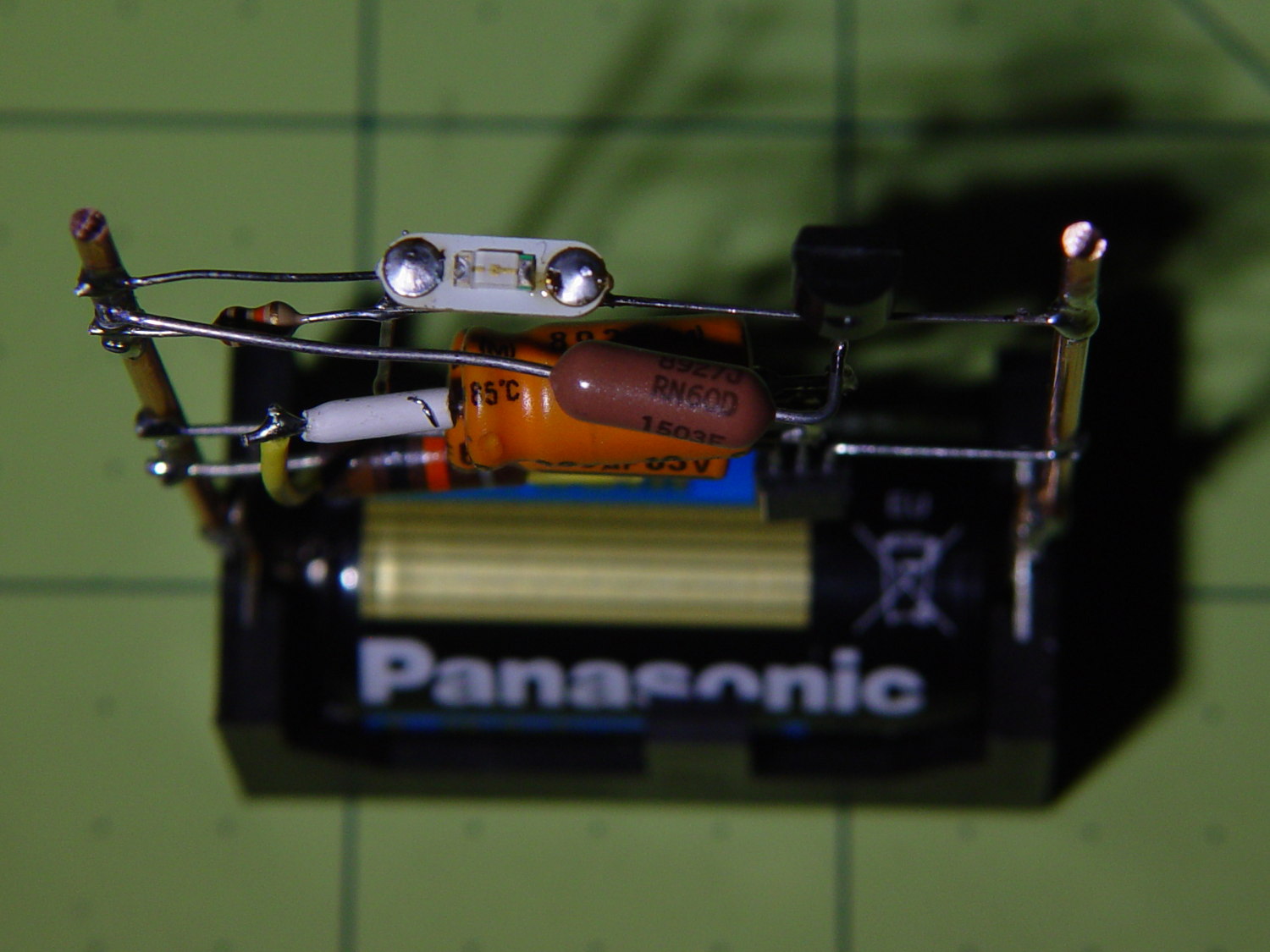
    Mashing the wearable LED from the completely dead CR2032 cell with a classic astable multivibrator circuit and a not-dead-yet CR123 cell produced a pure-analog desktop blinky:

    CR123A Astable - front
    CR123A Astable – front

    Of course, I managed to swap the base resistors, which meant the LED stayed on most of the time, which accounts for the slightly off-kilter brown resistor just under the LED.

    It doesn’t look like much with the LED off:

    CR123A Astable - top - off
    CR123A Astable – top – off

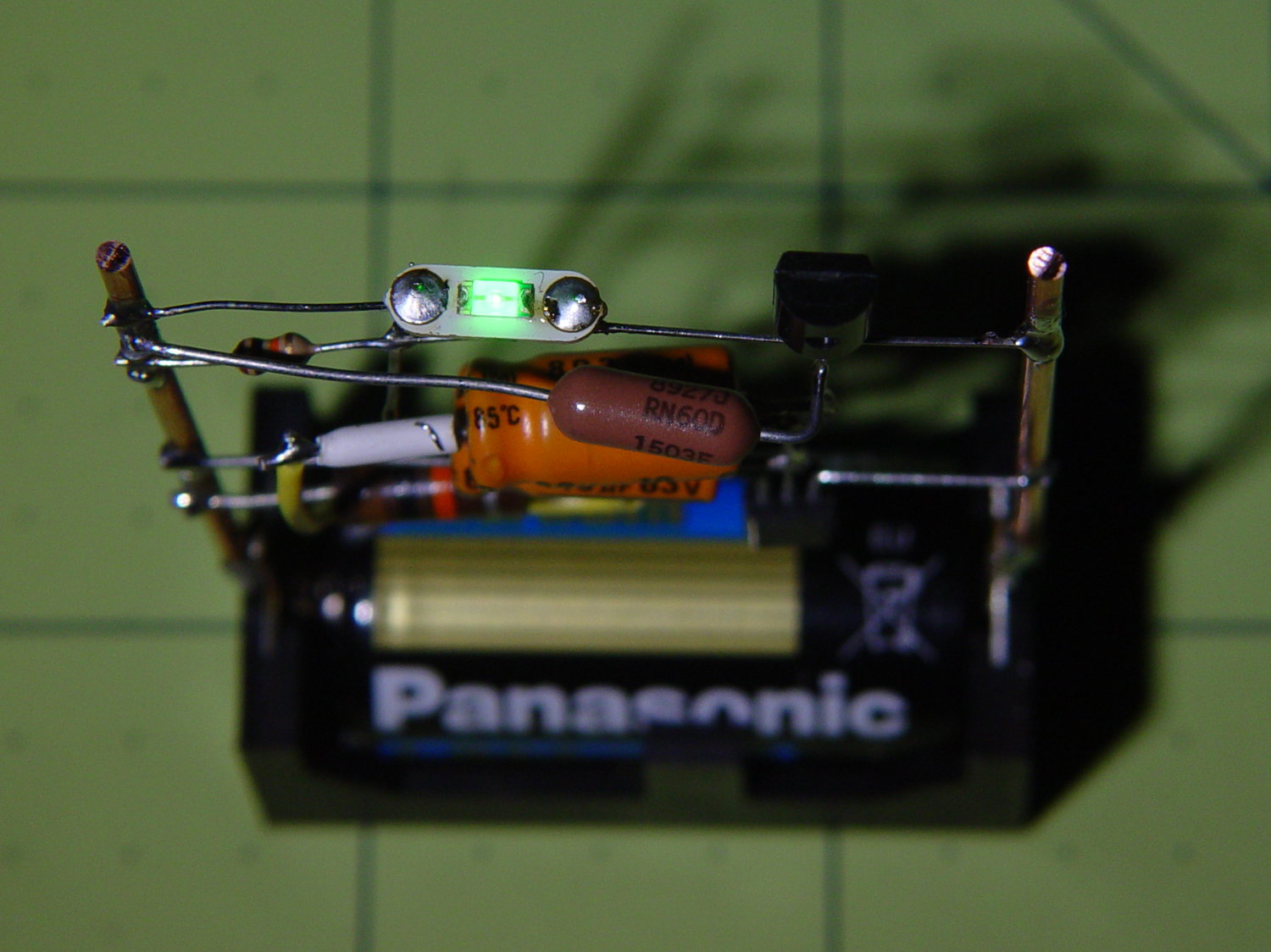
    Running from a 2.8 V (= dead) lithium cell, the LED lights a dark room at 3 mA:

    CR123A Astable - top - on
    CR123A Astable – top – on

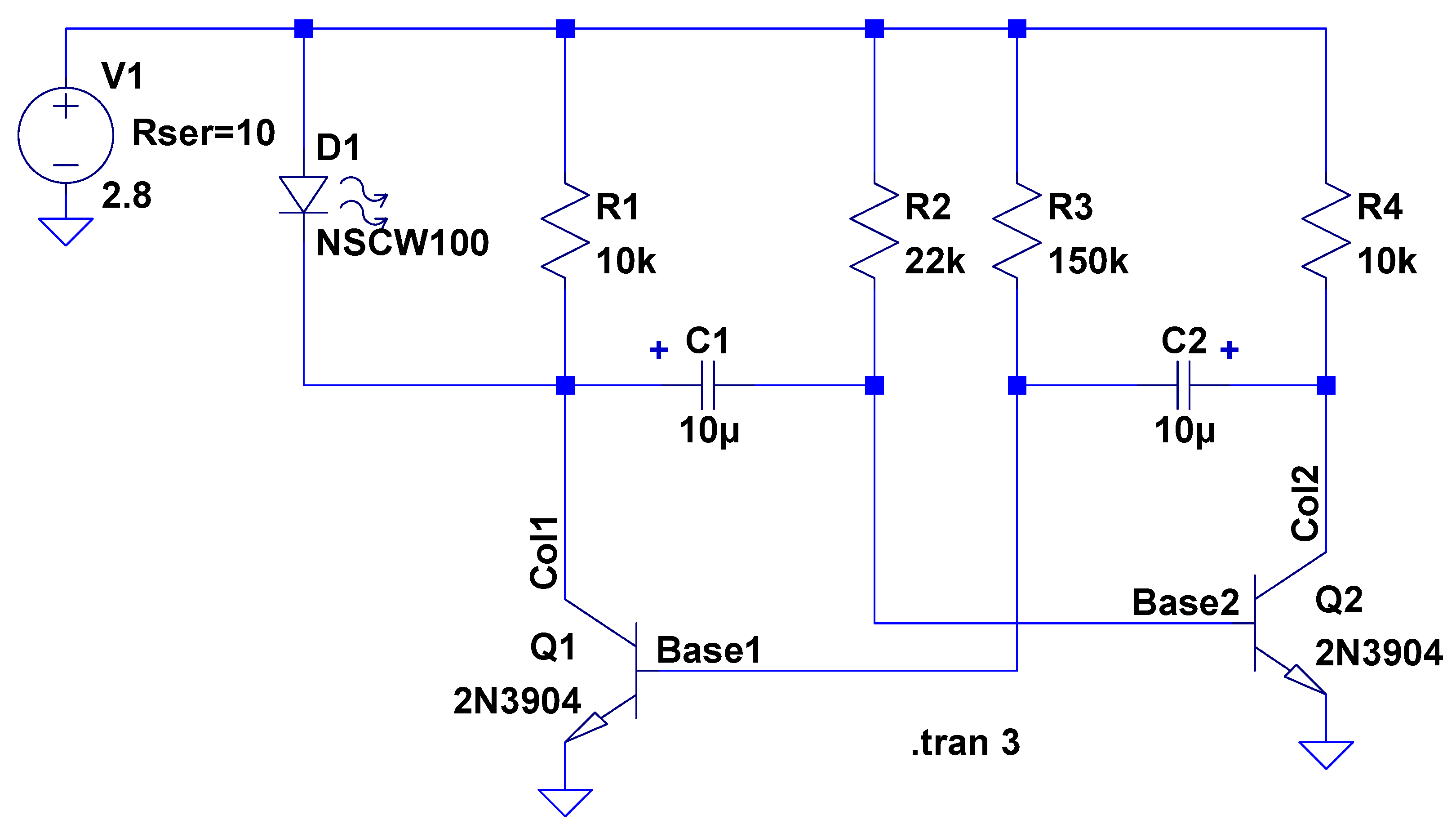
    The LTSpice schematic gives the details:

    Astable Multivibrator - CR2032 - schematic
    Astable Multivibrator – CR2032 – schematic

    The LED definitely didn’t come from Nichia and the 2N3704 transistors aren’t the 2N3904s found in the LTSpice library, but, by and large, this is the kind of circuit where nearly anything will work.

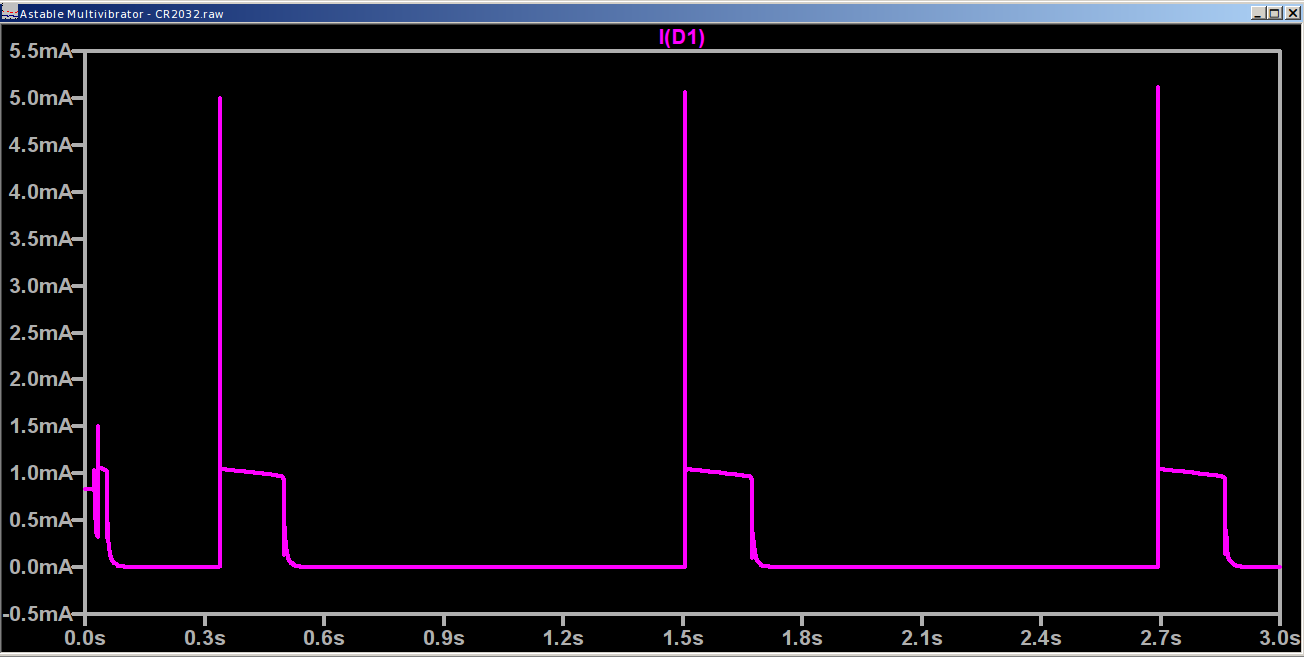
    The actual LED current obviously depends critically on the particular LED and the cell voltage, so this represents more of a serving suggestion than an actual prediction:

    Astable Multivibrator - CR2032 - waveform
    Astable Multivibrator – CR2032 – waveform

    Indeed, a Tek current probe clamped around one of those 10 AWG copper wires shows a much more enthusiastic LED current (1 mA/div):

    Astable - CR123A 2.8 V - 1 mA -green
    Astable – CR123A 2.8 V – 1 mA -green

    I don’t trust the baseline very much. The simulation & back of the envelope agree: the LED-off current should be around 400 µA (which doesn’t depend on the LED at all), so it’s in the right ballpark.

    Your mileage will definitely differ.

    It runs without a trace of software, which everybody at Squidwrench thought was wonderful …

  • Monthly Science: CR2023 Lithium Cells vs. Wearable LEDs

    Those wearable LEDs spent the last five months sitting on the kitchen window sash, quietly discharging their CR2032 lithium cells:

    Wearable LED with CR2023 cell
    Wearable LED with CR2023 cell

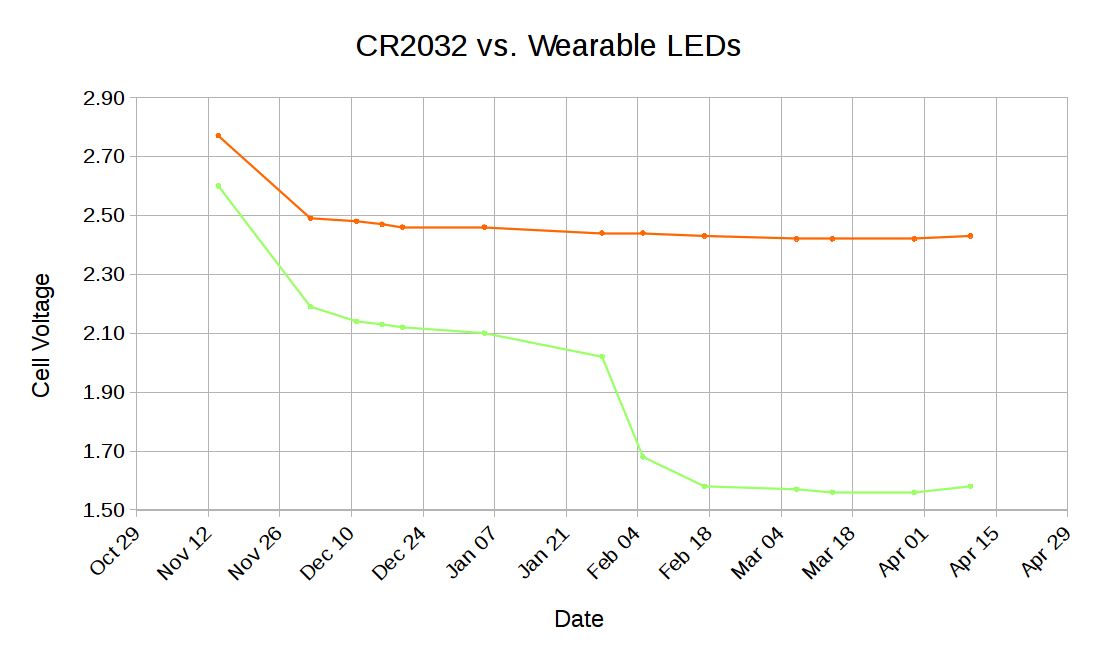
    Occasional voltage measurements produced an interesting graph:

    CR2032 vs Wearable LEDs
    CR2032 vs Wearable LEDs

    CR2023 primary lithium cells start out around 3.3 V, so these were pretty much dead (from their previous lives in dataloggers) when I slipped them into their holders. The LEDs seem to be blue LEDs, with threshold voltages around 3.6 V, with colored phosphors / filters, so they started out dim and got dimmer. The green(-ish) LED obviously fell over a cliff and went dark in late January; I have no way to measure long-term microamp currents, alas.

    The reddish LED is still going, mmm, strong.

    If you need a rather dim light for a surprisingly long time, these things will do the trick.

    I should gimmick up another astable multivibrator to blink one LED.

    The original data:

    CR2032 vs Wearable LEDs - data
    CR2032 vs Wearable LEDs – data
  • Eneloop AAA Cells: First Charge

    With an AAA-to-AA adapter in hand, the Eneloop AAA cells looked like this:

    Eneloop AAA - as received - Ah scale - 2017-04-20
    Eneloop AAA – as received – Ah scale – 2017-04-20

    The glitch comes from a not-quite-seated cell, showing that a poor connection matters.

    The package touts “up to 800 mA·h, 750 mA·h min”, with asterisks and superscripts leading to “Based on IEC 61951-2(7.3.2)“, access to which requires coughing up 281 bucks. So it goes.

    A full charge made them happier:

    Eneloop AAA - first charge - Ah scale - 2017-04-22
    Eneloop AAA – first charge – Ah scale – 2017-04-22

    The as-delivered 530 mA·h capacity represents 73% of the 725 mA·h after the first charge, so I suppose they’re more-or-less within the “Maintains up to 70% charge after 10 years of storage” claim. The 16-10 date code suggests they’re hot off the factory charger, so they must ship with somewhat less than a full charge.

    Comparing the capacity in W·h makes more sense, because most devices (other than the Planet Bike blinky light these will go into, of course) use a boost converter to get a fixed voltage from the declining terminal voltage.

    They arrived bearing just over 600 mW·h:

    Eneloop AAA - as received - Wh scale - 2017-04-20
    Eneloop AAA – as received – Wh scale – 2017-04-20

    After charging, that went a bit over 850 mW·h :

    Eneloop AAA - first charge - Wh scale - 2017-04-22
    Eneloop AAA – first charge – Wh scale – 2017-04-22

    Call it 71% of full capacity on arrival. Close enough.

    The Planet Bike blinky will be somewhat dimmer with two NiMH cells delivering 2.3-ish V, compared with the initial 3-ish V from a pair of alkaline cells. I generally burn the alkalines down to 1.1 V apiece, so perhaps they’ll be Good Enough.

    Now, if I were gutsy, I’d install a rechargeable lithium AAA cell, with a dummy pass-through adapter in the other cell socket, and run the blinky at 3.7 V. At least for a few moments, anyhow …

  • Cylindrical Cell Adapters

    An octet of Eneloop AAA cells arrived, I wanted to measure their as-delivered charge (the package says “Factory Charged With SOLAR ENERGY”, so you know it’s good), and discovered I’d given away my AAA cell holders. You can actually get inter-series adapters on eBay, but what’s the fun in that? Plus, I didn’t want to delay gratification for a month; you know how it is.

    Soooo:

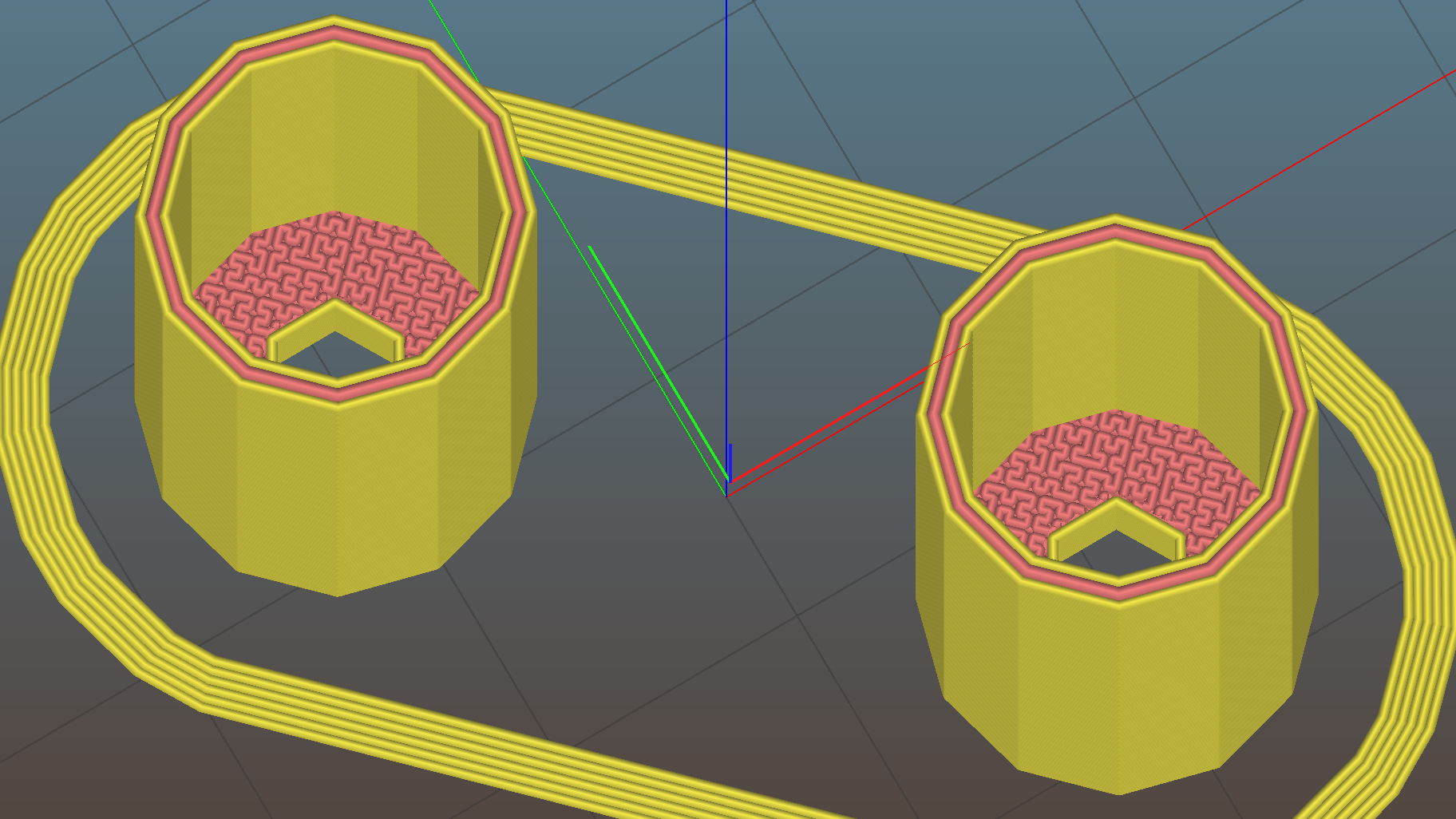
    AAA to AA Adapter - top - Slic3r
    AAA to AA Adapter – top – Slic3r

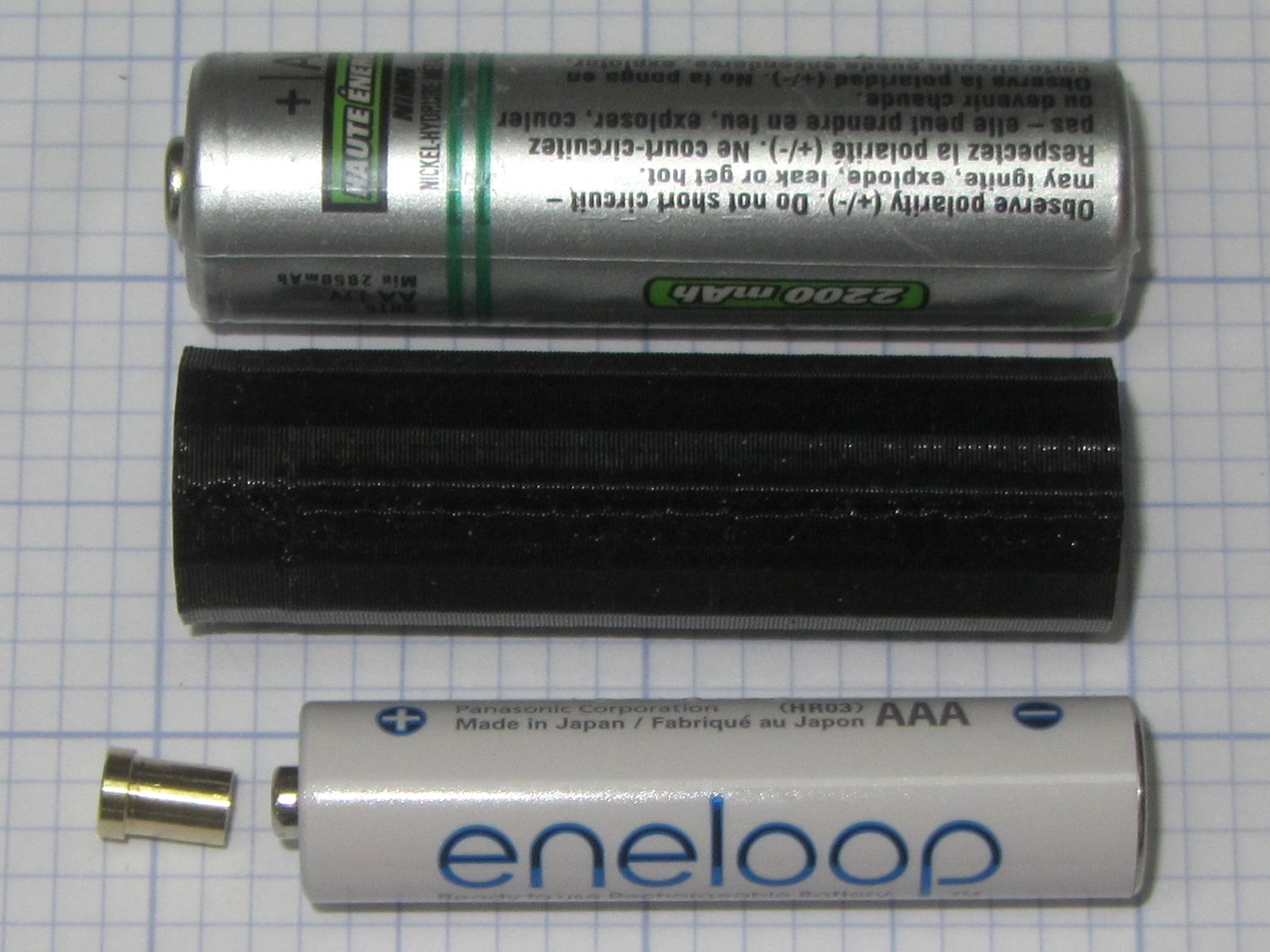
    It’s basically an AA-size sleeve that fits over the AAA cell, with a lathe-turned brass post conducting juice from the + terminal of the inner cell outward:

    AAA to AA Adapter - parts
    AAA to AA Adapter – parts

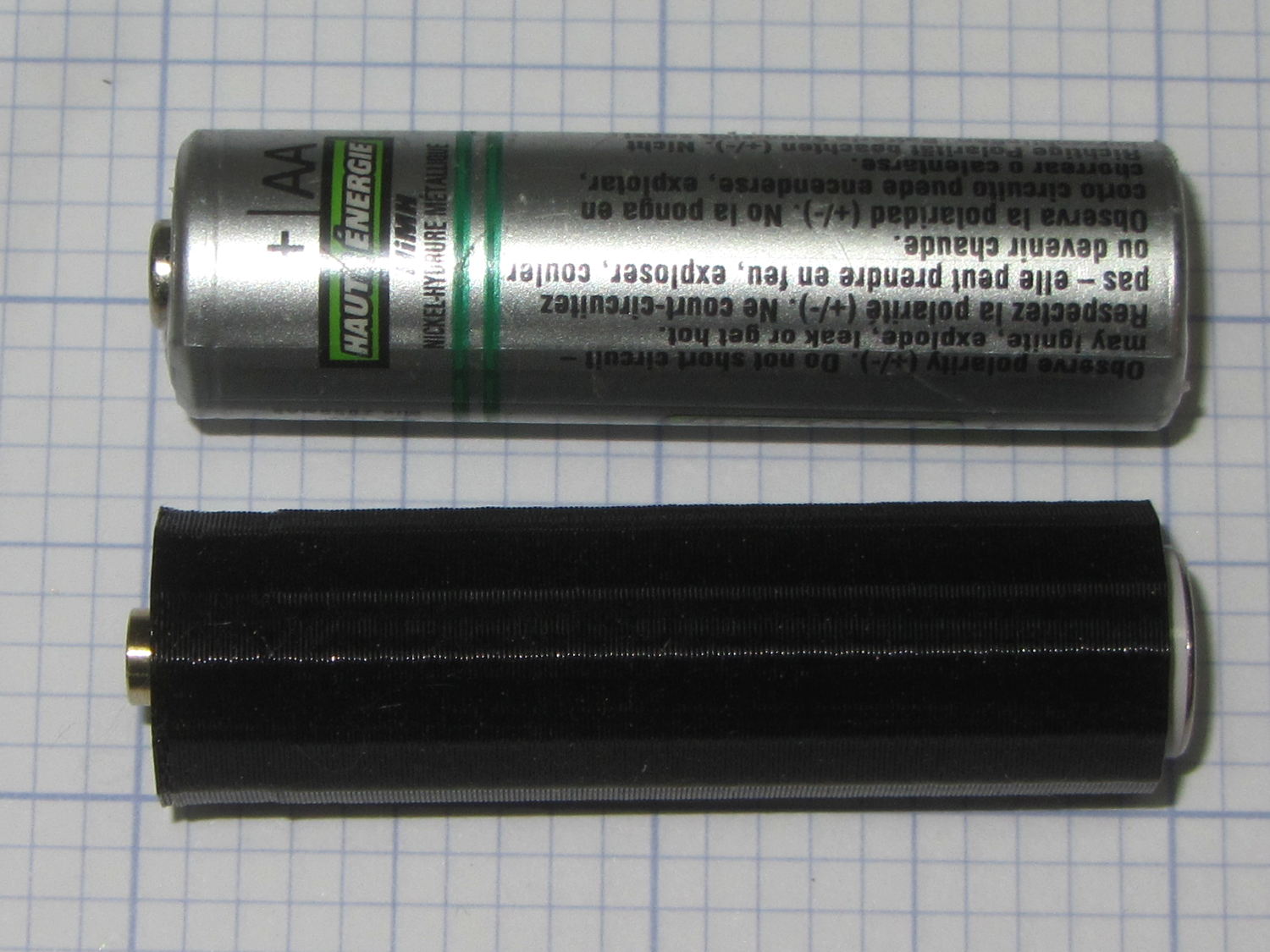
    Not much to look at when it’s assembled:

    AAA to AA Adapter - assembled
    AAA to AA Adapter – assembled

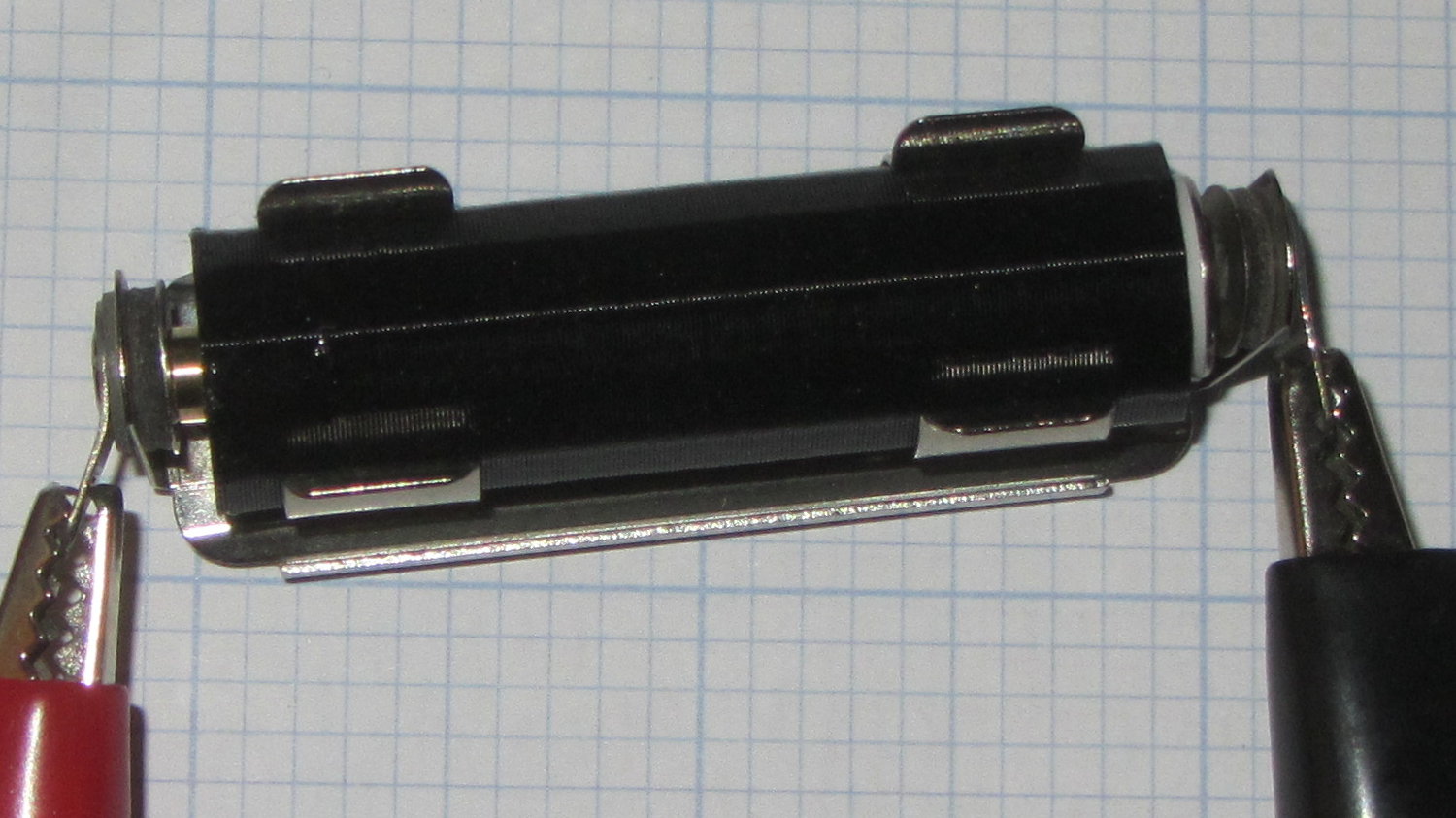
    The AAA cell fits deliberately loose, because this goes into a metal clip holding everything firmly in place for the battery tester:

    AAA to AA Adapter - in use
    AAA to AA Adapter – in use

    The source code tabulates the sizes of several cylindrical cells, exactly zero other pairs of which have been tested; I expect most won’t work correctly. In particular, the table entries should include the contact button OD and thickness for each cell, so that I can turn out the proper terminal for each pair of cells. If I ever need a different adapter, I’ll beat some cooperation out of that, too.

    Discovered I needed an adapter after breakfast, started testing cells after lunch. Life is good!

    The OpenSCAD source code as a GitHub Gist:

    // Cylindrical cell adapters
    // Ed Nisley KE4ZNU April 2017
    //- Extrusion parameters must match reality!
    ThreadThick = 0.25;
    ThreadWidth = 0.40;
    HoleWindage = 0.2;
    Protrusion = 0.1; // make holes end cleanly
    inch = 25.4;
    function IntegerMultiple(Size,Unit) = Unit * ceil(Size / Unit);
    //———————-
    // Dimensions
    OutCell = "AA"; // cell sizes
    InCell = "AAA";
    BottomClear = 3*ThreadThick; // shorten outer shell to allow base protrusion
    Terminal = [3.0,4.0,2.0]; // terminal: OD = nub dia, length = nub thickness
    NAME = 0;
    ID = 0; // for non-cell cylinders
    OD = 1;
    LENGTH = 2;
    Cells = [
    ["AAAA",8.3,42.5],
    ["AAA",10.5,44.5],
    ["AA",14.5,50.5],
    ["C",26.2,50],
    ["D",34.2,61.5],
    ["A23",10.3,28.5],
    ["CR123",17.0,34.5],
    ["18650",18.6,65.2]
    ];
    Outer = search([OutCell],Cells,1,0)[0];
    Inner = search([InCell],Cells,1,0)[0];
    echo(str("Outer cell: ",Cells[Outer][NAME]));
    echo(str("Inner cell: ",Cells[Inner][NAME]));
    echo(str("Wall: ",Cells[Outer][OD] – (Cells[Inner][OD]/cos(180/NumSides) + 2*ThreadWidth)));
    Delta = Cells[Outer][LENGTH] – Cells[Inner][LENGTH];
    echo(str("Terminal OAL: ",Delta));
    echo(str(" … head: ",Terminal[LENGTH]));
    echo(str(" … shaft: ",Delta – Terminal[LENGTH]));
    NumSides = 3*4;
    //———————-
    // Useful routines
    module PolyCyl(Dia,Height,ForceSides=0) { // based on nophead's polyholes
    Sides = (ForceSides != 0) ? ForceSides : (ceil(Dia) + 2);
    FixDia = Dia / cos(180/Sides);
    cylinder(r=(FixDia + HoleWindage)/2,h=Height,$fn=Sides);
    }
    //———————-
    // Construct adapter
    module Adapter() {
    difference() {
    cylinder(d=Cells[Outer][OD],
    h=Cells[Outer][LENGTH] – BottomClear – Terminal[LENGTH],
    $fn=NumSides);
    translate([0,0,Delta – Terminal[LENGTH]])
    PolyCyl(Cells[Inner][OD] + 2*ThreadWidth,
    Cells[Inner][LENGTH] + Protrusion,
    NumSides);
    translate([0,0,-Protrusion])
    PolyCyl(Terminal[ID],
    2*Cells[Outer][LENGTH],
    6);
    }
    }
    //———————-
    // Build it
    Adapter();

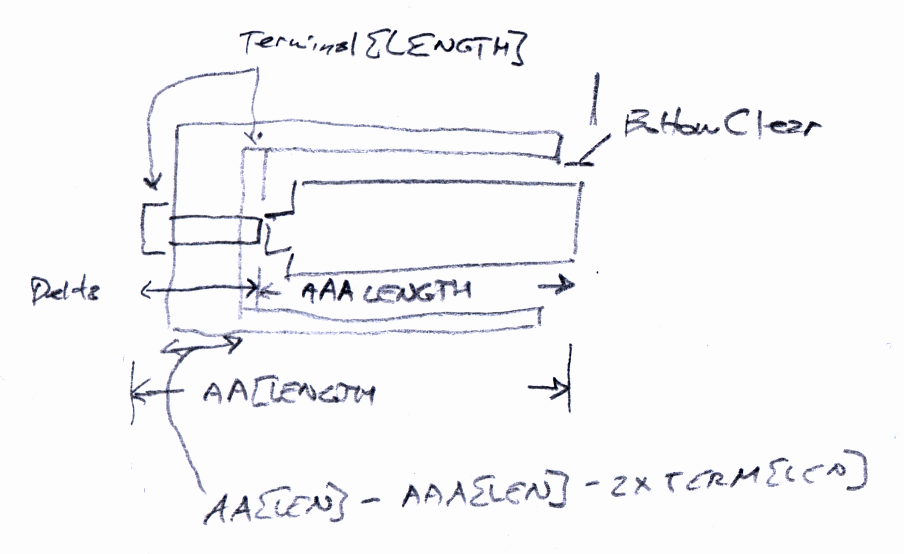
    The original doodle:

    AAA to AA Adapter - sketch
    AAA to AA Adapter – sketch
  • 3D Printer Design Conversation: Part 5

    The final installment of musings about building a large-format 3D printer …

    (Continued from yesterday)

    Perhaps they saw your blog post?

    The old-old (original) high-resistance Kysan motor costs something like $45 and, apart from minor cosmetic differences, looks /exactly/ the same as the old-new low-resistance motor. If you were picking motors and didn’t quite understand why you needed a low-resistance winding, which would you pick? Hence, my insistence on knowing the requirements before plunking down your money.

    To be fair, I didn’t understand that problem until the Thing-O-Matic rubbed my nose in it. With all four motors. Vigorously.

    So, yeah, I think I had a part in that.

    comes back to the same numbers over and over

    The new-new leadscrews have something like half the pitch of the old-new and old-old threads; I don’t recall the number offhand. In any event, that gives you twice the number of motor steps per millimeter of motion and roughly twice the lifting force. This is pretty much all good, even though it may reduce the maximum Z axis speed (depends on your settings & suchlike).

    When it moves upward by, say, 5 mm and downward by 5 mm, you’re measuring position repeatability. That level of repeatability is pretty much a given (for the M2, anyhow), but it doesn’t involve stiction & suchlike.

    Can you move the platform up by 0.01 mm, then down by 0.01 mm, and measure 0.01 mm change after each motion?

    Do larger increments track equally well in both directions?

    Move upward a few millimeters, then step downward by 0.01 mm per step. Does the measurement increase by 0.01 mm after each step?

    Repeat that by moving downward, then upward in 0.01 mm increments.

    If the platform moves without backlash & stiction in both directions with those increments, it’s a definite improvement.

    I wish I knew more
    everything you learned is burned into your head forever

    The way to learn more is exactly what you’re doing.

    Two things I learned a long time ago:

    1. Whenever you have two numbers, divide them and ask whether the ratio makes sense.

    2. Whenever you don’t understand a problem, do any part of it you do understand, then look at it again.

    Also, write everything down. When you come back later, you won’t remember quite how you got those results.

    Which is precisely why I have a blog. I search with Google (site:softsolder.com microstepping) and /wham/ I get a quick refresher on what I was thinking. That’s why I keep link-whoring URLs: that’s my memory out there!

    You’ll sometimes find scans of my scrawled notes & doodles. They won’t mean anything to you, but they remind me what I do to get the answers in that blog post.

    modern controllers utilize much higher voltage and current bursts

    More or less. Microstepping drivers apply a relatively high voltage, far in excess of what the winding can tolerate as a DC voltage, then regulate the current to a value that produces the appropriate waveform.

    This may be helpful:

    https://softsolder.com/2011/05/05/thing-o-matic-mbi-stepper-motor-analysis/

    The mass of the bed APPEARS to be cancelling out any magnetic or mechanical stiction.

    That can’t be true in both directions: the gravity vector points downward and the results aren’t symmetric. I think you’re reading noise. If the sequences of motions I described don’t produce the results I described, then you’re /definitely/ measuring noise.

    From back in the Thing-O-Matic days:

    https://softsolder.com/2011/05/22/thing-o-matic-z-axis-resolution-repeatability-backlash/

    E3D hot end setups vs MakerGear’s?

    No opinion.

    I’d want that groovemount post in an all-metal socket, though, rather than the traditional plastic, to get solid positioning and tolerance control. Makergear has the right idea with the aluminum V4 heater block mount.

  • 3D Printer Design Conversation: Part 4

    Continued musings about building a large-format 3D printer …

    (Continued from yesterday)

    taking your challenge and am starting by cloning the M2

    That gives you an existence theorem: you know exactly what you want to end up with.

    AFAICT, few of the M2’s parts bear standardized numbers you can simply order from a reputable seller. Makergear knows what it’s buying (obviously!), but they’re under no obligation to help out: you must reverse engineer the requirements, find a suitable part, find a supplier, then buy one item.

    Let me know how that works out for cost & performance; “cost” should include a nonzero value for your time and “performance” should have numbers you can verify. I (obviously) think the build will be a dead loss on both counts (*), but good data will be interesting.

    (*) Albeit useful for educational purposes, which I’ve used to justify many absurd projectst!

    How the heck do you read out the current (estimated, obviously) X Y Z position absolute to the machine coordinates?

    Perhaps M114 or M117?

    My overall list may be helpful, although the RepRap Marlin reference has more detail on their command set:

    https://softsolder.com/2013/03/14/g-code-and-m-code-grand-master-list/

    The LinuxCNC (and, perhaps, Machinekit) G-Code languages give you access to built-in variables and extend G-Code into a true scripting language. Marlin evolved differently and doesn’t support that sort of thing.

    G-Code is pretty much a write-only language, but you can do some interesting things:

    https://softsolder.com/2013/07/18/makergear-m2-cnc-platform-corner-clips/

    I use the gcmc compiler whenever I can for actual CNC machining:

    https://softsolder.com/2014/02/21/can-opener-gear-rebuild/

    Works for me, anyhow, although I don’t do much CNC these days.

    move my nozzle up .01 at a time

    Stiction / microstep errors / command resolution prevent that:

    Makergear M2 Z-axis Backlash Numbers

    The only way to measure the nozzle position is to measure a finished part with a known height, because any variation comes from the first layer offset. That’s if you have Z=0 at the platform, of course, rather than whatever offset you get by defining Z=0 at some random height based on jamming business cards / feeler gages / special Japanese rolling papers under the snout. [ptui & similar remarks]

    For example:

    https://softsolder.com/2015/09/14/makergear-m2-platform-stability/

    You need numbers. Lots of numbers. [grin]

    strip basic tools out of the control interface

    Yet another reason I don’t use S3D: that “Simplify” thing gets in the way of my obsessive need for control.

    (Continues tomorrow)

  • 3D Printer Design Conversation: Part 3

    More musings in response to questions about building a large-format 3D printer.

    (Continued from yesterday)

    make a direct clone of the M2. No thinking required.

    The present-day M2 has survived four years of rather fierce Darwininan winnowing, so it’s a much better thought-out product than, ahem, you may think just by looking at it.

    To build a one-off duplicate, you’ll spend as much money collecting the parts as you would to just buy another M2 and start printing.

    Should you buy cheap parts to save money, without considering the requirements, you’ll get, say, the same Z-axis motor Makergear used on the original M2, the complete faceplant of Thing-O-Matic electronics, or crap from eBay described as being kinda-sorta what you want.

    Sometimes crap from eBay can be educational, of course:

    https://softsolder.com/2013/01/24/hall-effect-sensors-from-ebay-variations-on-a-specification/

    I encourage thinking, particularly with numbers, because it leads to understanding, rather than being surprised by the results.

    increase the rigidity of the X and Y axis

    In round numbers, deflection varies as the fourth power of length: enlarge a frame member by 50% and it becomes five times bendier. If your design simply scales up the frame, it won’t hold the tolerances required to produce a good object.

    https://en.wikipedia.org/wiki/Euler%E2%80%93Bernoulli_beam_theory

    If you add more mass (“stiffening”) to the Y axis, then the Z axis motor (probably) can’t accelerate the new load upward with the original firmware settings and the Y axis motor may have trouble, too. Perhaps you should measure the as-built torque to support your design:

    https://softsolder.com/2013/07/02/makergear-m2-better-z-axis-motor-calculations/

    Reduce the acceleration and lower the print speed? Use bigger motors (if you can find a Z motor with the correct leadscrew) and lose vertical space? Make the frame taller and lose stiffness? Use two Z motors (like the RepRap Mendels) and get overconstrained vertical guides? Try building a kinematic slide and lose positioning accuracy? Your choice!

    If your intent is to print more parts at once, buy more M2 printers, which will not only be cheaper, but also give you more throughput, lower the cost of inevitable failures, good redundancy, and generally produce better results. Some of the folks on the forum run a dozen M2s building production parts; they’re not looking for bigger print volumes to wreck more parts at once.

    Conversely, if your intent is to learn how to build a printer, then, by all means, think about the design, run the numbers, collect the parts, then proceed. It sounds like a great project with plenty of opportunity for learning; don’t let me discourage you from proceeding!

    However, I’ll be singularly unhelpful with specific advice, because I’m not the guy building the printer. You must think carefully about what you want to achieve, figure out how to get there, and make it happen.

    To a large extent, searching my blog with appropriate keywords will tell you exactly what I think about 3D printing, generally with numbers to back up the conclusions. Get out your calculator, fire up your pencil, and get started!

    (Continues tomorrow)